
Ruby for Sketchup 贪吃蛇演示源码(naive_snake)
sketchup是非常简单易用的三维建模软件,可以利用ruby 做二次开发,
api文档 http://www.rbc321.cn/api
今天在su中做了一款小游戏 贪吃蛇,说一下步骤
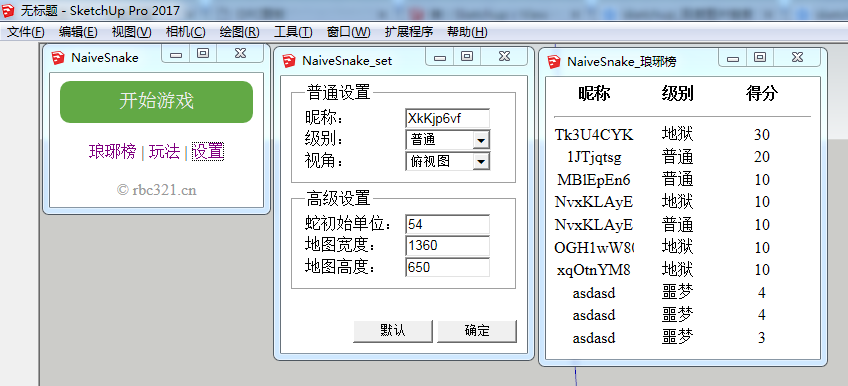
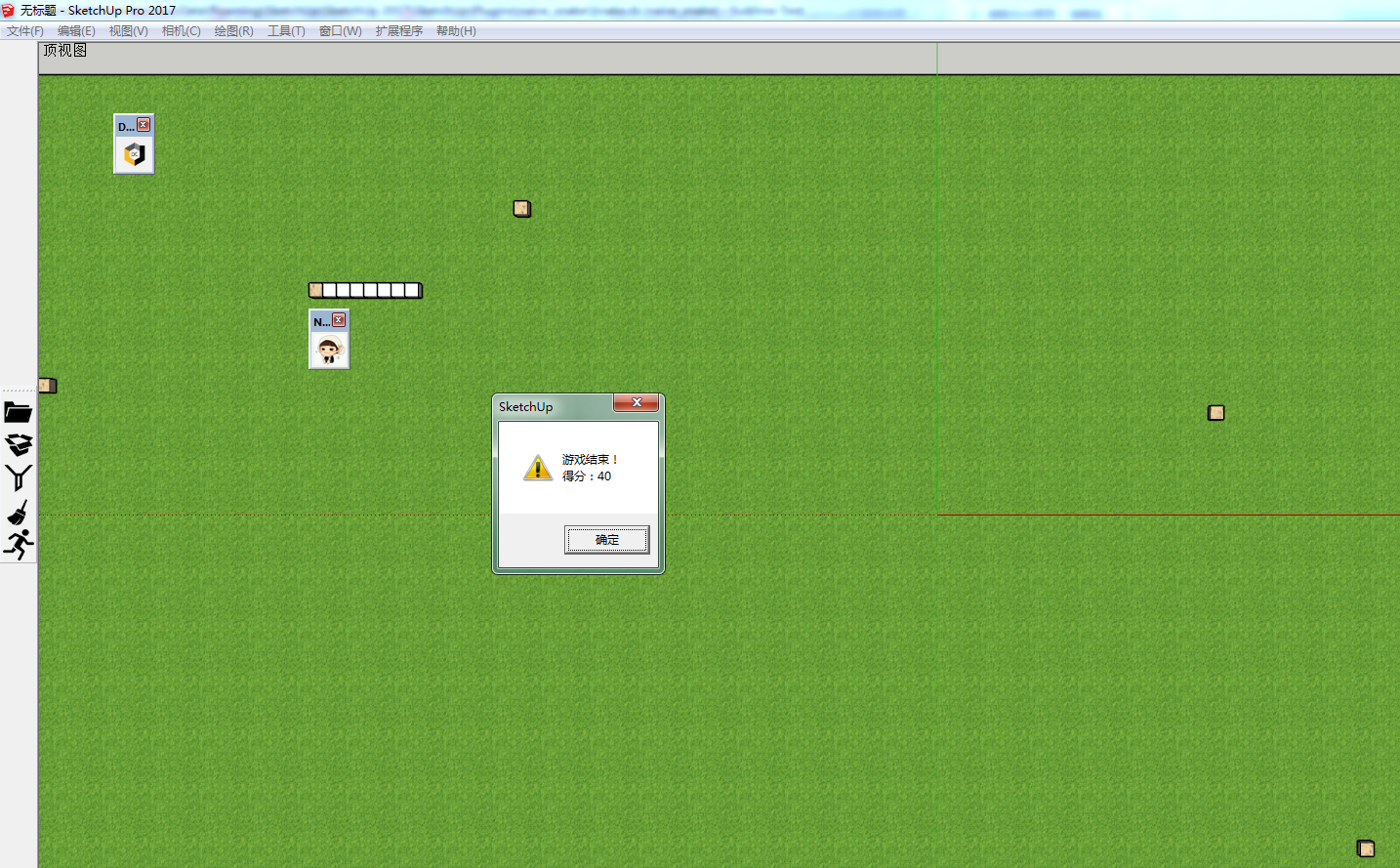
展示
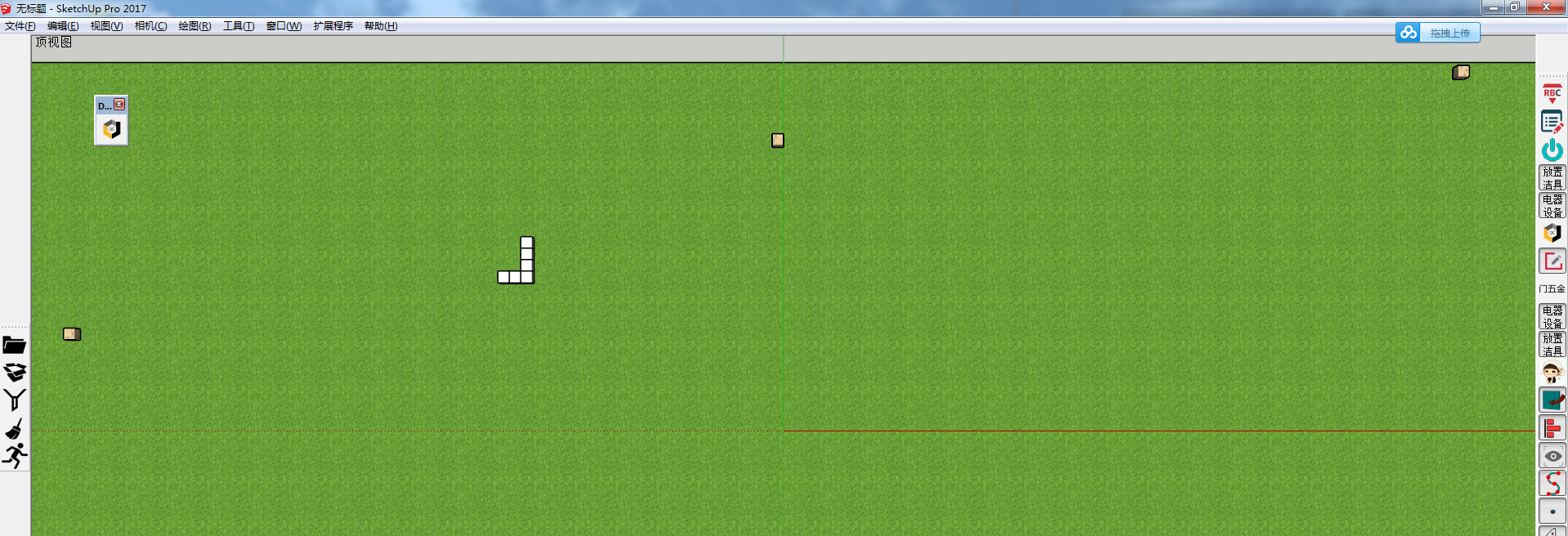
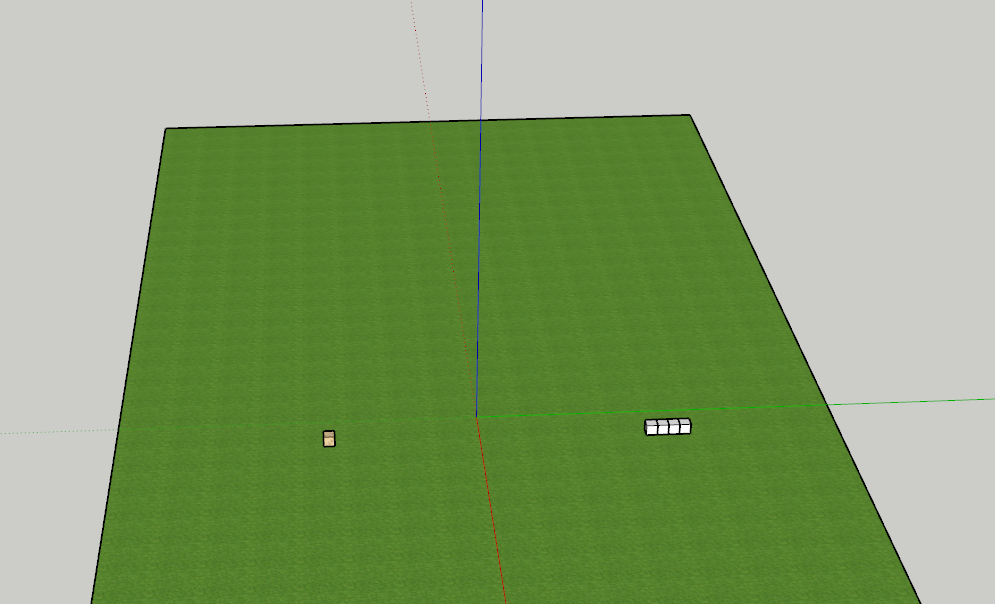
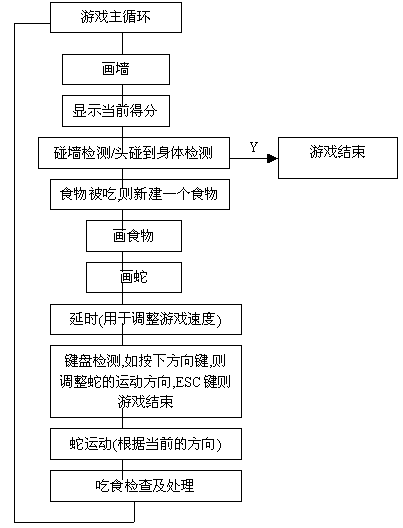
主要思路:
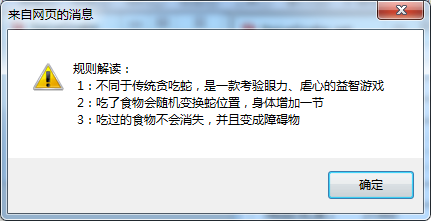
我制作的的玩法是这样的
关于入口文件
# ----------------------------- #

#  email:bc8web@126.com        #

#  uri: http://www.rbc321.cn    #

# ------------------------------#

# 入口文件

require 'json'

require_relative 'help.rb'  # 帮助文件

module NaiveSnake

    $game = nil  # 用于保存蛇类实例变量

    class Index

        @@dig = nil

        @@setDig = nil

        @@lydig = nil

        def initialize

            cmd = UI::Command.new("NaiveSnake") {

                # 主窗口

                @@dig = UI::WebDialog.new "NaiveSnake", false, "", 229, 172, 5, 90, false

                @@dig.set_file __dir__+'/index.html'

                # 设置窗口

                @@setDig = UI::WebDialog.new "NaiveSnake_set", false, "", 262, 315, 235, 90, false

                @@setDig.set_file __dir__+'/set.html'

                # 排行窗口

                @@lydig = UI::WebDialog.new "NaiveSnake_琅琊榜", false, "", 290, 320, 5, 260, false

                @@lydig.set_url 'http://00a00.com/snake/'

                @@dig.show if not @@dig.visible?

                @@dig.add_action_callback 'start' do

                    # 检测是否有模型

                    if Sketchup.active_model.active_entities.length > 0

                        is = UI.messagebox("检测到有模型存在,是否清空?\r\n(注:清空才可进入游戏)",MB_YESNO)

                        if is == 6

                            Sketchup.active_model.active_entities.clear!

                            load __dir__+'/Base.rb'

                            require_relative 'Camera.rb'

                            require_relative 'Map.rb'

                            load __dir__+'/Food.rb'

                            load __dir__+'/Snake.rb'

                            load __dir__+'/SnakeTool.rb'

                            Camera.new        # 初始化相机

                            Map.new.show      # 显示场景

                            Food.new.show     # 显示食物

                            $game = Snake.new # 蛇实例

                            $game.start       # 开始游戏

                            Sketchup.active_model.select_tool SnakeTool.new # 选择工具

                            @@dig.close if @@dig.visible? # 关闭窗口

                            @@setDig.close if @@dig.visible? # 关闭窗口

                            @@lydig.close if @@dig.visible? # 关闭窗口

                        else

                            next

                        end

                    end

                end

                # ready

                @@dig.add_action_callback 'ready' do

                    # 生成随机名字

                    len = 8

                    chars = ("a".."z").to_a + ("A".."Z").to_a + ("".."").to_a

                    newpass = ""

                    1.upto(len) { |i| newpass << chars[rand(chars.size-1)] }

                    config 'nickname', newpass

                end

                # 设置按钮

                @@dig.add_action_callback 'set' do

                    @@setDig.show

                end

                # 琅琊榜

                @@dig.add_action_callback 'langYa' do

                    @@lydig.show

                end

                # 确认按钮

                @@setDig.add_action_callback('ok'){|dig, json|

                    hash = JSON.parse json

                    hash.each{|k, v| config k, v }

                    dig.close

                }

                # 默认按钮

                @@setDig.add_action_callback('rec'){|dig, json|

                    json = configRec()

                    @@setDig.execute_script "fill(#{json})"

                }

                # 页面刷新

                @@setDig.add_action_callback('init'){|dig, json|

                    json = configAll()

                    @@setDig.execute_script "data = #{json}"

                }

            }

            # 工具栏

            cmd.small_icon = cmd.large_icon = __dir__+"/assets/icon.png"

            cmd.menu_text = "NaiveSnake"

            toolbar = UI::Toolbar.new "NaiveSnake"

            toolbar = toolbar.add_item cmd

            toolbar.show

            # 菜单

            menu = UI.menu('Plugins').add_submenu('NaiveSnake(贪吃蛇)')

            menu.add_item

        end

    end

end

NaiveSnake::Index.new
初始化基类
# ----------------------------- #

#  email:bc8web@126.com        #

#  uri: http://www.rbc321.cn    #

# ------------------------------#

# 基类

module NaiveSnake

    class Base

        @@model = Sketchup.active_model   # 模型

        @@view  = @@model.active_view     # 视

        @@ent   = @@model.active_entities # 实体

        @@mat   = @@model.materials       # 材质

        @@mapWidth     = config('mapWidth').to_i    # 地图宽

        @@mapHeight    = config('mapHeight').to_i   # 地图高

        @@snakeHeight  = config('snakeHeight').to_i # 蛇高度

        @@snakeWidth   = config('snakeWidth').to_i     # 蛇宽度

        @@snakeNums    = config('snakeNums').to_i      # 蛇身数

        @@level        = config('级别')             # 级别

        @@direction    = UP     # 初始方向

        @@currentSnake = []     # 当前蛇body

        @@snakeArr     = []     # 出生蛇body

        @@foot         = []     # 储存食物

        @@blackList    = []     # 食物黑名单

        @@time_id      = nil    # 定时器

        @@score        = 0      # 分数

    end

end
初始化相机
# ----------------------------- #

#  email:bc8web@126.com        #

#  uri: http://www.rbc321.cn    #

# ------------------------------#

# 相机类

module NaiveSnake

	class Camera < Base

		def initialize

			start

		end

		def start

			eye = [0, 0,1300]; target = [0,0,0]; up = [0,1,0]

			start_camera = Sketchup::Camera.new eye, target, up

			@@view.camera = start_camera

		end

	end

end
初始化场景
# ----------------------------- #

#  email:bc8web@126.com        #

#  uri: http://www.rbc321.cn    #

# ------------------------------#

# 场景类

module NaiveSnake

    class Map < Base

        def show

            grassland # 草地

        end

        def grassland

            filename = __dir__+'/assets/grassland.skm'

            material = @@mat.load(filename)

            pt1 = Geom::Point3d.new -@@mapWidth/2, -@@mapHeight/2, 0

            pt2 = Geom::Point3d.new @@mapWidth/2, -@@mapHeight/2, 0

            pt3 = Geom::Point3d.new @@mapWidth/2, @@mapHeight/2, 0

            pt4 = Geom::Point3d.new -@@mapWidth/2, @@mapHeight/2, 0

            grp = @@ent.add_group

            grp.entities.add_face pt1, pt2, pt3, pt4

            grp.material = material

        end

    end

end
初始化蛇类
# ----------------------------- #

#  email:bc8web@126.com        #

#  uri: http://www.rbc321.cn    #

# ------------------------------#

# 蛇类

module NaiveSnake

	class Snake < Base

		def initialize

			@@snakeArr = initSnake @@snakeNums

			@up = 38; @down = 40; @left = 37; @right = 39

			@direction = @@direction

			@x = rand(-@@mapWidth..@@mapWidth)/2/10*10

			@y = rand(-@@mapHeight..@@mapHeight)/2/10*10

		end

		def start

			createSnake # 绘制蛇

			speed = 0.5

			case @@level

				when '普通'; speed = 0.4

				when '勇士'; speed = 0.1

				when '地狱'; speed = 0.03

				when '噩梦'; speed = 0.006

			end

			time = 1

			@@time_id = UI.start_timer(speed, true) do

				move(@direction)

				time += 1

			end

		end

		def set(direction)

			@direction = direction

		end

		# 绘制蛇

		def createSnake

			@@currentSnake.clear # 清空蛇当前状态

			@@snakeArr.each do |box|

				xBaseValue = @@snakeWidth/2

				yBaseValue = @@snakeWidth/2

				point1 = Geom::Point3d.new(box[0]-xBaseValue, box[1]-yBaseValue, 0)

				point2 = Geom::Point3d.new(box[0]+xBaseValue, box[1]-yBaseValue, 0)

				point3 = Geom::Point3d.new(box[0]+xBaseValue, box[1]+yBaseValue, 0)

				point4 = Geom::Point3d.new(box[0]-xBaseValue, box[1]+yBaseValue, 0)

				boxGroup = @@ent.add_group

				face = boxGroup.entities.add_face point1, point2, point3, point4

				face.reverse!.pushpull @@snakeHeight

				@@currentSnake.push boxGroup # 重新设置蛇身体

			end

		end

		# 移动

		def move(direction)

			tmpArray = [] # 临时容器

			head = @@snakeArr.last # 蛇头

			# 判断蛇头是否碰到黑名单

			@@blackList.each{|list|

				if head == list # Game Over

					gameOver

					return

				end

			}

			#判断蛇头是否碰到边缘

			if head[0].abs >= @@mapWidth/2 || head[1].abs >= @@mapHeight/2

				gameOver

				return

			end

			# 判断蛇头是否碰到食物

			if head == @@foot

				# 加分

				@@score += 10

				# 将食物列入黑名单

				@@blackList.push @@foot

				# 蛇头随机移动

				@x = rand(-(@@mapWidth-50)..@@mapWidth-50)/2/10*10

				@y = rand(-@@mapHeight..@@mapHeight)/2/10*10

				@@snakeArr.push [@x+@@snakeWidth/2, @y+@@snakeHeight/2]

				# 再次显示食物

				Food.new.show

			end

			# 移动数组前一位

			lastValue = @@snakeArr.last.clone;

			for i in 0...@@snakeArr.size-1

				tmpArray[i] = @@snakeArr[i+1]

			end

			tmpArray.push(lastValue)

			case direction

				when @up;    tmpArray.last[1] += @@snakeWidth

				when @down;  tmpArray.last[1] -= @@snakeWidth

				when @right; tmpArray.last[0] += @@snakeWidth

				when @left;  tmpArray.last[0] -= @@snakeWidth

			end

			@@snakeArr = tmpArray # 重新设置蛇body

			deleteSnake # 删除

			createSnake # 再次绘制

		end

		def deleteSnake

			@@currentSnake.each do |ent|

				ent.entities.each{|ent| @@ent.erase_entities ent}

			end # 删除原来

		end

		def gameOver

			UI.stop_timer @@time_id

			UI.messagebox "游戏结束!\r\n得分:"+@@score.to_s

			updateScore # 更新分数

		end

		def updateScore

			hash = {

				:nickname => config('nickname'),

				:score    => @@score,

				:level    => config('级别'),

				:tk       => 'qwertyuioplkjhgfdsazxcvbnm',

			}

			request = Sketchup::Http::Request.new("http://00a00.com/snake/save.php", Sketchup::Http::POST)

			request.body= httpBuild(hash)

			request.start do |request, response|

				p '琅琊榜更新成功' if response

			end

		end

		def httpBuild(hash)

			str = ''

			hash.each{|k, v|

				str+= k.to_s+'='+v.to_s+'&'

			}

			str.chop!

		end

		def initSnake(n)

			array = []

			n.times{|i|

				array.push [@@snakeWidth/2+@@snakeWidth*i, @@snakeWidth/2]

				next if i == 0

			}

			array

		end

	end

end
初始化食物类
# ----------------------------- #

#  email:bc8web@126.com        #

#  uri: http://www.rbc321.cn    #

# ------------------------------#

# 食物类

module NaiveSnake

    class Food < Base

        def initialize

            @x = rand(-@@mapWidth..@@mapWidth)/2/10*10

            @y = rand(-@@mapHeight..@@mapHeight)/2/10*10

        end

        def show

            filename = __dir__+'/assets/food.skm'

            material = @@mat.load(filename)

            point = []

            unless isFull?

                point[0] = [@x, @y, 0]

                point[1] = [@x+@@snakeWidth, @y, 0]

                point[2] = [@x+@@snakeWidth, @y+@@snakeWidth, 0]

                point[3] = [@x, @y+@@snakeWidth, 0]

                group = @@ent.add_group

                @@foot = [@x+@@snakeWidth/2, @y+@@snakeHeight/2]

                face = group.entities.add_face point

                face.material = material

                face.reverse!.pushpull @@snakeHeight

                @foot = face

            else

                @x = rand(-@@mapWidth..@@mapWidth)

                @y = rand(-@@mapHeight..@@mapHeight)

            end

        end

        def isFull?

            return @@snakeArr.include? [@x, @y]

        end

    end

end
下载地址:
http://www.rbc321.cn/home/plugin/plugindetail/id/247
Ruby for Sketchup 贪吃蛇演示源码(naive_snake)的更多相关文章
- C# unity3d 贪吃蛇 游戏 源码 及其感想
这个游戏的设计过程是这样的: 1,创建
- 利用Bootstrap快速搭建个人响应式主页(附演示+源码)
1.前言 我们每个程序员都渴望搭建自己的技术博客平台与他人进行交流分享,但使用别人的博客模板没有创意.做网站后台的开发人员可能了解前端,可是自己写一个不错的前端还是很费事的.幸好我们有Bootstra ...
- ZedGraph 柱状图、饼图、折线图演示源码
http://code1.okbase.net/codefile/ZedGraphControl.ContextMenu.cs_201211225626_97.htm // //This librar ...
- C#中文件下载的几种方法演示源码
内容过程,把内容过程比较重要的内容做个珍藏,如下的内容是关于C#中文件下载的几种方法演示的内容,应该是对各朋友有较大好处. using System;using System.Data;using S ...
- C#中声明、调用和配置事件的演示源码
下面的内容是关于C#中声明.调用和配置事件的演示的内容,应该能对大伙有些好处. using System;namespace MyCollections { using System.Collecti ...
- C++二分查找算法演示源码
如下内容段是关于C++二分查找算法演示的内容. #include <cstdio>{ int l = 0, r = n-1; int mid; while (l <= r){ mid ...
- C#中的yield return用法演示源码
下边代码段是关于C#中的yield return用法演示的代码. using System;using System.Collections;using System.Collections.Gene ...
- 超多经典 canvas 实例,动态离子背景、移动炫彩小球、贪吃蛇、坦克大战、是男人就下100层、心形文字等等等
超多经典 canvas 实例 普及:<canvas> 元素用于在网页上绘制图形.这是一个图形容器,您可以控制其每一像素,必须使用脚本来绘制图形. 注意:IE 8 以及更早的版本不支持 &l ...
- Luat Inside | 致敬经典,使用Air724UG制作简易贪吃蛇
作者简介: 打盹的消防车--活跃于Luat社群的新生代全能开发者,东北小伙儿爽朗幽默.好学敏思,更是实力行动派.幼年曾手握火红炽铁而后全然无恙,堪称魔幻经历:如今热衷于各类嵌入式软硬件研究,快意物联江 ...
随机推荐
- Chip Factory(01字典树)
Chip Factory http://acm.hdu.edu.cn/showproblem.php?pid=5536 Time Limit: 18000/9000 MS (Java/Others) ...
- asp.net 关于Response.Redirect重定向前无法弹出alert对话框的问题
要实现的功能:某项操作后,使用alert()提示框提示"操作成功"之类的提示,然后使用response.Redirect()来进行页面重定向. 出现的问题:运行代码,操作完成后,直 ...
- 使用select实现多并发的socket的功能
select是一个io多路复用的io模型,也叫做事件驱动的io模型,我们今天用select来实现一个多并发的socket的聊天的程序 先看下server端的代码 import socket impor ...
- Jmeter元件作用域
转载自飞测团队
- ViewPager欢迎界面
一.几张图片组成欢迎界面 下方有几个点对应每个图片 当图片被选中时对应的点会变亮,当对应的点被点击时也会切换到指定画面 以下是代码 package com.example.viewpager_1; i ...
- ROS学习笔记三(理解ROS节点)
要求已经在Linux系统中安装一个学习用的ros软件包例子: sudo apt-get install ros-indigo-ros-tutorials ROS图形概念概述 nodes:节点,一个节点 ...
- Vmware迁移以后eth0消失,无法上网
一个再普通不过的大神帮助小菜做虚拟机镜像的事情: 小张:帮我做个Vmware下的Ubuntu镜像吧,大神. 小黄:好啊,等我一下,下午发给你. 经过一番操作,小黄顺利的做出了一个虚拟机操作系统 小黄: ...
- MessagePack 使用
MessagePack 使用 MessagePack(https://msgpack.org/) 是一个基于二进制高效的对象序列化 Library 用于跨语言通信.它可以像 JSON 那样,在许多种语 ...
- struts2用到的jar有那些
struts2.0 lib/antlr-2.7.6.jarlib/struts2-core-2.0.14.jarlib/struts2-spring-plugin-2.0.14.jarlib/free ...
- jquery 插入节点的方法
方法 描述 示例 append() 向每个匹配的元素内部追加内容 HTML代码: <p>我想说:</p> jQuery代码: $("p").append(& ...