
Active Directory PowerShell模块收集AD信息
0x00 前言简介
Microsoft为Windows Server 2008 R2(以及更高版本)提供了多个Active Directory PowerShell cmdlet,这大大简化了以前需要将涉及到的ADSI冗长代码行放在一起的任务。
在Windows客户端上,需要安装远程服务器管理工具(RSAT)并确保已安装Active Directory PowerShell模块。而在Windows服务器(2008 R2或更高版本)上的 PowerShell控制台(作为管理员)中运行如下命令:Import-Module ServerManager ; Add-WindowsFeature RSAT-AD-PowerShell。

0x01 AD的目录预览
AD PowerShell cmdlet和以下方式执行效果一样:
Import-module activeDirectory
$UserID = “JoeUser”
Get-ADUser $UserID –property *
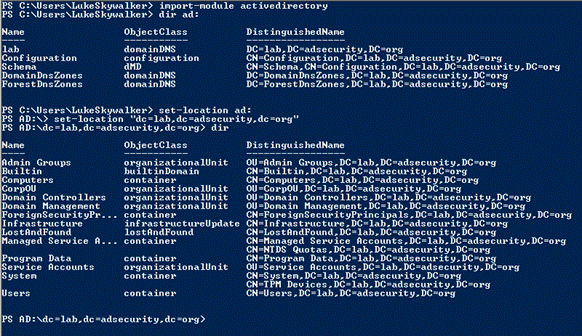
需要值得注意的是使用PowerShell v3版本以及高版本,你无需运行第一行命令,因为PowerShell的将识别必要的模块和自动加载它。一旦加载了Active Directory PowerShell模块,就可以像浏览文件系统那样浏览AD。命令如下:
Ps> Import-module activeDirectory
Ps>dir ad:
Ps>set-location ad:
Ps >set-location “dc=lab,dc=adsecurity,dc=org”
Ps>dir
0x02 查找有用的命令(Cmdlet)
1.基本的模块和统计
发现可用的PowerShell模块:Get-Module -ListAvailable
在PowerShell模块中发现cmdlet:Get-Command -module ActiveDirectory
PowerShell AD模块的Cmdlet个数:
(Get-Command -module ActiveDirectory).count
- Windows Server 2008 R2: 76 cmdlets
- Windows Server 2012: 135 cmdlets
- Windows Server 2012 R2: 147 cmdlets
- Windows Server 2016: 147 cmdlets
WINDOWS SERVER 2008 R2主要的cmdlets:
• Get/Set-ADForest
• Get/Set-ADDomain
• Get/Set-ADDomainController
• Get/Set-ADUser
• Get/Set-ADComputer
• Get/Set-ADGroup
• Get/Set-ADGroupMember
• Get/Set-ADObject
• Get/Set-ADOrganizationalUnit
• Enable-ADOptionalFeature
• Disable/Enable-ADAccount
• Move-ADDirectoryServerOperationMasterRole
• New-ADUser
• New-ADComputer
• New-ADGroup
• New-ADObject
• New-ADOrganizationalUnit
WINDOWS SERVER 2012含以版本一些新的cmdlets:
• *-ADResourcePropertyListMember
• *-ADAuthenticationPolicy
• *-ADAuthenticationPolicySilo
• *-ADCentralAccessPolicy
• *-ADCentralAccessRule
• *-ADResourceProperty
• *-ADResourcePropertyList
• *-ADResourcePropertyValueType
• *-ADDCCloneConfigFile
• *-ADReplicationAttributeMetadata
• *-ADReplicationConnection
• *-ADReplicationFailure
• *-ADReplicationPartnerMetadata
• *-ADReplicationQueueOperation
• *-ADReplicationSite
• *-ADReplicationSiteLink
• *-ADReplicationSiteLinkBridge
• *-ADReplicationSubnet
• *-ADReplicationUpToDatenessVectorTable
• Sync-ADObject
2.发现全局目录 GLOBAL CATALOGS (GCS)
• Forest GCs(森林全局目录):
import-module ActiveDirectory
$ADForest = Get-ADForest
$ADForestGlobalCatalogs = $ADForest.GlobalCatalogs
• Domain DCs that are GCs(以域DCS的全局目录):
import-module ActiveDirectory
$DCsNotGCs = Get-ADDomainController -filter { IsGlobalCatalog -eq $True}
• Domain DCs that are not GCs(以非域DCS的全局目录):
import-module ActiveDirectory
$DCsNotGCs = Get-ADDomainController -filter { IsGlobalCatalog -eq $False }
3.查找Active Directory灵活单主机操作(FSMO)角色
活动目录模块:
(GET-ADForest).SchemaMaster
(GET-ADForest).DomainNamingMaster
(GET-ADDomain).InfrastructureMaster
(GET-ADDomain).PDCEmulator
(GET-ADDomain).RIDMaster
.NET调用:
•Get the Current Domain:
[System.DirectoryServices.ActiveDirectory.Domain]::GetCurrentDomain().Name
[System.DirectoryServices.ActiveDirectory.Domain]::GetComputerDomain().Name
• Get the Computer’s Site:
[System.DirectoryServices.ActiveDirectory.ActiveDirectorySite]::GetComputerSite()
• List All Domain Controllers in a Domain:
[System.DirectoryServices.ActiveDirectory.Domain]::GetCurrentDomain().DomainControllers
• Get Active Directory Domain Mode:
[System.DirectoryServices.ActiveDirectory.Domain]::GetCurrentDomain().DomainMode
• List Active Directory FSMOs:
([System.DirectoryServices.ActiveDirectory.Forest]::GetCurrentForest()).SchemaRoleOwner
([System.DirectoryServices.ActiveDirectory.Forest]::GetCurrentForest()).NamingRoleOwner
([System.DirectoryServices.ActiveDirectory.Domain]::GetCurrentDomain()).InfrastructureRoleOwner
([System.DirectoryServices.ActiveDirectory.Domain]::GetCurrentDomain()).PdcRoleOwner
([System.DirectoryServices.ActiveDirectory.Domain]::GetCurrentDomain()).RidRoleOwner
•Get Active Directory Forest Name:
[System.DirectoryServices.ActiveDirectory.Forest]::GetCurrentForest().Name
• Get a List of Sites in the Active
Directory Forest:
[array] $ADSites =
[System.DirectoryServices.ActiveDirectory.Forest]::GetCurrentForest().Sites
• Get Active Directory Forest Domains:
[System.DirectoryServices.ActiveDirectory.Forest]::GetCurrentForest().Domains
• Get Active Directory Forest Global
Catalogs:
[System.DirectoryServices.ActiveDirectory.Forest]::GetCurrentForest().GlobalCatalogs
• Get Active Directory Forest Mode:
[System.DirectoryServices.ActiveDirectory.Forest]::GetCurrentForest().ForestMode
• Get Active Directory Forest Root
Domain:
[System.DirectoryServices.ActiveDirectory.Forest]::GetCurrentForest().RootDomain
4.FSMO角色从一个DC移动到另一个DC
get-command
-module activedirectory -noun *Master*
•Moving FSMO Roles:
Move-ADDirectoryServerOperationMasterRole
-Identity $DCName -OperationMasterRole RIDMaster
Move-ADDirectoryServerOperationMasterRole
-Identity $DCName -
OperationMasterRole
DomainNamingMaster
Move-ADDirectoryServerOperationMasterRole
-Identity $DCName -OperationMasterRole PDCEmulato
•Seizing FSMO Roles:
Move-ADDirectoryServerOperationMasterRole
-Identity $DCName -OperationMasterRole PDCEmulator –FORCE
0x03 Active Directory PowerShell模块Cmdlet示例
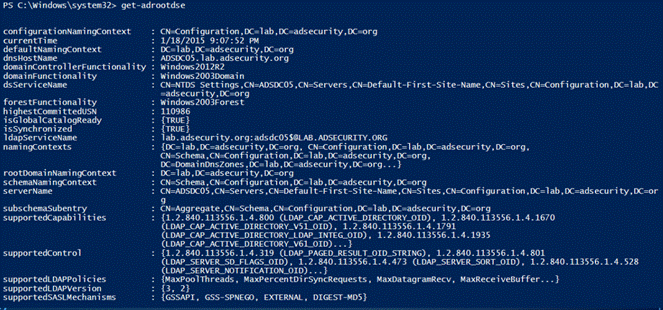
1.Get-RootDSE
获取有关LDAP服务器(域控制器)的信息并显示其内容,结果中有一些有趣的信息,比如DC运行的操作系统信息。
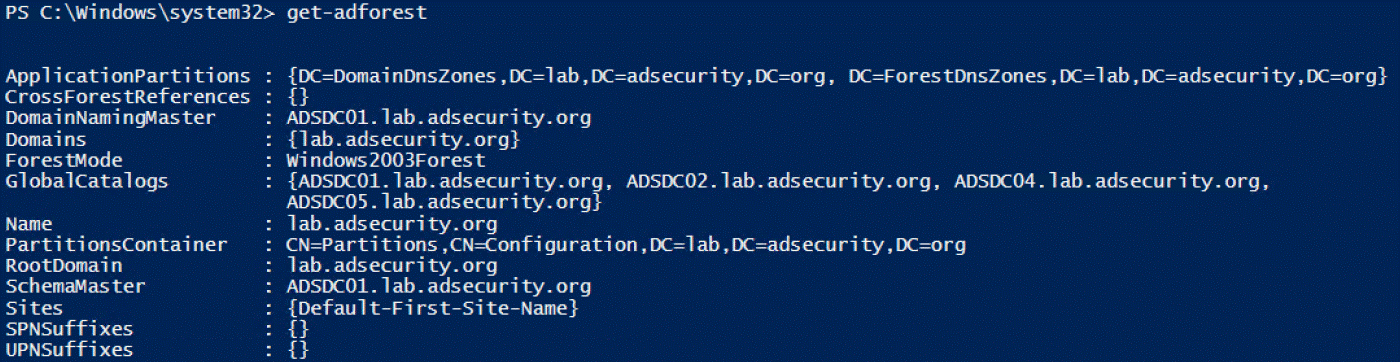
2.Get-ADForest
提供有关运行该命令计算机所在的Active
Directory森林信息。
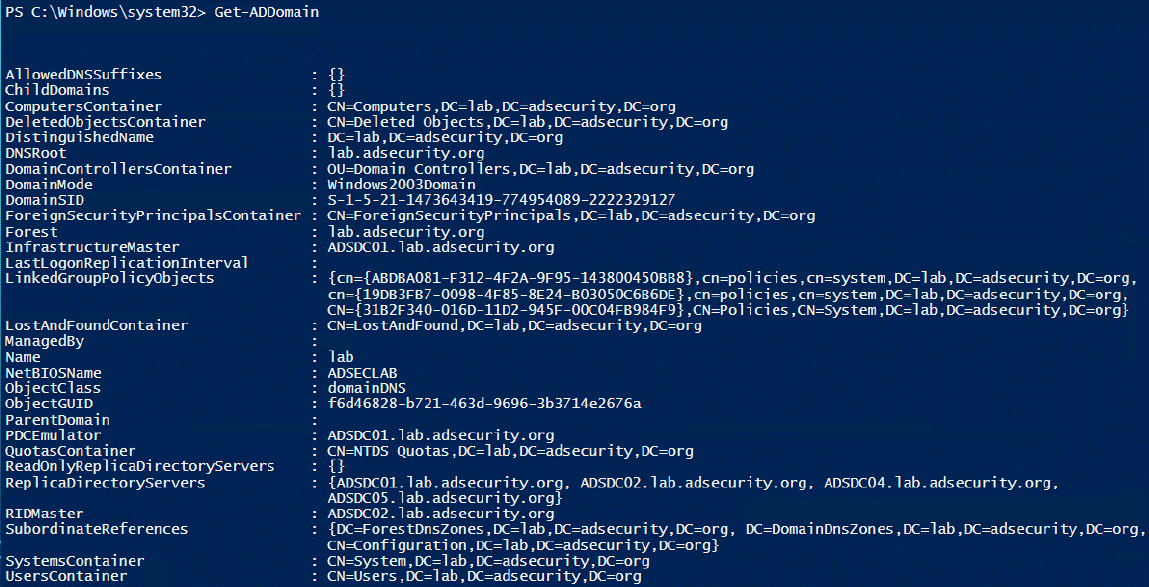
3.Get-ADDomain
提供有关当前所在域的信息
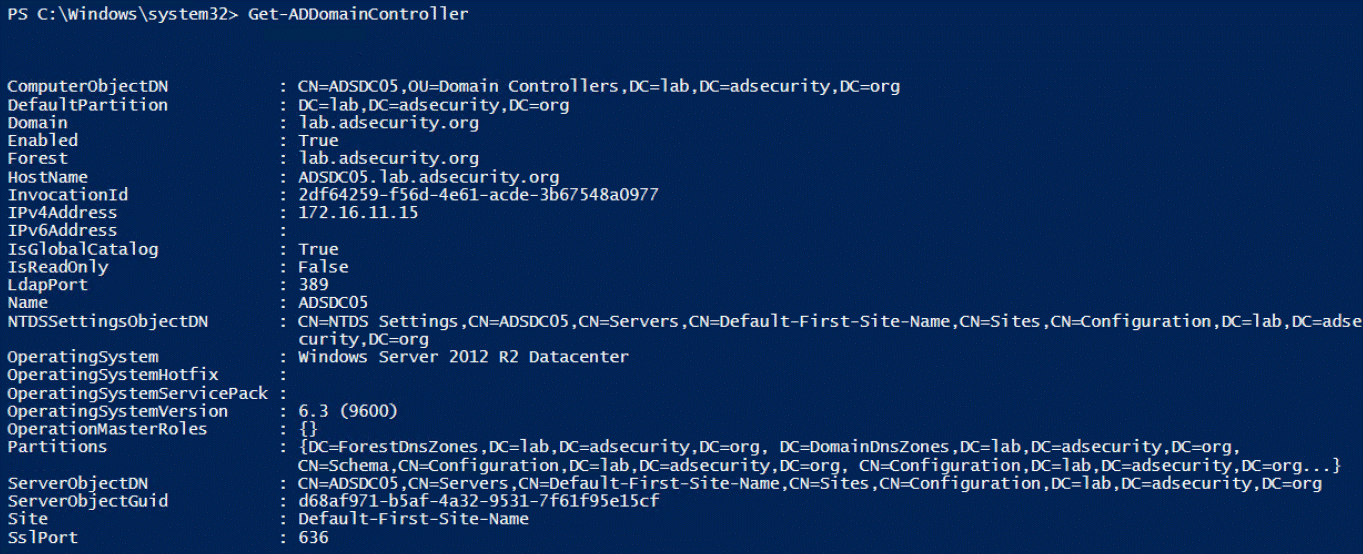
4.Get-ADDomainController
提供特定于域控制器的计算机信息,通过cmdlet命令,可轻松查找到特定站点中的所有DC或运行OS版本信息。
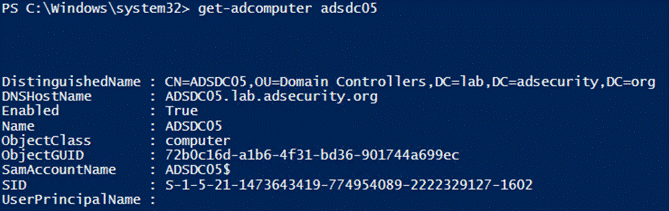
5.Get-ADComputer
提供了关于AD中大多数计算机对象的信息,使用“-Prop *”参数运行的命令可以显示所有标准属性信息。
6. AD计算机的统计
$Time = (Measure-Command `
{[array] $AllComputers =
Get-ADComputer -filter * -properties
Name,CanonicalName,Enabled,passwordLastSet,SAMAccountName,LastLogonTimeSt
amp,DistinguishedName,OperatingSystem
}).TotalMinutes
$AllComputersCount =
$AllComputers.Count
Write-Output “There were
$AllComputersCount Computers discovered in
$DomainDNS in $Time minutes… `r “
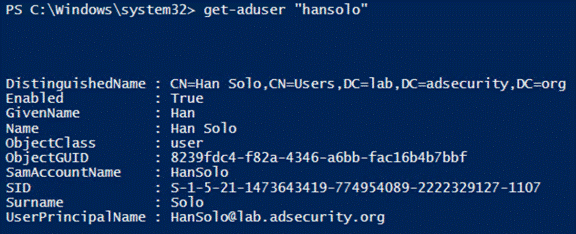
7.Get-ADUser
提供了想要了解有关AD用户的大部分内容信息,使用“-Prop *”参数运行的命令可以显示所有标准属性信息。
8. AD用户的统计
import-Module ActiveDirectory
$DomainDNS =
[System.DirectoryServices.ActiveDirectory.Domain]::GetCurrentDomain().Name
[array]$AllUsers = Get-ADUser
-filter * -properties
Name,DistinguishedName,Enabled,LastLogonDate,LastLogonTimeStamp,LockedOut,msExchHom
eServerName,SAMAccountName
$AllUsersCount = $AllUsers.Count
Write-Output “There were
$AllUsersCount user objects discovered in $ADDomainDNSRoot … “
[array] $DisabledUsers =
$AllUsers | Where-Object { $_.Enabled -eq $False }
$DisabledUsersCount =
$DisabledUsers.Count
[array] $EnabledUsers = $AllUsers
| Where-Object { $_.Enabled -eq $True }
$EnabledUsersCount =
$EnabledUsers.Count
Write-Output “There are
$EnabledUsersCount Enabled users and there are $DisabledUsersCount
Disabled users in $DomainDNS “
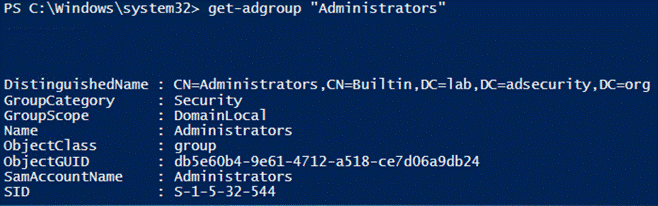
9.Get-ADGroup
提供有关AD组的信息,运行如下命令可查找所有安全组:
Get-ADGroup -Filter {GroupCategory -eq ‘Security}
10.Get-ADGroupMember
枚举并返回组成员信息,使用”-Recursive”参数可包括嵌套组的所有成员。
Get-ADGroupMember ‘Administrators’ -Recursive

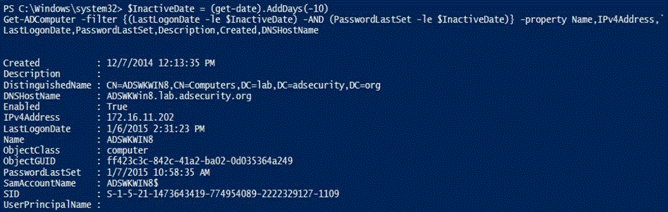
11.查找非活动计算机
以下示例查找非活动(旧版本)计算机和用户:在过去10天内未更改其密码的帐户。请注意,这是一个测试示例。对于实际的生产环境,将此建议更改为计算机的60到90天,用户的180到365天的策略。
12.查找非活动用户

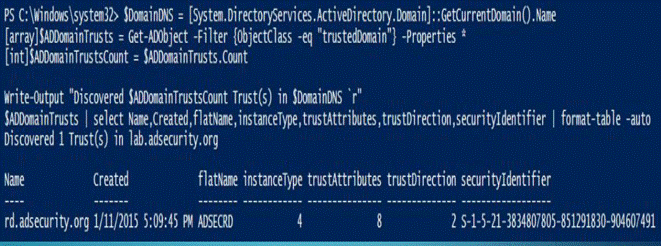
13.枚举域信任
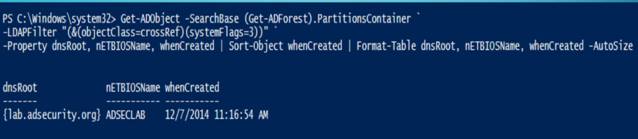
14.获取活动目录的实施日期
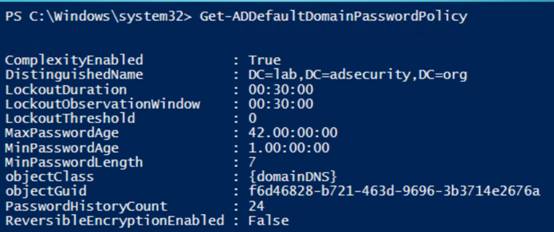
15.获取AD密码策略
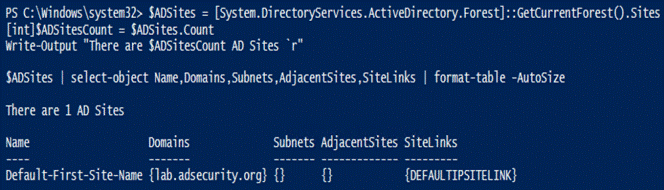
16.获取AD站点信息
请注意Windows 2012模块中包含站点的cmdlet(Get-ADReplicationSite *)。
17. 获得tombstonelifetime信息

18.AD的回收信息
Requires Forest Functional Mode =
Windows Server 2008 R2
• Enable the Recycle Bin
(as Enterprise Admin)
Enable-ADOptionalFeature
–Identity ‘CN=Recycle Bin Feature,CN=Optional Features,CN=Directory
Service,CN=Windows
NT,CN=Services,CN=Configuration,DC=DOMAIN,DC=COM’ –Scope
ForestOrConfigurationSet –Target
‘DOMAIN.COM’
• Find all Deleted Users
$DeletedUsers = Get-ADObject
-SearchBase “CN=Deleted Objects,DC=DOMAIN,DC=COM” -Filter
{ObjectClass -eq “user”}
-IncludeDeletedObjects -Properties lastKnownParent
• Restore all Deleted
Users
$DeletedUsers | Restore-ADObject
• Restore users deleted on
a specific date
$ChangeDate = Get-Date (“1/1/2015″)
Get-ADObject -Filter {
(whenChanged -eq $changeDate) -and (isDeleted -eq $true) -and (name -ne
“Deleted Objects”) -and
(ObjectClass -eq “user”) } -IncludeDeletedObjects -Properties * |
RestoreADObject
19.DOMAIN RID STATS(域 rid 统计)

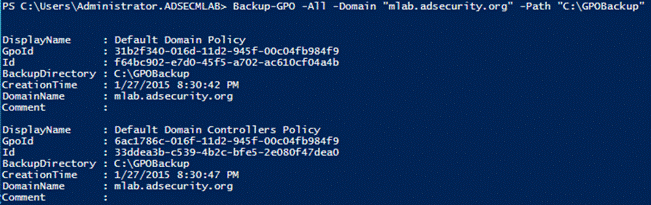
20.备份域GPO
请注意,这需要安装组策略PowerShell模块,该模块与Active Directory模块分开。
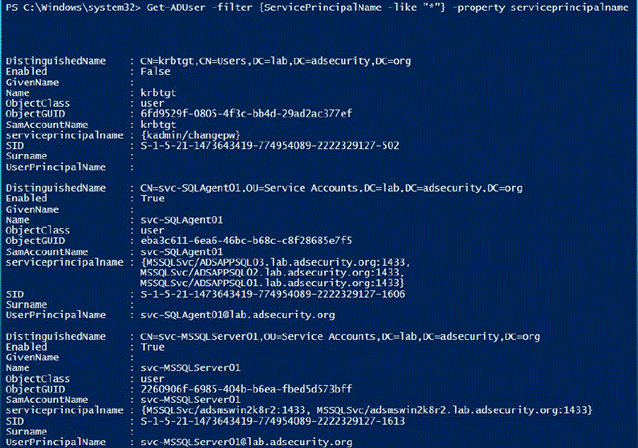
21.查找AD Kerberos服务帐户
22. 服务账号脚本
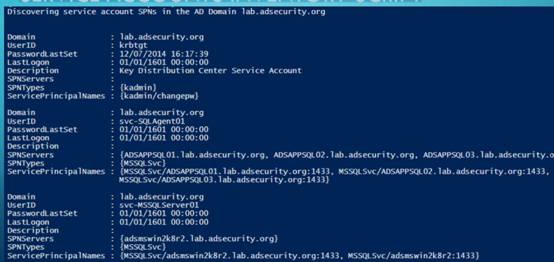
https://github.com/PyroTek3/PowerShell-AD-Recon/blob/master/Find-PSServiceAccounts
使用SPNS在AD中发现服务:SQl
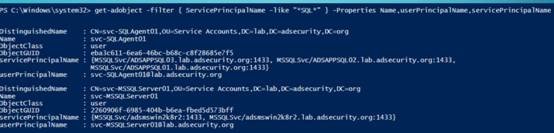
列出SQL服务:
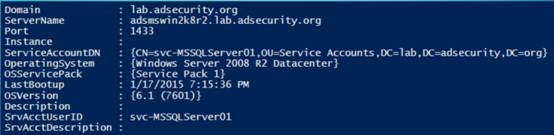
https://github.com/PyroTek3/PowerShell-AD-Recon/blob/master/Discover-PSMSSQLServers
23.列出域控制器
Get-ADDomainController-filter
* | `select hostname,IPv4Address,IsGlobalCatalog,IsReadOnly,OperatingSystem
| `format-table -auto
 24.DOMAIN CONTROLLERS DISCOVERY(域控制器的发现)
• Discover
PDCe in domain(发现域的PDCe)
Get-ADDomainController –Discover –ForceDiscover –Service “PrimaryDC” –
DomainName “lab.adsecurity.org”
• Discover
DCs in a Site(发现站点的DCs)
Get-ADDomainController –Discover –Site “HQ”
• Find all
Read-Only Domain Controllers that are GCs(查找所有作为GCs的只读域控制器)
Get-ADDomainController –filter `
{ (isGlobalCatalog –eq $True) –AND (isReadOnly –eq $True) }
25.AD数据库完整性检查
Write-Output
"Checking the NTDS database for errors (semantic database
analysis)
`r "
Stop-Service
ntds -force
$NTDSdbChecker
= ntdsutil "activate instance ntds" "semantic database
analysis"
"verbose on" "Go" q q
Start-Service
ntds
Write-Output
"Results of Active Directory database integrity check: `r "
$NTDSdbChecker
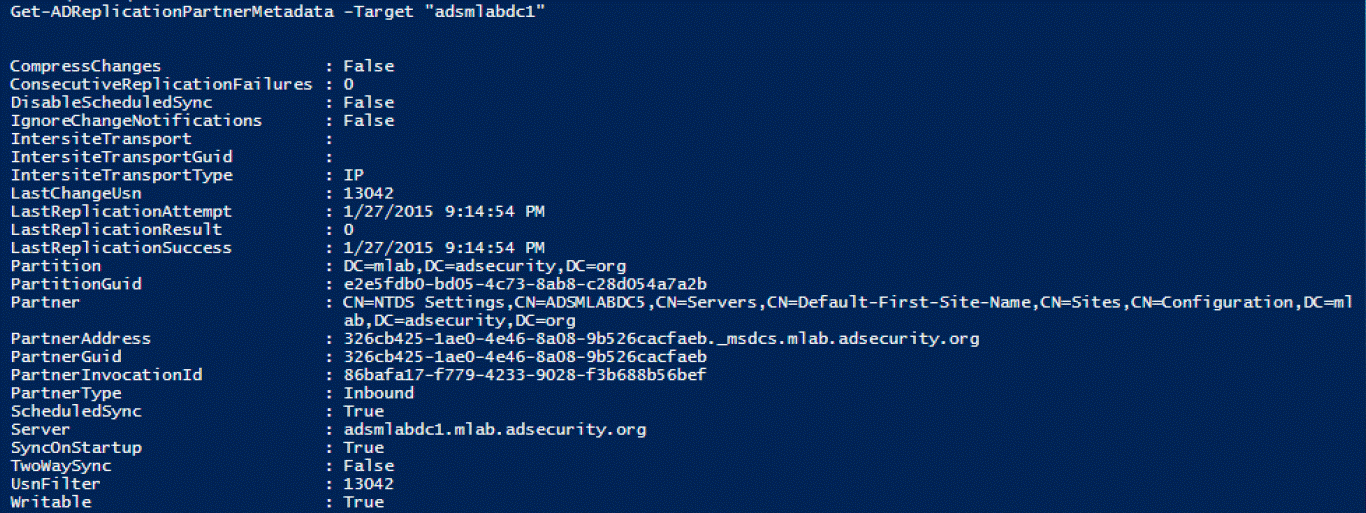
26.Get-ADReplicationPartnerMetadata
Windows
Server 2012及更高版本,此命令用于显示目标DC复制伙伴的复制元数据
27.Get-ADReplicationPartnerFailure
提供有关DC复制失败状态的信息,此命令显示AD复制错误的描述,CMDLETS (2012)

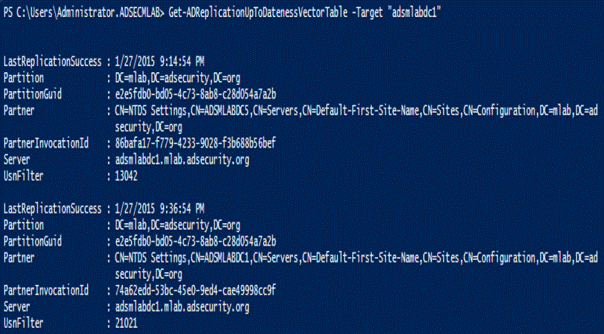
28.Get-ADReplicationUptodatenessVectorTable
跟踪域控制器之间的复制状态,CMDLETS (2012)
29.AD Web服务(ADWS)
需要在目标DC上运行AD Web服务(ADWS)(TCP 9389)
Get-ADDomainController
–Discover –Service “ADWS”
30.REPADMIN(目录复制工具) VS.
POWERSHELL
|
REPADMIN |
PowerShell |
|
2012 Cmdlets |
|
|
/FailCache |
Get-ADReplicationFailure |
|
/Queue |
Get-ADReplicationQueueOperation |
|
/ReplSingleObj |
Sync-ADObject |
|
/ShowConn |
Get-ADReplicationConnection |
|
/ShowObjMeta |
Get-ADReplicationAttributeMetadata |
|
/ShowRepl |
Get-ADReplicationPartnerMetadata |
|
/ShowUTDVec |
Get-ADReplicationUpToDatenessVectorTable |
|
/SiteOptions |
Set-ADReplicationSite |
|
2008 R2 Cmdlets |
|
|
/ShowAttr |
Get-ADObject |
|
/SetAttr |
Set-ADObject |
|
/PRP |
Get-ADDomainControllerPasswordReplicationPolicy |
|
Add-ADDomainControllerPasswordReplicationPolicy |
|
|
Remove-ADDomainControllerPasswordReplicationPolicy |
|
|
Get-ADAccountResultantPasswordReplicationPolicy |
|
|
Get-ADDomainControllerPasswordReplicationPolicyUsage |
Active Directory PowerShell模块收集AD信息的更多相关文章
- Windows Azure Active Directory (3) China Azure AD增加新用户
<Windows Azure Platform 系列文章目录> 本文介绍的是国内由世纪互联运维的China Azure. 本文是对笔者之前的文档:Windows Azure Active ...
- Windows Azure Active Directory (4) China Azure AD Self Password Reset
<Windows Azure Platform 系列文章目录> 本文介绍的是国内由世纪互联运维的Azure China. 在开始本章内容之前,请读者熟悉笔者之前写的文档: Windows ...
- Active Directory 域服务(AD DS)
本文内容 概述 工作组架构与域架构 名称空间(Namespace) 对象(Object).容器(Container)与组织单位(Organization Units,OU) 域树(Domain Tre ...
- Windows Azure Active Directory (2) Windows Azure AD基础
<Windows Azure Platform 系列文章目录> Windows Azure AD (WAAD)是Windows Azure提供的一个REST风格的服务,为您的云服务提供了身 ...
- 自动化之路 python psutil模块 收集硬件信息
一.psutil模块 1. psutil是一个跨平台库,能够轻松实现获取系统运行的进程和系统利用率(包括CPU.内存.磁盘.网络等)信息.它主要应用于系统监控,分析和限制系统资源及进程的管理.它实现了 ...
- 客户端无法加入域,报错:“无法与域‘xxx.com’的Active Directory域控制器(AD DC)链接” 请确保键入的域名正确
1.客户端能不能解析到域名? nslookup 一下域名看看解析到的IP的地址 2.客户端的DNS要指向DC 3.客户端的相关服务,workstation,TCP/IP NetBios Helper, ...
- 安装 Windows Server 2012 Active Directory 只读域控制器 (RODC)(级别 200)
安装 Windows Server 2012 Active Directory 只读域控制器 (RODC)(级别 200) 适用对象:Windows Server 2012 本主题介绍如何创建分步的 ...
- SharePoint 2013技巧分享系列 - Active Directory同步显示用户照片
为了保持通讯信息的一致性,需要设置SharePoint,Exchange, Lync等信息同步更新显示,例如,员工头像信息. 本文介绍如何在SharePoint 2013中同步显示Active Dir ...
- Windows Server 2016-管理Active Directory复制任务
Repadmin.exe可帮助管理员诊断运行Microsoft Windows操作系统的域控制器之间的Active Directory复制问题. Repadmin.exe内置于Windows Serv ...
随机推荐
- 【坚持】Selenium+Python学习之从读懂代码开始 DAY6
2018/05/23 Python内置的@property装饰器 [@property](https://www.programiz.com/python-programming/property) ...
- spring-framework-reference(5.1.1.RELEASE)中文版——Core部分
前言 最近在学习Spring框架,在学习的同时,借助有道翻译,整理翻译了部分文档,由于尚在学习当中,所以该篇文章将会定时更新,目标在一个月左右时间翻译完全部版本. 虽然大部分内容为翻译,但是其中可能会 ...
- 10款常见MySQL高可用方案选型解读
一.概述 我们在考虑MySQL数据库的高可用架构时,主要考虑如下几方面: 如果数据库发生了宕机或者意外中断等故障,能尽快恢复数据库的可用性,尽可能的减少停机时间,保证业务不会因为数据库的故障而中断. ...
- GC知识随笔
1. http://blog.csdn.net/column/details/14851.html 地址记录 2.关于Minor GC,Major GC与Full GC 1) Minor GC ...
- CocoaPods did not set the base configuration of your project because your project already has a custom config set.
今天在封装自己的消息推送SDK的时候,pod install 的时候,突然报这个错误,解决方式如下: $ pod install Analyzing dependencies Downloading ...
- Scrum立会报告+燃尽图(十二月九日总第四十次):视频剪辑与用户反馈
此作业要求参见:https://edu.cnblogs.com/campus/nenu/2018fall/homework/2484 项目地址:https://git.coding.net/zhang ...
- js中模拟a标签的点击事件
var a = document.createElement('a'); a.target = "_blank"; a.href = "personal"; a ...
- Daily Scrum (2015/10/26)
今晚由于我们组成员就团队Week5作业的个人贡献分开会协商,所以把今天的编码工作往后延迟了.考虑到有些成员代码还没理解够,正好TFS的代码阅读分配的工作时间还没进行完,所以在会议之后我们让成员回寝自由 ...
- 20135234mqy-——信息安全系统设计基础第三周学习总结
(1)计算机将信息按位编码,通常组成字节序列.用不同的编码方式表示整数,师叔和字符串.不同的计算机模型在编码数字和多字节数据中的字节排序时使用不同的约定. (2)C语言的设计可以包容多种不同字长和数字 ...
- 20135316王剑桥 linux第六周课实验笔记
6.存储器层次结构 6.1存储技术 1.如果你的程序需要的数据是存储在CPU寄存器中的,那么在执行期间,在零个周期内就能访问到它们.如果存储在高速缓冲中,需要1-10个周期.如果存储在主存中,需要50 ...