
Active Directory PowerShell模块收集AD信息
0x00 前言简介
Microsoft为Windows Server 2008 R2(以及更高版本)提供了多个Active Directory PowerShell cmdlet,这大大简化了以前需要将涉及到的ADSI冗长代码行放在一起的任务。
在Windows客户端上,需要安装远程服务器管理工具(RSAT)并确保已安装Active Directory PowerShell模块。而在Windows服务器(2008 R2或更高版本)上的 PowerShell控制台(作为管理员)中运行如下命令:Import-Module ServerManager ; Add-WindowsFeature RSAT-AD-PowerShell。

0x01 AD的目录预览
AD PowerShell cmdlet和以下方式执行效果一样:
Import-module activeDirectory
$UserID = “JoeUser”
Get-ADUser $UserID –property *
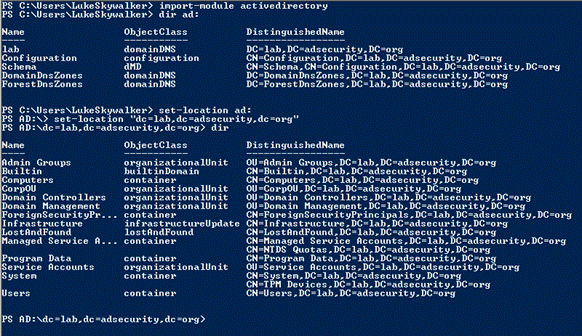
需要值得注意的是使用PowerShell v3版本以及高版本,你无需运行第一行命令,因为PowerShell的将识别必要的模块和自动加载它。一旦加载了Active Directory PowerShell模块,就可以像浏览文件系统那样浏览AD。命令如下:
Ps> Import-module activeDirectory
Ps>dir ad:
Ps>set-location ad:
Ps >set-location “dc=lab,dc=adsecurity,dc=org”
Ps>dir
0x02 查找有用的命令(Cmdlet)
1.基本的模块和统计
发现可用的PowerShell模块:Get-Module -ListAvailable
在PowerShell模块中发现cmdlet:Get-Command -module ActiveDirectory
PowerShell AD模块的Cmdlet个数:
(Get-Command -module ActiveDirectory).count
- Windows Server 2008 R2: 76 cmdlets
- Windows Server 2012: 135 cmdlets
- Windows Server 2012 R2: 147 cmdlets
- Windows Server 2016: 147 cmdlets
WINDOWS SERVER 2008 R2主要的cmdlets:
• Get/Set-ADForest
• Get/Set-ADDomain
• Get/Set-ADDomainController
• Get/Set-ADUser
• Get/Set-ADComputer
• Get/Set-ADGroup
• Get/Set-ADGroupMember
• Get/Set-ADObject
• Get/Set-ADOrganizationalUnit
• Enable-ADOptionalFeature
• Disable/Enable-ADAccount
• Move-ADDirectoryServerOperationMasterRole
• New-ADUser
• New-ADComputer
• New-ADGroup
• New-ADObject
• New-ADOrganizationalUnit
WINDOWS SERVER 2012含以版本一些新的cmdlets:
• *-ADResourcePropertyListMember
• *-ADAuthenticationPolicy
• *-ADAuthenticationPolicySilo
• *-ADCentralAccessPolicy
• *-ADCentralAccessRule
• *-ADResourceProperty
• *-ADResourcePropertyList
• *-ADResourcePropertyValueType
• *-ADDCCloneConfigFile
• *-ADReplicationAttributeMetadata
• *-ADReplicationConnection
• *-ADReplicationFailure
• *-ADReplicationPartnerMetadata
• *-ADReplicationQueueOperation
• *-ADReplicationSite
• *-ADReplicationSiteLink
• *-ADReplicationSiteLinkBridge
• *-ADReplicationSubnet
• *-ADReplicationUpToDatenessVectorTable
• Sync-ADObject
2.发现全局目录 GLOBAL CATALOGS (GCS)
• Forest GCs(森林全局目录):
import-module ActiveDirectory
$ADForest = Get-ADForest
$ADForestGlobalCatalogs = $ADForest.GlobalCatalogs
• Domain DCs that are GCs(以域DCS的全局目录):
import-module ActiveDirectory
$DCsNotGCs = Get-ADDomainController -filter { IsGlobalCatalog -eq $True}
• Domain DCs that are not GCs(以非域DCS的全局目录):
import-module ActiveDirectory
$DCsNotGCs = Get-ADDomainController -filter { IsGlobalCatalog -eq $False }
3.查找Active Directory灵活单主机操作(FSMO)角色
活动目录模块:
(GET-ADForest).SchemaMaster
(GET-ADForest).DomainNamingMaster
(GET-ADDomain).InfrastructureMaster
(GET-ADDomain).PDCEmulator
(GET-ADDomain).RIDMaster
.NET调用:
•Get the Current Domain:
[System.DirectoryServices.ActiveDirectory.Domain]::GetCurrentDomain().Name
[System.DirectoryServices.ActiveDirectory.Domain]::GetComputerDomain().Name
• Get the Computer’s Site:
[System.DirectoryServices.ActiveDirectory.ActiveDirectorySite]::GetComputerSite()
• List All Domain Controllers in a Domain:
[System.DirectoryServices.ActiveDirectory.Domain]::GetCurrentDomain().DomainControllers
• Get Active Directory Domain Mode:
[System.DirectoryServices.ActiveDirectory.Domain]::GetCurrentDomain().DomainMode
• List Active Directory FSMOs:
([System.DirectoryServices.ActiveDirectory.Forest]::GetCurrentForest()).SchemaRoleOwner
([System.DirectoryServices.ActiveDirectory.Forest]::GetCurrentForest()).NamingRoleOwner
([System.DirectoryServices.ActiveDirectory.Domain]::GetCurrentDomain()).InfrastructureRoleOwner
([System.DirectoryServices.ActiveDirectory.Domain]::GetCurrentDomain()).PdcRoleOwner
([System.DirectoryServices.ActiveDirectory.Domain]::GetCurrentDomain()).RidRoleOwner
•Get Active Directory Forest Name:
[System.DirectoryServices.ActiveDirectory.Forest]::GetCurrentForest().Name
• Get a List of Sites in the Active
Directory Forest:
[array] $ADSites =
[System.DirectoryServices.ActiveDirectory.Forest]::GetCurrentForest().Sites
• Get Active Directory Forest Domains:
[System.DirectoryServices.ActiveDirectory.Forest]::GetCurrentForest().Domains
• Get Active Directory Forest Global
Catalogs:
[System.DirectoryServices.ActiveDirectory.Forest]::GetCurrentForest().GlobalCatalogs
• Get Active Directory Forest Mode:
[System.DirectoryServices.ActiveDirectory.Forest]::GetCurrentForest().ForestMode
• Get Active Directory Forest Root
Domain:
[System.DirectoryServices.ActiveDirectory.Forest]::GetCurrentForest().RootDomain
4.FSMO角色从一个DC移动到另一个DC
get-command
-module activedirectory -noun *Master*
•Moving FSMO Roles:
Move-ADDirectoryServerOperationMasterRole
-Identity $DCName -OperationMasterRole RIDMaster
Move-ADDirectoryServerOperationMasterRole
-Identity $DCName -
OperationMasterRole
DomainNamingMaster
Move-ADDirectoryServerOperationMasterRole
-Identity $DCName -OperationMasterRole PDCEmulato
•Seizing FSMO Roles:
Move-ADDirectoryServerOperationMasterRole
-Identity $DCName -OperationMasterRole PDCEmulator –FORCE
0x03 Active Directory PowerShell模块Cmdlet示例
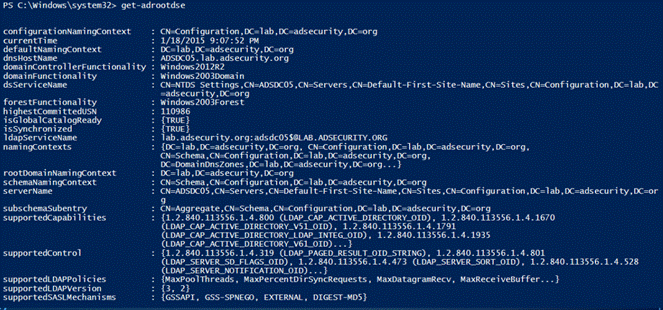
1.Get-RootDSE
获取有关LDAP服务器(域控制器)的信息并显示其内容,结果中有一些有趣的信息,比如DC运行的操作系统信息。
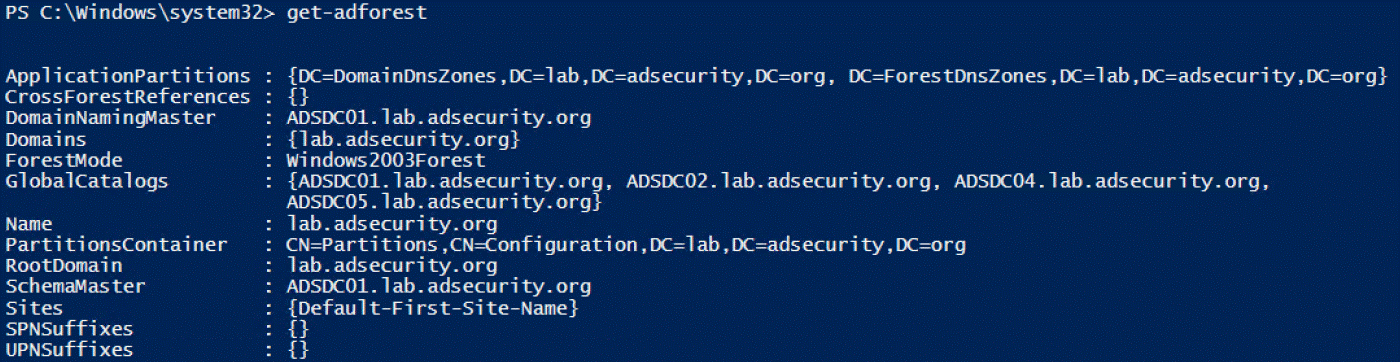
2.Get-ADForest
提供有关运行该命令计算机所在的Active
Directory森林信息。
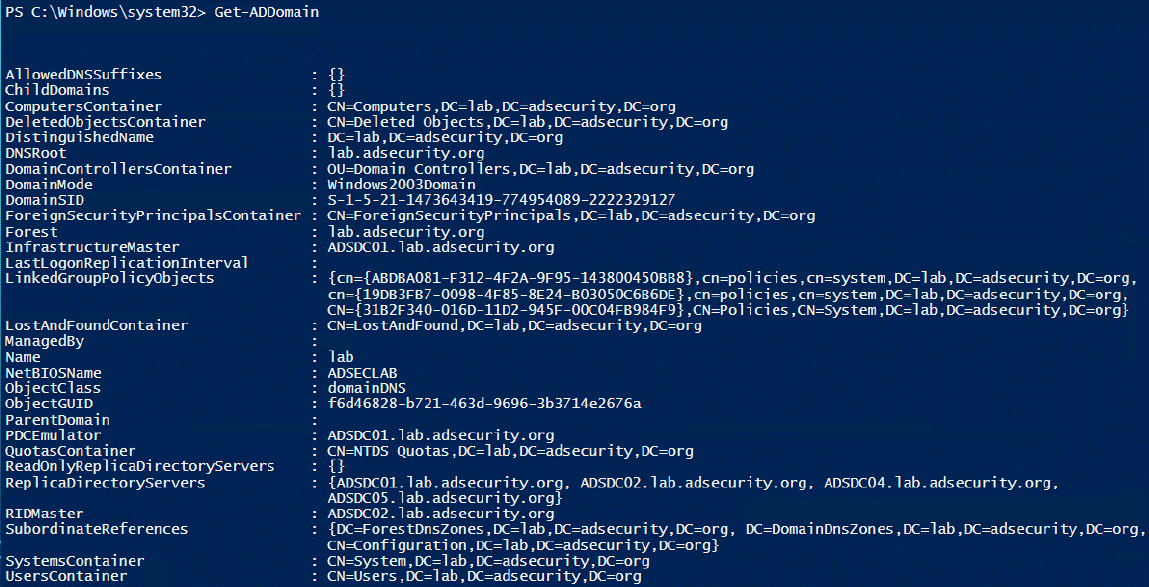
3.Get-ADDomain
提供有关当前所在域的信息
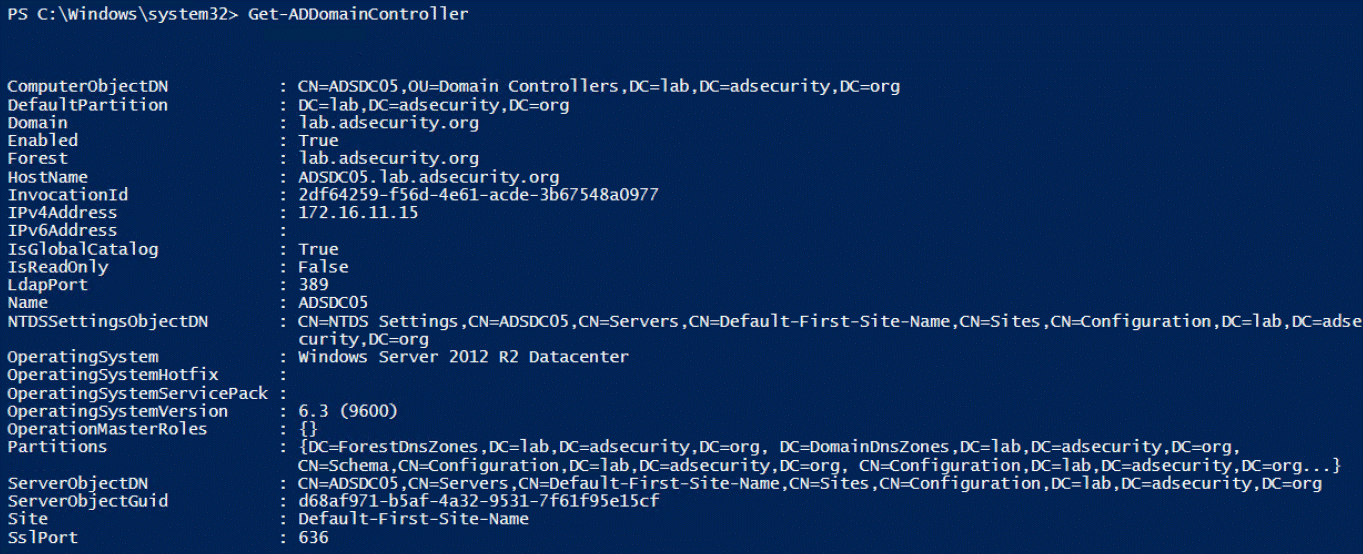
4.Get-ADDomainController
提供特定于域控制器的计算机信息,通过cmdlet命令,可轻松查找到特定站点中的所有DC或运行OS版本信息。
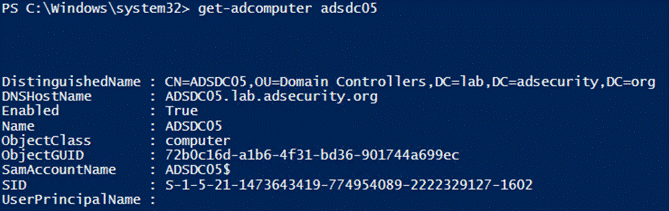
5.Get-ADComputer
提供了关于AD中大多数计算机对象的信息,使用“-Prop *”参数运行的命令可以显示所有标准属性信息。
6. AD计算机的统计
$Time = (Measure-Command `
{[array] $AllComputers =
Get-ADComputer -filter * -properties
Name,CanonicalName,Enabled,passwordLastSet,SAMAccountName,LastLogonTimeSt
amp,DistinguishedName,OperatingSystem
}).TotalMinutes
$AllComputersCount =
$AllComputers.Count
Write-Output “There were
$AllComputersCount Computers discovered in
$DomainDNS in $Time minutes… `r “
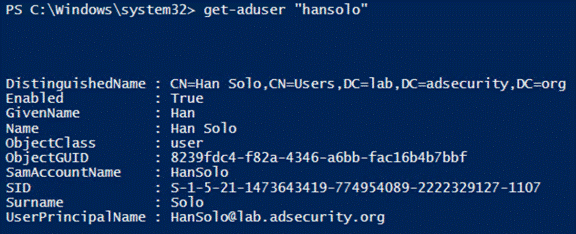
7.Get-ADUser
提供了想要了解有关AD用户的大部分内容信息,使用“-Prop *”参数运行的命令可以显示所有标准属性信息。
8. AD用户的统计
import-Module ActiveDirectory
$DomainDNS =
[System.DirectoryServices.ActiveDirectory.Domain]::GetCurrentDomain().Name
[array]$AllUsers = Get-ADUser
-filter * -properties
Name,DistinguishedName,Enabled,LastLogonDate,LastLogonTimeStamp,LockedOut,msExchHom
eServerName,SAMAccountName
$AllUsersCount = $AllUsers.Count
Write-Output “There were
$AllUsersCount user objects discovered in $ADDomainDNSRoot … “
[array] $DisabledUsers =
$AllUsers | Where-Object { $_.Enabled -eq $False }
$DisabledUsersCount =
$DisabledUsers.Count
[array] $EnabledUsers = $AllUsers
| Where-Object { $_.Enabled -eq $True }
$EnabledUsersCount =
$EnabledUsers.Count
Write-Output “There are
$EnabledUsersCount Enabled users and there are $DisabledUsersCount
Disabled users in $DomainDNS “
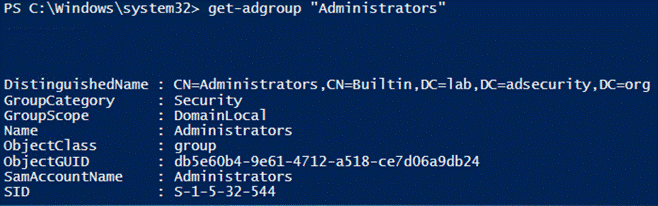
9.Get-ADGroup
提供有关AD组的信息,运行如下命令可查找所有安全组:
Get-ADGroup -Filter {GroupCategory -eq ‘Security}
10.Get-ADGroupMember
枚举并返回组成员信息,使用”-Recursive”参数可包括嵌套组的所有成员。
Get-ADGroupMember ‘Administrators’ -Recursive

11.查找非活动计算机
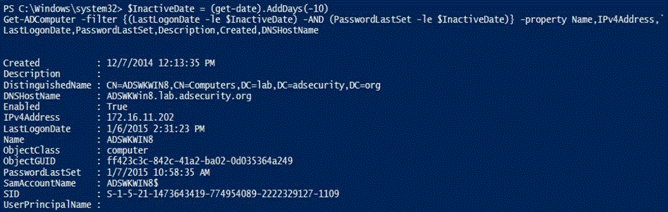
以下示例查找非活动(旧版本)计算机和用户:在过去10天内未更改其密码的帐户。请注意,这是一个测试示例。对于实际的生产环境,将此建议更改为计算机的60到90天,用户的180到365天的策略。
12.查找非活动用户

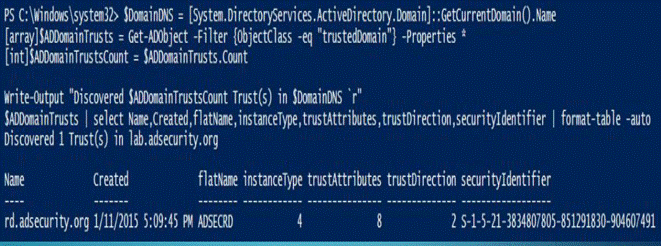
13.枚举域信任
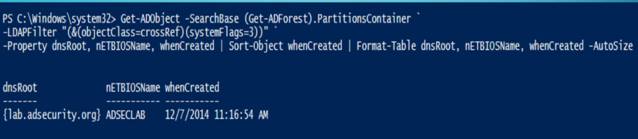
14.获取活动目录的实施日期
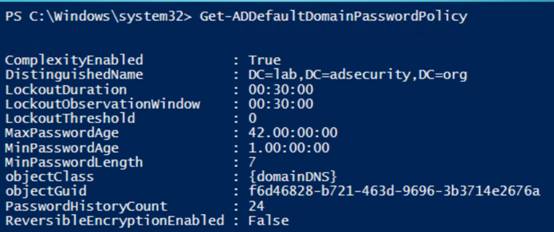
15.获取AD密码策略
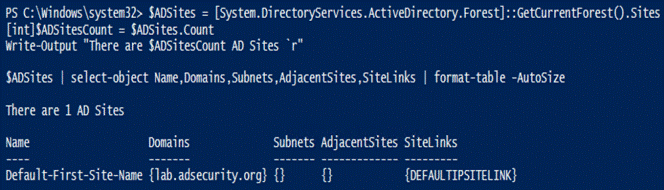
16.获取AD站点信息
请注意Windows 2012模块中包含站点的cmdlet(Get-ADReplicationSite *)。
17. 获得tombstonelifetime信息

18.AD的回收信息
Requires Forest Functional Mode =
Windows Server 2008 R2
• Enable the Recycle Bin
(as Enterprise Admin)
Enable-ADOptionalFeature
–Identity ‘CN=Recycle Bin Feature,CN=Optional Features,CN=Directory
Service,CN=Windows
NT,CN=Services,CN=Configuration,DC=DOMAIN,DC=COM’ –Scope
ForestOrConfigurationSet –Target
‘DOMAIN.COM’
• Find all Deleted Users
$DeletedUsers = Get-ADObject
-SearchBase “CN=Deleted Objects,DC=DOMAIN,DC=COM” -Filter
{ObjectClass -eq “user”}
-IncludeDeletedObjects -Properties lastKnownParent
• Restore all Deleted
Users
$DeletedUsers | Restore-ADObject
• Restore users deleted on
a specific date
$ChangeDate = Get-Date (“1/1/2015″)
Get-ADObject -Filter {
(whenChanged -eq $changeDate) -and (isDeleted -eq $true) -and (name -ne
“Deleted Objects”) -and
(ObjectClass -eq “user”) } -IncludeDeletedObjects -Properties * |
RestoreADObject
19.DOMAIN RID STATS(域 rid 统计)

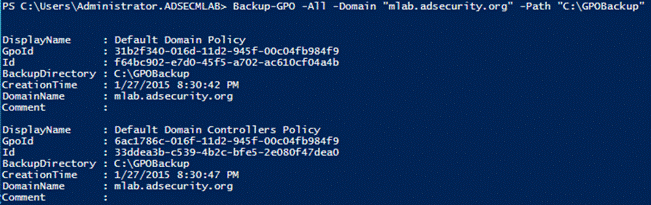
20.备份域GPO
请注意,这需要安装组策略PowerShell模块,该模块与Active Directory模块分开。
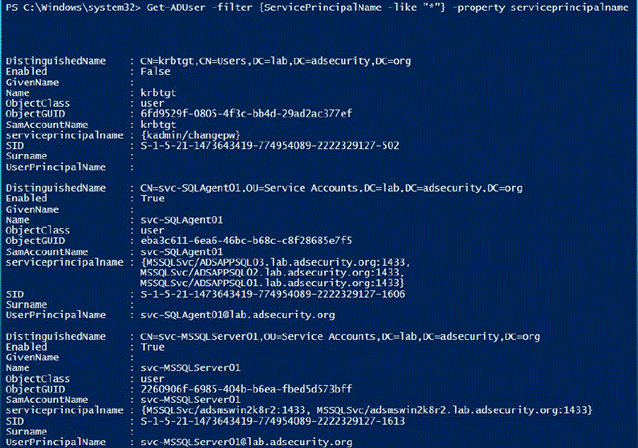
21.查找AD Kerberos服务帐户
22. 服务账号脚本
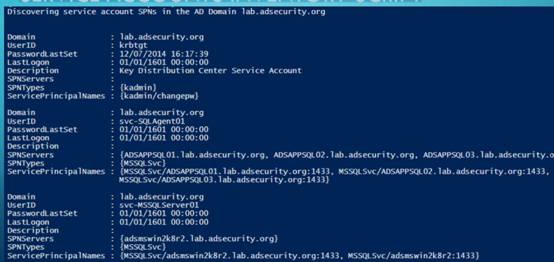
https://github.com/PyroTek3/PowerShell-AD-Recon/blob/master/Find-PSServiceAccounts
使用SPNS在AD中发现服务:SQl
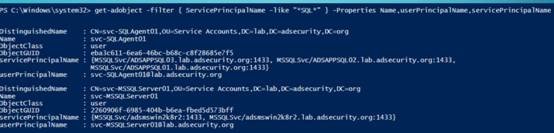
列出SQL服务:
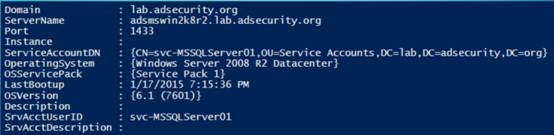
https://github.com/PyroTek3/PowerShell-AD-Recon/blob/master/Discover-PSMSSQLServers
23.列出域控制器
Get-ADDomainController-filter
* | `select hostname,IPv4Address,IsGlobalCatalog,IsReadOnly,OperatingSystem
| `format-table -auto
 24.DOMAIN CONTROLLERS DISCOVERY(域控制器的发现)
• Discover
PDCe in domain(发现域的PDCe)
Get-ADDomainController –Discover –ForceDiscover –Service “PrimaryDC” –
DomainName “lab.adsecurity.org”
• Discover
DCs in a Site(发现站点的DCs)
Get-ADDomainController –Discover –Site “HQ”
• Find all
Read-Only Domain Controllers that are GCs(查找所有作为GCs的只读域控制器)
Get-ADDomainController –filter `
{ (isGlobalCatalog –eq $True) –AND (isReadOnly –eq $True) }
25.AD数据库完整性检查
Write-Output
"Checking the NTDS database for errors (semantic database
analysis)
`r "
Stop-Service
ntds -force
$NTDSdbChecker
= ntdsutil "activate instance ntds" "semantic database
analysis"
"verbose on" "Go" q q
Start-Service
ntds
Write-Output
"Results of Active Directory database integrity check: `r "
$NTDSdbChecker
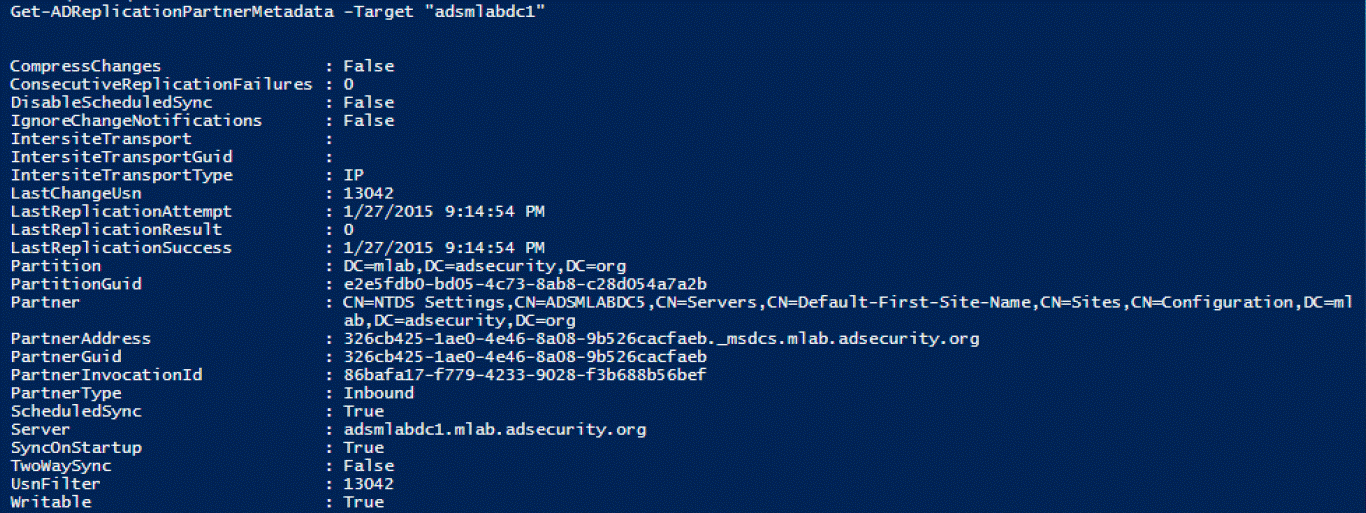
26.Get-ADReplicationPartnerMetadata
Windows
Server 2012及更高版本,此命令用于显示目标DC复制伙伴的复制元数据
27.Get-ADReplicationPartnerFailure
提供有关DC复制失败状态的信息,此命令显示AD复制错误的描述,CMDLETS (2012)

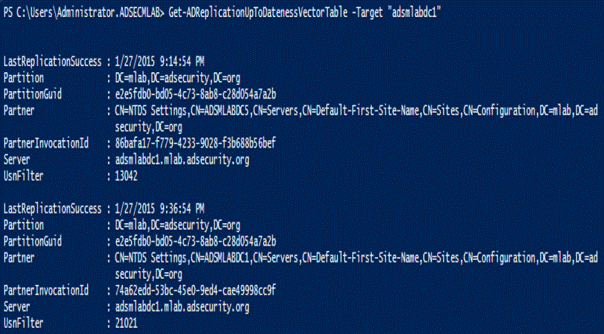
28.Get-ADReplicationUptodatenessVectorTable
跟踪域控制器之间的复制状态,CMDLETS (2012)
29.AD Web服务(ADWS)
需要在目标DC上运行AD Web服务(ADWS)(TCP 9389)
Get-ADDomainController
–Discover –Service “ADWS”
30.REPADMIN(目录复制工具) VS.
POWERSHELL
|
REPADMIN |
PowerShell |
|
2012 Cmdlets |
|
|
/FailCache |
Get-ADReplicationFailure |
|
/Queue |
Get-ADReplicationQueueOperation |
|
/ReplSingleObj |
Sync-ADObject |
|
/ShowConn |
Get-ADReplicationConnection |
|
/ShowObjMeta |
Get-ADReplicationAttributeMetadata |
|
/ShowRepl |
Get-ADReplicationPartnerMetadata |
|
/ShowUTDVec |
Get-ADReplicationUpToDatenessVectorTable |
|
/SiteOptions |
Set-ADReplicationSite |
|
2008 R2 Cmdlets |
|
|
/ShowAttr |
Get-ADObject |
|
/SetAttr |
Set-ADObject |
|
/PRP |
Get-ADDomainControllerPasswordReplicationPolicy |
|
Add-ADDomainControllerPasswordReplicationPolicy |
|
|
Remove-ADDomainControllerPasswordReplicationPolicy |
|
|
Get-ADAccountResultantPasswordReplicationPolicy |
|
|
Get-ADDomainControllerPasswordReplicationPolicyUsage |
Active Directory PowerShell模块收集AD信息的更多相关文章
- Windows Azure Active Directory (3) China Azure AD增加新用户
<Windows Azure Platform 系列文章目录> 本文介绍的是国内由世纪互联运维的China Azure. 本文是对笔者之前的文档:Windows Azure Active ...
- Windows Azure Active Directory (4) China Azure AD Self Password Reset
<Windows Azure Platform 系列文章目录> 本文介绍的是国内由世纪互联运维的Azure China. 在开始本章内容之前,请读者熟悉笔者之前写的文档: Windows ...
- Active Directory 域服务(AD DS)
本文内容 概述 工作组架构与域架构 名称空间(Namespace) 对象(Object).容器(Container)与组织单位(Organization Units,OU) 域树(Domain Tre ...
- Windows Azure Active Directory (2) Windows Azure AD基础
<Windows Azure Platform 系列文章目录> Windows Azure AD (WAAD)是Windows Azure提供的一个REST风格的服务,为您的云服务提供了身 ...
- 自动化之路 python psutil模块 收集硬件信息
一.psutil模块 1. psutil是一个跨平台库,能够轻松实现获取系统运行的进程和系统利用率(包括CPU.内存.磁盘.网络等)信息.它主要应用于系统监控,分析和限制系统资源及进程的管理.它实现了 ...
- 客户端无法加入域,报错:“无法与域‘xxx.com’的Active Directory域控制器(AD DC)链接” 请确保键入的域名正确
1.客户端能不能解析到域名? nslookup 一下域名看看解析到的IP的地址 2.客户端的DNS要指向DC 3.客户端的相关服务,workstation,TCP/IP NetBios Helper, ...
- 安装 Windows Server 2012 Active Directory 只读域控制器 (RODC)(级别 200)
安装 Windows Server 2012 Active Directory 只读域控制器 (RODC)(级别 200) 适用对象:Windows Server 2012 本主题介绍如何创建分步的 ...
- SharePoint 2013技巧分享系列 - Active Directory同步显示用户照片
为了保持通讯信息的一致性,需要设置SharePoint,Exchange, Lync等信息同步更新显示,例如,员工头像信息. 本文介绍如何在SharePoint 2013中同步显示Active Dir ...
- Windows Server 2016-管理Active Directory复制任务
Repadmin.exe可帮助管理员诊断运行Microsoft Windows操作系统的域控制器之间的Active Directory复制问题. Repadmin.exe内置于Windows Serv ...
随机推荐
- [面试]CVTE 2019提前批 Windows应用开发一面
7.30接到面试电话问有没有时间进行一个20分钟左右的电话面试,不巧当时要去赶火车,就约到了两天后. 8.1还是同一个面试官打来电话 首先介绍项目吧,第一场面试,项目准备的也不怎么充分,讲了一个HAL ...
- 007 --MySQL索引底层实现原理
MySQL官方对索引的定义为:索引(Index)是帮助MySQL高效获取数据的数据结构.提取句子主干,就可以得到索引的本质:索引是数据结构. 我们知道,数据库查询是数据库的最主要功能之一.我们都希望查 ...
- 【Go】累加器的测试问题记录
关于GoLang学习过程中的一个问题mark,教程上说两个累加器的地址应该是不一样的,但是实际测试出来结果一样 package main import( "fmt" ) func ...
- jar包、war包
JavaSE程序可以打包成Jar包(J其实可以理解为Java了),而JavaWeb程序可以打包成war包(w其实可以理解为Web了).然后把war发布到Tomcat的webapps目录下,Tomcat ...
- GlusterFS分布式存储集群-2. 使用
参考文档: Quick Start Guide:http://gluster.readthedocs.io/en/latest/Quick-Start-Guide/Quickstart/ Instal ...
- Playfair加密
前面讲的不管是单码加密还是多码加密都属于单图加密,什么是单图加密和多图加密呢,简单来说单图加密就是一个字母加密一个字母,而多图加密就是一个字符组加密一个字符组.比如双图加密就是两个字母加密两个字母,这 ...
- python之模块_随手记录的模块
目录 1.StringIO模块 2.string模块 3.pprint模块 4.struct模块 5.uuid模块 6.itertools 7.prettytable 1.StringIO (1)使用 ...
- 一个demo 理解 vuex
相比接触vue的同学们已经看了官方文档了.这里我用一个简单的demo来阐述下vuex的知识点,虽然简单,但是容易理解.也加深自己的记忆. 用脚手架建立个项目vue init webpakc-simpl ...
- java判断字符串编码
是 public static String getEncoding(String str){ String encoding = "UTF-8"; try { if (str.e ...
- Task 6.4 冲刺Two之站立会议9
今天主要对昨天用户提出的意见加以改进,虽然有些不能轻易实现但是仍然查阅了很多资料.因为他目前可以实现实时通信的功能,而我们想要在这个基础上实现临时的视频聊天的功能,但是时间有点紧迫,所以还没有实现.