
[WSUS] Windows Server Update Service 更新后,出现错误不能连接
执行以下命令:C:\Program Files\Update Services\Tools\wsusutil postinstall /servicing
参考:http://www.urtech.ca/2016/08/solved-wsus-server-will-not-launch-after-august-patch-cycle-including-kb3159706/
To allow WSUS (and presumably SCCM) to support Windows 10 Anniversary, Microsoft released a patch last month which blew up a number of WSUS servers. They have now released KB3159706 which is supposed to fix that problem and support Windows 10 Anniversary. This patch installs on WSUS servers through the normal Windows Update process so even if you are not running Windows 10 or care about Anniversary, you will receive that patch. The problem is that it REQUIRES a number of MANUAL steps to complete the install and if you don’t, your WSUS console will not launch.
You can read https://support.microsoft.com/en-us/kb/3159706 and https://blogs.technet.microsoft.com/wsus/2016/05/05/the-long-term-fix-for-kb3148812-issues/ for full details but it boils down to:
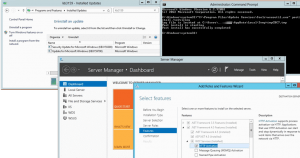
- Run a patch cycle on the server that host your WSUS, reboot and then ensure that KB3159706 is installed
- From an elevated command prompt run: “C:\Program Files\Update Services\Tools\wsusutil.exe” postinstall /servicing This takes more than a few seconds to complete.
- SERVER MANAGER > ROLES & FEATURES > .NET FRAMEWORK 4.5 FEATURES > add HTTP ACTIVATION
- Restart WSUS SERVICE
- Launch the WSUS console and all should be well
- If you are using SSL on the WSUS you need to read the bottom of KB3159706
- If you check your WSUS > OPTIONS > PRODUCTS AND CLASSIFICATIONS, UPGRADES should now be listed and function correctly
[WSUS] Windows Server Update Service 更新后,出现错误不能连接的更多相关文章
- GPO - Windows Server Update Services
Windows Server Update Services Configuration Wizard: Approve procedure of these updates is very tiri ...
- Windows Server 2012 R2更新(KB2919355)
必须按以下顺序安装这些KB:clearcompressionflag.exe,KB2919355,KB2932046,KB2959977,KB2937592,KB2938439和KB2934018. ...
- IIS启动失败,启动Windows Process Activation Service时,出现错误13:数据无效 ;HTTP 错误 401.2 - Unauthorized 由于身份验证头无效,您无权查看此页
因为修改过管理员账号的密码后重启服务器导致IIS无法启动,出现已下异常 1.解决:"启动Windows Process Activation Service时,出现错误13:数据无效&quo ...
- 在启动Windows Process Activation Service时,出现错误13:数据无效
在启动Windows Process Activation Service时,出现错误13:数据无效 1.错误原因: 当Windows Process Activation Service从C:\Wi ...
- Windows Server 2008 服务器重启后卡死在Windows Update 页面问题处理
Windows Update 服务器 服务器是联想RD640 操作系统Windows Server 2008 R2 Enterprise版 补丁版本是SP1 远程windows服务器时,一直处于远程建 ...
- 搭建windows server 2008 r2 FTP 后 开启防火墙无法访问的解决办法
转自http://kkworms.blog.51cto.com/540865/558477 今天在windows server 2008 R2上安装了FTP,安装过程如下,然后添加内置防火墙设置,设置 ...
- [数据库] windows server 2003下mysql出现10048错误的解决办法 Can't connect to MySQL server on '127.0.0.1' (10048)(抄)
网站访问量大了的时候mysql连接数自然就多了,当超出mysql最大连接数的时候就会出现错误,当出现too many字样的错误的时候一般是因为连接数的问题,只需要修改最大连接数max_conectio ...
- windows Server 2012/2016 路由和远程访问,PPPOE,ADSL,连接接口时出现一个错误,连接被远程计算机终止
经过查询资料,是由mprddm.dll的bug引起的. 修改位置: 将je修改为jmp. 查找修改位置,可参考 前面的RasGetPortUserData的调用,或者 后面的 字符串 64位dll可使 ...
- Windows Server 部署WEB API时内部错误
Windows Server 部署WEB API时,发生HTTP 错误 500.21 - Internal Server Error,如图所示: 错误原因:IIS注册Framework4.0 解决方法 ...
随机推荐
- Java_单例模式
主要介绍单例模式的一种写法.注意事项.作用.测试,以Java语言为例,下面代码是目前见过最好的写法: ? 1 2 3 4 5 6 7 8 9 10 11 12 13 14 15 16 17 18 19 ...
- Names and Identifiers
JLS:https://docs.oracle.com/javase/specs/jls/se7/html/jls-6.html#jls-6.2 Not all identifiers in a pr ...
- Base64加密解密工具类
使用Apache commons codec类Base64进行加密解密 maven依赖 <dependency> <groupId>commons-codec</grou ...
- Go语言学习笔记十一: 切片(slice)
Go语言学习笔记十一: 切片(slice) 切片这个概念我是从python语言中学到的,当时感觉这个东西真的比较好用.不像java语言写起来就比较繁琐.不过我觉得未来java语法也会支持的. 定义切片 ...
- centos虚拟机网络配置--桥接模式
什么是桥接模式?桥接模式就是将主机网卡与虚拟机虚拟的网卡利用虚拟网桥 进行通信.在桥接的作用下,类似于把物理主机虚拟为一个交换机,所有桥接 设置的虚拟机连接到这个交换机的一个接口上,物理主机也同样插在 ...
- 解释mysql 语句 ——解释CREATE DATABASE `test` DEFAULT CHARACTER SET utf8 COLLATE utf8_general_ci
在我们创建mysql数据库的时候我们经常会用到这句SQL:CREATE DATABASE `test` DEFAULT CHARACTER SET utf8 COLLATE utf8_general_ ...
- Hybrid混合式开发---回顾
一.前言 去年12月份开启了一个新项目--在线抓娃娃,就是让用户可以通过app去控制我们机房中的娃娃机来抓取娃娃.本项目开发半个月就紧急上线第一版本,中间经过2次大版本迭代,一个月不到就做到用户量超过 ...
- SpringBoot自动化配置的注解开关原理
我们以一个最简单的例子来完成这个需求:定义一个注解EnableContentService,使用了这个注解的程序会自动注入ContentService这个bean. @Retention(Retent ...
- EMC,EMI,EMS,ESD分别是什么?有什么区别和联系?
一.EMC EMI EMS定义: EMC(ElectromagneticCompatibility) 电磁兼容,是指设备或系统在电磁环境中性能不降级的状态.电磁兼容,一方面要求系统内没有严重的干扰源, ...
- js oop中的三种继承方法
JS OOP 中的三种继承方法: 很多读者关于js opp的继承比较模糊,本文总结了oop中的三种继承方法,以助于读者进行区分. <继承使用一个子类继承另一个父类,子类可以自动拥有父类的属性和方 ...