
python之系统命令
subprocess执行系统命令
call:执行命令,返回状态码
#!/usr/bin/env python

# _*_ coding:utf-8 _*_

__Author__ = 'KongZhaGen'

import subprocess

# call模块默认接受列表形式的命令

ret = subprocess.call(['df','-h'], shell=False)

# 当shell=True时,call也可以接受字符串形式的命令

ret = subprocess.call("df -h", shell=True)

# 返回状态码,0正确,非0错误

print ret
check_call:如果状态码是0,
#!/usr/bin/env python

# _*_ coding:utf-8 _*_

__Author__ = 'KongZhaGen'

import subprocess

ret = subprocess.check_call("df -h")

print ret
check_out:执行结果为0,返回结果,否则抛出异常
#!/usr/bin/env python

# _*_ coding:utf-8 _*_

__Author__ = 'KongZhaGen'

import subprocess

ret = subprocess.check_output("df -h")

print ret
subprocess.Popen(...)
用于执行复杂的系统命令
参数:
- args:shell命令,可以是字符串或者序列类型(如:list,元组)
- bufsize:指定缓冲。0 无缓冲,1 行缓冲,其他 缓冲区大小,负值 系统缓冲
- stdin, stdout, stderr:分别表示程序的标准输入、输出、错误句柄
- preexec_fn:只在Unix平台下有效,用于指定一个可执行对象(callable object),它将在子进程运行之前被调用
- close_sfs:在windows平台下,如果close_fds被设置为True,则新创建的子进程将不会继承父进程的输入、输出、错误管道。
所以不能将close_fds设置为True同时重定向子进程的标准输入、输出与错误(stdin, stdout, stderr)。 - shell:同上
- cwd:用于设置子进程的当前目录
- env:用于指定子进程的环境变量。如果env = None,子进程的环境变量将从父进程中继承。
- universal_newlines:不同系统的换行符不同,True -> 同意使用 \n
- startupinfo与createionflags只在windows下有效
将被传递给底层的CreateProcess()函数,用于设置子进程的一些属性,如:主窗口的外观,进程的优先级等等
示例:
communicate:执行输入的命令,结果返回为元组(stdout,stderr)
#!/usr/bin/env python

# _*_ coding:utf-8 _*_

__Author__ = 'KongZhaGen'

import subprocess

# 作为与进程的交互,stdin将命令发送子进程,stdout,stderr读取执行结果,等待进程结束

obj = subprocess.Popen(["ipconfig","-all"], stdin=subprocess.PIPE, stdout=subprocess.PIPE)

(out,err) = obj.communicate()

'''

Interact with process: Send data to stdin.  Read data from

        stdout and stderr, until end-of-file is reached.  Wait for

        process to terminate.  The optional input argument should be a

        string to be sent to the child process, or None, if no data

        should be sent to the child.

        communicate() returns a tuple (stdout, stderr).

'''

print out
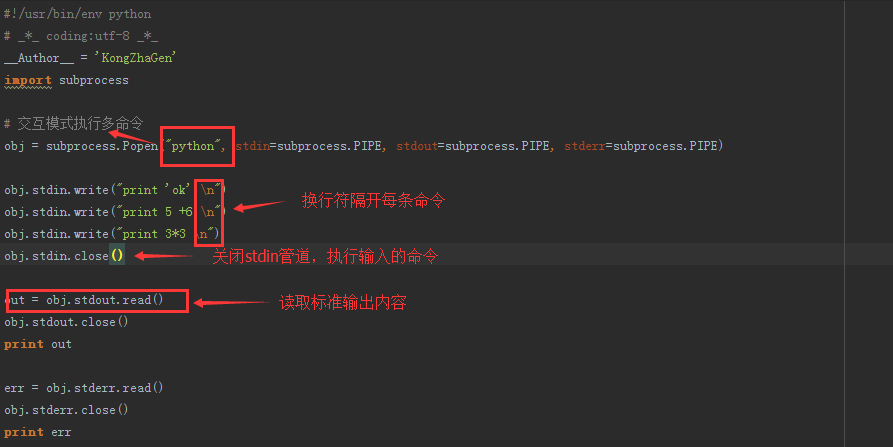
如果在交互模式下执行多个命令怎么办?
shutil:高级的 文件、文件夹、压缩包 处理模块
1、将文件内容从一个文件拷贝到另一个文件中去,可以是部分数据
def copyfileobj(fsrc, fdst, length=16*1024):
    """copy data from file-like object fsrc to file-like object fdst"""
    while 1:
        buf = fsrc.read(length)
        if not buf:
            break
        fdst.write(buf)
#!/usr/bin/env python

# _*_ coding:utf-8 _*_

__Author__ = 'KongZhaGen'

import shutil

fp_src = open("three-level-menu.py",'r')

fp_dst = open("user_lock.key",'w')

shutil.copyfileobj(fp_src,fp_dst)

fp_src.close()

fp_dst.close()
2、拷贝文件
def copyfile(src, dst):
    """Copy data from src to dst"""
    if _samefile(src, dst):
        raise Error("`%s` and `%s` are the same file" % (src, dst))

    for fn in [src, dst]:
        try:
            st = os.stat(fn)
        except OSError:
            # File most likely does not exist
            pass
        else:
            # XXX What about other special files? (sockets, devices...)
            if stat.S_ISFIFO(st.st_mode):
                raise SpecialFileError("`%s` is a named pipe" % fn)

    with open(src, 'rb') as fsrc:
        with open(dst, 'wb') as fdst:
            copyfileobj(fsrc, fdst)
#!/usr/bin/env python

# _*_ coding:utf-8 _*_

__Author__ = 'KongZhaGen'

import shutil

shutil.copyfile("three-level-menu.py","user_auth.py")
3、shutil.copymode(src, dst)
仅拷贝权限。内容、组、用户均不变
4、shutil.copystat(src, dst)
拷贝状态的信息,包括:mode bits, atime, mtime, flags
5、shutil.copy(src, dst)
拷贝文件和权限
6、shutil.copy2(src, dst)
拷贝文件和状态信息
7、
shutil.ignore_patterns(*patterns)
shutil.copytree(src, dst, symlinks=False, ignore=None)
递归的去拷贝文件
例如:copytree(source, destination, ignore=ignore_patterns('*.pyc', 'tmp*'))
8、shutil.rmtree(path[, ignore_errors[, onerror]])
递归的去删除文件
9、shutil.move(src, dst)
递归的去移动文件
10、shutil.make_archive(base_name, format,...)
创建压缩包并返回文件路径,例如:zip、tar
- base_name: 压缩包的文件名,也可以是压缩包的路径。只是文件名时,则保存至当前目录,否则保存至指定路径,
如:www =>保存至当前路径
如:/Users/wupeiqi/www =>保存至/Users/wupeiqi/ - format: 压缩包种类,“zip”, “tar”, “bztar”,“gztar”
- root_dir: 要压缩的文件夹路径(默认当前目录)
- owner: 用户,默认当前用户
- group: 组,默认当前组
- logger: 用于记录日志,通常是logging.Logger对象
#将 /Users/wupeiqi/Downloads/test 下的文件打包放置当前程序目录

import shutil

ret = shutil.make_archive("wwwwwwwwww", 'gztar', root_dir='/Users/wupeiqi/Downloads/test')

#将 /Users/wupeiqi/Downloads/test 下的文件打包放置 /Users/wupeiqi/目录

import shutil

ret = shutil.make_archive("/Users/wupeiqi/wwwwwwwwww", 'gztar', root_dir='/Users/wupeiqi/Downloads/test')
python之系统命令的更多相关文章
- Python执行系统命令的方法 os.system(),os.popen(),commands
os.popen():用python执行shell的命令,并且返回了结果,括号中是写shell命令 Python执行系统命令的方法: https://my.oschina.net/renwofei42 ...
- python 调用系统命令
Python执行系统命令一般的用到了四种方法, 第一种是 os.system(), 这个方法比较常用, 使用也简单, 会自动的生成一个进程,在进程完成后会自动退出, 需要注意的是 os.system ...
- python调用系统命令 shell命令
使用python调用系统命令,基本有3种选择: 1. 使用os模块的system方法 import os os.system('ls') 2. 使用os模块的popen方法 import os os. ...
- windows linux 使用python执行系统命令并将结果保存到变量
最近需要用到os.system 发现不能赋值到变量 后查有更新的模块,如下: os.system os.spawn* os.popen* popen2.* commands.* 重新使用content ...
- 转 Python执行系统命令的方法
传送门 Python执行系统命令的方法 http://www.linux-field.com/?p=15 Python中执行系统命令常见方法有两种: 两者均需 import os (1) os.sys ...
- Python执行系统命令并获得输出的几种方法
[root@a upfc]# ./ffmpeg-linux64-v3.3.1 -i a.mp3 ffmpeg version N-86111-ga441aa90e8-static http://joh ...
- python 执行系统命令模块比较
python 执行系统命令模块比较 1.os.system模块 仅仅在子终端运行命令,返回状态码,0为成功,其他为失败,但是不返回执行结果 如果再命令行下执行,结果直接打印出来 >>> ...
- Python 调用系统命令的模块 Subprocess
Python 调用系统命令的模块 Subprocess 有些时候需要调用系统内部的一些命令,或者给某个应用命令传不定参数时可以使用该模块. 初识 Subprocess 模块 Subprocess 模块 ...
- python执行系统命令后获取返回值的几种方式集合
python执行系统命令后获取返回值的几种方式集合 今天小编就为大家分享一篇python执行系统命令后获取返回值的几种方式集合,具有很好的参考价值,希望对大家有所帮助.一起跟随小编过来看看吧 第一种情 ...
- Python执行系统命令的方法
Python中执行系统命令常见方法有两种: 两者均需 import os (1) os.system # 仅仅在一个子终端运行系统命令,而不能获取命令执行后的返回信息 system(command) ...
随机推荐
- 【数组】Spiral Matrix
题目: Given a matrix of m x n elements (m rows, n columns), return all elements of the matrix in spira ...
- Javac语法糖之其它
1.变长参数 class VarialbeArgumentsDemo { public static void doWork(int... a) {//可变参数 } public static voi ...
- Vue图片懒加载之lazyload插件使用
当内容没有加载完的时候,用户体验不是很好,这时候,可以使用lazyload这个插件,提升用户体验,使用方法特别简单易用 一. vue lazyload插件: 插件地址:https://github.c ...
- django中有外键关系两张表的相互查找方法
两张通过外键联系的表,如何在一张表上根据另一张表上的属性查找满足条件的对象集? 1 平常查找表中数据的条件是python中已有的数据类型,通过名字可以直接查找.如果条件是表中外键列所对应表的某一列, ...
- 面试题6:二叉树最近公共节点(LCA)《leetcode236》
Lowest Common Ancestor of a Binary Tree(二叉树的最近公共父亲节点) Given a binary tree, find the lowest common an ...
- ASP.NET Core 中的 ORM 之 Entity Framework
目录 EF Core 简介 使用 EF Core(Code First) EF Core 中的一些常用知识点 实体建模 实体关系 种子数据 并发管理 执行 SQL 语句和存储过程 延迟加载和预先加载 ...
- rails image_tag生成图片标签
image_tag(source, options={}) Link Returns an HTML image tag for thesource. The source can be a full ...
- ES6 笔记(二)- 总结
在最近进行的项目中,已经全面使用到ES6,这里对ES6进行整理总结.用得比较多的是带*的内容,这些语法.新增类型.模块调用等从代码量上.可读性上.操作上给项目带来了不少便利. 1.语法 1 ...
- CPU结构与指令执行过程简介
CPU(Central Processing Unit)是计算机中进行算术和逻辑计算处理指令的主要部件. CPU结构 CPU由通用寄存器组,运算器,控制器和数据通路等部件组成. 寄存器包括 数据寄存器 ...
- [原] Bash Script 显示其自身位置
SOURCE="${BASH_SOURCE[0]}" BIN_DIR="$( dirname "$SOURCE" )" while [ -h ...