
AsyncTask 进行耗时操作和UI 更新
相信各位对 AsyncTask 不会陌生,虽然它有如下弊端:
1. 如果在activiy内部new 一个AsyncTask, 横竖屏切换生成一个新的activity,等结果返回时,处理不好容易出现NPE。
2. 容易出现内存泄漏,如果AsyncTask 进行比较耗时的IO操作(网络操作, 打开一个文件等等),在activity onDestroy的时候没有cancel的话,
导致该Activity不能被GC回收(AsyncTask 在Activity内部执行耗时操作)。
3. 如果调用 executeOnExecutor, 如果等待queue里面的请求过多没有得到及时处理,容易造成RejectException, 具体原因我在我的博客已经有所介绍(AsyncTask RejectedExecutionException 小结)。
闲话少说, 本文的重点不在于介绍AsyncTask的优缺点,而是一直有一个问题困扰我,为什么AsyncTask 里面既能进行UI 操作,又能进行耗时的操作。
让我们从代码角度来分析这个问题, 首先看他的构造函数:
public AsyncTask() {

        mWorker = new WorkerRunnable<Params, Result>() {

            public Result call() throws Exception {

                mTaskInvoked.set(true);

                Result result = null;

                try {

                    Process.setThreadPriority(Process.THREAD_PRIORITY_BACKGROUND);

                    //noinspection unchecked

                    result = doInBackground(mParams);

                    Binder.flushPendingCommands();

                } catch (Throwable tr) {

                    mCancelled.set(true);

                    throw tr;

                } finally {

                    postResult(result);

                }

                return result;

            }

        };

        mFuture = new FutureTask<Result>(mWorker) {

            @Override

            protected void done() {

                try {

                    postResultIfNotInvoked(get());

                } catch (InterruptedException e) {

                    android.util.Log.w(LOG_TAG, e);

                } catch (ExecutionException e) {

                    throw new RuntimeException("An error occurred while executing doInBackground()",

                            e.getCause());

                } catch (CancellationException e) {

                    postResultIfNotInvoked(null);

                }

            }

        };

    }
private static abstract class WorkerRunnable<Params, Result> implements Callable<Result> {

        Params[] mParams;

    }
public class FutureTask<V> implements RunnableFuture<V>
public interface Callable<V> {

    /**

     * Computes a result, or throws an exception if unable to do so.

     *

     * @return computed result

     * @throws Exception if unable to compute a result

     */

    V call() throws Exception;

}
public interface RunnableFuture<V> extends Runnable, Future<V> {

    /**

     * Sets this Future to the result of its computation

     * unless it has been cancelled.

     */

    void run();

}
从上面的代码可以看出, mWorker 实际上就是一个 Callable, 而 mFuture 就是一个Thread, 构造函数中将Callable 作为参数传给了 FutureTask,下面
我们看看FutureTask 中的相关实现:
public void run() {

        if (state != NEW ||

            !U.compareAndSwapObject(this, RUNNER, null, Thread.currentThread()))

            return;

        try {

            Callable<V> c = callable;

            if (c != null && state == NEW) {

                V result;

                boolean ran;

                try {

                    result = c.call();

                    ran = true;

                } catch (Throwable ex) {

                    result = null;

                    ran = false;

                    setException(ex);

                }

                if (ran)

                    set(result);

            }

        } finally {

            // runner must be non-null until state is settled to

            // prevent concurrent calls to run()

            runner = null;

            // state must be re-read after nulling runner to prevent

            // leaked interrupts

            int s = state;

            if (s >= INTERRUPTING)

                handlePossibleCancellationInterrupt(s);

        }

    }
 protected void set(V v) {

        if (U.compareAndSwapInt(this, STATE, NEW, COMPLETING)) {

            outcome = v;

            U.putOrderedInt(this, STATE, NORMAL); // final state

            finishCompletion();

        }

    }
private void finishCompletion() {

        // assert state > COMPLETING;

        for (WaitNode q; (q = waiters) != null;) {

            if (U.compareAndSwapObject(this, WAITERS, q, null)) {

                for (;;) {

                    Thread t = q.thread;

                    if (t != null) {

                        q.thread = null;

                        LockSupport.unpark(t);

                    }

                    WaitNode next = q.next;

                    if (next == null)

                        break;

                    q.next = null; // unlink to help gc

                    q = next;

                }

                break;

            }

        }

        done();

        callable = null;        // to reduce footprint

    }
可以看到 result = c.call(); 在run方法中被调用, 实际就是 result = doInBackground(mParams); 被调用,因为该方法是在子线程里面执行,所以可以执行耗时操作。 继续读代码,call-> set(result) -> finishCompletion->done()-> postResultIfNotInvoked-> postResult
 private Result postResult(Result result) {

        @SuppressWarnings("unchecked")

        Message message = getHandler().obtainMessage(MESSAGE_POST_RESULT,

                new AsyncTaskResult<Result>(this, result));

        message.sendToTarget();

        return result;

    }
private static Handler getHandler() {

        synchronized (AsyncTask.class) {

            if (sHandler == null) {

                sHandler = new InternalHandler();

            }

            return sHandler;

        }

    }
 private static class InternalHandler extends Handler {

        public InternalHandler() {

            super(Looper.getMainLooper());

        }

        @SuppressWarnings({"unchecked", "RawUseOfParameterizedType"})

        @Override

        public void handleMessage(Message msg) {

            AsyncTaskResult<?> result = (AsyncTaskResult<?>) msg.obj;

            switch (msg.wh所以at) {

                case MESSAGE_POST_RESULT:

                    // There is only one result

                    result.mTask.finish(result.mData[0]);

                    break;

                case MESSAGE_POST_PROGRESS:

                    result.mTask.onProgressUpdate(result.mData);

                    break;

            }

        }

    }
相信上面的代码大家都能看懂,值得说明的是,因为 InternalHandler的构造函数使用 mainlooper,所以 handleMessage 当然可以进行UI 操作。
继续看源码:
private void finish(Result result) {

        if (isCancelled()) {

            onCancelled(result);

        } else {

            onPostExecute(result);

        }

        mStatus = Status.FINISHED;

    }
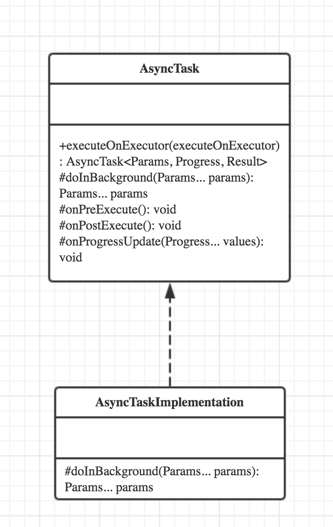
总结一下,虚函数 doInBackground 在Thread(FutureTask)run方法执行,所以能进行耗时操作,而InternalHanlder 通过获得mainlooper,在 handleMessage中调用 onPostExecute 从而保证了UI 操作可以在onPostExecute执行。这个过程实际就是模板模式。
AsyncTask 进行耗时操作和UI 更新的更多相关文章
- AsyncTask 处理耗时操作&&显示进度条
在Android中实现异步任务机制有两种,Handler和AsyncTask.优缺点自己百度,推荐使用AsyncTask. private ProgressDialog dialog; //新建一个对 ...
- RxJava2-后台执行耗时操作,实时通知 UI 更新(一)
一.前言 接触RxJava2已经很久了,也看了网上的很多文章,发现基本都是在对RxJava的基本思想介绍之后,再去对各个操作符进行分析,但是看了之后感觉过了不久就忘了. 偶然的机会看到了开源项目 Rx ...
- Winform 界面执行耗时操作--UI卡顿假死问题
UI卡顿假死问题 误区1:使用不同的线程操作UI控件和耗时操作(即,跨线程操作UI控件CheckForIllegalCrossThreadCalls = false;), 注意:此处只是为了记录... ...
- iOS开发创建UI的耗时操作处理
项目中有网络请求.读写操作等一系列耗时操作时,为了避免阻塞主线程,我们会把这些耗时操作放到子线程中去处理,当处理完成后,再回到主线程更新UI,这样就不会阻塞主线程.但是创建UI的时候一般都是在主线程中 ...
- C#.NET使用Task,await,async,异步执行控件耗时事件(event),不阻塞UI线程和不跨线程执行UI更新,以及其他方式比较
使用Task,await,async,异步执行事件(event),不阻塞UI线程和不跨线程执行UI更新 使用Task,await,async 的异步模式 去执行事件(event) 解决不阻塞UI线程和 ...
- Android AsyncTask 异步任务操作
1:activity_main.xml <RelativeLayout xmlns:android="http://schemas.android.com/apk/res/androi ...
- android异步任务处理(网络等耗时操作)
在实际应用中经常会遇到比较耗时任务的处理,比如网络连接,数据库操作等情况时,如果这些操作都是放在主线程(UI线程)中,则会造成UI的假死现象(android4.0后也不许放在UI线程),这可以使用As ...
- runloop事件、UI更新、observer与coranimation
一.触摸事件派发与视图绘制打包 __CFRUNLOOP_IS_CALLING_OUT_TO_A_SOURCE0_PERFORM_FUNCTION__ __dispatchPreprocessedEve ...
- 深入理解android的UI更新机制
深入理解android的UI更新机制 由问题开始: 如何更新android UI? 可以通过如下方法: 在主线程里直接操作UI控件. handler.post(Runnable) runOnUiThr ...
随机推荐
- IBase<T>
public interface IBase<T>//基类 { IEnumerable<T> SelectAll();//查询所有 T FindById(int ID);//根 ...
- c++ std::advance
// advance example #include <iostream> // std::cout #include <iterator> // std::advance ...
- CSS之不常用但重要的样式总结
1,设置颜色渐变 background-image: linear-gradient(to bottom, rgba(0, 0, 0, 0.67), rgba(255, 255, 255, 0));( ...
- DAY 21内存处理与正则
一.python的垃圾回收机制 1.引用计数(垃圾回收机制的根本) 1.引用计数是用来记录值的内存地址被记录的次数的 2.每一次对值地址的引用都可以使该值的引用计数+1 3.每一次对值地址的释放都可以 ...
- nodejs+express+socket.io
其实官网文档清楚了 https://socket.io/get-started/chat/ 但是因为之前写的是nodejs+express, socket.io是后加的, 还是有小坑 服务器端: 官 ...
- js 回文判断
方法一: 1.toLowerCase() //统一小写. 2.split(" ").reverse().join(" "); //字符串翻转. func ...
- Data Block -- Uncompressed
Overview of Data Blocks Oracle Database manages the logical storage space in the data files of a dat ...
- selenium在scrapy中的使用、UA池、IP池的构建
selenium在scrapy中的使用流程 重写爬虫文件的构造方法__init__,在该方法中使用selenium实例化一个浏览器对象(因为浏览器对象只需要被实例化一次). 重写爬虫文件的closed ...
- docker 中安装 redis
使用以下命令在Docker Hub搜索Redis镜像docker search redis 使用以下命令拉取镜像,Redis的镜像docker pull redis:latest 使用以下命令查看,本 ...
- html计时发送验证码功能的实现
function countdown() { var time=60; setTime=setInterval(function(){ if(time<=0){ clearInterval(se ...