
netcore应用程序部署程序到ubuntu
运维需求:获取服务器的运行情况,是否CPU、内存较高等,上报到运维系统
环境:ubuntu16.04
工具::netcore2.1、supervisor
程序实现(代码就不贴了)参考:https://blog.csdn.net/u014518337/article/details/86291984
因需要获取系统数据,部分命令行不支持在docker环境运行,因此直接由dotnet直接运行程序,守护进程由supervisor 守护
1、安装netcore2.1
wget -q https://packages.microsoft.com/config/ubuntu/16.04/packages-microsoft-prod.deb

sudo dpkg -i packages-microsoft-prod.deb

sudo apt-get install apt-transport-https

sudo apt-get update

sudo apt-get install dotnet-sdk-2.1
执行 dotnet --info 查看是否安装正确
2、安装supervisor
参考:https://www.cnblogs.com/savorboard/p/dotnetcore-supervisor.html
sudo apt-get install supervisor
安装完成之后,在 /ect/supervisor/conf.d/ 目录下新建一个配置文件(touch HelloWebApp.conf),取名为 HelloWebApp.conf
打开HelloWebApp.conf (vim HelloWebApp.conf),写入如下命令:
[program:HelloWebApp]

command=dotnet HelloWebApp.dll  #要执行的命令

directory=/home/xxx/publish #命令执行的目录

environment=ASPNETCORE__ENVIRONMENT=Production #环境变量

user=www-data  #进程执行的用户身份

stopsignal=INT

autostart=true #是否自动启动

autorestart=true #是否自动重启

startsecs= #自动重启间隔

stderr_logfile=/var/log/HelloWebApp.err.log #标准错误日志

stdout_logfile=/var/log/HelloWebApp.out.log #标准输出日志
注意:上面代码需要把注释 #后面的中文删掉
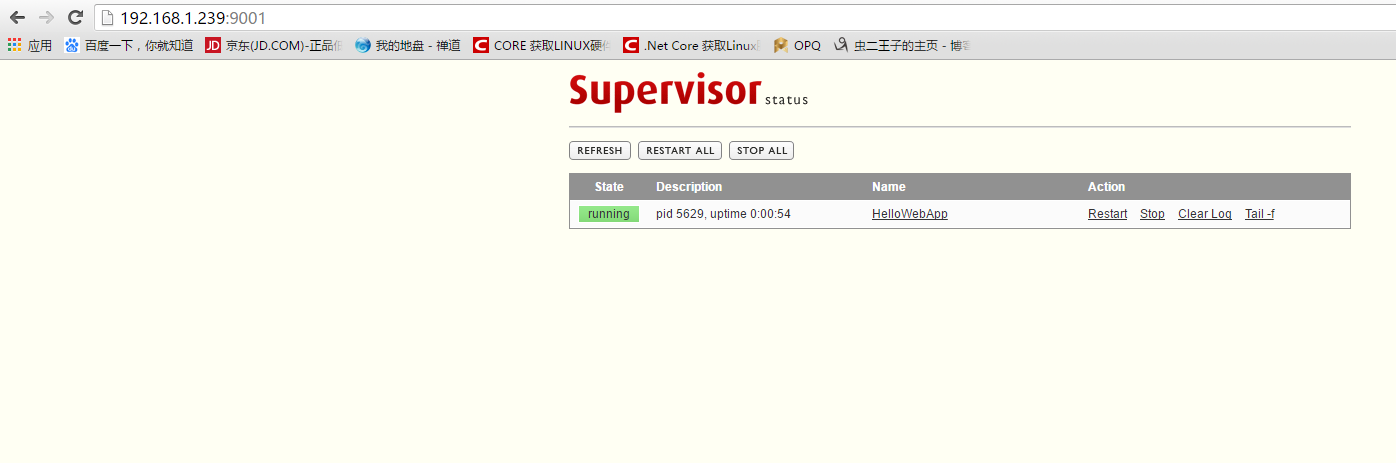
修改配置文件/etc/supervisor/supervisord.conf 添加supervisord web管理功能 红色为新增配置部分
;upervisor config file

[unix_http_server]

file=/var/run/supervisor.sock   ; (the path to the socket file)

chmod=                       ; sockef file mode (default )

[inet_http_server]

port=*:9001

username=user

password=123

[supervisord]

logfile=/var/log/supervisor/supervisord.log ; (main log file;default $CWD/supervisord.log)

pidfile=/var/run/supervisord.pid ; (supervisord pidfile;default supervisord.pid)

childlogdir=/var/log/supervisor            ; ('AUTO' child log dir, default $TEMP)

; the below section must remain in the config file for RPC

; (supervisorctl/web interface) to work, additional interfaces may be

; added by defining them in separate rpcinterface: sections

[rpcinterface:supervisor]

supervisor.rpcinterface_factory = supervisor.rpcinterface:make_main_rpcinterface

[supervisorctl]

serverurl=unix:///var/run/supervisor.sock ; use a unix:// URL  for a unix socket

; The [include] section can just contain the "files" setting.  This

; setting can list multiple files (separated by whitespace or

; newlines).  It can also contain wildcards.  The filenames are

; interpreted as relative to this file.  Included files *cannot*

; include files themselves.

[include]

files = /etc/supervisor/conf.d/*.conf
保存之后重启下程序
sudo supervisorctl shutdown && sudo supervisord -c /etc/supervisor/supervisord.conf
如果启动异常根据提示查看配置修改配置文件
netcore应用程序部署程序到ubuntu的更多相关文章
- netcore程序部署 ubuntu 16.0.4 报错 The type initializer for 'System.Net.Http.CurlHandler'的解决方案
最近业务扩展需要把netcore程序部署到ubuntu 16.0.4上,因为代码里面用到了HttpClient 请求. 部署ubuntu后一直报错 参考地址:https://github.com/do ...
- netcore程序部署及守护
一.程序发布 1.在本机编译无误的情况下,选择发布成文件系统.注意如果使用了swagger 需要将生成的xml文档说明复制到发版包里面.否则会报错.(可以在项目的csproj 中加入 <Prop ...
- 使用VS Code 开发.NET Core 应用程序 部署到Linux 跨平台
使用VS Code 开发.NET Core 应用程序 部署到Linux 跨平台. 前面讲解了VSCode开发调试 .NET Core.都只是在windows下运行. .NET Core真正的核心是跨平 ...
- .net程序部署(mono方式)
某一次 我同事用了这个词 ,说这样才显得够专业 擦.把某某项目 部署到服务器上 .擦 不就是拷个文件过去运行么.月亮 还是绵羊 我搞不清楚了 咱英文不好,绵羊叫的声音?.你就叫我山寨程序猿 随意 一 ...
- deployment与Web应用程序部署
定义用于支持 Web 应用程序部署的配置设置. <deployment retail="true|false" /> retail属性:设置一个值,该值指定是否以发布模 ...
- IIS安装与MVC程序部署
最近在做访客系统,虽然说不是什么多大的项目,但麻雀虽小五脏俱全,使用EF Code First+Mysql+Frozenui响应式布局,感觉通过这个项目学到好多东西,Mysql的使用.EF映射Mysq ...
- SNF开发平台WinForm之八-自动升级程序部署使用说明-SNF快速开发平台3.3-Spring.Net.Framework
9.1运行效果: 9.2开发实现: 1.首先配置服务器端,把“SNFAutoUpdate2.0\服务器端部署“目录按网站程序进行发布到IIS服务器上. 2.粘贴语句,生成程序 需要调用的应用程序的Lo ...
- 新手在sae部署程序容易忽略的一个细节
从来没用过这类云空间服务,尝了下鲜试用一下sae,但是部署的时候发现问题了,各种404..各种无奈啊..虽然百度无数篇介绍,但是都千篇一律没什么启发.. 但是巧在我部署的应用有个欢迎页面,点击链接的时 ...
- [翻译][MVC 5 + EF 6] 5:Code First数据库迁移与程序部署
原文:Code First Migrations and Deployment with the Entity Framework in an ASP.NET MVC Application 1.启用 ...
随机推荐
- 中国 A 股纳入 MSCI
1 .什么是 MSCI MSCI 是美国指数编制公司 --- 美国明晟公司的简称. 是一家股权,固定资产,对冲基金,股票市场指数的供应商. MSCI 旗下编制了多种指数,他们把全球股票市场分成发达国家 ...
- 2018-2019-2 20165325 《网络对抗技术》 Exp5:MSF基础应用
2018-2019-2 20165325 <网络对抗技术> Exp5:MSF基础应用 实验内容(概要) 1.1 一个主动攻击实践,本实验选择 ms17_010_eternalblue(成功 ...
- 游记-HNOI2019
Day -1 最后一场考试依旧没有ak(达成成就:\(\mathrm{OI}\) 生涯 AK 次数仅一次) Day 0 听dalao们说现在做题已经没有意义了,不如多口胡几道题,拓展视野 虽然很抗拒但 ...
- C++头文件用<>还是“” 以及 要加.h还是不加 的问题
1.C++头文件用<>包含还是” “? 答:用<>包含,编译器会先在系统目录下搜索: 用” ” 包含,编译器会先在用户目录下搜索. 所以,如果使用系统标准库,要使用<&g ...
- 【easy】189. Rotate Array
题目标签:Array 题目给了我们一个数组 和 k. 让我们 旋转数组 k 次. 方法一: 这里有一个很巧妙的方法: 利用数组的length - k 把数组 分为两半: reverse 左边和右边的数 ...
- Codeforces Round #550 (Div. 3) F. Graph Without Long Directed Paths
F. Graph Without Long Directed Paths time limit per test 2 seconds memory limit per test 256 ...
- 从头开始学Maven【依赖范围】
例如 <dependencies> <dependency> <groupId></groupId> <artifactId></ar ...
- 程序员不能忍996了!全民 fuck ,GitHub来说话
前两天有个Github超级火的一个项目,在一小时之内星标上千. https://github.com/997icu/996.ICU 截至目前 这个项目start数量超过63K.Issues5000 ...
- luoguP2502旅行
2006河南省选 思路:(参考题解) 枚举最大的边(第\(i\)条),从这条边开始由大到小枚举.添边,当\(s\)和\(t\)联通时,此时即为以第\(i\)条边为最大边的答案,比较每个答案,判断输出. ...
- docker部署jira破解版
1.制作Dockerfile FROM cptactionhank/atlassian-jira-software:7.12.0 USER root # 将代理破解包加入容器 COPY "a ...