
nginx的autoindex,目录浏览,配置和美化,美观的xslt_stylesheet
nginx的autoindex,目录浏览,配置和美化,美观的xslt_stylesheet
Nginx custom autoindex with XSLT
转载注明来源: 本文链接 来自osnosn的博客,写于 2019-04-11.
- 另有个项目,用php写的单文件,显示文件目录。https://github.com/osnosn/autoindex
需要在浏览器页面中浏览服务器的目录。Apache2很容易配置,还能通过配置让目录浏览显示比较美观。
Nginx也很容易配置,Nginx提供了相应的ngx_http_autoindex_module 模块,该模块提供了我们想要的功能。
例如,要让/bt/目录能显示,nginx的配置这样写:
location ^~ /bt/ {

   autoindex on;

   autoindex_format html;

   #autoindex_localtime off;

   charset utf-8;

   include /etc/nginx/default.d/php71w-fpm.conf;

}
文件修改时间,可用参数autoindex_localtime设置为utc或当地时间。
效果如下图,可惜不太美观:

那再用上 ngx_http_xslt_module 模块。
长文件名溢出自动显示省略号。效果如下:
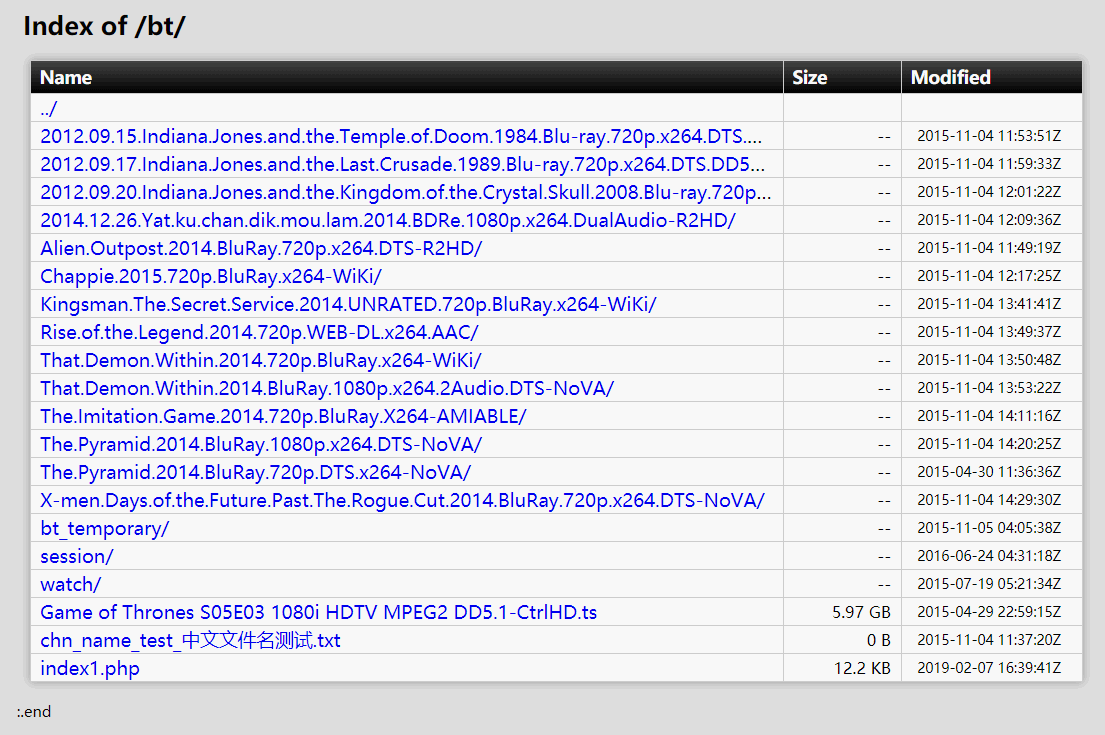
nginx配置如下:
location ^~ /bt/ {

   autoindex on;

   autoindex_format xml;

   xslt_stylesheet /data/www/html/autoindex.xslt cpath="$uri";

   include /etc/nginx/default.d/php71w-fpm.conf;

}
autoindex.xslt 这个文件有点大。
似乎ngx_http_xslt_module只支持stylesheet-1.0,不支持2.0。但支持libexslt,可以使用EXSLT函数。
xml中只提供UTC时间。不能通过nginx的配置修改。
时区修改在xslt文件中,TIMEDIFF变量。
改为PT0H时间不变,PT8H加8小时,-PT6H减6小时。
autoindex.xslt文件如下:
<?xml version="1.0" encoding="UTF-8"?>
<xsl:stylesheet version="1.0" xmlns:xsl="http://www.w3.org/1999/XSL/Transform"
xmlns:date="http://exslt.org/dates-and-times"
extension-element-prefixes="date" >
<xsl:output method="html" encoding="UTF-8"/>
<xsl:param name="cpath"/>
<xsl:variable name="TIMEDIFF" select="'PT8H'"/><!-- 'PT0H' '-PT6H' -->
<xsl:template match="/">
<xsl:text disable-output-escaping="yes"><!DOCTYPE html></xsl:text>
<html>
<head>
<title>IndexOf <xsl:value-of select="$cpath"/></title>
<meta charset="utf-8"/>
<meta name="viewport" content="width=device-width, initial-scale=1"/>
<xsl:text disable-output-escaping="yes">
<!--
========= config in nginx: ===============
autoindex on;
autoindex_format xml;
xslt_stylesheet /..path_to.../html/autoindex.xslt cpath="$uri";
========= config in nginx: ===============
modify variable "TIMEDIFF".
-->
</xsl:text>
<style type="text/css">
body {
margin: 5px;
background-color: #ddd;
}
table {
font-size: 15px;
width: 96%;
min-width:650px;
table-layout:fixed;
margin-top: 15px;
margin-left: 5px;
margin-right: 5px;
box-shadow: 0 0 0.5em #999;
border: none !important;
margin-bottom: 1em;
border-collapse: collapse;
border-spacing: 0;
}
th {
background: #000;
background: -webkit-linear-gradient(top, #444, #000);
background: -moz-linear-gradient(top, #444, #000);
background: -ms-linear-gradient(top, #444, #000);
background: -o-linear-gradient(top, #444, #000);
background: linear-gradient(top, #444, #000);
font-size: 14px;
line-height: 24px;
border: none;
text-align: left;
color: #fff;
}
tr {
background: rgba(255, 255, 255, 0.8);
}
tr:hover {
background: rgba(255, 255, 255, 0.5);
}
.f9 {
font-size: 9px;
}
tr th td {
overflow:hidden;
text-overflow:ellipsis;
white-space:nowrap;
word-break:keep-all;
}
th, td {
height: 20px;
vertical-align: middle;
white-space: nowrap;
padding: 0.1em 0.5em;
border: 1px solid #ccc;
}
a{text-decoration:none;}
a:hover{text-decoration:underline;}
.name{min-width:400px;text-overflow:ellipsis;overflow:hidden;white-space:nowrap;font-size:15px;}
.size{min-width:65px;white-space:nowrap;font-size:13px;text-align:right;}
.mtime{width:115px;white-space:nowrap;font-size:11px;text-align:center;}
</style>
</head>
<body>
<div style="margin-left:15px;margin-top:10px;font-size:15pt">
<b>
Index of <xsl:value-of select="$cpath"/>
</b>
</div>
<center>
<xsl:apply-templates/>
</center>
<div style="margin-left:10px;font-size:9pt">:.end</div>
<br/>
</body>
</html>
</xsl:template>
<xsl:template match="list">
<table style="width:100%;min-width:670px;margin:0;box-shadow:none" cellpadding="0"><tr style="background:none"><td style="padding:0;border:0"><center>
<table>
<tr>
<th>Name</th>
<th width="80px">Size</th>
<th width="115px">Modified</th>
</tr>
<tr>
<td><a href="../">../</a></td>
<td></td>
<td></td>
</tr>
<xsl:for-each select="directory">
<xsl:sort select="name"/>
</xsl:for-each>
<xsl:apply-templates/>
</table>
</center></td></tr></table>
</xsl:template>
<xsl:template match="file">
<xsl:variable name="name">
<xsl:value-of select="."/>
</xsl:variable>
<xsl:variable name="size">
<xsl:if test="string-length(@size) > 0">
<xsl:if test="number(@size) = 0">
<xsl:value-of select="@size" /> B
</xsl:if>
<xsl:if test="number(@size) > 0">
<xsl:choose>
<xsl:when test="round(@size div 1024) < 2"><xsl:value-of select="@size" /> B</xsl:when>
<xsl:when test="round(@size div 1048576) < 2"><xsl:value-of select="format-number((@size div 1024), '0.0')" /> KB</xsl:when>
<xsl:when test="round(@size div 1073741824) < 2"><xsl:value-of select="format-number((@size div 1048576), '0.00')" /> MB</xsl:when>
<xsl:otherwise><xsl:value-of select="format-number((@size div 1073741824), '0.00')" /> GB</xsl:otherwise>
</xsl:choose>
</xsl:if>
</xsl:if>
</xsl:variable>
<tr>
<td class="f11"><div class="name"><a href="{$name}" title="{$name}"><xsl:value-of select="."/></a></div></td>
<td><div class="size" title="{@size} bytes"><xsl:value-of select="$size"/></div></td>
<td><div class="mtime">
<xsl:value-of select="translate(date:add(@mtime,$TIMEDIFF),'TZ',' ')" />
</div></td>
</tr>
</xsl:template>
<xsl:template match="directory" name="directory">
<xsl:variable name="name">
<xsl:value-of select="."/>
</xsl:variable>
<tr>
<td class="f11"><div class="name"><a href="{$name}" title="{$name}/"><xsl:value-of select="."/>/</a></div></td>
<td><div class="size"> -- </div></td>
<td><div class="mtime">
<xsl:value-of select="translate(date:add(@mtime,$TIMEDIFF),'TZ',' ')" />
</div></td>
</tr>
</xsl:template>
</xsl:stylesheet>
nginx的autoindex,目录浏览,配置和美化,美观的xslt_stylesheet的更多相关文章
- NGINX服务器打开目录浏览功能
我们做文件服务器的时候,希望打开目录浏览的功能.但是Nginx默认是不允许列出目录功能的.若需要此功能,需要在配置文件中手动开启. 首先需要打开开关.autoindex on;autoindex_ex ...
- nginx开启网站目录浏览功能
一.开启全站目录浏览功能 编辑nginx.conf, 在http下面添加以下内容: autoindex on; # 开启目录文件列表 autoindex_exact_size on; # 显示出文件的 ...
- Nginx浏览目录配置及美化
https://segmentfault.com/a/1190000012606305 在项目中有一个功能需要在浏览器页面中浏览服务器的目录.服务器使用Nginx,而Nginx提供了相应的ngx_ht ...
- nginx autoindex 配置目录浏览功能
Nginx打开目录浏览功能 yum install httpd-tools -y cd /usr/local/openrestry/nginx/conf/ htpasswd -c passwd adm ...
- nginx下目录浏览及其验证功能配置记录
工作中常常有写不能有网页下载东西的需求,在Apache下搭建完成后直接导入文件即可达到下载/显示文件的效果;而Nginx的目录列表功能默认是关闭的,如果需要打开Nginx的目录列表功能,需要手动配置, ...
- nginx和apache配置目录浏览功能
今天工作需要,要给客户提供一个patch的下载地址,于是想用nginx的目录浏览功能来做,需要让客户看到指定一个目录下的文件列表,然后让他自己来选择该下载那个文件: 我们都知道在apache下可以配置 ...
- 配置 Nginx 的目录浏览功能
Nginx 默认是不允许列出整个目录的,需要配置 Nginx 自带的 ngx_http_autoindex_module 模块实现目录浏览功能 . location / { alias /opt/fi ...
- nginx下目录浏览及其验证功能、版本隐藏等配置记录
工作中常常有写不能有网页下载东西的需求,在Apache下搭建完成后直接导入文件即可达到下载/显示文件的效果;而Nginx的目录列表功能默认是关闭的,如果需要打开Nginx的目录列表功能,需要手动配置, ...
- Nginx设置目录浏览并配置验证
Nginx默认是不允许进行列目录的,如果需要使某个目录可以进行浏览,可如下设置:如: 让/var/www/soft 这个目录在浏览器中完成列出. 一.设置目录浏览1.打开/usr/local/ngin ...
随机推荐
- linux下快速安装chrome
linux下安装chrome 1.按下 Ctrl + Alt + t 键盘组合键,启动终端 2.在终端中,输入以下命令: (将下载源加入到系统的源列表.命令的反馈结果如图.如果返回“地址解析错误”等信 ...
- element ui 手动关闭$notify弹框
1.需求: 当用户点击 “点击下载” 后,文件导出这个弹框主动消失. 2.解决方案: 如下图所示 (需要注意的是这里的关闭是 点击弹框任意处就会关闭,如果想实现我的需求需要判断一下即可)
- Windows 2008 asp.net 配置
目录 1. 前言.. 32. 部署环境.. 32.1 服务器环境信息.. 33. 磁盘阵列配置.. 44. 安装操作系统.. 45. 安装软件. ...
- sql注入2
一.查询数据库的版本号 http://10.1.2.5:10631/sqli/Less-2/?id=-1 union select 1,2,version() 二.查询数据库中所有的库名 http:/ ...
- ABP中mapping中忽略属性
创建一个XXXXProfile继承Profile,然后在构造函数中写忽略相关的,如下 public class ProductPriceDtoProfile: Profile { /// <su ...
- TabLayout下划线指示器自适应文字宽度
解决方案1: 更新design库到28.0.0-rc01 implementation 'com.android.support:design:28.0.0-rc01' 然后在TabLayout里设置 ...
- OFBiz项目简介
记得最早使用OFBiz是十年前在公司的一个EA游戏项目中,用来实现玩家在游戏中购买各种游戏装备.当由于自己刚出校门不久,经验也少,对软件产品架构.思想.目的了解不透彻,不明白OFBiz设计上的优点,本 ...
- HTML学习笔记01(标签)
<html> <head> <meta charset = "utf-8"> <!--字符集编码设置--> <title& ...
- (转)hibernate 之hiberante.hbm2ddl.auto 参数的配置
我们在搭建环境的时候,在配置文件中有一个属性标签为: 完整配置如下 <?xml version='1.0' encoding='utf-8'?> <!DOCTYPE hibernat ...
- React Native 获取组件(Component)在屏幕上的位置
年后主客户端的需求以及老的业务迁移RN,现在疯狂的在学RN.在迁移需求的时候遇到需要获取组件在屏幕上的绝对位置.页面如下: 就需要展开的时候获取sectionHeader(默认排序)在屏幕上的具体位置 ...