
一种提升连接Dynamics 365性能的方法
using Microsoft.Xrm.Sdk;

using Microsoft.Xrm.Sdk.Query;

using Microsoft.Xrm.Tooling.Connector;

using System;

using System.ServiceModel;

using System.Threading;

namespace LuoYongLab

{

    class Program

    {

        static void Main(string[] args)

        {

            try

            {

                for (var i = ; i < ; i++)

                {

                    ThreadStart tStart = new ThreadStart(Work);

                    Thread thread = new Thread(tStart);

                    thread.Start();

                }

                Console.WriteLine("程序运行完成!");

                Console.ReadKey();

            }

            catch (FaultException ex)

            {

                Console.WriteLine("程序出现异常:ex.Message=" + ex.Message);

                Console.ReadKey();

            }

        }

        static void Work()

        {

            Console.WriteLine("线程开始" + DateTime.Now.ToLongTimeString() + ";线程ID:" + Thread.CurrentThread.ManagedThreadId);

            var crmSvc = new CrmServiceClient(new System.Net.NetworkCredential("crmadmin@luoyong.me", "Pass", null), Microsoft.Xrm.Tooling.Connector.AuthenticationType.IFD, "demo.luoyong.me", "", "demo", useUniqueInstance: false, useSsl: true);

            Console.WriteLine("线程ID: " + Thread.CurrentThread.ManagedThreadId + ";Token过期时间:" + crmSvc.OrganizationServiceProxy.SecurityTokenResponse.Response.Lifetime.Expires);

            if (crmSvc.IsReady)

            {

                QueryExpression qe = new QueryExpression("organization");

                qe.ColumnSet = new ColumnSet("languagecode", "basecurrencyid");

                EntityCollection ec = crmSvc.RetrieveMultiple(qe);

                if (ec.Entities.Count >= )

                {

                    Console.WriteLine("线程ID: " + Thread.CurrentThread.ManagedThreadId + ";组织偏好语言:" + ec.Entities[].GetAttributeValue<int>("languagecode"));

                }

            }

            Console.WriteLine("线程结束" + DateTime.Now.ToLongTimeString() + ";线程ID:" + Thread.CurrentThread.ManagedThreadId);

        }

    }

}
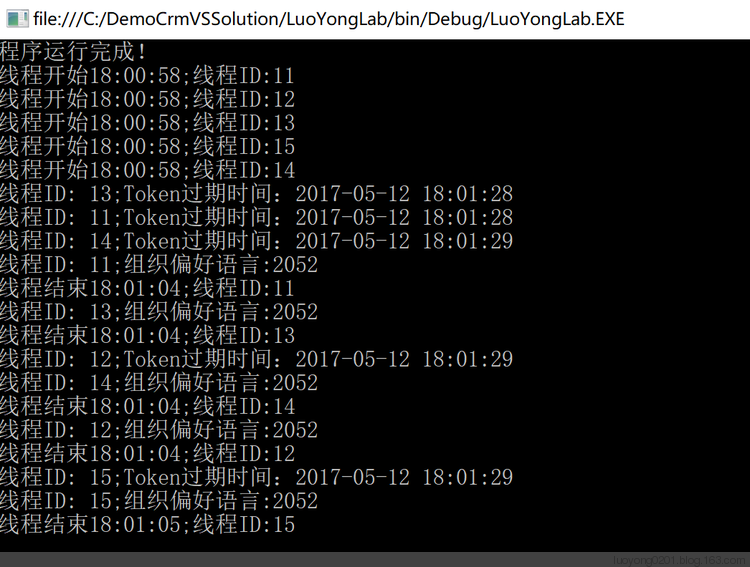

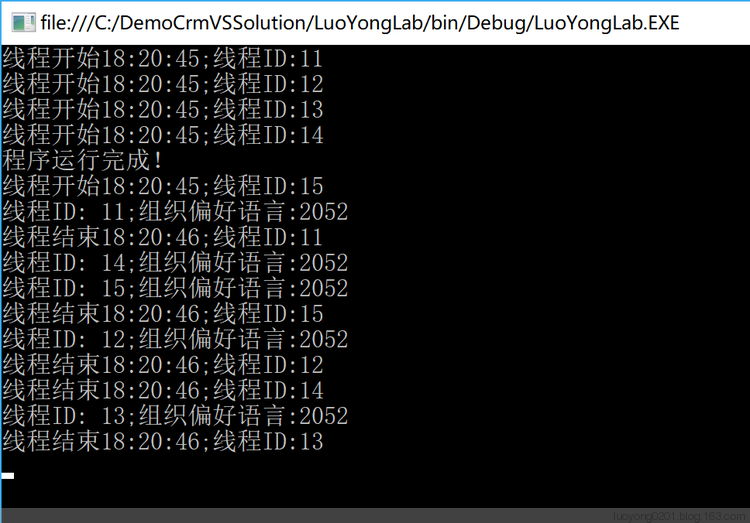
using Microsoft.Xrm.Sdk;

using Microsoft.Xrm.Sdk.Client;

using Microsoft.Xrm.Sdk.Query;

using System;

using System.Configuration;

using System.ServiceModel;

using System.Threading;

namespace ConsoleApp

{

    class Program

    {

        public static IServiceManagement<IOrganizationService> sm;

        public static AuthenticationCredentials authCredentials;

        static void Main(string[] args)

        {

            sm = ServiceConfigurationFactory.CreateManagement<IOrganizationService>(new Uri(ConfigurationManager.AppSettings["orgUrl"]));

            authCredentials = new AuthenticationCredentials();

            authCredentials.ClientCredentials.UserName.UserName = ConfigurationManager.AppSettings["userName"];

            authCredentials.ClientCredentials.UserName.Password = ConfigurationManager.AppSettings["passWord"];

            authCredentials = sm.Authenticate(authCredentials);

            try

            {

                for (var i = ; i < ; i++)

                {

                    ThreadStart tStart = new ThreadStart(Work);

                    Thread thread = new Thread(tStart);

                    thread.Start();

                }

                Console.WriteLine("程序运行完成!");

                Console.ReadKey();

            }

            catch (FaultException ex)

            {

                Console.WriteLine("程序出现异常:ex.Message=" + ex.Message);

                Console.ReadKey();

            }

        }

        static void Work()

        {

            Console.WriteLine("线程开始" + DateTime.Now.ToLongTimeString() + ";线程ID:" + Thread.CurrentThread.ManagedThreadId);

            OrganizationServiceProxy orgSvc = new OrganizationServiceProxy(sm, authCredentials.ClientCredentials);

            //OrganizationServiceProxy orgSvc = new OrganizationServiceProxy(sm, authCredentials.SecurityTokenResponse);

            //ManagedTokenOrganizationServiceProxy orgSvc = new ManagedTokenOrganizationServiceProxy(sm, authCredentials.ClientCredentials);

            QueryExpression qe = new QueryExpression("organization");

            qe.ColumnSet = new ColumnSet("languagecode", "basecurrencyid");

            EntityCollection ec = orgSvc.RetrieveMultiple(qe);

            if (ec.Entities.Count >= )

            {

                Console.WriteLine("线程ID: " + Thread.CurrentThread.ManagedThreadId + ";组织偏好语言:" + ec.Entities[].GetAttributeValue<int>("languagecode"));

            }

            Console.WriteLine("线程结束" + DateTime.Now.ToLongTimeString() + ";线程ID:" + Thread.CurrentThread.ManagedThreadId);

        }

    }

}
using Microsoft.Xrm.Sdk;

using Microsoft.Xrm.Sdk.Client;

using System;

using System.ServiceModel;

using System.ServiceModel.Description;

namespace ConsoleApp

{

    public sealed class ManagedTokenOrganizationServiceProxy : OrganizationServiceProxy

    {

        private AutoRefreshSecurityToken<OrganizationServiceProxy, IOrganizationService> _proxyManager;

        public ManagedTokenOrganizationServiceProxy(Uri serviceUri, ClientCredentials userCredentials)

            : base(serviceUri, null, userCredentials, null)

        {

            this._proxyManager = new AutoRefreshSecurityToken<OrganizationServiceProxy, IOrganizationService>(this);

        }

        public ManagedTokenOrganizationServiceProxy(IServiceManagement<IOrganizationService> serviceManagement,

            SecurityTokenResponse securityTokenRes)

            : base(serviceManagement, securityTokenRes)

        {

            this._proxyManager = new AutoRefreshSecurityToken<OrganizationServiceProxy, IOrganizationService>(this);

        }

        public ManagedTokenOrganizationServiceProxy(IServiceManagement<IOrganizationService> serviceManagement,

            ClientCredentials userCredentials)

            : base(serviceManagement, userCredentials)

        {

            this._proxyManager = new AutoRefreshSecurityToken<OrganizationServiceProxy, IOrganizationService>(this);

        }

        protected override void AuthenticateCore()

        {

            this._proxyManager.PrepareCredentials();

            base.AuthenticateCore();

        }

        protected override void ValidateAuthentication()

        {

            this._proxyManager.RenewTokenIfRequired();

            base.ValidateAuthentication();

        }

    }

    ///<summary>

    /// Class that wraps acquiring the security token for a service

    /// </summary>

    public sealed class AutoRefreshSecurityToken<TProxy, TService>

        where TProxy : ServiceProxy<TService>

        where TService : class

    {

        private TProxy _proxy;

        ///<summary>

        /// Instantiates an instance of the proxy class

        /// </summary>

        /// <param name="proxy">Proxy that will be used to authenticate the user</param>

        public AutoRefreshSecurityToken(TProxy proxy)

        {

            if (null == proxy)

            {

                throw new ArgumentNullException("proxy");

            }

            this._proxy = proxy;

        }

        ///<summary>

        /// Prepares authentication before authenticated

        /// </summary>

        public void PrepareCredentials()

        {

            if (null == this._proxy.ClientCredentials)

            {

                return;

            }

            switch (this._proxy.ServiceConfiguration.AuthenticationType)

            {

                case AuthenticationProviderType.ActiveDirectory:

                    this._proxy.ClientCredentials.UserName.UserName = null;

                    this._proxy.ClientCredentials.UserName.Password = null;

                    break;

                case AuthenticationProviderType.Federation:

                case AuthenticationProviderType.LiveId:

                    this._proxy.ClientCredentials.Windows.ClientCredential = null;

                    break;

                default:

                    return;

            }

        }

        ///<summary>

        /// Renews the token (if it is near expiration or has expired)

        /// </summary>

        public void RenewTokenIfRequired()

        {

            if (null != this._proxy.SecurityTokenResponse &&

            DateTime.UtcNow.AddMinutes() >= this._proxy.SecurityTokenResponse.Response.Lifetime.Expires)

            {

                try

                {

                    this._proxy.Authenticate();

                }

                catch (CommunicationException)

                {

                    if (null == this._proxy.SecurityTokenResponse ||

                        DateTime.UtcNow >= this._proxy.SecurityTokenResponse.Response.Lifetime.Expires)

                    {

                        throw;

                    }

                }

            }

        }

    }

}
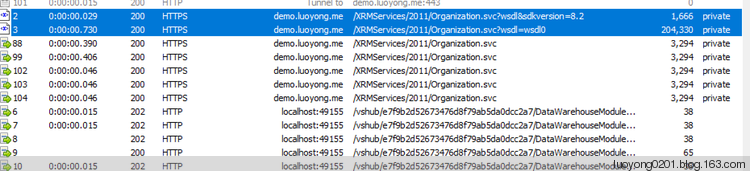
using System.Runtime.Caching;
ObjectCache cache = MemoryCache.Default;

CacheItemPolicy policy = new CacheItemPolicy();

policy.Priority = CacheItemPriority.NotRemovable;

IServiceManagement<IOrganizationService> sm = ServiceConfigurationFactory.CreateManagement<IOrganizationService>(new Uri(ConfigurationManager.AppSettings["orgUrl"]));

cache.Set("sm", sm, policy);

AuthenticationCredentials authCredentials = new AuthenticationCredentials();

authCredentials.ClientCredentials.UserName.UserName = ConfigurationManager.AppSettings["userName"];

authCredentials.ClientCredentials.UserName.Password = ConfigurationManager.AppSettings["passWord"];

cache.Set("authCredentials", sm.Authenticate(authCredentials), policy);
然后在代码中获取组织服务就用如下代码:
using System.Runtime.Caching;
ObjectCache cache = MemoryCache.Default;

OrganizationServiceProxy orgSvc = new OrganizationServiceProxy(((IServiceManagement<IOrganizationService>)cache["sm"]), ((AuthenticationCredentials)cache["authCredentials"]).ClientCredentials);
一种提升连接Dynamics 365性能的方法的更多相关文章
- JS中三种字符串连接方式及其性能比较
工作中经常会碰到要把2个或多个字符串连接成一个字符串的问题,在JS中处理这类问题一般有三种方法,这里将它们一一列出顺便也对它们的性能做个具体的比较. 第一种方法 用连接符“+”把要连接的字符串连起来 ...
- JavaScript中三种字符串连接方式及其性能比较
参考地址: https://www.cnblogs.com/programs/p/5554742.html 工作中经常会碰到要把2个或多个字符串连接成一个字符串的问题,在JS中处理这类问题一般有三种方 ...
- T4 模板 : 一种提升ASP.NET MVC开发速度方法
最近由于需要在框架中提供一些自定义模板的功能,找到了一篇博客,可惜似乎是翻译工具直接翻的,读不通顺,就试着自己翻译下,我不会完全翻译原文的句子,可能会对原文进行小范围的我认为更合适的句子并添加些注释, ...
- Dynamics 365应用程序池回收对连接造成的影响。
我是微软Dynamics 365 & Power Platform方面的工程师罗勇,也是2015年7月到2018年6月连续三年Dynamics CRM/Business Solutions方面 ...
- Dynamics 365 CRM 开发架构简介
Dynamics 365 CRM提供了多种编程模型,你可以灵活地按需选用最佳模式. 本文是对Dynamics 365 CRM编程模型的综述. 概览 下图表明了Dynamics 365 CRM的主要可编 ...
- Spring下配置几种常用连接池
1.连接池概述 数据库连接是一种关键的有限的昂贵的资源,这一点在多用户的网页应用程序中体现得尤为突出.对数据库连接的管理能显著影响到整个应用程序的伸缩性和健壮性,影响到程序的性能指标.数据库连接池正是 ...
- 启用WCF压缩提升Dynamics 365 CE的网络性能
摘要: 微软动态CRM专家罗勇 ,回复307或者20190308可方便获取本文,同时可以在第一间得到我发布的最新博文信息,follow me!我的网站是 www.luoyong.me . 本文系根据微 ...
- Android4种网络连接方式HttpClient、HttpURLConnection、OKHttp和Volley优缺点和性能对比
比较的指标: 1.cpu 2.流量 3.电量 4.内存占用 5.联网时间 功能点: 1.重试机制 2.提供的扩展功能 3.易用性 4.是否https 5.是否支持reflect api,OkHttp有 ...
- 升级本地部署的CRM到Dynamics 365及部分新特性介绍。
关注本人微信和易信公众号: 微软动态CRM专家罗勇 ,回复241或者20161226可方便获取本文,同时可以在第一间得到我发布的最新的博文信息,follow me!我的网站是 www.luoyong. ...
随机推荐
- [IOT] 自制蓝牙工牌办公室定位系统 (二)—— 基于ESP32的蓝牙信号扫描系统
前面章节: 自制蓝牙工牌办公室定位系统 (一)-- 阿里物联网平台概览及打通端到云(硬核·干货) 目录: 1.蓝牙广播简介 2.蓝牙扫描简介 3.基于蓝牙广播和蓝牙扫描常见应用 4.ESP32 ...
- js 格式化数字,格式化金额:
js 格式化数字,格式化金额: function number_format(number, decimals, dec_point, thousands_sep) { /* * 参数说明: * nu ...
- [Swift]LeetCode830. 较大分组的位置 | Positions of Large Groups
In a string S of lowercase letters, these letters form consecutive groups of the same character. For ...
- webpack的基本配置项
const path = require("path"); const HtmlWebpackPlugin = require("html-webpack-plugin& ...
- Vuex的模块化、优点
前言:如果说我们的vuex的仓库代码量巨大,我们要不要采用就像后端与一样的分层,要不然一吨的代码放在main里,呵呵.所以我们要采用模块化! 看这篇文章的时候,一定要看看上一篇的vuex入门精讲:Vu ...
- bind(),unbind(),hover(),toggle(),animate()
First.bind() bind(Type,fn) type:click/mouseover/mouseout fn:functionsecond.unbind() unbind(Type,fn) ...
- asp.net core AuthenticationMiddleware 在WebApi中的的使用
在.net framework 4.5架构下使用认证(Authentication)授权(Authorization). IIS使用HttpModule进行认证(Authentication),我们可 ...
- Android 开发工具类 18_NetWorkUtil
检测网络的一个工具包: 1.网络是否可用: 2.判断是否有网络连接: 3.判断 WIFI 网络是否可用: 4.判断 MOBILE 网络是否可用; 5.获取当前网络连接的类型信息: 6.获取当前的网络状 ...
- EF架构~mysql数据库无法创建数据模型
回到目录 主要是通过vs2017+mysql.Data+Mysql.data.Entity+ef 来进行开始,当我们选择数据模型生成实体时,可以会出现以下问题: http:// 解决办法: 1.安装 ...
- shell实战之tomcat看门狗
1.脚本简介 tomcat看门狗,在tomcat进程异常退出时会自动拉起tomcat进程并记录tomcat运行的日志. 函数说明: log_info:打印日志的函数,入参为需要在日志中打印的msg s ...