
Centos7-yum部署配置LAMP-之LAMP及php-fpm实现反代动态资源
一、简介
LAMP:linux+apache+mysql(这里用mariadb)+php(perl,python)
LAMMP:memcached缓存的
CGI:Common Gateway Interface通用网关接口,说白了就是个简化的httpd协议
httpd+php有三种模式
modules 动态模块模式,最简单最容易配置的方式,httpd启动时会加载模块,加载时将对应的模块激活,php-cgi也就启动了,很多人认为动态编译模块时在需要的时候随时加载调用,不需要的时候就停止,其实动态编译的模块实际上和静态编译模块一样,动态加载的模块被加载时就被加入到激活链表中,无论使用不使用,它都已经运行在httpd的内部
cgi 模式, 很少使用这个模式,httpd接受到一个动态请求就fork一个cgi进程,cgi进程返回结果给httpd进程后自我销毁
fastcgi(fpm),php-fpm模式,使用php-fpm管理php-cgi,httpd不在控制php-cgi进程的启动,可以将php-fpm独立运行在非web服务器上,实现动静分离。
最简单就是模块的方式加入apache,fastcgi模式的php-cgi,是由php-fpm提供服务管理,它会根据配置文件启动一定数量的cgi进程,其默认监听端口为9000,该服务正常工作需要配置文件,所以fastcgi模式的php有两个配置文件,一个php的配置文件,一个是php-fpm的配置文件。
模块化安装php,不推荐在apache2.x中使用先出啊MPM(worker和event),而是使用prefork模式的mpm,因为linux系统线程设计并不是那么完美,所以,如果php和apache在同一个主机上(cgi或模块化方式安装php的时候),建议httpd使用prefork模型,而不同主机,建议php设计在fastcgi的工作模式,而windows平台无需考虑这个问题,因为windows系统是真正意义上的多线程系统。
本文yum安装LAMP得步骤,其中php使用得是frefork模型的,还有单独一台主机实现反代动态资源php-fpm管理方式。
1、官方资源下载地址:http://archive.apache.org/dist/
2、实验环境
| 主机 | IP地址 | 用途 | 备注 |
| web1 | 192.168.216.199 | web服务器 | 虚拟机 centos7 |
| web2 | 192.168.216.198 | Mysql服务器 | 虚拟机 centos7 |
| 客户端 | 物理机 win10 | ||
| web4 | 虚拟机 centos7,压测 | ||
| web3 | 192.168.216.232 | php-fpm | 虚拟机 centos7,实现反向动态代理 |
3、测试环境关闭selinux,firewall
关闭selinux
vim /etc/selinux/config
 # This file controls the state of SELinux on the system.

 # SELINUX= can take one of these three values:

 #     enforcing - SELinux security policy is enforced.

 #     permissive - SELinux prints warnings instead of enforcing.

 #     disabled - No SELinux policy is loaded.

 6 SELINUX=disabled

 # SELINUXTYPE= can take one of three two values:

 #     targeted - Targeted processes are protected,

 #     minimum - Modification of targeted policy. Only selected processes are protected.

 #     mls - Multi Level Security protection.

 SELINUXTYPE=targeted
关闭防火墙
systemctl stop firewalld
systemctl disable firewalld
init 6
4、LAMP架构图

二、配置安装LAMP
1、解决依赖
yum -y install @"Development Tools" libxml2-devel mariadb-devel bzip2-devel
2、安装安装关键软件包,httpd与php
yum install httpd httpd-devel php php-mysql
启动服务
systemctl start httpd
检查监听端口
80端口监听
 [root@web1 ~]# systemctl start httpd

 [root@web1 ~]# ss -untlp

 Netid  State      Recv-Q Send-Q          Local Address:Port                         Peer Address:Port

 udp    UNCONN                                      *:                                    *:*                   users:(("avahi-daemon",pid=,fd=))

 udp    UNCONN                                      *:                                   *:*                   users:(("avahi-daemon",pid=,fd=))

 udp    UNCONN                                      *:                                   *:*                   users:(("dhclient",pid=,fd=))

 udp    UNCONN                          192.168.122.1:                                      *:*                   users:(("dnsmasq",pid=,fd=))

 udp    UNCONN                               *%virbr0:                                      *:*                   users:(("dnsmasq",pid=,fd=))

 udp    UNCONN                                      *:                                      *:*                   users:(("dhclient",pid=,fd=))

 udp    UNCONN                                      *:                                     *:*                   users:(("lightdm",pid=,fd=))

 udp    UNCONN                                     :::                                  :::*                   users:(("dhclient",pid=,fd=))

 udp    UNCONN                                     :::                                    :::*                   users:(("lightdm",pid=,fd=))

 tcp    LISTEN                                    *:                                     *:*                   users:(("systemd",pid=,fd=))

 tcp    LISTEN                          192.168.122.1:                                      *:*                   users:(("dnsmasq",pid=,fd=))

 tcp    LISTEN                                    *:                                      *:*                   users:(("sshd",pid=,fd=))

 tcp    LISTEN                            127.0.0.1:                                     *:*                   users:(("cupsd",pid=,fd=))

 tcp    LISTEN                            127.0.0.1:                                      *:*                   users:(("master",pid=,fd=))

 tcp    LISTEN                                   :::                                    :::*                   users:(("systemd",pid=,fd=))

19 tcp    LISTEN     0      128                        :::80                                     :::*                   users:(("httpd",pid=51240,fd=4),("httpd",pid=51239,fd=4),("httpd",pid=51238,fd=4),("httpd",pid=51237,fd=4),("httpd",pid=51236,fd=4),("httpd",pid=,fd=))

 tcp    LISTEN                                   :::                                     :::*                   users:(("sshd",pid=,fd=))

 tcp    LISTEN                                  :::                                    :::*                   users:(("cupsd",pid=,fd=))

 tcp    LISTEN                                  :::                                     :::*                   users:(("master",pid=,fd=))

 [root@web1 ~]#
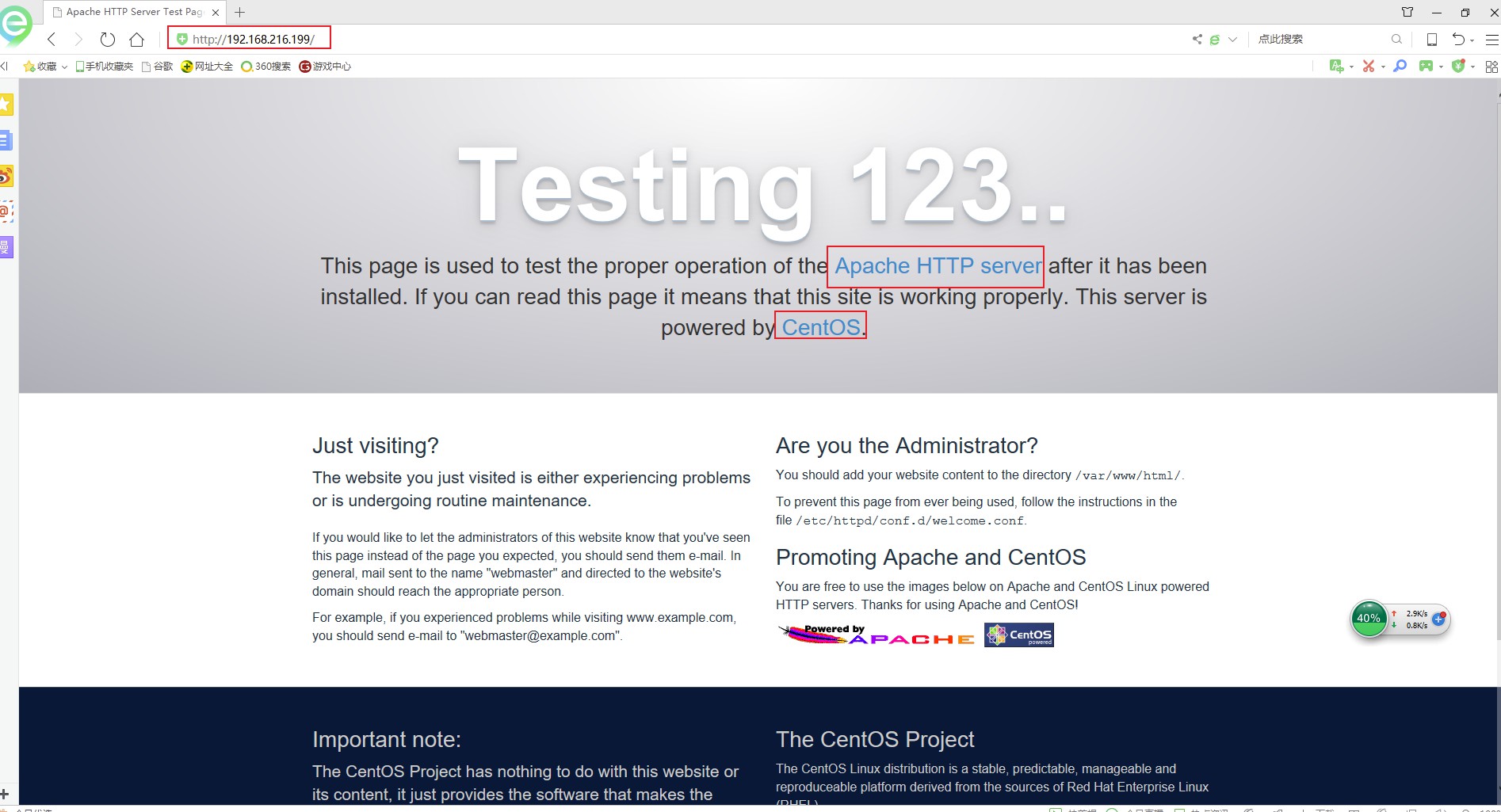
访问主页
测试php模块
 [root@web1 ~]# cat /var/www/html/info.php

 <?php

         phpinfo();

 ?>

 [root@web1 ~]# systemctl restart httpd

安装常用php模块
yum install -y php-gd php-ldap php-odbc php-pear php-xml php-xmlrpc php-mbstring php-snmp php-soap curl curl-devel php-bcmath
3、web2主机,安装mysql服务,并设置mysql安全设置
1)、安装数据包,依赖
yum install mariadb mariadb-server mariadb-libs mariadb-devel
 Installed:

   mariadb.x86_64 :5.5.-.el7_5   mariadb-devel.x86_64 :5.5.-.el7_5   mariadb-server.x86_64 :5.5.-.el7_5

 Dependency Installed:

   keyutils-libs-devel.x86_64 :1.5.-.el7                  krb5-devel.x86_64 :1.15.-.el7

   libcom_err-devel.x86_64 :1.42.-.el7                   libselinux-devel.x86_64 :2.5-14.1.el7

   libsepol-devel.x86_64 :2.5-.el7                        libverto-devel.x86_64 :0.2.-.el7

   openssl-devel.x86_64 :1.0.2k-.el7                      pcre-devel.x86_64 :8.32-.el7

   perl-Compress-Raw-Bzip2.x86_64 :2.061-.el7              perl-Compress-Raw-Zlib.x86_64 :2.061-.el7

   perl-DBD-MySQL.x86_64 :4.023-.el7                       perl-DBI.x86_64 :1.627-.el7

   perl-Data-Dumper.x86_64 :2.145-.el7                     perl-IO-Compress.noarch :2.061-.el7

   perl-Net-Daemon.noarch :0.48-.el7                       perl-PlRPC.noarch :0.2020-.el7

   zlib-devel.x86_64 :1.2.-.el7

 Updated:

   mariadb-libs.x86_64 :5.5.-.el7_5

 Dependency Updated:

   e2fsprogs.x86_64 :1.42.-.el7                         e2fsprogs-libs.x86_64 :1.42.-.el7

   krb5-libs.x86_64 :1.15.-.el7                         krb5-workstation.x86_64 :1.15.-.el7

   libcom_err.x86_64 :1.42.-.el7                        libkadm5.x86_64 :1.15.-.el7

   libselinux.x86_64 :2.5-14.1.el7                         libselinux-python.x86_64 :2.5-14.1.el7

   libselinux-utils.x86_64 :2.5-14.1.el7                   libsepol.x86_64 :2.5-.el7

   libss.x86_64 :1.42.-.el7                             openssl.x86_64 :1.0.2k-.el7

   openssl-libs.x86_64 :1.0.2k-.el7                      pcre.x86_64 :8.32-.el7

   zlib.x86_64 :1.2.-.el7

 Complete!

 [root@web2 ~]#
2)、开启服务,并设置开机启动,检查状态
systemctl start mariadb
systemctl enable mariadb
systemctl status mariadb
netstat -tulp
3306端口是否监听
 [root@web2 ~]# netstat -tunlp

 Active Internet connections (only servers)

 Proto Recv-Q Send-Q Local Address           Foreign Address         State       PID/Program name

 tcp        0      0 0.0.0.0:3306            0.0.0.0:*               LISTEN      92673/mysqld

 tcp               0.0.0.0:             0.0.0.0:*               LISTEN      /systemd

 tcp               192.168.122.1:        0.0.0.0:*               LISTEN      /dnsmasq

 tcp               0.0.0.0:              0.0.0.0:*               LISTEN      /sshd

 tcp               127.0.0.1:           0.0.0.0:*               LISTEN      /cupsd

 tcp               127.0.0.1:            0.0.0.0:*               LISTEN      /master

 tcp6              :::                  :::*                    LISTEN      /systemd

 tcp6              :::                   :::*                    LISTEN      /sshd

 tcp6              :::                 :::*                    LISTEN      /cupsd

 tcp6              :::                  :::*                    LISTEN      /master

 udp               0.0.0.0:           0.0.0.0:*                           /dhclient

 udp               0.0.0.0:            0.0.0.0:*                           /avahi-daemon: r

 udp               0.0.0.0:           0.0.0.0:*                           /avahi-daemon: r

 udp               192.168.122.1:        0.0.0.0:*                           /dnsmasq

 udp               0.0.0.0:              0.0.0.0:*                           /dnsmasq

 udp               0.0.0.0:              0.0.0.0:*                           /dhclient

 udp6              :::                :::*                                /dhclient

 [root@web2 ~]#
3)、数据库安全设置
 [root@web2 ~]# mysql_secure_installation

 NOTE: RUNNING ALL PARTS OF THIS SCRIPT IS RECOMMENDED FOR ALL MariaDB

       SERVERS IN PRODUCTION USE!  PLEASE READ EACH STEP CAREFULLY!

 In order to log into MariaDB to secure it, we'll need the current

 password for the root user.  If you've just installed MariaDB, and

 you haven't set the root password yet, the password will be blank,

 so you should just press enter here.

 Enter current password for root (enter for none): <-初次使用直接回车即可

 OK, successfully used password, moving on...

 Setting the root password ensures that nobody can log into the MariaDB

 root user without the proper authorisation.

 Set root password? [Y/n] y   <-输入y,设置root密码

 New password: <-设置root得密码

 Re-enter new password: <-重复密码

 Password updated successfully!

 Reloading privilege tables..

  ... Success!

 By default, a MariaDB installation has an anonymous user, allowing anyone

 to log into MariaDB without having to have a user account created for

 them.  This is intended only for testing, and to make the installation

 go a bit smoother.  You should remove them before moving into a

 production environment.

 Remove anonymous users? [Y/n] y <-是否删除匿名用户,建议删除

  ... Success!

 Normally, root should only be allowed to connect from 'localhost'.  This

 ensures that someone cannot guess at the root password from the network.

 Disallow root login remotely? [Y/n] y  <-是否禁止root远程登陆,建议禁止,我这里测试选择N不禁止

  ... Success!

 By default, MariaDB comes with a database named 'test' that anyone can

 access.  This is also intended only for testing, and should be removed

 before moving into a production environment.

 Remove test database and access to it? [Y/n] y  <-是否删除test数据库,建议删除

  - Dropping test database...

  ... Success!

  - Removing privileges on test database...

  ... Success!

 Reloading the privilege tables will ensure that all changes made so far

 will take effect immediately.

 Reload privilege tables now? [Y/n] y  <-是否重新加载权限表,y

  ... Success!

 Cleaning up...

 All done!  If you've completed all of the above steps, your MariaDB

 installation should now be secure.

 Thanks for using MariaDB!
4)、php和数据库关联并测试
在web1上vim /var/www/html/index.php
 [root@web1 html]# cat index.php

 vim index.php

 <?php

 $conn=mysql_connect('192.168.216.202','root','你的root密码');

 if ($conn)

 echo "Success...";

 else

 echo "Failure!!!";

 ?>

 [root@web1 html]#
我们来访问一下

php
检查一下php默认使用哪种模型模块
 [root@web1 conf.d]# pwd

 /etc/httpd/conf.d

 [root@web1 conf.d]# cat php.conf

 #

 # Cause the PHP interpreter to handle files with a .php extension.

 #

 <FilesMatch \.php$>

     SetHandler application/x-httpd-php

 </FilesMatch>

 #

 # Allow php to handle Multiviews

 #

 AddType text/html .php

 #

 # Add index.php to the list of files that will be served as directory

 # indexes.

 #

 DirectoryIndex index.php

 #

 # Uncomment the following lines to allow PHP to pretty-print .phps

 # files as PHP source code:

 #

 #<FilesMatch \.phps$>

 #    SetHandler application/x-httpd-php-source

 #</FilesMatch>

 #

 # Apache specific PHP configuration options

 # those can be override in each configured vhost

 #

 php_value session.save_handler "files"

 php_value session.save_path    "/var/lib/php/session"

 [root@web1 conf.d]#
好像看不到,接下来,看到是用的prefork MPM
 [root@web1 conf.d]# cat /etc/httpd/conf.modules.d/-mpm.conf

 # Select the MPM module which should be used by uncommenting exactly

 # one of the following LoadModule lines:

 # prefork MPM: Implements a non-threaded, pre-forking web server

 # See: http://httpd.apache.org/docs/2.4/mod/prefork.html

 7 LoadModule mpm_prefork_module modules/mod_mpm_prefork.so


 # worker MPM: Multi-Processing Module implementing a hybrid

 # multi-threaded multi-process web server

 # See: http://httpd.apache.org/docs/2.4/mod/worker.html

 #

13 #LoadModule mpm_worker_module modules/mod_mpm_worker.so


 # event MPM: A variant of the worker MPM with the goal of consuming

 # threads only for connections with active processing

 # See: http://httpd.apache.org/docs/2.4/mod/event.html

 #

19 #LoadModule mpm_event_module modules/mod_mpm_event.so
三、怎么使用fast-cgi那
现在利用web3做php-fpm,做反代
1、web3
yum install php-fpm php-mysql php-mbstring php-mcrypt php-zlib
php-mbstring:多字节字符支持;
php-mcrypt:整合libmcrpt至php加密传输
php-zlib:压缩传输
rpm -ql php-fpm
查看一下路径
 [root@web3 ~]# rpm -ql php-fpm

 /etc/logrotate.d/php-fpm

 /etc/php-fpm.conf

 /etc/php-fpm.d

 /etc/php-fpm.d/www.conf

 /etc/sysconfig/php-fpm

 /run/php-fpm

 /usr/lib/systemd/system/php-fpm.service

 /usr/lib/tmpfiles.d/php-fpm.conf

 /usr/sbin/php-fpm

 /usr/share/doc/php-fpm-5.4.

 /usr/share/doc/php-fpm-5.4./fpm_LICENSE

 /usr/share/doc/php-fpm-5.4./php-fpm.conf.default

 /usr/share/fpm

 /usr/share/fpm/status.html

 /usr/share/man/man8/php-fpm..gz

 /var/log/php-fpm

 [root@web3 ~]#
2、修改配置文件
vim /etc/php-fpm.d/www.conf
 [root@web3 ~]# vim /etc/php-fpm.d/www.conf

 ; Start a new pool named 'www'.

 [www]

 ; The address on which to accept FastCGI requests.

 ; Valid syntaxes are:

 ;   'ip.add.re.ss:port'    - to listen on a TCP socket to a specific address on

 ;                            a specific port;

 ;   'port'                 - to listen on a TCP socket to all addresses on a

 ;                            specific port;

 ;   '/path/to/unix/socket' - to listen on a unix socket.

 ; Note: This value is mandatory.

14 listen = 192.168.216.232:9000   #监听在哪台主机的9000端口,232即php-fpm服务器

 ; Set listen() backlog. A value of '-1' means unlimited.

 ; Default Value: -

 ;listen.backlog = -

 ; List of ipv4 addresses of FastCGI clients which are allowed to connect.

 ; Equivalent to the FCGI_WEB_SERVER_ADDRS environment variable in the original

 ; PHP FCGI (5.2.+). Makes sense only with a tcp listening socket. Each address

 ; must be separated by a comma. If this value is left blank, connections will be

 ; accepted from any ip address.

 ; Default Value: any

26 listen.allowed_clients = 192.168.216.199   #允许哪台主机,199为httpd,即web服务器

 ; Set permissions for unix socket, if one is used. In Linux, read/write

 ; permissions must be set in order to allow connections from a web server. Many

 ; BSD-derived systems allow connections regardless of permissions.

 ; Default Values: user and group are set as the running user

 ;                 mode is set to

 ;listen.owner = nobody

 ;listen.group = nobody

 ;listen.mode =

 ; Unix user/group of processes

 ; Note: The user is mandatory. If the group is not set, the default user's group

 ;       will be used.

 ; RPM: apache Choosed to be able to access some dir as httpd

 user = apache

 ; RPM: Keep a group allowed to write in log dir.

 group = apache

 ; Choose how the process manager will control the number of child processes.

 ; Possible Values:

 ;   static  - a fixed number (pm.max_children) of child processes;

 ;   dynamic - the number of child processes are set dynamically based on the

 ;             following directives:

 ;             pm.max_children      - the maximum number of children that can

 ;                                    be alive at the same time.

 ;             pm.start_servers     - the number of children created on startup.

 ;             pm.min_spare_servers - the minimum number of children in 'idle'

 ;                                    state (waiting to process). If the number

 ;                                    of 'idle' processes is less than this

 ;                                    number then some children will be created.

 ;             pm.max_spare_servers - the maximum number of children in 'idle'

 ;                                    state (waiting to process). If the number

 ;                                    of 'idle' processes is greater than this

 ;                                    number then some children will be killed.

 ; Note: This value is mandatory.

62 pm = dynamic        #动态请求是prefork模型
启动服务
systemctl start php-fpm.service
创建目录
mkdir -pv /data/web/
创建index.php,读取info就可以了
vim /data/web/index.php
 [root@web3 ~]# cat /data/www/index.php

 <?php

 phpinfo();

 ?>

 [root@web3 ~]#
3、web1,web服务器上建个虚拟主机
 [root@web1 conf.d]# cat /etc/httpd/conf.d/fcgi.conf

 DirectoryIndex index.php

 <VirtualHost *:>

 DocumentRoot "/data/web/fcgi"

 ProxyRequests off

 ProxyPassMatch ^/(.*\.php)$ fcgi://192.168.216.232:9000/data/www/fcgi/$1

 <Directory "data/web/fcgi">

 Options FollowSymlinks

 AllowOverride None

 Require all granted

 </Directory>

 CustomLog logs/www_access_log combined

 ErrorLog logs/www_error_log

 </VirtualHost>

 [root@web1 conf.d]#
测试语法
httpd -t
[root@web1 conf.modules.d]# httpd -t

AH00112: Warning: DocumentRoot [/data/web/fcgi] does not exist    #忽略这个错误

Syntax OK

[root@web1 conf.modules.d]# !sys

systemctl restart httpd
重启服务
systemctl restart httpd
测试网页

三、测试
1、压测
web4做压力测试
yum -y install httpd-tools
 [root@web4 ~]# yum install -y httpd-tools

 Loaded plugins: fastestmirror, langpacks

 base                                                       | 3.6 kB  ::

 extras                                                     | 3.4 kB  ::

 updates                                                    | 3.4 kB  ::

 Loading mirror speeds from cached hostfile

  * base: mirrors.huaweicloud.com

  * extras: centos.ustc.edu.cn

  * updates: mirrors.huaweicloud.com

 Resolving Dependencies

 --> Running transaction check

 ---> Package httpd-tools.x86_64 :2.4.-.el7.centos will be installed

 --> Processing Dependency: libaprutil-.so.()(64bit) for package: httpd-tools-2.4.-.el7.centos.x86_64

 --> Processing Dependency: libapr-.so.()(64bit) for package: httpd-tools-2.4.-.el7.centos.x86_64

 --> Running transaction check

 ---> Package apr.x86_64 :1.4.-.el7_4. will be installed

 ---> Package apr-util.x86_64 :1.5.-.el7 will be installed

 --> Finished Dependency Resolution

 Dependencies Resolved

 ==================================================================================

  Package            Arch          Version                       Repository   Size

 ==================================================================================

 Installing:

  httpd-tools        x86_64        2.4.-.el7.centos           base          k

 Installing for dependencies:

  apr                x86_64        1.4.-.el7_4.               base         k

  apr-util           x86_64        1.5.-.el7                   base          k
 [root@web4 ~]# ab -c  -n  http://192.168.216.199/index.php   #-c并发,-n请求次数

 This is ApacheBench, Version 2.3 <$Revision:  $>

 Copyright  Adam Twiss, Zeus Technology Ltd, http://www.zeustech.net/

 Licensed to The Apache Software Foundation, http://www.apache.org/

 Benchmarking 192.168.216.199 (be patient)

 Completed  requests

 Completed  requests

 Completed  requests

 Completed  requests

 Completed  requests

 Completed  requests

 Completed  requests

 Completed  requests

 Completed  requests

 Completed  requests

 Finished  requests

 Server Software:        Apache/2.4.

 Server Hostname:        192.168.216.199

 Server Port:

 Document Path:          /index.php

 Document Length:         bytes  #请求文件大小


 Concurrency Level:      200        #并发级别

 Time taken for tests:   30.998 seconds  #本次测试总共花费事件

 Complete requests:      10000        #总共的请求数

30 Failed requests:        1037          ##失败了1037次

    (Connect: , Receive: , Length: , Exceptions: )

 Write errors:

 Total transferred:       bytes    #总传输量

 HTML transferred:        bytes    #index.html总大小

 Requests per second:    322.60 [#/sec] (mean) #每秒平均完成的请求数

 Time per request:       619.965 [ms] (mean)  #从用户角度,完成一个请求所需要的时间

 Time per request:       3.100 [ms] (mean, across all concurrent requests)#服务器完成一个请求的时间

 Transfer rate:          15034.51 [Kbytes/sec] received #网络传输速度


 Connection Times (ms)

               min  mean[+/-sd] median   max

 Connect:           218.3

 Processing:       345.7

 Waiting:           352.7

 Total:            411.6

 Percentage of the requests served within a certain time (ms)

   %

   %

   %

   %

   %    826   #百分之90的请求小于等于826ms

   %

   %

   %

  %    (longest request)

 [root@web4 ~]#
四、压力测试
web3添加xcache模块
yum install php-xcache
systemctl restart php-fpm
web4再次测试
 [root@web4 ~]# ab -c  -n  http://192.168.216.199/index.php

 This is ApacheBench, Version 2.3 <$Revision:  $>

 Copyright  Adam Twiss, Zeus Technology Ltd, http://www.zeustech.net/

 Licensed to The Apache Software Foundation, http://www.apache.org/

 Benchmarking 192.168.216.199 (be patient)

 Completed  requests

 Completed  requests

 Completed  requests

 Completed  requests

 Completed  requests

 Completed  requests

 Completed  requests

 Completed  requests

 Completed  requests

 Completed  requests

 Finished  requests

 Server Software:        Apache/2.4.

 Server Hostname:        192.168.216.199

 Server Port:

 Document Path:          /index.php

 Document Length:         bytes

 Concurrency Level:

 Time taken for tests:   31.298 seconds

 Complete requests:

 Failed requests:

    (Connect: , Receive: , Length: , Exceptions: )

 Write errors:

 Total transferred:       bytes

 HTML transferred:        bytes

35 Requests per second:    319.51 [#/sec] (mean)

 Time per request:       625.956 [ms] (mean)

 Time per request:       3.130 [ms] (mean, across all concurrent requests)

 Transfer rate:          14890.63 [Kbytes/sec] received

 Connection Times (ms)

               min  mean[+/-sd] median   max

 Connect:           143.7

 Processing:       462.0

 Waiting:           455.0

 Total:            486.4

 Percentage of the requests served within a certain time (ms)

   %

   %

   %

   %

52   90%    801

   %

   %

   %

  %   (longest request)

 [root@web4 ~]#
转载请注明出处:https://www.cnblogs.com/zhangxingeng/p/10178534.html
Centos7-yum部署配置LAMP-之LAMP及php-fpm实现反代动态资源的更多相关文章
- centos7 yum安装配置redis 并设置密码
原文:https://www.cnblogs.com/fanlinglong/p/6635828.html centos7 yum安装配置redis 并设置密码 1.设置Redis的仓库地址 yum ...
- 【转】CentOS7 yum方式配置LAMP环境
采用Yum方式搭建: Apache+Mysql+PHP环境 原文地址: http://www.cnblogs.com/zutbaz/p/4420791.html 1.安装Apache yum inst ...
- OpenVPN CentOS7 安装部署配置详解
一 .概念相关 1.vpn 介绍 vpn 虚拟专用网络,是依靠isp和其他的nsp,在公共网络中建立专用的数据通信网络的技术.在vpn中任意两点之间的链接并没有传统的专网所需的端到端的物理链路,而是利 ...
- CentOS7 yum安装配置
一.安装必要包 yum install gcc 二.linux下安装 #下载 wget http://download.redis.io/releases/redis-3.0.0.tar.gz tar ...
- CentOS7 yum安装配置 drbd-84-utils (外部模式)
1 安装环境介绍 1.1 系统环境 内核:3.10.0-862.el7.x86_64 版本:CentOS Linux release 7.5.1804 (Core) 主服务器:hostname = ...
- centos7 yum安装配置redis
1.设置Redis的仓库地址 yum install epel-release 2.安装redis yum install redis 修改配置文件,监听所有的IP地址 vim /etc/redis. ...
- CentOS7 yum安装配置 +redis主从配置
一.安装必要包 yum install gcc 二.linux下安装 #下载 wget http://download.redis.io/releases/redis-3.0.0.tar.gz tar ...
- CentOS7 yum 安装配置 MySQL 5.7
1.配置yum源 # 下载mysql源安装包 wget http://dev.mysql.com/get/mysql57-community-release-el7-8.noarch.rpm # 安装 ...
- Centos7 yum源配置及关闭防火墙
清理源 #yum clean all更新源缓存 #yum makecache更新源 #yum update 设置主机名: #hostnamectl set-hostname 查看防火墙状态 #syst ...
随机推荐
- 打包java程序生成exe
打包java程序生成exe 目标 我们知道c++的控制台程序编译运行以后就会生成一个exe可执行文件,在电脑上可以直接双击运行,但是java是跨平台的语言,编译运行以后的字节码文件.class是和平台 ...
- JavaScript经典作用域问题(转载)
题目 var a = 10; function test(){ a = 100; console.log(a); console.log(this.a); var a; console.log(a); ...
- PHP 反射的简单使用
反射机制简介 之前已经介绍过Java反射机制的简单使用,所有的反射机制的思想作用等都是类似的,下面就一起来了解一下PHP反射机制. 个人理解:反射机制就是可以利用类名或者一个类的对象来获取关于这个类的 ...
- jQuery倒计时组件(jquery.downCount.js)
//html <span class="days">00</span> <span class="hours">00< ...
- js 压缩
听到同事说没找到压缩js文件的,说软件压缩貌似有点问题,我自己就用nodejs练手般写了压缩文件的. 主要的思路就是,先通过前端上传js文件,然后服务器接收,然后引用uglifyjs 压缩,再返回文件 ...
- python | Elasticsearch-dsl常用方法总结(join为案例)
Elasticsearch DSL是一个高级库,其目的是帮助编写和运行针对Elasticsearch的查询.它建立在官方低级客户端(elasticsearch-py)之上. 它提供了一种更方便和习惯的 ...
- swust oj 1013
哈希表(开放定址法处理冲突) 1000(ms) 10000(kb) 2698 / 6177 采用除留余数法(H(key)=key %n)建立长度为n的哈希表,处理冲突用开放定址法的线性探测. 输入 第 ...
- f12 headers 变字典快捷方式
- 回顾4180天在腾讯使用C#的历程,开启新的征途
今天是2018年8月8日,已经和腾讯解除劳动关系,我的公司正式开始运营,虽然还有很多事情需要理清,公司官网也没有做,接下来什么事情都需要自己去完成了,需要一步一个脚印去完善,开启一个新的征途,我将在博 ...
- [BlueZ] 2、使用bluetoothctl搜索、连接、配对、读写、使能notify蓝牙低功耗设备
星期三, 05. 九月 2018 02:03上午 - beautifulzzzz 1.前言 上一篇讲了如何编译安装BlueZ-5,本篇主要在于玩BlueZ,用命令行去操作BLE设备: [BlueZ] ...