
Asp.Net Core基于JWT认证的数据接口网关Demo
近日,应一位朋友的邀请写了个Asp.Net Core基于JWT认证的数据接口网关Demo。朋友自己开了个公司,接到的一个升级项目,客户要求用Aps.Net Core做数据网关服务且基于JWT认证实现对前后端分离的数据服务支持,于是想到我一直做.Net开发,问我是否对.Net Core有所了解?能不能做个简单Demo出来看看?我说,分道扬镳之后我不是调用别人的接口就是提供接口给别人调用,于是便有了以下示例代码。
示例要求能演示获取Token及如何使用该Token访问数据资源,在Demo中实现了JWT的颁发及验证以及重写一个ActionAuthorizeAttribute实现对具体数据接口的调用权限控制,先看一下项目截图:
 [项目截图]
项目文件介绍
解决方案下只有一个项目,项目名称就叫Jwt.Gateway,包含主要文件有:
- Controllers目录下的ApiActionFilterAttribute.cs文件,继承Microsoft.AspNetCore.Mvc.Filters.ActionFilterAttribute,用于校验接口调用者对具体接口的访问权限。
- Controllers目录下的ApiBase.cs文件,继承Microsoft.AspNetCore.Mvc.Controller,具有Microsoft.AspNetCore.Authorization.Authorize特性引用,用于让所有数据接口用途的控制器继承,定义有CurrentAppKey属性(来访应用程序的身份标识)并在OnActionExecuting事件中统一分析Claims并赋值。
- Controllers目录下的TokenController.cs控制器文件,用于对调用方应用程序获取及注销Token。
- Controllers目录下的UsersController.cs控制器文件,继承ApiBase.cs,作为数据调用示例。
- MiddleWares目录下的ApiCustomException.cs文件,是一个数据接口的统一异常处理中间件。
- Models目录下的ApiResponse.cs文件,用于做数据接口的统一数据及错误信息输出实体模型。
- Models目录下的User.cs文件,示例数据实体模型。
- Program.cs及Startup.cs文件就不介绍了,随便建个空项目都有。
项目文件代码
ApiActionFilterAttribute.cs
Controllers目录下的ApiActionFilterAttribute.cs文件,继承Microsoft.AspNetCore.Mvc.Filters.ActionFilterAttribute,用于校验接口调用者对具体接口的访问权限。
设想每一个到访的请求都是一个应用程序,每一个应用程序都分配有基本的Key和Password,每一个应用程序具有不同的接口访问权限,所以在具体的数据接口上应该声明该接口所要求的权限值,比如修改用户信息的接口应该在接口方法上声明需要具有“修改用户”的权限,用例:[ApiActionFilter("用户修改")]。
大部分情况下一个接口(方法)对应一个操作,这样基本上就能应付了,但是不排除有时候可能需要多个权限组合进行验证,所以该文件中有一个对多个权限值进行校验的“与”和“和”枚举,用例:[ApiActionFilter(new string[] { "用户修改", "用户录入", "用户删除" },ApiActionFilterAttributeOption.AND)],这样好像就差不多了。
由于在一个接口调用之后可能需要将该接口所声明需要的权限值记入日志等需求,因此权限值集合将被写入到HttpContext.Items["Permissions"]中以方便可能的后续操作访问,看代码:
 using System;

 using System.Collections.Generic;

 using System.Linq;

 using System.Threading.Tasks;

 using Microsoft.AspNetCore.Mvc.Filters;

 namespace Jwt.Gateway.Controllers

 {

     public enum ApiActionFilterAttributeOption

     {

         OR,AND

     }

     public class ApiActionFilterAttribute : Microsoft.AspNetCore.Mvc.Filters.ActionFilterAttribute

     {

         List<string> Permissions = new List<string>();

         ApiActionFilterAttributeOption Option = ApiActionFilterAttributeOption.AND;

         public ApiActionFilterAttribute(string permission)

         {

             Permissions.Add(permission);

         }

         public ApiActionFilterAttribute(string[] permissions, ApiActionFilterAttributeOption option)

         {

             foreach(var permission in permissions) {

                 if (Permissions.Contains(permission))

                 {

                     continue;

                 }

                 Permissions.Add(permission);

             }

             Option = option;

         }

         public override void OnActionExecuting(ActionExecutingContext context)

         {

             var key = GetAppKey(context);

             List<string> keyPermissions = GetAppKeyPermissions(key);

             var isAnd = Option == ApiActionFilterAttributeOption.AND;

             var permissionsCount = Permissions.Count;

             var keyPermissionsCount = keyPermissions.Count;

             for (var i = ; i < permissionsCount; i++)

             {

                 bool flag = false;

                 for (var j = ; j < keyPermissions.Count; j++)

                 {

                     if (flag = string.Equals(Permissions[i], keyPermissions[j], StringComparison.OrdinalIgnoreCase))

                     {

                         break;

                     }

                 }

                 if (flag)

                 {

                     continue;

                 }

                 if (isAnd)

                 {

                     throw new Exception("应用“" + key + "”缺少“" + Permissions[i] + "”的权限");

                 }

             }

             context.HttpContext.Items.Add("Permissions", Permissions);

             base.OnActionExecuting(context);

         }

         private string GetAppKey(ActionExecutingContext context)

         {

             var claims = context.HttpContext.User.Claims;

             if (claims == null)

             {

                 throw new Exception("未能获取到应用标识");

             }

             var claimKey = claims.ToList().Find(o => string.Equals(o.Type, "AppKey", StringComparison.OrdinalIgnoreCase));

             if (claimKey == null)

             {

                 throw new Exception("未能获取到应用标识");

             }

             return claimKey.Value;

         }

         private List<string> GetAppKeyPermissions(string appKey)

         {

             List<string> li = new List<string>

             {

                 "用户明细","用户列表","用户录入","用户修改","用户删除"

             };

             return li;

         }

     }

 }
ApiActionAuthorizeAttribute.cs
ApiBase.cs
Controllers目录下的ApiBase.cs文件,继承Microsoft.AspNetCore.Mvc.Controller,具有Microsoft.AspNetCore.Authorization.Authorize特性引用,用于让所有数据接口用途的控制器继承,定义有CurrentAppKey属性(来访应用程序的身份标识)并在OnActionExecuting事件中统一分析Claims并赋值。
通过验证之后,Aps.Net Core会在HttpContext.User.Claims中将将来访者的身份信息记录下来,我们可以通过该集合得到来访者的身份信息。
 using System;

 using System.Collections.Generic;

 using System.Linq;

 using System.Threading.Tasks;

 using Microsoft.AspNetCore.Http;

 using Microsoft.AspNetCore.Mvc;

 using Microsoft.AspNetCore.Mvc.Filters;

 namespace Jwt.Gateway.Controllers

 {

     [Microsoft.AspNetCore.Authorization.Authorize]

     public class ApiBase : Microsoft.AspNetCore.Mvc.Controller

     {

         private string _CurrentAppKey = "";

         public string CurrentAppKey { get { return _CurrentAppKey; } }

         public override void OnActionExecuting(ActionExecutingContext context)

         {

             var claims = context.HttpContext.User.Claims.ToList();

             var claim = claims.Find(o => o.Type == "appKey");

             if (claim == null)

             {

                 throw new Exception("未通过认证");

             }

             var appKey = claim.Value;

             if (string.IsNullOrEmpty(appKey))

             {

                 throw new Exception("appKey不合法");

             }

             _CurrentAppKey = appKey;

             base.OnActionExecuting(context);

         }

     }

 }
ApiBase.cs
TokenController.cs
Controllers目录下的TokenController.cs控制器文件,用于对调用方应用程序获取及注销Token。
 using System;

 using System.Collections.Generic;

 using System.Linq;

 using System.Threading.Tasks;

 using Microsoft.AspNetCore.Http;

 using Microsoft.AspNetCore.Mvc;

 namespace Jwt.Gateway.Controllers

 {

     [Route("api/[controller]/[action]")]

     public class TokenController : Controller

     {

         private readonly Microsoft.Extensions.Configuration.IConfiguration _configuration;

         public TokenController(Microsoft.Extensions.Configuration.IConfiguration configuration)

         {

             _configuration = configuration;

         }

         // /api/token/get

         public IActionResult Get(string appKey, string appPassword)

         {

             try

             {

                 if (string.IsNullOrEmpty(appKey))

                 {

                     throw new Exception("缺少appKey");

                 }

                 if (string.IsNullOrEmpty(appKey))

                 {

                     throw new Exception("缺少appPassword");

                 }

                 if (appKey != "myKey" && appPassword != "myPassword")//固定的appKey及appPassword,实际项目中应该来自数据库或配置文件

                 {

                     throw new Exception("配置不存在");

                 }

                 var key = new Microsoft.IdentityModel.Tokens.SymmetricSecurityKey(System.Text.Encoding.UTF8.GetBytes(_configuration["JwtSecurityKey"]));

                 var creds = new Microsoft.IdentityModel.Tokens.SigningCredentials(key, Microsoft.IdentityModel.Tokens.SecurityAlgorithms.HmacSha256);

                 var claims = new List<System.Security.Claims.Claim>();

                 claims.Add(new System.Security.Claims.Claim("appKey", appKey));//仅在Token中记录appKey

                 var token = new System.IdentityModel.Tokens.Jwt.JwtSecurityToken(

                         issuer: _configuration["JwtTokenIssuer"],

                         audience: _configuration["JwtTokenAudience"],

                         claims: claims,

                         expires: DateTime.Now.AddMinutes(),

                         signingCredentials: creds);

                 return Ok(new Models.ApiResponse { status = , message = "OK", data = new System.IdentityModel.Tokens.Jwt.JwtSecurityTokenHandler().WriteToken(token) });

             }

             catch(Exception ex)

             {

                 return Ok(new Models.ApiResponse { status = , message = ex.Message, data = "" });

             }

         }

         // /api/token/delete

         public IActionResult Delete(string token)

         {

             //code: 加入黑名单,使其无效

             return Ok(new Models.ApiResponse { status = , message = "OK", data = "" });

         }

     }

 }
TokenController.cs
UsersController.cs
Controllers目录下的UsersController.cs控制器文件,继承ApiBase.cs,作为数据调用示例。
该控制器定义了对User对象常规的 明细、列表、录入、修改、删除 等操作。
 using System;

 using System.Collections.Generic;

 using System.Linq;

 using System.Threading.Tasks;

 using Microsoft.AspNetCore.Mvc;

 namespace Jwt.Gateway.Controllers

 {

     [Produces("application/json")]

     [Route("api/[controller]/[action]")]

     public class UsersController : ApiBase

     {

         /*

          * 1.要访问访问该控制器提供的接口请先通过"/api/token/get"获取token

          * 2.访问该控制器提供的接口http请求头必须具有值为"Bearer+空格+token"的Authorization键,格式参考:

          *   "Authorization"="Bearer eyJhbGciOiJIUzI1NiIsInR5cCI6IkpXVCJ9.eyJyb2xlIjoiQXBwIiwiYXBwS2V5IjoibXlLZXkiLCJleHAiOjE1NTE3ODc2MDMsImlzcyI6IkdhdGV3YXkiLCJhdWQiOiJhdWRpZW5jZSJ9.gQ9_Q7HUT31oFyfl533T-bNO5IWD2drl0NmD1JwQkMI"

         */

         /// <summary>

         /// 临时用户测试数据,实际项目中应该来自数据库等媒介

         /// </summary>

         static List<Models.User> _Users = null;

         static object _Lock = new object();

         public UsersController()

         {

             if (_Users == null)

             {

                 lock (_Lock)

                 {

                     if (_Users == null)

                     {

                         _Users = new List<Models.User>();

                         var now = DateTime.Now;

                         for(var i = ; i < ; i++)

                         {

                             var num = i + ;

                             _Users.Add(new Models.User { UserId = num, UserName = "name"+num, UserPassword = "pwd"+num, UserJoinTime = now });

                         }

                     }

                 }

             }

         }

         // /api/users/detail

         [ApiActionFilter("用户明细")]

         public IActionResult Detail(long userId)

         {

             /*

             //获取appKey(在ApiBase中写入)

             var appKey = CurrentAppKey;

             //获取使用的权限(在ApiActionAuthorizeAttribute中写入)

             var permissions = HttpContext.Items["Permissions"];

             */

             var user = _Users.Find(o => o.UserId == userId);

             if (user == null)

             {

                 throw new Exception("用户不存在");

             }

             return Ok(new Models.ApiResponse { data = user, status = , message = "OK" });

         }

         // /api/users/list

         [ApiActionFilter("用户列表")]

         public IActionResult List(int page, int size)

         {

             page = page <  ?  : page;

             size = size <  ?  : size;

             var total = _Users.Count();

             var pages = total % size ==  ? total / size : ((long)Math.Floor((double)total / size + ));

             if (page > pages)

             {

                 return Ok(new Models.ApiResponse { data = new List<Models.User>(), status = , message = "OK", total = total });

             }

             var li = new List<Models.User>();

             var startIndex = page * size - size;

             var endIndex = startIndex + size - ;

             if (endIndex > total - )

             {

                 endIndex = total - ;

             }

             for(; startIndex <= endIndex; startIndex++)

             {

                 li.Add(_Users[startIndex]);

             }

             return Ok(new Models.ApiResponse { data = li, status = , message = "OK", total = total });

         }

         // /api/users/add

         [ApiActionFilter("用户录入")]

         public IActionResult Add()

         {

             return Ok(new Models.ApiResponse { status = , message = "OK" });

         }

         // /api/users/update

         [ApiActionFilter(new string[] { "用户修改", "用户录入", "用户删除" },ApiActionFilterAttributeOption.AND)]

         public IActionResult Update()

         {

             return Ok(new Models.ApiResponse { status = , message = "OK" });

         }

         // /api/users/delete

         [ApiActionFilter("用户删除")]

         public IActionResult Delete()

         {

             return Ok(new Models.ApiResponse { status = , message = "OK" });

         }

     }

 }
UsersController.cs
ApiCustomException.cs
MiddleWares目录下的ApiCustomException.cs文件,是一个数据接口的统一异常处理中间件。
该文件整理并抄袭自:https://www.cnblogs.com/ShenNan/p/10197231.html
在此特别感谢一下作者的先行贡献,并请原谅我无耻的抄袭。
 using System;

 using System.Collections.Generic;

 using System.Linq;

 using System.Threading.Tasks;

 using Microsoft.AspNetCore.Http;

 using Microsoft.AspNetCore.Builder;

 using Microsoft.Extensions.DependencyInjection;

 namespace Jwt.Gateway.MiddleWares

 {

     //参考: https://www.cnblogs.com/ShenNan/p/10197231.html

     public enum ApiCustomExceptionHandleType

     {

         JsonHandle = ,

         PageHandle = ,

         Both =

     }

     public class ApiCustomExceptionMiddleWareOption

     {

         public ApiCustomExceptionMiddleWareOption(

             ApiCustomExceptionHandleType handleType = ApiCustomExceptionHandleType.JsonHandle,

             IList<PathString> jsonHandleUrlKeys = null,

             string errorHandingPath = "")

         {

             HandleType = handleType;

             JsonHandleUrlKeys = jsonHandleUrlKeys;

             ErrorHandingPath = errorHandingPath;

         }

         public ApiCustomExceptionHandleType HandleType { get; set; }

         public IList<PathString> JsonHandleUrlKeys { get; set; }

         public PathString ErrorHandingPath { get; set; }

     }

     public class ApiCustomExceptionMiddleWare

     {

         private RequestDelegate _next;

         private ApiCustomExceptionMiddleWareOption _option;

         private IDictionary<int, string> _exceptionStatusCodeDic;

         public ApiCustomExceptionMiddleWare(RequestDelegate next, ApiCustomExceptionMiddleWareOption option)

         {

             _next = next;

             _option = option;

             _exceptionStatusCodeDic = new Dictionary<int, string>

             {

                 { , "未授权的请求" },

                 { , "找不到该页面" },

                 { , "访问被拒绝" },

                 { , "服务器发生意外的错误" }

                 //其余状态自行扩展

             };

         }

         public async Task Invoke(HttpContext context)

         {

             Exception exception = null;

             try

             {

                 await _next(context);

             }

             catch (Exception ex)

             {

                 context.Response.Clear();

                 context.Response.StatusCode = ;//手动设置状态码(总是成功)

                 exception = ex;

             }

             finally

             {

                 if (_exceptionStatusCodeDic.ContainsKey(context.Response.StatusCode) &&

                     !context.Items.ContainsKey("ExceptionHandled"))

                 {

                     var errorMsg = string.Empty;

                     if (context.Response.StatusCode ==  && exception != null)

                     {

                         errorMsg = $"{_exceptionStatusCodeDic[context.Response.StatusCode]}\r\n{(exception.InnerException != null ? exception.InnerException.Message : exception.Message)}";

                     }

                     else

                     {

                         errorMsg = _exceptionStatusCodeDic[context.Response.StatusCode];

                     }

                     exception = new Exception(errorMsg);

                 }

                 if (exception != null)

                 {

                     var handleType = _option.HandleType;

                     if (handleType == ApiCustomExceptionHandleType.Both)

                     {

                         var requestPath = context.Request.Path;

                         handleType = _option.JsonHandleUrlKeys != null && _option.JsonHandleUrlKeys.Count(

                             k => requestPath.StartsWithSegments(k, StringComparison.CurrentCultureIgnoreCase)) >  ?

                             ApiCustomExceptionHandleType.JsonHandle :

                             ApiCustomExceptionHandleType.PageHandle;

                     }

                     if (handleType == ApiCustomExceptionHandleType.JsonHandle)

                         await JsonHandle(context, exception);

                     else

                         await PageHandle(context, exception, _option.ErrorHandingPath);

                 }

             }

         }

         private Jwt.Gateway.Models.ApiResponse GetApiResponse(Exception ex)

         {

             return new Jwt.Gateway.Models.ApiResponse() { status = , message = ex.Message };

         }

         private async Task JsonHandle(HttpContext context, Exception ex)

         {

             var apiResponse = GetApiResponse(ex);

             var serialzeStr = Newtonsoft.Json.JsonConvert.SerializeObject(apiResponse);

             context.Response.ContentType = "application/json";

             await context.Response.WriteAsync(serialzeStr, System.Text.Encoding.UTF8);

         }

         private async Task PageHandle(HttpContext context, Exception ex, PathString path)

         {

             context.Items.Add("Exception", ex);

             var originPath = context.Request.Path;

             context.Request.Path = path;

             try

             {

                 await _next(context);

             }

             catch { }

             finally

             {

                 context.Request.Path = originPath;

             }

         }

     }

     public static class ApiCustomExceptionMiddleWareExtensions

     {

         public static IApplicationBuilder UseApiCustomException(this IApplicationBuilder app, ApiCustomExceptionMiddleWareOption option)

         {

             return app.UseMiddleware<ApiCustomExceptionMiddleWare>(option);

         }

     }

 }
ApiCustomException.cs
配置相关
appsettings.json
算法'HS256'要求SecurityKey.KeySize大于'128'位,所以JwtSecurityKey可不要太短了哦。
 {

   "Urls": "http://localhost:60000",

   "AllowedHosts": "*",

   "JwtSecurityKey": "areyouokhhhhhhhhhhhhhhhhhhhhhhhhhhh",

   "JwtTokenIssuer": "Jwt.Gateway",

   "JwtTokenAudience": "App"

 }
appsettings.json
Startup.cs
关于JWT的配置可以在通过JwtBearerOptions加入一些自己的事件处理逻辑,共有4个事件可供调用:OnAuthenticationFailed,OnMessageReceived,OnTokenValidated,OnChallenge, 本示例中是在OnTokenValidated中插入Token黑名单的校验逻辑。黑名单应该是Jwt应用场景中主动使Token过期的主流做法了。
 using System;

 using System.Collections.Generic;

 using System.Linq;

 using System.Threading.Tasks;

 using Microsoft.AspNetCore.Builder;

 using Microsoft.AspNetCore.Hosting;

 using Microsoft.AspNetCore.Http;

 using Jwt.Gateway.MiddleWares;

 using Microsoft.Extensions.DependencyInjection;

 namespace Jwt.Gateway

 {

     public class Startup

     {

         private readonly Microsoft.Extensions.Configuration.IConfiguration _configuration;

         public Startup(Microsoft.Extensions.Configuration.IConfiguration configuration)

         {

             _configuration = configuration;

         }

         public void ConfigureServices(IServiceCollection services)

         {

             services.AddAuthentication(Microsoft.AspNetCore.Authentication.JwtBearer.JwtBearerDefaults.AuthenticationScheme)

                 .AddJwtBearer(options => {

                     options.Events = new Microsoft.AspNetCore.Authentication.JwtBearer.JwtBearerEvents

                     {

                         /*OnMessageReceived = context =>

                         {

                             context.Token = context.Request.Query["access_token"];

                             return Task.CompletedTask;

                         },*/

                         OnTokenValidated = context =>

                         {

                             var token = ((System.IdentityModel.Tokens.Jwt.JwtSecurityToken)context.SecurityToken).RawData;

                             if (InBlacklist(token))

                             {

                                 context.Fail("token in blacklist");

                             }

                             return Task.CompletedTask;

                         }

                     };

                     options.TokenValidationParameters = new Microsoft.IdentityModel.Tokens.TokenValidationParameters

                     {

                         ValidateIssuer = true,

                         ValidateAudience = true,

                         ValidateLifetime = true,

                         ValidateIssuerSigningKey = true,

                         ValidAudience = _configuration["JwtTokenAudience"],

                         ValidIssuer = _configuration["JwtTokenIssuer"],

                         IssuerSigningKey = new Microsoft.IdentityModel.Tokens.SymmetricSecurityKey(System.Text.Encoding.UTF8.GetBytes(_configuration["JwtSecurityKey"]))

                     };

                 });

             services.AddMvc().AddJsonOptions(option=> {

                 option.SerializerSettings.DateFormatString = "yyyy-MM-dd HH:mm:ss.fff";

             });

         }

         public void Configure(IApplicationBuilder app, IHostingEnvironment env)

         {

             if (env.IsDevelopment())

             {

                 app.UseDeveloperExceptionPage();

             }

             app.UseApiCustomException(new ApiCustomExceptionMiddleWareOption(

                      handleType: ApiCustomExceptionHandleType.Both,

                      jsonHandleUrlKeys: new PathString[] { "/api" },

                      errorHandingPath: "/home/error"));

             app.UseAuthentication();

             app.UseMvc();

         }

         bool InBlacklist(string token)

         {

             //code: 实际项目中应该查询数据库或配置文件进行比对

             return false;

         }

     }

 }
Startup.cs
Program.cs
 using System;

 using System.Collections.Generic;

 using System.IO;

 using System.Linq;

 using System.Threading.Tasks;

 using Microsoft.AspNetCore;

 using Microsoft.AspNetCore.Hosting;

 using Microsoft.Extensions.Configuration;

 using Microsoft.Extensions.Logging;

 namespace Jwt.Gateway

 {

     public class Program

     {

         public static void Main(string[] args)

         {

             BuildWebHost(args).Run();

         }

         public static IWebHost BuildWebHost(string[] args)

         {

             var config = new ConfigurationBuilder()

                 .SetBasePath(Directory.GetCurrentDirectory())

                 .AddJsonFile("appsettings.json", optional: true)

                 .Build();

             return WebHost.CreateDefaultBuilder(args)

                 .UseKestrel()

                 .UseConfiguration(config)

                 .UseStartup<Startup>()

                 .Build();

         }

     }

 }
Program.cs
运行截图
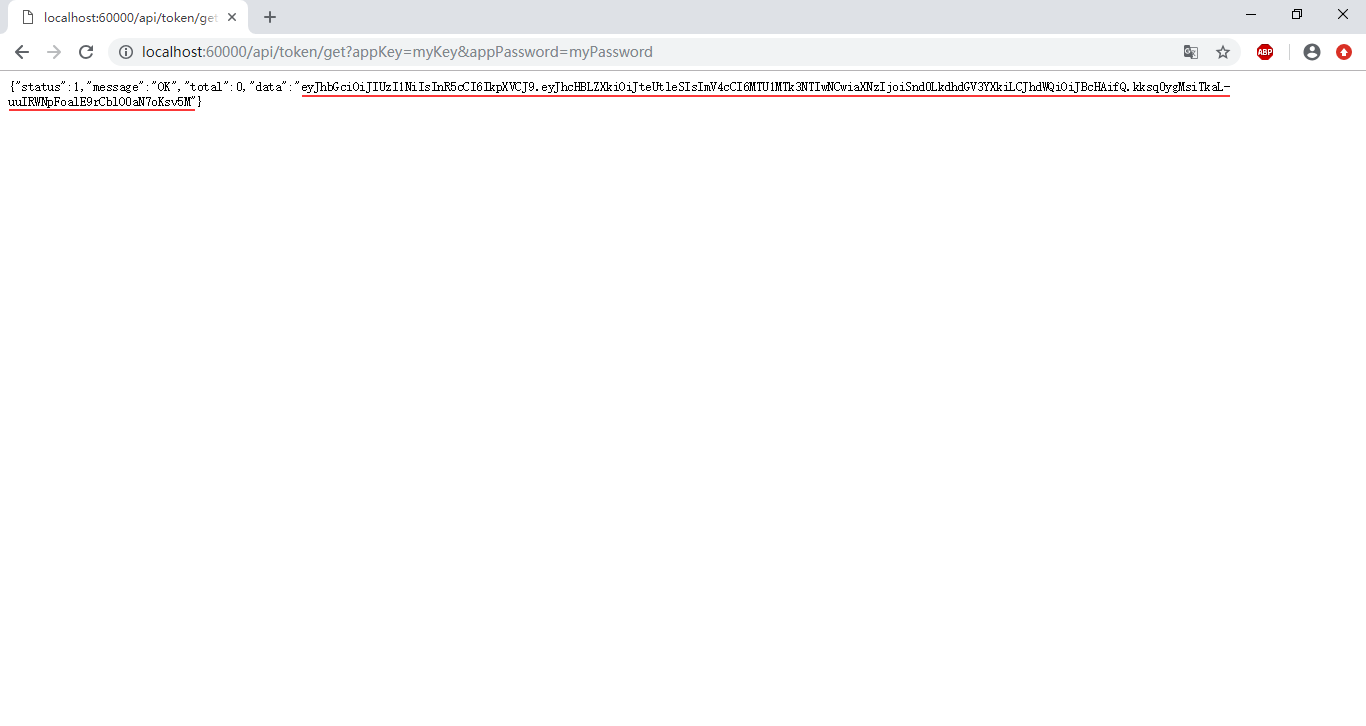 [运行截图-获取Token]
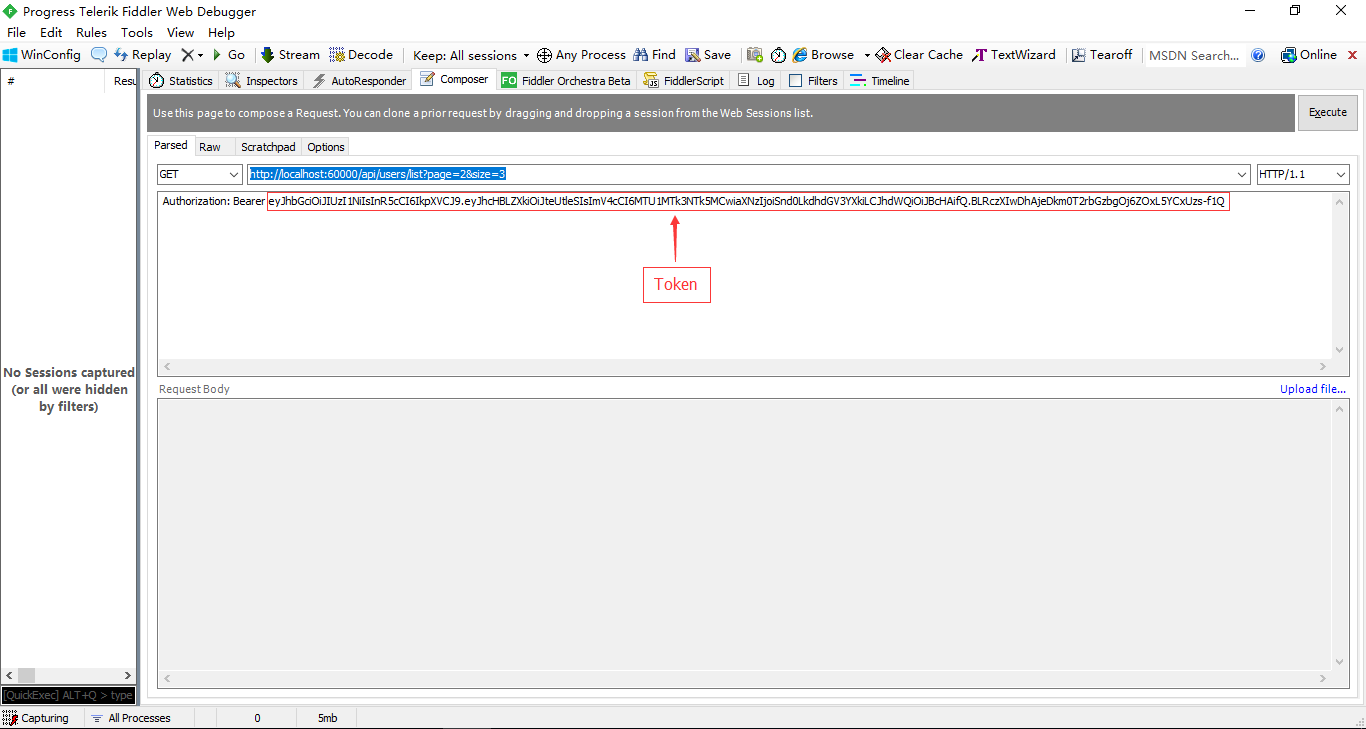 [运行截图-配置Fiddler调用接口获取数据]
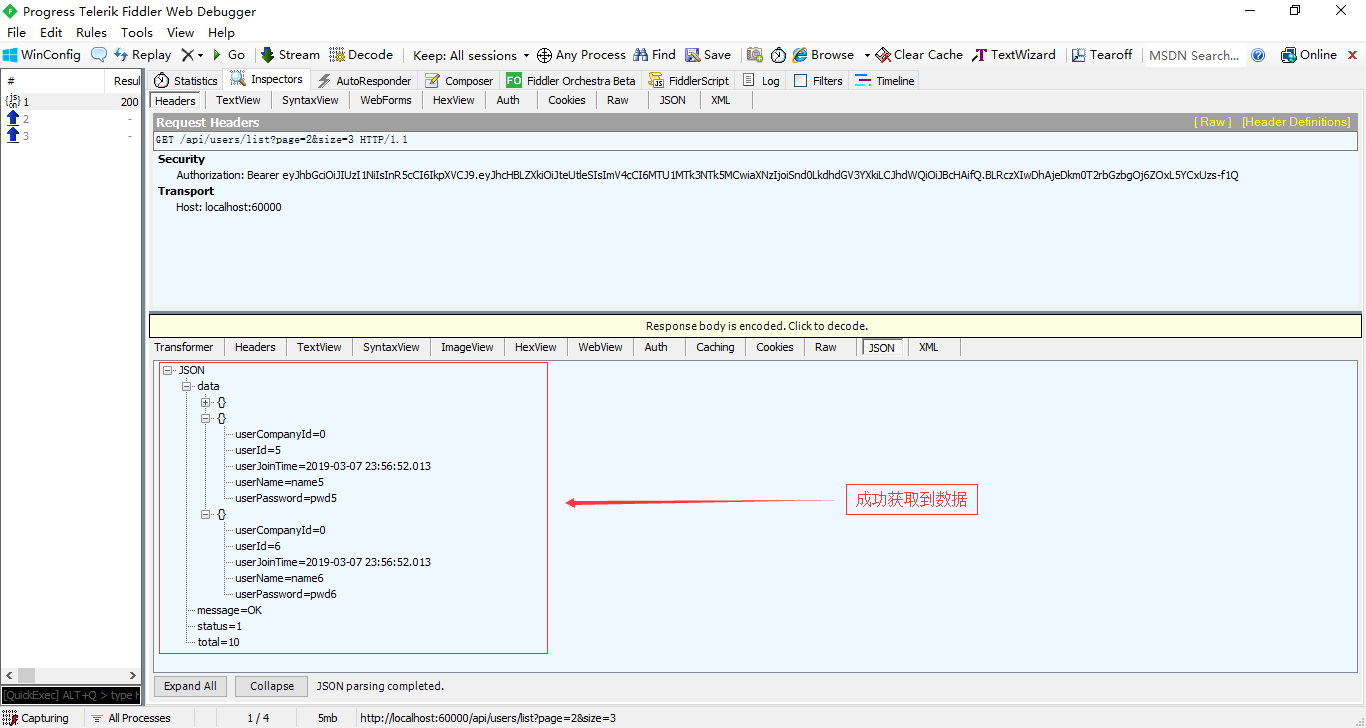 [运行截图-获取到数据]
如果Token校验失败将会返回401错误!
如果你发现有错误,请善意指出,谢谢!
Asp.Net Core基于JWT认证的数据接口网关Demo的更多相关文章
- ASP.NET Core 基于JWT的认证(一)
ASP.NET Core 基于JWT的认证(一) Json web token (JWT), 是为了在网络应用环境间传递声明而执行的一种基于JSON的开放标准((RFC 7519).该token被设计 ...
- ASP.NET Core 基于JWT的认证(二)
ASP.NET Core 基于JWT的认证(二) 上一节我们对 Jwt 的一些基础知识进行了一个简单的介绍,这一节我们将详细的讲解,本次我们将详细的介绍一下 Jwt在 .Net Core 上的实际运用 ...
- ASP.NET WebApi 基于JWT实现Token签名认证
一.前言 明人不说暗话,跟着阿笨一起玩WebApi!开发提供数据的WebApi服务,最重要的是数据的安全性.那么对于我们来说,如何确保数据的安全将会是需要思考的问题.在ASP.NET WebServi ...
- asp.net core 集成JWT(二)token的强制失效,基于策略模式细化api权限
[前言] 上一篇我们介绍了什么是JWT,以及如何在asp.net core api项目中集成JWT权限认证.传送门:https://www.cnblogs.com/7tiny/p/11012035.h ...
- ASP.NET Core的JWT的实现(中间件).md
既然选择了远方,便只顾风雨兼程 __ HANS许 JWT(JSON Web Token) ASP.NET Core 的Middleware实现 引言:挺久没更新了,之前做了Vue的系列,后面想做做服务 ...
- asp.net core 集成JWT(一)
[什么是JWT] JSON Web Token(JWT)是目前最流行的跨域身份验证解决方案. JWT的官网地址:https://jwt.io/ 通俗地来讲,JWT是能代表用户身份的令牌,可以使用JWT ...
- ASP.NET Core的身份认证框架IdentityServer4--入门
ASP.NET Core的身份认证框架IdentityServer4--入门 2018年08月11日 10:09:00 qq_42606051 阅读数 4002 https://blog.csdn ...
- ASP.NET Core基于K8S的微服务电商案例实践--学习笔记
摘要 一个完整的电商项目微服务的实践过程,从选型.业务设计.架构设计到开发过程管理.以及上线运维的完整过程总结与剖析. 讲师介绍 产品需求介绍 纯线上商城 线上线下一体化 跨行业 跨商业模式 从0开始 ...
- Dotnet core使用JWT认证授权最佳实践(二)
最近,团队的小伙伴们在做项目时,需要用到JWT认证.遂根据自己的经验,整理成了这篇文章,用来帮助理清JWT认证的原理和代码编写操作. 第一部分:Dotnet core使用JWT认证授权最佳实践(一) ...
随机推荐
- 在.NET Core使用TimeZone将客户端时间转服务器本地时间但编译提示已过期
当我们的项目国际化后,需要处理时区问题. 在.NET Core之前我们可以通过以下代码将客户端时间转换为服务端时间: DateTime serverTime = TimeZone.CurrentTim ...
- MTK(android init.rc) 写一个开机启动的服务
在开机往往我们想要做一些初始化的操作,这时候可以使用init.rc文件来实现,当然书写一个开机启动的服务也需要规范的. 假设是C程序,则需要准备C程序的源码,在我的例程中是一个在开机完成(androi ...
- hiho一下 第206周
题目1 : Guess Number with Lower or Higher Hints 时间限制:10000ms 单点时限:1000ms 内存限制:256MB 描述 There is a game ...
- python多态和规范
python规范(接口类) 接口类可以规范代码,但接口类本身是不实现的 class Payment: def pay(self,money): raise Notlmplemented class W ...
- CEF 自定义用户协议(scheme)实现以二进制流的方式显示图片、视频、音频
转载:https://www.cnblogs.com/sinceret/p/10417941.html 转载:https://stackoverflow.com/questions/48811756/ ...
- JS(JavaScript)的进一步了解2(更新中···)
js数据类型 基本数据类型:string undefined null boolean number 引用数据类型 Object array function 二者的区别 基本数据类 ...
- 【转载】TCP /IP协议详解
首先,TCP/IP不是一个协议,而是一个协议族的统称. 里面包括了IP协议,IMCP协议,TCP协议,以及http.ftp.pop3协议等等. TCP/IP协议分层 提到协议分层,我们很容易联想到IS ...
- KMP总结
首先给一个我能看懂的KMP讲解: http://blog.csdn.net/v_july_v/article/details/7041827 来自大神july 文章很长,但是慢慢看,会发现讲的很好. ...
- Autowired(required=true)
问题原因 没有实现类的接口上添加了@Autowired注解 问题解决 删掉@Autowired注解 bug详情 Description: Field userDAO in com.crab.servi ...
- Chrom Firefox 非安全端口访问
使用Chrom Firefox 访问非安全端口 问题描述 Firefox 此网址已被限制 此网址使用了一个通常用于网络浏览以外目的的端口.出于安全原因,Firefox 取消了该请求. Chrome 无 ...