
rsyslog及loganalyzer
日志:历史日志
历史事件:
时间记录,事件的关键性程度,loglevel
系统日志服务:
syslogd,守护进程
syslogd:system
klogd:kernel
rsyslog:
syslogd
klogd
多线程:
UDP,TCP,SSL,TLS,
Mysql,PGSQL
强大的过滤器,可实现过滤日志信息中的任何部分;
自定义输出格式;
日志收集方:
priority:
debug,info,notice,warn(warning),err(error),crit(critical),alert,emerg(panic)
调试-信息级别-引起注意-警告-产生错误-蓝色警报-橙色警报-要挂了。
指定级别:
*:表示所以级别
none:没用级别
priority:此级别及更高级别的日志信息;
[root@localhost ~]# rpm -ql rsyslog
/etc/rsyslog.conf 主配置文件
rsyslogd 主程序;
/etc/rc.d/init.d/rsyslog 服务脚本;
root@localhost ~]# vim /etc/rsyslog.conf
# rsyslog v5 configuration file
# For more information see /usr/share/doc/rsyslog-*/rsyslog_conf.html
# If you experience problems, see http://www.rsyslog.com/doc/troubleshoot.html
#### MODULES ####
$ModLoad imuxsock # provides support for local system logging (e.g. via logger command) //支持本地日志收集的模块
$ModLoad imklog # provides kernel logging support (previously done by rklogd) //支持本地内核日志收集的模块
#$ModLoad immark # provides --MARK-- message capability
# Provides UDP syslog reception
#$ModLoad imudp
#$UDPServerRun 514
# Provides TCP syslog reception
#$ModLoad imtcp
#$InputTCPServerRun 514
#### GLOBAL DIRECTIVES #### 全局参数指定
# Use default timestamp format
$ActionFileDefaultTemplate RSYSLOG_TraditionalFileFormat
# File syncing capability is disabled by default. This feature is usually not required,
# not useful and an extreme performance hit
#$ActionFileEnableSync on
# Include all config files in /etc/rsyslog.d/
$IncludeConfig /etc/rsyslog.d/*.conf
#### RULES ####
# Log all kernel messages to the console.
# Logging much else clutters up the screen.
#kern.* /dev/console //
# Log anything (except mail) of level info or higher.
# Don't log private authentication messages!
*.info;mail.none;authpriv.none;cron.none /var/log/messages //
# The authpriv file has restricted access.
authpriv.* /var/log/secure
# Log all the mail messages in one place.
mail.* -/var/log/maillog //-号表示异步写入;
# Log cron stuff
cron.* /var/log/cron
# Everybody gets emergency messages
*.emerg * //通知所有用户在线的用户系统要挂了
# Save news errors of level crit and higher in a special file.
uucp,news.crit /var/log/spooler
# Save boot messages also to boot.log
local7.* /var/log/boot.log //自定义日志
# ### begin forwarding rule ###
# The statement between the begin ... end define a SINGLE forwarding
# rule. They belong together, do NOT split them. If you create multiple
# forwarding rules, duplicate the whole block!
# Remote Logging (we use TCP for reliable delivery)
#
# An on-disk queue is created for this action. If the remote host is
# down, messages are spooled to disk and sent when it is up again.
#$WorkDirectory /var/lib/rsyslog # where to place spool files
#$ActionQueueFileName fwdRule1 # unique name prefix for spool files
#$ActionQueueMaxDiskSpace 1g # 1gb space limit (use as much as possible)
#$ActionQueueSaveOnShutdown on # save messages to disk on shutdown
#$ActionQueueType LinkedList # run asynchronously
#$ActionResumeRetryCount -1 # infinite retries if host is down
# remote host is: name/ip:port, e.g. 192.168.0.1:514, port optional
#*.* @@remote-host:514
# ### end of the forwarding rule ###
# A template to for higher precision timestamps + severity logging
$template SpiceTmpl,"%TIMESTAMP%.%TIMESTAMP:::date-subseconds% %syslogtag% %syslogseverity-text%:%msg:::sp-if-no-1st-sp%%msg:::drop-last-lf%\n"
:programname, startswith, "spice-vdagent" /var/log/spice-vdagent.log;SpiceTmpl
(END)
主服务器测试:
root@localhost ~]# vim /etc/ssh/sshd_config
添加:SyslogFacility local2
service sshd reload
root@localhost ~]# vim /etc/rsyslog.conf
local7.* /var/log/boot.log 下添加如下:
local2.* /var/log/sshd.log
重启服务:servicee rsyslog restart
测试:只要复制下当前xshell会话即可,然后查看日志;
总结:
文件记录的日志的格式:
时间产生记录的日期时间 主机 进程(PID) :事件内容
有些日志记录二进制格式:/var/log/wtmp,/var/logbtmp
/var/log/wtmp :当前系统上成功登陆的日志;
last 查看
/var/log/btmp:当前系统上失败的登陆尝试;
lastb
lastlog 查看哪些用户登陆过系统,
mail **Never logged in** 表示从来没用登陆过系统;
--------------------------------------------------------------------------------------------------
一:rsyslog服务器:
1,主服务器:root@localhost ~]# vim /etc/rsyslog.conf
# Provides UDP syslog reception
$ModLoad imudp 去掉#号
$UDPServerRun 514 去掉#号
# Provides TCP syslog reception
$ModLoad imtcp 去掉#号
$InputTCPServerRun 514 去掉#号
service rsyslog restart
netstat -tunl
3:主服务器查看日志:
tail /var/log/messages
2,从服务器:
主服务器:root@localhost ~]# vim /etc/rsyslog.conf
*.info;mail.none;authpriv.none;cron.none @172.16.100.6 //把从服务器的日志传输给主日志服务器;
service rsyslog restart
yum -y install vsftpd
二: 配置下rsyslog如何记录到mysql服务中;
1:从服务安装mysql;
查看包: rpm -q mariadb
安装: [root@localhost ~]# yum -y install mariadb-server
启动: [root@localhost ~]# systemctl start mariadb.service
查看监听:ss -tnlp
进入mysql数据库: [root@localhost ~]# mysql -uroot -p 直接回车,默认密码为空;
mariaDB [(none)]> use mysql;
MariaDB [mysql]> update user set password=password('password') where user='root';
MariaDB [(none)]> GRANT ALL ON Syslog.* TO 'syslog'@'192.168.%.%' IDENTIFIED BY 'syslogpass';
MariaDB [mysql]> flush privileges;
MariaDB [mysql]> quit
root@localhost ~]# vim /etc/my.cnf
[mysqld]
skip_name_resolve = on
innodb_file_per_table = on
[root@localhost ~]# systemctl restart mariadb.service
[root@localhost ~]# ss -tnl
测试:
[root@localhost ~]# mysql -usyslog -psyslogpass -h 192.168.214.140
Welcome to the MariaDB monitor. Commands end with ; or \g.
Your MariaDB connection id is 3
Server version: 5.5.56-MariaDB MariaDB Server
Copyright (c) 2000, 2017, Oracle, MariaDB Corporation Ab and others.
Type 'help;' or '\h' for help. Type '\c' to clear the current input statement.
MariaDB [(none)]> show databases;
+--------------------+
| Database |
+--------------------+
| information_schema |
| test |
+--------------------+
2 rows in set (0.00 sec)
MariaDB [(none)]>
4:验证
[root@localhost ~]# mysql -usyslog -psyslogpass -h 192.168.214.140
Welcome to the MariaDB monitor. Commands end with ; or \g.
Your MariaDB connection id is 5
Server version: 5.5.56-MariaDB MariaDB Server
Copyright (c) 2000, 2017, Oracle, MariaDB Corporation Ab and others.
Type 'help;' or '\h' for help. Type '\c' to clear the current input statement. MariaDB [(none)]> show databases;
+--------------------+
| Database |
+--------------------+
| information_schema |
| Syslog |
| test |
+--------------------+
3 rows in set (0.00 sec)
MariaDB [(none)]> use Syslog
Reading table information for completion of table and column names
You can turn off this feature to get a quicker startup with -A
Database changed
MariaDB [Syslog]> show tables;
+------------------------+
| Tables_in_Syslog |
+------------------------+
| SystemEvents |
| SystemEventsProperties |
+------------------------+
2 rows in set (0.00 sec)
6:查看日志
MariaDB [Syslog]> show tables;
+------------------------+
| Tables_in_Syslog |
+------------------------+
| SystemEvents |
| SystemEventsProperties |
+------------------------+
2 rows in set (0.00 sec)
MariaDB [Syslog]>
MariaDB [Syslog]> show tables;
+------------------------+
| Tables_in_Syslog |
+------------------------+
| SystemEvents |
| SystemEventsProperties |
+------------------------+
2 rows in set (0.00 sec)
MariaDB [Syslog]> select * from SystemEvents\G;
2:主服务器端想要rsyslog日志存储到mysql服务器中,使用 yum list all rsyslog*,有一个rsyslog-mysql的程序包,安装即可。
yum -y install rsyslog-mysql
[root@localhost log]# rpm -ql rsyslog-mysql
/lib64/rsyslog/ommysql.so
/usr/share/doc/rsyslog-mysql-5.8.10
/usr/share/doc/rsyslog-mysql-5.8.10/createDB.sql
3:[root@localhost log]# mysql -usyslog -h192.168.214.140 -p < /usr/share/doc/rsyslog-mysql-5.8.10/createDB.sql
Enter password: syslogpass //192.168.214.140是从服务器的IP地址
5:[root@localhost log]# vim /etc/rsyslog.conf
#### MODULES ####
$ModLoad ommysql 手动添加;
#### RULES ####
*.info;mail.none;authpriv.none;cron.none :ommysql:192.168.214.140,Syslog,syslog,syslogpass
service rsyslog restart
记录日志:yum -y install vsftp
---------------------------------------------
主服务器:
yum install httpd php php-mysql
vim /var/www/html/index.php
<?php
$conn = mysql_connect('192.168.214.140','syslog','syslogpass');
if ($conn)
echo "OK";
else
echo "Failure";
?>
service httpd start
网页测试:192.168.214.146 是否显示OK
下载loganalyzer-3.6.5.tar.gz
tar xf alyzer-3.6.5.tar.gz
mv alyzer-3.6.5 /var/www/html/log
cd /var/www/html/log
ls
cd ..
ls
mv log/src loganalyzer
ls
cd loganalyzer
cd ..
cd log
ls
ls contrib/
cp conrtib/* ../loganalyzer/
cd ../loganalyzer/
chmod +x *.sh
./configure.sh
./secure.sh
chmod 666 config.php
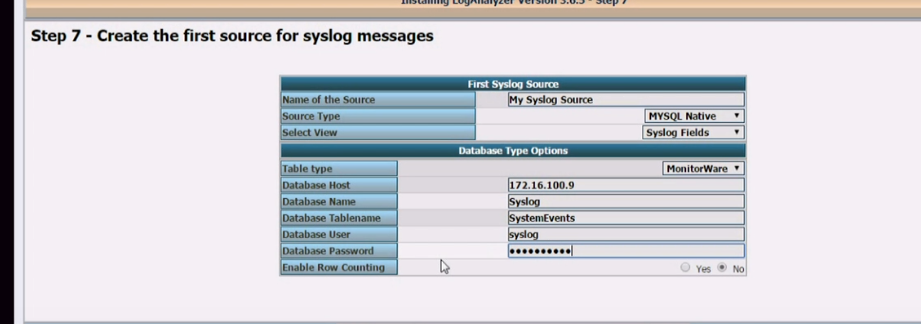
访问:192.168.214.145/loganalyzer/install.php
~ 
yum -y install php-gd
service httpd restart
//支持本地日志收集的模块
rsyslog及loganalyzer的更多相关文章
- django+nginx+xshell简易日志查询,接上<关于《rsyslog+mysql+loganalyzer搭建日志服务器<个人笔记>》的反思>
纠正一下之前在<关于<rsyslog+mysql+loganalyzer搭建日志服务器<个人笔记>>的反思>中说到的PHP+MySQL太慢,这里只是说我技术不好,没 ...
- 关于《rsyslog+mysql+loganalyzer搭建日志服务器<个人笔记>》的反思
关于<rsyslog+mysql+loganalyzer搭建日志服务器<个人笔记>>的反思--链接--http://www.cnblogs.com/drgcaosheng/p/ ...
- rsyslog+mariadb+loganalyzer实现日志服务器搭建
rsyslog+mariadb+loganalyzer实现日志服务器搭建 一.概述 Linux的日志记录了用户在系统上一切操作,包括系统自身运作产生的日志,这些日志是应使用者了解服务器的情况最好的资料 ...
- rsyslog+mysql+loganalyzer搭建日志服务器<个人笔记>
大概思路如下: 使用Linux自带的rsyslog服务来做底层,然后再使用mysql与rsyslog的模板来存储文件,并且以web来进行显示出来.<模板的存储以日期的树形结构来存储,并且以服务器 ...
- Linux 之 rsyslog+mysql+LogAnalyzer 日志收集系统
作者:邓聪聪 LogAnalyzer 是一个 syslog 和其他网络事件数据的 Web 前端工具,提供简单易用的日志浏览.搜索和基本分析以及图表显示 由于公司部分项目需求使用日志记录系统,随笔记录 ...
- CentOS 6.5下的lamp环境rsyslog+MySQL+loganalyzer实现日志集中分析管理
前言 rsyslog系统日志,在CentOS5上叫syslog,而在CentOS6上叫rsyslog,是增强版的syslog,CentOS5上的配置文件在/etc/syslog.conf下,而Cent ...
- rsyslog+loganalyzer配置
1.loganalyzer服务器搭建[root@localhost ~]# getenforce #查看selinux是否关闭[root@localhost ~]# setenforce 0 #临时关 ...
- 实现将rsyslog将日志记录与MySQL中
准备两个节点 node3: rsyslog node2: 数据库 准备相应的包 [root@node3 php-fpm.d]#yum install rsyslog-mysql 将数据拷贝到数据 ...
- CentOS 6.7下利用Rsyslog+LogAnalyzer+MySQL部署日志服务器
一.简介 LogAnalyzer 是一款syslog日志和其他网络事件数据的Web前端.它提供了对日志的简单浏览.搜索.基本分析和一些图表报告的功能.数据可以从数据库或一般的syslog文本文件中获取 ...
随机推荐
- Centos7下安装配置elasticsearch 6.3.1
1)下载 Elasticsearch 6.3.1 地址:https://artifacts.elastic.co/downloads/elasticsearch/elasticsearch-6.3.1 ...
- mysql数据库优化之索引的维护和优化
这里是一个工具,即pt-duplicate-key-checker工具 用来检查重复及冗余的索引 用法如下:pt-duplicate-key-checker -uroot -p密码 -h127. ...
- 码云和git
第一步: 码云上注册: 第二部: 创建项目;根据需求,哒哒哒全部填完 第三部: 设置公钥(重点来了,头晕) 1. 打开git终端 git Bash 2.进入.ssh目录 输入命令 cd ~/.ssh ...
- 2、每日复习点--ConcurrentHashMap vs HashMap vs HashTable
HashMap:允许键或者值为null.底层是基于数组+链表的结构.默认初始容量是16,默认加载因子是0.75F,默认扩容增加一倍.如果指定了初始容量n,n必然在(2x,2x+1]范围内,n经过运算所 ...
- shell 环境变量的相关配置文件和配置方法
shell 环境变量的相关配置文件和配置方法: bash 的配置文件: 全局配置: /etc/profile, /etc/profile.d/*.sh, /etc/bashrc 个人配置 ~/.bas ...
- CEF 支持JSON操作
转载:https://blog.csdn.net/foruok/article/details/50687864(解析json) 转载:https://blog.csdn.net/foruok/art ...
- IDEA修改显示星号*和热部署
IDEA修改显示*星号: IDEA热部署: 两步: 1. 2. Ctrl+Alt+Shift+/ 打开下面界面,选Registry 对于Springboot应用,可能无法启动,在上述两步不起作用的情况 ...
- html2canvas文字重叠(手机端)
发现情况: 1.设置文字居中,文字自动换行后文字有重叠 text-align: center; 解决办法: text-align: left; text-align: justify;等 2.使用 ...
- Redis 错误:Failed with result 'start-limit-hit'
Redis 错误:Failed with result 'start-limit-hit' 背景 Redis 版本为 5.0.4: 文件 /etc/systemd/system/redis.servi ...
- 【Mac】【创建钥匙串】
1 Mac在钥匙串创建系统证书失败 https://blog.csdn.net/lllkey/article/details/79423596 问题: 在Eclipse的Debug,使用gdb的时候, ...