在写selenium的时候,发现很简单的case也报错
package com.lv.test;

import org.junit.Test;

import org.openqa.selenium.WebDriver;

import org.openqa.selenium.chrome.ChromeDriver;

public class Orders {

	private WebDriver driver = new ChromeDriver();

	String orderUrl="http://www.baidu.com";

	@Test

	public void OrdersPage(){

		driver.get(orderUrl);

		System.out.println(driver.getTitle());

		driver.quit();

	}
}
org.openqa.selenium.WebDriverException: unknown error: Runtime.executionContextCreated has invalid 'context': {"auxData":{"frameId":"15372.1","isDefault":true},"id":1,"name":"","origin":"://"}
(Session info: chrome=57.0.2987.110)
(Driver info: chromedriver=2.7.236900,platform=Windows NT 6.1 SP1 x86_64) (WARNING: The server did not provide any stacktrace information)
Command duration or timeout: 184 milliseconds
Build info: version: '2.26.0', revision: '18041', time: '2012-11-01 19:33:38'
System info: os.name: 'Windows 7', os.arch: 'amd64', os.version: '6.1', java.version: '1.8.0_20'
Driver info: driver.version: RemoteWebDriver
Session ID: 0db0541b1e8337218da90c01bd25804b
at sun.reflect.NativeConstructorAccessorImpl.newInstance0(Native Method)
at sun.reflect.NativeConstructorAccessorImpl.newInstance(Unknown Source)
at sun.reflect.DelegatingConstructorAccessorImpl.newInstance(Unknown Source)
at java.lang.reflect.Constructor.newInstance(Unknown Source)
at org.openqa.selenium.remote.ErrorHandler.createThrowable(ErrorHandler.java:188)
at org.openqa.selenium.remote.ErrorHandler.throwIfResponseFailed(ErrorHandler.java:145)
at org.openqa.selenium.remote.RemoteWebDriver.execute(RemoteWebDriver.java:531)
at org.openqa.selenium.remote.RemoteWebDriver.get(RemoteWebDriver.java:275)
at com.lvmama.test.Orders.OrdersPage(Orders.java:20)
at sun.reflect.NativeMethodAccessorImpl.invoke0(Native Method)
at sun.reflect.NativeMethodAccessorImpl.invoke(Unknown Source)
at sun.reflect.DelegatingMethodAccessorImpl.invoke(Unknown Source)
at java.lang.reflect.Method.invoke(Unknown Source)
at org.junit.runners.model.FrameworkMethod$1.runReflectiveCall(FrameworkMethod.java:45)
at org.junit.internal.runners.model.ReflectiveCallable.run(ReflectiveCallable.java:15)
at org.junit.runners.model.FrameworkMethod.invokeExplosively(FrameworkMethod.java:42)
at org.junit.internal.runners.statements.InvokeMethod.evaluate(InvokeMethod.java:20)
at org.junit.runners.ParentRunner.runLeaf(ParentRunner.java:263)
at org.junit.runners.BlockJUnit4ClassRunner.runChild(BlockJUnit4ClassRunner.java:68)
at org.junit.runners.BlockJUnit4ClassRunner.runChild(BlockJUnit4ClassRunner.java:47)
at org.junit.runners.ParentRunner$3.run(ParentRunner.java:231)
at org.junit.runners.ParentRunner$1.schedule(ParentRunner.java:60)
at org.junit.runners.ParentRunner.runChildren(ParentRunner.java:229)
at org.junit.runners.ParentRunner.access$000(ParentRunner.java:50)
at org.junit.runners.ParentRunner$2.evaluate(ParentRunner.java:222)
at org.junit.runners.ParentRunner.run(ParentRunner.java:300)
at org.eclipse.jdt.internal.junit4.runner.JUnit4TestReference.run(JUnit4TestReference.java:50)
at org.eclipse.jdt.internal.junit.runner.TestExecution.run(TestExecution.java:38)
at org.eclipse.jdt.internal.junit.runner.RemoteTestRunner.runTests(RemoteTestRunner.java:459)
at org.eclipse.jdt.internal.junit.runner.RemoteTestRunner.runTests(RemoteTestRunner.java:675)
at org.eclipse.jdt.internal.junit.runner.RemoteTestRunner.run(RemoteTestRunner.java:382)
at org.eclipse.jdt.internal.junit.runner.RemoteTestRunner.main(RemoteTestRunner.java:192)
百度后知道这是由于Chrome和chromeDriver的不匹配造成的
然后就查Chrome和chromeDriver的对应关系:
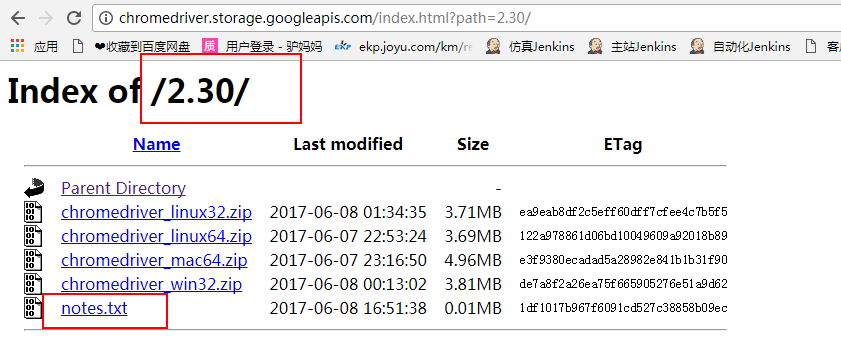
可以在这里http://chromedriver.storage.googleapis.com/index.html,点击其中某个Chrome版本进入到下载页面(我选择的是2.30)
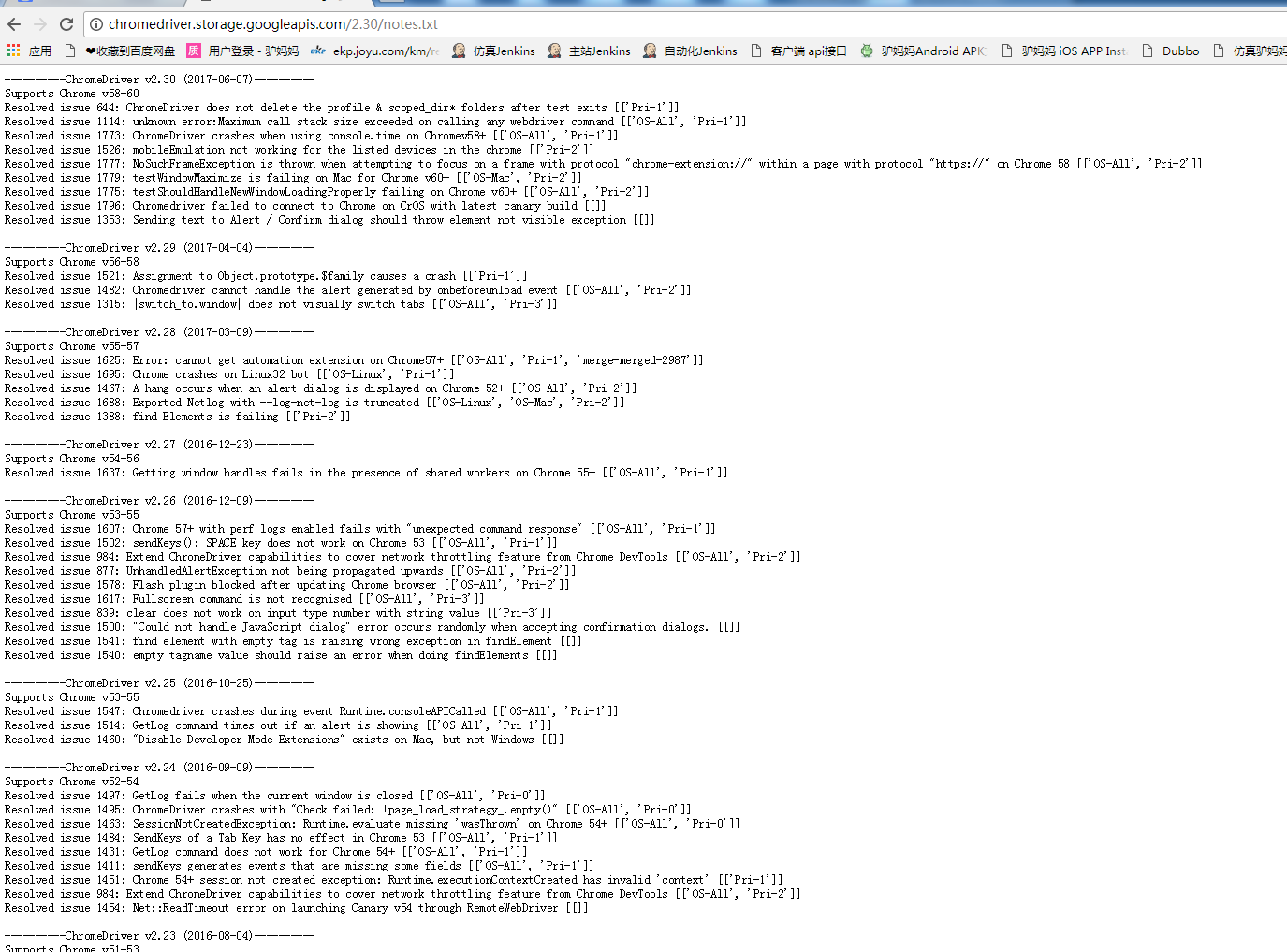
在下载页面有个notes.txt文件,点击这个文件就能看到这个ChromeDriver支持的Chrome版本了
然后下载下来的是一个压缩包,解压其中的.exe文件后,放到Chrome的安装目录下
我的安装目录是:C:\Program Files (x86)\Google\Chrome\Application
如果你是直接复制替换文件,可能会提醒文件被占用的什么东西,可能是刚才你跑selenium的时候没有写diriver.quit()
(哎,这坑我都能踩,也是醉了,所以说不管写多简单的case都要最后quit一下,别图省事),只需要打开任务管理器,结束chromedriver.exe就好
- selenium自动化测试资源整理(含所有版本chrome、chromedriver、firefox下载链接)
今天把手头有的一些关于selenium测试的资源整理了一下,分享出来. 1. 所有版本chrome下载 是不是很难找到老版本的chrome?博主收集了几个下载chrome老版本的网站,其中哪个下载的是 ...
- 【转】所有版本chrome、chromedriver、firefox下载链接
所有版本chrome.chromedriver.firefox下载链接 1. 所有版本chrome下载 是不是很难找到老版本的chrome?博主收集了几个下载chrome老版本的网站,其中哪个下载的是 ...
- 所有版本chrome、chromedriver、firefox下载链接
1. 所有版本chrome下载 是不是很难找到老版本的chrome?博主收集了几个下载chrome老版本的网站,其中哪个下载的是原版的就不得而知了. http://www.slimjet.com/ch ...
- Chrome与chromedriver.exe的版本对应
Chrome与chromedriver.exe的版本对应 分类专栏: pyhton3.7+selenium3 转:https://blog.csdn.net/weixin_44545954/art ...
- Python selenium web UI之Chrome 与 Chromedriver对应版本映射表及下载地址和配置(windows, Mac OS)
浏览器及驱动下载 进行web UI 自动化时,需要安装浏览器驱动webdriver,Chrome浏览器需要安装chromedriver.exe 驱动,Firefox需安装 geckodriver.ex ...
- 【Linux】【Selenium】安装Chrome和ChromeDriver的配置
转自:https://www.cnblogs.com/longronglang/p/8078898.html 1.安装chrome sudo apt-get install libxss1 libap ...
- 如何解决selenium打开chrome提示chromedriver.exe已停止工作
场景:启动Chrome,打开URL,提示“disconnected: unable to connect to renderer” 解决方法:chromedriver与chrome的对应关系表, 需要 ...
- ubuntu 安装chrome 和chromedriver
1. chromedriver 下载地址: https://npm.taobao.org/mirrors/chromedriver 在这里找到对应的驱动 2. 安装谷歌浏览器 2.1 安装依赖 ap ...
- python+ubuntu+selenium安装chrome和chromedriver
请确保selenium已经安装成功,没安装的可以pip install selenium 安装chrome 在终端输入 下载安装包 wget https://dl.google.com/linux/d ...
随机推荐
- Node.js //TODO
目录 技术背景 开发环境 学习过程 参考资料 结束语 技术背景 开发环境 学习过程 参考资料 结束语
- SecureCRT8.1安装破解
博主本人平和谦逊,热爱学习,读者阅读过程中发现错误的地方,请帮忙指出,感激不尽 一.安装破解 [基本信息] SecureCRT v8.x 注册机,TEAM Z.W.T 出品,MD5 = 44114b9 ...
- JsonPath入门教程
有时候需要从json里面提取相关数据,必须得用到如何提取信息的知识,下面来写一下 语法格式 JsonPath 描述 $ 根节点 @ 当前节点 .or[] 子节点 .. 选择所有符合条件的节点 * 所有 ...
- [LC] 221. Maximal Square
Given a 2D binary matrix filled with 0's and 1's, find the largest square containing only 1's and re ...
- stack|session|fuss|anniversary
N-COUNT A stack of things is a pile of them. 摞; 堆 例: There were stacks of books on the bedside table ...
- git创建/合并分支/删除分支/将修改后的内容同步到GitHub远程仓库
1.创建分支并切换到刚创建的分支(这里创建新的分支来修改README.md的内容然后将创建的分支与master分支合并,最后删除创建的分支) $ git checkout -b 分支名 Switche ...
- xstream的介绍及用法
使用xstream工具包导入xpp3_min-1.1.4c和xstream-1.4.9特点:代码简洁,超级方便,可以自己定义xml格式(适合做文件传输)属性特点:1. xStream.alias(&q ...
- shell的循环嵌套语法
测试shell的循环嵌套语法 [root@localhost test]# vi Xunhuanqiantao.sh #!/bin/bash #程序功能描述: # 测试循环嵌套 #作者:孤舟点点 #版 ...
- Data Visualization and D3.js 笔记(1)
课程地址: https://classroom.udacity.com/courses/ud507 什么是数据可视化? 高效传达一个故事/概念,探索数据的pattern 通过颜色.尺寸.形式在视觉上表 ...
- Centos7上pkg-config的安装
1.官网下载自己想要的版本,我这里下载的是目前最新版 https://www.freedesktop.org/wiki/Software/pkg-config/ 2.安装 tar xf XXX.tgz ...