
drf的频率认证
频率认证源码分析
APIView ---》dispatch方法---》self.initial(request, *args, **kwargs)---》 self.check_throttles(request)
  #重新访问这个接口的时候,都会重新调用这个方法,每次访问都会throtttle_durations=[]置空

    def check_throttles(self, request):

        """

        Check if request should be throttled.

        Raises an appropriate exception if the request is throttled.

        """

        #比如一分钟只能访问三次,第一,二,三次访问的时候都没有限制,第四次访问就会制

        #限次的持续时间,还有多少秒才能接着访问这个接口

        throtttle_durations=[]

        # self.get_throttles()全局或局部配置的类

        for throttle in self.get_throttles():

            #allow_request允许请求返回True,不允许就返回False,为false时成立,

            if not throttle.allow_request(request, self):

                #throttle.wait()等待的限次持续时间

                self.throttled(request, throttle.wait())

        # 第四次限制,有限制持续时间才会走这部

        if throttle_durations:

            durations = [

                duration for duration in throttle_durations

                if duration is not None

            ]

            duration = max(durations, default=None)

            self.throttled(request, duration)
这说明我们自定义类要重写allow_request(request, self)和wait(),因为throttle调用了

点击 self.get_throttles()查看

    def get_throttles(self):

        """

        Instantiates and returns the list of throttles that this view uses.

        """

        return [throttle() for throttle in self.throttle_classes]

点击 self.throttle_classes

throttle_classes = api_settings.DEFAULT_THROTTLE_CLASSES

throttle_classes跟之前一样可局部配置throttle_classes=[] ,可全局配置settings文件中配置

到drf资源文件settings.py文件中的APISettings类中查看默认配置:ctrl+f键查找DEFAULT_THROTTLE_CLASSES

'DEFAULT_THROTTLE_CLASSES': [],#所以说任何接口都可以无限次访问

回到def check_throttles(self, request):pass 中的allow_request方法进行思考,首先去获取下多长时间能够访问多少次,然后就是访问一次就计数一次,超次了就不能访问了,所以要去获取时间,在一定的时间内不能超次,如果在一定的时间内超次了就调用wait,倒计时多久才能再次访问,

allow_request其实就是先获取到多长时间访问多少次,每来一次请求把当前的时间和次数保存着,如果它两的间隔时间足够大,就重置次数为0,如果间隔时间较小就次数累加
找到drf资源文件throttling.py (有以下类)

AnonRateThrottle(SimpleRateThrottle)

BaseThrottle(object)

ScopedRateThrottle(SimpleRateThrottle)

SimpleRateThrottle(BaseThrottle)

UserRateThrottle(SimpleRateThrottle)

我们自定义的类有可能继承BaseThrottle,或SimpleRateThrottle
class BaseThrottle(object):

    """

    Rate throttling of requests.

    """

	#判断是否限次:没有限次可以请求True,限次就不可以请求False

    def allow_request(self, request, view):

        """

        Return `True` if the request should be allowed, `False` otherwise.

        """

        #如果继承 BaseThrottle,必须重写allow_request

        raise NotImplementedError('.allow_request() must be overridden')

    def get_ident(self, request):

        """

        Identify the machine making the request by parsing HTTP_X_FORWARDED_FOR

        if present and number of proxies is > 0. If not use all of

        HTTP_X_FORWARDED_FOR if it is available, if not use REMOTE_ADDR.

        """

        xff = request.META.get('HTTP_X_FORWARDED_FOR')

        remote_addr = request.META.get('REMOTE_ADDR')

        num_proxies = api_settings.NUM_PROXIES

        if num_proxies is not None:

            if num_proxies == 0 or xff is None:

                return remote_addr

            addrs = xff.split(',')

            client_addr = addrs[-min(num_proxies, len(addrs))]

            return client_addr.strip()

        return ''.join(xff.split()) if xff else remote_addr

	#限次后调用,还需等待多长时间才能再访问

    def wait(self):

        """

        Optionally, return a recommended number of seconds to wait before

        the next request.

        """

        return None  #返回的是等待的时间秒数
返回到 def check_throttles(self, request):

        throtttle_durations=[]

        for throttle in self.get_throttles():

            if not throttle.allow_request(request, self):

                #wait()的返回值就是要等待的多少秒,把秒数添加到数组里面

                self.throttled(request, throttle.wait())

           #数组就是要等待的秒时间

        if throttle_durations:

            #格式化,展示还需要等待多少秒

            durations = [

                duration for duration in throttle_durations

                if duration is not None

            ]

            duration = max(durations, default=None)

            self.throttled(request, duration)
分析def get_ident(self, request):pass

查看:

num_proxies = api_settings.NUM_PROXIES

到APISettings中ctrl+F查找NUM_PROXIES

'NUM_PROXIES'=None

返回到def get_ident(self, request):pass函数方法

NUM_PROXIES如果为空走:

return ''.join(xff.split()) if xff else remote_addr
查看 SimpleRateThrottle类,继承BaseThrottle,并没有写get_ident方法

但是写了allow_request,和wait

class SimpleRateThrottle(BaseThrottle):

    """

    A simple cache implementation, that only requires `.get_cache_key()`

    to be overridden.

    The rate (requests / seconds) is set by a `rate` attribute on the View

    class.  The attribute is a string of the form 'number_of_requests/period'.

    Period should be one of: ('s', 'sec', 'm', 'min', 'h', 'hour', 'd', 'day')

    Previous request information used for throttling is stored in the cache.

    """

    cache = default_cache

    timer = time.time

    cache_format = 'throttle_%(scope)s_%(ident)s'

    scope = None

    THROTTLE_RATES = api_settings.DEFAULT_THROTTLE_RATES

    def __init__(self):

        if not getattr(self, 'rate', None):

            self.rate = self.get_rate()

        self.num_requests, self.duration = self.parse_rate(self.rate)

    def get_cache_key(self, request, view):

        """

        Should return a unique cache-key which can be used for throttling.

        Must be overridden.

        May return `None` if the request should not be throttled.

        """

        raise NotImplementedError('.get_cache_key() must be overridden')

    def get_rate(self):

        """

        Determine the string representation of the allowed request rate.

        """

        if not getattr(self, 'scope', None):

            msg = ("You must set either `.scope` or `.rate` for '%s' throttle" %

                   self.__class__.__name__)

            raise ImproperlyConfigured(msg)

        try:

            return self.THROTTLE_RATES[self.scope]

        except KeyError:

            msg = "No default throttle rate set for '%s' scope" % self.scope

            raise ImproperlyConfigured(msg)

    def parse_rate(self, rate):

        """

        Given the request rate string, return a two tuple of:

        <allowed number of requests>, <period of time in seconds>

        """

        if rate is None:

            return (None, None)

        num, period = rate.split('/')

        num_requests = int(num)

        duration = {'s': 1, 'm': 60, 'h': 3600, 'd': 86400}[period[0]]

        return (num_requests, duration)

    def allow_request(self, request, view):

        """

        Implement the check to see if the request should be throttled.

        On success calls `throttle_success`.

        On failure calls `throttle_failure`.

        """

        if self.rate is None:

            return True

        self.key = self.get_cache_key(request, view)

        if self.key is None:

            return True

        self.history = self.cache.get(self.key, [])

        self.now = self.timer()

        # Drop any requests from the history which have now passed the

        # throttle duration

        while self.history and self.history[-1] <= self.now - self.duration:

            self.history.pop()

        if len(self.history) >= self.num_requests:

            return self.throttle_failure()

        return self.throttle_success()

    def throttle_success(self):

        """

        Inserts the current request's timestamp along with the key

        into the cache.

        """

        self.history.insert(0, self.now)

        self.cache.set(self.key, self.history, self.duration)

        return True

    def throttle_failure(self):

        """

        Called when a request to the API has failed due to throttling.

        """

        return False

    def wait(self):

        """

        Returns the recommended next request time in seconds.

        """

        if self.history:

            remaining_duration = self.duration - (self.now - self.history[-1])

        else:

            remaining_duration = self.duration

        available_requests = self.num_requests - len(self.history) + 1

        if available_requests <= 0:

            return None

        return remaining_duration / float(available_requests)
分析SimpleRateThrottle中的__init__方法

因为返回到get_throttles(self):  return[throttle() for throttle in self.throttle_classes]

throttle()对象加括号调用触发__init__方法

#初始化没有传入参数,所以没有'rate'参数

 def __init__(self):

        # 如果没有rate就调用get_rate()进行赋值

        if not getattr(self, 'rate', None):

            self.rate = self.get_rate()

            #解析rate,用两个变量存起来

        self.num_requests, self.duration = self.parse_rate(self.rate)

 所有继承SimpleRateThrottle都会走__init__
返回到

 def check_throttles(self, request):

        throtttle_durations=[]

        #throttle初始化成功之后

        for throttle in self.get_throttles():

           #初始化成功之后调用allow_request方法,也就是SimpleRateThrottle中的allow_request

            if not throttle.allow_request(request, self):

                self.throttled(request, throttle.wait())
分析SimpleRateThrottle中的allow_request方法

  def allow_request(self, request, view):

        """

        Implement the check to see if the request should be throttled.

        On success calls `throttle_success`.

        On failure calls `throttle_failure`.

        """

        #rate没有值,就永远也不会限制访问

        if self.rate is None:

            return True

		#如果有值往下走

        #获取缓存的key赋值给self.key

        self.key = self.get_cache_key(request, view)

        if self.key is None:

            return True

        self.history = self.cache.get(self.key, [])

        self.now = self.timer()

        # Drop any requests from the history which have now passed the

        # throttle duration

        while self.history and self.history[-1] <= self.now - self.duration:

            self.history.pop()

        if len(self.history) >= self.num_requests:

            #频率失败

            return self.throttle_failure()

        #频率成功

        return self.throttle_success()
  #频率失败,返回false,没有请求次数

    def throttle_failure(self):

        """

        Called when a request to the API has failed due to throttling.

        """

        return False
    #频率成功

    def throttle_success(self):

        """

        Inserts the current request's timestamp along with the key

        into the cache.

        """

        # history中加时间,再成功再加,而且是加在insert列表的第一个,history长度就会越来越大,所以history的长度就是访问了几次

        self.history.insert(0, self.now)

        self.cache.set(self.key, self.history, self.duration)

        return True
#一直成功一直成功,然后就超次了,所以就会返回False,所以就调用wait()

返回到

 def check_throttles(self, request):

        throtttle_durations=[]

        #throttle初始化成功之后

        for throttle in self.get_throttles():

           #初始化成功之后调用allow_request方法,也就是SimpleRateThrottle中的allow_request

            if not throttle.allow_request(request, self):

                self.throttled(request, throttle.wait())
找到drf资源文件throttling.py (有以下类)

以下是系统提供的三大频率认证类,可以局部或者全局配置

ScopedRateThrottle(SimpleRateThrottle)

SimpleRateThrottle(BaseThrottle)

UserRateThrottle(SimpleRateThrottle)
分析UserRateThrottle(SimpleRateThrottle)

class UserRateThrottle(SimpleRateThrottle):

    """

    Limits the rate of API calls that may be made by a given user.

    The user id will be used as a unique cache key if the user is

    authenticated.  For anonymous requests, the IP address of the request will

    be used.

    """

    scope = 'user'

    #返回一个字符串

    def get_cache_key(self, request, view):

        #有用户并且是认证用户

        if request.user.is_authenticated:

            #获取到用户的id

            ident = request.user.pk

        else:

            ident = self.get_ident(request)

		#'throttle_%(user)s_%(request.user.pk)s'

        return self.cache_format % {

            'scope': self.scope,

            'ident': ident

        }

点击self.cache_format

cache_format = 'throttle_%(scope)s_%(ident)s'
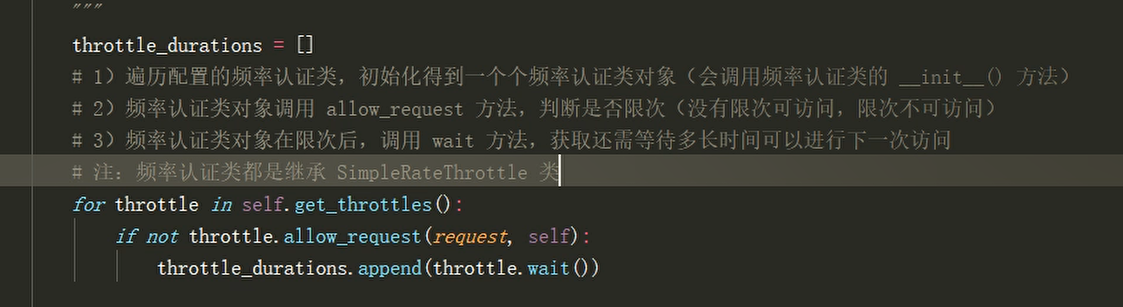
   假设我的认证类采用了UserRateThrottle(SimpleRetaThrottle),

    for throttle in self.get_throttles():pass  产生的throttle的就是UserRateThrottle产生的对象,然后UserRateThrottle中没有__init__,所以走SimpleRetaThrottle的__init__方法

    def __init__(self):

        if not getattr(self, 'rate', None):

            self.rate = self.get_rate()

        self.num_requests, self.duration = self.parse_rate(self.rate)

点击self.get_rate(),

    def get_rate(self):

        """

        Determine the string representation of the allowed request rate.

        """

        #如果没有scope直接抛异常,

        #这里的self就是UserRateThrottle产生的对象,返回到UserRateThrottle获取到 scope = 'user'

        if not getattr(self, 'scope', None):

            msg = ("You must set either `.scope` or `.rate` for '%s' throttle" %

                   self.__class__.__name__)

            raise ImproperlyConfigured(msg)

        try:

            #self.THROTTLE_RATES['user'] ,这种格式就可以判断THROTTLE_RATES是一个字典,点击进入THROTTLE_RATES = api_settings.DEFAULT_THROTTLE_RATES   ,,跟之前一样资源settings.py中ctrl+F查找DEFAULT_THROTTLE_RATES,

# 'DEFAULT_THROTTLE_RATES': {

     #   'user': None,

     #   'anon': None,

 #   },

#然后在自己的settings.py中进行配置,就先走自己的配置,

			#所以在这里的返回值是None

            return self.THROTTLE_RATES[self.scope]

        except KeyError:

            # 当key没有对应的value的时候就会报错,而这里的user对应None所以是有value的

            msg = "No default throttle rate set for '%s' scope" % self.scope

            raise ImproperlyConfigured(msg)
返回到SimpleRetaThrottle

    def __init__(self):

        if not getattr(self, 'rate', None):

            #self.rate=None

            self.rate = self.get_rate()

        self.num_requests, self.duration = self.parse_rate(self.rate)
点击 self.parse_rate(self.rate)

   def parse_rate(self, rate):

        """

        Given the request rate string, return a two tuple of:

        <allowed number of requests>, <period of time in seconds>

        """

        #如果rate是None,返回None,None

        if rate is None:

            return (None, None)

        #如果rate不是None,就得到的是字符串并且包含有一个‘/’,因为拆分后得到得是两个结果,然后有int强转,所以num一定是一个数字

        num, period = rate.split('/')

        num_requests = int(num)

        #period[0]取第一位,然后作为key到字典duration中查找,所以字母开头一定要是s /m / h / d,发现value都是以秒来计算,所以得到rate得格式是'3/min' 也就是'3/60'

        duration = {'s': 1, 'm': 60, 'h': 3600, 'd': 86400}[period[0]]

        return (num_requests, duration)

返回到SimpleRetaThrottle

    def __init__(self):

        if not getattr(self, 'rate', None):

            #self.rate=None

            self.rate = self.get_rate()

            #self.num_requests, self.duration =None,None

        self.num_requests, self.duration = self.parse_rate(self.rate)
为了能rate拿到值,就可以到自己得settings.py中配置

# drf配置

REST_FRAMEWORK = {

    # 频率限制条件配置

    'DEFAULT_THROTTLE_RATES': {

        'user': '3/min',

        'anon': None,

    },

}

返回

def get_rate(self):

     if not getattr(self, 'scope', None):

            msg = ("You must set either `.scope` or `.rate` for '%s' throttle" %

                   self.__class__.__name__)

            raise ImproperlyConfigured(msg)

        try:

            #return '3/min'

            return self.THROTTLE_RATES[self.scope]

        except KeyError:

            msg = "No default throttle rate set for '%s' scope" % self.scope

            raise ImproperlyConfigured(msg)

返回到SimpleRetaThrottle

    def __init__(self):

        if not getattr(self, 'rate', None):

            self.rate = self.get_rate()

            #self.num_requests:3, self.duration:60

        self.num_requests, self.duration = self.parse_rate(self.rate)
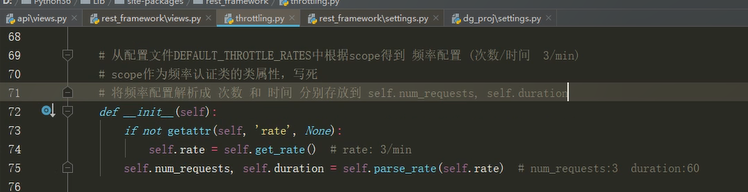
返回到

 def check_throttles(self, request):

        throtttle_durations=[]

        for throttle in self.get_throttles():

         	# 然后调用allow_request,到UserRateThrottle找,没有走UserRateThrottle得父类SimpleRetaThrottle

            if not throttle.allow_request(request, self):

                self.throttled(request, throttle.wait())
    def allow_request(self, request, view):

        """

        Implement the check to see if the request should be throttled.

        On success calls `throttle_success`.

        On failure calls `throttle_failure`.

        """

        if self.rate is None:

            return True

        #rate有值rate = '3/60'

        # self.get_cache_key父级有这个方法,是抛异常,自己去实现这个方法

        #然后子级UserRateThrottle实现了这个方法

        self.key = self.get_cache_key(request, view)

        if self.key is None:

            return True

        self.history = self.cache.get(self.key, [])

        self.now = self.timer()

        # Drop any requests from the history which have now passed the

        # throttle duration

        while self.history and self.history[-1] <= self.now - self.duration:

            self.history.pop()

        if len(self.history) >= self.num_requests:

            return self.throttle_failure()

        return self.throttle_success()
UserRateThrottle中得get_cache_key方法

class UserRateThrottle(SimpleRateThrottle):

    """

    Limits the rate of API calls that may be made by a given user.

    The user id will be used as a unique cache key if the user is

    authenticated.  For anonymous requests, the IP address of the request will

    be used.

    """

    scope = 'user'

    def get_cache_key(self, request, view):

        if request.user.is_authenticated:

            ident = request.user.pk

        else:

            ident = self.get_ident(request)

		#'throttle_%(scope)s_%(ident)s' =》'throttle_user_1'

        return self.cache_format % {

            'scope': self.scope,

            'ident': ident

        }
    def allow_request(self, request, view):

        """

        Implement the check to see if the request should be throttled.

        On success calls `throttle_success`.

        On failure calls `throttle_failure`.

        """

        if self.rate is None:

            return True

       #self.key = 'throttle_user_1'

        self.key = self.get_cache_key(request, view)

        if self.key is None:

            return True

        #django缓存

        #导包cache:from django.core.cache import cache as default_cache

        #缓存有过期时间,key,value,,,default是默认值

        #添加缓存:cache.set(key,defalut)

        #获取缓存:cache.get(key,default) 没有获取到key采用默认值

        #获取缓存key:'throttle_user_1'

        #初次访问缓存为空列表,self.history=[],

        self.history = self.cache.get(self.key, [])

        #获取当前时间存入到self.now

        self.now = self.timer()

        while self.history and self.history[-1] <= self.now - self.duration:

            self.history.pop()

        #history的长度与限制次数3进行比较

        if len(self.history) >= self.num_requests:

            return self.throttle_failure()

        #history的长度未达到限制次数3,代表可以访问

        return self.throttle_success()
点击self.throttle_success()

#将当前时间插入到history列表的开头,将history列表作为数据存到缓存中,key是'throttle_user_1'  ,过期时间60s

   def throttle_success(self):

        """

        Inserts the current request's timestamp along with the key

        into the cache.

        """

        #将当前的时间插到第一位

        self.history.insert(0, self.now)

        #设置缓存,key:'throttle_user_1' history:[self.now, self.now...]

        # duration过期时间60s:'60'

        self.cache.set(self.key, self.history, self.duration)

        return True
 第二次访问走到这个函数的时候

    def allow_request(self, request, view):

        """

        Implement the check to see if the request should be throttled.

        On success calls `throttle_success`.

        On failure calls `throttle_failure`.

        """

        if self.rate is None:

            return True

       #self.key = 'throttle_user_1'

        self.key = self.get_cache_key(request, view)

        if self.key is None:

            return True

     	#第二次访问self.history已经有值,就是第一次访问存放的时间

        self.history = self.cache.get(self.key, [])

        #获取当前时间存入到self.now

        self.now = self.timer()

        #也就是当前的时间减去history缓存的时间(永远都取第一次访问的时间,所以是-1)是否大于过期时间

        #self.now - self.history[-1] >= self.duration

        #当超出的过期时间时,也就是第四次访问

        while self.history and self.history[-1] <= self.now - self.duration:

            #pop是将最后的时间拿出来

            self.history.pop()

        #history的长度与限制次数3进行比较

        #history长度 第一次访问为0, 第二次访问为1,第三次访问的时间长度为2,第四次访问失败

        if len(self.history) >= self.num_requests:

            #直接返回False,代表频率限制了

            return self.throttle_failure()

        #history的长度未达到限制次数3,代表可以访问

        return self.throttle_success()
def throttle_failure(self):

    return False
返回到

  def check_throttles(self, request):

        throtttle_durations=[]

        for throttle in self.get_throttles():

       		#只要频率限制了,allow_request 返回False,才会调用wait

            if not throttle.allow_request(request, self):

                self.throttled(request, throttle.wait())
调用的是SimpleRateThrottle的wait,因为UserRateThrouttle中没有wait这个方法

    def wait(self):

        """

        Returns the recommended next request time in seconds.

        """

        #如果缓存中还有history等30s

        if self.history:

            #self.duration=60, self.now当前时间-self.history[-1]第一次访问时间

            remaining_duration = self.duration - (self.now - self.history[-1])

        else:

            #如果缓存中没有,直接等60s

            remaining_duration = self.duration

		#self.num_requests=3,len(self.history)=3 结果3-3+1=1

        available_requests = self.num_requests - len(self.history) + 1

        if available_requests <= 0:

            return None

		# 30/1=30 返回的就是30s

        #如果意外第二次访问就被限制了就是30/2=15s

        return remaining_duration / float(available_requests)
自定义频率类
# 1) 自定义一个继承 SimpleRateThrottle 类 的频率类

# 2) 设置一个 scope 类属性,属性值为任意见名知意的字符串

# 3) 在settings配置文件中,配置drf的DEFAULT_THROTTLE_RATES,格式为 {scope字符串: '次数/时间'}

# 4) 在自定义频率类中重写 get_cache_key 方法

	# 限制的对象返回 与限制信息有关的字符串

    # 不限制的对象返回 None (只能放回None,不能是False或是''等)
短信接口 1/min 频率限制
频率:api/throttles.py
from rest_framework.throttling import SimpleRateThrottle

class SMSRateThrottle(SimpleRateThrottle):

    scope = 'sms'

    # 只对提交手机号的get方法进行限制,因为get请求发送数据就是在params中传送数据的,如果想要禁用post请发送过来的数据就要mobile = request.query_params.get('mobile') or request.data.get('mobile')

    def get_cache_key(self, request, view):

        mobile = request.query_params.get('mobile')

        # 没有手机号,就不做频率限制

        if not mobile:

            return None

        # 返回可以根据手机号动态变化,且不易重复的字符串,作为操作缓存的key

        return 'throttle_%(scope)s_%(ident)s' % {'scope': self.scope, 'ident': mobile}
配置:settings.py
# drf配置

REST_FRAMEWORK = {

    # 频率限制条件配置

    'DEFAULT_THROTTLE_RATES': {

        'sms': '3/min'  #60s内可以访问三次请求

    },

}
视图:views.py
from .throttles import SMSRateThrottle

class TestSMSAPIView(APIView):

    # 局部配置频率认证

    throttle_classes = [SMSRateThrottle]

    def get(self, request, *args, **kwargs):

        return APIResponse(0, 'get 获取验证码 OK')

    def post(self, request, *args, **kwargs):

        return APIResponse(0, 'post 获取验证码  OK')
路由:api/url.py
url(r'^sms/$', views.TestSMSAPIView.as_view()),
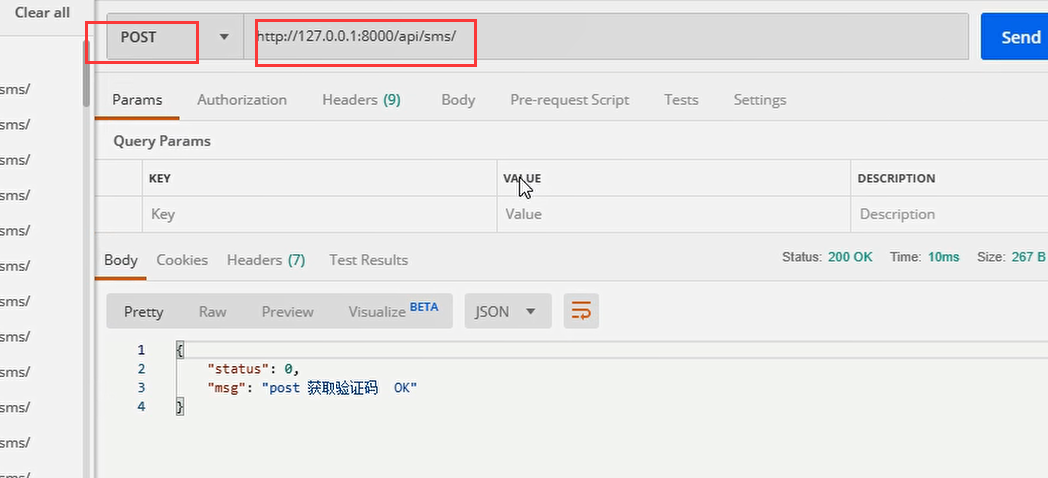
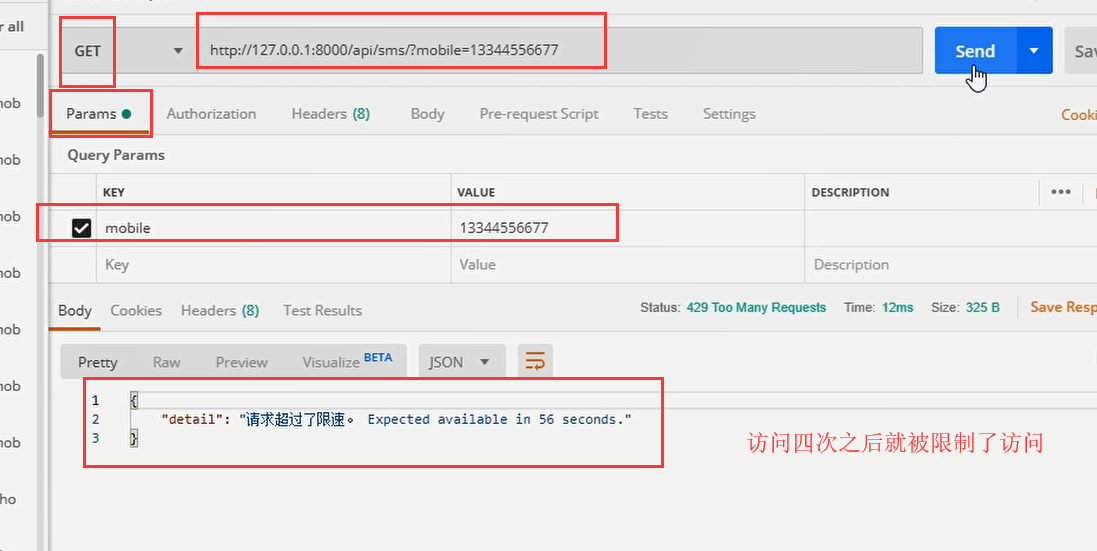
限制的接口
# 只会对 /api/sms/?mobile=具体手机号 接口才会有频率限制

# 1)对 /api/sms/ 或其他接口发送无限制

# 2)对数据包提交mobile的/api/sms/接口无限制

# 3)对不是mobile(如phone)字段提交的电话接口无限制
测试


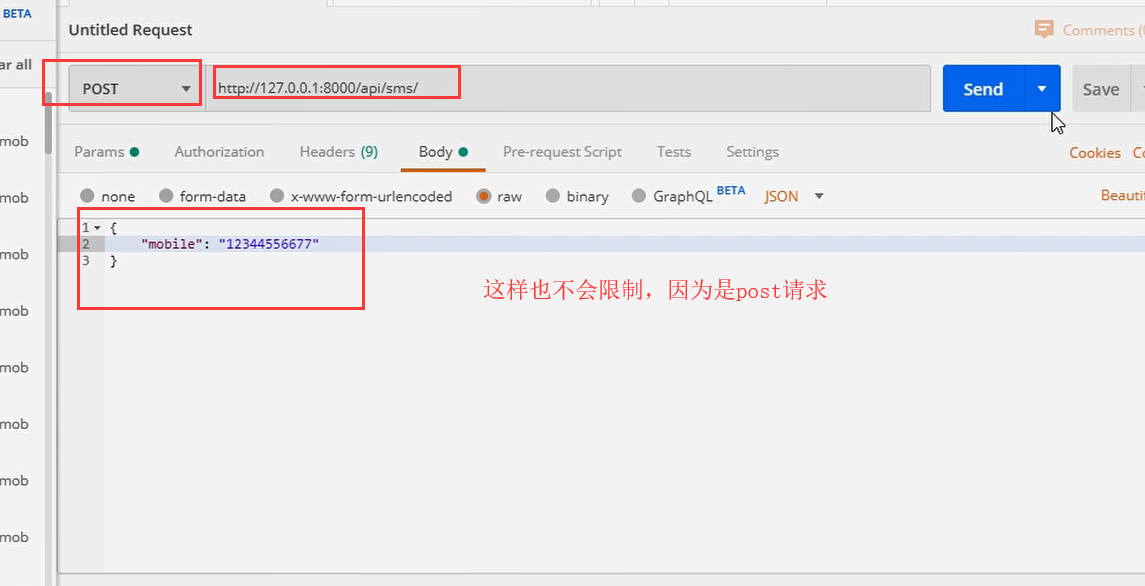
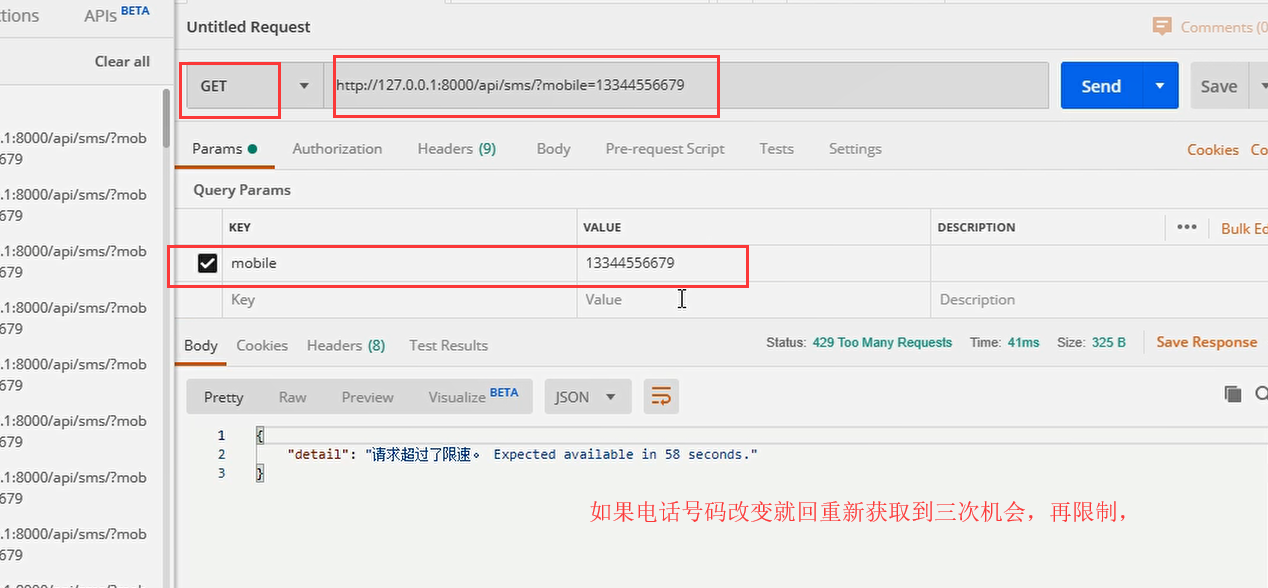
drf的频率认证的更多相关文章
- drf框架 - 三大认证组件 | 认证组件 | 权限组件 | 频率组件
RBAC 基于用户权限访问控制的认证 - Role-Based Access Control Django框架采用的是RBAC认证规则,RBAC认证规则通常会分为 三表规则.五表规则,Django采用 ...
- drf三大组件之频率认证组件
复习 """ 1.认证组件:校验认证字符串,得到request.user 没有认证字符串,直接放回None,游客 有认证字符串,但认证失败抛异常,非法用户 有认证字符串, ...
- DRF之频率限制、分页、解析器和渲染器
一.频率限制 1.频率限制是做什么的 开放平台的API接口调用需要限制其频率,以节约服务器资源和避免恶意的频繁调用. 2.频率组件原理 DRF中的频率控制基本原理是基于访问次数和时间的,当然我们可以通 ...
- DRF 权限 频率
DRF的权限 权限是什么 大家之前都应该听过权限~那么我们权限到底是做什么用的呢~~ 大家都有博客~或者去一些论坛~一定知道管理员这个角色~ 比如我们申请博客的时候~一定要向管理员申请~也就是说管理员 ...
- DRF 版本、认证、权限、限制、解析器和渲染器
目录 一.DRF之版本控制 为什么要有版本控制? DRF提供的版本控制方案 版本的使用 全局配置 局部配置(使用较少) 二.DRF之认证 内置的认证 步骤 三.DRF之权限 1.自定义一个权限类 2. ...
- drf框架中认证与权限工作原理及设置
0909自我总结 drf框架中认证与权限工作原理及设置 一.概述 1.认证 工作原理 返回None => 游客 返回user,auth => 登录用户 抛出异常 => 非法用户 前台 ...
- day75_10_22频率认证和jwt
一.频率认证原理. 1.从dispatch中获取配置,找到setting中的配置. 2.从thtoyyling中寻找到各个认证类. 3.所有认证类都继承自basethrottle,basethrott ...
- drf的三大认证
目录 三大认证任务分析 auth组件的认证权限六表 自定义User表分析 源码分析 认证与权限工作原理 源码分析 认证模块工作原理 权限模块工作原理 admin关联自定义用户表 自定义认证.权限类 用 ...
- DRF之三大认证
一.用户认证Authorticatons 1.源码解析 第一步. 找入口 def dispatch(self, request, *args, **kwargs): # 1.首先我们进入的是APIVi ...
随机推荐
- javaSE复习之——线程
线程其实就是程序执行的一条路径,一个进程中可以包含多条线程,多线程并发执行可以提高程序效率,可以同使完成多项任务 多线程的应用场景 迅雷多线程一起下载 服务器同时处理多个客户请求 多线程原理(单核CP ...
- ES6中的数组
数组是js中很重要的数据类型,虽然在 ES5 中,关于数组的方法和属性很多.但为了更加简洁.高效的操作数组,ES6 中又在数组原型上和实例上新增了一些方法. 一.Array方法 1.1 Array.f ...
- (转)Linux设备驱动之HID驱动 源码分析
//Linux设备驱动之HID驱动 源码分析 http://blog.chinaunix.net/uid-20543183-id-1930836.html HID是Human Interface De ...
- CSS——NO.10(设置技巧)
*/ * Copyright (c) 2016,烟台大学计算机与控制工程学院 * All rights reserved. * 文件名:text.cpp * 作者:常轩 * 微信公众号:Worldhe ...
- 前端每日实战:85# 视频演示如何用纯 CSS 创作一个小球反弹的动画
效果预览 按下右侧的"点击预览"按钮可以在当前页面预览,点击链接可以全屏预览. https://codepen.io/comehope/pen/OwWROO 可交互视频 此视频是可 ...
- Vue请求第三方接口跨域最终解决办法!2020最终版!
废话少说,再百度的近三个小时尝试了近10种方法无解后,终于皇天不负有心人! 这个vue axios 跨域问题被我解决了! 需求:请求客户端ip地址获取客户ip,再根据ip获取用户位置 工具:Vue,a ...
- 广告行业中那些趣事系列6:BERT线上化ALBERT优化原理及项目实践(附github)
摘要:BERT因为效果好和适用范围广两大优点,所以在NLP领域具有里程碑意义.实际项目中主要使用BERT来做文本分类任务,其实就是给文本打标签.因为原生态BERT预训练模型动辄几百兆甚至上千兆的大小, ...
- 阿里云Tomcat配置
阿里云Tomcat配置并开放 本文可对以下问题提供参考 服务器 如何配置 Tomcat 配置 端口在监听,但是外网无法访问怎么办 注意事项: 对于阿里云服务器相对较为特殊,因为阿里云服务器除了需要在系 ...
- 05 Linux目录速查表
/:根目录,一般根目录下只存放目录,在 linux 下有且只有一个根目录,所有的东西都是从这里开始 当在终端里输入 /home,其实是在告诉电脑,先从 /(根目录)开始,再进入到 home 目录 /b ...
- 18 JpaRepository和JpaSpecificationExecutor
继承JpaRepository后的方法列表 JpaRepository findAll() List<T> findAll(Sort) List<T> findAll(Iter ...