
自动化运维工具Ansible之Tests测验详解
Ansible Tests 详解与使用案例
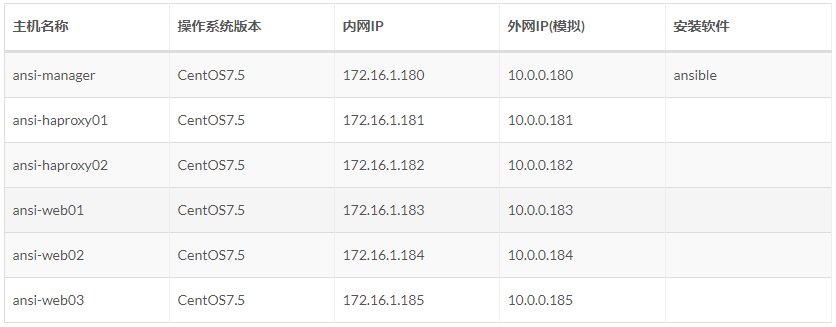
主机规划
添加用户账号
说明:
1、 运维人员使用的登录账号;
2、 所有的业务都放在 /app/ 下「yun用户的家目录」,避免业务数据乱放;
3、 该用户也被 ansible 使用,因为几乎所有的生产环境都是禁止 root 远程登录的(因此该 yun 用户也进行了 sudo 提权)。
 # 使用一个专门的用户,避免直接使用root用户

 # 添加用户、指定家目录并指定用户密码

 # sudo提权

 # 让其它普通用户可以进入该目录查看信息

 useradd -u  -d /app yun && echo '' | /usr/bin/passwd --stdin yun

 echo "yun  ALL=(ALL)       NOPASSWD: ALL" >>  /etc/sudoers

 chmod  /app/
Ansible 配置清单Inventory
之后文章都是如下主机配置清单
 [yun@ansi-manager ansible_info]$ pwd

 /app/ansible_info

 [yun@ansi-manager ansible_info]$ cat hosts_key

 # 方式1、主机 + 端口 + 密钥

 [manageservers]

 172.16.1.180:

 [proxyservers]

 172.16.1.18[:]:

 # 方式2:别名 + 主机 + 端口 + 密码

 [webservers]

 web01 ansible_ssh_host=172.16.1.183 ansible_ssh_port=

 web02 ansible_ssh_host=172.16.1.184 ansible_ssh_port=

 web03 ansible_ssh_host=172.16.1.185 ansible_ssh_port=
Tests 概述
Tests 在 Jinja 中是一种评估模板表达式,并最终返回 True 或 False。Jinja 中就有自带的 Tests 清单,具体地址如下:
http://docs.jinkan.org/docs/jinja2/templates.html#builtin-tests
tests 和 filters 的主要区别在于Jinja tests 用于比较,而 filters 用于数据操作,两者在Jinja中有不同的应用。
与所有模板一样,tests 总是在 Ansible 控制机上执行,而不是在任务的目标机上,因为它们测验本地数据。
除了 Jinja2 tests 之外,Ansible还提供了一些 tests,用户也可以轻松创建自己的 tests。
测验字符串
若要将字符串与子字符串或正则表达式匹配,请使用「match」、「search」或「regex」过滤。
match:必须有开头匹配
search:子串匹配
regex:正则匹配
示例:
 [yun@ansi-manager ansi_tests]$ pwd

 /app/ansible_info/ansi_tests

 [yun@ansi-manager ansi_tests]$ cat tests_str.yml

 ---

 - hosts: manageservers

   vars:

     url: "http://example.com/users/foo/resources/bar"

   tasks:

     - debug:

         msg: "matched pattern 1-1"

       when: url is match("http://example.com/users/.*/resources/.*") # True

     - debug:

         msg: "matched pattern 1-2"

       when: url is match("http://example.com") # True

     - debug:

         msg: "matched pattern 1-3"

       when: url is match(".*://example.com") # True

     - debug:

         msg: "matched pattern 1-4"

       when: url is match("example.com/users/.*/resources/.*") # False

     - debug:

         msg: "matched pattern 2-1"

       when: url is search("/users/.*/resources/.*") # True

     - debug:

         msg: "matched pattern 2-2"

       when: url is search("/users/") # True

     - debug:

         msg: "matched pattern 2-3"

       when: url is search("/user/") # False

     - debug:

         msg: "matched pattern 3"

       when: url is regex("example.com/\w+/foo") # True

 [yun@ansi-manager ansi_tests]$ ansible-playbook -b -i ../hosts_key tests_str.yml  # 注意查看执行
测验版本比较
使用「version」,用于版本号比较。
「version」接受的运算符如下:
<, lt, <=, le, >, gt, >=, ge, ==, =, eq, !=, <>, ne
「version」也可以接受「strict」参数,这个参数默认值为「False」,如果设置为「True」则ansible会进行更严格的版本检查:
{{ sample_version_var is version('1.0', operator='lt', strict=True) }}
示例:
 # 判断 ansible_python_version 版本是否 大于等于 2.7.

 [yun@ansi-manager ansi_tests]$ pwd

 /app/ansible_info/ansi_tests

 [yun@ansi-manager ansi_tests]$ ll

 total

 drwxrwxr-x  yun yun   Sep  : file

 -rw-rw-r--  yun yun  Sep  : tests_version.yml

 [yun@ansi-manager ansi_tests]$ cat file/tests_version.conf.j2   # 涉及文件

 # Jinja2 版本测验

 {% if ansible_python_version is version('2.7.3', '>=') %}

 result True. ansible_python_version = {{ ansible_python_version }}

 {% else %}

 result False

 {% endif %}

 [yun@ansi-manager ansi_tests]$ cat tests_version.yml  # 涉及的playbook文件

 ---

 # ansible tests Version Comparison

 - hosts: proxyservers

   tasks:

     - name: "Tests Version Comparison"

       template:

         src: ./file/tests_version.conf.j2

         dest: /tmp/tests_version.conf

 [yun@ansi-manager ansi_tests]$ ansible-playbook -b -i ../hosts_key tests_version.yml   # 执行
测验子集和超集
关键字「superset」和「subset」,用于测验一个列表是否包含或被包含于另一个列表
示例:
 [yun@ansi-manager ansi_tests]$ pwd

 /app/ansible_info/ansi_tests

 [yun@ansi-manager ansi_tests]$ cat tests_set.yml

 ---

 # tests 子集和超集

 - hosts: manageservers

   vars:

     a: [,,,,]

     b: [,]

   tasks:

     - debug:

         msg: "A includes B"

       when: a is superset(b)

     - debug:

         msg: "B is included in A"

       when: b is subset(a)

 [yun@ansi-manager ansi_tests]$ ansible-playbook -b -i ../hosts_key tests_set.yml  # 注意查看执行
测验列表真假
关键字「all」和「any」,用于检查列表里元素的真假,列表中所有为真或者任何一个为真。
all:一假则假
any:一真则真
 [yun@ansi-manager ansi_tests]$ pwd

 /app/ansible_info/ansi_tests

 [yun@ansi-manager ansi_tests]$ cat tests_list.yml

 ---

 #  tests 测验 all any

 - hosts: manageservers

   vars:

     mylist:

       -

       - "{{ 3 == 3 }}"

       - True

     myotherlist:

       - False

       - True

   tasks:

     - debug:

         msg: "all are true!"

       when: mylist is all

     - debug:

         msg: "at least one is true"

       when: myotherlist is any

 [yun@ansi-manager ansi_tests]$ ansible-playbook -b -i ../hosts_key tests_list.yml  # 注意查看执行
测验文件或目录
用于测验目录、文件、软连接、是否已存在、是相对路径还是绝对路径等等。
 [yun@ansi-manager ansi_tests]$ pwd

 /app/ansible_info/ansi_tests

 [yun@ansi-manager ansi_tests]$ cat tests_path.yml

 ---

 - hosts: manageservers

   vars:

     # - mypath: /tmp/

     - mypath: /tmp/yum_hard.sh

     - path2: /tmp/

     # - path2: /tmp/yum_hard_2.sh

   tasks:

     - debug:

         msg: "path is a directory"

       when: mypath is directory

     - debug:

         msg: "path is a file"

       when: mypath is file

     - debug:

         msg: "path is a symlink"

       when: mypath is link

     - debug:

         msg: "path already exists"

       when: mypath is exists

     - debug:

         msg: "path is {{ (mypath is abs)|ternary('absolute','relative')}}"

     - debug:

         msg: "path is the same file as path2"

       when: mypath is same_file(path2)

     - debug:

         msg: "path is a mount"

       when: mypath is mount

 [yun@ansi-manager ansi_tests]$ ansible-playbook -b -i ../hosts_key tests_path.yml  # 注意查看执行
测验任务执行结果
对任务执行结果进行测验。
 [yun@ansi-manager ansi_tests]$ pwd

 /app/ansible_info/ansi_tests

 [yun@ansi-manager ansi_tests]$ cat tests_result.yml

 ---

 - hosts: 172.16.1.180

   ## 对如下3种情况一次测验

   tasks:

     - shell: /usr/bin/foo

     #- shell: /usr/bin/true

     #- shell: /usr/bin/false

       register: result

       ignore_errors: True

     - debug:

         msg: "{{ result }}"

     - debug:

         msg: "it failed"

       when: result is failed

     # in most cases you'll want a handler, but if you want to do something right now, this is nice

     - debug:

         msg: "it changed"

       when: result is changed

     - debug:

         msg: "it succeeded in Ansible >= 2.1"

       when: result is succeeded

     - debug:

         msg: "it succeeded"

       when: result is success

     - debug:

         msg: "it was skipped"

       when: result is skipped

 [yun@ansi-manager ansi_tests]$ ansible-playbook -b -i ../hosts_key tests_result.yml  # 注意查看执行
———END———
如果觉得不错就关注下呗 (-^O^-) !

自动化运维工具Ansible之Tests测验详解的更多相关文章
- 自动化运维工具Ansible之Roles测验详解
Ansible Roles 详解与实战案例 主机规划 添加用户账号 说明: 1. 运维人员使用的登录账号: 2. 所有的业务都放在 /app/ 下「yun用户的家目录」,避免业务数据乱放: 3. 该用 ...
- 自动化运维工具Ansible的部署步骤详解
本文来源于http://sofar.blog.51cto.com/353572/1579894,主要是看到这样一篇好文章,想留下来供各位同僚一起分享. 一.基础介绍 ================= ...
- 自动化运维工具-Ansible之7-roles
自动化运维工具-Ansible之7-roles 目录 自动化运维工具-Ansible之7-roles Ansible Roles基本概述 Ansible Roles目录结构 Ansible Roles ...
- 自动化运维工具Ansible详细部署 (转载)
自动化运维工具Ansible详细部署 标签:ansible 原创作品,允许转载,转载时请务必以超链接形式标明文章 原始出处 .作者信息和本声明.否则将追究法律责任.http://sofar.blog. ...
- 自动化运维工具Ansible详细部署 - 人生理想在于坚持不懈 - 51CTO技术博客
自动化运维工具Ansible详细部署 - 人生理想在于坚持不懈 - 51CTO技术博客 自动化运维工具Ansible详细部署
- CentOS7Linux中自动化运维工具Ansible的安装,以及通过模块批量管理多台主机
使用自动化运维工具Ansible集中化管理服务器 Ansible概述 Ansible是一款为类Unix系统开发的自由开源的配置和自动化工具.它用Python写成,类似于saltstack和Puppet ...
- 自动化运维工具Ansible介绍
一个由 Python 编写的强大的配置管理解决方案.尽管市面上已经有很多可供选择的配置管理解决方案,但他们各有优劣,而 ansible 的特点就在于它的简洁. 让 ansible 在主流的配置管理系统 ...
- 在CentOS7.6上安装自动化运维工具Ansible以及playbook案例实操
前言 Ansible是一款优秀的自动化IT运维工具,具有远程安装.远程部署应用.远程管理能力,支持Windows.Linux.Unix.macOS和大型机等多种操作系统. 下面就以CentOS 7.6 ...
- 自动化运维工具-Ansible基础
目录 自动化运维工具-Ansible基础 什么是Ansible 同类型软件对比 Ansible的功能及优点 Ansible的架构 Ansible的执行流程 安装Ansible ansible配置文件 ...
随机推荐
- java添加对象成功后想知道当前添加对象的id
我使用的是springboot Mybatis写的项目,结构如下 mapper.xml(以下2个属性必须要有,主键id 一般是自动生成的) mapper.java (注意新增的返回值不需要,一般情况 ...
- floyd三重循环最外层为什么一定是K
Floyd算法为什么把k放在最外层? - 知乎 https://www.zhihu.com/question/30955032高票答案: 简单地总结一下:K没放在最外面一定是错的,但是在某些数据比较水 ...
- go1.13errors的用法
go1.13errors的用法 前言 基本用法 fmt.Errorf Unwrap errors.Is As 扩展 参考 go1.13errors的用法 前言 go 1.13发布了error的一些新的 ...
- 【python实现卷积神经网络】padding2D层实现
代码来源:https://github.com/eriklindernoren/ML-From-Scratch 卷积神经网络中卷积层Conv2D(带stride.padding)的具体实现:https ...
- 文件上传——客户端检测绕过(JavaScript检测)(一)
前言 通常再一个web程序中,一般会存在登陆注册功能,登陆后一般会有上传头像等功能,如果上传验证不严格就可能造成攻击者直接上传木马,进而控制整个web业务控制权.下面通过实例,如果程序只进行了客户端J ...
- 【小学数学】算术口诀 独立音频MP3
算术口诀 独立音频MP3 原文载于本人个人网站:http://www.unlimitedbladeworks.cc/writing_202004_01_sskj 特点 加法口诀 乘法口诀 独立音频 m ...
- 【08NOIP提高组】笨小猴
笨 小 猴 来自08年NOIP提高组的第一题 1.题目描述 [题目描述] 笨小猴的词汇量很小,所以每次做英语选择题的时候都很头痛.经实验证明,用这种方法去选择选项的时候选对的几率非常大!这种方法的具体 ...
- css特效sh
1 opacity=0.5: 透明度 2 选择器 .btn1:ho ...
- samba 客户端工具 smbclient和samba挂载到本地
smbclient命令属于samba套件,它提供一种命令行使用交互式方式访问samba服务器的共享资源. 安装 yum install -y samba-client 常用参数 -c<命令> ...
- Java IO 流-- 文件拷贝
IO流操作套路: 1.创建源: 2.选择流: 3.操作: 4.释放资源 上代码: package com.xzlf.io; import java.io.File; import java.io.Fi ...