
部署MYSQL高可用集群
mysql-day08 部署MYSQL高可用集群
u 集群架构
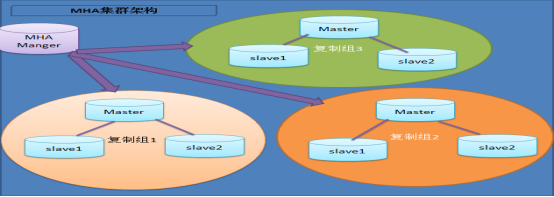
MHA 工作过程
• MHA Manager 会定时探测集群中的 master 节点,
当 master 出现故障时,它可以自动将最新数据的 sl
ave 提升为新的 master ,然后将所有其他的 slave
重新指向新的 master 。整个故障转移过程对应用程
序完全透明。
– ( 1 )从宕机崩溃的 master 保存二进制日志事件( binlog events)
– ( 2 )识别含有最新更新的 slave
– ( 3 )应用差异的中继日志( relay log )到其他的 slave
– ( 4 )应用从 master 保存的二进制日志事件( binlog events )
– ( 5 )提升一个 slave 为新的 master ;
– ( 6 )使其他的 slave 连接新的 master 进行复制;
u 准备环境
一、集群定义:使用多台服务提供相同的服务
二、高可用集群定义:主备模式,被客户端访问的称作主,当主宕机时,备用
服务器自动接收客户端访问。
拓扑结构
client
|
| -->vip 192.168.4.100 《51,52,53》
_____________________________________________________
||| ||| ||| || || || ||
master51 master(备)52 master(备)53 slave54 slave55 mgm56 Manager
一、配置所有数据节点主机之间可以互相以ssh密钥对方式认证登陆
二、配置manager56主机无密码ssh登录所有数据节点主机
三、配置主从同步,要求如下:
51主库 开半同步复制
52从库(备用主库)开半同步复制
53从库(备用主库)开半同步复制
54从库不做备用主库所以不用开半同步复制
55从库不做备用主库所以不用开半同步复制
拓扑图
• 采用 5 个数据库服务器节点
u 步骤
注意:安装mariadb,就有mysql命令
1.在所有主机上安装perl软件包(51~56)
]#cd mha-soft-student
]#yum -y install perl-*.rpm
2.在所有主机上安装mha_node软件包(51~56)
yum -y install perl-DBD-mysql
rpm -ivh mha4mysql-node-0.56-0.el6.noarch.rpm
2.只在管理"主机56"上安装mha_manager软件包
]#yum -y install perl-ExtUtils-* perl-CPAN*
]#tar -zxvf mha4mysql-manager-0.56.tar.gz
]#cd mha4mysql-manager-0.56
]#perl Makefile.PL
]#make
]#make install
3.2.4检查配置环境
在主机51 52 53检查是否有同步数据的用户repluser
mysql>show grants for repluser@"%";
u 在主机51~55做如下授权
mysql>grant all on *.* to root@"%" identified by "123456";
u 在主机51~55做如下设置
mysql>set global relay_log_purge=off;
3.2.5拷贝命令(56)
]#cp mha4mysql-manager-0.56/bin/* /usr/local/bin/
3.2.6创建工作目录和主配置文件(56)
]#mkdir /etc/mha_manager/
]#cp mha4mysql-manager-0.56/samples/conf/app1.cnf
/etc/mha_manager/
3.2.7创建故障切换脚本(56)
]#ls /usr/local/bin/master_ip_failover
]#cp mha4mysql-manager-0.56/samples/scripts/master_ip_failover /usr/local/bin/
3.2.8编辑主配置文件app1.cnf (56)
]#vim /etc/mha_manager/app1.cnf
[server default]
manager_workdir=/etc/mha_manager
manager_log=/etc/mha_manager/manager.log
master_ip_failover_script=/usr/local/bin/master_ip_failover
ssh_user=root
ssh_port=22
repl_user=repluser
repl_password=123456
user=root
password=123456
[server1]
hostname=192.168.4.51
port=3306
[server2]
hostname=192.168.4.52
port=3306
candidate_master=1
[server3]
hostname=192.168.4.53
port=3306
candidate_master=1
[server4]
hostname=192.168.4.54
no_master=1
[server5]
hostname=192.168.4.55
no_master=1
2.2.9验证配置
u 验证ssh免密码登录数据节点主机
]#masterha_check_ssh --conf=/etc/mha_manager/app1.cnf
Sun May 6 16:38:19 2018-[info]All SSH connection tests passed
successfully.
u 验证数据节点的主从同步配置(要不调用故障切换脚本)
masterha_check_repl --conf=/etc/mha_manager/app1.cnf
MySQL Replication Health is OK.
四、测试高可用集群配置
4.1在主库上手动部署vip地址192.168.4.100
[root@db51~]#ifconfig eth0:1 192.168.4.100/24
[root@db51~]#ifconfig eth0:1
eth0:1:flags=4163<UP,BROADCAST,RUNNING,MULTICAST>mtu 1500
inet 192.168.4.100 netmask 255.255.255.0 broadcast
192.168.4.255
ether 74:52:09:07:51:01 txqueuelen 1000(Ethernet)
4.2修改故障切换脚本指定vip地址的部署信息
]#vim/usr/local/bin/master_ip_failover
my$vip='192.168.4.100/24';#Virtual IP
my$key="1";
my$ssh_start_vip="/sbin/ifconfig eth0:$key$vip";
my$ssh_stop_vip="/sbin/ifconfig eth0:$key down";
......
##Update master ip on the catalog database,etc
#FIXME_xxx;//备注
:wq
#!/usr/bin/env perl
# Copyright (C) 2011 DeNA Co.,Ltd.
#
# This program is free software; you can
redistribute it and/or modify
# it under the terms of the GNU General
Public License as published by:
# the Free Software Foundation; either
version 2 of the License, or
# (at your option) any later
version.
#
# This program is distributed in the
hope that it will be useful,
# but WITHOUT ANY WARRANTY; without even
the implied warranty of
# MERCHANTABILITY or FITNESS FOR A
PARTICULAR PURPOSE. See the
# GNU General Public License for more
details.
#
# You should have received a copy of the
GNU General Public License
# along with this program; if not,
write to the Free Software
# Foundation, Inc.,
# 51 Franklin Street, Fifth Floor,
Boston, MA 02110-1301 USA
## Note: This is a sample script and is not complete. Modify the script based
on your environment.
use strict;
use warnings FATAL => 'all';
use Getopt::Long;
use MHA::DBHelper;
my (
$command, $ssh_user, $orig_master_host,
$orig_master_ip, $orig_master_port,
$new_master_host,
$new_master_ip, $new_master_port, $new_master_user,
$new_master_password
);
my $vip = '192.168.4.60/24'; # Virtual
IP
my $key = "1";
my $ssh_start_vip = "/sbin/ifconfig eth0:$key $vip";
my $ssh_stop_vip = "/sbin/ifconfig eth0:$key down";
GetOptions(
'command=s' => \$command,
'ssh_user=s' => \$ssh_user,
'orig_master_host=s' => \$orig_master_host,
'orig_master_ip=s' => \$orig_master_ip,
'orig_master_port=i' => \$orig_master_port,
'new_master_host=s' => \$new_master_host,
'new_master_ip=s' => \$new_master_ip,
'new_master_port=i' => \$new_master_port,
'new_master_user=s' => \$new_master_user,
'new_master_password=s' => \$new_master_password,
);
exit &main();
sub main {
if ( $command eq "stop" ||
$command eq "stopssh" ) {
# $orig_master_host, $orig_master_ip,
$orig_master_port are passed.
# If you manage master ip address at
global catalog database,
# invalidate orig_master_ip
here.
my $exit_code = 1;
eval {
# updating global catalog,
etc
&stop_vip();
$exit_code = 0;
};
if ($@) {
warn "Got Error:
$@\n";
exit $exit_code;
}
exit $exit_code;
}
elsif ( $command eq "start" )
{
# all arguments are passed.
# If you manage master ip address at
global catalog database,
# activate new_master_ip here.
# You can also grant write access
(create user, set read_only=0, etc) here.
my $exit_code = 10;
eval {
my $new_master_handler = new
MHA::DBHelper();
# args: hostname, port, user,
password, raise_error_or_not
$new_master_handler->connect(
$new_master_ip, $new_master_port,
$new_master_user,
$new_master_password, 1 );
## Set read_only=0 on the new master
$new_master_handler->disable_log_bin_local();
print "Set read_only=0 on the
new master.\n";
$new_master_handler->disable_read_only();
## Creating an app user on the new
master
print "Creating app user on
the new master..\n";
$new_master_handler->enable_log_bin_local();
$new_master_handler->disconnect();
## Update master ip on the catalog
database, etc
&start_vip();
$exit_code = 0;
};
if ($@) {
warn $@;
# If you want to continue failover,
exit 10.
exit $exit_code;
}
exit $exit_code;
}
elsif ( $command eq "status"
) {
# do nothing
exit 0;
}
else {
&usage();
exit 1;
}
}
sub start_vip() {
`ssh $ssh_user\@$new_master_host
\" $ssh_start_vip \"`;
}
sub stop_vip() {
return 0 unless ($ssh_user);
`ssh $ssh_user\@$orig_master_host
\" $ssh_stop_vip \"`;
}
sub usage {
print
"Usage: master_ip_failover --command=start|stop|stopssh|status --orig_master_host=host
--orig_master_ip=ip --orig_master_port=port --new_master_host=host
--new_master_ip=ip --new_master_port=port\n";
}
4.3启动管理服务,并查看服务状态
]#masterha_manager--conf=/etc/mha/app1.cnf
--remove_dead_master_conf--ignore_last_failover
[root@host56~]#masterha_check_status--conf=/etc/mha_manager/app1.cnf
app1(pid:16944)is running(0:PING_OK),master:192.168.4.51
[root@host56~]#
+++++++++++++++++++++++++++++++++++++++++++
4.4测试故障转移
在主库51上执行]#shutdown-h now
4.5在管理主机上查看服务状态(如果服务停止了,手动启动一下服务,再查看状态)
[root@host56~]#masterha_check_status --conf=/etc/mha_manager/app1.cnf
app1(pid:17507)is running(0:PING_OK),master:192.168.4.52
4.6在52本机查看是否获取vip地址
[root@db52~]#ip addr show|grep 192.168.4 inet 192.168.4.52/24 brd 192.168.4.255 scope global eth0
inet 192.168.4.100/24 brd 192.168.4.255 scope global secondary
4.7客户端连接vip地址,访问数据服务
]#mysql-h192.168.4.100-uwebadmin-p123456
4.8重置主库
Smysql>stop slave;
Mysql>change master to
master_host="192.168.4.51",master_user="repluser", master_password="123456",
master_log_file="master51.000014",
master_log_pos=154;
Mysql>start slave;
Mysql>show slave status\G;//查看主库信息
mysql>show variables like'log_bin%';//查看log设置
##############################################
还原成独立数据库
root@host55~]#systemctl stop mysqld
[root@host55~]#cd /var/lib/mysql
[root@host55 mysql]#rm -rf master.info relay-log.info
[root@host55 mysql]#ls
[root@host55 mysql]#rm -rf host55-relay-bin.*
[root@host55 mysql]#systemctl start mysqld
[root@host55 mysql]#mysql -uroot -p123456 -e "show slave status\G"
部署MYSQL高可用集群的更多相关文章
- MySQL高可用集群方案
一.Mysql高可用解决方案 方案一:共享存储 一般共享存储采用比较多的是 SAN/NAS 方案. 方案二:操作系统实时数据块复制 这个方案的典型场景是 DRBD,DRBD架构(MySQL+DRBD+ ...
- MySQL高可用集群MHA方案
MySQL高可用集群MHA方案 爱奇艺在用的数据库高可用方案 MHA 是目前比较成熟及流行的 MySQL 高可用解决方案,很多互联网公司正是直接使用或者基于 MHA 的架构进行改造实现 MySQL 的 ...
- (六) Docker 部署 Redis 高可用集群 (sentinel 哨兵模式)
参考并感谢 官方文档 https://hub.docker.com/_/redis GitHub https://github.com/antirez/redis happyJared https:/ ...
- Mysql高可用集群环境介绍
MySQL高可用集群环境搭建 01.MySQL高可用环境方案 02.MySQL主从复制原理 03.MySQL主从复制作用 04.在Linux环境上安装MySQL 05.在MySQL集群环境上配置主从复 ...
- Mysql 高可用集群PXC
PXC是percona公司的percona xtraDB cluster,简称PXC.它是基于Galera协议的高可用集群方案.可以实现多个节点间的数据同步复制以及读写,并且可保障数据库的服务高可 ...
- 部署zookeepe高可用集群
部署zookeepe高可用集群 部署规划 Nno1 192.16 ...
- keepalived+MySQL高可用集群
基于keepalived搭建MySQL的高可用集群 MySQL的高可用方案一般有如下几种: keepalived+双主,MHA,MMM,Heartbeat+DRBD,PXC,Galera Clus ...
- corosync+pacemaker and drbd实现mysql高可用集群
DRBD:Distributed Replicated Block Device 分布式复制块设备,原理图如下 DRBD 有主双架构和双主架构的,当处于主从架构时,这个设备一定只有一个节点是可以读写的 ...
- 一键部署Kubernetes高可用集群
三台master,四台node,系统版本为CentOS7 IP ROLE 172.60.0.226 master01 172.60.0.86 master02 172.60.0.106 master0 ...
随机推荐
- 推荐一个学习python非常好的网站
推荐一个入门python非常好的网站(也可以学习JAVA)非常适合入门,不说多易于理解,也是比较亲民的0基础学习教程,还免费…… 网址:https://www.liaoxuefeng.com/(廖雪峰 ...
- openstack的yum源出错,配置openstack-ocata版的在线yum源,openstack的yum源配置
真的是几经周折,终于配置好了!我做好了一键配置yum的代码,地址:https://www.cnblogs.com/guarding/p/12321702.html 首先看一下配置前的报错信息把: 需要 ...
- Java基础(五):数组
数组,一种应用非常广泛的数据结构,简单地来说就是一组类型相同且无序的元素的存储在固定长度且有序的内存空间. 创建一个数组 在Java中,我们可以通过[]去声明一个指定类型的数组 int[] a; // ...
- H5解决安卓软键盘弹出遮蔽的方法
首先先判断是否为安卓,是的话才添加事件监听,获取焦点元素判断是否为input或者textarea类型,是的话,Element.scrollIntoView() 方法会让当前的元素滚动到浏览器窗口的可视 ...
- java第一次上机练习作业
1.已知a,b均是整型变量,写出将a,b两个变量中的值互换的程序.(知识点:变量和 运算符综合应用) int a = 5, b = 10; int temp; temp = a; a = b; b = ...
- vue中v-slot使用
vue中v-slot使用 1,v-slot的使用步骤 <!-- slot.vue--> <!-- 通过name属性指定具名插槽,没有name属性的为默认插槽--> <sl ...
- 小白学 Python 数据分析(18):Matplotlib(三)常用图表(上)
人生苦短,我用 Python 前文传送门: 小白学 Python 数据分析(1):数据分析基础 小白学 Python 数据分析(2):Pandas (一)概述 小白学 Python 数据分析(3):P ...
- Git&Github入门
Github: 仓库repository: 存放项目代码,每个项目对应一个项目 收藏star: 收藏 复制克隆项目(Fork): 发起请求Pull Reques: 别人改进你的代码,如果觉得不错可以合 ...
- hdu2203kmp匹配
拼接字符串即可解决移位的问题: 代码如下: #include<bits/stdc++.h> using namespace std; typedef unsigned int ui; ty ...
- C++中decltype(*)作为模板实参时的隐藏问题
在函数模板中使用智能指针时,可能会希望根据指针的类型推导出指针引用的对象类型作为模板参数,于是写出以下代码: shared_ptr<decltype(*objPtr)>(objPtr); ...