有时候,我们需要在实例创建过程中进行一些初始化的工作,以帮助我们完成项目中更复杂更丰富的需求开发,针对这样的需求,Vue提供给我们一系列的钩子函数。

本文详细介绍了Vue实例在创建和销毁的过程中,我们可以利用的钩子函数。

Vue生命周期

下面,我们结合官方文档提供的Vue实例生命周期图,来进行钩子函数的解析。
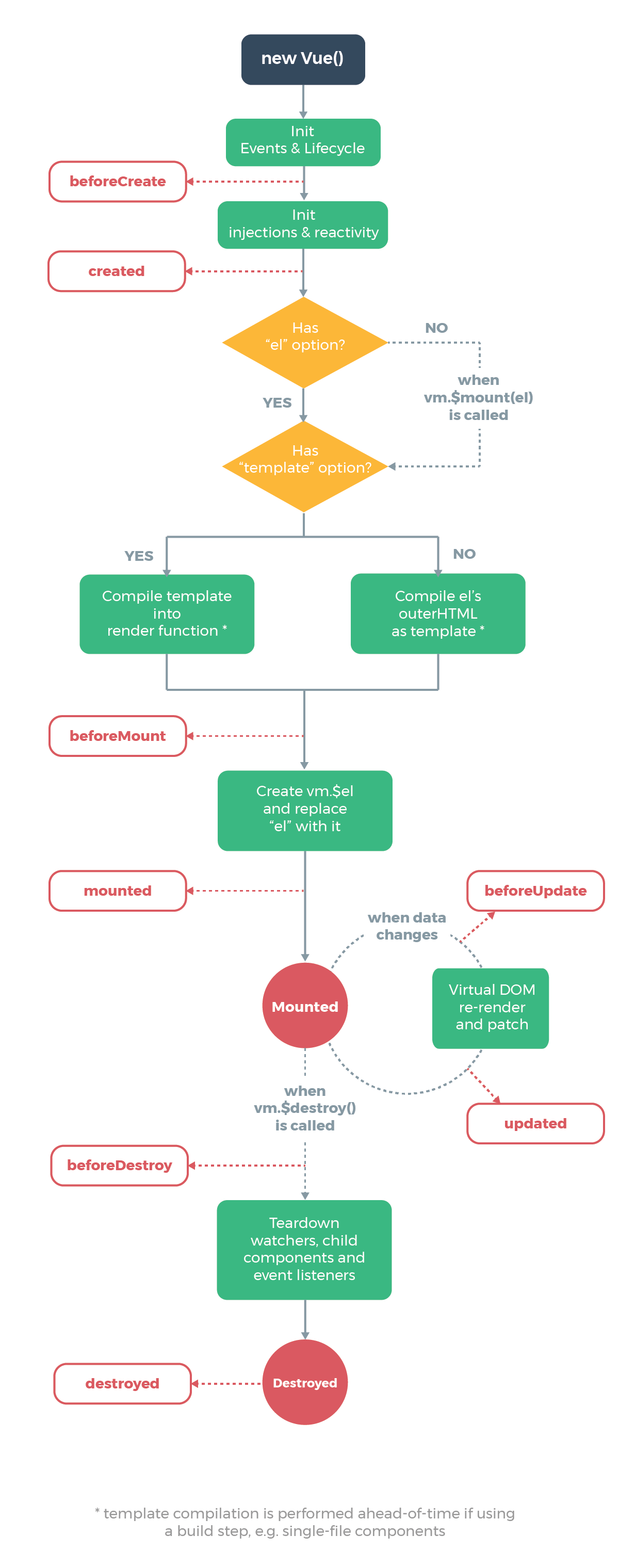
beforeCreate

在实例初始化之后,数据观测 (data observer) 和 event/watcher 事件配置之前被调用。

1
2
3
4
5
6
7
8
9
10
11
12
13
14
15
16
17
18
19
20
21
22
23
24
25
26
27
28
29
30
31
32
33
34
35
36
37
38
39
40
41
42
43
44
<!DOCTYPE html>
<html lang="en">
<head>
<meta charset="UTF-8">
<title>Title</title>
<script src="../statics/vue.js"></script>
</head>
<body> <div id="app">
{{ name }}
<button @click="myClick">点击修改数据</button>
</div> <script> new Vue({
el: "#app",
// 在template中使用组件与在body中使用组件是一样的
// template: `<cont></cont>`,
data: {
name: "Alex"
},
methods: {
init: function () {
console.log(this.name);
},
myClick: function () {
this.name = "Pizza";
}
},
beforeCreate() {
console.group("beforeCreate");
console.log("el: ", this.$el);
console.log("data: ", this.$data);
console.log("name: ", this.name);
console.log("init: ", this.init);
console.log("innerHTML: ", document.getElementById("app").innerHTML);
},
});
</script> </body>
</html>
created

在实例创建完成后被立即调用。在这一步,实例已完成以下的配置:数据观测 (data observer),属性和方法的运算,watch/event 事件回调。然而,挂载阶段还没开始,$el 属性目前不可见。

1
2
3
4
5
6
7
8
9
10
11
12
13
14
15
16
17
18
19
20
21
22
23
24
25
26
27
28
29
30
31
32
33
34
35
36
37
38
39
40
41
42
43
44
45
46
47
48
49
50
51
52
<!DOCTYPE html>
<html lang="en">
<head>
<meta charset="UTF-8">
<title>Title</title>
<script src="../statics/vue.js"></script>
</head>
<body> <div id="app">
{{ name }}
<button @click="myClick">点击修改数据</button>
</div> <script> new Vue({
el: "#app",
// 在template中使用组件与在body中使用组件是一样的
// template: `<cont></cont>`,
data: {
name: "Alex"
},
methods: {
init: function () {
console.log(this.name);
},
myClick: function () {
this.name = "Pizza";
}
},
beforeCreate() {
console.group("beforeCreate");
console.log("el: ", this.$el);
console.log("data: ", this.$data);
console.log("name: ", this.name);
console.log("init: ", this.init);
console.log("innerHTML: ", document.getElementById("app").innerHTML);
},
created() {
console.group("Created");
console.log("el: ", this.$el);
console.log("data: ", this.$data);
console.log("name: ", this.name);
console.log("init: ", this.init);
console.log("innerHTML: ", document.getElementById("app").innerHTML);
}
})
</script> </body>
</html>
beforeMount

在挂载开始之前被调用:相关的 render 函数首次被调用。

1
2
3
4
5
6
7
8
9
10
11
12
13
14
15
16
17
18
19
20
21
22
23
24
25
26
27
28
29
30
31
32
33
34
35
36
37
38
39
40
41
42
43
44
45
46
47
48
49
50
51
52
53
54
55
56
57
58
59
60
<!DOCTYPE html>
<html lang="en">
<head>
<meta charset="UTF-8">
<title>Title</title>
<script src="../statics/vue.js"></script>
</head>
<body> <div id="app">
{{ name }}
<button @click="myClick">点击修改数据</button>
</div> <script> new Vue({
el: "#app",
// 在template中使用组件与在body中使用组件是一样的
// template: `<cont></cont>`,
data: {
name: "Alex"
},
methods: {
init: function () {
console.log(this.name);
},
myClick: function () {
this.name = "Pizza";
}
},
beforeCreate() {
console.group("beforeCreate");
console.log("el: ", this.$el);
console.log("data: ", this.$data);
console.log("name: ", this.name);
console.log("init: ", this.init);
console.log("innerHTML: ", document.getElementById("app").innerHTML);
},
created() {
console.group("Created");
console.log("el: ", this.$el);
console.log("data: ", this.$data);
console.log("name: ", this.name);
console.log("init: ", this.init);
console.log("innerHTML: ", document.getElementById("app").innerHTML);
},
beforeMount() {
console.group("beforeMount");
console.log("el: ", this.$el);
console.log("data: ", this.$data);
console.log("name: ", this.name);
console.log("init: ", this.init);
console.log("innerHTML: ", document.getElementById("app").innerHTML);
}
})
</script> </body>
</html>
mounted

el 被新创建的 vm.$el 替换,并挂载到实例上去之后调用该钩子。如果 root 实例挂载了一个文档内元素,当 mounted 被调用时 vm.$el 也在文档内。

1
2
3
4
5
6
7
8
9
10
11
12
13
14
15
16
17
18
19
20
21
22
23
24
25
26
27
28
29
30
31
32
33
34
35
36
37
38
39
40
41
42
43
44
45
46
47
48
49
50
51
52
53
54
55
56
57
58
59
60
61
62
63
64
65
66
67
68
<!DOCTYPE html>
<html lang="en">
<head>
<meta charset="UTF-8">
<title>Title</title>
<script src="../statics/vue.js"></script>
</head>
<body> <div id="app">
{{ name }}
<button @click="myClick">点击修改数据</button>
</div> <script> new Vue({
el: "#app",
// 在template中使用组件与在body中使用组件是一样的
// template: `<cont></cont>`,
data: {
name: "Alex"
},
methods: {
init: function () {
console.log(this.name);
},
myClick: function () {
this.name = "Pizza";
}
},
beforeCreate() {
console.group("beforeCreate");
console.log("el: ", this.$el);
console.log("data: ", this.$data);
console.log("name: ", this.name);
console.log("init: ", this.init);
console.log("innerHTML: ", document.getElementById("app").innerHTML);
},
created() {
console.group("Created");
console.log("el: ", this.$el);
console.log("data: ", this.$data);
console.log("name: ", this.name);
console.log("init: ", this.init);
console.log("innerHTML: ", document.getElementById("app").innerHTML);
},
beforeMount() {
console.group("beforeMount");
console.log("el: ", this.$el);
console.log("data: ", this.$data);
console.log("name: ", this.name);
console.log("init: ", this.init);
console.log("innerHTML: ", document.getElementById("app").innerHTML);
},
mounted() {
console.group("mounted");
console.log("el: ", this.$el);
console.log("data: ", this.$data);
console.log("name: ", this.name);
console.log("init: ", this.init);
console.log("innerHTML: ", document.getElementById("app").innerHTML);
},
})
</script> </body>
</html>
beforeUpdate

数据更新时调用,发生在虚拟 DOM 打补丁之前。这里适合在更新之前访问现有的 DOM,比如手动移除已添加的事件监听器。

该钩子在服务器端渲染期间不被调用,因为只有初次渲染会在服务端进行

1
2
3
4
5
6
7
8
9
10
11
12
13
14
15
16
17
18
19
20
21
22
23
24
25
26
27
28
29
30
31
32
33
34
35
36
37
38
39
40
41
42
43
44
45
46
47
48
49
50
51
52
53
54
55
56
57
58
59
60
61
62
63
64
65
66
67
68
69
70
71
72
73
74
75
76
<!DOCTYPE html>
<html lang="en">
<head>
<meta charset="UTF-8">
<title>Title</title>
<script src="../statics/vue.js"></script>
</head>
<body> <div id="app">
{{ name }}
<button @click="myClick">点击修改数据</button>
</div> <script> new Vue({
el: "#app",
// 在template中使用组件与在body中使用组件是一样的
// template: `<cont></cont>`,
data: {
name: "Alex"
},
methods: {
init: function () {
console.log(this.name);
},
myClick: function () {
this.name = "Pizza";
}
},
beforeCreate() {
console.group("beforeCreate");
console.log("el: ", this.$el);
console.log("data: ", this.$data);
console.log("name: ", this.name);
console.log("init: ", this.init);
console.log("innerHTML: ", document.getElementById("app").innerHTML);
},
created() {
console.group("Created");
console.log("el: ", this.$el);
console.log("data: ", this.$data);
console.log("name: ", this.name);
console.log("init: ", this.init);
console.log("innerHTML: ", document.getElementById("app").innerHTML);
},
beforeMount() {
console.group("beforeMount");
console.log("el: ", this.$el);
console.log("data: ", this.$data);
console.log("name: ", this.name);
console.log("init: ", this.init);
console.log("innerHTML: ", document.getElementById("app").innerHTML);
},
mounted() {
console.group("mounted");
console.log("el: ", this.$el);
console.log("data: ", this.$data);
console.log("name: ", this.name);
console.log("init: ", this.init);
console.log("innerHTML: ", document.getElementById("app").innerHTML);
},
beforeUpdate() {
console.group("beforeUpdate");
console.log("el: ", this.$el);
console.log("data: ", this.$data);
console.log("name: ", this.name);
console.log("init: ", this.init);
console.log("innerHTML: ", document.getElementById("app").innerHTML);
}
})
</script> </body>
</html>
updated

由于数据更改导致的虚拟 DOM 重新渲染和打补丁,在这之后会调用该钩子。

当这个钩子被调用时,组件 DOM 已经更新,所以你现在可以执行依赖于 DOM 的操作。然而在大多数情况下,你应该避免在此期间更改状态。如果要相应状态改变,通常最好使用计算属性或 watcher 取而代之。

1
2
3
4
5
6
7
8
9
10
11
12
13
14
15
16
17
18
19
20
21
22
23
24
25
26
27
28
29
30
31
32
33
34
35
36
37
38
39
40
41
42
43
44
45
46
47
48
49
50
51
52
53
54
55
56
57
58
59
60
61
62
63
64
65
66
67
68
69
70
71
72
73
74
75
76
77
78
79
80
81
82
83
84
<!DOCTYPE html>
<html lang="en">
<head>
<meta charset="UTF-8">
<title>Title</title>
<script src="../statics/vue.js"></script>
</head>
<body> <div id="app">
{{ name }}
<button @click="myClick">点击修改数据</button>
</div> <script> new Vue({
el: "#app",
// 在template中使用组件与在body中使用组件是一样的
// template: `<cont></cont>`,
data: {
name: "Alex"
},
methods: {
init: function () {
console.log(this.name);
},
myClick: function () {
this.name = "Pizza";
}
},
beforeCreate() {
console.group("beforeCreate");
console.log("el: ", this.$el);
console.log("data: ", this.$data);
console.log("name: ", this.name);
console.log("init: ", this.init);
console.log("innerHTML: ", document.getElementById("app").innerHTML);
},
created() {
console.group("Created");
console.log("el: ", this.$el);
console.log("data: ", this.$data);
console.log("name: ", this.name);
console.log("init: ", this.init);
console.log("innerHTML: ", document.getElementById("app").innerHTML);
},
beforeMount() {
console.group("beforeMount");
console.log("el: ", this.$el);
console.log("data: ", this.$data);
console.log("name: ", this.name);
console.log("init: ", this.init);
console.log("innerHTML: ", document.getElementById("app").innerHTML);
},
mounted() {
console.group("mounted");
console.log("el: ", this.$el);
console.log("data: ", this.$data);
console.log("name: ", this.name);
console.log("init: ", this.init);
console.log("innerHTML: ", document.getElementById("app").innerHTML);
},
beforeUpdate() {
console.group("beforeUpdate");
console.log("el: ", this.$el);
console.log("data: ", this.$data);
console.log("name: ", this.name);
console.log("init: ", this.init);
console.log("innerHTML: ", document.getElementById("app").innerHTML);
},
updated() {
console.log("updated");
console.log("el: ", this.$el);
console.log("data: ", this.$data);
console.log("name: ", this.name);
console.log("init: ", this.init);
console.log("innerHTML: ", document.getElementById("app").innerHTML);
}
})
</script> </body>
</html>
activated

keep-alive 组件激活时调用。<keep-alive> 包裹动态组件时,会缓存不活动的组件实例,而不是销毁它们

该钩子在服务器端渲染期间不被调用。

1
2
3
4
5
6
7
8
9
10
11
12
13
14
15
16
17
18
19
20
21
22
23
24
25
26
27
28
29
30
31
32
33
34
35
36
37
38
39
40
41
42
43
44
45
46
47
48
49
50
51
52
53
54
55
56
57
58
59
60
61
62
63
64
65
66
67
68
69
70
71
72
73
74
75
76
77
78
79
80
81
82
83
84
85
86
87
88
89
90
91
92
<!DOCTYPE html>
<html lang="en">
<head>
<meta charset="UTF-8">
<title>Title</title>
<script src="../statics/vue.min.js"></script>
</head>
<body> <div id="app">
<App></App>
</div> <script>
let Laside = {
template: `
<div>
<h1>{{ message }}</h1>
<button @click="changeData">点击修改数据</button>
</div>
`, data () {
return {
message: "Hello Vue!"
}
}, methods: {
init: function () {
console.log(this.message)
}
changeData: function () {
this.mes = "Pizza is here!";
}
}, // 组件的创建和销毁对性能有影响
beforeDestroy () {
console.log("beforeDestroy");
}, destroyed () {
console.log("destroyed");
}, activated () {
console.group("activated");
console.log("el: ", this.$el);
console.log("data: ", this.$data);
console.log("message: ", this.message);
console.log("init: ", this.init);
console.log("innerHTML: ", document.getElementById("app").innerHTML);
},
}; let App = {
template: `
<div >
<keep-alive>
<Laside v-if="isShow"></Laside>
</keep-alive>
<button @click="showHide">创建消除组件</button>
</div>
`,
components: {
"Laside": Laside,
},
methods: {
showHide: function () {
this.isShow = !this.isShow;
}
},
data () {
return {
isShow: true,
}
}
}; new Vue({
el: "#app",
// 在template中使用组件与在body中使用组件是一样的
// template: `<cont></cont>`,
components: {
App,
}
})
</script> </body>
</html>
deactivated

keep-alive 组件停用时调用。

该钩子在服务器端渲染期间不被调用。

1
2
3
4
5
6
7
8
9
10
11
12
13
14
15
16
17
18
19
20
21
22
23
24
25
26
27
28
29
30
31
32
33
34
35
36
37
38
39
40
41
42
43
44
45
46
47
48
49
50
51
52
53
54
55
56
57
58
59
60
61
62
63
64
65
66
67
68
69
70
71
72
73
74
75
76
77
78
79
80
81
82
83
84
85
86
87
88
89
90
91
92
93
94
95
96
97
98
99
100
101
<!DOCTYPE html>
<html lang="en">
<head>
<meta charset="UTF-8">
<title>Title</title>
<script src="../statics/vue.min.js"></script>
</head>
<body> <div id="app">
<App></App>
</div> <script>
let Laside = {
template: `
<div>
<h1>{{ mes }}</h1>
<button @click="changeData">点击修改数据</button>
</div>
`, data () {
return {
message: "Hello Vue!"
}
}, methods: {
init: function () {
console.log(this.message);
}
changeData: function () {
this.mes = "Pizza is here!";
}
}, // 组件的创建和销毁对性能有影响
beforeDestroy () {
console.log("beforeDestroy");
}, destroyed () {
console.log("destroyed");
}, activated () {
console.group("activated");
console.log("el: ", this.$el);
console.log("data: ", this.$data);
console.log("message: ", this.message);
console.log("init: ", this.init);
console.log("innerHTML: ", document.getElementById("app").innerHTML);
}, deactivated () {
console.group("deactivated");
console.log("el: ", this.$el);
console.log("data: ", this.$data);
console.log("name: ", this.name);
console.log("init: ", this.init);
console.log("innerHTML: ", document.getElementById("app").innerHTML);
}
}; let App = {
template: `
<div >
<keep-alive>
<Laside v-if="isShow"></Laside>
</keep-alive>
<button @click="showHide">创建消除组件</button>
</div>
`,
components: {
"Laside": Laside,
},
methods: {
showHide: function () {
this.isShow = !this.isShow;
}
},
data () {
return {
isShow: true,
}
}
}; new Vue({
el: "#app",
// 在template中使用组件与在body中使用组件是一样的
// template: `<cont></cont>`,
components: {
App,
}
})
</script> </body>
</html>
beforeDestroy

实例销毁之前调用。在这一步,实例仍然完全可用。频繁的创建和销毁组件对性能的影响很大,因此可以使用activated和deactivated。

该钩子在服务器端渲染期间不被调用。

1
2
3
4
5
6
7
8
9
10
11
12
13
14
15
16
17
18
19
20
21
22
23
24
25
26
27
28
29
30
31
32
33
34
35
36
37
38
39
40
41
42
43
44
45
46
47
48
49
50
51
52
53
54
55
56
57
58
59
60
61
62
63
64
65
66
67
68
69
70
71
72
73
74
75
76
77
78
79
80
<!DOCTYPE html>
<html lang="en">
<head>
<meta charset="UTF-8">
<title>Title</title>
<script src="../statics/vue.js"></script>
</head>
<body> <div id="app">
<App></App>
</div> <script>
let Laside = {
template: `
<div>
<h1>{{ mes }}</h1>
<button @click="changeData">点击修改数据</button>
</div>
`, data () {
return {
mes: "Hello Vue!"
}
}, methods: {
changeData: function () {
this.mes = "Pizza is here!";
}
}, // 组件的创建和销毁对性能有影响
beforeDestroy() {
console.log("beforeDestroy");
console.log("el: ", this.$el);
console.log("data: ", this.$data);
console.log("name: ", this.name);
console.log("init: ", this.init);
console.log("innerText: ", document.getElementById("app").innerText);
console.log("innerHTML: ", document.getElementById("app").innerHTML);
},
}; let App = {
template: `
<div >
<Laside v-if="isShow"></Laside>
<button @click="showHide">创建消除组件</button>
</div>
`,
components: {
"Laside": Laside,
},
methods: {
showHide: function () {
this.isShow = !this.isShow;
}
},
data () {
return {
isShow: true,
}
}
}; new Vue({
el: "#app",
// 在template中使用组件与在body中使用组件是一样的
// template: `<cont></cont>`,
components: {
App,
}
})
</script> </body>
</html>
destroyed

Vue 实例销毁后调用。调用后,Vue 实例指示的所有东西都会解绑定,所有的事件监听器会被移除,所有的子实例也会被销毁。

该钩子在服务器端渲染期间不被调用。

1
2
3
4
5
6
7
8
9
10
11
12
13
14
15
16
17
18
19
20
21
22
23
24
25
26
27
28
29
30
31
32
33
34
35
36
37
38
39
40
41
42
43
44
45
46
47
48
49
50
51
52
53
54
55
56
57
58
59
60
61
62
63
64
65
66
67
68
69
70
71
72
73
74
75
76
77
78
79
80
81
82
83
84
85
86
87
88
<!DOCTYPE html>
<html lang="en">
<head>
<meta charset="UTF-8">
<title>Title</title>
<script src="../statics/vue.min.js"></script>
</head>
<body> <div id="app">
<App></App>
</div> <script>
let Laside = {
template: `
<div>
<h1>{{ mes }}</h1>
<button @click="changeData">点击修改数据</button>
</div>
`, data () {
return {
mes: "Hello Vue!"
}
}, methods: {
changeData: function () {
this.mes = "Pizza is here!";
}
}, // 组件的创建和销毁对性能有影响
beforeDestroy() {
console.log("beforeDestroy");
console.log("el: ", this.$el);
console.log("data: ", this.$data);
console.log("name: ", this.name);
console.log("init: ", this.init);
console.log("innerHTML: ", document.getElementById("app").innerHTML);
}, destroyed () {
console.log("destroyed");
console.log("el: ", this.$el);
console.log("data: ", this.$data);
console.log("name: ", this.name);
console.log("init: ", this.init);
console.log("innerHTML: ", document.getElementById("app").innerHTML);
}
}; let App = {
template: `
<div >
<Laside v-if="isShow"></Laside>
<button @click="showHide">创建消除组件</button>
</div>
`,
components: {
"Laside": Laside,
},
methods: {
showHide: function () {
this.isShow = !this.isShow;
}
},
data () {
return {
isShow: true,
}
}
}; new Vue({
el: "#app",
// 在template中使用组件与在body中使用组件是一样的
// template: `<cont></cont>`,
components: {
App,
}
})
</script> </body>
</html>

好了,关于Vue.js实例的生命周期就介绍到这里。

Vue专题-生命周期的更多相关文章

  1. 8.vue的生命周期

    Vue实例有一个完整的生命周期,也就是从开始创建.初始化数据.编译模板.挂载Dom.渲染→更新→渲染.卸载等一系列过程,我们称这是Vue的生命周期.通俗说就是Vue实例从创建到销毁的过程,就是生命周期 ...

  2. 如何解释vue的生命周期才能令面试官满意?

    当面试官问:"谈谈你对vue的生命周期的理解",听到这句话你是不是心里暗自窃喜:这也太容易了吧,不就是beforeCreate.created.beforeMount.mounte ...

  3. vue之生命周期

    vue的生命周期的过程提供了我们执行自定义逻辑的机会,好好理解它的生命周期,对我们很有帮助. 1.vue实例的生命周期(vue2.0) 2.生命周期描述:(参考截图) 3.例子 window.vm = ...

  4. vue的生命周期的理解

    Vue实例有一个完整的生命周期,也就是从开始创建.初始化数据.编译模板.挂载Dom.渲染→更新→渲染.销毁等一系列过程,我们称这是Vue的生命周期.通俗说就是Vue实例从创建到销毁的过程,就是生命周期 ...

  5. vue笔记-生命周期

    生命周期钩子 <!DOCTYPE html> <html lang="en"> <head> <meta charset="UT ...

  6. vue 关于生命周期

    序言: 1. vue 单组件的生命周期: 2. vue 父子组件的生命周期: 3. axios 异步请求 与 vue 的组件周期: 一.vue 每个组件的生命周期 关于每个组件的生命周期,官方文档里也 ...

  7. Vue:生命周期

    一.什么是vue的生命周期 Vue中的生命周期是指组件从创建到销毁的一系列过程.看下面这张官方文档的图: 从图片中可以看出Vue的整个生命周期包括8个状态,按照先后顺序分别为: beforeCreat ...

  8. vue生命周期图示中英文版Vue实例生命周期钩子

    vue生命周期图示中英文版Vue实例生命周期钩子知乎上近日有人发起了一个 “react 是不是比 vue 牛皮,为什么?” 的问题,Vue.js 作者尤雨溪12月4日正面回应了该问题.以下是尤雨溪回复 ...

  9. 深入理解Vue的生命周期

    谈到Vue的生命周期,相信许多人并不陌生.但大部分人和我一样,只是听过而已,具体用在哪,怎么用,却不知道.我在学习vue一个多礼拜后,感觉现在还停留在初级阶段,对于mounted这个挂载还不是很清楚. ...

随机推荐

  1. 吴裕雄--天生自然C++语言学习笔记:C++ 基本的输入输出

    C++ 的 I/O 发生在流中,流是字节序列.如果字节流是从设备(如键盘.磁盘驱动器.网络连接等)流向内存,这叫做输入操作.如果字节流是从内存流向设备(如显示屏.打印机.磁盘驱动器.网络连接等),这叫 ...

  2. ZOJ - 2671 Cryptography(线段树+求区间矩阵乘积)

    题意:已知n个矩阵(下标从1开始),求下标x~y区间矩阵的乘积.最多m次询问,n ( 1 <= n <= 30,000) and m ( 1 <= m <= 30,000). ...

  3. invisble

    不可见索引概念: 不可见索引(Invisible Index)是ORACLE 11g引入的新特性.不可见索引是会被优化器忽略的不可见索引,除非在会话或系统级别上将OPTIMIZER_USE_INVIS ...

  4. C++编程学习(二) 数据

    博主已经有一些基础了,所以写的东西可能是容易错的,或者以前没记住的,或者是对理解知识点有帮助的.因此如果有纯小白看到了这篇博文,不懂的地方请自行百度啦~ 另外,本系列所有内容的图片均来自于西北工业大学 ...

  5. redis主要配置项

    目录 redisd配置 redis主要配置项 这里就列举两例示例,之后的实验会有详细的示例!! redisd配置 redis主要配置项 bind 0.0.0.0 #监听地址,可以用空格隔开后多个监听I ...

  6. 实验吧web-易-拐弯抹角(url伪静态)

    <?php // code by SEC@USTC echo '<html><head><meta http-equiv="charset" c ...

  7. Sqlserver 增删改查----增

    注意我说的常见查询,可不是简单到一个表得增删改查,做过实际开发得人都知道,在实际开发中,真正牵扯到一个表得增删改查只能说占很小得一部分,大多都是好几个表的关联操作的. 下面我就说一下我在实际开发中经常 ...

  8. 谈谈我近一个半月的dp练习

    前请提示:https://www.cnblogs.com/caiyishuai/p/9047991.html   配合这篇文章食用风味更佳哦! 首先十分感谢henry_y提供的50道dp练习,链接在这 ...

  9. POJ 3970:Party

    Party Time Limit: 1000MS   Memory Limit: 65536KB   64bit IO Format: %I64d & %I64u Submit Status ...

  10. VMware Workstation 12 PRo密钥

    注意:手动输入(起初复制输入,一个都没成功,不要偷懒哦) VMware Workstation 12序列号: 5A02H-AU243-TZJ49-GTC7K-3C61N