
WebAPI异常捕捉处理,结合log4net日志(webapi框架)
一:异常捕捉处理
首先,在我们需要区分controller的类型。是全部基层controller,还是Apicontroller。(当然一般API框架,用的都是Apicontroller)。两者异常处理是不同的。
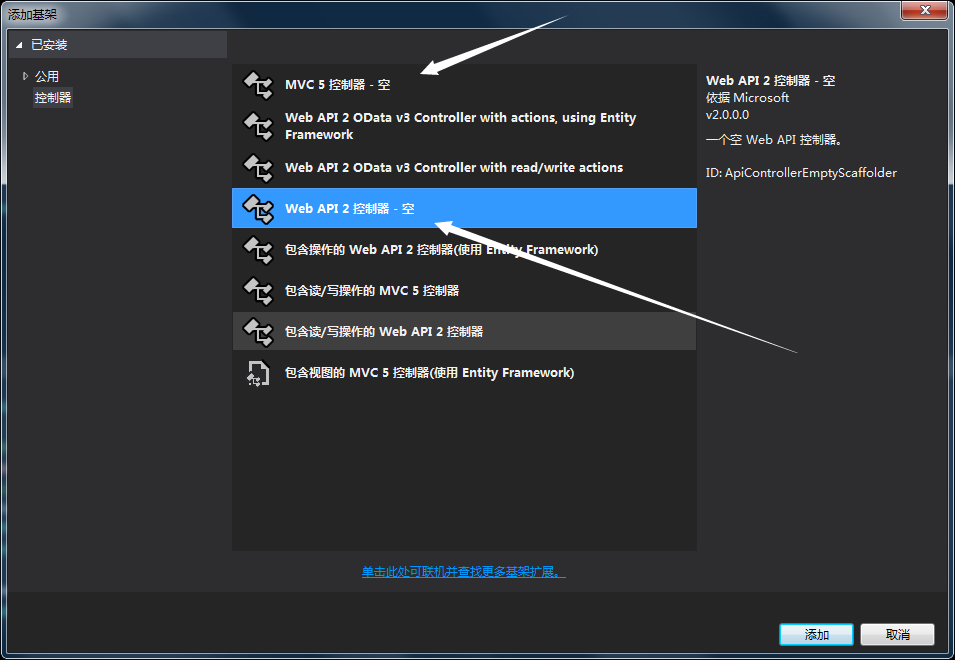
1.apicontroller webapi框架错误处理:
首先在App_Start里添加一个新类,继承于ExceptionFilterAttribute类
public class WebApiExceptionFilterAttribute : ExceptionFilterAttribute

{

      //重写基类的异常处理方法

        #region

        public override void OnException(HttpActionExecutedContext actionExecutedContext)

        {

            //2.返回调用方具体的异常信息

            if (actionExecutedContext.Exception is NotImplementedException)

            {

                var oResponse = new HttpResponseMessage(HttpStatusCode.NotImplemented);

                //oResponse.Content = new StringContent("方法不被支持");

                oResponse.Content = new StringContent(actionExecutedContext.Exception.Message);

                oResponse.ReasonPhrase = "This Func is Not Supported";

                actionExecutedContext.Response = oResponse;

            }

            else if (actionExecutedContext.Exception is TimeoutException)

            {

                actionExecutedContext.Response = new HttpResponseMessage(HttpStatusCode.RequestTimeout);

            }

            //.....这里可以根据项目需要返回到客户端特定的状态码。如果找不到相应的异常,统一返回服务端错误500

            else

            {

                // actionExecutedContext.Response = new HttpResponseMessage(HttpStatusCode.InternalServerError);

                //注释掉错误信息的展示,显示统一的错误

                var Message = JsonHelper.GetJsonString(new { Errorcode = HttpStatusCode.InternalServerError, message = actionExecutedContext.Exception.Message});

                //写日志

                ILog log = LogManager.GetLogger(typeof(GoodsController));

                log.Error(Message, new Exception("Error异常"));

                // 自定义message的错误信息

                //var Message =JsonHelper.GetJsonString(new {Errorcode = HttpStatusCode.InternalServerError, message = "接口调用失败,请检查传入参数是否正确"});

                var oResponse = new HttpResponseMessage(HttpStatusCode.InternalServerError)

                {

                  //Content = new StringContent(actionExecutedContext.Exception.Message),

                  Content = new StringContent(Message),

                  ReasonPhrase = "Error"

                };

                actionExecutedContext.Response = oResponse;

            }

            base.OnException(actionExecutedContext);

        }

        #endregion

}
看个人需求是全局捕捉错误,还是区域捕捉。
全局:Global里加上这句。GlobalConfiguration.Configuration.Filters.Add(new WebApiExceptionFilterAttribute());

区域: 这ApiController或是方法名称前加一个特性就OK了。

2.继承controller的 还是MVC那一套(在Global中添加 Application_Error方法)

protected void Application_Error(object sender, EventArgs e)

        {

            // 在出现未处理的错误时运行的代码

            HttpContext ctx = HttpContext.Current;

            Exception exception = ctx.Server.GetLastError();

            Exception exception_s = Server.GetLastError();

            HttpException ex = exception_s as HttpException;

            if (exception != null)

            {

                string m = exception.Message;

                string errorInfo = "URL:<strong>" + ctx.Request.RawUrl.ToString() + "<strong><br/>Source:<strong>" + exception.Source

                                   + "<strong><br/>Message:<strong>" + exception.Message + "<>";

                if (!m.Contains("不存在"))

                {

                    if (exception.InnerException != null)

                        errorInfo += "<br/>错误信息为:<strong>" + exception.InnerException.Message + "<>";

                }

                if (exception is HttpException)

                {

                    HttpException ex2 = exception as HttpException;

                    int httpCode = ex2.GetHttpCode();

                    errorInfo += "<br />Code:<strong>" + httpCode.ToString() + "<>";

                }

                //写日志

                ILog log = LogManager.GetLogger(typeof(GoodsController));

                log.Error(errorInfo, new Exception("Error异常")); ctx.Items.Add("LastError", errorInfo); ctx.Server.ClearError();
                }

               try { //写逻辑 ctx.Response.Redirect("/Home/Index"); } catch { }
                }
二:log4net日志管理。配合WebApi框架,个人感觉十分方便
打开NuGet,添加log4net。成功之后,可以直接处理
使用方法:
 [HttpGet,Route("LogTest")]

        public IHttpActionResult LogTest()

        {

            ILog log = LogManager.GetLogger(typeof(GoodsController)); // 下面是日志处理

            log.Debug("测试debug", new Exception("debug异常"));

            log.Info("测试Info", new Exception("Info异常"));

            log.Warn("测试Warn", new Exception("Warn异常"));

            log.Error("测试Error", new Exception("Error异常"));

            log.Fatal("测试Fatal", new Exception("Fatal异常"));

            return Json(new {result = "Complent"});

        }
log4net需要配置文件,才能输出。添加Log4net.config文件。然后在程序集AssemblyInfo.cs中,添加 [assembly: XmlConfigurator(Watch = true, ConfigFile = "Log4Net.config")]

<?xml version="1.0" encoding="utf-8"?>

<configuration>

  <log4net>

    <!--记录所有的完整日志-->

    <appender name="AllLogFileAppender" type="log4net.Appender.RollingFileAppender">

      <!--或者是文件名或是文件夹(没有后缀)Gets or sets the path to the file that logging will be written to.,-->

      <file value="log/all/log_" />

      <!--是否总是写在一个文件里Gets or sets a value indicating whether to always log to the same file.-->

      <staticLogFileName value="false" />

      <!--Gets or sets a flag that indicates whether the file should be appended to or overwritten.-->

      <appendToFile value="true" />

      <!--可设置为Size、Date,即大小/日期超出一定范围后就新建一个日志文件-->

      <rollingStyle value="Date" />

      <!--一天最多保存多少Gets or sets the maximum number of backup files that are kept before the oldest is erased.-->

      <maxSizeRollBackups value="" />

      <!--每个文件最大大小,单位可是MB,KBGets or sets the maximum size that the output file is allowed to reach before being rolled over to backup files.-->

      <maximumFileSize value="5MB" />

      <!--设置用来生产文件的日期格式Gets or sets the date pattern to be used for generating file names when rolling over on date.-->

      <datePattern value="yyyy-MM-dd'.log'"/>

      <!--日志输入的通用格式(日志的内容格式)-->

      <layout type="log4net.Layout.PatternLayout">

        <conversionPattern value="%date [%thread] %-5level %logger [%property{NDC}] - %message%newline" />

      </layout>

      <filter type="log4net.Filter.LevelRangeFilter,log4net">

        <!--级别由低往高依次是

        ALL

        DEBUG

        INFO

        WARN

        ERROR

        FATAL

        None-->

        <levelMin value="DEBUG" />

        <levelMax value="Warn" />

      </filter>

    </appender>

    <!--记录错误日志,这些错误往往是一个程序bug或是要注意的-->

    <appender name="ErrorLogFileAppender" type="log4net.Appender.RollingFileAppender">

      <!--或者是文件名或是文件夹(没有后缀)Gets or sets the path to the file that logging will be written to.,-->

      <file value="log/error/error_" />

      <!--是否总是写在一个文件里Gets or sets a value indicating whether to always log to the same file.-->

      <staticLogFileName value="false" />

      <!--Gets or sets a flag that indicates whether the file should be appended to or overwritten.-->

      <appendToFile value="true" />

      <!--可设置为Size、Date,即大小/日期超出一定范围后就新建一个日志文件-->

      <rollingStyle value="Date" />

      <!--一天最多保存多少Gets or sets the maximum number of backup files that are kept before the oldest is erased.-->

      <maxSizeRollBackups value="" />

      <!--每个文件最大大小,单位可是MB,KBGets or sets the maximum size that the output file is allowed to reach before being rolled over to backup files.-->

      <maximumFileSize value="5MB" />

      <!--设置用来生产文件的日期格式Gets or sets the date pattern to be used for generating file names when rolling over on date.-->

      <datePattern value="yyyy-MM-dd'.log'"/>

      <!--日志输入的通用格式(日志的内容格式)-->

      <layout type="log4net.Layout.PatternLayout">

        <conversionPattern value="%date [%thread] %-5level %logger [%property{NDC}] - %message%newline" />

      </layout>

      <filter type="log4net.Filter.LevelRangeFilter,log4net">

        <levelMin value="ERROR" />

        <levelMax value="FATAL" />

      </filter>

    </appender>

    <!--Set root logger level to DEBUG and its only appender to A1-->

    <root>

      <!--控制级别,由低到高: ALL|DEBUG|INFO|WARN|ERROR|FATAL|OFF-->

      <level value="ALL" />

      <appender-ref ref="AllLogFileAppender" />

      <appender-ref ref="ErrorLogFileAppender" />

    </root>

  </log4net>

  <system.web>

      <compilation debug="true" targetFramework="4.5.2" />

      <httpRuntime targetFramework="4.5.2" />

    </system.web>

</configuration>
上面只是写了一个,测试方法而已。WebAPI实际使用本文全局错误处理 + log4net,日志模块简直起飞。遇到问题,系统BUG之类的也不用慌,去日志里找就行了,全都记录了。

WebAPI异常捕捉处理,结合log4net日志(webapi框架)的更多相关文章
- WebApi异常
WebApi异常处理解决方案 前言:上篇C#进阶系列——WebApi接口传参不再困惑:传参详解介绍了WebApi参数的传递,这篇来看看WebApi里面异常的处理.关于异常处理,作为程序员的我们肯定 ...
- Log4Net日志的配置
<configuration> <configSections> <section name="log4net" type="log ...
- C# Log4Net 日志
C#使用Log4Net记录日志 第一步:下载Log4Net 下载地址:http://logging.apache.org/log4net/download_log4net.cgi ...
- C#实现多级子目录Zip压缩解压实例 NET4.6下的UTC时间转换 [译]ASP.NET Core Web API 中使用Oracle数据库和Dapper看这篇就够了 asp.Net Core免费开源分布式异常日志收集框架Exceptionless安装配置以及简单使用图文教程 asp.net core异步进行新增操作并且需要判断某些字段是否重复的三种解决方案 .NET Core开发日志
C#实现多级子目录Zip压缩解压实例 参考 https://blog.csdn.net/lki_suidongdong/article/details/20942977 重点: 实现多级子目录的压缩, ...
- 关于log4net日志的配置流程
最近又重新整理一下log4net日志的配置,现在记录一下流程和一些遇到的问题,以备后续使用,具体的配置参数等信息.此文无,见谅! 1. 下载log4net.dll文件(网上很多,随便找一个!) 2. ...
- LOG4NET日志配置及使用
Log4net的安装 Install-Package log4net 1.先弄个日志记录的类 /// <summary> /// 使用LOG4NET记录日志的功能,在WEB.CONFIG里 ...
- ExceptionLess异常日志收集框架-1
哈哈,中秋和代码更配哦,不知不觉一年过半了,祝园友们中秋快乐 前一阵子在博客园看到了一篇博文 http://www.cnblogs.com/savorboard/p/exceptionless.htm ...
- [.Net MVC] 使用 log4net 日志框架
项目:后台管理平台 意义:项目开发中提出增加日志功能,对关键的操作.程序运行中的错误信息进行记录,这对程序部署后的调试有很大意义. 注:本文只是对网上搜集的信息进行了整合,以备今后查询. 关键字:.N ...
- C#Log4net日志记录组件的使用
一.Log4Net介绍 Log4net是基于.NET开发的一款非常著名的记录日志开源组件.它通过一套XML配置的日志引擎,将日志分不同的等级,分别是:FATAL . ERROR. WARN. INFO ...
随机推荐
- cf749 D. Leaving Auction
#include<bits/stdc++.h> #define lowbit(x) x&(-x) #define LL long long #define N 200005 #de ...
- log4j1-x使用
目录 代码 配置 编译 测试 代码: import org.apache.log4j.*; public class Client{ public static void main(String[] ...
- Python 中 configparser 配置文件的读写及封装,配置文件存放数据,方便修改
1. 将程序中不常变化的数据放在配置文件中,有什么好处? 将配置统一放在一起,进行统一管理,方便维护,方便修改 配置文件将存放测试数据比如: Excel文件名. 日志名. 用例执行的结果. 实际结果和 ...
- 017-PHP数组形式读取TXT记事本内容
<?php // 打开文件同时,输出每一行 $myFile = file("data.txt"); for ($index = 0; $index < count($m ...
- 《thinkphp》二、创建实例
1.目录结构 project 应用部署目录 ├─application 应用目录(可设置) │ ├─common 公共模块目录(可更改) │ ├─index 模块目录(可更改) │ │ ├─confi ...
- 【转】selenium技巧 - 通过js来控制滚动条,通过xpath定位最上层的div层
http://blog.csdn.net/iceryan/article/details/8162703 业务流程: 1.打开此网页 http://nanjing.xiaomishu.com/sh ...
- 每天一点点之 taro 框架开发 - taro调用组件传值
1.调用组件 组件文件 import Taro, { Component } from '@tarojs/taro' import { View } from '@tarojs/components' ...
- javascript 解决provisional headers are shown的过程
请求没有被发送,因为是载入缓存资源. 大概是说 完全相同的请求间隔数毫秒(太短),导致加载失败,查看了chrome控制台发现 Provisional headers are shown 出现在 载入缓 ...
- POJ 1045:Bode Plot
Bode Plot Time Limit: 1000MS Memory Limit: 10000K Total Submissions: 13392 Accepted: 8462 Descri ...
- Linux下C程序的内存映像
2.Linux下C程序的内存映像 2.1. 代码段.只读数据段(1)对应着程序中的代码(函数),代码段在Linux中又叫文本段(.text)(2)只读数据段就是在程序运行期间只能读不能写的数据,con ...