
bat如何实现图片与名字匹配重命名
背景:有一批图片按顺序截取,需要按照规定的名称进行重名命。
问题:用批处理怎么实现呢?(公司电脑手动重名时,卡的不要不要的)
No1:解决:将规定的名称放入criterion.txt中,将批处理Rename.bat文件、criterion.txt以及要处理的图片放到同一目录下,运行bat文件即可。

步骤:1,先创建一个criterion.txt,将规定的名称放入文本中

2,将以下代码放入Rename.bat文件中
@echo off&setlocal enabledelayedexpansion

title ::rename tool

color 0a

dir /b *.png >png.txt

(for /f %%i in (png.txt) do (

   rem echo %%~ni

    set /p newName=

    echo  %%~ni.png !newName!.png

))<criterion.txt

pause
3,将需要重命名的图片放到该目录下。运行bat文件。
注:若重命名时,命名出现空格,需使用双引号引起来。
==================================分割线===================================
No2:以上是最初的一个需求。重命名的规范中前缀是需要变动的(按不同的code命名),而且要将改好的放入文件夹中。直接上代码:
@echo off&setlocal enabledelayedexpansion

title ::rename tool

color 0a

rem +++++++++++++++++++++++++++++++++++++++++++

rem   OneKeyRename.bat

rem          By zhzw @2017/5/4

rem

rem            Version: 1.2

rem +++++++++++++++++++++++++++++++++++++++++++

set /p folderName=InputFolderName:

set /p code=InputCountryCode:

for /f "delims=- tokens=2" %%i in (criterion.txt) do (

    set "update=%code%_%%i"

    echo !update!>>temp.txt

)

rem 也可以这样写

rem for /f "delims=" %%a in ('dir /b "%~dp0*.png"') do (echo %%a)

(for /r %cd% %%j in (*.png) do (

    set /p newName=

    ren "%%~nj.png" "!newName!.png"

))<temp.txt

del %cd%\temp.txt

rem md or mkdir

mkdir "%cd%\%folderName%"

move "%cd%\*.png" "%cd%\%folderName%"

echo OK !

pause
==================================分割线===================================
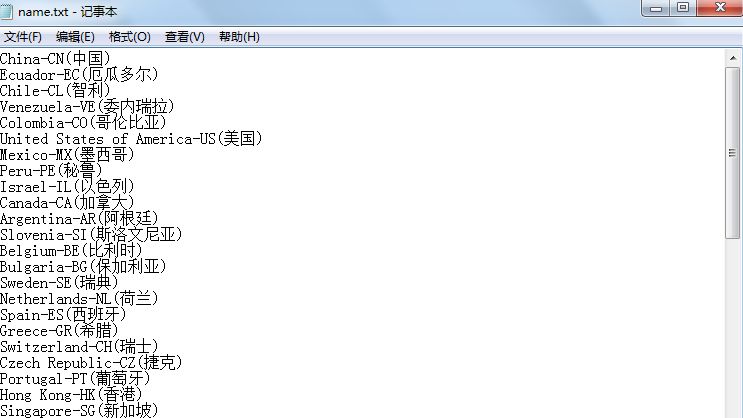
No3:在上次的代码上进行优化,文件夹的名字也需要按照规定的命名(name.txt)。且名字中含有code.
@echo off&setlocal enabledelayedexpansion

title ::rename tool

color 0a

rem +++++++++++++++++++++++++++++++++++++++++++

rem   OneKeyRename.bat

rem          By zhzw @2017/5/20

rem

rem            Version: 1.3

rem +++++++++++++++++++++++++++++++++++++++++++

set /p code=InputCountryCode:

rem ping 127.0.0.1 -n 2 >nul

rem findstr "CN" name.txt | cmd /v /c "set /p var=&echo !var!"

:search

findstr "/c:-%code%" name.txt

rem 简单理解为 0表示成功,1表示失败

if not %errorlevel%== 0 (

    echo Not exist ! &goto :end

) else (

    for /f %%i in ('findstr "/c:-%code%" name.txt') do (

        echo Create folder ...

        if exist %%i (

            echo The folder exist !

        ) else (

            mkdir "%cd%\%%i"

        )

        echo Rename files ...

        rem call调用后,%%i处于关闭状态,先保存%%i再使用%1调用

        rem 或者在call前面set一个变量来保存%%i,然后再来调用这个变量

        call :rename %%i

        :move

        echo Move files ...

        del "%cd%\temp.txt"

        move "%cd%\*.png" "%cd%\%1" 1>nul

        echo OK

        goto :end

    )

)

:rename

for /f "delims=- tokens=2" %%j in (criterion.txt) do (

    set "update=%code%_%%j"

    echo !update!>>temp.txt

)

( for /r %cd% %%k in (*.png) do (

    rem 使用call时,需要注意循环。可能会出现死循环,需要跳出for循环

    set /a a+=1

    set /p newName=

    ren "%%~nk.png" "!newName!.png"

    if !a! == 11 goto :move

))<temp.txt

:end

timeout /t 2 &exit

pause
==================================分割线===================================
No4.来个最终版本,从android设备中提取图片(存在9.10.11张图才会进行重命名),从name.txt中获取folder名字并创建folder,且把重命名的文件放入folder中.当然相应的也需要稍微修改criterion.txt中的数据.( ^S*.*g 注意不需要加双引号,匹配Screenshots.png 或者Screenshots.jpg等的图片)
修改后的criterion.txt:

@echo off&setlocal enabledelayedexpansion

title Import-and-Rename

color 0a

@mode con lines=35 cols=75

:comment

set a=0

set b=0

set c=0

cls

color 0a

rem +++++++++++++++++++++++++++++++++++++++++++

rem   OneKeyImportRename.bat

rem          By zhzw @2017/5/22

rem

rem            Version: 1.4

rem +++++++++++++++++++++++++++++++++++++++++++

echo.

echo                              注意事项!!!

echo.

echo 1.截图必须为criterion.txt对应的顺序

echo.

echo 2.打开USB,连接设备,勾选总是允许USB调试.输入code(如:US)即可.

echo.

echo 3.若运行中出现异常请根据提示操作(不要操作criterion.txt,name.txt文件).

echo.

echo ==================================== end ================================

rem ======================================================================

:input

color 0a

set /p code=InputCountryCode:

:search

findstr "/c:-%code%" name.txt >nul

if not %errorlevel%== 0 (

    color 0d

    echo Not exist. Please reenter

    ping 127.0.0.1 -n 3 >nul

    goto :input

) else (

    for /f "delims=" %%i in ('findstr "/c:-%code%" name.txt') do (

        set "i=%%i"

        echo.

        if not exist %cd%\%%i (

            echo Create folder ...

            echo folder name = %%i

            mkdir "%cd%\%%i"

            echo Create successful!

        ) else (

            echo Create folder ...

            echo This folder already exists!

            echo Do you want to overwrite this folder ?

            echo "Yes" Please press Enter Key to continue.

            echo "NO"  Please close this window.

            pause >nul

        )

        rem 因为%%i中存在空格.传递参数时,会以空格为准,出现多个参数.

        rem call :rename %%i

        rem :move

        rem echo %1

        rem ---------------------------------------------------

        call :rename

        :move

        echo Rename successful!

        del "%cd%\temp.txt"

        echo Move files ...

        move "%cd%\*.png" "%cd%\!i!" 1>nul

        echo.

        echo It's OK

        goto :end1

    )

)

rem ========================================================================

:rename

adb devices|findstr "device$" 1>nul 2>nul

if not %errorlevel%== 0 (

    echo Devices not connected !

    echo Please check whether the USB is turned on.

    goto :end2

)

echo Import screenshots into the current folder ...

rem You need to pay attention to the version of adb

rem adb pull /sdcard/DCIM/Screenshots/ "%cd%" 1>nul 2>nul

adb pull /sdcard/Pictures/Screenshots/ "%cd%" 1>nul 2>nul

echo.

ping 127.0.0.1 -n 3 >nul

if not exist %cd%\^S*.*g (

    echo Import pictures failure !

    echo Please check the "allow the debug?" whether always allow?&goto :end2

)

rem Count the number of pictures.

for /f %%i in ('dir /b %cd%\^S*.*g') do (

    set /a a+=1

)

if %a% equ 9 (

    echo Successfully import %a% pictures !

    rem Modify code and Transfer new names to temp.txt

    for /f "eol=. delims=- tokens=2" %%j in (criterion.txt) do (

        set "update=%code%_%%j"

        echo !update!>>temp.txt

    )

    echo Rename files ...

    rem Using adb pull pictures is ascending sort

    rem Using /r or /f is descending sort (dir /b /od)

    ( for /r %cd% %%k in (^S*.*g) do (

        set /a b+=1

        set /p newName=

        echo %%~nxk --^>"!newName!.png"

        ren %%~nxk "!newName!.png"

        if !b! == %a% goto :move

    ))<temp.txt

) else (

    if %a% equ 10 (

        echo Successfully import %a% pictures !

        for /f "delims=- tokens=2" %%j in (criterion.txt) do (

            set /a c+=1

            if !c! == 11 (

                set update=""

            ) else (

                set update=%code%_%%j

                echo !update!>>temp.txt

            )

        )

        echo Rename files ...

        ( for /r %cd% %%k in (^S*.*g) do (

            set /a b+=1

            set /p newName=

            echo %%~nxk --^>"!newName!.png"

            ren %%~nxk "!newName!.png"

            if !b! == %a% goto :move

        ))<temp.txt

    ) else (

        if %a% equ 11 (

            echo Successfully import %a% pictures !

            for /f "delims=- tokens=2" %%j in (criterion.txt) do (

                set update=%code%_%%j

                echo !update!>>temp.txt

            )

            echo Rename files ...

            ( for /r %cd% %%k in (^S*.*g) do (

                set /a b+=1

                set /p newName=

                echo %%~nxk --^>"!newName!.png"

                ren %%~nxk "!newName!.png"

                if !b! == %a% goto :move

            ))<temp.txt

        ) else (

            color 0d

            echo Successfully import %a% pictures !

            echo The total number of pictures is error!

            echo Please check the total number of pictures.&goto :end2

        )

    )

)

rem =========================================================================

:end1

timeout /t 5 &goto :comment

:end2

echo Please operate according to the prompt.

timeout /t 10 &goto :comment

pause
bat如何实现图片与名字匹配重命名的更多相关文章
- WordPress 中文图片 上传 自动重命名
由于国人很少有在上传图片前将图片名重命名为英语的,所以自动重命名对于WP来说尤为重要,特别是LINUX的不支持中文名的. WordPress上传多媒体的代码都存放于\wp-admin\includes ...
- bat批量修改图片的名字实现(两种方法)
问题描述: 业务中遇到需要批量修改大量图片的名字. 如下图,需要修改为图片名字“u=”之后和“,”之前的那一串 解决思路1: bat批处理,网上查找相关代码如下: @echo off SetLocal ...
- bat遍历当前目录下的文件,批量重命名
@echo off setlocal enabledelayedexpansion for %%x in (*) do ( if not "%%x"=="demo.bat ...
- shell curl 下载图片并另存为(重命名)
curl -o fuck.png http://img30.360buyimg.com/imgzone/jfs/t19711/232/1837927836/150222/e4cd87bb/5ad990 ...
- [转]Windows系统下批量重命名文件(bat命令版本)
原文地址:https://jingyan.baidu.com/article/6dad507524bdcba122e36e44.html 我们有时候会遇到大量文件需要重命名,Windows系统下右键菜 ...
- 怎样用bat批量重命名文件夹和文件
很早以前本人写过重命名文件夹的文章,发现其中稍有不完善的地方,其主要功能在文件夹名前统一加上字符,或者在文件夹名后统一加上字符,有网友反应功能太单一.今天我又仔细研究了一下bat批处理代码,分别能完全 ...
- Dotfuscator类重命名方法解析
Dotfuscator是专业的.NET程序代码混淆工具,拥有重命名.字符串加密.流程模糊.自定义规则和水印等功能,倍受开发人员喜爱.其中类重命名的使用方法非常普遍,涉及到既要保护代码信息,又要在以后能 ...
- Win10家庭版重命名Administrator用户文件夹
需要将Windows系统默认的Administrator帐号文件夹改名为我们自定义的名称.. 但是Win10家庭版找不到组策略gpedit.msc 根据微软官方有关Win10各版本操作系统中对于组策略 ...
- PHP 批量修改图片的名字
<?php // glob() 返回指定目录下的文件名以及目录 $arr = glob("img/*.jpg"); $time = time(); $i = 100001; ...
随机推荐
- 使用Python批量修改文件名
使用os.rename(fold,newfilename)对文件重命名 # coding:utf-8 import os filename_list = os.listdir('./') for fi ...
- Element-ui 中dialog的使用方法
<template> <div> <el-button type="text" @click="dialogFormVisible = tr ...
- Oracle 11g R2 for Win10(64位)的安装步骤
下载 官网下载地址: win64_11gR2_database_1of2.zip win64_11gR2_database_2of2.zip 将两个压缩包解压到同一个目录下,即"databa ...
- sap部署
SAP部署 连接sap系统需要通过sap javaconnect来连接,对于sapjco.jar系列文件有32位与64位之分.即对jdk有严格要求.现说明客户端部署及服务端部署两种情况: 一. 部署客 ...
- Css - 精灵图
Css - 精灵图css sprite 一个页面文档上总是会有N多的图标小图片,它们都是以背景图的方式嵌入文档,每个小图片需要一个url的css属性,每个url都指向一个服务器地址的链接,每个链接都代 ...
- python基础-----字符编码
1.ASCII ASCII(American Standard Code for Information Interchange,美国标准信息交换代码)是基于拉丁字母的一套电脑编码系统,主要用于显示现 ...
- dubbo初步认识
dubbo中文网站:http://dubbo.apache.org/zh-cn/ dubbo英文网站:http://dubbo.apache.org/en-us/ 1.Apache Dubbo是一款高 ...
- 扒一扒JVM的垃圾回收机制,下次面试你准备好了吗
相信和小编一样的程序猿们在日常工作或面试当中经常会遇到JVM的垃圾回收问题,有没有在夜深人静的时候详细捋一捋JVM垃圾回收机制中的知识点呢?没时间捋也没关系,因为小编接下来会给你捋一捋. 一. 技 ...
- 利用crash 分析软死锁问题【转】
转自:https://blog.csdn.net/divlee130/article/details/47806551 版权声明:本文为博主原创文章,未经博主允许不得转载. https://blog. ...
- 巧用这19条MySQL优化【转】
1.EXPLAIN 做MySQL优化,我们要善用EXPLAIN查看SQL执行计划. 下面来个简单的示例,标注(1.2.3.4.5)我们要重点关注的数据: type列,连接类型.一个好的SQL语句至少要 ...