
Python3学习笔记27-ConfigParser模块
ConfigParser模块在Python3修改为configparser,这个模块定义了一个ConfigeParser类,该类的作用是让配置文件生效。配置文件的格式和window的ini文件相同,大致如下:
【section】
name = value
name:value
用 = 或 : 来赋值
section可以理解为一个模块,比如登录的时候,这个section可以叫login,下面放着username和password
该模块主要使用模块中RawConfigParser(),ConfigParser()、SafeConfigParse()这三个方法(三选一),创建一个对象使用对象的方法对配置文件进行增删改查操作
主要介绍ConfigParser()下的方法
涉及增删改的操作 都需要使用write()方法之后才会生效
add_section():用来新增section
set():用来新增对应section下的某个键值对
import  configparser

config = configparser.ConfigParser()

file = 'D:/PycharmProjects/Vuiki/Config/config.ini'

config.read(file)

config.add_section('login')

config.set('login','username','')

config.set('login','password','')

with open(file,'w') as configfile:

    config.write(configfile)
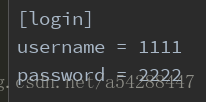
read()方法是用来读取配置文件的,如果不加上read()方法,写入是直接从头开始写的,使用了read()之后,是从读取完后的光标开始写入,类似追加模式'a'一样。可能有疑惑,既然有追加模式,直接把with里面的'w'换成'a'就可以,干嘛还要读一次
将上面的代码修改一下,将username和password的值修改一下
import  configparser

config = configparser.ConfigParser()

file = 'D:/PycharmProjects/Vuiki/Config/config.ini'

config.read(file)

config.set('login','username','')

config.set('login','password','')

with open(file,'w') as configfile:

    config.write(configfile)
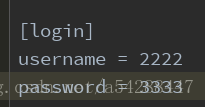
会发现username和password的值被修改了,如果使用'a'模式,会发现报错,没有找到login这个section。
就算把上面代码中加上config.add_section('login')也只会在后面进行追加新增,而不会做修改操作
所以考虑到把方法封装的缘故,使用read()和'w'写入模式,来实现追加新增,修改配置文件
读取
使用get()方法可以获得指定section下某个键的值
import  configparser

config = configparser.ConfigParser()

file = 'D:/PycharmProjects/Vuiki/Config/config.ini'

config.read(file)

username = config.get('login','username')

password = config.get('login','password')

print(username,password)
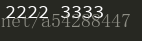
import  configparser

config = configparser.ConfigParser()

file = 'D:/PycharmProjects/Vuiki/Config/config.ini'

config.read(file)

username = config.sections()

print(username)

options()返回对应section下可用的键
import  configparser

config = configparser.ConfigParser()

file = 'D:/PycharmProjects/Vuiki/Config/config.ini'

config.read(file)

username = config.options('login')

print(username)

has_section()方法判断section是否存在,存在返回True,不存在返回False
import  configparser

config = configparser.ConfigParser()

file = 'D:/PycharmProjects/Vuiki/Config/config.ini'

config.read(file)

test1 = config.has_section('login')

test2 = config.has_section('test')

print(test1)

print(test2)

has_option()方法判断section下,某个键是否存在,存在返回True,不存在返回False
import  configparser

config = configparser.ConfigParser()

file = 'D:/PycharmProjects/Vuiki/Config/config.ini'

config.read(file)

test1 = config.has_option('login','username')

test2 = config.has_option('login','pass')

print(test1)

print(test2)

还有一些不罗列了,感兴趣可以去查一下
删除
remove_section()方法删除某个section
remove_option()方法删除某个section下的键
import  configparser

config = configparser.ConfigParser()

file = 'D:/PycharmProjects/Vuiki/Config/config.ini'

config.read(file)

config.remove_option('login','username')

config.remove_option('login','password')

config.remove_section('login')

with open(file,'w') as configfile:

    config.write(configfile)
一定要先read()到内存,不然删除报错
Python3学习笔记27-ConfigParser模块的更多相关文章
- Python3学习笔记(urllib模块的使用)转http://www.cnblogs.com/Lands-ljk/p/5447127.html
Python3学习笔记(urllib模块的使用) 1.基本方法 urllib.request.urlopen(url, data=None, [timeout, ]*, cafile=None, ...
- Python3学习笔记(urllib模块的使用)
转载地址:https://www.cnblogs.com/Lands-ljk/p/5447127.html 1.基本方法 urllib.request.urlopen(url, data=None, ...
- 【转】Python3学习笔记(urllib模块的使用)
原文地址:https://www.cnblogs.com/Lands-ljk/p/5447127.html 1.基本方法 urllib.request.urlopen(url, data=None, ...
- python3学习笔记(7)_listComprehensions-列表生成式
#python3 学习笔记17/07/11 # !/usr/bin/env python3 # -*- conding:utf-8 -*- #通过列表生成式可以生成格式各样的list,这种list 一 ...
- python3学习笔记(6)_iteration
#python3 学习笔记17/07/10 # !/usr/bin/env python3 # -*- coding:utf-8 -*- #类似 其他语言的for循环,但是比for抽象程度更高 # f ...
- Python3学习笔记 - 准备环境
前言 最近乘着项目不忙想赶一波时髦学习一下Python3.由于正好学习了Docker,并深深迷上了Docker,所以必须趁热打铁的用它来创建我们的Python3的开发测试环境.Python3的中文教程 ...
- python3学习笔记(5)_slice
#python3 学习笔记17/07/10 # !/usr/bin/env python3 # -*- coding:utf-8 -*- #切片slice 大大简化 对于指定索引的操作 fruits ...
- python3学习笔记(4)_function-参数
#python学习笔记 17/07/10 # !/usr/bin/evn python3 # -*- coding:utf-8 -*- import math #函数 函数的 定义 #定义一个求绝对值 ...
- python自动化测试学习笔记-5常用模块
上一次学习了os模块,sys模块,json模块,random模块,string模块,time模块,hashlib模块,今天继续学习以下的常用模块: 1.datetime模块 2.pymysql模块(3 ...
随机推荐
- java虚拟机的内存模型
一.为什么要了解java虚拟机的内存模型 java虚拟机作为java代码运行的平台,是java技术的基石.了解java虚拟机的内存模型也就变得十分必要.它能帮助我们更好的了解java代码的运行机制,更 ...
- Hadoop记录-Hadoop jmx
https://cwiki.apache.org/confluence/display/EAG/Hadoop+JMX+Monitoring+and+Alerting curl http://10.11 ...
- Hive记录-Impala jdbc连接hive和kudu参考
1.配置环境Eclipse和JDK 2.加载hive jar包或者impala jar包 备注:从CDH集群里面拷贝出来 下载地址:https://www.cloudera.com/downloads ...
- golang channle阻塞
当一个channle容量写满时,会出现阻塞状态 package main func main() { var c1 = make(chan int, 10) for i := 0; i < 10 ...
- 牛客网暑期ACM多校训练营(第十场)D Rikka with Prefix Sum (组合数学)
https://www.nowcoder.com/acm/contest/148/D 题意 一个A数组,初始全为0.现有三种操作,1:给区间[L,R]+w:2:把每个位置的元素变为其前缀和:3:求区间 ...
- c++进阶学习
以后可能要做c++开发了..记录要看的书和可能用的技术,让自己有个学习的方向... 1. 语言基础 2. 算法与数据结构基础 3. 多线程开发基础 4. 数据库 5. 网络编程 6. 内存数据库技 ...
- Golang入门教程(九)复合数据类型使用案例二
参考:http://www.runoob.com/go/go-slice.html 目录 切片 字典(map) 函数(func) 接口(interface) 通道(chan) 四.切片(Slice) ...
- javascript获取值
<div id='name'>张三</div> $('#name').val() $(name).val() 以上两个都可以得到值,第一种用的比较多.
- php下curl ssl常用问题
1. 查看curl版本 在phpinfo中,可以查看 curl cURL support enabled cURL Information 7.35.0 Age 3 Features AsynchDN ...
- 利用PHP实现登录与注册功能以及使用PHP读取mysql数据库——以表格形式显示数据
登录界面 <body><form action="login1.php" method="post"><div>用户名:&l ...