
form表单的属性标签和练习
form表单的标签
做一个如下图的form表单:
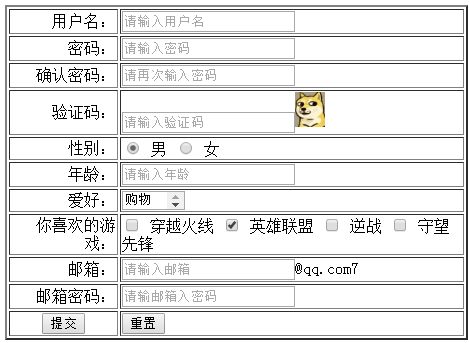
我们的代码如下:
<body leftmargin="400px" topmargin="200px">

<form method="post" action="http://www.baidu.com">

<table border="2px" heigth="200px">

<tr>

<td align="right">用户名:</td>

<td>

<input type="text" name="" id="" value="" placeholder="请输入用户名" />

</td>

</tr>

<tr>

<td align="right">密码:</td>

<td>

<input type="password" name="" id="" value="" placeholder="请输入密码"/>

</td>

</tr>

<tr>

<td align="right">确认密码:</td>

<td>

<input type="password" name="" id="" value="" placeholder="请再次输入密码"/>

</td>

</tr>

<tr>

<td align="right">验证码:</td>

<td>

<input type="text" name="" id="" value="" placeholder="请输入验证码" /><img src="1.gif" width="30px"/>

</td>

</tr>

<tr>

<td align="right">性别:</td>

<td>

<input type="radio" name="r1" id="r1" checked="checked" value="" />

<lable for="r1">男</lable>

<input type="radio" name="r1" id="r2" value="" />

<lable for="r1">女</lable>

</td>

</tr>

<tr>

<td align="right">年龄:</td>

<td>

<input type="text" name="" id="" value="" placeholder="请输入年龄"/>

</td>

</tr>

<tr>

<td align="right">爱好:</td>

<td>

<select name="" id="si" size="1" multiple="multiple">

<option value="">购物</option>

<option value="">上网</option>

<option value="">运动</option>

<option value="">看电影</option>

<option value="">听音乐</option>

</select>

</td>

</tr>

<tr>

<td align="right">你喜欢的游戏:</td>

<td>

<input type="checkbox" name="" id="c1" value="b1" />

<label for="c1">穿越火线</label>

<input type="checkbox" name="" id="c2" value="b2" checked="checked"/>

<label for="c2">英雄联盟</label>

<input type="checkbox" name="" id="c3" value="b3" />

<label for="c3">逆战</label>

<input type="checkbox" name="" id="c4" value="b4" />

<label for="c1">守望先锋</label>

</td>

</tr>

<tr>

<td align="right">邮箱:</td>

<td>

<input id="" name="" value="" placeholder="请输入邮箱" />@qq.com7

</td>

</tr>

<tr>

<td align="right">邮箱密码:</td>

<td>

<input type="password" name="" id="" value="" placeholder="请输邮箱入密码"/>

</td>

</tr>

<tr>

<td align="center">

<input type="submit" name="" id="" value="提交" />

</td>

<td>

<input type="reset" name="" id="" value="重置"/>

</td>

</tr>

</table>

</form>

</body>
form的常用标签和属性都有了,有什么问题多多交流。
form表单的属性标签和练习的更多相关文章
- form表单的属性标签
form表单的常用标签 表单: <form id="" name="" method="post/get" action=" ...
- html/form表单常用属性认识
1.form表单常用属性练习 <style> .form1 { margin: auto; height: 900px; width: 500px; text-align: center; ...
- html5中form表单新增属性以及改良的input标签元素的种类
在HTML5中,表单新增了一些属性,input标签也有了更多的type类型,有些实现了js才能实现的特效,但目前有些浏览器不能全部支持.下面是一些h5在表单和input标签上的一些改动. <!D ...
- 关于html 中form表单的内标签和使用
表单标记 1.普通文本框: <input type=”text” name=”名称” value=”值”;不写value默认为空/> 2.密码框:<input type=”passw ...
- 常用6种type的form表单的input标签分析及示例
<input> 标签用于搜集用户信息. 根据不同的 type 属性值,输入字段拥有很多种形式.输入字段可以是文本字段.复选框.掩码后的文本控件.单选按钮.按钮等等. 在这里博主介绍6中ty ...
- form 表单 enctype 属性-(转自w3c)
<from action="xxx.xxx" enctype="multipart/form-data"></from> 在上传文件时必 ...
- Form表单,textarea标签输入框 字数限制,和已输入字数的统计显示
<script type="text/javascript"> $(document).ready(function() { <%-- 页面进来时就调用 --%& ...
- day75 form 组件(对form表单进行输入值校验的一种方式)
我们的组件是什么呢 select distinct(id,title,price) from book ORM: model.py class Book(): title=model.CharFiel ...
- 在学习HTML——form表单中的label标签时的一点小体会
在我啃了一遍书本之后,开始了在慕课看视频的过程,从最开始的HTML+CSS的基础课程看起,在第5-9小节讲到了form表单的label标签, 首先看一下慕课的讲解: label 标签不会向用户呈现任 ...
随机推荐
- 关于iPhone图片的问题。
由于iOS设备的屏幕分辨率不尽相同,有大有小,那么在不同设备中显示同一张图片,可能会造成图片被拉伸.变形,严重影响用户体验.为了让图片在不同设备中都能得到很好的显示效果,同一类图片我们一般会准备几种版 ...
- Java并发之原子变量和原子引用与volatile
我们知道在并发编程中,多个线程共享某个变量或者对象时,必须要进行同步.同步的包含两层作用:1)互斥访问(原子性):2)可见性:也就是多个线程对共享的变量互斥地访问,同时线程对共享变量的修改必须对其他线 ...
- python处理json和redis hash的坑
1.使用MySQLdb读取出来的数据是unicode字符串,如果要写入redis的hash中会变成 "{u'eth0_outFlow': 2.5, u'eth1_inFlow': 3.44} ...
- Docker中部署Kubernetes
Kubernetes为Google开源的容器管理框架,提供了Docker容器的夸主机.集群管理.容器部署.高可用.弹性伸缩等一系列功能:Kubernetes的设计目标包括使容器集群任意时刻都处于用户期 ...
- python写红包的原理流程包含random,lambda其中的使用和见简单介绍
Python写红包的原理流程 首先来说说要用到的知识点,第一个要说的是扩展包random,random模块一般用来生成一个随机数 今天要用到ramdom中unifrom的方法用于生成一个指定范围的随机 ...
- monkey之monkey日志分析
一.初步分析方法:Monkey测试出现错误后,一般的差错步骤为以下几步:1.找到是monkey里面的哪个地方出错2.查看Monkey里面出错前的一些事件动作,并手动执行该动作3.若以上步骤还不能找出, ...
- HDOJ 1326. Box of Bricks 纯水题
Box of Bricks Time Limit: 2000/1000 MS (Java/Others) Memory Limit: 65536/32768 K (Java/Others) To ...
- 用grunt搭建web前端开发环境
1.前言 本文章旨在讲解grunt入门,以及讲解grunt最常用的几个插件的使用. 2.安装node.js Grunt和所有grunt插件都是基于nodejs来运行的,如果你的电脑上没有nodejs, ...
- BZOJ 3529: [Sdoi2014]数表 [莫比乌斯反演 树状数组]
3529: [Sdoi2014]数表 Time Limit: 10 Sec Memory Limit: 512 MBSubmit: 1399 Solved: 694[Submit][Status] ...
- java.io.NotSerializableException: test.io.file.Student
java.io.NotSerializableException: test.io.file.Student at java.io.ObjectOutputStream.writeObject0 ...