
步步为营-75-Cookie简介
说明:cookie常用于数据保存
1 使用
//创建cookie
Response.cookies["yk"].value ="xyxtl";
//设置过期时间 如果不设置cookie只存在内存中,无法实现长期保存
Response.cookies["yk"].Expires = DateTime.Now.AddDays(3);
//删除cookie == 修改过期时间
Response.cookies["yk"].Expires = DateTime.Now.AddDays(-3);
//cookie跨域 正常的情况主域可以自动向子域传递数据,子域无法向主域传递数据
Response.cookies["yk"].Domain = "主域网址";
//cookie使用范围
Response.cookies["yk"].Path = ...
二:C#中的使用实例:记住密码
<%@ Page Language="C#" AutoEventWireup="true" CodeBehind="01Cookie记住密码.aspx.cs" Inherits="_03状态保持_Cookies和Session_._01Cookie记住密码" %>

<!DOCTYPE html>

<html xmlns="http://www.w3.org/1999/xhtml">

<head runat="server">

<meta http-equiv="Content-Type" content="text/html; charset=utf-8"/>

    <title></title>

</head>

<body>

    <form id="form1" method="post" >

    用户名:<input type="text" name="UserName"/>

        <br />

    密码:<input type="password" name="Pwd"/>

        <br />

     <input type="checkbox" id="Remember" name="Remember"  />记住我1周

     <input type="checkbox" id="Forget" name="Forget" />退出

        <br />

     <input type="submit" value="登录" />

    </form>

</body>

</html>
aspx
using System;

using System.Collections.Generic;

using System.Linq;

using System.Web;

using System.Web.UI;

using System.Web.UI.WebControls;

namespace _03状态保持_Cookies和Session_

{

    public partial class _01Cookie记住密码 : System.Web.UI.Page

    {

        protected void Page_Load(object sender, EventArgs e)

        {

            //写入cookie

            if (   Request["Remember"]=="on")

            {

                string userName = Request["UserName"];

                string pwd = Request["Pwd"];

                Response.Cookies[userName].Value = pwd;

                Response.Cookies[userName].Expires = DateTime.Now.AddDays();

            }

            //删除cookie

            if ( Request["Forget"] == "on")

            {

                string userName = Request["UserName"];

                string pwd = Request["Pwd"];

                Response.Cookies[userName].Value = pwd;

                Response.Cookies[userName].Expires = DateTime.Now.AddDays(-);

            }

            //判断cookie

            if ( (Request.Cookies["yk"]) != null)

            {

                if (Request.Cookies["yk"].Value == "")

                {

                    Response.Write("登录成功!");

                     Response.Write(Request["category"]);

                }

                else {

                    Response.Write("登录失败!");

                    Response.Write(Request["category"]);

                }

            }

            else

            {

                if (!String.IsNullOrEmpty(Request["UserName"]) && !String.IsNullOrEmpty(Request["Pwd"]) && Request["UserName"] == "yk" && Request["Pwd"]=="")

                {

                    Response.Write("登录成功!");

                    Response.Write(Request["category"]);

                }

                else {

                    Response.Write("登录失败!");

                      Response.Write(Request["category"]);

                }

            }

        }

    }

}
aspx.cs
在不使用cookie记录前登录是失败的


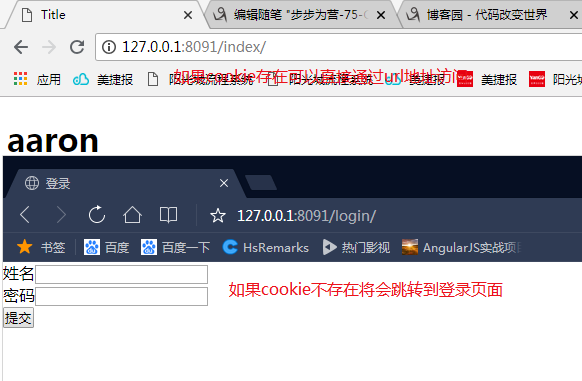
三:python 中使用cookie直接访问index页面
1:注释掉setting.py的中间件配置

2:配置路由
"""cookie_Session URL Configuration

The `urlpatterns` list routes URLs to views. For more information please see:

    https://docs.djangoproject.com/en/2.1/topics/http/urls/

Examples:

Function views

    1. Add an import:  from my_app import views

    2. Add a URL to urlpatterns:  path('', views.home, name='home')

Class-based views

    1. Add an import:  from other_app.views import Home

    2. Add a URL to urlpatterns:  path('', Home.as_view(), name='home')

Including another URLconf

    1. Import the include() function: from django.urls import include, path

    2. Add a URL to urlpatterns:  path('blog/', include('blog.urls'))

"""

from django.contrib import admin

from django.urls import path

from app011 import views

urlpatterns = [

    path('admin/', admin.site.urls),

    path('login/', views.login),

    path('index/', views.index),

]
urls.py
from django.shortcuts import render,redirect

# Create your views here.

def login(request):

    # print("SSSSSSSSS",request.session)

    if request.method=="POST":

        name=request.POST.get("user")

        pwd = request.POST.get("pwd")

        if  name=="aaron" and pwd=="":

            ret = redirect("/index/")

            ret.set_cookie("user",name)

            ret.set_cookie("password",pwd)

            return ret

    return render(request,"login.html")

def index(request):

    if  request.COOKIES.get("user",None) == "aaron":

        name = "aaron"

        return render(request, "index.html",locals())

    else:

        return redirect("/login/")
Views.py
<!DOCTYPE html>

<html lang="en">

<head>

    <meta charset="UTF-8">

    <title>Title</title>

</head>

<body>

    <h1>{{ name }}</h1>

</body>

</html>
index.html
<!DOCTYPE html>

<html lang="en">

<head>

    <meta charset="UTF-8">

    <title>登录</title>

    <style>

        *{

            margin: 0;

            padding:0;

        }

    </style>

</head>

<body>

<form action="/login/" method="post">

    <p>姓名<input type="text" name="user"></p>

    <p>密码<input type="password" name="pwd"></p>

    <p><input type="submit"></p>

</form>

</body>

</html>
login.html
步步为营-75-Cookie简介的更多相关文章
- Session & Cookie 简介
(一)简介 会话(Session)跟踪是Web程序中常用的技术,用来跟踪用户的整个会话.常用的会话跟踪技术是Cookie与Session.Cookie通过在客户端记录信息确定用户身份,Session通 ...
- cookie简介
上例子 1.首先要用php创建cookie发送给客户端,利用setcookie()方法即可 <?php /* * * @Authors peng--jun * @Email 1098325951 ...
- session cookie简介
会话机制:Web程序中常用的技术,用来跟踪用户的整个会话.常用的会话跟踪技术是Cookie与Session.Cookie通过在客户端记录信息确定用户身份,Session通过在服务器端记录信息确定用户身 ...
- Session&Cookie 简介及使用
Cookie cookie 是存储于访问者的计算机中的变量.每当同一台计算机通过浏览器请求某个页面时,就会发送这个 cookie.你可以使用 JavaScript 或其它语言来创建和取回 cookie ...
- 步步为营-36-ADO.Net简介
与数据库进行连接交互 方法一 #region 01连接对象 //01 连接字符串 string connstr = "server=.;uid=sa;pwd=sa;database=Demo ...
- cookie技术简介
Cookie简介 众所周知,HTTP协议是一个无状态的协议.一个Web应用由很多个Web页面组成,每个页面都有唯一的URL来定义.用户在浏览器的地址栏输入页面的URL,浏览器就会向Web Server ...
- 《AngularJS入门与进阶》图书简介
一.图书封面 二.图书CIP信息 图书在版编目(CIP)数据 AngularJS入门与进阶 / 江荣波著. – 北京 : 清华大学出版社, 2017 ISBN 978-7-302-46074-9 Ⅰ. ...
- C#中Cookie的概述及应用
1.Cookie简介 Cookie 提供了一种在 Web 应用程序中存储用户特定信息的方法.例如,当用户访问您的站点时,您可以使用 Cookie 存储用户首选项或其他信息.当该用户再次访问您的网站时, ...
- Asp.net操作cookie大全
实例代码: 1 2 3 4 5 6 7 8 9 10 11 12 13 14 15 16 17 18 19 20 21 22 23 24 25 26 27 28 29 30 31 32 33 34 3 ...
- [转载]JavaEE学习篇之——Session&&Cookie
原文链接: http://blog.csdn.net/jiangwei0910410003/article/details/23337043 今天继续来看看JavaWeb的相关知识,这篇文章主要来讲一 ...
随机推荐
- shell编程 之 文件包含
解释:就是在一个脚本中引用或者运行其他脚本的文件. 常用格式:. filename 或者 source filename 实例:/hehe文件夹下有两个文件:t2.sh 和t3.sh t2.sh的内容 ...
- TensorFlow tf.app&tf.app.flags用法介绍
TensorFlow tf.app&tf.app.flags用法介绍 TensorFlow tf.app argparse tf.app.flags 下面介绍 tf.app.flags.FL ...
- [转] 浅谈Trie树(字典树)
原文地址:https://www.cnblogs.com/TheRoadToTheGold/p/6290732.html Trie树(字典树) 一.引入 字典是干啥的?查找字的. 字典树自然也是起查找 ...
- sqlserver开窗函数在财务对账中的用法
曾几何时发现开窗函数在财务对账总特别好用.但是每次可能很久没用,逻辑都要重头来过.特此留一份完整的思考逻辑待日后参考. 以下是数据源: 从上面的数据可以看到通过C列,那么只需要两个条件即可获得已经用对 ...
- Ubuntu 16.04 Matlab2015b安装
小白一个,安装过程参考了一大堆教程. 这里记录一下. 一.安装 1) sudo mkdir /media/matlab 2) cd 到下载的镜像文件所在文件夹 3) 挂载镜像: sudo mount ...
- 【转】Python模块学习 - fnmatch & glob
[转]Python模块学习 - fnmatch & glob 介绍 fnmatch 和 glob 模块都是用来做字符串匹配文件名的标准库. fnmatch模块 大部分情况下使用字符串匹配查找特 ...
- 高并发的socket的高性能设计【转】
转自:https://blog.csdn.net/quincyfang/article/details/44654351 高性能数据传输系统的框架设计 1 引言 随着互联网和物联网的高速发展,使用网络 ...
- 解决MySQL报错ERROR 2002 (HY000)【转】
今天在为新的业务线搭架数据库后,在启动的时候报错 root@qsbilldatahis-db01:/usr/local/mysql/bin# ./mysql ERROR 2002 (HY000): C ...
- python3+selenium框架设计02-自动化测试框架需要什么
什么是自动化测试框架 自动化测试框架能够提供便利给用户高效完成一些事情,比如,结构清晰开发脚本,多种方式.平台执行脚本,良好的日志和报告去跟踪脚本执行结果. 关于自动化测试框架的定义有很多,在我大致理 ...
- hibernate框架学习第二天:核心API、工具类、事务、查询、方言、主键生成策略等
核心API Configuration 描述的是一个封装所有配置信息的对象 1.加载hibernate.properties(非主流,早期) Configuration conf = new Conf ...