
KingbaseES R6 集群repmgr.conf参数'recovery'测试案例(三)
案例三:测试‘recovery = manual’
1、查看集群节点状态信息:
[kingbase@node1 bin]$ ./repmgr cluster show

 ID | Name    | Role    | Status    | Upstream | Location | Priority | Timeline | Connection string

----+---------+---------+-----------+----------+----------+----------+----------+---------------------------

 1  | node243 | primary | * running |          | default  | 100      | 3        | host=192.168.7.243 user=esrep dbname=esrep port=54321 connect_timeout=10 keepalives=1 keepalives_idle=10 keepalives_interval=1 keepalives_count=3

 2  | node248 | standby |   running | node243  | default  | 100      | 3        | host=192.168.7.248 user=esrep dbname=esrep port=54321 connect_timeout=10 keepalives=1 keepalives_idle=10 keepalives_interval=1 keepalives_count=3
2、查看recovery配置信息

3、重启主库主机系统
[root@node3 ~]# reboot
4、查看备库hamgr日志
=从以下日志信息获知,主库系统宕机后,集群执行主备切换,备库被提升为主库。==
[2022-03-02 10:32:38] [NOTICE] starting monitoring of node "node248" (ID: 2)

[2022-03-02 10:32:38] [INFO] "connection_check_type" set to "ping"

[2022-03-02 10:32:38] [INFO] monitoring connection to upstream node "node243" (ID: 1)

[2022-03-02 10:32:38] [NOTICE] try to change wal catched_up state to 1

[2022-03-02 10:32:38] [INFO] primary flush lsn is 0/1F000D40, local flush lsn is 0/1F000D40

[2022-03-02 10:32:38] [NOTICE] try to change streaming_sync state to TRUE

[2022-03-02 10:34:24] [WARNING] unable to ping "host=192.168.7.243 user=esrep dbname=esrep port=54321 connect_timeout=10 keepalives=1 keepalives_idle=10 keepalives_interval=1 keepalives_count=3"

[2022-03-02 10:34:24] [DETAIL] PQping() returned "PQPING_REJECT"

[2022-03-02 10:34:24] [WARNING] unable to connect to upstream node "node243" (ID: 1)

[2022-03-02 10:34:24] [INFO] sleeping 6 seconds until next reconnection attempt

[2022-03-02 10:34:30] [INFO] checking state of node 1, 1 of 10 attempts

[2022-03-02 10:34:40] [WARNING] unable to ping "user=esrep connect_timeout=10 dbname=esrep host=192.168.7.243 port=54321 keepalives=1 keepalives_idle=10 keepalives_interval=1 keepalives_count=3 fallback_application_name=repmgr"

[2022-03-02 10:34:40] [DETAIL] PQping() returned "PQPING_NO_RESPONSE"

[2022-03-02 10:34:40] [INFO] sleeping 6 seconds until next reconnection attempt

......

[2022-03-02 10:35:47] [INFO] checking state of node 1, 10 of 10 attempts

[2022-03-02 10:35:47] [WARNING] unable to ping "user=esrep connect_timeout=10 dbname=esrep host=192.168.7.243 port=54321 keepalives=1 keepalives_idle=10 keepalives_interval=1 keepalives_count=3 fallback_application_name=repmgr"

[2022-03-02 10:35:47] [DETAIL] PQping() returned "PQPING_NO_RESPONSE"

[2022-03-02 10:35:47] [WARNING] unable to reconnect to node 1 after 10 attempts

[2022-03-02 10:35:47] [NOTICE] setting "wal_retrieve_retry_interval" to 86405000 milliseconds

[2022-03-02 10:35:47] [WARNING] wal receiver not running

[2022-03-02 10:35:47] [NOTICE] WAL receiver disconnected on all sibling nodes

[2022-03-02 10:35:47] [INFO] WAL receiver disconnected on all 0 sibling nodes

[2022-03-02 10:35:47] [INFO] 0 active sibling nodes registered

[2022-03-02 10:35:47] [INFO] primary and this node have the same location ("default")

[2022-03-02 10:35:47] [INFO] no other sibling nodes - we win by default

[2022-03-02 10:35:47] [NOTICE] setting "wal_retrieve_retry_interval" to 5000 ms

[2022-03-02 10:35:48] [NOTICE] this node is the only available candidate and will now promote itself

[2022-03-02 10:35:48] [INFO] try to ping the trusted_servers "192.168.7.1" before execute promote_command

[2022-03-02 10:35:50] [NOTICE] PING 192.168.7.1 (192.168.7.1) 56(84) bytes of data.

--- 192.168.7.1 ping statistics ---

2 packets transmitted, 2 received, 0% packet loss, time 1008ms

rtt min/avg/max/mdev = 2.473/2.535/2.598/0.080 ms

[2022-03-02 10:35:50] [NOTICE] successfully ping one or more of the trusted_servers "192.168.7.1"

[2022-03-02 10:35:51] [NOTICE] PING 192.168.7.241 (192.168.7.241) 56(84) bytes of data.

--- 192.168.7.241 ping statistics ---

2 packets transmitted, 0 received, +1 errors, 100% packet loss, time 1000ms

[2022-03-02 10:35:51] [WARNING] ping host"192.168.7.241" failed

[2022-03-02 10:35:51] [DETAIL] average RTT value is not greater than zero

[2022-03-02 10:35:51] [INFO] loadvip result: 1, arping result: 1

[2022-03-02 10:35:51] [NOTICE] new primary node (ID: 2) acquire the virtual ip 192.168.7.241/24 success

[2022-03-02 10:35:51] [INFO] promote_command is:

  "/home/kingbase/cluster/R6C5/R6C5R/kingbase/bin/repmgr  standby promote -f /home/kingbase/cluster/R6C5/R6C5R/kingbase/etc/repmgr.conf"

NOTICE: promoting standby to primary

DETAIL: promoting server "node248" (ID: 2) using sys_promote()

NOTICE: waiting up to 60 seconds (parameter "promote_check_timeout") for promotion to complete

[2022-03-02 10:35:51] [NOTICE] try to stop old primary db (host: "192.168.7.243")

INFO: SET synchronous TO "async" on primary host

NOTICE: STANDBY PROMOTE successful

DETAIL: server "node248" (ID: 2) was successfully promoted to primary

[2022-03-02 10:35:56] [INFO] 0 followers to notify

[2022-03-02 10:35:56] [INFO] switching to primary monitoring mode

[2022-03-02 10:35:56] [NOTICE] monitoring cluster primary "node248" (ID: 2)

[2022-03-02 10:35:56] [INFO] create a thread 0x7fdeaa4b9700 to check the cluster status

[2022-03-02 10:35:57] [INFO] node (ID: 1): no server running

[2022-03-02 10:35:57] [INFO] [thread 0x7fdeaa4b9700] the cluster has no other running primary node, exit
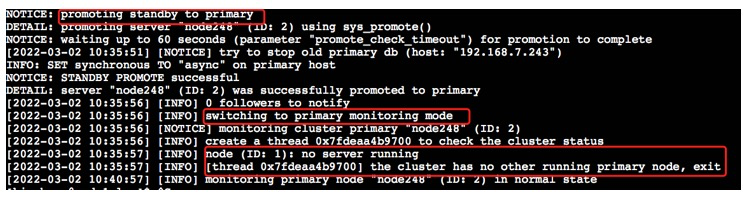
5、原主库系统正常启动
1)从新主库查看集群状态 信息
=从以下信息可以获知,集群现在处于‘双主’状态,只是原主库是‘failed’,无法连接。=
[kingbase@node1 bin]$ ./repmgr cluster show

 ID | Name    | Role    | Status    | Upstream | Location | Priority | Timeline | Connection string

----+---------+---------+-----------+----------+----------+----------+----------+----------------

 1  | node243 | primary | - failed  |          | default  | 100      | ?        | host=192.168.7.243 user=esrep dbname=esrep port=54321 connect_timeout=10 keepalives=1 keepalives_idle=10 keepalives_interval=1 keepalives_count=3

 2  | node248 | primary | * running |          | default  | 100      | 10       | host=192.168.7.248 user=esrep dbname=esrep port=54321 connect_timeout=10 keepalives=1 keepalives_idle=10 keepalives_interval=1 keepalives_count=3

WARNING: following issues were detected

  - unable to connect to node "node243" (ID: 1)

You have new mail in /var/spool/mail/kingbase
2)在新主库(原备库)创建复制槽
# 创建replication slots

test=# select sys_create_physical_replication_slot('repmgr_slot_1');

 sys_create_physical_replication_slot

--------------------------------------

 (repmgr_slot_1,)

(1 row)

test=# select sys_create_physical_replication_slot('repmgr_slot_2');

 sys_create_physical_replication_slot

--------------------------------------

 (repmgr_slot_2,)

(1 row)

test=# select * from sys_replication_slots;

   slot_name   | plugin | slot_type | datoid | database | temporary | active | active_pid | xmin | catalog_xmin |

restart_lsn | confirmed_flush_lsn

---------------+--------+-----------+--------+----------+-----------+--------+------------+-----

 repmgr_slot_1 |        | physical  |        |          | f         | f      |            |      |              |

            |

 repmgr_slot_2 |        | physical  |        |          | f         | f      |            |      |              |

            |

(2 rows)
3)在原主库(新主库)执行以下恢复操作
# 备份data目录

[kingbase@node3 kingbase]$ cp data data.bk -r

# 生成备库标识文件

[kingbase@node3 kingbase]$ cd data

[kingbase@node3 data]$ touch standby.signal
4)在原主库执行repmgr node rejoin重新加入到集群
 [kingbase@node3 bin]$ ./repmgr node rejoin -h 192.168.7.248 -U esrep -d esrep --force-rewind

NOTICE: sys_rewind execution required for this node to attach to rejoin target node 2

DETAIL: rejoin target server's timeline 10 forked off current database system timeline 9 before current recovery point 0/200000A0

NOTICE: executing sys_rewind

DETAIL: sys_rewind command is "/home/kingbase/cluster/R6C5/R6C5R/kingbase/bin/sys_rewind -D '/home/kingbase/cluster/R6C5/R6C5R/kingbase/data' --source-server='host=192.168.7.248 user=esrep dbname=esrep port=54321 connect_timeout=10 keepalives=1 keepalives_idle=10 keepalives_interval=1 keepalives_count=3'"

sys_rewind: servers diverged at WAL location 0/1F000D70 on timeline 9

sys_rewind: rewinding from last common checkpoint at 0/1E000A70 on timeline 9

sys_rewind: find last common checkpoint start time from 2022-03-02 10:52:34.133058 CST to 2022-03-02 10:52:34.358066 CST, in "0.225008" seconds.

sys_rewind: update the control file: minRecoveryPoint is '0/1F011AD0', minRecoveryPointTLI is '10', and database state is 'in archive recovery'

sys_rewind: rewind start wal location 0/1E000A40 (file 00000009000000000000001E), end wal location 0/1F011AD0 (file 0000000A000000000000001F). time from 2022-03-02 10:52:34.133058 CST to 2022-03-02 10:53:06.442270 CST, in "32.309212" seconds.

sys_rewind: Done!

NOTICE: 0 files copied to /home/kingbase/cluster/R6C5/R6C5R/kingbase/data

NOTICE: setting node 1's upstream to node 2

WARNING: unable to ping "host=192.168.7.243 user=esrep dbname=esrep port=54321 connect_timeout=10 keepalives=1 keepalives_idle=10 keepalives_interval=1 keepalives_count=3"

DETAIL: PQping() returned "PQPING_NO_RESPONSE"

NOTICE: begin to start server at 2022-03-02 10:53:06.588331

NOTICE: starting server using "/home/kingbase/cluster/R6C5/R6C5R/kingbase/bin/sys_ctl  -w -t 90 -D '/home/kingbase/cluster/R6C5/R6C5R/kingbase/data' -l /home/kingbase/cluster/R6C5/R6C5R/kingbase/bin/logfile start"

NOTICE: start server finish at 2022-03-02 10:53:07.313294

NOTICE: NODE REJOIN successful

DETAIL: node 1 is now attached to node 2
5)启动新备库数据库服务
[kingbase@node3 bin]$ ps -ef |grep kingbase

kingbase  3218     1  0 10:36 ?        00:00:00 /home/kingbase/cluster/R6C5/R6C5R/kingbase/bin/kbha -A daemon -f /home/kingbase/cluster/R6C5/R6C5R/kingbase/bin/../etc/repmgr.conf

kingbase  5817     1  0 10:49 ?        00:00:01 /home/kingbase/cluster/R6C5/R6C5R/kingbase/bin/repmgrd -d -v -f /home/kingbase/cluster/R6C5/R6C5R/kingbase/bin/../etc/repmgr.conf

kingbase  6730     1  0 10:53 ?        00:00:00 /home/kingbase/cluster/R6C5/R6C5R/kingbase/bin/kingbase -D /home/kingbase/cluster/R6C5/R6C5R/kingbase/data

kingbase  6731  6730  0 10:53 ?        00:00:00 kingbase: logger

kingbase  6732  6730  0 10:53 ?        00:00:00 kingbase: startup   recovering 0000000A000000000000001F

kingbase  6736  6730  0 10:53 ?        00:00:00 kingbase: checkpointer

kingbase  6737  6730  0 10:53 ?        00:00:00 kingbase: background writer

kingbase  6738  6730  0 10:53 ?        00:00:00 kingbase: stats collector

kingbase  6739  6730  0 10:53 ?        00:00:00 kingbase: walreceiver   streaming 0/1F012A78

kingbase  6743  6730  0 10:53 ?        00:00:00 kingbase: esrep esrep 192.168.7.243(55941) idle

kingbase  6750  6730  0 10:53 ?        00:00:00 kingbase: esrep esrep 192.168.7.243(55947) idle
6)查看集群节点状态
[kingbase@node3 bin]$ ./repmgr cluster show

 ID | Name    | Role    | Status    | Upstream | Location | Priority | Timeline | Connection string

----+---------+---------+-----------+----------+----------+----------+----------+----------------

 1  | node243 | standby |   running | node248  | default  | 100      | 9        | host=192.168.7.243 user=esrep dbname=esrep port=54321 connect_timeout=10 keepalives=1 keepalives_idle=10 keepalives_interval=1 keepalives_count=3

 2  | node248 | primary | * running |          | default  | 100      | 10       | host=192.168.7.248 user=esrep dbname=esrep port=54321 connect_timeout=10 keepalives=1 keepalives_idle=10 keepalives_interval=1 keepalives_count=3
7)重启集群测试(可选)
[kingbase@node3 bin]$ ./sys_monitor.sh restart

2022-03-02 10:55:26 Ready to stop all DB ...

....

server started

2022-03-02 10:55:52 execute to start DB on "[192.168.7.248]" success, connect to check it.

2022-03-02 10:55:53 DB on "[192.168.7.248]" start success.

 ID | Name    | Role    | Status    | Upstream  | Location | Priority | Timeline | Connection string

----+---------+---------+-----------+-----------+----------+----------+----------+---------------

 1  | node243 | standby |   running | ! node248 | default  | 100      | 10       | host=192.168.7.243 user=esrep dbname=esrep port=54321 connect_timeout=10 keepalives=1 keepalives_idle=10 keepalives_interval=1 keepalives_count=3

 2  | node248 | primary | * running |           | default  | 100      | 10       | host=192.168.7.248 user=esrep dbname=esrep port=54321 connect_timeout=10 keepalives=1 keepalives_idle=10 keepalives_interval=1 keepalives_count=3

WARNING: following issues were detected

  - node "node243" (ID: 1) is not attached to its upstream node "node248" (ID: 2)

2022-03-02 10:55:53 The primary DB is started.

......

2022-03-02 10:56:15 repmgrd on "[192.168.7.248]" start success.

 ID | Name    | Role    | Status    | Upstream | repmgrd | PID   | Paused? | Upstream last seen

----+---------+---------+-----------+----------+---------+-------+---------+--------------------

 1  | node243 | standby |   running | node248  | running | 9500  | no      | 1 second(s) ago

 2  | node248 | primary | * running |          | running | 27881 | no      | n/a

[2022-03-02 10:56:18] [NOTICE] redirecting logging output to "/home/kingbase/cluster/R6C5/R6C5R/kingbase/log/kbha.log"

[2022-03-02 10:56:20] [NOTICE] redirecting logging output to "/home/kingbase/cluster/R6C5/R6C5R/kingbase/log/kbha.log"

2022-03-02 10:56:22 Done.
=从以上信息获知,通过手工执行repmgr node rejoin,原主库作为新备库重新加入到集群中。=
总结:
   1、对于recovery=standby,主库节点系统宕机后,集群执行主库切换,原主库需要人工配置为备库模式,并启动数据库服务,然后集群可自动将其加入到集群。

   2、对于recovery=automatic,主库节点系统宕机后,集群执行主库切换,不需要人工参与,原主库将作为新的备库自动加入到集群。

   3、对于recovery=manual,主库节点系统宕机后,集群执行主库切换,需要人工参与,在原主库执行‘repmgr node rejoin’操作,将原主库将作为新的备库自动加入到集群。

   4、对于无DBA日常监控管理的生产环境,可以考虑将recovery配置为automatic,提升集群架构的可靠性。
KingbaseES R6 集群repmgr.conf参数'recovery'测试案例(三)的更多相关文章
- KingbaseES R6 集群repmgr.conf参数'recovery'测试案例(一)
KingbaseES R6集群repmgr.conf参数'recovery'测试案例(一) 案例说明: 在KingbaseES R6集群中,主库节点出现宕机(如重启或关机),会产生主备切换,但是当主库 ...
- KingbaseES R6 集群repmgr.conf参数'recovery'测试案例(二)
案例二:测试'recovery = automatic' 1.查看集群节点状态信息: [kingbase@node1 bin]$ ./repmgr cluster show ID | Name | R ...
- KingbaseES R6 集群备库网卡down测试案例
数据库版本: test=# select version(); version ------------------------------------------------------------ ...
- KingbaseES R6 集群修改物理IP和VIP案例
在用户的实际环境里,可能有时需要修改主机的IP,这就涉及到集群的配置修改.以下以例子的方式,介绍下KingbaseES R6集群如何修改IP. 一.案例测试环境 操作系统: [KINGBASE@nod ...
- KingbaseES R6 集群repmgr witness 手工配置案例
使用见证服务器: 见证服务器是一个正常的KingbaseES实例,不是流复制群集的一部分; 其目的是,如果发生故障转移情况,则提供证明它是主服务器本身不可用的证据,而不是例如在不同物理位置之间的网络分 ...
- KingbaseES R6 集群 recovery 参数对切换的影响
案例说明:在KingbaseES R6集群中,主库节点出现宕机(如重启或关机),会产生主备切换,但是当主库节点系统恢复正常后,如何对原主库节点进行处理,保证集群数据的一致性和安全,可以通过对repmg ...
- KingbaseES R6 集群一键修改集群和数据库参数测试案例
案例说明: 集群环境修改集群或数据库参数,需要在每个node上都要修改,在每个节点而执行修改操作,容易出现漏改或节点上参数不一致等错误:在KingbaseES V8R6的集群中增加了,一键修改参数 ...
- KingbaseES R6 集群修改data目录
案例说明: 本案例是在部署完成KingbaseES R6集群后,由于业务的需求,集群需要修改data(数据存储)目录的测试.本案例分两种修改方式,第一种是离线修改data目录,即关闭整个集群后,修改数 ...
- KingbaseES R6 集群启动‘incorrect command permissions for the virtual ip’故障案例
案例说明: KingbaseES R6集群启动时,出现"incorrect command permissions for the virtual ip"故障,本案例介绍了如何分析 ...
随机推荐
- 关于个人全栈项目【臻美Chat】遇到的BUG以及解决方法
项目展示: 问题总结:一.单用户重复登录设备 将每次输入的用户名与已经记录在后台的数组ar比较,如果存在则表示重复. // 生成数组var ar="";socket.on('arr ...
- SAP 查看在线用户
SM04 可查看服务器全部客户端(Client)的用户的在线状态,并可以结束指定用户的会话状态,也就是强制踢出用户.
- 方法引用(Method References)
* 方法引用的使用 * * 1.使用情境:当要传递给Lambda体的操作,已经有实现的方法了,可以使用方法引用! * * 2.方法引用,本质上就是Lambda表达式,而Lambda表达式作为函数式接口 ...
- 【cartographer_ros】五: 发布和订阅陀螺仪Imu信息
上一节介绍了里程计Odometry传感数据的订阅和发布. 本节会介绍陀螺仪Imu数据的发布和订阅.陀螺仪在cartographer中主要用于前端位置预估和后端优化. 目录 1:sensor_msgs/ ...
- 选择结构-单if语句和标准if else语句
判断语句1--if if语句第一种格式: if if(关系表达式){ 语句体; } 执行流程 首先判断关系表达式看其结果是true还是false 如果是true就执行语句体 如果是false就不执行语 ...
- javaWeb,web服务器
一. 1.ASP 国内最早最流行的语言就是ASP:微软研发 在HTML中嵌套了VB脚本,ASP+COM(网页元素) 在ASP开发中,基本一个业务就有几千行代码,页面机器混乱 维护成本高 <h1& ...
- Re:用webpack从零开始的vue-cli搭建'生活'
有了vue-cli的帮助,我们创建vue的项目非常的方便,使用vue create然后选择些需要的配置项就能自动帮我们创建配置好的webpack项目脚手架了,实在是'居家旅行'必备良药.这次借着学习w ...
- mysql面试题整理
1 myisam 和 innodb 引擎的区别 innodb 支持事务,外键,myisam 不支持 innodb 支持 mvcc ,myisam 不支持 innodb 支持表锁.行锁,myisam 仅 ...
- [NOIP2015 提高组] 运输计划题解
题目链接:P2680 [NOIP2015 提高组] 运输计划 - 洛谷 | 计算机科学教育新生态 (luogu.com.cn) 看了好长时间题解才终于懂的,有关lca和二分答案的题解解释的不详细,一时 ...
- Java开发学习(十八)----AOP通知获取数据(参数、返回值、异常)
前面的博客我们写AOP仅仅是在原始方法前后追加一些操作,接下来我们要说说AOP中数据相关的内容,我们将从获取参数.获取返回值和获取异常三个方面来研究切入点的相关信息. 前面我们介绍通知类型的时候总共讲 ...