
第八十篇:Vue购物车(一) 购物车基本框架
好家伙,又是购物车
来吧,这是参照黑马的课程写的一个购物车
目录结构如下:
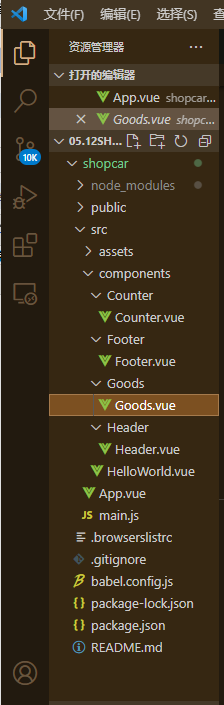
1.首先组件导入,
Counter.vue
<template>

  <div class="number-container d-flex justify-content-center align-items-center">

    <!-- 减 1 的按钮 -->

    <button type="button" class="btn btn-light btn-sm">-</button>

    <!-- 购买的数量 -->

    <span class="number-box">1</span>

    <!-- 加 1 的按钮 -->

    <button type="button" class="btn btn-light btn-sm">+</button>

  </div>

</template>

<script>

export default {}

</script>

<style lang="less" scoped>

.number-box {

  min-width: 30px;

  text-align: center;

  margin: 0 5px;

  font-size: 12px;

}

.btn-sm {

  width: 30px;

}

</style>
Footer.vue
<template>

  <div class="number-container d-flex justify-content-center align-items-center">

    <!-- 减 1 的按钮 -->

    <button type="button" class="btn btn-light btn-sm">-</button>

    <!-- 购买的数量 -->

    <span class="number-box">1</span>

    <!-- 加 1 的按钮 -->

    <button type="button" class="btn btn-light btn-sm">+</button>

  </div>

</template>

<script>

export default {}

</script>

<style lang="less" scoped>

.number-box {

  min-width: 30px;

  text-align: center;

  margin: 0 5px;

  font-size: 12px;

}

.btn-sm {

  width: 30px;

}

</style>
Goods.vue
<template>

  <div class="goods-container">

    <!-- 左侧图片 -->

    <div class="thumb">

      <div class="custom-control custom-checkbox">

        <!-- 复选框 -->

        <input type="checkbox" class="custom-control-input" id="cb1" :checked="true" />

        <label class="custom-control-label" for="cb1">

          <!-- 商品的缩略图 -->

          <img src="../../assets/logo.png" alt="" />

        </label>

      </div>

    </div>

    <!-- 右侧信息区域 -->

    <div class="goods-info">

      <!-- 商品标题 -->

      <h6 class="goods-title">商品名称商品名称商品名称商品名称</h6>

      <div class="goods-info-bottom">

        <!-- 商品价格 -->

        <span class="goods-price">¥0</span>

        <!-- 商品的数量 -->

      </div>

    </div>

  </div>

</template>

<script>

export default {}

</script>

<style lang="less" scoped>

.goods-container {

  + .goods-container {

    border-top: 1px solid #efefef;

  }

  padding: 10px;

  display: flex;

  .thumb {

    display: flex;

    align-items: center;

    img {

      width: 100px;

      height: 100px;

      margin: 0 10px;

    }

  }

  .goods-info {

    display: flex;

    flex-direction: column;

    justify-content: space-between;

    flex: 1;

    .goods-title {

      font-weight: bold;

      font-size: 12px;

    }

    .goods-info-bottom {

      display: flex;

      justify-content: space-between;

      .goods-price {

        font-weight: bold;

        color: red;

        font-size: 13px;

      }

    }

  }

}

</style>
Header.vue
<template>

  <div class="header-container">标题</div>

</template>

<script>

export default {}

</script>

<style lang="less" scoped>

.header-container {

  font-size: 12px;

  height: 45px;

  width: 100%;

  background-color: #1d7bff;

  display: flex;

  justify-content: center;

  align-items: center;

  color: #fff;

  position: fixed;

  top: 0;

  z-index: 999;

}

</style>
来到App.vue
2.来看看效果:
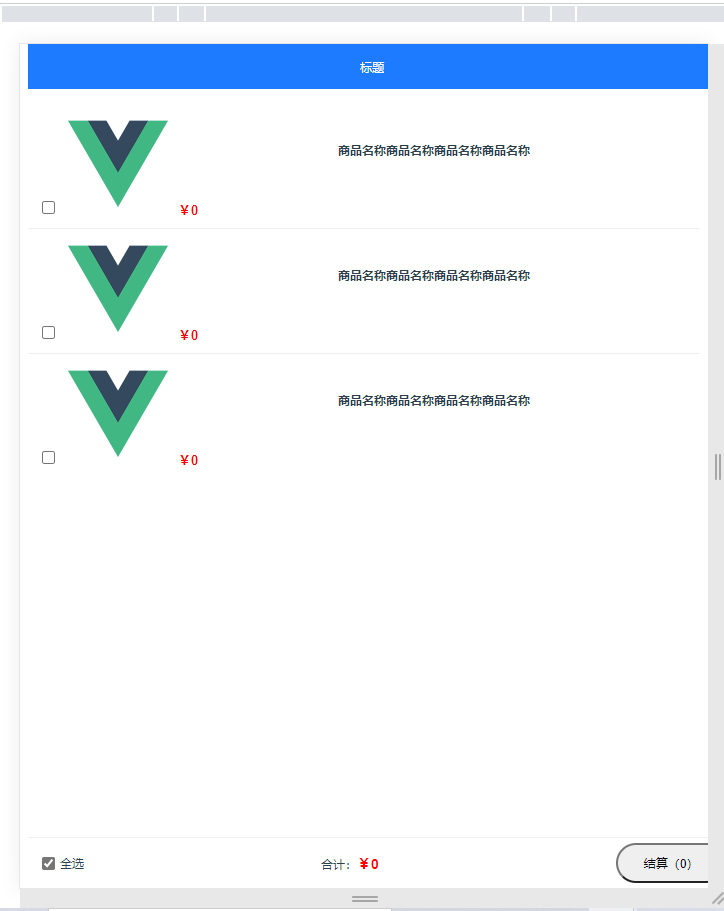
还行
第八十篇:Vue购物车(一) 购物车基本框架的更多相关文章
- 第十篇:vue.js for循环语句(大作业进行时)
Vue.js 循环语句 <div id="app"> <ol> <li v-for="site in sites"> /*f ...
- 第四十篇:Vue的生命周期(一)
好家伙,军训结束了,回归 Vue实例的生命周期 1.什么是生命周期? 从Vue实例创建,运行到销毁期间总是伴随着各种各样的事件,这些事件,统称为生命周期. 2.什么是生命周期钩子? 生命周期函数的别称 ...
- 如何一步一步用DDD设计一个电商网站(十)—— 一个完整的购物车
阅读目录 前言 回顾 梳理 实现 结语 一.前言 之前的文章中已经涉及到了购买商品加入购物车,购物车内购物项的金额计算等功能.本篇准备把剩下的购物车的基本概念一次处理完. 二.回顾 在动手之前我对之 ...
- vue.js实现购物车功能
购物车是电商必备的功能,可以让用户一次性购买多个商品,常见的购物车实现方式有如下几种: 1. 用户更新购物车里的商品后,页面自动刷新. 2. 使用局部刷新功能,服务器端返回整个购物车的页面html 3 ...
- 用vue.js实现购物车功能
购物车是电商必备的功能,可以让用户一次性购买多个商品,常见的购物车实现方式有如下几种: 1. 用户更新购物车里的商品后,页面自动刷新. 2. 使用局部刷新功能,服务器端返回整个购物车的页面html 3 ...
- 基于vue2.0打造移动商城页面实践 vue实现商城购物车功能 基于Vue、Vuex、Vue-router实现的购物商城(原生切换动画)效果
基于vue2.0打造移动商城页面实践 地址:https://www.jianshu.com/p/2129bc4d40e9 vue实现商城购物车功能 地址:http://www.jb51.net/art ...
- 《手把手教你》系列基础篇(八十)-java+ selenium自动化测试-框架设计基础-TestNG依赖测试-番外篇(详解教程)
1.简介 经过前边几篇知识点的介绍,今天宏哥就在实际测试中应用一下前边所学的依赖测试.这一篇主要介绍在TestNG中一个类中有多个测试方法的时候,多个测试方法的执行顺序或者依赖关系的问题.如果不用de ...
- 《手把手教你》系列基础篇(八十四)-java+ selenium自动化测试-框架设计基础-TestNG日志-上篇(详解教程)
1.简介 TestNG还为我们提供了测试的记录功能-日志.例如,在运行测试用例期间,用户希望在控制台中记录一些信息.信息可以是任何细节取决于目的.牢记我们正在使用Selenium进行测试,我们需要有助 ...
- 《手把手教你》系列基础篇(八十五)-java+ selenium自动化测试-框架设计基础-TestNG自定义日志-下篇(详解教程)
1.简介 TestNG为日志记录和报告提供的不同选项.现在,宏哥讲解分享如何开始使用它们.首先,我们将编写一个示例程序,在该程序中我们将使用 ITestListener方法进行日志记录. 2.Test ...
随机推荐
- springboot2.7.x 集成log4j2配置写入日志到mysql自定义表格
在阅读之前请先查看[springboot集成log4j2] 本文暂不考虑抽象等实现方式,只限于展示如何自定义配置log4j2并写入mysql数据库(自定义结构) 先看下log4j2的配置 <?x ...
- JS:比较运算符
比较运算符有如下: 1.== 等于: 值相等 var a = "0"; var b = 1; var c = 0; console.log(a==0); //true consol ...
- 华为AppLinking中统一链接的创建和使用
运营的同学近期在准备海外做一波线下投放,涉及到海外的Google Play,iOS设备的App Store,以及华为渠道的AppGallery. 其中运营希望我们能够将三个平台的下载整合到一个链接 ...
- FICO 常用事务码
1.SAP配置流程 1.定义,定义组织,概念,比如FI中定义公司代码,会计科目表,年度变式.SAP中有大量的定义过程. 2.分配,把会计科目表/公司/年度变式等参数分配到公司代码,逻辑组织,基本实现框 ...
- React技巧之字符串插值
原文链接:https://bobbyhadz.com/blog/react-string-interpolation 作者:Borislav Hadzhiev 正文从这开始~ 总览 在React中,使 ...
- Android (微信扫码登录) 获取微信二维码+扫码登录
话不多说 直接上菜! 一.因为是微信扫码登录,所有要在微信开放平台 微信开放平台 (qq.com) 进行注册----- 如下 1.资源中心 里面也有详细的官方讲解,里面也有demo 可以下载 2 ...
- Nacos配置失败(java.lang.IllegalStateException: failed to req API:/nacos/v1/ns/instance after all server)
解决: nacos服务器过载,可以删掉nacos文件夹下的data文件夹,重新启动.
- 微服务远程Debug,Nocalhost + Rainbond微服务开发第二弹
之前的文章中我们介绍了如何通过 Nocalhost 快速开发 Rainbond 上的微服务,介绍了基本的开发流程. 本文将续接上文继续介绍,使用 Nocalhost 开发配置文件 实现以下内容: 一键 ...
- Kalman卡尔曼滤波,Least Square最小二乘估计,加权最小二乘,递归最小二乘
以下是Kalman的收敛性证明思路: cite:Stochastic Processes and Filtering Theory
- 免费SSL证书申请及部署实践
网络上关于如何签发免费SSL证书的博文一大片,但是真正操作起来的能让新手不迷惑的却很少,很多操作步骤受限于国内无法访问外网的阻碍,导致无法真正实施成功. 实际上,关于申请免费SSL证书主要涉及两大部分 ...