
第八十篇:Vue购物车(一) 购物车基本框架
好家伙,又是购物车
来吧,这是参照黑马的课程写的一个购物车
目录结构如下:
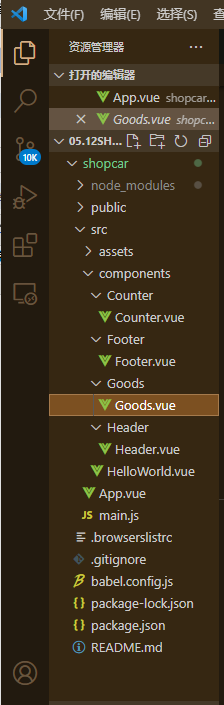
1.首先组件导入,
Counter.vue
<template>

  <div class="number-container d-flex justify-content-center align-items-center">

    <!-- 减 1 的按钮 -->

    <button type="button" class="btn btn-light btn-sm">-</button>

    <!-- 购买的数量 -->

    <span class="number-box">1</span>

    <!-- 加 1 的按钮 -->

    <button type="button" class="btn btn-light btn-sm">+</button>

  </div>

</template>

<script>

export default {}

</script>

<style lang="less" scoped>

.number-box {

  min-width: 30px;

  text-align: center;

  margin: 0 5px;

  font-size: 12px;

}

.btn-sm {

  width: 30px;

}

</style>
Footer.vue
<template>

  <div class="number-container d-flex justify-content-center align-items-center">

    <!-- 减 1 的按钮 -->

    <button type="button" class="btn btn-light btn-sm">-</button>

    <!-- 购买的数量 -->

    <span class="number-box">1</span>

    <!-- 加 1 的按钮 -->

    <button type="button" class="btn btn-light btn-sm">+</button>

  </div>

</template>

<script>

export default {}

</script>

<style lang="less" scoped>

.number-box {

  min-width: 30px;

  text-align: center;

  margin: 0 5px;

  font-size: 12px;

}

.btn-sm {

  width: 30px;

}

</style>
Goods.vue
<template>

  <div class="goods-container">

    <!-- 左侧图片 -->

    <div class="thumb">

      <div class="custom-control custom-checkbox">

        <!-- 复选框 -->

        <input type="checkbox" class="custom-control-input" id="cb1" :checked="true" />

        <label class="custom-control-label" for="cb1">

          <!-- 商品的缩略图 -->

          <img src="../../assets/logo.png" alt="" />

        </label>

      </div>

    </div>

    <!-- 右侧信息区域 -->

    <div class="goods-info">

      <!-- 商品标题 -->

      <h6 class="goods-title">商品名称商品名称商品名称商品名称</h6>

      <div class="goods-info-bottom">

        <!-- 商品价格 -->

        <span class="goods-price">¥0</span>

        <!-- 商品的数量 -->

      </div>

    </div>

  </div>

</template>

<script>

export default {}

</script>

<style lang="less" scoped>

.goods-container {

  + .goods-container {

    border-top: 1px solid #efefef;

  }

  padding: 10px;

  display: flex;

  .thumb {

    display: flex;

    align-items: center;

    img {

      width: 100px;

      height: 100px;

      margin: 0 10px;

    }

  }

  .goods-info {

    display: flex;

    flex-direction: column;

    justify-content: space-between;

    flex: 1;

    .goods-title {

      font-weight: bold;

      font-size: 12px;

    }

    .goods-info-bottom {

      display: flex;

      justify-content: space-between;

      .goods-price {

        font-weight: bold;

        color: red;

        font-size: 13px;

      }

    }

  }

}

</style>
Header.vue
<template>

  <div class="header-container">标题</div>

</template>

<script>

export default {}

</script>

<style lang="less" scoped>

.header-container {

  font-size: 12px;

  height: 45px;

  width: 100%;

  background-color: #1d7bff;

  display: flex;

  justify-content: center;

  align-items: center;

  color: #fff;

  position: fixed;

  top: 0;

  z-index: 999;

}

</style>
来到App.vue
2.来看看效果:
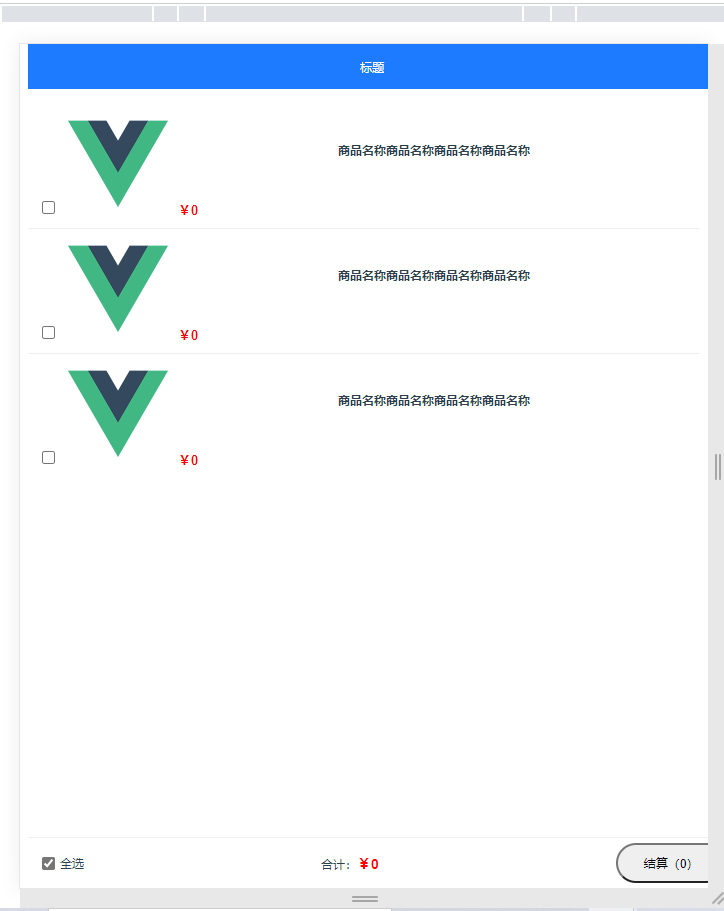
还行
第八十篇:Vue购物车(一) 购物车基本框架的更多相关文章
- 第十篇:vue.js for循环语句(大作业进行时)
Vue.js 循环语句 <div id="app"> <ol> <li v-for="site in sites"> /*f ...
- 第四十篇:Vue的生命周期(一)
好家伙,军训结束了,回归 Vue实例的生命周期 1.什么是生命周期? 从Vue实例创建,运行到销毁期间总是伴随着各种各样的事件,这些事件,统称为生命周期. 2.什么是生命周期钩子? 生命周期函数的别称 ...
- 如何一步一步用DDD设计一个电商网站(十)—— 一个完整的购物车
阅读目录 前言 回顾 梳理 实现 结语 一.前言 之前的文章中已经涉及到了购买商品加入购物车,购物车内购物项的金额计算等功能.本篇准备把剩下的购物车的基本概念一次处理完. 二.回顾 在动手之前我对之 ...
- vue.js实现购物车功能
购物车是电商必备的功能,可以让用户一次性购买多个商品,常见的购物车实现方式有如下几种: 1. 用户更新购物车里的商品后,页面自动刷新. 2. 使用局部刷新功能,服务器端返回整个购物车的页面html 3 ...
- 用vue.js实现购物车功能
购物车是电商必备的功能,可以让用户一次性购买多个商品,常见的购物车实现方式有如下几种: 1. 用户更新购物车里的商品后,页面自动刷新. 2. 使用局部刷新功能,服务器端返回整个购物车的页面html 3 ...
- 基于vue2.0打造移动商城页面实践 vue实现商城购物车功能 基于Vue、Vuex、Vue-router实现的购物商城(原生切换动画)效果
基于vue2.0打造移动商城页面实践 地址:https://www.jianshu.com/p/2129bc4d40e9 vue实现商城购物车功能 地址:http://www.jb51.net/art ...
- 《手把手教你》系列基础篇(八十)-java+ selenium自动化测试-框架设计基础-TestNG依赖测试-番外篇(详解教程)
1.简介 经过前边几篇知识点的介绍,今天宏哥就在实际测试中应用一下前边所学的依赖测试.这一篇主要介绍在TestNG中一个类中有多个测试方法的时候,多个测试方法的执行顺序或者依赖关系的问题.如果不用de ...
- 《手把手教你》系列基础篇(八十四)-java+ selenium自动化测试-框架设计基础-TestNG日志-上篇(详解教程)
1.简介 TestNG还为我们提供了测试的记录功能-日志.例如,在运行测试用例期间,用户希望在控制台中记录一些信息.信息可以是任何细节取决于目的.牢记我们正在使用Selenium进行测试,我们需要有助 ...
- 《手把手教你》系列基础篇(八十五)-java+ selenium自动化测试-框架设计基础-TestNG自定义日志-下篇(详解教程)
1.简介 TestNG为日志记录和报告提供的不同选项.现在,宏哥讲解分享如何开始使用它们.首先,我们将编写一个示例程序,在该程序中我们将使用 ITestListener方法进行日志记录. 2.Test ...
随机推荐
- BSS应用程序云原生部署的8大挑战
云原生部署改变了软件开发.根据云原生计算基金会(CNCF)2021年年度调查,96%的组织正在使用或评估Kubernetes.更确切地说,560万开发者在使用Kubernetes,比去年增加了67%. ...
- UiPath选择器之页面选择器的介绍和使用
一.页面选择器的介绍 某些软件程序的布局和属性节点具有易变的值,例如某些Web应用程序.UiPath Studio无法预测这些变化,因此,您可能必须手动生成一些选择器. 每个属性都有一个分配的值.选择 ...
- java中JVM和JMM之间的区别
一 jvm结构 jvm的内部结构如下图所示,这张图很清楚形象的描绘了整个JVM的内部结构,以及各个部分之间的交互和作用. 1 Class Loader(类加载器)就是将Class文件加载到内存,再说的 ...
- S32Kxxx bootloader之UDS bootloader
了解更多关于bootloader 的C语言实现,请加我Q扣: 1273623966 (验证信息请填 bootloader),欢迎咨询或定制bootloader(在线升级程序). 两周前完成了基于UDS ...
- 手写一个模拟的ReentrantLock
package cn.daheww.demo.juc.reentrylock; import sun.misc.Unsafe; import java.lang.reflect.Field; impo ...
- AspectJ和AOP细节
AspectJ1. 简介 AspectJ:Java社区里最完整最流行的AOP框架.(在Spring中AOP是一种思想,而AspectJ是一种AOP的更明确具体实现) 在Spring2.0以上版本中,可 ...
- linux 运行.sh出现 Permission denied
执行.sh脚本时提示如下错误: [root@Dolen2021 redis]# ./startRedis.sh -bash: ./startRedis.sh: Permission denied [r ...
- DHCP 动态主机设置协议 分析
在TCP/IP网络中,每个接口都需要一个IP地址.子网掩码和广播地址( IPv6中没有),简单来说就是需要网络配置信息.如果想访问外部网络可以通过DNS获取外部地址,再通过路由间接转发出去.但是在&q ...
- 阻塞赋值-非阻塞赋值(LUT,FDC,BUF...)
一.看RTL级综合网络 1.1 FDC FDPE FDRE FDSE均是XILINX FPGA片上资源中四种不同的触发器,具体功能可直接百度 1.2 LUT是实现组合逻辑功能的一张真值表,根据输入值直 ...
- ZJOI2016 小星星 题解
我一生之敌是状压 本文发表于 洛谷博客:https://www.luogu.com.cn/blog/LoveMC/solution-p3349 Cnblogs:https://www.cnblogs. ...