
(K8s学习笔记八)Pod的扩缩容
1.手动扩容机制
示例:对busybox-deployment手动扩缩容
apiVersion:apps/v1

kind: Deployment

metadata:

  name: busybox-deployment

spec:

  replicas: 3

  template:

    metadata:

      labels:

        app: busybox

    spec:

      containers:

      - name: busybox

        image: busybox:latest

# 此Pod已运行副本数量3个,使用kubectl scale命令扩容至5个

kubectl scale deploy busybox-deployment --replicas 5

注:如将replicas值设置小于当前副本数则系统会杀掉一些运行中的Pod已实现缩容
2.自动扩容机制(HPA)
Horizontal Pod Autoscaler(HPA)的控制器,用于实现基于CPU使用率进行自动Pod扩容的功能,HPA控制器基于Master的kube-controllere-manager服务启动参数--horizontal-pod-autoscaler-sync-period定义的探测周期(默认值为15s),周期性监测目标Pod的资源性能指标,并与HPA资源对象中的扩容条件进行对比,在满足条件时对Pod副本数量进行调整。
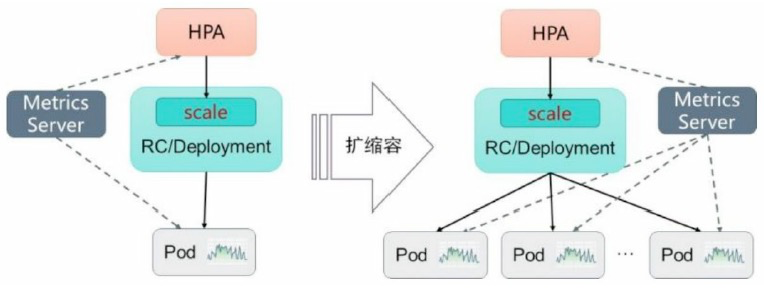
使用HPA功能需要在controller-manager启动文件中加入的参数:
- --horizontal-pod-autoscaler-tolerance=0.1,设置扩缩容忍度,默认值0.1(10%),表示基于算法得到的结果在0.9-1.1(-10%-10%),控制器都不会进行扩缩容
- --horizontal-pod-autoscaler-initial-readiness-delay=30s,设置首次探测Pod是否Ready的延时时间,默认值30min
- --horizontal-pod-autoscaler-cpuinitialization-period=10s,设置首次采集Pod的CPU使用率的延迟时间
- --horizontal-pod-autoscaler-downscale-stabilization=1m0s,这个配置可让系统更平滑的进行缩容操作,默认值5min
使用HorizontalPodAutoscaler配置自定义扩缩容的规则:
apiVersion: autoscaling/v2beta2

kind: HorizontalPodAutoscaler

metadata:

  name: nginx

spec:

  scaleTargetRef:              # 定义目标对象,可以是deploy/RC/RS

    apiVersion: apps/v1

    kind: Deployment

    name: nginx

  minReplicas: 1               # pod副本数量的最下值

  maxReplicas: 10              # pod副本数量的最大值

  metrics:                     # 目标指标值,系统在指标数据达到目标值时出发扩缩容操作

  - type: Resource             # 定义目标值

    resources:

      name: cpu

      target:

        type: Utilization

        averageUtilization: 50
注:目标值类型可包括三项
- Resource:基于资源的指标,可设置CPU和内存,对于CPU使用率可在target参数中设置averageUtilization定义目标平均CPU使用率;对于内存使用率可在target参数中设置AverageValue定义目标平均内存使用率
- Pods:基于pod的指标,系统对全部Pod副本的指标进行计算平均值,数据来源于Pod对象本身,其target类型只能使用AverageValue
- Object:基于某种资源对象(如Ingress)的指标或应用系统的任意自定义指标,数据来源于其它资源对象或任意自定义指标,其target类型可以使用Value和AverageValue(根据Pod副本数计算平均值)进行设置
示例一:
apiVersion: autoscaling/v2beta2

kind: HorizontalPodAutoscaler

metadata:

  name: nginx

spec:

  scaleTargetRef:

    apiVersion: apps/v1

    kind: Deployment

    name: nginx

  minReplicas: 1

  maxReplicas: 10

  metrics:

  - type: Object

    object:

      metrics:

        name: requests-per-second         # 指标名称

      describedObject:

        apiVersion: extensions/v1beta1

        kind: Ingress                     # 来源于ingress main-route

        name: main-route

      target:

        type: Value

        value: 2k                         # 目标值为2000,即在ingress的每秒请求数达到2000时触发扩缩容操作
示例二:
apiVersion: autoscaling/v2beta2

kind: HorizontalPodAutoscaler

metadata:

  name: nginx

spec:

  scaleTargetRef:

    apiVersion: apps/v1

    kind: Deployment

    name: nginx

  minReplicas: 1

  maxReplicas: 10

  metrics:

  - type: Object

    object:

      metrics:

        name: 'http_requests'         # 指标名称

        selector: 'verb=GET'          # 资源对象具有的标签

      target:

        type: AverageValue

        averageValue: 500             # 平均值到500触发扩缩容操作
示例三:系统针对每种类型的指标都计算Pod副本的目标数量,以最大值为准进行扩缩容操作
apiVersion: autoscaling/v2beta2

kind: HorizontalPodAutoscaler

metadata:

  name: nginx

spec:

  scaleTargetRef:

    apiVersion: apps/v1

    kind: Deployment

    name: nginx

  minReplicas: 1

  maxReplicas: 10

  metrics:

  - type: Resource

    resources:

      name: cpu

    targetAverageUtilization: 50

  - type: Pods

    pods:

      metrics:

        name: packets-per-second

      targetAverageUtilization: 1k

  - type: Object

    object:

      metrics:

        name: requests-per-second

      describedObject:

        apiVersion: extensions/v1beta1

        kind: Ingress

        name: main-route

      target:

        kind: Value

        value: 1k
示例四:使用外部服务的性能指标对自己部署的K8s中的服务进行HPA
.......

metrics:

- type: External

  external:

    metrics:

      name: queue-message-ready

      selector: 'queue=worker_tasks'

    targetAverageUtilization: 30
基于外部服务的性能指标实现HPA需要预先部署自定义Metries Server,目前可以基于Prometheus、MS Azure、Datadog Cluster和Google Stackdriver等系统的Adapter实现

使用外部性能指标,在K8s master的API Server启动Aggregation层,需要在apierver启动文件中加入的参数:
- --requestheader-client-ca-file,指定客户端的CA证书
- --requestheader-allowed-names,允许访问的客户端common name列表,将其设置为空置时,表示任意客户端都可以访问
- --requestheader-extra-headers-prefix=X-Remote-Extra,请求头中需要检查的前缀名
- --requestheader-group-headers=X-Remote-Group,请求头中需要检查的组名
- --requestheader-username-headers=X-Remote-User,请求头中需要检查的用户名
- --proxy-client-cert-file,在请求期间验证Aggregator的客户端CA证书
- --proxy-client-key-file,在请求期间验证Aggreagator的客户端私钥
使用外部性能指标,在K8s master的API Server启动Aggregation层,需要在controller-manager启动文件中加入的参数:
--horizontal-pod-autoscaler-sync-period=10s,HPA控制器同步Pod副本数量的时间间隔,默认值15s
示例五、使用Prometheus作为外部性能指标收集器
# 部署Prometheus Operator

apiVersion: apps/v1

kind: Deployment

metadata:

  labels:

    k8s-app: prometheus-operator

  name: prometheus-operator

spec:

  replicas: 1

  selector:

    matchLabels:

      k8s-app: prometheus-operator

  template:

    metadata:

      labels:

        k8s-app: prometheus-operator

    spec:

      containers:

      - image: quay.io/coreos/prometheus-operator:v0.40.0

        imagePullPolicy: IfNotPresent

        name: prometheus-operator

        ports:

        - containerPort: 8080

          name: http

        resources:

          limits:

            cpu: 200M

            memory: 100Mi

          requests:

            cpu: 100m

            memory: 50Mi

这个prometheus-operatord会自动创建名为monitoring.coreos.com的CRD资源

# 通过Operator的配置部署Prometheus

apiVersion: monitoring.coreos.com/v1

kind: Prometheus

metadata:

  name: prometheus

  labels:

    app: promethus

    prometheus: prometheus

spec:

  replicas: 2

  baseImage: quay.io/prometheus/prometheus

  version: v2.10.0

  serviceMonitorSelector:

    matchLabels:

      service-monitor: function

  resources:

      requests:

        memory: 300Mi

---

apiVersion: v1

kind: Service

metadata:

  name: prometheus

  labels:

    app: prometheus

    prometheus: prometheus

spec:

  selector:

    prometheus: prometheus

  ports:

  - name: http

    port: 9090

# 确认prometheus operator和prometheus服务正常

kubectl get pods
d
(K8s学习笔记八)Pod的扩缩容的更多相关文章
- Kubernetes 笔记 11 Pod 扩容与缩容 双十一前后的忙碌
本文首发于我的公众号 Linux云计算网络(id: cloud_dev),专注于干货分享,号内有 10T 书籍和视频资源,后台回复「1024」即可领取,欢迎大家关注,二维码文末可以扫. Hi,大家好, ...
- k8s学习笔记之六:Pod控制器(kube-controller-manager)
第一章.什么是kube-controller-manager? Controller Manager 由 kube-controller-manager 和 cloud-controller-mana ...
- k8s学习笔记之五:Pod资源清单spec字段常用字段及含义
第一章.前言 在上一篇博客中,我们大致简述了一般情况下资源清单的格式,以及如何获得清单配置的命令帮助,下面我们再讲解下清单中spec字段中比较常见的字段及其含义 第二章.常用字段讲解 spec.con ...
- K8S学习笔记之Pod的Volume emptyDir和hostPath
0x00 Volume的类型 Volume是Kubernetes Pod中多个容器访问的共享目录. Volume被定义在Pod上,被这个Pod里的多个容器挂在到相同或不同的路径下. Volume的生命 ...
- 三十三、HPA实现自动扩缩容
通过HPA实现业务应用的动态扩缩容 HPA控制器介绍 当系统资源过高的时候,我们可以使用如下命令来实现 Pod 的扩缩容功能 $ kubectl -n luffy scale deployment m ...
- k8s 学习笔记
常用的kubectl命令 kubectl run kubia --image=luksa/kubia --port=8080 --generator=run/v1 --image 指定镜像 - ...
- 【K8s学习笔记】K8s是如何部署应用的?
本文内容 本文致力于介绍K8s一些基础概念与串联部署应用的主体流程,使用Minikube实操 基础架构概念回顾 温故而知新,上一节[K8S学习笔记]初识K8S 及架构组件 我们学习了K8s的发展历史. ...
- Redis学习笔记八:集群模式
作者:Grey 原文地址:Redis学习笔记八:集群模式 前面提到的Redis学习笔记七:主从复制和哨兵只能解决Redis的单点压力大和单点故障问题,接下来要讲的Redis Cluster模式,主要是 ...
- Learning ROS forRobotics Programming Second Edition学习笔记(八)indigo rviz gazebo
中文译著已经出版,详情请参考:http://blog.csdn.net/ZhangRelay/article/category/6506865 Learning ROS forRobotics Pro ...
- python3.4学习笔记(八) Python第三方库安装与使用,包管理工具解惑
python3.4学习笔记(八) Python第三方库安装与使用,包管理工具解惑 许多人在安装Python第三方库的时候, 经常会为一个问题困扰:到底应该下载什么格式的文件?当我们点开下载页时, 一般 ...
随机推荐
- 多资产VAR风险--基于python处理
一.数据准备,先在excel表格上计算每日的波动率: excel数据为: 二.数据导入: import pandas as pd import numpy as np import akshare a ...
- php链接access并查询列出
<?php$odbc = "Driver={Microsoft Access Driver (*.mdb)};Dbq=".realpath("db.mdb" ...
- 柯尼卡美能达C226打印机安装使用说明
安装驱动,选择通过IP地址安装 输入打印机IP 点击完成即可使用
- .NET 中创建录音机和播放器应用
前言 在本博客中,你将了解如何在 .NET MAUI 中开发录音机和播放器.音频播放器将录制和播放音频文件.此应用程序可以在Android和iOS上部署和使用. 预览 以下是该录音机和播放录音的应用程 ...
- 关于vscode 一些配置
一. 基本操作 1.创建完项目, code . 直接在vscode 中打开 2.设置--首选项 检测 package.json 文件 点击serve 是可以运行 3.常用的vscode 插件 ...
- vue 使用import之后就会报Object(...) is not a function的错
最近在学习vue,学到了路由,vue-router, 写demo的时候,想引入import VueRotuer from "vue-router",但是添加这句引用浏览器就会报错, ...
- netstate查找端口占用
netstat -nao 列出本机端口占用信息加上|findstr 筛选 各个字段的意思: 协议 本地地址:端口 外部地址:端口 状态 PID 这 ...
- centos7.8GPU服务器搭建
首先官方文档有cuda驱动和toolkit和Linux内核本,gcc版本的对应关系,其中也有一些安装过程可参考: https://developer.nvidia.com/cuda-toolkit-a ...
- vue样式穿透 滚动条隐藏 原生样式修改
样式穿透:deep,否则可能不能覆盖原有样式,vue2使用/v-deep/或者::v-deep,或者取消scoped,但不推荐,因为会影响到其他页面样式 <style lang="sc ...
- jmeter接口自动化-读取CSV文件执行测试用例
一.在csv文件中编写好用例 首先在csv文件首行填写相关参数并编写测试用例.脚本可通过优先级参数控制执行哪些接口,通过请求方式执行不同端口下的接口,再读取csv文件时进行参数化. 二.设计测试脚本并 ...