
第2-3-4章 上传附件的接口开发-文件存储服务系统-nginx/fastDFS/minio/阿里云oss/七牛云oss
5.3 接口开发-上传附件
第2-1-2章 传统方式安装FastDFS-附FastDFS常用命令
第2-1-3章 docker-compose安装FastDFS,实现文件存储服务
第2-1-5章 docker安装MinIO实现文件存储服务-springboot整合minio-minio全网最全的资料
5.3.1 接口文档
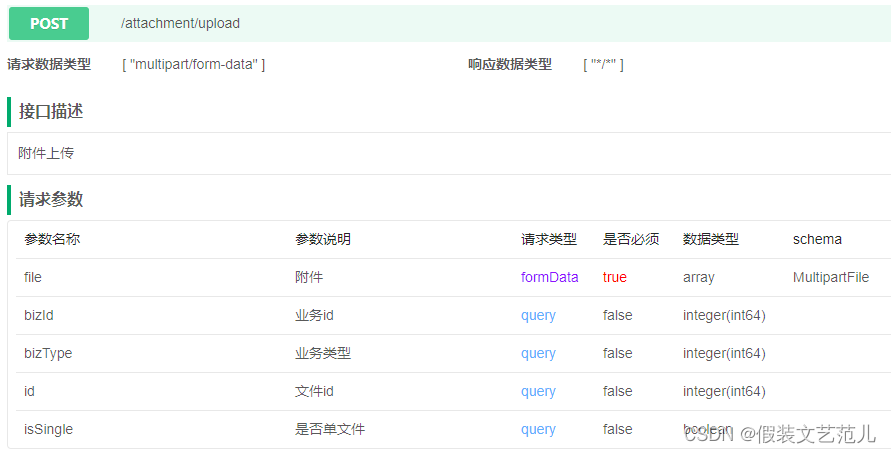
上传附件接口要完成的操作主要有两个:
- 将客户端提交的文件上传到指定存储位置(具体存储位置由配置文件配置的存储策略确定)
- 将上传的文件信息保存到数据库的pd_attachment表中
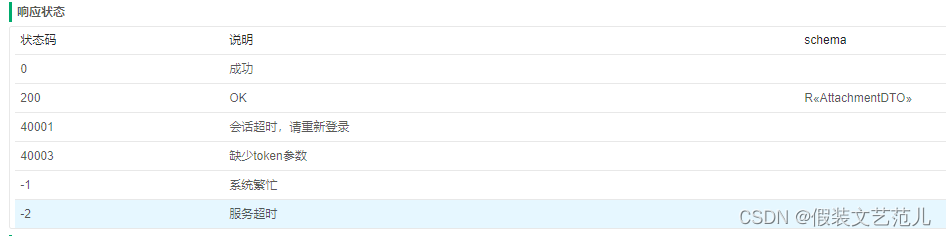
接口文档如下:
5.3.2 代码实现
第一步:创建AttachmentController并提供文件上传方法
package com.itheima.pinda.file.controller;

import com.baomidou.mybatisplus.core.metadata.IPage;

import com.baomidou.mybatisplus.core.toolkit.Wrappers;

import com.baomidou.mybatisplus.core.toolkit.support.SFunction;

import com.baomidou.mybatisplus.extension.plugins.pagination.Page;

import com.itheima.pinda.base.BaseController;

import com.itheima.pinda.base.R;

import com.itheima.pinda.file.dto.AttachmentDTO;

import com.itheima.pinda.file.dto.AttachmentRemoveDTO;

import com.itheima.pinda.file.dto.AttachmentResultDTO;

import com.itheima.pinda.file.dto.FilePageReqDTO;

import com.itheima.pinda.file.entity.Attachment;

import com.itheima.pinda.file.service.AttachmentService;

import com.itheima.pinda.utils.BizAssert;

import io.swagger.annotations.*;

import lombok.extern.slf4j.Slf4j;

import org.apache.commons.collections.MapUtils;

import org.apache.commons.lang3.ArrayUtils;

import org.apache.commons.lang3.StringUtils;

import org.springframework.beans.factory.annotation.Autowired;

import org.springframework.web.bind.annotation.*;

import org.springframework.web.multipart.MultipartFile;

import javax.servlet.http.HttpServletRequest;

import javax.servlet.http.HttpServletResponse;

import java.util.List;

import java.util.Map;

import static com.itheima.pinda.exception.code.ExceptionCode.BASE_VALID_PARAM;

import static java.util.stream.Collectors.groupingBy;

/**

 * 附件处理控制器

 */

@RestController

@RequestMapping("/attachment")

@Slf4j

@Api(value = "附件", tags = "附件")

public class AttachmentController extends BaseController {

    @Autowired

    private AttachmentService attachmentService;

    /**

     * 上传附件

     */

    @ApiOperation(value = "附件上传", notes = "附件上传")

    @ApiImplicitParams({

            @ApiImplicitParam(name = "isSingle", value = "是否单文件", dataType = "boolean", paramType = "query"),

            @ApiImplicitParam(name = "id", value = "文件id", dataType = "long", paramType = "query"),

            @ApiImplicitParam(name = "bizId", value = "业务id", dataType = "long", paramType = "query"),

            @ApiImplicitParam(name = "bizType", value = "业务类型", dataType = "long", paramType = "query"),

            @ApiImplicitParam(name = "file", value = "附件", dataType = "MultipartFile", allowMultiple = true, required = true),

    })

    @PostMapping(value = "/upload")

    public R<AttachmentDTO> upload(

            @RequestParam(value = "file") MultipartFile file,

            @RequestParam(value = "isSingle", required = false, defaultValue = "false") Boolean isSingle,

            @RequestParam(value = "id", required = false) Long id,

            @RequestParam(value = "bizId", required = false) String bizId,

            @RequestParam(value = "bizType") String bizType) {

        // 忽略路径字段,只处理文件类型

        if (file.isEmpty()) {

            return fail(BASE_VALID_PARAM.build("请求中必须至少包含一个有效文件"));

        }

        AttachmentDTO attachment = attachmentService.upload(file,

                                                            id,

                                                            bizType,

                                                            bizId,

                                                            isSingle);

        return success(attachment);

    }

}
第二步:创建AttachmentService接口
package com.itheima.pinda.file.service;

import com.baomidou.mybatisplus.core.metadata.IPage;

import com.baomidou.mybatisplus.extension.plugins.pagination.Page;

import com.baomidou.mybatisplus.extension.service.IService;

import com.itheima.pinda.file.dto.AttachmentDTO;

import com.itheima.pinda.file.dto.AttachmentResultDTO;

import com.itheima.pinda.file.dto.FilePageReqDTO;

import com.itheima.pinda.file.entity.Attachment;

import org.springframework.web.multipart.MultipartFile;

import javax.servlet.http.HttpServletRequest;

import javax.servlet.http.HttpServletResponse;

import java.util.List;

/**

 * 附件业务接口

 */

public interface AttachmentService extends IService<Attachment> {

    /**

     * 上传附件

     *

     * @param file 文件

     * @param id 附件id

     * @param bizType 业务类型

     * @param bizId 业务id

     * @param isSingle 是否单个文件

     * @return

     */

    AttachmentDTO upload(MultipartFile file, Long id, String bizType,

                         String bizId, Boolean isSingle);

}
第三步:创建AttachmentServiceImpl实现类
package com.itheima.pinda.file.service.impl;

import com.baomidou.mybatisplus.core.metadata.IPage;

import com.baomidou.mybatisplus.core.toolkit.Wrappers;

import com.baomidou.mybatisplus.extension.service.impl.ServiceImpl;

import com.itheima.pinda.base.id.IdGenerate;

import com.itheima.pinda.database.mybatis.conditions.Wraps;

import com.itheima.pinda.database.mybatis.conditions.query.LbqWrapper;

import com.itheima.pinda.dozer.DozerUtils;

import com.itheima.pinda.exception.BizException;

import com.itheima.pinda.file.dao.AttachmentMapper;

import com.itheima.pinda.file.domain.FileDO;

import com.itheima.pinda.file.domain.FileDeleteDO;

import com.itheima.pinda.file.dto.AttachmentDTO;

import com.itheima.pinda.file.dto.AttachmentResultDTO;

import com.itheima.pinda.file.dto.FilePageReqDTO;

import com.itheima.pinda.file.entity.Attachment;

import com.itheima.pinda.file.entity.File;

import com.itheima.pinda.file.enumeration.DataType;

import com.itheima.pinda.file.properties.FileServerProperties;

import com.itheima.pinda.file.service.AttachmentService;

import com.itheima.pinda.file.strategy.FileStrategy;

import com.itheima.pinda.utils.DateUtils;

import lombok.extern.slf4j.Slf4j;

import org.apache.commons.lang3.ArrayUtils;

import org.apache.commons.lang3.StringUtils;

import org.springframework.beans.factory.annotation.Autowired;

import org.springframework.stereotype.Service;

import org.springframework.web.multipart.MultipartFile;

import javax.servlet.http.HttpServletRequest;

import javax.servlet.http.HttpServletResponse;

import java.time.LocalDateTime;

import java.util.Arrays;

import java.util.List;

import java.util.stream.Collectors;

/**

 * 附件业务实现类

 */

@Slf4j

@Service

public class AttachmentServiceImpl extends ServiceImpl<AttachmentMapper, Attachment> implements AttachmentService {

    @Autowired

    private IdGenerate<Long> idGenerate;

    @Autowired

    private DozerUtils dozer;

    @Autowired

    private FileStrategy fileStrategy;

    @Autowired

    private FileServerProperties fileProperties;

    /**

     * 上传附件

     *

     * @param multipartFile 文件

     * @param id 附件id

     * @param bizType 业务类型

     * @param bizId 业务id

     * @param isSingle 是否单个文件

     * @return

     */

    @Override

    public AttachmentDTO upload(MultipartFile multipartFile, Long id, String bizType, String bizId, Boolean isSingle) {

        //根据业务类型来判断是否生成业务id

        if (StringUtils.isNotEmpty(bizType) && StringUtils.isEmpty(bizId)) {

            bizId = String.valueOf(idGenerate.generate());

        }

        File file = fileStrategy.upload(multipartFile);

        Attachment attachment = dozer.map(file, Attachment.class);

        attachment.setBizId(bizId);

        attachment.setBizType(bizType);

        setDate(attachment);

        if (isSingle) {

            super.remove(Wraps.<Attachment>lbQ().eq(Attachment::getBizId, bizId).eq(Attachment::getBizType, bizType));

        }

        if (id != null && id > 0) {

            //当前端传递了文件id时,修改这条记录

            attachment.setId(id);

            super.updateById(attachment);

        } else {

            attachment.setId(idGenerate.generate());

            super.save(attachment);

        }

        AttachmentDTO dto = dozer.map(attachment, AttachmentDTO.class);

        return dto;

    }

    private void setDate(Attachment file) {

        LocalDateTime now = LocalDateTime.now();

        file.setCreateMonth(DateUtils.formatAsYearMonthEn(now));

        file.setCreateWeek(DateUtils.formatAsYearWeekEn(now));

        file.setCreateDay(DateUtils.formatAsDateEn(now));

    }

}
5.3.3 接口测试
第一步:启动Nacos配置中心,pd-file-server.yml配置内容如下:
pinda:

  mysql:

    database: pd_files

  nginx:

    ip: ${spring.cloud.client.ip-address} #正式环境要将该ip设置成nginx对应的公网ip

    port: 10000  #正式环境需要将该ip设置成nginx对应的公网端口

  swagger:

    enabled: true

    docket:

      file:

        title: 文件服务

        base-package: com.itheima.pinda.file.controller

  file:

    type: LOCAL # LOCAL ALI MINIO FAST_DFS

    local:

      uriPrefix: http://${pinda.nginx.ip}:${pinda.nginx.port}

      bucket-name: oss-file-service

      endpoint: D:\soft\nginx-1.23.0\uploadFiles

    ali:

      # 请填写自己的阿里云存储配置

      bucket-name: bladex-loan

      endpoint: http://oss-cn-qingdao.aliyuncs.com

      access-key-id: LTAI4FhtimFAiz6iLGJSiJui

      access-key-secret: SsU15qaPwpF1x5xMqwc0XzGuY92fnc

#FAST_DFS配置

fdfs:

  soTimeout: 1500

  connectTimeout: 600

  thumb-image:

    width: 150

    height: 150

  tracker-list:

    - 111.231.76.210:22122

  pool:

    #从池中借出的对象的最大数目

    max-total: 153

    max-wait-millis: 102

    jmx-name-base: 1

    jmx-name-prefix: 1

server:

  port: 8765
第二步:启动Nginx服务
第三步:启动文件服务
第四步:访问接口文档,地址为http://localhost:8765/doc.html
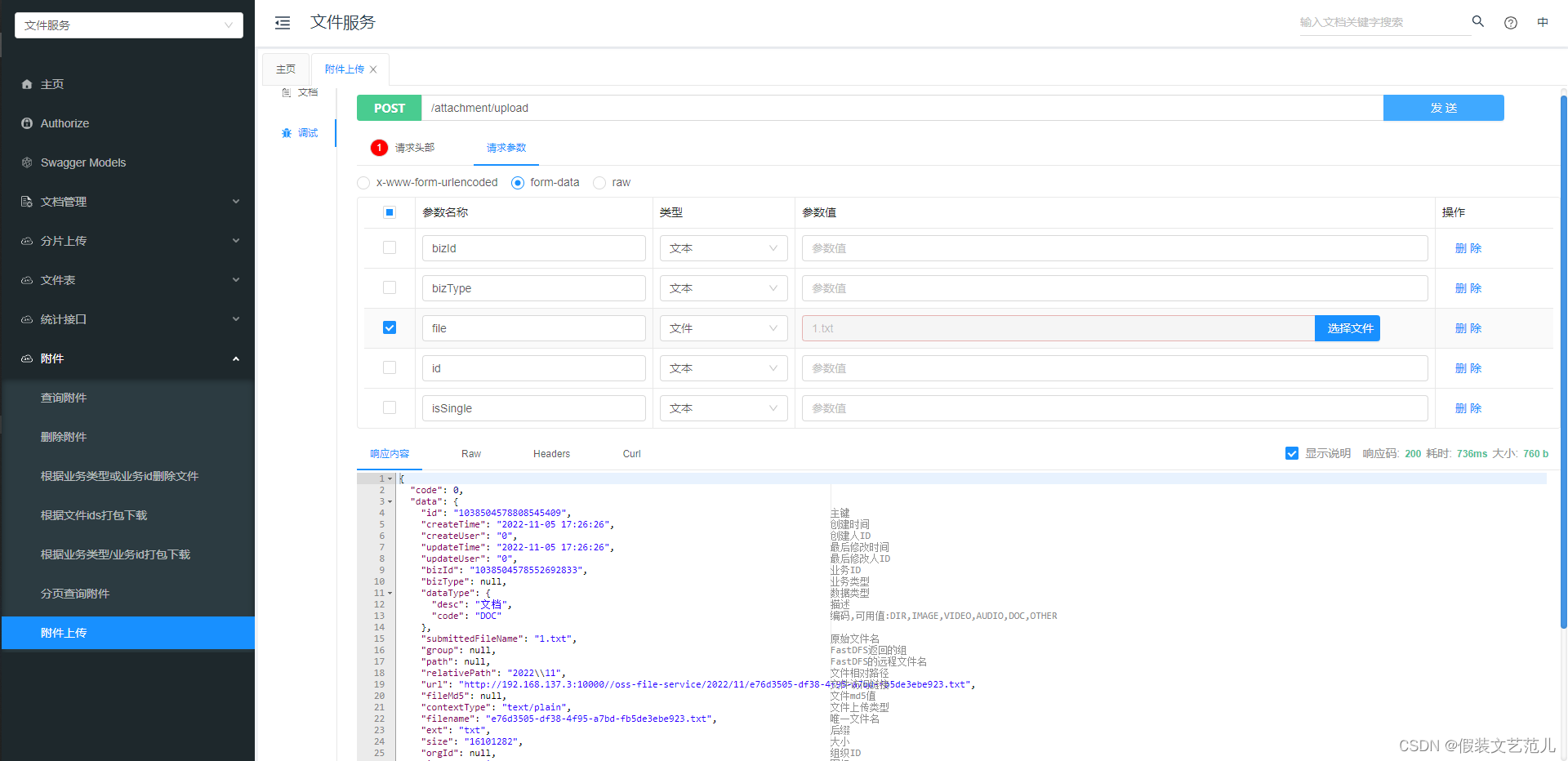
可以看到上传的文件已经保存到了本地磁盘:

同时上传的文件信息也已经保存到了pd_attachment表中:

可以通过Nginx提供的Http服务来访问上传的文件:
http://192.168.137.3:10000//oss-file-service/2022/11/e76d3505-df38-4f95-a7bd-fb5de3ebe923.txt
第2-3-4章 上传附件的接口开发-文件存储服务系统-nginx/fastDFS/minio/阿里云oss/七牛云oss的更多相关文章
- 第2-3-1章 文件存储服务系统-nginx/fastDFS/minio/阿里云oss/七牛云oss
目录 文件存储服务 1. 需求背景 2. 核心功能 3. 存储策略 3.1 本地存储 3.2 FastDFS存储 3.3 云存储 3.4 minio 4. 技术设计 文件存储服务 全套代码及资料全部完 ...
- HDFS文件系统上传时序图 PB级文件存储时序图
自己设计的时序图. 来自为知笔记(Wiz)
- 怎样解决asp.net.mvc上传附件超过长度问题?
最近,在做一个上传附件功能,但是文件超过4M,就报上传的文件超过长度问题
- React antd如何实现<Upload>组件上传附件再次上传已清除附件缓存问题。
最近在公司做React+antd的项目,遇到一个上传组件的问题,即上传附件成功后,文件展示处仍然还有之前上传附件的缓存信息,需要解决的问题是,要把上一次上传的附件缓存在上传成功或者取消后,可以进行清除 ...
- jeecms系统使用介绍——通过二次开发实现对word、pdf、txt等上传附件的全文检索
转载请注明出处:http://blog.csdn.net/dongdong9223/article/details/76912307 本文出自[我是干勾鱼的博客] 之前在文章<基于Java的门户 ...
- wordpress多站点环境设置上传附件大小
多站点环境更改上传附件大小: php.ini post_max_size = 8M upload_max_filesize = 10M 另外,后台域名管理中设置/网络设置/可以设置上传文件大小. 代码 ...
- jquery 通过ajax FormData 对象上传附件
之前上传附件都是用插件,或者用form表单体检(这个是很久以前的方式了),今天突发奇想,自己来实现附件上传,具体实现如下 html: <div> 流程图: <input id=& ...
- Discuz! X论坛上传附件到100%自动取消上传的原因及解决方案
最近接到一些站长的反馈,说论坛上传附件,到100%的时候自己取消上传了.经查是附件索引表pre_forum_attachment表的aid字段自增值出现了问题,导致程序逻辑返回的aid值实际为一个My ...
- Discuz模拟批量上传附件发帖
简介 对于很多用discuz做资源下载站来说,一个个上传附件,发帖是很繁琐的过程.如果需要批量上传附件发帖,就需要去模拟discuz 上传附件的流程. 模拟上传 discuz 附件逻辑 dz附件储存在 ...
- 修改WordPress中上传附件2M大小限制的方法/php+iis上传附件默认大小修改方法
在服务器上架设好WordPress后,使用过程中发现,上传附件大小有2M的限制 话说服务器就是本机,可以直接把文件拖到附件存储文件夹下,然后在需要附件的地方引用链接 可是这种落后的方法终究不是办法,还 ...
随机推荐
- PHP代码审计——文件操作漏洞
梦想CMS(lmxcms)任意文件删除 1. 漏洞详情--CNVD-2020-59469 2. 漏洞描述称后台Ba***.cl***.php文件存在任意文件删除,查看cms源码,只有BackdbA ...
- 国产CPLD(AGM1280)试用记录——做个SPI接口的任意波形DDS [原创www.cnblogs.com/helesheng]
我之前用过的CPLD有Altera公司的MAX和MAX-II系列,主要有两个优点:1.程序存储在片上Flash,上电即行,保密性高.2.CPLD器件规模小,成本和功耗低,时序不收敛情况也不容易出现.缺 ...
- nginx进程所属用户问题讨论
结论 1,在非root账户下启动时,nignx的master和worker进程的用户都将是这个账户, 2,在root账户下启动时 nignx的master进程是用户是root,worker的用户在co ...
- Kubernetes(k8s)为容器设置启动时要执行的命令和参数
创建 Pod 时设置命令及参数 创建 Pod 时,可以为其下的容器设置启动时要执行的命令及其参数.如果要设置命令,就填写在配置文件的 command 字段下,如果要设置命令的参数,就填写在配置文件的 ...
- 使用 Elastic Stack 分析地理空间数据 (一)
文章转载自:https://blog.csdn.net/UbuntuTouch/article/details/106531939 随着人类在不断地探索空间,地理空间数据越来越多. 收集信息的速度以及 ...
- Docker镜像仓库Harbor之Swagger REST API整合配置
转载自:https://cloud.tencent.com/developer/article/1010618 1.Swagger 介绍 Swagger 是一个规范和完整的框架,用于生成.描述.调用和 ...
- NSIS隐藏桌面
下午在网上闲逛发现了一段代码, 刷新桌面用的,当时觉得可以利用nsis现有命令再结合API来实现,翻了些资料,终于搞定,同时结合查找到的桌面句柄,写了一个隐藏桌面的小玩意娱乐下. 完整脚本: !inc ...
- .NET周报【10月第1期 2022-10-11】
本周精选 继C#实现await/async无栈协程几年后,davidwrighton实现了.NET绿色线程(有栈协程)的原型 https://github.com/dotnet/runtimelab/ ...
- JS---HelloWorld
1.功能效果图 2.代码实现 <!DOCTYPE html> <html> <head> <meta charset="utf-8"> ...
- 齐博x2是什么?
齐博x2是什么? 齐博x2是齐博x1的延申版本. 对小程序全方位加强