
Android之GridLayout网格布局
1、相关属性
GridLayout网格布局是4.0之后引入的布局方式!
    android:columnCount="4" //设置列数(4列)

    android:rowCount="6"      //设置行数(6行)

    android:orientation="horizontal"    //设置排列方式(默认竖直)

    android:layout_gravity="fill"         //设置对齐方式

    android:layout_columnSpan="4"   //横向横跨几列(4列)

    android:layout_rowSpan="4"        //纵向横跨几行(4行)

    android:layout_row="2"               //设置组件在第几行(第二行)

    android:layout_column="2"          //设置组件在第几列(第二列)
2、简单使用
组件默认占一行一列
<?xml version="1.0" encoding="utf-8"?>

<GridLayout xmlns:android="http://schemas.android.com/apk/res/android"

    xmlns:tools="http://schemas.android.com/tools"

    android:layout_width="wrap_content"

    android:layout_height="match_parent"

    android:columnCount="4"

    android:orientation="horizontal"

    android:id="@+id/GirdLayout1"

    android:rowCount="6"

    tools:context="com.example.xianfengzhang.cleartext.GirdActivity">

    <TextView

        android:layout_columnSpan="4"

        android:layout_gravity="fill"

        android:layout_marginLeft="5dp"

        android:layout_marginRight="5dp"

        android:layout_marginTop="5dp"

        android:background="#ffcccc"

        android:text="0"

        android:gravity="right|bottom"

        android:textSize="50sp"/>

    <Button

        android:layout_columnSpan="2"

        android:layout_height="wrap_content"

        android:layout_gravity="fill_horizontal"

        android:text="回退"/>

    <Button

        android:layout_columnSpan="2"

        android:layout_height="wrap_content"

        android:layout_gravity="fill_horizontal"

        android:text="清空"/>

    <Button android:text="+" />

    <Button android:text="1" />

    <Button android:text="2" />

    <Button android:text="3" />

    <Button android:text="-" />

    <Button android:text="4" />

    <Button android:text="5" />

    <Button android:text="6" />

    <Button android:text="*" />

    <Button android:text="7" />

    <Button android:text="8" />

    <Button android:text="9" />

    <Button android:text="/" />

    <Button android:text="." />

    <Button android:text="0" />

    <Button android:text="=" />

</GridLayout>
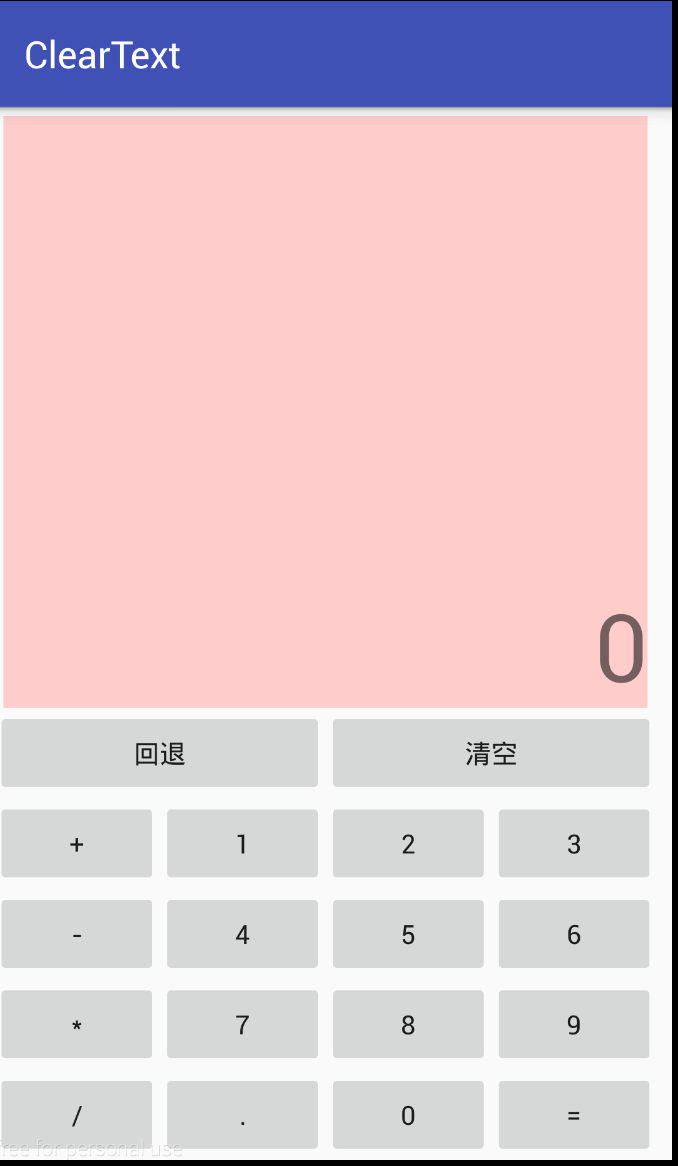
效果图
Android之GridLayout网格布局的更多相关文章
- Android精通:TableLayout布局,GridLayout网格布局,FrameLayout帧布局,AbsoluteLayout绝对布局,RelativeLayout相对布局
在Android中提供了几个常用布局: LinearLayout线性布局 RelativeLayout相对布局 FrameLayout帧布局 AbsoluteLayout绝对布局 TableLayou ...
- Android零基础入门第32节:新推出的GridLayout网格布局
原文:Android零基础入门第32节:新推出的GridLayout网格布局 本期主要学习的是网格布局是Android 4.0新增的布局,和前面所学的TableLayout表格布局 有点类似,不过他有 ...
- android——学习:网格布局——GridLayout
Android一开始就提供了几种布局控件,如线性布局LinearLayout.相对布局RelativeLayout和表格布局TableLayout等,但在很多情况下,这些布局控件是不能满足要求的,因此 ...
- android的布局-----GridLayout(网格布局)
学习导图 (一)简介 网格布局由GridLayout所代表,在android4.0之后新增加的布局管理器,因此需要android4.0之后的版本中使用,如果在更早的平台使用该布局管理器,则需要导入相应 ...
- GridLayout(网格布局)
常用属性: 排列对齐: ①设置组件的排列方式: android:orientation="" vertical(竖直,默认)或者horizontal(水平) ②设置组件的 ...
- GridLayout网格布局
网格布局特点: l 使容器中的各组件呈M行×N列的网格状分布. l 网格每列宽度相同,等于容器的宽度除以网格的列数. l 网格每行高度相同,等于容器的高度除以网格的行数. l 各组件的排列方式 ...
- Android——gridLayout(网格布局)
<?xml version="1.0" encoding="utf-8"?> <GridLayout xmlns:android=" ...
- java 图形化小工具Abstract Window Toolit ;布局管理器FlowLayout流式布局;BorderLayout边界布局;GridLayout网格布局;CardLayou重叠卡片布局;BoxLayout方框布局;绝对定位
1.FlowLayout流式布局管理器: FlowLayout布局管理器中,组件像水流一样向某方向流动(排列),遇到障碍(边界)就折回,重头开始排列 .在默认情况下,FlowLayout局管理器从左向 ...
- 浅谈GridLayout(网格布局)
Android 4.0 布局-->GridLayout 网格布局 以行列单元格的形式展示内部控件排列,可以实现类似计算机键盘效果 ,也可以实现可自动变行的标签群效果 使用GridLayout , ...
随机推荐
- 使用SDK方式进行微信授权
1.在pom.xml中添加依赖 <dependency> <groupId>com.github.binarywang</groupId> <artifact ...
- 如何查看jdk版本和路径
cmd进入命令提示符,查看jdk版本,输入java -version;查看jdk路径 ,输入set java home.,这个也是默认路径
- sklearn中回归器性能评估方法
explained_variance_score() mean_absolute_error() mean_squared_error() r2_score() 以上四个函数的相同点: 这些函数都有一 ...
- 三层(3-tier architecture)基础
版权声明:本文为博主原创文章,未经博主同意不得转载. https://blog.csdn.net/lhc2207221755/article/details/24802053 之前看过非常多关 ...
- java获得磁盘、网络实时I/O速率
最近项目中需要一个平台硬件资源的监控模块,当时采用了Sigar中api,但是做到针对磁盘和网络的实时I/O速率的时候发现Sigar并没有直接支持的接口.于是……它就诞生了.底层采用C++编写,通过ja ...
- TwainCapabilities
Twain Capabilities 2013年10月15日 ⁄ 综合 ⁄ 共 6098字 ⁄ 字号 小 中 大 ⁄ 评论关闭 转自:http://blog.163.com/lvan100@yeah/ ...
- 【hihocoder】Demo Day
时间限制:10000ms 单点时限:1000ms 内存限制:256MB 描述 You work as an intern at a robotics startup. Today is your co ...
- CSS——溢出文字隐藏
溢出的文字隐藏 word-break:自动换行 normal 使用浏览器默认的换行规则. break-all 允许在单词内换行. keep-all 只能在半角空格或连字符处换行. 主要处理英文单词 w ...
- JS switch 分支语句
描述:根据一个变量的不同取值,来执行不同的代码. 语法结构: switch(变量) { case 值1: 代码1; break; case 值2: 代码2; break; case 值3: 代码3; ...
- 区间dp及优化
看了下感觉区间dp就是一种套路,直接上的板子代码就好了. 基础题ac代码:石子归并 #include<bits/stdc++.h> using namespace std; typedef ...