
Ionic App 更新插件cordova-plugin-app-version
1.安装相关插件
cordova-plugin-file ,cordova-plugin-file-opener2,cordova-plugin-file-transfer,cordova-plugin-app-version
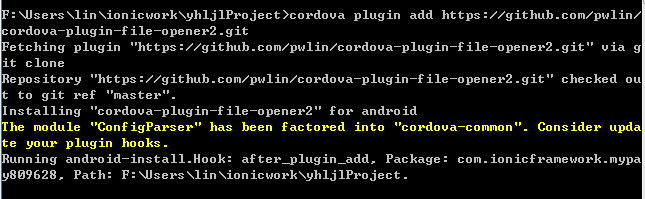

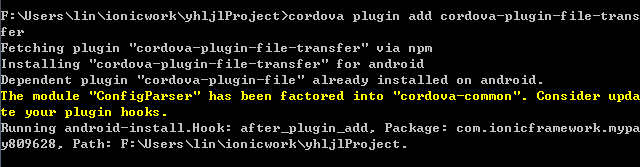
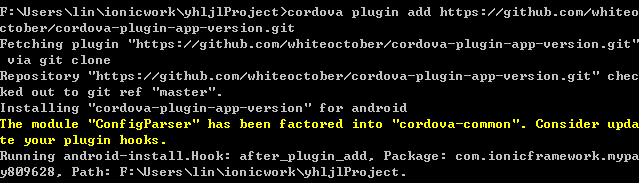
cordova plugin add cordova-plugin-file
cordova plugin add cordova-plugin-file-opener2
cordova plugin add cordova-plugin-file-transfer
2.html
<ion-view view-title="关于我们" >

   <ion-content overflow-scroll="true" style="overflow: hidden">

   <ion-list>

      <ion-item>******科技股份有限公司</ion-item>

      <ion-item>地址:北京市海淀区**********</ion-item>

      <ion-item>邮箱:sulin11026@163.com</ion-item>

      <ion-item>电话: *********</ion-item>

      <ion-item><sapn>版本:{{versionNow}}</sapn>
      <span style="float:right"><button class="button button-balanced"   ng-click="UpdateApp()">检查更新</button></span></ion-item>

   </ion-list>

  </ion-content>

</ion-view>
3.controller
.controller('AboutCtrl', function ($scope, ENV, $http, Storage,   $ionicLoading, $ionicPopup, $timeout,$cordovaFileTransfer,

                                   $cordovaFileOpener2,CommonFactory) {

  $scope.versionNow= ENV.version;

    $scope.$on('$ionicView.beforeEnter', function () {

      // var versionType = navigator.platform; //获取操作系统Android ios

        if (Storage.getLoginInfo() != null) {

            $scope.user_name = Storage.getLoginInfo().user_name;

            $scope.userId = Storage.getLoginInfo().id;

        }

        $scope.versionNow = ENV.version;

    })

    // 查询最新版本下载并安装app

    $scope.UpdateApp = function () {

      var  versioninter=ENV.versionInter;

      CommonFactory.NewVersion(versioninter).then(function(data){

             if (data){

                var json  =JSON.parse(data);

                if(json.status==1){

                  var versionmodel=json.Result;

                  var confirmPopup = $ionicPopup.confirm({

                    title: versionmodel.Title,

                    template: versionmodel.Content,

                    cancelText: '下次再说',

                    okText: '立即更新'

                  });

                  confirmPopup.then(function (res) {

                    if (res) {

                      $ionicLoading.show({

                        template: "已经下载:0%"

                      });

                      var url = encodeURI(versionmodel.ApkAddress);

                      var targetPath = cordova.file.externalRootDirectory + "/download/" + url.substr(url.lastIndexOf("/") + 1);

                      var trustHosts = true

                      var options = {};

                      $cordovaFileTransfer.download(url, targetPath, options, trustHosts).then(function (result) {

                        // 打开下载下来的APP

                        $cordovaFileOpener2.open(targetPath, 'application/vnd.android.package-archive'

                        ).then(function () {

                          // 成功

                        }, function (err) {

                          // 错误

                        });

                        $ionicLoading.hide();

                      }, function (err) {

                        $ionicLoading.show({

                          noBackdrop: true,

                          template: "下载失败,请检查网络",

                          duration: 1500

                        });

                      }, function (progress) {

                        //进度,这里使用文字显示下载百分比

                        $timeout(function () {

                          var downloadProgress = (progress.loaded / progress.total) * 100;

                          $ionicLoading.show({

                            template: "已经下载:" + Math.floor(downloadProgress) + "%"

                          });

                          if (downloadProgress > 99) {

                            $ionicLoading.hide();

                          }

                        })

                      });

                    } else {

                      // 取消更新

                    }

                  });

                }else{

                  $ionicLoading.show({

                    noBackdrop: true,

                    template: json.msg,

                    duration: 1500

                  });

                }

             }

      });

    }

})

;
备注:$cordova开头都是ngcordova 插件 需要引用ngCordova ,否则就是cordova 插件
4.service
.factory("CommonFactory", function ($q, ENV, $http) {

    var  getNewVersion=function(vsion){

      var r = $q.defer();

      $http.get(ENV.APIUrl + "/About/GetNewVersion", {

        params: {

          strverersion: vsion

        }

      }).success(function (data) {

        r.resolve(data);

      }).error(function (er) {

        r.resolve(!1);

      });

      return r.promise;

    }

    return {

      NewVersion:getNewVersion

    }

  })
5.后端代码
/// <summary>

        /// 获取最新版本

        /// </summary>

        /// <returns></returns>

        [HttpGet]

        public string GetNewVersion(string  strverersion)

        {

            string strjson = "";

            string datas = "";

            string xmlpath = HostingEnvironment.MapPath("~/xmlconfig/verapp.config");

            XDocument xelement = XDocument.Load(xmlpath);

            VersionModel vsmodel = new VersionModel();

            foreach (var item in xelement.Element("appconfig").Elements())

            {

                switch (item.Name.ToString().Trim())

                {

                    case "title":

                        vsmodel.Title = item.Value.ToString().Trim();

                        break;

                    case "content":

                        vsmodel.Content = item.Value.ToString().Trim();

                        break;

                    case "version":

                        vsmodel.Version = item.Value.ToString().Trim();

                        break;

                    case "apk":

                        vsmodel.ApkAddress = item.Value.ToString().Trim();

                        break;

                    default:

                        break;

                }

            };

            if (vsmodel.Version!="" && int.Parse(vsmodel.Version)> int.Parse(strverersion))

            {

                datas = JsonConvert.SerializeObject(vsmodel);

                strjson = CommonMenthod.GetResultStr("", "获取成功", "Result", datas);

            }

            else

            {

                strjson = CommonMenthod.GetResultStr("",  "当前是最新版本,不需要更新");

            }

            return  strjson;

        }

public  class VersionModel

    {

       public string Version { get; set; }

       public string Title { get; set; }

       public string Content { get; set; }

       public string ApkAddress { get; set; }

    }

public static string GetResultStr(string status, string msg,string datakey,string datainfo)

        {

            datainfo = datainfo == "" ? "[]" : datainfo;

            string strjson = "{\"status\":" + status + ",\"msg\":\""+ msg + "\",\""+ datakey + "\":"+ datainfo + "}";

            return strjson;

        }
6 xml配置

备注:修改大于当前版本号和配置下载app路径相关内容就可以更新了
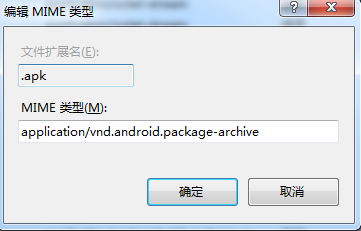
7.IIS配置
8效果图
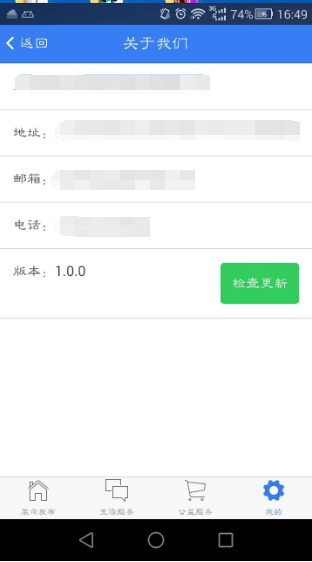
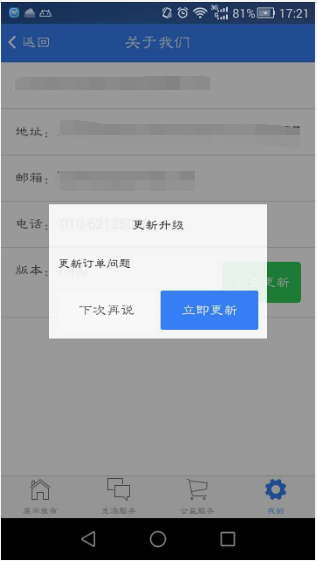
在android 7.0系统上导致无法下载更新是权限问题,修改下载路径
cordova.file.externalDataDirectory + "download/memberApp.apk" ;
Ionic App 更新插件cordova-plugin-app-version的更多相关文章
- ionic 项目内部更新用到的插件,退出app插件
一 cordova-plugin-app-version插件 用来获取APP版本 ionic plugin add cordova-plugin-app-version -----cordova-p ...
- cordova热更新插件的使用
cordova常用命令 一.添加插件 新建Cordova项目 cordova create CordovaHotCode com.ezample.hotcode 添加Android平台 在新建项目的 ...
- cordova获取app版本信息插件的使用:cordova-plugin-app-version
1. 添加插件: cordova plugin add cordova-plugin-app-version 2. 调用方法: //获取当前文件的版本号: document.addEventListe ...
- ionic cordova plugin simple demo
要用cordova plugin 的话还是需要设置一下的 1. 下载 ng-cordova.js download the zip file here 2. 在index.html 中引用 (cord ...
- cordova 更改app的图标
写在前面:cordova 使一个前端开发者成为一个“假”的android开发人员,不得不说提供给我们巨大的方便~,cordova打包生成的apk的默认样式和启动的名字真的是需要我们字更改的:本文将记录 ...
- 使用 Cordova 打包 app
1.安装nodejs 2.安装 cordova npm install -g cordova 3.Cordova 打包成安卓APK需要用到ANT打包工具,首先配置好java环境: 下载安装Java J ...
- 从国内APP更新“精雕细琢” 看国内外产品理念之差
看国内外产品理念之差" title="从国内APP更新"精雕细琢" 看国内外产品理念之差"> 对于当下的大众来说,智能手机已经成为新的" ...
- cordova plugin汇总大全
1.获取当前应用的版本号 cordova plugin add cordova-plugin-app-version 2.获取网络连接信息 cordova plugin add cordova-plu ...
- ionic 热更新 cordova-hot-code-push
cordova-hot-code-push ,Cordova热代码推送插件提供了在应用程序中执行基于Web的内容的自动更新的功能.使用此插件可以更新存储在项目的www文件夹中的所有内容. cordov ...
随机推荐
- docker中国区镜像加速
[root@syzyy ~]# vim /etc/docker/daemon.json { "registry-mirros":[ "https://registry.d ...
- 盒子阴影 box-shadow
<!DOCTYPE html> <html> <head> <meta charset="utf-8"> <title> ...
- CSS 兼容性调试技巧
CSS HACK 针对不同浏览器,书写不同的CSS代码的过程,称为“CSS HACK”. 也就是说:写一个CSS代码,让IE6识别,其它浏览器不识别. 下面,针对不同浏览器,有几个符号: 这些符号是在 ...
- JVM规范
- <Python基础>字符串的基本操作
s = 'abCDeFg aBcDea' print(s.find('b')) #通过元素查找索引,找不到返回-1 print(s.index('b')) #通过元素查找索引,找不到报错(会报错,基本 ...
- cv2 & PIL(pillow)显示图像
= OpenCV和PIL中显示图像方式不一样,且支持的格式也不同 = cv在显示图像时是自定义的显示窗口,而PIL中显示是调用操作系统中的默认打开程序 如: import cv2 im = cv2.i ...
- linux centos&Ubuntu&RedHat更换软件源
linux三大版本更换软件源 前排提示,有的源可能已经失效,如果发现请留言或自行寻找其他源. 1.centos mv /etc/yum.repos.d/CentOS-Base.repo [--path ...
- 74CMS漏洞打包(从老博客转)
引子 这套CMS是上个月中做的审计,总共找到几个后台漏洞,可后台getshell,一个逻辑漏洞可任意发短信,还有一个前台注入漏洞.不过发到了某平台上之后,审核又要求我提交利用的poc,所以懒得发去了, ...
- Longge's problem
Longge's problem 求\(\sum_{i=1}^ngcd(i,n)\),\(n< 2^{31}\). 解 理解1: 注意式子的实际意义,显然答案只可能在n的约数中,而现在问题变成了 ...
- MySQL之从忘记密码到重置密码
在对MySQL的应用中,难免会有忘记登陆密码的情况:接下来,将简单介绍下MySQL忘记密码如何登陆和重置密码的操作过程. 首先来说下新版MySQL(5.7+)的重置密码过程: 由于忘记登陆密码,所以正 ...