
MATLAB实例:PCA(主成成分分析)详解
MATLAB实例:PCA(主成成分分析)详解
作者:凯鲁嘎吉 - 博客园 http://www.cnblogs.com/kailugaji/
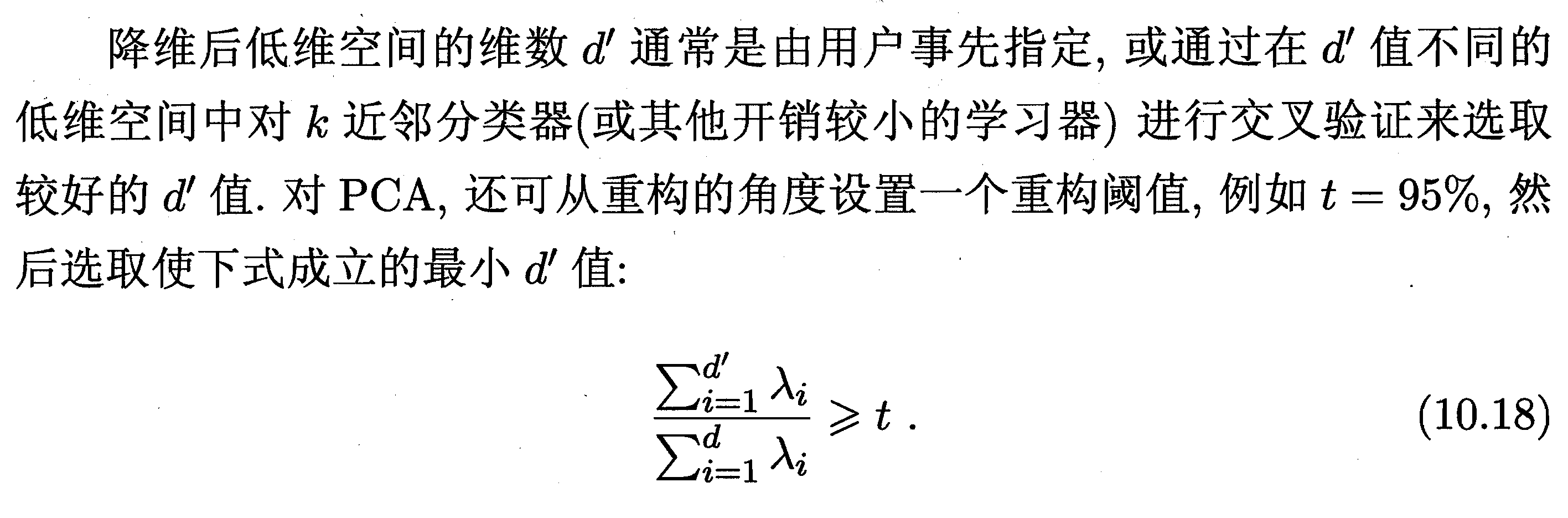
1. 主成成分分析
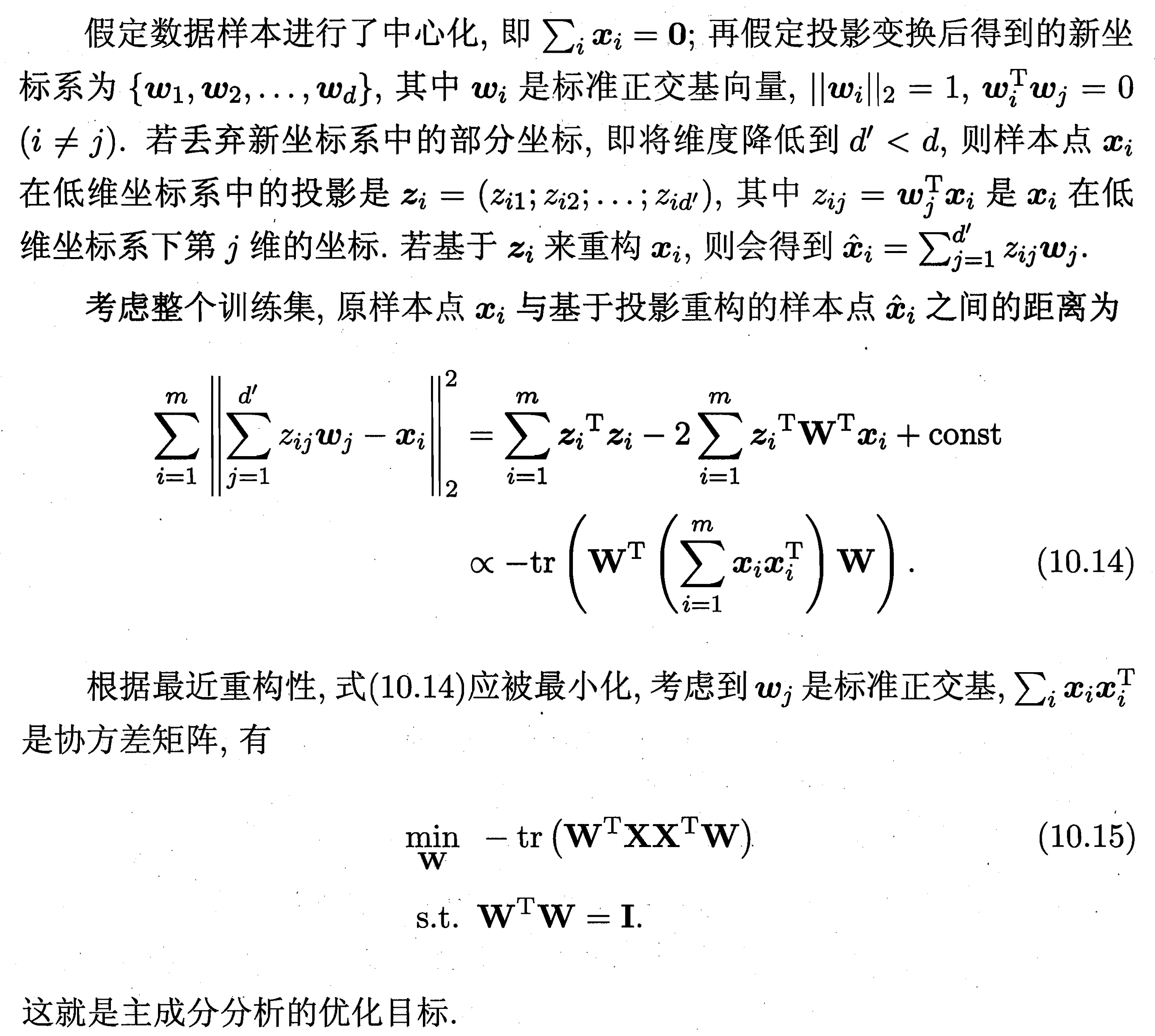
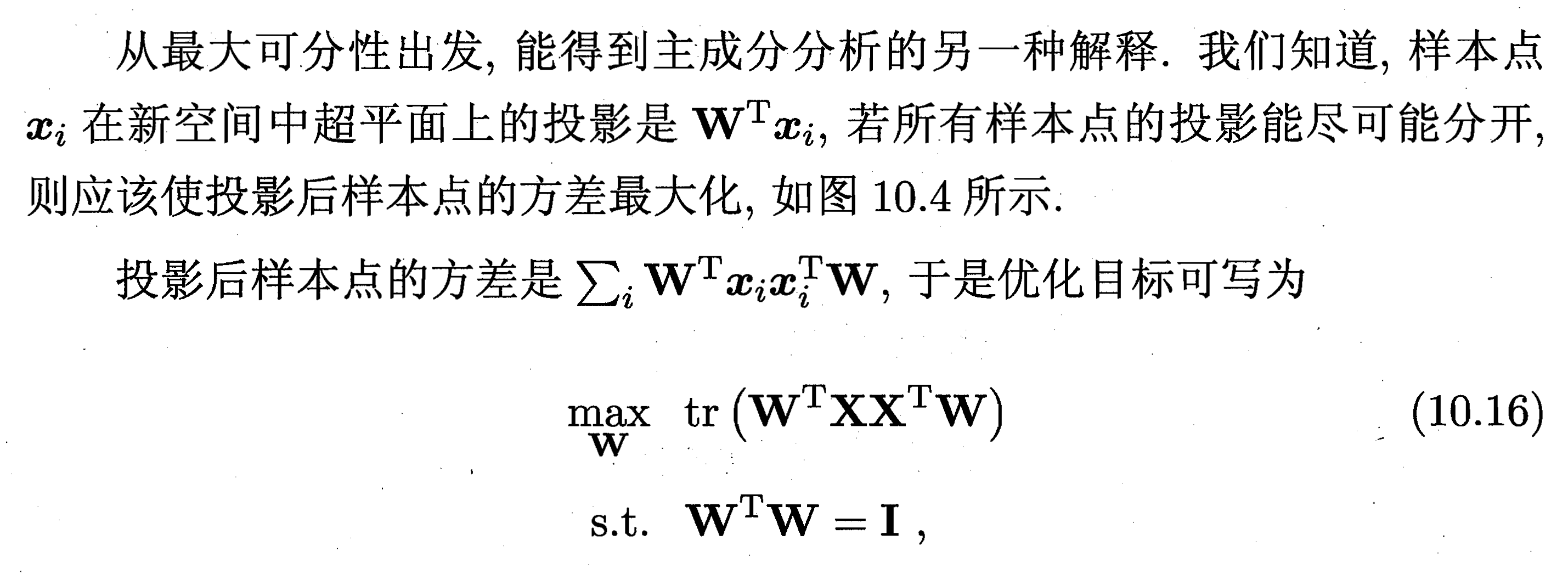
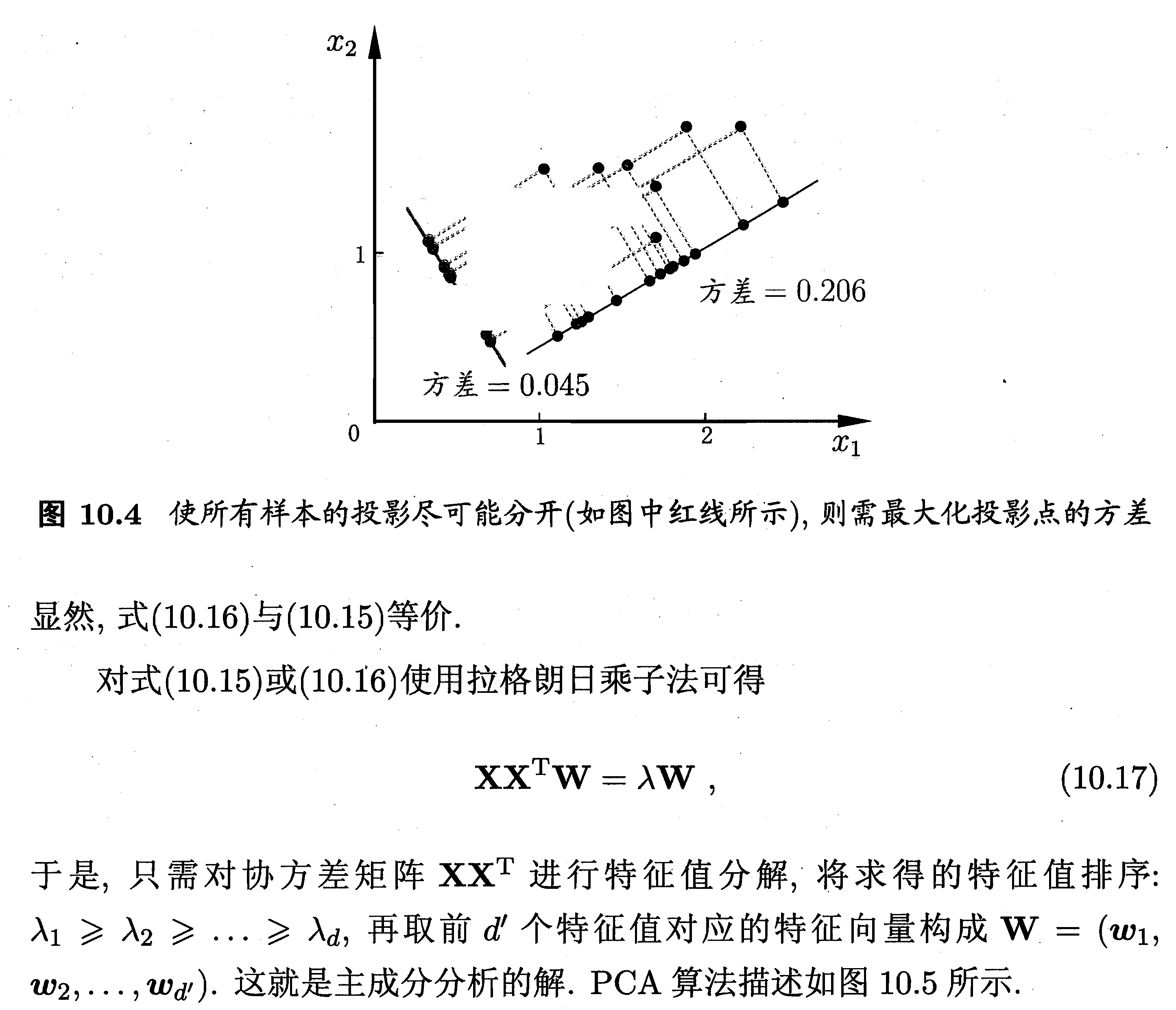
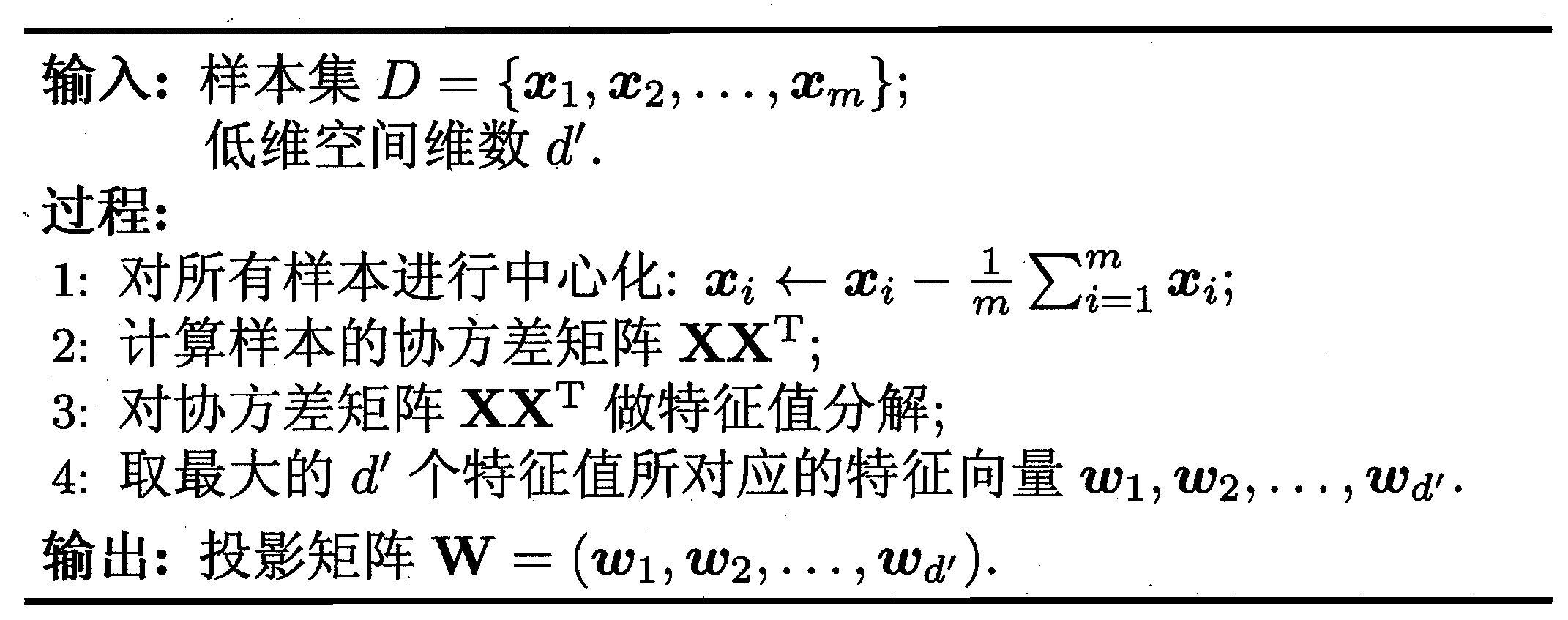
2. MATLAB解释
详细信息请看:Principal component analysis of raw data - mathworks
[coeff,score,latent,tsquared,explained,mu] = pca(X)
coeff = pca(X) returns the principal component coefficients, also known as loadings, for the n-by-p data matrix X. Rows of X correspond to observations and columns correspond to variables.
The coefficient matrix is p-by-p.
Each column of coeff contains coefficients for one principal component, and the columns are in descending order of component variance.
By default, pca centers the data and uses the singular value decomposition (SVD) algorithm.
coeff = pca(X,Name,Value) returns any of the output arguments in the previous syntaxes using additional options for computation and handling of special data types, specified by one or more Name,Value pair arguments.
For example, you can specify the number of principal components pca returns or an algorithm other than SVD to use.
[coeff,score,latent] = pca(___) also returns the principal component scores in score and the principal component variances in latent.
You can use any of the input arguments in the previous syntaxes.
Principal component scores are the representations of X in the principal component space. Rows of score correspond to observations, and columns correspond to components.
The principal component variances are the eigenvalues of the covariance matrix of X.
[coeff,score,latent,tsquared] = pca(___) also returns the Hotelling's T-squared statistic for each observation in X.
[coeff,score,latent,tsquared,explained,mu] = pca(___) also returns explained, the percentage of the total variance explained by each principal component and mu, the estimated mean of each variable in X.
coeff: X矩阵所对应的协方差矩阵的所有特征向量组成的矩阵,即变换矩阵或投影矩阵,coeff每列代表一个特征值所对应的特征向量,列的排列方式对应着特征值从大到小排序。
source: 表示原数据在各主成分向量上的投影。但注意:是原数据经过中心化后在主成分向量上的投影。
latent: 是一个列向量,主成分方差,也就是各特征向量对应的特征值,按照从大到小进行排列。
tsquared: X中每个观察值的Hotelling的T平方统计量。Hotelling的T平方统计量(T-Squared Statistic)是每个观察值的标准化分数的平方和,以列向量的形式返回。
explained: 由每个主成分解释的总方差的百分比,每一个主成分所贡献的比例。explained = 100*latent/sum(latent)。
mu: 每个变量X的估计平均值。
3. MATLAB程序
3.1 方法一:指定降维后低维空间的维度k
function [data_PCA, COEFF, sum_explained]=pca_demo_1(data,k)

% k:前k个主成分

data=zscore(data);  %归一化数据

[COEFF,SCORE,latent,tsquared,explained,mu]=pca(data);

latent1=100*latent/sum(latent);%将latent特征值总和统一为100,便于观察贡献率

data= bsxfun(@minus,data,mean(data,1));

data_PCA=data*COEFF(:,1:k);

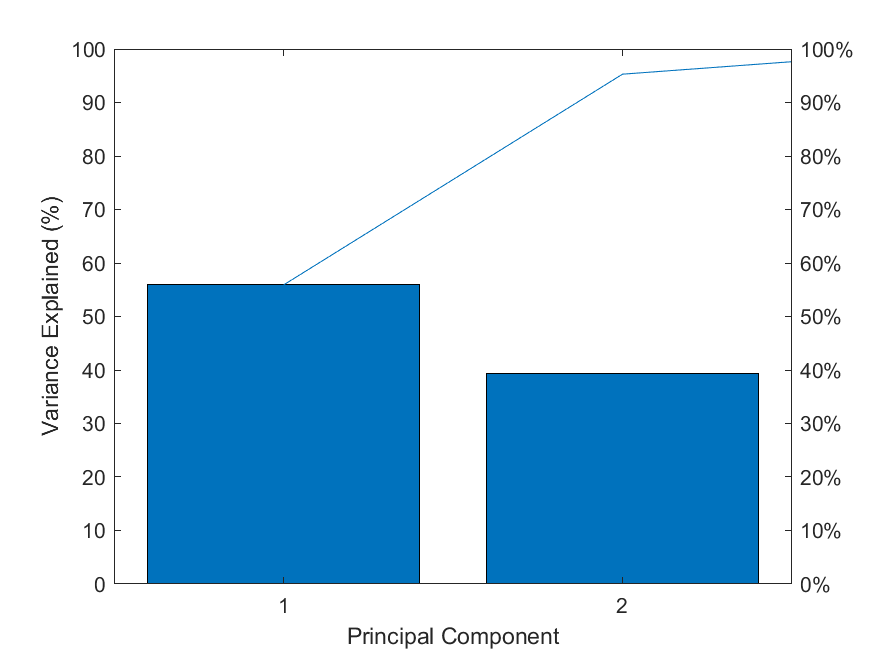
pareto(latent1);%调用matla画图 pareto仅绘制累积分布的前95%,因此y中的部分元素并未显示

xlabel('Principal Component');

ylabel('Variance Explained (%)');

% 图中的线表示的累积变量解释程度

print(gcf,'-dpng','PCA.png');

sum_explained=sum(explained(1:k));
3.2 方法二:指定贡献率percent_threshold
function [data_PCA, COEFF, sum_explained, n]=pca_demo_2(data)

%用percent_threshold决定保留xx%的贡献率

percent_threshold=95;   %百分比阈值,用于决定保留的主成分个数;

data=zscore(data);  %归一化数据

[COEFF,SCORE,latent,tsquared,explained,mu]=pca(data);

latent1=100*latent/sum(latent);%将latent特征值总和统一为100,便于观察贡献率

A=length(latent1);

percents=0;                          %累积百分比

for n=1:A

    percents=percents+latent1(n);

    if percents>percent_threshold

        break;

    end

end

data= bsxfun(@minus,data,mean(data,1));

data_PCA=data*COEFF(:,1:n);

pareto(latent1);%调用matla画图 pareto仅绘制累积分布的前95%,因此y中的部分元素并未显示

xlabel('Principal Component');

ylabel('Variance Explained (%)');

% 图中的线表示的累积变量解释程度

print(gcf,'-dpng','PCA.png');

sum_explained=sum(explained(1:n));
4. 结果
数据来源于MATLAB自带的数据集hald
>> load hald

>> [data_PCA, COEFF, sum_explained]=pca_demo_1(ingredients,2)

data_PCA =

  -1.467237802258083  -1.903035708425560

  -2.135828746398875  -0.238353702721984

   1.129870473833422  -0.183877154192583

  -0.659895489750766  -1.576774209965747

   0.358764556470351  -0.483537878558994

   0.966639639692207  -0.169944028103651

   0.930705117077330   2.134816511997477

  -2.232137996884836   0.691670682875924

  -0.351515595975561   1.432245069443404

   1.662543014130206  -1.828096643220118

  -1.640179952926685   1.295112751426928

   1.692594091826333   0.392248821530480

   1.745678691164958   0.437525487914425

COEFF =

   0.475955172748970  -0.508979384806410   0.675500187964285   0.241052184051094

   0.563870242191994   0.413931487136985  -0.314420442819292   0.641756074427213

  -0.394066533909303   0.604969078471439   0.637691091806566   0.268466110294533

  -0.547931191260863  -0.451235109330016  -0.195420962611708   0.676734019481284

sum_explained =

  95.294252628439153

>> [data_PCA, COEFF, sum_explained, n]=pca_demo_2(ingredients)

data_PCA =

  -1.467237802258083  -1.903035708425560

  -2.135828746398875  -0.238353702721984

   1.129870473833422  -0.183877154192583

  -0.659895489750766  -1.576774209965747

   0.358764556470351  -0.483537878558994

   0.966639639692207  -0.169944028103651

   0.930705117077330   2.134816511997477

  -2.232137996884836   0.691670682875924

  -0.351515595975561   1.432245069443404

   1.662543014130206  -1.828096643220118

  -1.640179952926685   1.295112751426928

   1.692594091826333   0.392248821530480

   1.745678691164958   0.437525487914425

COEFF =

   0.475955172748970  -0.508979384806410   0.675500187964285   0.241052184051094

   0.563870242191994   0.413931487136985  -0.314420442819292   0.641756074427213

  -0.394066533909303   0.604969078471439   0.637691091806566   0.268466110294533

  -0.547931191260863  -0.451235109330016  -0.195420962611708   0.676734019481284

sum_explained =

  95.294252628439153

n =

     2
5. 参考
[1] 周志华,《机器学习》.
[2] MATLAB实例:PCA降维
MATLAB实例:PCA(主成成分分析)详解的更多相关文章
- 数字图像处理-----主成成分分析PCA
主成分分析PCA 降维的必要性 1.多重共线性--预测变量之间相互关联.多重共线性会导致解空间的不稳定,从而可能导致结果的不连贯. 2.高维空间本身具有稀疏性.一维正态分布有68%的值落于正负标准差之 ...
- 机器学习 —— 基础整理(四)特征提取之线性方法:主成分分析PCA、独立成分分析ICA、线性判别分析LDA
本文简单整理了以下内容: (一)维数灾难 (二)特征提取--线性方法 1. 主成分分析PCA 2. 独立成分分析ICA 3. 线性判别分析LDA (一)维数灾难(Curse of dimensiona ...
- wav文件格式分析详解
wav文件格式分析详解 文章转载自:http://blog.csdn.net/BlueSoal/article/details/932395 一.综述 WAVE文件作为多媒体中使用的声波文件格式 ...
- HanLP中人名识别分析详解
HanLP中人名识别分析详解 在看源码之前,先看几遍论文<基于角色标注的中国人名自动识别研究> 关于命名识别的一些问题,可参考下列一些issue: l ·名字识别的问题 #387 l ·机 ...
- Vue实例初始化的选项配置对象详解
Vue实例初始化的选项配置对象详解 1. Vue实例的的data对象 介绍 Vue的实例的数据对象data 我们已经用了很多了,数据绑定离不开data里面的数据.也是Vue的核心属性. 它是Vue绑定 ...
- Memcache的使用和协议分析详解
Memcache的使用和协议分析详解 作者:heiyeluren博客:http://blog.csdn.NET/heiyeshuwu时间:2006-11-12关键字:PHP Memcache Linu ...
- 线程组ThreadGroup分析详解 多线程中篇(三)
线程组,顾名思义,就是线程的组,逻辑类似项目组,用于管理项目成员,线程组就是用来管理线程. 每个线程都会有一个线程组,如果没有设置将会有些默认的初始化设置 而在java中线程组则是使用类ThreadG ...
- DOS文件转换成UNIX文件格式详解
转:DOS文件转换成UNIX文件格式详解 由windows平台迁移到unix系统下容易引发的问题:Linux执行脚本却提示No such file or directory dos格式文件传输到uni ...
- GC日志分析详解
点击返回上层目录 原创声明:作者:Arnold.zhao 博客园地址:https://www.cnblogs.com/zh94 GC日志分析详解 以ParallelGC为例,YoungGC日志解释如下 ...
随机推荐
- poj 3862 && LA 4589 Asteroids (三维凸包+多面体重心)
3862 -- Asteroids ACM-ICPC Live Archive 用给出的点求出凸包的重心,并求出重心到多边形表面的最近距离. 代码如下: #include <cstdio> ...
- hdu 1255 覆盖的面积 (Bruceforce)
Problem - 1255 暴力统计覆盖超过一次的区域.1y. 代码如下: #include <cstdio> #include <cstring> #include < ...
- 深入理解String、StringBuffer、StringBuilder(转)
文章系转载,非原创,原地址: http://www.cnblogs.com/dolphin0520/p/3778589.html 相信String这个类是Java中使用得最频繁的类之一,并且又是各大公 ...
- H3C Basic NAT
- Educational Codeforces Round 65 (Rated for Div. 2) E. Range Deleting(思维+coding)
传送门 参考资料: [1]:https://blog.csdn.net/weixin_43262291/article/details/90271693 题意: 给你一个包含 n 个数的序列 a,并且 ...
- python基础十四之匿名函数
匿名函数 处理简单问题的简化函数,关键字lambda. # 格式:函数名 = lambda 参数:返回值 anonymity = lambda s: s ** 0.5 print(anonymity( ...
- Redux action 状态
action 不同的状态,设置不同的action.type [就是一个名字],返回对应的数据 不同的状态返回不同的 接口数据
- 关于Ping和Tracert命令原理详解
本文只是总结了两个常用的网络命令的实现原理和一点使用经验说明.这些东西通常都分布在各种书籍或者文章中的,我勤快那么一点点,总结一下,再加上我的一点理解和使用经验,方便大家了解.这些也是很基础的东西,没 ...
- spring security自定义指南
序 本文主要研究一下几种自定义spring security的方式 主要方式 自定义UserDetailsService 自定义passwordEncoder 自定义filter 自定义Authent ...
- C# json 转 xml 字符串
本文告诉大家如何将 json 转 xml 或将 xml 转 json 字符串 首先需要安装 Newtonsoft.Json 库,打开 VisualStudio 2019 新建一个 dotnet cor ...