
c#数字图像处理(七)直方图匹配
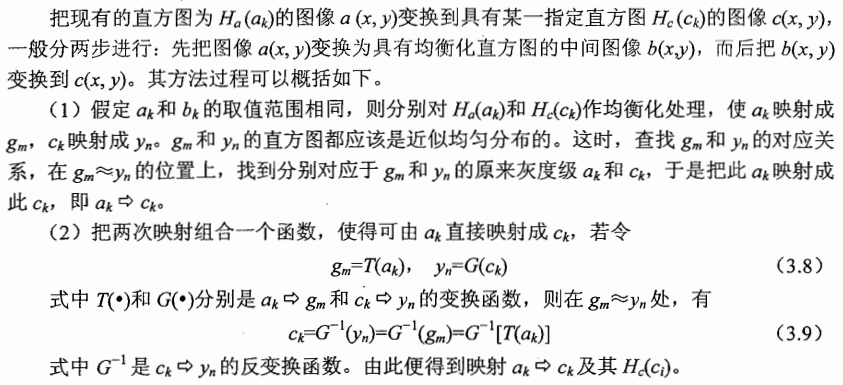
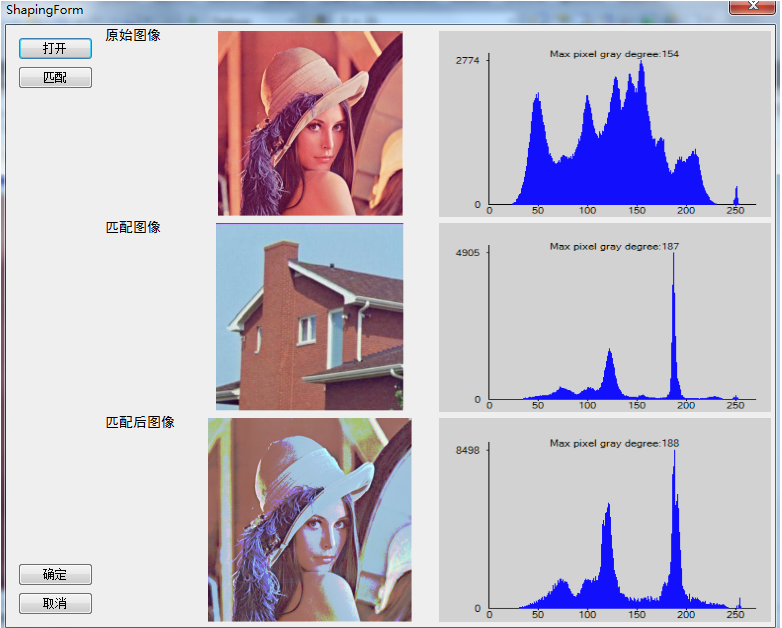
直方图匹配,又称直方图规定化,即变换原图的直方图为规定的某种形式的直方图,从而使两幅图像具有类似的色调和反差。直方图匹配属于非线性点运算。
直方图规定化的原理:对两个直方图都做均衡化,变成相同的归一化的均匀直方图,以此均匀直方图为媒介,再对参考图像做均衡化的逆运算
     /// <summary>

        /// 直方图匹配

        /// </summary>

        /// <param name="srcBmp">原始图像</param>

        /// <param name="matchingBmp">匹配图像</param>

        /// <param name="dstBmp">处理后图像</param>

        /// <returns>处理成功 true 失败 false</returns>

        public static bool HistogramMatching(Bitmap srcBmp, Bitmap matchingBmp, out Bitmap dstBmp)

        {

            if (srcBmp == null || matchingBmp == null)

            {

                dstBmp = null;

                return false;

            }

            dstBmp = new Bitmap(srcBmp);

            Bitmap tempSrcBmp = new Bitmap(srcBmp);

            Bitmap tempMatchingBmp = new Bitmap(matchingBmp);

            double[] srcCpR = null;

            double[] srcCpG = null;

            double[] srcCpB = null;

            double[] matchCpB = null;

            double[] matchCpG = null;

            double[] matchCpR = null;

            //分别计算两幅图像的累计概率分布

            getCumulativeProbabilityRGB(tempSrcBmp, out srcCpR, out srcCpG, out srcCpB);

            getCumulativeProbabilityRGB(tempMatchingBmp, out matchCpR, out matchCpG, out matchCpB);

            double diffAR = , diffBR = , diffAG = , diffBG = , diffAB = , diffBB = ;

            byte kR = , kG = , kB = ;

            //逆映射函数

            byte[] mapPixelR = new byte[];

            byte[] mapPixelG = new byte[];

            byte[] mapPixelB = new byte[];

            //分别计算RGB三个分量的逆映射函数

            //R

            for (int i = ; i < ; i++)

            {

                diffBR = ;

                for (int j = kR; j < ; j++)

                {

                    //找到两个累计分布函数中最相似的位置

                    diffAR = Math.Abs(srcCpR[i] - matchCpR[j]);

                    if (diffAR - diffBR < 1.0E-08)

                    {//当两概率之差小于0.000000001时可近似认为相等

                        diffBR = diffAR;

                        //记录下此时的灰度级

                        kR = (byte)j;

                    }

                    else

                    {

                        kR = (byte)Math.Abs(j - );

                        break;

                    }

                }

                if (kR == )

                {

                    for (int l = i; l < ; l++)

                    {

                        mapPixelR[l] = kR;

                    }

                    break;

                }

                mapPixelR[i] = kR;

            }

            //G

            for (int i = ; i < ; i++)

            {

                diffBG = ;

                for (int j = kG; j < ; j++)

                {

                    diffAG = Math.Abs(srcCpG[i] - matchCpG[j]);

                    if (diffAG - diffBG < 1.0E-08)

                    {

                        diffBG = diffAG;

                        kG = (byte)j;

                    }

                    else

                    {

                        kG = (byte)Math.Abs(j - );

                        break;

                    }

                }

                if (kG == )

                {

                    for (int l = i; l < ; l++)

                    {

                        mapPixelG[l] = kG;

                    }

                    break;

                }

                mapPixelG[i] = kG;

            }

            //B

            for (int i = ; i < ; i++)

            {

                diffBB = ;

                for (int j = kB; j < ; j++)

                {

                    diffAB = Math.Abs(srcCpB[i] - matchCpB[j]);

                    if (diffAB - diffBB < 1.0E-08)

                    {

                        diffBB = diffAB;

                        kB = (byte)j;

                    }

                    else

                    {

                        kB = (byte)Math.Abs(j - );

                        break;

                    }

                }

                if (kB == )

                {

                    for (int l = i; l < ; l++)

                    {

                        mapPixelB[l] = kB;

                    }

                    break;

                }

                mapPixelB[i] = kB;

            }

            //映射变换

            BitmapData bmpData = dstBmp.LockBits(new Rectangle(, , dstBmp.Width, dstBmp.Height), ImageLockMode.ReadWrite, PixelFormat.Format24bppRgb);

            unsafe

            {

                byte* ptr = null;

                for (int i = ; i < dstBmp.Height; i++)

                {

                    ptr = (byte*)bmpData.Scan0 + i * bmpData.Stride;

                    for (int j = ; j < dstBmp.Width; j++)

                    {

                        ptr[j *  + ] = mapPixelR[ptr[j *  + ]];

                        ptr[j *  + ] = mapPixelG[ptr[j *  + ]];

                        ptr[j * ] = mapPixelB[ptr[j * ]];

                    }

                }

            }

            dstBmp.UnlockBits(bmpData);

            return true;

        }

        /// <summary>

        /// 计算各个图像分量的累计概率分布

        /// </summary>

        /// <param name="srcBmp">原始图像</param>

        /// <param name="cpR">R分量累计概率分布</param>

        /// <param name="cpG">G分量累计概率分布</param>

        /// <param name="cpB">B分量累计概率分布</param>

        private static void getCumulativeProbabilityRGB(Bitmap srcBmp, out double[] cpR, out double[] cpG, out double[] cpB)

        {

            if (srcBmp == null)

            {

                cpB = cpG = cpR = null;

                return;

            }

            cpR = new double[];

            cpG = new double[];

            cpB = new double[];

            int[] hR = null;

            int[] hG = null;

            int[] hB = null;

            double[] tempR = new double[];

            double[] tempG = new double[];

            double[] tempB = new double[];

            getHistogramRGB(srcBmp, out hR, out hG, out hB);

            int totalPxl = srcBmp.Width * srcBmp.Height;

            for (int i = ; i < ; i++)

            {

                if (i != )

                {

                    tempR[i] = tempR[i - ] + hR[i];

                    tempG[i] = tempG[i - ] + hG[i];

                    tempB[i] = tempB[i - ] + hB[i];

                }

                else

                {

                    tempR[] = hR[];

                    tempG[] = hG[];

                    tempB[] = hB[];

                }

                cpR[i] = (tempR[i] / totalPxl);

                cpG[i] = (tempG[i] / totalPxl);

                cpB[i] = (tempB[i] / totalPxl);

            }

        }

        /// <summary>

        /// 获取图像三个分量的直方图数据

        /// </summary>

        /// <param name="srcBmp">图像</param>

        /// <param name="hR">R分量直方图数据</param>

        /// <param name="hG">G分量直方图数据</param>

        /// <param name="hB">B分量直方图数据</param>

        public static void getHistogramRGB(Bitmap srcBmp, out int[] hR, out int[] hG, out int[] hB)

        {

            if (srcBmp == null)

            {

                hR = hB = hG = null;

                return;

            }

            hR = new int[];

            hB = new int[];

            hG = new int[];

            BitmapData bmpData = srcBmp.LockBits(new Rectangle(, , srcBmp.Width, srcBmp.Height), ImageLockMode.ReadOnly, PixelFormat.Format24bppRgb);

            unsafe

            {

                byte* ptr = null;

                for (int i = ; i < srcBmp.Height; i++)

                {

                    ptr = (byte*)bmpData.Scan0 + i * bmpData.Stride;

                    for (int j = ; j < srcBmp.Width; j++)

                    {

                        hB[ptr[j * ]]++;

                        hG[ptr[j *  + ]]++;

                        hR[ptr[j *  + ]]++;

                    }

                }

            }

            srcBmp.UnlockBits(bmpData);

            return;

        }
c#数字图像处理(七)直方图匹配的更多相关文章
- OpenCV-跟我一起学数字图像处理之直方图均衡化
从这篇博文开始,小生正式从一个毫不相干专业转投数字图像处理.废话不多说了,talk is cheap. show me the code. 直方图均衡化目的 由于一些图像灰度的分布过于集中,这样会导致 ...
- Win8 Metro(C#)数字图像处理--3.3图像直方图计算
原文:Win8 Metro(C#)数字图像处理--3.3图像直方图计算 /// <summary> /// Get the array of histrgram. /// </sum ...
- Win8Metro(C#)数字图像处理--2.34直方图规定化
原文:Win8Metro(C#)数字图像处理--2.34直方图规定化 [函数名称] WriteableBitmap HistogramSpecificateProcess(WriteableBi ...
- Win8Metro(C#)数字图像处理--2.30直方图均衡化
原文:Win8Metro(C#)数字图像处理--2.30直方图均衡化 [函数名称] 直方图均衡化函数HistogramEqualProcess(WriteableBitmap src) [算法说明] ...
- FPGA与数字图像处理技术
数字图像处理方法的重要性源于两个主要应用领域: 改善图像信息以便解释. 为存储.传输和表示而对图像数据进行处理,以便于机器自动理解. 图像处理(image processing): 用计算机对图像进行 ...
- 数字图像处理:基于MATLAB的车牌识别项目 标签: 图像处理matlab算法 2017-06-24 09:17 98人阅读 评论(0)
学过了数字图像处理,就进行一个综合性强的小项目来巩固一下知识吧.前阵子编写调试了一套基于MATLAB的车牌识别的项目的代码.今天又重新改进了一下代码,识别的效果好一点了,也精简了一些代码.这里没有使用 ...
- FPGA经典:Verilog传奇与基于FPGA的数字图像处理原理及应用
一 简述 最近恶补基础知识,借了<<Verilog传奇>>,<基于FPGA的嵌入式图像处理系统设计>和<<基千FPGA的数字图像处理原理及应用>& ...
- 数字图像处理的Matlab实现(4)—灰度变换与空间滤波
第3章 灰度变换与空间滤波(2) 3.3 直方图处理与函数绘图 基于从图像亮度直方图中提取的信息的亮度变换函数,在诸如增强.压缩.分割.描述等方面的图像处理中扮演着基础性的角色.本节的重点在于获取.绘 ...
- 数字图像处理实验(总计23个)汇总 标签: 图像处理MATLAB 2017-05-31 10:30 175人阅读 评论(0)
以下这些实验中的代码全部是我自己编写调试通过的,到此,最后进行一下汇总. 数字图像处理实验(1):PROJECT 02-01, Image Printing Program Based on Half ...
随机推荐
- 洛谷——P1305 新二叉树(新建二叉树以及遍历)
题目描述输入一串二叉树,用遍历前序打出. 输入输出格式输入格式: 第一行为二叉树的节点数n.(n \leq 26n≤26) 后面n行,每一个字母为节点,后两个字母分别为其左右儿子. 空节点用*表示 输 ...
- CP防火墙配置NAT
Static NAT配置 Step1:创建host对象并且配置static NAT,如下图: Step2:修改全局属性的NAT项的ARP代理选项,勾选即可,如下图: Step3:在网关的web por ...
- Visual Studio Team Services使用教程【2】:添加团队成员
2017.4.23之后建议朋友看下面的帖子 TFS2017 & VSTS 实战(繁体中文视频) Visual Studio Team Services(VSTS)与敏捷开发ALM实战关键报告( ...
- Nginx 究竟如何处理事件?
在了解了网络事件以及事件分发收集器以后,让我们来了解 Nginx 是怎么样处理事件的? Nginx 事件循环 当 Nginx 刚刚启动时,在等待事件部分,也就是打开了 80 或 443 端口,这个时候 ...
- Maven 生命周期的概念(指令默认顺序执行)
生命周期的概念 IDEA中使用maven构建项目都集中放到了窗口右侧"Maven Projects"中,点击该区域可以直观的看到,maven中几个常用指令都归类为LifeCycle ...
- 不懂Neo4j?没关系,先学增删改查
从上篇文章中我们了解到了什么是Neo4j.为什么要用Neo4j.什么场景使用 以及怎么安装,如果您还不想熟悉,点击此处,传送过去哦~ 既然Neo4j是一个图数据库,那么毫无疑问,增删改查是必不可少的, ...
- 从0开发3D引擎(五):函数式编程及其在引擎中的应用
目录 上一篇博文 函数式编程的优点与缺点 优点 缺点 为什么使用Reason语言 函数式编程学习资料 引擎中相关的函数式编程知识点 数据 不可变数据 可变数据 函数 纯函数 高阶函数 柯西化 参考资料 ...
- [Windows] 系统清理与优化神器Advanced SystemCare 13 PRO非破解附正版激活码
Advanced SystemCare是一款功能强大的系统清理优化软件,该软件提供的主要功能有:启动项优化.注册表整理和清理.隐私清扫.垃圾文件清理.快捷方式修复.恶意软件清除.网络加速.系统优化.安 ...
- arthas 使用指导
arthas 阿尔萨斯 这种命令行的东西首先得知道 如何使用帮助,帮助文档最先开始用的,应该是可以在网上找到的官方文档 文档一:https://alibaba.github.io/arthas/ind ...
- 揭秘webpack plugin
前言 Plugin(插件) 是 webpack 生态的的一个关键部分.它为社区提供了一种强大的方法来扩展 webpack 和开发 webpack 的编译过程.这篇文章将尝试探索 webpack plu ...