
PHP实现打印出库单,有没有实现过?
https://mp.weixin.qq.com/s/X3JldplICRq7KR0HNFcpuw
背景
有时候你在实现一个出库订单之类的功能模块,这里也有可能要你的站点也实现相应的打印出库单预览,今天给大家分享用laravel(TP也行),PHP原生的也行。有需要的可以学习学习
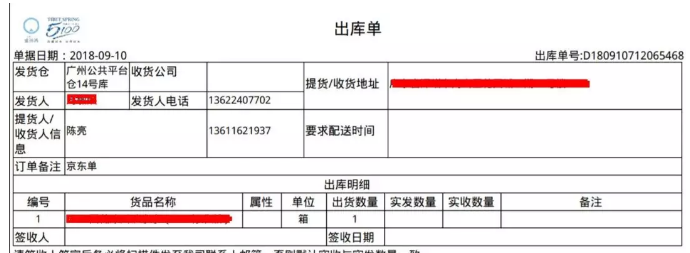
源码实现,php原生的话,需要include相关的print文件
laravel,首先先引入print插件包,我是放在app目录里
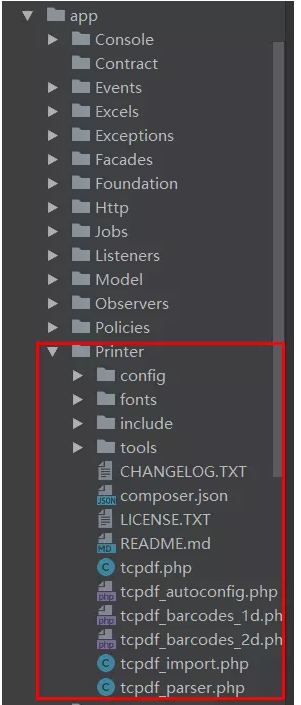
路由文件
Route::any('admin/outWares/{outWares}/printer', ['as'=> 'admin.outWares.printer', 'uses' => 'PrinterController@index']);
控制器文件 PrinterController
public function index($id)

    {

        $outWare = $this->outWareRepository->findWithoutFail($id);

        $since = $outWare->outWareSince;

        if (empty($outWare)) {

            Flash::error('OutWare not found');

            return redirect(route('admin.outWares.index'));

        }

        //处理地址,当为自提时,地址为仓库的地址

        if($outWare->mode == 0){

            $province_name = count($outWare->regionProvince->where('region_type', 1)) ? current($outWare->regionProvince->where('region_type', 1))[0]->region_name : '';

            $city_name = count($outWare->regionCity->where('region_type', 2)) ? current(current($outWare->regionCity->where('region_type', 2)))->region_name : '';

            $district_name = count($outWare->regionDistrict->where('region_type', 3)) ? current(current($outWare->regionDistrict->where('region_type', 3)))->region_name : '';

            $address = $province_name.$city_name.$district_name.$outWare->address;

        }else{

            $province_name = count($outWare->ware->regionProvince->where('region_type', 1)) ? current($outWare->ware->regionProvince->where('region_type', 1))[0]->region_name : '';

            $city_name = count($outWare->ware->regionCity->where('region_type', 2)) ? current(current($outWare->ware->regionCity->where('region_type', 2)))->region_name : '';

            $district_name = count($outWare->ware->regionDistrict->where('region_type', 3)) ? current(current($outWare->ware->regionDistrict->where('region_type', 3)))->region_name : '';

            $address = isset($outWare->ware) ? $province_name.$city_name.$district_name.$outWare->ware->address : '';

        }

        $consignee = [];

        if($outWare->mode==0){

            $consignee = $outWare->customer_name;

            $consignee_phone = $outWare->customer_phone;

        }else{

            foreach($since as $so){

                $consignee[$so->consignee] = $so->consignee_phone;

            }

            list($keys, $values) = array_divide($consignee);

            if(count($keys) > 0){

                $consignee = implode('<br>',$keys);

                $consignee_phone = implode('<br>',$values);

            }else{

                $consignee = '';

                $consignee_phone = '';

            }

        }

        if($outWare->demand_time == '0000-00-00 00:00:00' || empty($outWare->demand_time)){

            $demand_time = '';

        }else{

            $demand_time = date('Y-m-d',strtotime($outWare->demand_time));

        }

        $out_ware_detail = $this->getWareDetail($outWare->outWareDetail);

        $data = [

            'out_sn'        => $outWare->out_sn,

            'ware'          => isset($outWare->ware) ? $outWare->ware->name : '',

            'company'       => isset($outWare->company) ? $outWare->company : '',

            'telephone'     => isset($outWare->ware) ? $outWare->ware->phone_1 : '',

            'consignor'     => isset($outWare->ware) ? $outWare->ware->director_1 : '',

            'consignee'         => $consignee,

            'consignee_phone'   => $consignee_phone,

            'remark'            => $outWare->remark,

            'demand_time'       => $demand_time,

            'created_at'        => $outWare->created_at->format('Y-m-d')

        ];

        $address = $this->getWareAddress($address);

        $this->TCPDF($data,$out_ware_detail,$address);

    }
一些数据的处理,这里只做参考
/**

     * Function:处理地址样式居中

     * User:wucy

     * @param $address

     * @return string

     */

    public function getWareAddress($address)

    {

        if(strlen($address) < 80){

            return <<<Eof

            <td rowspan="2" colspan="2" style="font-size: 16px;width: 455px;line-height:60px;">{$address}</td>

Eof;

        }else{

            return <<<Eof

            <td rowspan="2" colspan="2" style="font-size: 16px;width: 455px;">{$address}</td>

Eof;

        }

    }

    /**

     * Function:获取出库单商品详情

     * User:wucy

     * @param $outWareDetail

     * @return string

     */

    public function getWareDetail($outWareDetail)

    {

        $temp_row_data = [];

        $collection = collect($outWareDetail);

        $grouped = $collection->groupBy(function ($item, $key) {

            return $item['sku_id'];

        });

        $i=1;

        foreach ($grouped as $key => $item){

            $temp_row_data[$key] = [

                'key_num'    => $i++,

                'goods_name' => isset($item[0]->goodsSku) ? $item[0]->goodsSku->goods->goods_name : '--',

                'attr_name'  => isset($item[0]->goodsSku) ? $item[0]->goodsSku->value_name : '--',

                'goods_unit' => isset($item[0]->goodsSku) ? $item[0]->goodsSku->goods->goods_unit : '--',

                'total'      => abs($item->sum('goods_number')),

                'remark_detail'=>isset($item[0]) ? $item[0]->remark_detail : '--',

            ];

        }

        //dd($temp_row_data);

        if ($temp_row_data) {

            $item = '';

            foreach ($temp_row_data as $v) {

                $item.= $this->getRowsTable($v);

            }

            return $item;

        }

    }

    /**

     * Function:

     * User:wucy

     * @param $data

     * @return string

     */

    public function getRowsTable($data)

    {

        if($data){

            return <<<Eof

             <tr>

                <td style="font-size: 16px;text-align: center;">{$data['key_num']}</td>

                <td style="font-size: 16px;">{$data['goods_name']}</td>

                <td style="font-size: 16px;text-align: center;">{$data['attr_name']}</td>

                <td style="font-size: 16px;text-align: center;">{$data['goods_unit']}</td>

                <td style="font-size: 16px;text-align: center;">{$data['total']}</td>

                <td></td>

                <td></td>

                <td>{$data['remark_detail']}</td>

            </tr>

Eof;

        }

    }
模板文件
/**

     * Function:TCPDF

     * User:wucy

     * @param $data

     * @param $out_ware_detail

     */

    public function TCPDF($data,$out_ware_detail,$address)

    {

        // create new PDF document

        $pdf = new \TCPDF(PDF_PAGE_ORIENTATION, PDF_UNIT, PDF_PAGE_FORMAT, true, 'UTF-8', false);

        // set document information

        $pdf->SetCreator(PDF_CREATOR);

        $pdf->SetAuthor('仓库系统');

        $pdf->SetTitle('出库单');

        $pdf->SetSubject('TCPDF Tutorial');

        $pdf->SetKeywords('TCPDF, PDF, example, test, guide');

        // set default header data

        //$pdf->SetHeaderData(PDF_HEADER_LOGO, PDF_HEADER_LOGO_WIDTH, PDF_HEADER_TITLE.' 048', PDF_HEADER_STRING);

        // set header and footer fonts

        //$pdf->setHeaderFont(Array(PDF_FONT_NAME_MAIN, '', PDF_FONT_SIZE_MAIN));

        //$pdf->setFooterFont(Array(PDF_FONT_NAME_DATA, '', PDF_FONT_SIZE_DATA));

        $pdf->setPrintHeader(false);

        $pdf->setPrintFooter(false);

        // set default monospaced font

        $pdf->SetDefaultMonospacedFont(PDF_FONT_MONOSPACED);

        // set margins

        $pdf->SetMargins(PDF_MARGIN_LEFT, PDF_MARGIN_TOP, PDF_MARGIN_RIGHT);

        $pdf->SetHeaderMargin(PDF_MARGIN_HEADER);

        $pdf->SetFooterMargin(PDF_MARGIN_FOOTER);

        // set auto page breaks

        $pdf->SetAutoPageBreak(TRUE, PDF_MARGIN_BOTTOM);

        // set image scale factor

        $pdf->setImageScale(PDF_IMAGE_SCALE_RATIO);

        //$pdf->SetFont('stsongstdlight','', 14);

        $pdf->SetFont('droidsansfallback','', 14);

        // add a page

        $pdf->AddPage();

        $pdf->Write(0, '', '', 0, 'L', true, 0, false, false, 0);

        $pdf->setCellHeightRatio(1.3);

        $pdf->SetLineWidth(2);

        $tbl = <<<EOD

             <table cellpadding="0" cellspacing="0">

                <tr>

                    <th><img src="/adminResource/img/logo_5100.png" width="140" height="40"></th>

                    <th style="font-size: 25px;font-weight: bold">出库单</th>

                </tr>

             </table>

             <table cellpadding="0" cellspacing="0">

                <tr>

                    <td style="font-weight: bold">单据日期:{$data['created_at']}</td>

                    <td colspan="1"></td>

                    <td style="font-weight: bold;text-align: right;width:377px;">出库单号:{$data['out_sn']}</td>

                </tr>

             </table>

             <table cellpadding="2" cellspacing="0" border="1" summary="出库单">

                    <tr>

                        <th style="font-size: 18px;width:80px;font-weight: bold;">发货仓</th>

                        <td style="font-size: 16px;width: 100px;">{$data['ware']}</td>

                        <th style="font-size: 18px;width:120px;font-weight: bold">收货公司</th>

                        <td style="font-size: 16px;width: 150px;">{$data['company']}</td>

                        <th rowspan="2" style="font-size: 18px;width:130px;font-weight: bold;line-height:60px;">提货/收货地址</th>

                        {$address}

                    </tr>

                    <tr>

                        <th style="font-size: 18px;font-weight: bold">发货人</th>

                        <td style="font-size: 16px;">{$data['consignor']}</td>

                        <th style="font-size: 18px;font-weight: bold">发货人电话</th>

                        <td style="font-size: 16px;">{$data['telephone']}</td>

                    </tr>

                    <tr>

                        <th style="font-size: 18px;font-weight: bold">提货人/收货人信息</th>

                        <td colspan="2" style="font-size: 16px;line-height:60px;">{$data['consignee']}</td>

                        <td style="font-size: 16px;line-height:60px;">{$data['consignee_phone']}</td>

                        <th style="font-size: 18px;font-weight: bold;line-height:60px;">要求配送时间</th>

                        <td colspan="2" style="font-size: 16px;line-height:60px;">{$data['demand_time']}</td>

                    </tr>

                    <tr>

                        <th style="font-size: 18px;font-weight: bold">订单备注</th>

                        <td colspan="6" style="font-size: 16px;">{$data['remark']}</td>

                    </tr>

                    <tr>

                        <th colspan="7" style="font-size: 18px;text-align: center;font-weight: bold">出库明细</th>

                    </tr>

                    <tr>

                        <td style="font-size: 18px;text-align: center;font-weight: bold;width:80px;">编号</td>

                        <td style="font-size: 18px;text-align: center;font-weight: bold;width:275px;">货品名称</td>

                        <td style="font-size: 18px;text-align: center;font-weight: bold;width:60px;">属性</td>

                        <td style="font-size: 18px;text-align: center;font-weight: bold;width:70px;">单位</td>

                        <td style="font-size: 18px;text-align: center;font-weight: bold;width:90px;">出货数量</td>

                        <td style="font-size: 18px;text-align: center;font-weight: bold;width:90px;">实发数量</td>

                        <td style="font-size: 18px;text-align: center;font-weight: bold;width:90px;">实收数量</td>

                        <td style="font-size: 18px;text-align: center;font-weight: bold;width:280px;">备注</td>

                    </tr>

                    {$out_ware_detail}

                    <tr>

                        <th style="font-size: 18px;font-weight: bold">签收人</th>

                        <td colspan="3"></td>

                        <th style="font-size: 18px;font-weight: bold">签收日期</th>

                        <td colspan="3"></td>

                    </tr>

                    <b>请签收人签字后务必将扫描件发至我司联系人邮箱,否则默认实收与实发数量一致</b>

                </table>

EOD;

        $pdf->writeHTML($tbl, true, false, false, false, '');

        // -----------------------------------------------------------------------------

        //Close and output PDF document

        $pdf->Output('出库单_'.date('YmdHis').'.pdf', 'I');

    }
全部文件都分享了,因为需求不一样,这里只做参考!
PHP实现打印出库单,有没有实现过?的更多相关文章
- SAP打印出库单 新需求
*&---------------------------------------------------------------------* *& Report Z_SD_CKD ...
- SAP打印出库单需求
*&---------------------------------------------------------------------* *& Report Z_SD_CKD ...
- SAP 出库单新版
*&---------------------------------------------------------------------* *& Report ZSDR045 ...
- U811.1接口EAI系列之二--生成销售出库单调用U8的EAI通用处理方法--PowerBuilder语言
1.销售系统销售出库,更新U811.1材料库存的EAI的XML生成. 2.主要根据U8配置会生成出库单和同时是否更新库存量,还是更新现存量等等. 3.具体参考代码如下: 作者:王春天 2013-11- ...
- SD--怎样增强是同一类出库单使用不同号码段
在现实的业务中,一个公司有多个销售组织,它们使用同一个出库类型,业务往往希望它们创建的出库单的号码採用不同号码范围.但在sap里出库单号码范围是在出库单类型里设置,也就是使用同样的出库单类型,也就使用 ...
- 基于VUE实现的h5网页Web出库单入库单打印设计
经过将近一个月的研发,初步实现了打印单据的自定义设计,样子还有点丑陋,但是功能基本都实现了,实现了以下功能: 1.表头表尾支持动态添加行.添加列.合并单元格(可多行多列合并). 2.表头表尾分别布局, ...
- WMS出库单重复
发货通知单?WMS备货单选项勾选 不自动复制?新增?
- ERP出库审核业务(四十四)
结束表单流程的代码: protected void btnSubmit_Click(object sender, EventArgs e) { if(this.txtreceiveDate.Text! ...
- 使用Jasperreporter生成入库出库单打印等报表操作
项目需要打印报表:就是那种生成入库单,出库单等的操作.使用到的技术:使用iReport Designer5.1.0设计报表,使用struts2+jasperreporter生成最终填充数据的报表 首先 ...
随机推荐
- vector容量器的应用
vector容器的应用,感觉最近做的题目还用的挺多 vector与常用数组大部分是相同的,可以进行插入,删除之类的,但是,有些题目,用普通的数组就很容易爆掉,而vector可以动态的根据你所需要的来调 ...
- DLL编程总结
进行DLL的编程主要涉及到两个方面的问题,一个是要保证DLL中要导出的函数名不被编译器不可控地更改(在C++中由于重载机制的存在,会造成程序被编译时函数名被改变),其实就是要保证DLL导出的函数名与使 ...
- Redis学习03——存储字符串(String)
--------------------- 作者:愤怒的小明 来源:CSDN 原文:https://blog.csdn.net/qiwenmingshiwo/article/details/78118 ...
- javascript基础:bom
一.BOM 1.概念:Browser Object Model 浏览器对象模型 * 将浏览器的各个组成部分封装成对象 2.组成: * Window:窗口对象 1 ...
- Leetcode90. Subsets II子集2
给定一个可能包含重复元素的整数数组 nums,返回该数组所有可能的子集(幂集). 说明:解集不能包含重复的子集. 示例: 输入: [1,2,2] 输出: [ [2], [1], [1,2,2], [2 ...
- 一些js面试高频知识点的总结
第一部分:Object Prototypes (对象原型) (1)定义一个方法,要求传入一个string类型的参数,然后将string的每个字符间加个空格返回,例如: spacify('hello w ...
- canvas用2d渲染出3d的感觉
好久没有写博客了,深究动画其实也就是setTimeout setInterval requestAnimationFrame很多人可能不熟悉requestAnimationFrame但是事实上和set ...
- php+js实现百度地图多点标注的方法
本文实例讲述了php+js实现百度地图多点标注的方法.分享给大家供大家参考,具体如下: 1.php创建json数据 ? 1 2 $products = $this->product_db-> ...
- C# WPF 仿QQ靠近屏幕上方自动缩起功能实现
碰到了类似需求,但是上网查了一圈发现感觉要么很复杂,要么代码很臃肿,索性自己实现了一个 几乎和QQ是一模一样的效果,而且核心代码只有20行左右. 代码如下: using System; using S ...
- fidder抓包使用(一)
fidder是会占用 jupyter 端口的,在fidder里边最上边找到tools--->options-->connections里边的8888改成别的重启jupyter就好了