
Spring Boot 入门(十):集成Redis哨兵模式,实现Mybatis二级缓存
本片文章续《Spring Boot 入门(九):集成Quartz定时任务》。本文主要基于redis实现了mybatis二级缓存。较redis缓存,mybaits自带缓存存在缺点(自行谷歌)。本文是基于docker安装redis主从模式。
1.redis安装
(1)首先安装redis集群模式,建立redis目录,并编写主从模式docker-compose.yml文件
 version: '3.1'

 services:

   master:

     image: redis

     container_name: redis-master

     ports:

       - 6379:6379

   slave1:

     image: redis

     container_name: redis-slave-1

     ports:

       - 6380:6379

     command: redis-server --slaveof redis-master 6379

   slave2:

     image: redis

     container_name: redis-slave-2

     ports:

       - 6381:6379

     command: redis-server --slaveof redis-master 6379
(2).启动 docker-compose up -d
(3).建立sentinel文件,并编写docker-compose.yml文件
 version: '3.1'

 services:

   sentinel1:

     image: redis

     container_name: redis-sentinel-1

     ports:

       - 26379:26379

     command: redis-sentinel /usr/local/etc/redis/sentinel.conf

     volumes:

       - ./sentinel1.conf:/usr/local/etc/redis/sentinel.conf

   sentinel2:

     image: redis

     container_name: redis-sentinel-2

     ports:

       - 26380:26379

     command: redis-sentinel /usr/local/etc/redis/sentinel.conf

     volumes:

       - ./sentinel2.conf:/usr/local/etc/redis/sentinel.conf

   sentinel3:

     image: redis

     container_name: redis-sentinel-3

     ports:

       - 26381:26379

     command: redis-sentinel /usr/local/etc/redis/sentinel.conf

     volumes:

       - ./sentinel3.conf:/usr/local/etc/redis/sentinel.conf
从模式需要sentinel的conf文件,我创建了3个容器,所以这里需要3份(sentinel1.conf sentinel2.conf sentinel3.conf),内容是一模一样
 port 26379

 dir /tmp

 sentinel monitor mymaster 217.0.0.1 6379 2

 sentinel down-after-milliseconds rmaster 30000

 sentinel parallel-syncs mymaster 1

 sentinel failover-timeout mymaster 180000

 sentinel deny-scripts-reconfig yes
(4).启动:docker-compose up -d
(5).验证redis是否已经成功启动
进入容器:docker exec -it redis-sentinel-1 /bin/bash
连接redis:redis-cli -p 26379
如下图,表示启动成功

也可以通过桌面客户端查看是否启动成功,如图,我使用的RedisDesktopManager客户端
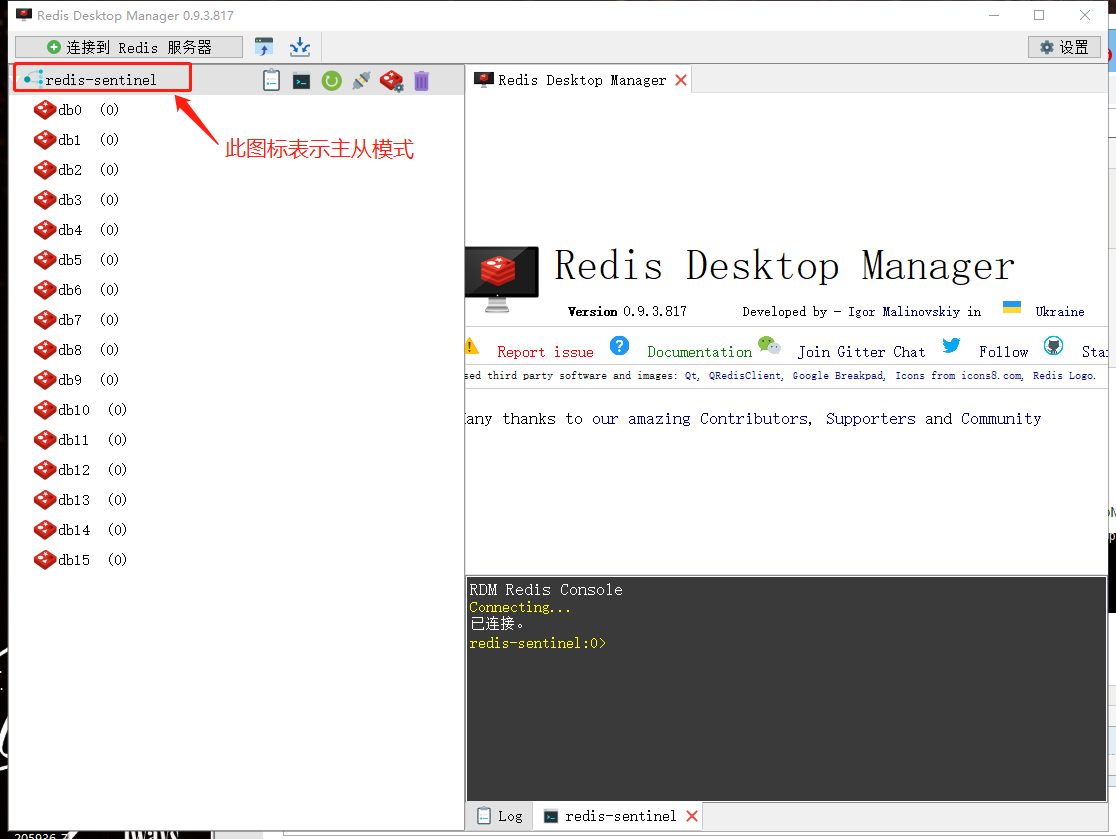
这里有个问题可以思考:传统的redis集群,即cluster,也有主从模式,现在为什么大家都选择sentinel主从模式?
2.编写RedisCache工具类
网上一大堆,根据自己需要选择合适的utils(有的utils中方法很全)
 package com.learn.hello.system.utils;

 import lombok.extern.slf4j.Slf4j;

 import org.apache.ibatis.cache.Cache;

 import org.springframework.data.redis.core.RedisCallback;

 import org.springframework.data.redis.core.RedisTemplate;

 import org.springframework.data.redis.core.ValueOperations;

 import java.util.concurrent.TimeUnit;

 import java.util.concurrent.locks.ReadWriteLock;

 import java.util.concurrent.locks.ReentrantReadWriteLock;

 /**

  * @ClassName RedisCache

  * @Deccription 通过redis实现mybaits的二级缓存

  * @Author DZ

  * @Date 2020/1/12 22:41

  **/

 @Slf4j

 public class RedisCache implements Cache {

     private final ReadWriteLock readWriteLock = new ReentrantReadWriteLock();

     private final String id; // cache instance id

     private RedisTemplate redisTemplate;

     private static final long EXPIRE_TIME_IN_MINUTES = 30; // redis过期时间

     public RedisCache(String id) {

         if (id == null) {

             throw new IllegalArgumentException("Cache instances require an ID");

         }

         this.id = id;

     }

     @Override

     public String getId() {

         return id;

     }

     /**

      * Put query result to redis

      *

      * @param key

      * @param value

      */

     @Override

     public void putObject(Object key, Object value) {

         try {

             RedisTemplate redisTemplate = getRedisTemplate();

             ValueOperations opsForValue = redisTemplate.opsForValue();

             opsForValue.set(key, value, EXPIRE_TIME_IN_MINUTES, TimeUnit.MINUTES);

             log.debug("Put query result to redis");

         } catch (Throwable t) {

             log.error("Redis put failed", t);

         }

     }

     /**

      * Get cached query result from redis

      *

      * @param key

      * @return

      */

     @Override

     public Object getObject(Object key) {

         try {

             RedisTemplate redisTemplate = getRedisTemplate();

             ValueOperations opsForValue = redisTemplate.opsForValue();

             log.debug("Get cached query result from redis");

             return opsForValue.get(key);

         } catch (Throwable t) {

             log.error("Redis get failed, fail over to db", t);

             return null;

         }

     }

     /**

      * Remove cached query result from redis

      *

      * @param key

      * @return

      */

     @Override

     @SuppressWarnings("unchecked")

     public Object removeObject(Object key) {

         try {

             RedisTemplate redisTemplate = getRedisTemplate();

             redisTemplate.delete(key);

             log.debug("Remove cached query result from redis");

         } catch (Throwable t) {

             log.error("Redis remove failed", t);

         }

         return null;

     }

     /**

      * Clears this cache instance

      */

     @Override

     public void clear() {

         RedisTemplate redisTemplate = getRedisTemplate();

         redisTemplate.execute((RedisCallback) connection -> {

             connection.flushDb();

             return null;

         });

         log.debug("Clear all the cached query result from redis");

     }

     /**

      * This method is not used

      *

      * @return

      */

     @Override

     public int getSize() {

         return 0;

     }

     @Override

     public ReadWriteLock getReadWriteLock() {

         return readWriteLock;

     }

     private RedisTemplate getRedisTemplate() {

         if (redisTemplate == null) {

             redisTemplate = SpringContextHolder.getBean("redisTemplate");

         }

         return redisTemplate;

     }

 }
3.在接口类增加redis缓存注解
@CacheNamespace(implementation = RedisCache.class)
例如:
 @CacheNamespace(implementation = RedisCache.class)

 public interface RoleMapper extends MyMapper<Role> {

     List<Role> selectByCondition(ModelMap modelMap);

     Role selectById(int id);

     List<Role> selectAllRole();

 }
这里也可以直接在MyMapper父接口中增加注解,这样,所有的接口就不需要单独增加这个注解(根据业务需要自行素选择)。
4.配置application.yml
 spring:

   redis:
       # 哨兵模式推荐使用lettuce作为客户端,弃用jedis

     lettuce:

       # 连接池配置

       pool:

         # 连接池中的最小空闲连接,默认 0

         min-idle: 0

         # 连接池中的最大空闲连接,默认 8

         max-idle: 8

         # 连接池最大阻塞等待时间(使用负值表示没有限制),默认 -1ms

         max-wait: -1ms

         # 连接池最大连接数(使用负值表示没有限制),默认 8

         max-active: 8

     #    集群模式

     #    cluster:

     #      nodes: 192.168.1.12:6379,192.168.1.12:6380,192.168.1.12:6381

     #    哨兵模式

     sentinel:

       master: mymaster

       nodes: 192.168.1.12:26379,192.168.1.12:26380,192.168.1.12:26381
 mybatis:

   mapper-locations: classpath:mapper/*.xml

   #  此配置的作用:xml中不用写实体类的全路径

   type-aliases-package: com.learn.hello.modules.entity

   #  查询的null字段也返回

   configuration:

     call-setters-on-nulls: true

     #    开启二级缓存

     cache-enabled: true
5.效果
当进行CURD操作时,相关的检索sql语句就会缓存到redis,如图:
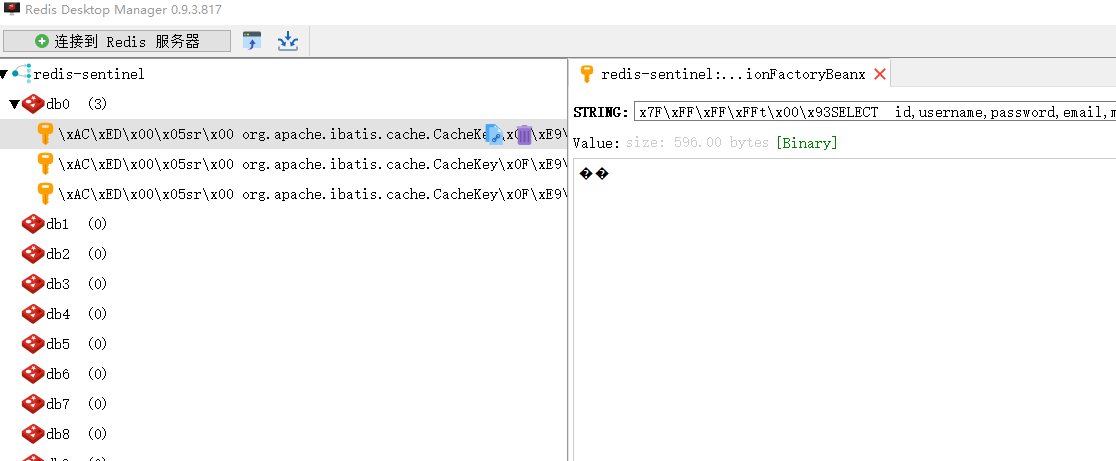
当再次对相关数据进行CRUD时,就会走缓存

Spring Boot 入门(十):集成Redis哨兵模式,实现Mybatis二级缓存的更多相关文章
- Spring Boot 如何快速集成 Redis 哨兵?
上一篇:Spring Boot 如何快速集成 Redis? 前面的分享栈长介绍了如何使用 Spring Boot 快速集成 Redis,上一篇是单机版,也有粉丝留言说有没有 Redis Sentine ...
- Springboot2.x集成Redis哨兵模式
Springboot2.x集成Redis哨兵模式 说明 Redis哨兵模式是Redis高可用方案的一种实现方式,通过哨兵来自动实现故障转移,从而保证高可用. 准备条件 pom.xml中引入相关jar ...
- 7、Spring Boot 2.x 集成 Redis
1.7 Spring Boot 2.x 集成 Redis 简介 继续上篇的MyBatis操作,详细介绍在Spring Boot中使用RedisCacheManager作为缓存管理器,集成业务于一体. ...
- 搞懂分布式技术14:Spring Boot使用注解集成Redis缓存
本文内容参考网络,侵删 本系列文章将整理到我在GitHub上的<Java面试指南>仓库,更多精彩内容请到我的仓库里查看 https://github.com/h2pl/Java-Tutor ...
- Logstash2.3.4趟坑之集成Redis哨兵模式
最新在使用Lostash2.3.4收集数据的时候,在读取redis数据的时候,报了如下的一个异常: 异常如下 Pipeline aborted due to error {:exception=> ...
- Spring Boot入门系列(六)如何整合Mybatis实现增删改查
前面介绍了Spring Boot 中的整合Thymeleaf前端html框架,同时也介绍了Thymeleaf 的用法.不清楚的朋友可以看看之前的文章:https://www.cnblogs.com/z ...
- Spring Boot 入门系列(二十三)整合Mybatis,实现多数据源配置!
d之前介绍了Spring Boot 整合mybatis 使用注解方式配置的方式实现增删改查以及一些复杂自定义的sql 语句 .想必大家对spring boot 项目中,如何使用mybatis 有了一定 ...
- Spring Boot 入门(十一):集成 WebSocket, 实时显示系统日志
以前面的博客为基础,最近一篇为Spring Boot 入门(十):集成Redis哨兵模式,实现Mybatis二级缓存.本篇博客主要介绍了Spring Boot集成 Web Socket进行日志的推送, ...
- Spring Boot 入门(十三):集成Hasor的Dataway模块,干掉后台,自动配置接口
终于出湖北了,封闭2个月,家里没电脑,感觉好久没自主撸代码啊啊啊啊啊啊啊啊啊啊啊啊啊. 连接上篇文章Spring Boot 入门(十二):报表导出,对比poi.jxl和esayExcel的效率,继续从 ...
随机推荐
- 微信小程序 view中的image水平垂直居中
当 display: flex 配合 justify-content: center 使用时可以让view水平居中 而配合 align-items: center 用时可以实现垂直居中效果 .card ...
- log4js的简单配置
js记录日志工具log4js,参数请参考官网文档https://log4js-node.github.io/log4js-node/index.html const log4js = require( ...
- uni-app学习记录04-轮播图和滑屏图片
<template> <view> <!-- 轮播图视图 swiper-item是每页的元素 --> <swiper :indicator-dots=&quo ...
- mac 安装 adb
安装命令 brew cask install android-platform-tools 测试安装情况 adb devices 设备打开开发者模式 略 查看log并过滤出设备id adb logca ...
- Python--day40--复习和回调函数实例
- 2019-10-24-dotnet-列表-Linq-的-Take-用法
title author date CreateTime categories dotnet 列表 Linq 的 Take 用法 lindexi 2019-10-24 9:4:23 +0800 201 ...
- linux 分配和释放设备编号
在建立一个字符驱动时你的驱动需要做的第一件事是获取一个或多个设备编号来使用. 为 此目的的必要的函数是 register_chrdev_region, 在 <linux/fs.h>中声明: ...
- 【t081】序列长度
Time Limit: 1 second Memory Limit: 128 MB [问题描述] 有一个整数序列,我们不知道她的长度是多少(即序列中整数的个数),但我们知道在某些区间中至少有多少个整数 ...
- 牛客小白月赛15A 斑羚飞渡
链接:https://ac.nowcoder.com/acm/contest/917/A 时间限制:C/C++ 1秒,其他语言2秒 空间限制:C/C++ 131072K,其他语言262144K 64b ...
- Gym - 101102D Rectangles (单调栈)
Given an R×C grid with each cell containing an integer, find the number of subrectangles in this gri ...