
bcc-tools工具之profile
profile是用于追踪程序执行调用流程的工具,类似于perf中的-g指令
相比perf -g而言,profile功能化更加细分,可以根据需要选择追踪层面,例如-U(用户要调用流程) -K (内核态调用流程)
下面具体介绍该工具的使用
采用profile --help,我们可以看到如下介绍:
usage: profile [-h] [-p PID] [-U | -K] [-F FREQUENCY | -c COUNT] [-d] [-a]

               [-f] [--stack-storage-size STACK_STORAGE_SIZE] [-C CPU]

               [duration]

Profile CPU stack traces at a timed interval

positional arguments:

  duration              duration of trace, in seconds   # profile的持续时间

optional arguments:

  -h, --help            show this help message and exit

  -p PID, --pid PID     profile this PID only           # 只追踪该pid的调用流程

  -U, --user-stacks-only                   # 查看用户态函数调用流程

                        show stacks from user space only (no kernel space

                        stacks)

  -K, --kernel-stacks-only                  # 只查看内核态调用流程

                        show stacks from kernel space only (no user space

                        stacks)

  -F FREQUENCY, --frequency FREQUENCY                   # profile追踪采样频率  例如: -F 99  表示按照99hz的频率进行采样,默认是采用的49hz

                        sample frequency, Hertz

  -c COUNT, --count COUNT                   # 选择采样次数 -c 5表示在周期内采样5次,-c和-F两者不能同时使用

                        sample period, number of events

  -d, --delimited       insert delimiter between kernel/user stacks  # 在内核和用户态之间插入分界符 “---”

  -a, --annotations     add _[k] annotations to kernel frames        # 在显示的内核函数后面标记 '[k]'标识

  -f, --folded          output folded format, one line per stack (for flame #采用横向线上模式 xxx;xxx_1;xxxxx_2

                        graphs)

  --stack-storage-size STACK_STORAGE_SIZE                 # 设置调用栈的使用空间和默认支持空间大小

                        the number of unique stack traces that can be stored

                        and displayed (default )

  -C CPU, --cpu CPU     cpu number to run profile on           # 允许几个cpu运行profile程序

examples:

    ./profile             # profile stack traces at  Hertz until Ctrl-C

    ./profile -F        # profile stack traces at  Hertz

    ./profile -c   # profile stack traces every  in a million events

    ./profile            # profile at  Hertz for  seconds only

    ./profile -f         # output in folded format for flame graphs

    ./profile -p       # only profile threads for PID

    ./profile -U          # only show user space stacks (no kernel)

    ./profile -K          # only show kernel space stacks (no user)
下面对相关重要指令进行测试分析:
- profile -f
在没有添加-f参数时,可看出是一行线上一个函数调用信息
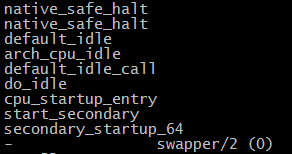
加入-f参数后,采用每行递增线上函数调用信息。

- profile -d :用于将内核态和用户态函数通过"--"分割开来,如下图红色框框所示

3.profile -F :用于设置该工具采样频率

4. profile -K -a :用于仅显示内核调用函数,并且在函数后面增加"_[K]"标识 (156标识进程id号)
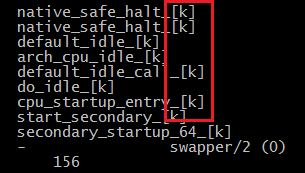
5. profile -c :在采样周期内对每一个线程xx个event进行采样

bcc-tools工具之profile的更多相关文章
- instsrv.exe下载和使用方法(微软Windows Server 2003 Resource Kit Tools工具中的一个)
instsrv.exe是微软Windows Server 2003 Resource Kit Tools工具中的一个. Windows Server 2003 Resource Kit Tools是一 ...
- MTK Android software Tools工具的说明
MTK发布的Android software Tools工具包,里面包含了很多的MTK工具,如下是简要说明及学习文档 MTK Android software Tools工具的说明如下: 工具 说明 ...
- kail linux虚拟机安装tools工具
因为自己比较懒,有时候自己不想打字需要粘贴就安装了虚拟机tools工具,又因为自己脑子不好使所以就写一下步骤,以便以后用得着.我这里用得是kail linux系统,不知道contest能不能这样安,下 ...
- 【申嵌视频】5-1 ubuntu下安装VMWare Tools工具
[申嵌视频]5-1 ubuntu下安装VMWare Tools工具 适合搭建mini2440, Tiny6410, smart210,Tiny4412, NanoPC-T2, NanoPC-T3, N ...
- 解决Linux安装 VMware tools 工具的方法
一:启动linux服务器,并用远程登录工具访问linux服务器 1:启动系统 2:用服务器控制台 :查看点ip地址 3:用客户端 连接服务器 二:挂起 vm虚拟机的 tools 安装光盘 三:开始 ...
- Linux下 安装VMware Tools工具
Linux下需要安装VMware Tools工具 Linux下需要安装VMware Tools工具来实现主机和虚拟机直接文件复制粘贴功能,安装方法如下: ①点击虚拟机VM菜单栏--虚拟机--安装VMw ...
- 【Linux】VMware安装VMware Tools工具
VMware Tools是VMware虚拟机中自带的一种增强工具,相当于VirtualBox中的增强功能(Sun VirtualBox Guest Additions),是VMware提供的增强虚拟显 ...
- VS混淆/反编译/远程调试/Spy++的Tools工具
VS的Tools工具(混淆/反编译/远程调试/Spy++等) https://blog.csdn.net/chunyexiyu/article/details/14445605 参考:http://b ...
- 虚拟机乌班图系统安装 VMware tools 工具
在VMware虚拟机中安装完毕Linux操作系统之后,我们经常会发现桌面不能全屏显示或者windows主机系统与linux操作系统之间无法创建共享文件夹.这是因为我们还没有安装VMware tools ...
- 第三篇:Entity Framework CodeFirst & Model 映射 续篇 EntityFramework Power Tools 工具使用
上一篇 第二篇:Entity Framework CodeFirst & Model 映射 主要介绍以Fluent API来实作EntityFramework CodeFirst,得到了大家一 ...
随机推荐
- HBase之BlockCache数据读取(转)
转自:http://blog.csdn.net/u014297175/article/details/47976909 Hbase上Regionserver的内存分为两个部分,一部分作为Memstor ...
- Spring事务管理-传播行为-隔离级别
事务是逻辑上的一组操作,这组操作要么全部成功,要么全部失败. 事务的特性:ACID 原子性:事务是一个不可分割的工作单位,事务中的操作要么都发生,要么都不发生 一致性:事务前后数据的完整性约束保持一致 ...
- AE开发中实现Control中的各种图形工具的方法(转)
Controls中的工具基本可以分为两类: 第一类:点击工具图标或按钮后,当前axMapControl的工具即为所点击的工具命令. 前面有Controls 后面有tool的工具都可以用同一类的代码实现 ...
- 循环神经网络(Recurrent Neural Network)
传统的神经网络模型,隐藏层的节点之间是无连接的,如下图所示. 而循环神经网络隐藏层的节点之间有连接,主要用于对序列数据进行分类.预测等处理.有连接意味着需要接受信息,这种网络通常用来对序列数据进行处理 ...
- PyCharm Change Font Size
file->settings->colors&fonts-> save as (save the current scheme as your own)-> font- ...
- auth 模块使用篇
from django.cintrib import auth #登录模块 只要用auth模块一旦登录 就可以在项目的任意地方用request.user 拿到当前的用户对象 再通过 request ...
- Service7
在真机上,利用clone-vm7新建一台虚拟机,名字:PXE-Server 1.设置防火墙为trusted 2.当前及永久关闭SELinux 3.配置IP地址:192.168.4.16 ...
- STM32库中自定义的数据类型
在头文件 <stdint.h> 中 1 /* exact-width signed integer types */ typedef signed char int8_t; typedef ...
- Karaf基础知识
Karaf 遵循OSGi开发规范的一个Apache框架 1.命令形如:scope:name 举例:feature:list 2 shell:completion tab键补齐 GLOBAL 补齐显 ...
- Ethenet: MAC PHY MII RMII
https://www.cnblogs.com/liangxiaofeng/p/3874866.html 1. general 下图是网口结构简图.网口由CPU.MAC和PHY三部分组成.DMA控制器 ...