
用Direct2D和DWM来做简单的动画效果
版权声明:本文为博主原创文章,未经博主允许不得转载。 https://blog.csdn.net/sunnyloves/article/details/50932582
0.由来
画流程图的时候需要根据数据画出每帧流场图制作出“动画”,而在Win7以上平台,Direct2D和IUAnimation结合可以做出很流畅的动画来。
1.一个简单例子
先看看效果
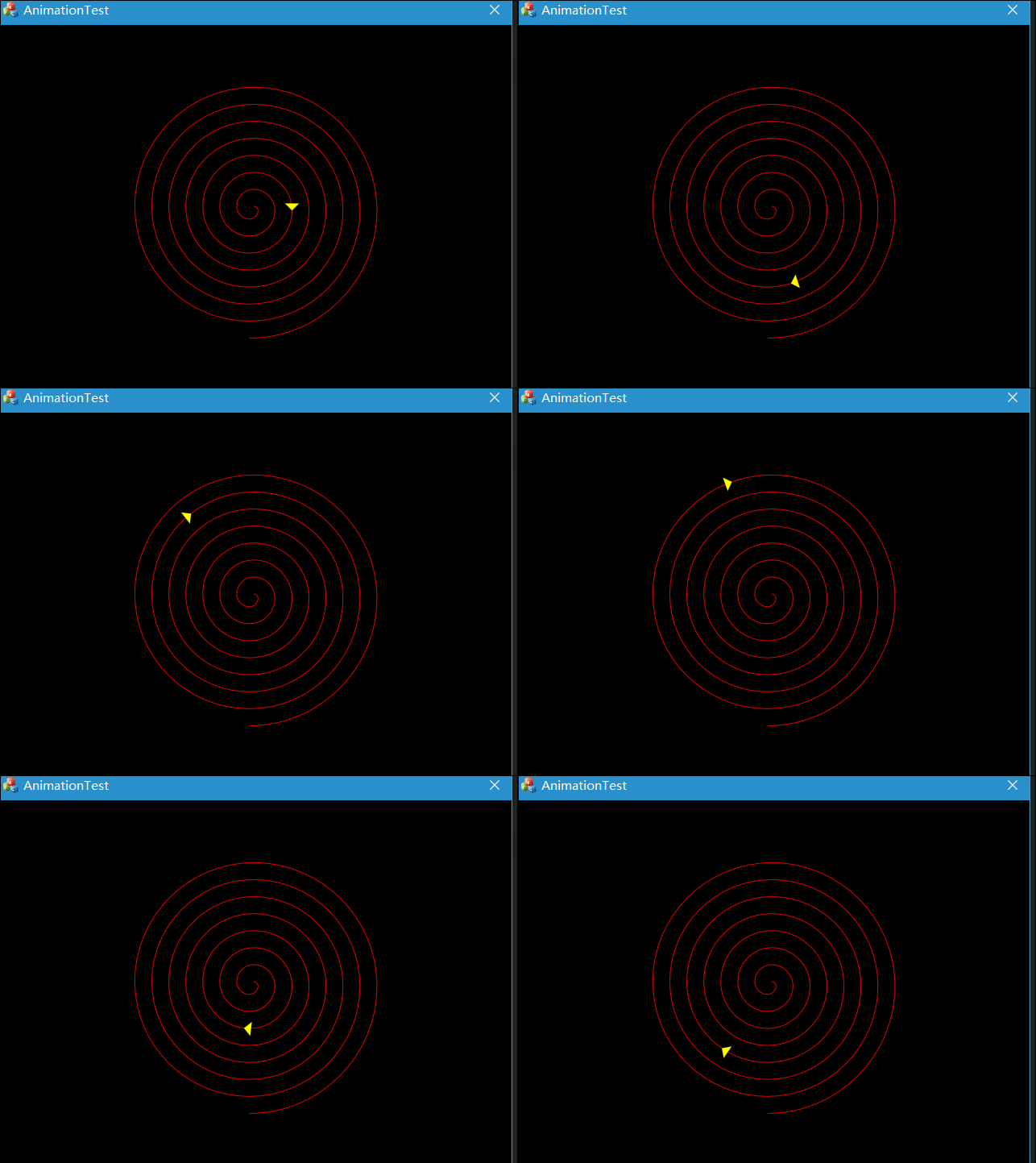
这个例子是根据MS官方的一个Win32例子改在MFC对话框下实现的。这里基本没有用到IUAnimation类,而是用了DWM。下面贴代码
2.流程
a.初始化D2D相关类,初始化DWM对象
b.构造D2D绘图对象
c.画图
d.按照DWM返回值刷新绘图对象的位置
3.部分代码
//根据start end duration计算实时位置,共4种方法-线性匀速,指数

template <class T>

class Animation

{

public:

    Animation(T start, T end, T duration) :

        m_Start(start),

        m_End(end),

        m_Duration(duration)

    {

    }

    void SetStart(T start)

    {

        m_Start = start;

    }

    T GetStart()

    {

        return m_Start;

    }

    void SetEnd(T end)

    {

        m_End = end;

    }

    T GetEnd()

    {

        return m_End;

    }

    void SetDuration(T duration)

    {

        m_Duration = max(0, duration);

    }

    T GetDuration()

    {

        return m_Duration;

    }

    T GetValue(T time)

    {

        time = min(max(time, 0), m_Duration);

        return ComputeValue(time);

    }

protected:

    virtual T ComputeValue(T time) = 0;

    T m_Duration;

    T m_Start;

    T m_End;

};

template <class T>

class LinearAnimation : public Animation<T>

{

public:

    LinearAnimation(T start=0, T end=0, T duration=0) :

        Animation(start, end, duration)

    {

    }

protected:

    virtual T ComputeValue(T time)

    {

        return m_Start + ((m_End - m_Start) * (time / m_Duration));

    }

};

template <class T>

class EaseInExponentialAnimation : public Animation<T>

{

public:

    EaseInExponentialAnimation(T start=0, T end=0, T duration=0) :

        Animation(start, end, duration)

    {

    }

protected:

    T ComputeValue(T time)

    {

        return m_Start + (m_End - m_Start) * pow(2, 10 * (time/m_Duration - 1));

    }

};

template <class T>

class EaseOutExponentialAnimation : public Animation<T>

{

public:

    EaseOutExponentialAnimation(T start=0, T end=0, T duration=0) :

        Animation(start, end, duration)

    {

    }

protected:

    T ComputeValue(T time)

    {

        return m_Start + (m_End - m_Start) * (-pow(2, -10 * time/m_Duration) + 1);

    }

};

template <class T>

class EaseInOutExponentialAnimation : public Animation<T>

{

public:

    EaseInOutExponentialAnimation(T start=0, T end=0, T duration=0) :

        Animation(start, end, duration)

    {

    }

protected:

    T ComputeValue(T time)

    {

        //compute the current time relative to the midpoint

        time = time / (m_Duration / 2);

        //if we haven't reached the midpoint, we want to do the ease-in portion

        if (time < 1)

        {

            return m_Start + (m_End - m_Start)/2 * pow(2, 10 * (time - 1));

        }

        //otherwise, do the ease-out portion

        return m_Start + (m_End - m_Start)/2 * (-pow(2, -10 * --time) + 2);

    }

};

template<class Interface>

inline void SafeRelease(Interface **ppInterfaceToRelease)

{

    if (*ppInterfaceToRelease != NULL)

    {

        (*ppInterfaceToRelease)->Release();

        (*ppInterfaceToRelease) = NULL;

    }

}
//d2d操作类
class CD2D
{
public:
CD2D();
~CD2D();
HRESULT CreateResources(HWND hWnd);
HRESULT CreateDeviceResources(void);
HRESULT Init(void);
HRESULT OnRender(void);
private:
HWND m_hwnd;
CRect rc;
ID2D1Factory *m_pD2DFactory;
ID2D1HwndRenderTarget *m_pRT;
ID2D1PathGeometry *m_pPathGeometry;
ID2D1PathGeometry *m_pObjectGeometry;
ID2D1SolidColorBrush *m_pRedBrush;
ID2D1SolidColorBrush *m_pYellowBrush;
LinearAnimation<float> m_Animation;//线性
DWM_TIMING_INFO m_DwmTimingInfo;
};
CD2D::CD2D() :

    m_hwnd(NULL),

    m_pD2DFactory(NULL),

    m_pRT(NULL),

    m_pPathGeometry(NULL),

    m_pObjectGeometry(NULL),

    m_pRedBrush(NULL),

    m_pYellowBrush(NULL),

    m_Animation()

{

}

CD2D::~CD2D()

{

    SafeRelease(&m_pD2DFactory);

    SafeRelease(&m_pRT);

    SafeRelease(&m_pPathGeometry);

    SafeRelease(&m_pObjectGeometry);

    SafeRelease(&m_pRedBrush);

    SafeRelease(&m_pYellowBrush);

}

HRESULT CD2D::CreateResources(HWND hWnd)

{

    HRESULT hr;

    ID2D1GeometrySink *pSink = NULL;

    // Create a Direct2D factory.

    hr = D2D1CreateFactory(D2D1_FACTORY_TYPE_SINGLE_THREADED, &m_pD2DFactory);

    D2D1_PIXEL_FORMAT pixelFormat = D2D1::PixelFormat(

        DXGI_FORMAT_B8G8R8A8_UNORM,

        D2D1_ALPHA_MODE_IGNORE

        );

    D2D1_RENDER_TARGET_PROPERTIES props = D2D1::RenderTargetProperties();

    props.pixelFormat = pixelFormat;

    props.dpiX = 96.0f;

    props.dpiY = 96.0f;

    GetClientRect(hWnd, &rc);

    // Create a Direct2D render target

    hr = m_pD2DFactory->CreateHwndRenderTarget(

        props,

        D2D1::HwndRenderTargetProperties(

            hWnd,

            D2D1::SizeU(rc.right - rc.left, rc.bottom - rc.top)

            ),

        &m_pRT

        );

    if (SUCCEEDED(hr))

    {

        // Create the path geometry.

        hr = m_pD2DFactory->CreatePathGeometry(&m_pPathGeometry);

    }

    if (SUCCEEDED(hr))

    {

        // Write to the path geometry using the geometry sink. We are going to create a

        // spiral

        hr = m_pPathGeometry->Open(&pSink);

    }

    if (SUCCEEDED(hr))

    {

        D2D1_POINT_2F currentLocation = { 0, 0 };

        pSink->BeginFigure(currentLocation, D2D1_FIGURE_BEGIN_FILLED);

        D2D1_POINT_2F locDelta = { 2, 2 };

        float radius = 3;

        for (UINT i = 0; i < 30; ++i)

        {

            currentLocation.x += radius * locDelta.x;

            currentLocation.y += radius * locDelta.y;

            pSink->AddArc(

                D2D1::ArcSegment(

                    currentLocation,

                    D2D1::SizeF(2 * radius, 2 * radius), // radiusx/y

                    0.0f, // rotation angle

                    D2D1_SWEEP_DIRECTION_CLOCKWISE,

                    D2D1_ARC_SIZE_SMALL

                    )

                );

            locDelta = D2D1::Point2F(-locDelta.y, locDelta.x);

            radius += 3;

        }

        pSink->EndFigure(D2D1_FIGURE_END_OPEN);

        hr = pSink->Close();

    }

    if (SUCCEEDED(hr))

    {

        // Create the path geometry.

        hr = m_pD2DFactory->CreatePathGeometry(&m_pObjectGeometry);

    }

    if (SUCCEEDED(hr))

    {

        // Write to the object geometry using the geometry sink.

        // We are going to create a simple triangle

        hr = m_pObjectGeometry->Open(&pSink);

    }

    if (SUCCEEDED(hr))

    {

        pSink->BeginFigure(

            D2D1::Point2F(0.0f, 0.0f),

            D2D1_FIGURE_BEGIN_FILLED

            );

        const D2D1_POINT_2F ptTriangle[] = { { -10.0f, -10.0f },{ -10.0f, 10.0f },{ 0.0f, 0.0f } };

        pSink->AddLines(ptTriangle, 3);

        pSink->EndFigure(D2D1_FIGURE_END_OPEN);

        hr = pSink->Close();

    }

    SafeRelease(&pSink);

    return hr;

}

HRESULT CD2D::CreateDeviceResources(void)

{

    HRESULT hr = S_OK;

    if (m_pRT != nullptr)

    {

        if (SUCCEEDED(hr))

        {

            // Create a red brush.

            hr = m_pRT->CreateSolidColorBrush(

                D2D1::ColorF(D2D1::ColorF::Red),

                &m_pRedBrush

                );

        }

        if (SUCCEEDED(hr))

        {

            // Create a yellow brush.

            hr = m_pRT->CreateSolidColorBrush(

                D2D1::ColorF(D2D1::ColorF::Yellow),

                &m_pYellowBrush

                );

        }

    }

    return hr;

}

HRESULT CD2D::Init(void)

{

    HRESULT hr;

    float length = 0;

    hr = m_pPathGeometry->ComputeLength(

        NULL, //no transform

        &length

        );

    if (SUCCEEDED(hr))

    {

        m_Animation.SetStart(0);        //start at beginning of path

        m_Animation.SetEnd(length);     //length at end of path

        m_Animation.SetDuration(5.0f);  //seconds

        ZeroMemory(&m_DwmTimingInfo, sizeof(m_DwmTimingInfo));

        m_DwmTimingInfo.cbSize = sizeof(m_DwmTimingInfo);

        // Get the composition refresh rate. If the DWM isn't running,

        // get the refresh rate from GDI -- probably going to be 60Hz

        if (FAILED(DwmGetCompositionTimingInfo(NULL, &m_DwmTimingInfo)))

        {

            HDC hdc = GetDC(m_hwnd);

            m_DwmTimingInfo.rateCompose.uiDenominator = 1;

            m_DwmTimingInfo.rateCompose.uiNumerator = GetDeviceCaps(hdc, VREFRESH);

            ReleaseDC(m_hwnd, hdc);

        }

    }

    return hr;

}

HRESULT CD2D::OnRender(void)

{

    HRESULT hr;

    if (!(m_pRT->CheckWindowState() & D2D1_WINDOW_STATE_OCCLUDED))//是否堵塞

    {

        D2D1_POINT_2F point;

        D2D1_POINT_2F tangent;

        D2D1_MATRIX_3X2_F triangleMatrix;

        D2D1_SIZE_F rtSize = m_pRT->GetSize();

        float minWidthHeightScale = min(rtSize.width, rtSize.height) / 512;

        D2D1::Matrix3x2F scale = D2D1::Matrix3x2F::Scale(

            minWidthHeightScale,

            minWidthHeightScale

            );

        D2D1::Matrix3x2F translation = D2D1::Matrix3x2F::Translation(

            rtSize.width / 2,

            rtSize.height / 2

            );

        // Prepare to draw.

        m_pRT->BeginDraw();

        // Reset to identity transform

        m_pRT->SetTransform(D2D1::Matrix3x2F::Identity());

        //clear the render target contents

        m_pRT->Clear(D2D1::ColorF(D2D1::ColorF::Black));

        //center the path

        m_pRT->SetTransform(scale * translation);

        //draw the path in red

        m_pRT->DrawGeometry(m_pPathGeometry, m_pRedBrush);

        static float float_time = 0.0f;

        float length = m_Animation.GetValue(float_time);

        // Ask the geometry to give us the point that corresponds with the

        // length at the current time.

        hr = m_pPathGeometry->ComputePointAtLength(length, NULL, &point, &tangent);

        ASSERT(SUCCEEDED(hr));

        // Reorient the triangle so that it follows the

        // direction of the path.

        triangleMatrix = D2D1::Matrix3x2F(

            tangent.x, tangent.y,

            -tangent.y, tangent.x,

            point.x, point.y

            );

        m_pRT->SetTransform(triangleMatrix * scale * translation);

        // Draw the yellow triangle.

        m_pRT->FillGeometry(m_pObjectGeometry, m_pYellowBrush);

        // Commit the drawing operations.

        hr = m_pRT->EndDraw();

        if (hr == D2DERR_RECREATE_TARGET)

        {

            hr = S_OK;

        }

        // When we reach the end of the animation, loop back to the beginning.

        if (float_time >= m_Animation.GetDuration())

        {

            float_time = 0.0f;

        }

        else

        {

            float_time += static_cast<float>(m_DwmTimingInfo.rateCompose.uiDenominator) /

                static_cast<float>(m_DwmTimingInfo.rateCompose.uiNumerator);

        }

    }

    return hr;

}
对话框界面中,删除所有按钮和static文本框,声明d2d变量m_d2d,在OnInitDialog()里初始化
HRESULT hr;

    hr = m_d2d.CreateResources(GetSafeHwnd());

    if (SUCCEEDED(hr))

    {

        hr = m_d2d.CreateDeviceResources();

        if (SUCCEEDED(hr))

        {

            hr = m_d2d.Init();

        }

    }
在OnPaint()里
    m_d2d.OnRender();

    //  CDialogEx::OnPaint();一定要注释掉,会自己刷新
用Direct2D和DWM来做简单的动画效果的更多相关文章
- 用Direct2D和DWM来做简单的动画效果2
原文:用Direct2D和DWM来做简单的动画效果2 版权声明:本文为博主原创文章,未经博主允许不得转载. https://blog.csdn.net/sunnyloves/article/detai ...
- 【从无到有】教你使用animation做简单的动画效果
今天写写怎么用animation属性做一些简单的动画效果 在CSS选择器中,使用animition动画属性,调用声明好的关键帧 首先声明一个动画(关键帧): @keyframes name{ from ...
- ExtJS简单的动画效果2(ext js淡入淡出特效)
Ext 开发小组则提供了 Fx 类集中处理了大部分常用的 js 动画特效,减少了我们自己手写代码的复杂度. 面我给出一个简单的实例代码,其中囊括了大部分的 Ext 动画效果: (注意导入js和css文 ...
- 32.ExtJS简单的动画效果
转自:http://blog.sina.com.cn/s/blog_74684ec501015lhq.html 说明:这篇文章的大部分内容来源于网上,经过自己实现其效果后,整理如下: 在进行 Java ...
- JavaScript做简单的购物车效果(增、删、改、查、克隆)
比如有时候遇到下面这种情况,点击加入购物车,然后在上方的购物车中动态的添加商品以及商品的信息,我们就可以通过JavaScript实现简单的这些操作. 首先我们需要在html文档中,通过css对页面的布 ...
- NSLayoutConstraint 布局,配合简单的动画效果
demo地址 :链接: http://pan.baidu.com/s/1c00ipDQ 密码: mi4c 1 @interface ViewController () @property (nonat ...
- css制作简单loading动画效果【css3 loading加载动画】
曾经以为,loading的制作需要一些比较高深的web动画技术,后来发现大多数loading都可以用“障眼法”做出来.比如一个旋转的圆圈,并不都是将gif图放进去,有些就是画个静止图像,然后让它旋转就 ...
- tableView简单的动画效果
tableView 中一些动画效果通常都是实现willDisplayCell的方法来展示出一些动画的效果 (1).带有3D效果的小型动态展示 -(void)tableView:(UITableView ...
- jquery 最简单的动画效果
<p style="border: 1px solid red"> 我会慢慢变大 </p> <a>dianji</a> <sc ...
随机推荐
- C开发系列-指针
指针 通过一段简单的程序,引入指针的概念 #include <iostream> using namespace std; // changeValue函数的定义 void changeV ...
- Leetcode 345 Reverse Vowels in a String
两个for 第一个for将每一个元音依次存放进一个char数组 第二个for,每检测到元音,就从char数尾部开始,依次赋值 如何检测元音呢?当然写一个冗长的if(),不过我们有更好的选择 hashs ...
- 错误 2 error C2059: 语法错误:“::”
设置项目属性,在预定义处理器中添加定义NOMINMAX来禁止使用Vsual C++的min/max宏定义. 项目属性 ——> C/C++ ——> 预处理器 ——> 预处理器定义 ...
- Ionic cordova-plugin-splashscreen
1.添加插件 cordova plugin add https://github.com/apache/cordova-plugin-splashscreen.git 2.设置启动画面 在根目录下面r ...
- springboot核心技术(四)-----Docker、数据访问、自定义starter
Docker 1.简介 Docker是一个开源的应用容器引擎:是一个轻量级容器技术: Docker支持将软件编译成一个镜像:然后在镜像中各种软件做好配置,将镜像发布出去,其他使用者可以直接使 用这个镜 ...
- JAVA开源微信管家平台——JeeWx捷微V3.3版本发布(支持微信公众号,微信企业号,支付窗)
JeeWx捷微V3.3版本紧跟微信小程序更新,在原有多触点版本基础上,引入了更多的新亮点:支持微信公众号.微信企业号.支付宝服务窗等多触点开发:采用微服务框架实现,可插拔可集成,轻量级开发:对小程序的 ...
- https://github.com/ronggang/transmission-web-control
首先需要保证你的电脑可以链接国际互联网 如果只能链接大型局域网,那么请您带着电脑出国以便于可以顺利安装https://github.com/ronggang/transmission-web-cont ...
- Python - 基本数据类型及其常用的方法之字典和布尔值
字典 特点:{"key1": value1, "key2":value2} , 键值对中的值可以为任何数据类型,键不能为列表.字典(无法哈希),布尔值可以为键 ...
- 解决CSocket高数据传输问题
这个是自己项目中发现的问题,所以这个不一定适用于你的. 仅供参考. 头文件: ESSocket.h // ESSocket.h : header file // #ifndef ESSOCKET_H ...
- 设置eclipse自动补全
点击" Window>Preferences"; 选择"Java>Editor>Content Assist",在右侧的"Auto- ...