
Django 实现CRM 问卷调查功能组件
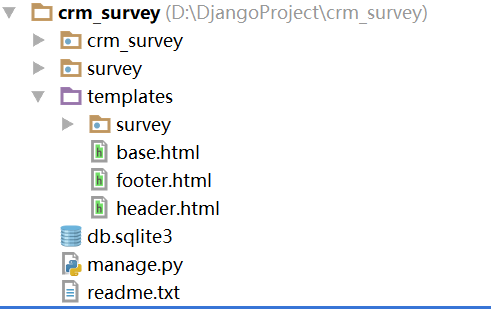
目录结构:
母版
{% load staticfiles %}
<!DOCTYPE html>
<html lang="zh-CN">
<head>
    <meta charset="UTF-8">
    <meta http-equiv="X-UA-Compatible" content="IE=edge">
    <meta name="viewport" content="width=device-width, initial-scale=1">
    <title>{% block title %}{% endblock %}</title>
    <link rel="stylesheet" href="{% static 'plugins/bootstrap/css/bootstrap.min.css' %}">
<body>
{% include 'header.html' %}
<div class="container-fluid">
    {% block content %}
    {% endblock %}
</div>
{% include 'footer.html' %}
{% block javascript %}
{% endblock %}
</body>
</html>
base.html
<nav class="navbar navbar-default">
    <div class="container-fluid">
        <div class="navbar-header">
            <a class="navbar-brand" href="#">CRM系统</a>
        </div>
        <div id="navbar" class="navbar-collapse collapse">
            <ul class="nav navbar-nav navbar-right">
                <li><a href="#">任务</a></li>
                <li><a href="#">通知</a></li>
                <li><a href="#">消息</a></li>
                <li><a href="#">登录</a></li>
            </ul>
        </div>
    </div>
</nav>
header.html
<div class="container-fluid " style="position:absolute;bottom:0;width:100%;height:100px;background-color: #eeeeee;">
    <hr>
    <p class="text-center"> © 2018 lcg</p>
</div>
footer.html
数据库设计
models.py
from django.db import models

from django.db import models

class UserInfo(models.Model):
    """
    员工表
    """
    name = models.CharField(max_length=32)

    def __str__(self):
        return self.name

class ClassInfo(models.Model):
    """
    班级表
    """
    name = models.CharField(max_length=32)

    def __str__(self):
        return self.name

class Student(models.Model):
    """
    学生表
    """
    user = models.CharField(max_length=32)
    pwd = models.CharField(max_length=32)
    cls = models.ForeignKey(to=ClassInfo)

    def __str__(self):
        return self.user

class Questionnaire(models.Model):
    """
    问卷表

    """
    title = models.CharField(max_length=64)
    cls = models.ForeignKey(to=ClassInfo)
    creator = models.ForeignKey(to=UserInfo)

    def __str__(self):
        return self.title

class Question(models.Model):
    """
    问题表
    """
    caption = models.CharField(max_length=64)

    question_type = (
        (1, '打分'),
        (2, '单选'),
        (3, '评价'),
    )
    question_type = models.IntegerField(choices=question_type)

    questionnaire = models.ForeignKey(Questionnaire, default=1)

    def __str__(self):
        return self.caption

class Option(models.Model):
    """
    单选题的选项
    """
    option_name = models.CharField(verbose_name='选项名称', max_length=32)
    score = models.IntegerField(verbose_name='选项对应的分值')
    question = models.ForeignKey(to=Question)

    def __str__(self):
        return self.option_name

class Answer(models.Model):
    """
    回答
    """
    student = models.ForeignKey(to=Student)
    question = models.ForeignKey(to=Question)

    # 三选一
    option = models.ForeignKey(to="Option", null=True, blank=True)
    val = models.IntegerField(null=True, blank=True)
    content = models.CharField(max_length=255, null=True, blank=True)
数据库迁移:
python manage.py makemigrations
python manage.py migrate
创建超级用户:
name:admin
password:admin123456
渲染编辑页面
model_forms组件:
from .models import *
from django.forms import ModelForm

class QuestionModelForm(ModelForm):
    class Meta:
        model = Question
        fields = ["caption", "question_type"]
views.py用列表的low方法
from django.shortcuts import render, HttpResponse
from .models import *
from .model_forms import *

def questionnaire(request, questionnaire_id):
    questionnaire_obj=Questionnaire.objects.filter(id=questionnaire_id).first()
    if not questionnaire_obj:
        return HttpResponse("未找到符合要求的问卷")# 处理没有找到问卷调查对象的情况
    question_list = Question.objects.filter(questionnaire_id=questionnaire_id)
    questionModelForm_list=[]
    for question in question_list:
        questionModelForm=QuestionModelForm(instance=question)
        questionModelForm_list.append(questionModelForm)
    return render(request, 'survey/questionnaire.html', locals())
html页渲染:
{% for questionModelForm in questionModelForm_list %}
<p>标题:{{ questionModelForm.caption }}</p>
<p>类型:{{ questionModelForm.question_type }}</p>
{% endfor %}
优化列表的low方法,采用生成器,原理参见(http://www.cnblogs.com/0bug/p/8183629.html):
def questionnaire(request, questionnaire_id):
    questionnaire_obj = Questionnaire.objects.filter(id=questionnaire_id).first()
    if not questionnaire_obj:
        return HttpResponse("未找到符合要求的问卷")  # 处理没有找到问卷调查对象的情况

    def generate_questionModelForm():

        question_list = Question.objects.filter(questionnaire_id=questionnaire_id)
        for question in question_list:
            questionModelForm = QuestionModelForm(instance=question)
            yield questionModelForm

    return render(request, 'survey/questionnaire.html', {"generate_questionModelForm": generate_questionModelForm()})
html渲染
{% extends 'base.html' %}
{% block title %} 调查问卷 {% endblock %}
{% block content %}

    {% for questionModelForm in generate_questionModelForm %}
        <p>标题:{{ questionModelForm.caption }}</p>
        <p>类型:{{ questionModelForm.question_type }}</p>
    {% endfor %}

{% endblock %}
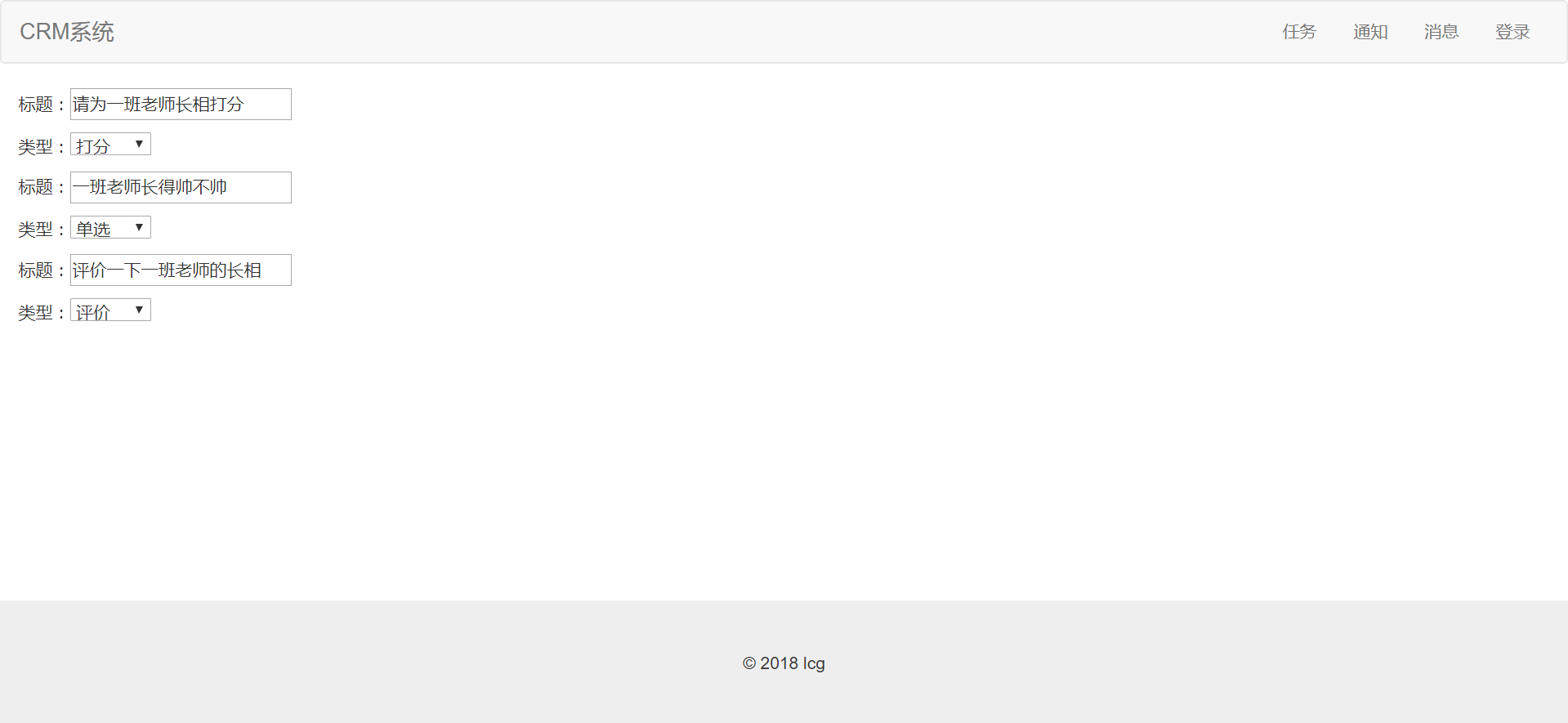
效果是一样的:
将单选问题选项筛选出来:
def questionnaire(request, questionnaire_id):
    questionnaire_obj = Questionnaire.objects.filter(id=questionnaire_id).first()
    if not questionnaire_obj:
        return HttpResponse("未找到符合要求的问卷")  # 处理没有找到问卷调查对象的情况

    def generate_questionModelForm_info():

        question_list = Question.objects.filter(questionnaire_id=questionnaire_id)
        for question in question_list:

            questionModelForm = QuestionModelForm(instance=question)
            if question.question_type == 2:
                option_list = question.option_set.all()
                optionModelForm_list = []
                for option in option_list:
                    optionModelForm = OptionModelForm(instance=option)
                    optionModelForm_list.append(optionModelForm)
                yield {"question": question, "questionModelForm": questionModelForm,
                       "optionModelForm_list": optionModelForm_list}
            else:
                yield {"question": question, "questionModelForm": questionModelForm}

    return render(request, 'survey/questionnaire.html',
                  {"generate_questionModelForm_info": generate_questionModelForm_info()})
html渲染页
{% extends 'base.html' %}
{% block title %} 调查问卷 {% endblock %}
{% block content %}
    <div class="question-item">
        {% for questionModelForm_info in generate_questionModelForm_info %}
            <span class="h3">问题{{ forloop.counter }}:</span>

            <p>标题:{{ questionModelForm_info.questionModelForm.caption }}</p>
            <p>类型:{{ questionModelForm_info.questionModelForm.question_type }}</p>

            {% if questionModelForm_info.question.question_type == 2 %}
                <a href="">添加选项</a>
                {% for optionModelForm in questionModelForm_info.optionModelForm_list %}
                    <p>选项内容:{{ optionModelForm.option_name }}选项所得分:{{ optionModelForm.score }}</p>
                {% endfor %}

            {% endif %}
        {% endfor %}
    </div>
{% endblock %}
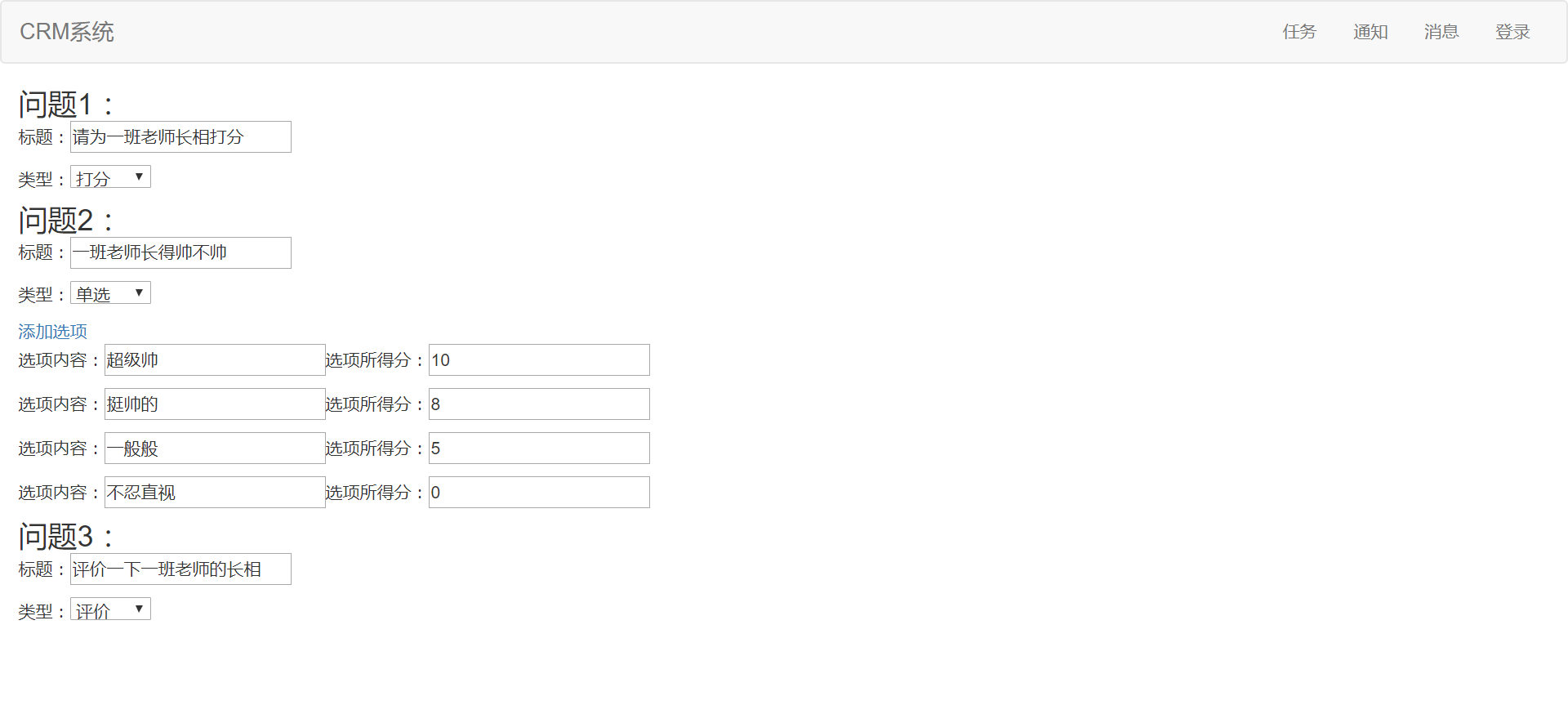
效果
Django 实现CRM 问卷调查功能组件的更多相关文章
- Django的rest_framework的分页组件源码分析
前言: 分页大家应该都很清楚,今天我来给大家做一下Django的rest_framework的分页组件的分析:我的讲解的思路是这样的,分别使用APIview的视图类和基于ModelViewSet的视图 ...
- Django之Form、ModelForm 组件
Django之Form.ModelForm 组件 一.Form组件: django框架提供了一个form类,来处理web开发中的表单相关事项.众所周知,form最常做的是对用户输入的内容进行验证,为此 ...
- 使用Django完成CRM管理系统
CRM介绍: CRM即客户关系管理,是指企业用CRM技术来管理与客户之间的关系.在不同场合下,CRM可能是一个管理学术语,可能是一个软件系统.通常所指的CRM,指用计算机自动化分析销售.市场营销.客户 ...
- django第13天(auth组件,forms组件,中间件,csrf)
django第13天(auth组件,forms组件) auth组件 -auth组件 -auth是什么? -django内置的用户认证系统,可以快速的实现,登录,注销,修改密码.... -怎么用? -( ...
- Django之Form与ModelForm组件
Django之Form与ModelForm组件 1.Form介绍 Form组件的主要功能如下: 生成页面可用的HTML标签 对用户提交的数据进行校验 O 保留上次的输入内容 普通方式手写注册功能 vi ...
- 在Django中使用Channels功能
前言:最近后台写游戏更新版本功能,简单就是前端发送更新请求,后端需要对很多台服务器进行更新和各种操作,本来想着实现不难,后来发现因为后端需要执行很长时间,前端返回报错,后端会执行完毕,但是前端先断开了 ...
- 在VirtualBox中安装了Ubuntu后,Ubuntu的屏幕分辨率非常小,操作非常不便。通过安装VirtualBox提供的“增强功能组件”,-摘自网络
在VirtualBox中安装了Ubuntu后,Ubuntu的屏幕分辨率非常小,操作非常不便.通过安装VirtualBox提供的“增强功能组件”,可以解决这一问题,并且使用非常方便. 一.环境 | En ...
- DSAPI多功能组件编程应用-HTTP监听服务端与客户端_指令版
前面介绍了DSAPI多功能组件编程应用-HTTP监听服务端与客户端的内容,这里介绍一个适用于更高效更快速的基于HTTP监听的服务端.客户端. 在本篇,你将见到前所未有的超简化超傻瓜式的HTTP监听服务 ...
- DSAPI多功能组件编程应用-参考-Win32API常数
DSAPI多功能组件编程应用-参考-Win32API常数 在编程过程中,常常需要使用Win32API来实现一些特定功能,而Win32API又往往需要使用一些API常数,百度搜索常数值,查手册,也就成了 ...
随机推荐
- svn: E200009: 'lib/systemd/system/dropbear@.service': a peg revision is not allowed here problem
case: svn add lib/systemd/system/dropbear@.service svn: E200009: 'lib/systemd/system/dropbear@.servi ...
- poj3461
题解: 简单kmp 然而strlen时间号费啊 代码: #include<cstdio> #include<cstring> using namespace std; ; #d ...
- RM报表,点击保存,为何每次都显示 另存为的对话框?
function TRMDesignerForm.FileSave: Boolean; var lSaved: Boolean; lFileName: string; begin Result := ...
- 玩转X-CTR100 l STM32F4 l W25Q64 SPI串行FLASH存储
我造轮子,你造车,创客一起造起来!塔克创新资讯[塔克社区 www.xtark.cn ][塔克博客 www.cnblogs.com/xtark/ ] 本文介绍X-CTR100控制器 板载FLA ...
- Spring学习(一)--概述
Spring是什么? 是一个框架,是为了解决企业应用开发的复杂性而创建的框架 是一个框架,是一个轻量级的控制反转和面向切面的容器框架 从大小与开销两方面而言Spring都是轻量的 通过控制反转(IoC ...
- C程序第四次作业
作业要求一 实践最简答的项目wordcount,必须完成其中的基本功能,若可以完成其他功能给予加分.完成后请将你的设计思路.主要代码写在本次作业博客里. 设计思路: 第一步:定义文件型指针变量fp,整 ...
- [LeetCode&Python] Problem 868. Binary Gap
Given a positive integer N, find and return the longest distance between two consecutive 1's in the ...
- laravel记住登录、设置时间
laravel 自动登陆的时间改如何实现? 控制器 public function login(){ $email =Input::get('email');$password = Input::g ...
- Flask, Tornado, GEvent组合运行与性能比较
我在选一个python的互联网框架, 本来已经定下来用Tornado了. 但我还听到很多人推荐Flask的简单性和灵活性, 还有gevent的高性能, 所以决定也试试它们以及它们和Tornado的结 ...
- Documentation/usb/gadget_configfs.txt
Linux USB gadget configured through configfs 25th April 2013 Overview======== A USB Linux Gadget is ...