
python作业(第十一周)基于RabbitMQ rpc实现的主机管理
作业需求:
可以对指定机器异步的执行多个命令
例子:
>>:run "df -h" --hosts 192.168.3.55 10.4.3.4
task id: 45334
>>: check_task 45334
>>:
注意,每执行一条命令,即立刻生成一个任务ID,不需等待结果返回,通过命令check_task TASK_ID来得到任务结果
思路解析:
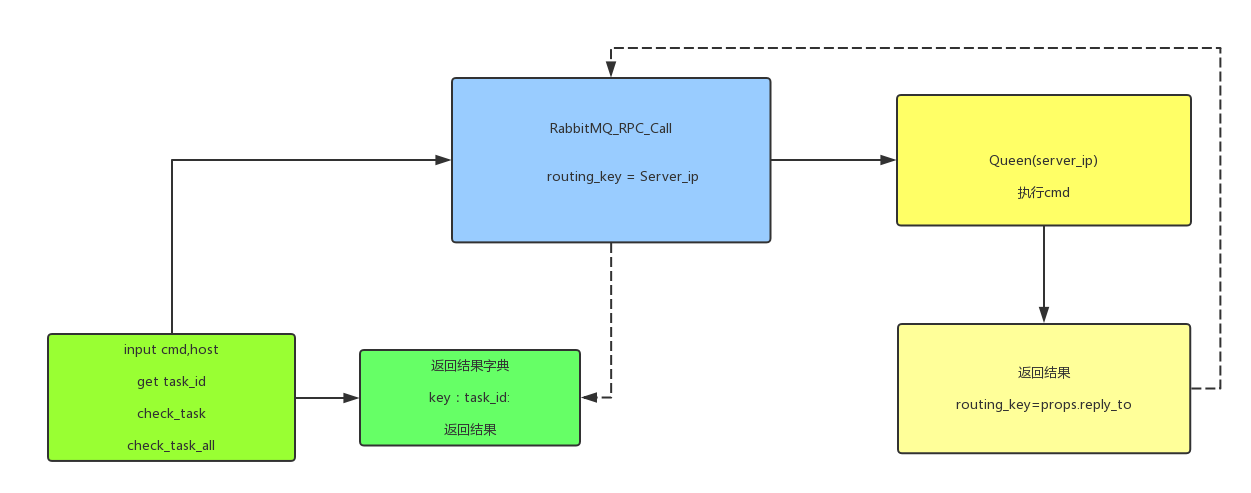
分析需求其实可以发现,输入命令为消费者,执行命令是生产者,参照RabbitMQ的官方文档rpc部分和课上的代码就可以了。
1. 使用RabbitMQ_RPC, Queen使用主机IP
2. 消费者输入命令,分割字段,获取run,check_task,check_task_all,host等信息,传给生产者。
3. 生产者执行命令处理windows/linux不同消息发送情况windows decode(‘gbk’) linux decode('utf-8'),返回结果。
4. 消费者将结果存成字典,查询结果后删除。
关于疑问在测试的过程中发现
  while self.response is None:

            self.connection.process_data_events()
在这段中如果没有消息返回就一直处于死循环也就是说,如果生产者挂掉一台,那我就会卡住,查看官方文档,对这个简单RPC实现也是延伸了下这个问题。
1. 如果没有服务器运行,客户应该如何应对?
2. 客户端是否应该对RPC有某种超时?
3. 如果服务器发生故障并引发异常,是否应将其转发给客户端?
4. 在处理之前防止无效的传入消息(例如检查边界)。
思维导图:
核心代码:
消费者:
#!/usr/bin/env python

# -*- coding:utf-8 -*-

# Time:2017/12/6 15:52

__Author__ = 'Sean Yao'

import pika

import uuid

class CommandToRabbitmq(object):

    def __init__(self):

        self.connection = pika.BlockingConnection(pika.ConnectionParameters(

            host='localhost'))

        self.channel = self.connection.channel()

        result = self.channel.queue_declare(exclusive=True)

        self.callback_queue = result.method.queue

        self.channel.basic_consume(self.on_response, no_ack=True,

                                   queue=self.callback_queue)

    def on_response(self, ch, method, props, body):

        if self.corr_id == props.correlation_id:

            self.response = body

    def call(self, command, host):

        self.response = None

        self.corr_id = str(uuid.uuid4())

        ack = self.channel.basic_publish(exchange='',

                                         routing_key=host,

                                         properties=pika.BasicProperties(

                                             reply_to=self.callback_queue,

                                             correlation_id=self.corr_id),

                                         body=str(command))

        while self.response is None:

            # 等待消息

            self.connection.process_data_events()

        task_id = self.corr_id

        res = self.response.decode()

        tmp_dict[task_id] = res

        print('task_id: %s host: %s cmd: %s ' % (self.corr_id, host, command))

        return self.corr_id, self.response.decode()

def help():

    print('Usage: run "df -h" --hosts 127.0.0.1 192.168.84.66 ')

    print('       check_task 54385061-aa3a-400f-8a21-2be368e66493 ')

    print('       check_task_all')

def start(command_input):

    command_list = command_input.split()

    if command_list[0] == 'check_task':

        try:

            print(tmp_dict[command_list[1]])

            del tmp_dict[command_list[1]]

        except IndexError:

            help()

    elif command_list[0] == 'run':

        # 获取命令主机,并循环执行

        try:

            ip_hosts_obj = command_input.split('run')

            hosts_obj = (ip_hosts_obj[1].split('--hosts'))

            hosts = hosts_obj[1].strip().split()

            command = command_input.split("\"")[1]

            for host in hosts:

                try:

                    command_rpc.call(command, host)

                except TypeError and AssertionError:

                    break

        except IndexError:

            print('-bash: %s command not found' % command_input)

            help()

    elif command_list[0] == 'check_task_all':

        for index, key in enumerate(tmp_dict.keys()):

            print(index, 'task_id: %s' % key)

    elif command_list[0] == 'help':

        help()

    else:

        print('-bash: %s command not found' % command_input)

        help()

command_rpc = CommandToRabbitmq()

exit_flag = True

tmp_dict = {}

help()

while exit_flag:

    command_input = input('请输入命令>>>:').strip()

    if len(command_input) == 0:

        continue

    else:

        start(command_input)
生产者:
#!/usr/bin/env python

# -*- coding:utf-8 -*-

# Time:2017/12/6 15:52

__Author__ = 'Sean Yao'

import pika

import time

import subprocess

import platform

connection = pika.BlockingConnection(pika.ConnectionParameters(

    host='localhost'))

# rabbitmq 设有权限的连接

# connection = pika.BlockingConnection(pika.ConnectionParameters(

# host='192.168.1.105',credentials=pika.PlainCredentials('admin', 'admin')))

channel = connection.channel()

channel.queue_declare(queue='127.0.0.1')

os_res = platform.system()

# def command(cmd, task_id):

def command(cmd):

    if os_res == 'Windows':

        res = subprocess.Popen(cmd, shell=True, stdout=subprocess.PIPE, stderr=subprocess.PIPE)

        msg = res.stdout.read().decode('gbk')

        if len(msg) == 0:

            msg = res.stderr.read().decode('gbk')

        print(msg)

        return msg

    else:

        res = subprocess.Popen(cmd, shell=True, stdout=subprocess.PIPE, stderr=subprocess.PIPE)

        print(res)

        msg = res.stdout.read().decode()

        if len(msg) == 0:

            msg = res.stderr.read().decode()

        return msg

def on_request(ch, method, props, body):

    cmd = body.decode()

    respone = command(cmd)

    ch.basic_publish(exchange='',

                     routing_key=props.reply_to,

                     properties=pika.BasicProperties(correlation_id=props.correlation_id),

                     body=respone)

    ch.basic_ack(delivery_tag=method.delivery_tag)

channel.basic_qos(prefetch_count=1)

channel.basic_consume(on_request, queue='127.0.0.1')

print(" [x] Awaiting RPC requests")

channel.start_consuming()
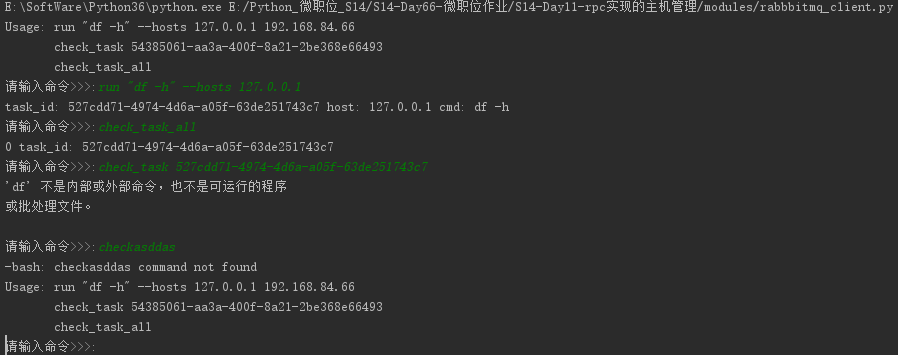
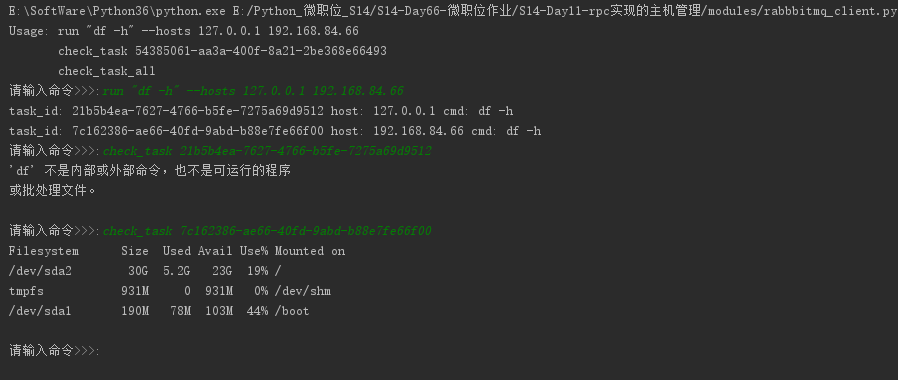
程序测试样图:
python作业(第十一周)基于RabbitMQ rpc实现的主机管理的更多相关文章
- 基于RabbitMQ rpc实现的主机管理
要求: 文件分布: 流程图: import pika import os import socket class Server(object): def __init__(self, queuenam ...
- python第十一周:RabbitMQ、Redis
Rabbit Mq消息队列 RabbitMQ能为你做些什么? 消息系统允许软件.应用相互连接和扩展.这些应用可以相互链接起来组成一个更大的应用,或者将用户设备和数据进行连接.消息系统通过将消息的发送和 ...
- Python并行编程(十一):基于进程的并行
1.基本概念 多进程主要用multiprocessing和mpi4py这两个模块. multiprocessing是Python标准库中的模块,实现了共享内存机制,可以让运行在不同处理器核心的进程能读 ...
- linux作业--第十一周
1. 导入hellodb.sql生成数据库 (1) 在students表中,查询年龄大于25岁,且为男性的同学的名字和年龄 (2) 以ClassID为分组依据,显示每组的平均年龄 (3) 显示第2题中 ...
- python第六十三天-- 第十一周作业
题目:基于RabbitMQ rpc实现的主机管理 需求: 可以对指定机器异步的执行多个命令例子:>>:run "df -h" --hosts 192.168.3.55 ...
- 2017-2018-2 20179205《网络攻防技术与实践》第十一周作业 SQL注入攻击与实践
<网络攻防技术与实践>第十一周作业 SQL注入攻击与实践 1.研究缓冲区溢出的原理,至少针对两种数据库进行差异化研究 缓冲区溢出原理 在计算机内部,输入数据通常被存放在一个临时空间内, ...
- 2017-2018-2 1723《程序设计与数据结构》第十一周作业 & 实验三 & (总体)第三周结对编程 总结
作业地址 第十一次作业:https://edu.cnblogs.com/campus/besti/CS-IMIS-1723/homework/1933 (作业界面已评分,可随时查看,如果对自己的评分有 ...
- python作业ATM(第五周)
作业需求: 额度 15000或自定义. 实现购物商城,买东西加入 购物车,调用信用卡接口结账. 可以提现,手续费5%. 支持多账户登录. 支持账户间转账. 记录每月日常消费流水. 提供还款接口. AT ...
- 基于RabbitMQ的跨平台RPC框架
RabbitMQRpc protocobuf RabbitMQ 实现RPC https://www.cnblogs.com/LiangSW/p/6216537.html 基于RabbitMQ的RPC ...
随机推荐
- 接口测试3-2csv格式
csv文件数据 IntellJ IDEA打开终端:view-tool windows-terminal,可以在终端中查看文件路径 阿里 马云 京东 刘强东 京东 马化腾 #java //读取csv文件 ...
- sersync基于rsync+inotify实现数据实时同步
一.环境描述 需求:服务器A与服务器B为主备服务模式,需要保持文件一致性,现采用sersync基于rsync+inotify实现数据实时同步 主服务器A:192.168.1.23 从服务器B:192. ...
- OpenGL chapter3 基础渲染
3.1 基础图形管线 三种向OpenGl着色器传递渲染数据的方法:属性,Uniform和纹理.3.2 创建坐标系 3.2.1 正投影 GLFrustum::SetOrthographic(⋯⋯): 3 ...
- ffmpeg 编码(视屏)
分析ffmpeg_3.3.2 muxing 1:分析主函数,代码如下: int main(int argc, char **argv) { OutputStream video_st = { }, a ...
- xiao look 知识贴
从事中医临床近二十年了,多少总是积累了点经验,本来准备将来老了经验更丰富的时候传给子女的,可惜儿子根本不打算学医.在这个论坛里也混了不短了,感觉这里的风气很纯正,也有不少立志于中医的人士.为此,我决定 ...
- 同步锁源码分析(一)AbstractQueuedSynchronizer原理
文章转载自 AbstractQueuedSynchronizer的介绍和原理分析 建议去看一下原文的评论,会有不少收获. 简介 AbstractQueuedSynchronizer 提供了一个基于FI ...
- DOM实战-js todo
1.需求: 实现一个如下页面: 最上面是输入框,后面是add按钮,输入文本点击add按钮,在下面就会出现一行,下面出现的每行最前面是两个按钮,然后后面是todo(要做的事) 第一个按钮是完成按钮,第二 ...
- PHP写日志公共类
Txl_Log.php <?php if ( ! defined('BASEPATH')) exit('No direct script access allowed'); /** * * * ...
- 动态html处理和及其图像识别
爬虫(Spider),反爬虫(Anti-Spider),反反爬虫(Anti-Anti-Spider) 之间恢宏壮阔的斗争... Day 1 小莫想要某站上所有的电影,写了标准的爬虫(基于HttpCli ...
- 记一次python爬虫实战,豆瓣电影Top250爬虫
import requests from bs4 import BeautifulSoup import re import traceback def GetHtmlText(url): for i ...