
Spring编程式事务管理
--------------------siwuxie095
Spring 编程式事务管理
以转账为例
1、在
MySQL 中手动创建数据库和表
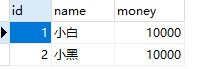
数据库名:tx_db,表名:account,字段:id、name、money

手动添加数据,用作测试
2、具体步骤
(1)配置事务管理器
|
<!-- 配置事务管理器 --> <bean class="org.springframework.jdbc.datasource.DataSourceTransactionManager"> <!-- 在 DataSourceTransactionManager 源代码中有 属性 dataSource 和其 set 方法,所以可以注入 --> <property </bean> |
(2)配置事务管理模板
|
<!-- 配置事务管理模板 --> <bean class="org.springframework.transaction.support.TransactionTemplate"> <!-- 在 TransactionTemplate 源代码中有属性 transactionTemplate 和其 set 方法,所以可以注入 --> <property </bean> |
(3)在业务层注入事务管理模板
|
<!-- 配置对象并注入属性 --> <bean <property <!-- 在业务层注入注入事务管理模板 --> <property </bean> |
(4)在业务层手动编写代码实现事务管理
3、具体实现
(1)编写
Dao 类
AccountDao.java:
|
package com.siwuxie095.dao; import org.springframework.jdbc.core.JdbcTemplate; public class AccountDao { private JdbcTemplate jdbcTemplate;
public this.jdbcTemplate = jdbcTemplate; }
/** * 转出 */ public String sql="update account set money=money-? where name=?"; jdbcTemplate.update(sql, money, from); }
/** * 转入 */ public String sql="update account set money=money+? where name=?"; jdbcTemplate.update(sql, money, to); }
} |
(2)编写一个
Service 类
AccountService.java:
|
package com.siwuxie095.service; import org.springframework.transaction.TransactionStatus; import org.springframework.transaction.support.TransactionCallbackWithoutResult; import org.springframework.transaction.support.TransactionTemplate; import com.siwuxie095.dao.AccountDao; public class AccountService { private AccountDao accountDao; private TransactionTemplate transactionTemplate;
public this.accountDao = accountDao; }
public this.transactionTemplate = transactionTemplate; }
/** * 转账 */ public
// 在业务层手动编写代码实现事务管理 transactionTemplate.execute(new TransactionCallbackWithoutResult() {
@Override protected
accountDao.lessMoney(from, money);
// 即便中间出现了什么异常,也会进行回滚 // 如:int num=10/0;
accountDao.moreMoney(to, money);
} });
}
} |
(3)在配置文件中进行配置
applicationContext.xml:
|
<?xml <beans xmlns:xsi="http://www.w3.org/2001/XMLSchema-instance" xmlns:aop="http://www.springframework.org/schema/aop" xmlns:context="http://www.springframework.org/schema/context" xmlns:tx="http://www.springframework.org/schema/tx" xsi:schemaLocation=" http://www.springframework.org/schema/beans http://www.springframework.org/schema/beans/spring-beans.xsd http://www.springframework.org/schema/aop http://www.springframework.org/schema/aop/spring-aop.xsd http://www.springframework.org/schema/context http://www.springframework.org/schema/context/spring-context.xsd http://www.springframework.org/schema/tx http://www.springframework.org/schema/tx/spring-tx.xsd">
<!-- 配置内置连接池 --> <bean <property <!-- jdbc:mysql:///tx_db 是 jdbc:mysql://localhost:3306/tx_db 的简写 --> <property <property <property </bean>
<!-- 配置事务管理器 --> <bean class="org.springframework.jdbc.datasource.DataSourceTransactionManager"> <!-- 在 DataSourceTransactionManager 源代码中有 属性 dataSource 和其 set 方法,所以可以注入 --> <property </bean>
<!-- 配置事务管理模板 --> <bean class="org.springframework.transaction.support.TransactionTemplate"> <!-- 在 TransactionTemplate 源代码中有属性 transactionTemplate 和其 set 方法,所以可以注入 --> <property </bean>
<!-- 配置对象并注入属性 --> <bean <property <!-- 在业务层注入注入事务管理模板 --> <property </bean>
<bean <property </bean>
<bean <!-- 在 JdbcTemplate 源代码中有属性 dataSource 和其 set 方法,所以可以注入 --> <property </bean> </beans> |
(4)编写一个测试类
TestDemo.java:
|
package com.siwuxie095.test; import org.junit.Test; import org.springframework.context.ApplicationContext; import org.springframework.context.support.ClassPathXmlApplicationContext; import com.siwuxie095.service.AccountService; public class TestDmo { /** * 手动加上 @Test 以进行单元测试(将自动导入 JUnit 4 的 jar 包) * * 选中方法名,右键->Run As->JUint Test */ @Test public
ApplicationContext context=new ClassPathXmlApplicationContext("applicationContext.xml");
AccountService accountService=(AccountService) context.getBean("accountService");
accountService.transfer("小白", "小黑", 1000); }
} |
【made by siwuxie095】
Spring编程式事务管理的更多相关文章
- spring 编程式事务管理和声明式事务管理
编程式事务管理 Spring 的编程式事务管理概述 在 Spring 出现以前,编程式事务管理对基于 POJO 的应用来说是唯一选择.用过 Hibernate 的人都知道,我们需要在代码中显式调用be ...
- Spring编程式事务管理及声明式事务管理
本文将深入讲解 Spring 简单而强大的事务管理功能,包括编程式事务和声明式事务.通过对本教程的学习,您将能够理解 Spring 事务管理的本质,并灵活运用之. Spring 事务属性分析 事务管理 ...
- Spring编程式事务管理和声明式事务管理
本来想写一篇随笔记一下呢,结果发现一篇文章写的很好了,已经没有再重复写的必要了. https://www.ibm.com/developerworks/cn/education/opensource/ ...
- 全面分析 Spring 的编程式事务管理及声明式事务管理
开始之前 关于本教程 本教程将深入讲解 Spring 简单而强大的事务管理功能,包括编程式事务和声明式事务.通过对本教程的学习,您将能够理解 Spring 事务管理的本质,并灵活运用之. 先决条件 本 ...
- Spring学习8-Spring事务管理(编程式事务管理)
一.Spring事务的相关知识 1.事务是指一系列独立的操作,但在概念上具有原子性. 比如转账:A账号-100, B账号+100,完成.这两个操作独立是没问题的. 但在逻辑上,要么全部完成,要么一 ...
- 全面分析 Spring 的编程式事务管理及声明式事务管理--转
开始之前 关于本教程 本教程将深入讲解 Spring 简单而强大的事务管理功能,包括编程式事务和声明式事务.通过对本教程的学习,您将能够理解 Spring 事务管理的本质,并灵活运用之. 先决条件 本 ...
- Spring事务管理的另一种方式--TransactionTemplate编程式事务管理简单入门
1, 一直以来, 在用Spring进行事物管理时, 只知道用声明式的策略, 即根据不同的数据源, 配置一个事物管理器(TransactionManager), 通过配置切面(PointCut)应用到相 ...
- 8.spring:事务管理(上):Spring的数据库编程、编程式事务管理
Spring的数据库编程 Spring框架提供了JDBC模板模式------>JdbcTemplate 简化了开发,在开发中并不经常是使用 实际开发更多使用的是Hibernate和MyBatis ...
- Spring事务管理之编程式事务管理
© 版权声明:本文为博主原创文章,转载请注明出处 案例:利用Spring的编程式事务管理模拟转账过程 数据库准备 -- 创建表 CREATE TABLE `account`( `id` INT NOT ...
随机推荐
- Find substring with K-1 distinct characters
参考 Find substring with K distinct characters Find substring with K distinct characters(http://www.cn ...
- mysql导入导出数据中文乱码解决方法小结(1、navicat导入问题已解决,创建连接后修改连接属性,选择高级->将使用Mysql字符集复选框去掉,下拉框选择GBK->导入sql文件OK;2、phpmyadmin显示乱码的问题也解决,两步:1.将sql文件以utf8的字符集编码另存,2.将文件中sql语句中的字段字符集编码改成utf8,导入OK)
当向 MySQL 数据库插入一条带有中文的数据形如 insert into employee values(null,'张三','female','1995-10-08','2015-11-12',' ...
- 批处理-通过mono把c#编译成dll
::copyright@cjy @echo off ::mcs.exe address set addrMcs=D:\Program Files\Unity\Editor\Data\MonoBleed ...
- 【Python编程:从入门到实践】chapter8 函数
chapter8 函数 8.6 将函数存储在模块中 8.6.1 导入整个模块 要让函数是可导入的,的先创建模块.模块 的扩展名为.py的文件 import pizza 8.6.2 到导入特定的函数 f ...
- pycharm格式报错: Remove redundant parentheses
处理:所在代码行,最外层括号去掉
- Linux下Nagios的安装与配置 及遇到的坑
原文http://www.jianshu.com/p/7bc822fa8278 不愿意看前5.6c部分可以直接跳到最后看命令. 一.Nagios简介 Nagios是一款开源的电脑系统和网络监视工具,能 ...
- 显式锁(四)Lock的等待通知机制Condition
任意一个Java对象,都拥有一组监视器方法(定义在根类Object上),主要包括:wait( ).wait(long timeout).notify().notifyAll()方法:这些方法与关 ...
- nginx, supervisor
Nginx(单进程): 反向代理, 负载均衡.图解 将配置文件 nginx.conf 的 user xx 配置好 xx用户 检查语法 $ sudo service nginx configtest 重 ...
- C语言键盘按键无阻塞侦测:kbhit()
http://www.360doc.com/content/12/0414/09/1317564_203474440.shtml kbhit in c kbhit in c: kbhit functi ...
- stdio.h头文件中申明的基本函数
调用scanf函数时,需传入变量的地址作为参数,scanf函数会等待标准输入设备(键盘等)输入数据,并且将输入的数据赋值给地址对应的变量. #include<stdio.h> #inclu ...