
Vue.js使用-组件(下篇)
上一节,我们定义了组件的基本使用,下面我们看看组件其他的一些特性。
1.组件作用域
同时在Vue对象和组件中定义一个属性,显示结果是怎样的呢?
<!DOCTYPE html>

<html lang="en">

<head>

    <meta charset="UTF-8">

    <title>Title</title>

</head>

<body>

    <div id="app">

        {{ msg }}

        <my-component></my-component>

    </div>

</body>

<script src="js/vue.js"></script>

<script>

    new Vue({

        el: '#app',

        data: {

            msg: 'hello world'

        },

        components: {

            'my-component':{

                template: '<div>{{ msg }}</div>',

                data: function () {

                    return {

                        msg: 'hello shijingjing'

                    }

                }

            }

        }

    })

</script>

</html>
运行结果:

可见,都在各自的作用域内有效,且组件不影响Vue定义的属性。
如何让组件使用Vue定义的属性呢,上节已经提到过,使用props属性。如下:
<!DOCTYPE html>

<html lang="en">

<head>

    <meta charset="UTF-8">

    <title>Title</title>

</head>

<body>

    <div id="app">

        <my-component v-bind:my-msg="msg"></my-component>

    </div>

</body>

<script src="js/vue.js"></script>

<script>

    new Vue({

        el: '#app',

        data: {

            msg: 'hello world'

        },

        components: {

            'my-component':{

                template: '<div>{{ myMsg }}</div>',

                props: ['myMsg']

            }

        }

    })

</script>

</html>
运行结果:

2.slot占位符
slot的意思是卡槽,也就是一个占位符,内容由组件包含的内容而定。
<!DOCTYPE html>

<html lang="en">

<head>

    <meta charset="UTF-8">

    <title>Title</title>

</head>

<body>

    <div id="app">

        <my-component>

            <div>这是组件里面真正包含的内容</div>

        </my-component>

    </div>

</body>

<script src="js/vue.js"></script>

<script>

    new Vue({

        el: '#app',

        components: {

            'my-component':{

                template: '<div>hello world</div><slot>这只是一个占位符,具体内容由component包含的内容来定</slot>'

            }

        }

    })

</script>

</html>
运行结果:
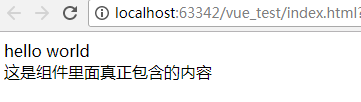
如果组件里面没有包含内容呢?
<!DOCTYPE html>

<html lang="en">

<head>

    <meta charset="UTF-8">

    <title>Title</title>

</head>

<body>

    <div id="app">

        <my-component>

        </my-component>

    </div>

</body>

<script src="js/vue.js"></script>

<script>

    new Vue({

        el: '#app',

        components: {

            'my-component':{

                template: '<div>hello world</div><slot>这只是一个占位符,具体内容由component包含的内容来定</slot>'

            }

        }

    })

</script>

</html>
运行结果:

可以再组件中包含占位符,来定义更为通用的组件。如一个对话框组件,不同时候弹出的标题不同,那么标题可以使用slot定义,真正内容放到组件内部。
<!DOCTYPE html>

<html lang="en">

<head>

    <meta charset="UTF-8">

    <title>Title</title>

</head>

<body>

    <div id="app">

        <my-component>

            <header slot="header">

                你好吗

            </header>

            <div slot="body">

                是的

            </div>

            <footer slot="footer">

                再见

            </footer>

        </my-component>

        ------------------------------------------------------

        <my-component>

            <header slot="header">

                早上好

            </header>

            <div slot="body">

                中午好

            </div>

            <footer slot="footer">

                晚上好

            </footer>

        </my-component>

    </div>

</body>

<script src="js/vue.js"></script>

<script>

    new Vue({

        el: '#app',

        components: {

            'my-component':{

                template: '<div>hello world</div><slot name="header"></slot><slot name="body"></slot><slot name="footer"></slot>'

            }

        }

    })

</script>

</html>
运行结果:
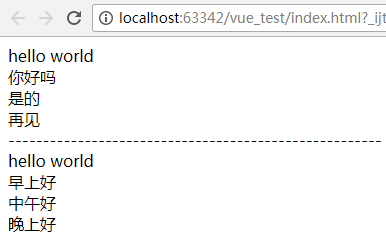
3.组件之间数据访问
1)父组件访问子组件属性 $children
<!DOCTYPE html>

<html lang="en">

<head>

    <meta charset="UTF-8">

    <title>Title</title>

</head>

<body>

    <div id="app">

        <my-component></my-component>

    </div>

</body>

<script src="js/vue.js"></script>

<script>

    new Vue({

        el: '#app',

        components: {

            'my-component':{

                template: '<div>hello world</div><child-component1></child-component1><button v-on:click="showChildData">显示组件</button>',

                components:{

                    'child-component1':{

                        template: '<div>hello child 1</div>',

                        data: function () {

                            return {

                                msg: 'child 1'

                            }

                        }

                    }

                },

                methods:{

                    showChildData: function () {

                        console.log(this.$children[0].msg);

                    }

                }

            }

        }

    })

</script>

</html>
运行结果:

除了$children,还可以使用v-ref:c1来给组件指定一个索引名称c1,查询子组件时,使用$refs.c1找到这个子组件。
<!DOCTYPE html>

<html lang="en">

<head>

    <meta charset="UTF-8">

    <title>Title</title>

</head>

<body>

    <div id="app">

        <my-component></my-component>

    </div>

</body>

<script src="js/vue.js"></script>

<script>

    new Vue({

        el: '#app',

        components: {

            'my-component':{

                template: '<div>hello world</div><child-component1 v-ref:c1></child-component1><button v-on:click="showChildData">显示子组件</button>',

                components:{

                    'child-component1':{

                        template: '<div>hello child 1</div>',

                        data: function () {

                            return {

                                msg: 'child 1'

                            }

                        }

                    }

                },

                methods:{

                    showChildData: function () {

                        console.log(this.$refs.c1.msg);

                    }

                }

            }

        }

    })

</script>

</html>
运行结果:
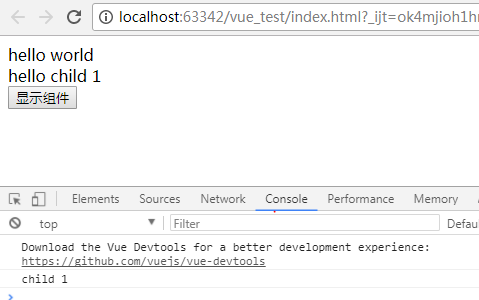
2)子组件访问父组件属性 $parent
<!DOCTYPE html>

<html lang="en">

<head>

    <meta charset="UTF-8">

    <title>Title</title>

</head>

<body>

    <div id="app">

        <my-component></my-component>

    </div>

</body>

<script src="js/vue.js"></script>

<script>

    new Vue({

        el: '#app',

        components: {

            'my-component':{

                template: '<div>hello world</div><child-component1></child-component1>',

                components:{

                    'child-component1':{

                        template: '<div>hello child 1</div><button v-on:click="showParentData">显示父组件</button>',

                        methods:{

                            showParentData: function () {

                                console.log(this.$parent.msg);

                            }

                        }

                    }

                },

                data: function () {

                    return {

                        msg: 'parent'

                    }

                }

            }

        }

    })

</script>

</html>
运行结果:

3)子组件访问根组件属性 $root
<!DOCTYPE html>

<html lang="en">

<head>

    <meta charset="UTF-8">

    <title>Title</title>

</head>

<body>

    <div id="app">

        <my-component></my-component>

    </div>

</body>

<script src="js/vue.js"></script>

<script>

    new Vue({

        el: '#app',

        data: {

            msg: 'root'

        },

        components: {

            'my-component':{

                template: '<div>hello world</div><child-component1></child-component1>',

                components:{

                    'child-component1':{

                        template: '<div>hello child 1</div><button v-on:click="showRootData">显示根组件</button>',

                        methods:{

                            showRootData: function () {

                                console.log(this.$root.msg);

                            }

                        }

                    }

                }

            }

        }

    })

</script>

</html>
运行结果:

可见,根元素指的是Vue对象
由$children,$parent,$root可以实现父子组件,以及Vue对象间的数据交互,但是还是尽量使用props属性来传递数据,
可以避免父子组件的过度耦合,以及子组件修改了父组件中的数据。
4.组件之间事件传递
1)派发事件$dispatch,事件沿着父链冒泡
<!DOCTYPE html>

<html lang="en">

<head>

    <meta charset="UTF-8">

    <title>Title</title>

</head>

<body>

    <div id="app">

        {{ message }}

        <my-component></my-component>

    </div>

</body>

<script src="js/vue.js"></script>

<script>

    new Vue({

        el: '#app',

        data: {

            message: ''

        },

        components: {

            'my-component':{

                template: ' <input v-model="msg" /><button v-on:click="notify">dispatch</button>',

                data: function () {

                    return {

                        msg: ''

                    }

                },

                methods:{

                    notify: function () {

                        this.$dispatch('child-msg', this.msg);

                    }

                }

            }

        },

        events:{

            'child-msg': function (msg) {

                this.message = msg;

            }

        }

    })

</script>

</html>
运行结果:

$.dispatch会将事件派发到父组件的events事件,父组件接收到子组件的派发后,调用child-msg事件。
2)broadcast广播事件,事件向下传导给所有的子组件
<!DOCTYPE html>

<html lang="en">

<head>

    <meta charset="UTF-8">

    <title>Title</title>

</head>

<body>

    <div id="app">

        <input type="text" v-model="message"/>

        <button v-on:click="notify">broadcast</button>

        <my-component></my-component>

    </div>

</body>

<script src="js/vue.js"></script>

<script>

    new Vue({

        el: '#app',

        data: {

            message: ''

        },

        components: {

            'my-component':{

                template: '{{msg}}',

                data: function () {

                    return {

                        msg: ''

                    }

                },

                events:{

                    'parent-msg': function (msg) {

                        this.msg = msg;

                    }

                }

            }

        },

        methods:{

            notify: function () {

                this.$broadcast('parent-msg', this.message);

            }

        }

    })

</script>

</html>
运行结果:

$.broadcast会将事件广播到子组件的events事件,子组件接收到父组件的广播后,调用parent-msg事件。
Vue.js使用-组件(下篇)的更多相关文章
- Vue.js多重组件嵌套
Vue.js多重组件嵌套 Vue.js中提供了非常棒的组件化思想,组件提高了代码的复用性.今天我们来实现一个形如 <app> <app-header></app-head ...
- 【Vue课堂】Vue.js 父子组件之间通信的十种方式
这篇文章介绍了Vue.js 父子组件之间通信的十种方式,不管是初学者还是已经在用 Vue 的开发者都会有所收获.无可否认,现在无论大厂还是小厂都已经用上了 Vue.js 框架,简单易上手不说,教程详尽 ...
- 【Vue.js实战案例】- Vue.js递归组件实现组织架构树和选人功能
大家好!先上图看看本次案例的整体效果. 浪奔,浪流,万里涛涛江水永不休.如果在jq时代来实这个功能简直有些噩梦了,但是自从前端思想发展到现在的以MVVM为主流的大背景下,来实现一个这样繁杂的功能简直不 ...
- Vue.js之组件传值
Vue.js之组件传值 属性传值可以从父组件到子组件,也可以从子组件到父组件. 这里讲一下从父组件到子组件的传值 还以上次的demo为例,demo里有APP.vue是父组件,Header.vue,Us ...
- Vue.js之组件嵌套小demo
Vue.js之组件嵌套的小demo项目 第一步:初始化一个wabpack项目,这里不在复述.第二步:在components文件夹下新建Header.vue Footer.vue和Users.vue三个 ...
- Vue.js之组件嵌套
Vue.js中组件嵌套有两种方式 第一种:注册全局组件 例如在components文件夹下新建一个User.vue组件,然后在main.js文件中注册全局组件 //注册全局组件 Vue.compone ...
- vue.js 同级组件之间的值传递方法(uni-app通用)
vue.js 兄弟组件之间的值传递方法 https://blog.csdn.net/jingtian678/article/details/81634149
- Vue.js说说组件
什么是组件:组件是Vue.js最强大的功能之一.组件可以扩展HTML元素,封装可重用的代码.在较高层面上,组件是自定义的元素,Vue.js的编译器为它添加特殊功能.在有些情况下,组件也可以是原生HTM ...
- Vue.js 递归组件实现树形菜单
最近看了 Vue.js 的递归组件,实现了一个最基本的树形菜单. 项目结构: main.js 作为入口,很简单: import Vue from 'vue' Vue.config.debug = tr ...
随机推荐
- 转:体积阴影(Shadow Volumes)生成算法
下面以最快的速度简单谈谈阴影生成技术,目前普遍采用的一般有三种:Planar Shadow.Shadow Mapping和Shadow Volume,前者类似投影,计算最简单,缺点只能绘制抛射在平面上 ...
- Heroku第三方服务接入指南(二)
上文我们讲了第三方服务.Heroku.用户三者的关系,这一篇进入正题,了解第三方厂商(下文简称厂商)怎样为Heroku开发服务.这里仅仅做简介,了解heroku大致是怎么做的.假设你的平台.希望接入第 ...
- Oracle Tuxedo工作站客户端与服务端的样例程序
服务端代码: #include <stdio.h> #include <stdlib.h> #include <string.h> #include <cty ...
- 【mysql】关于InnoDB存储引擎 text blob 大字段的存储和优化
最近在数据库优化的时候,看到一些表在设计上使用了text或者blob的字段,单表的存储空间已经达到了近100G,这种情况再去改变和优化就非常难了 一.简介 为了清楚大字段对性能的影响,我们必须要知道i ...
- Swift3 - compare方法之ComparisonResult说明
Swift3在实现两个对象比较时,引入了compare方法,其中,方法返回值ComparisonResult解释如下: ComparisonResult是一个枚举类型,包含了以下3个成员: 其中: q ...
- hibernate的批量删除
转自:hibernate的批量删除一般而言,hibernate的批量删除的写法有两种,一种是hibernate内置的批量删除,不过他的批量删除是将每条记录逐一生成删除语句,其效率极低,当然我们可以使用 ...
- mysql5.7忘记密码时,修改root密码
(1).由于MySQL5.7在安装完后,第一次启动时,会在root目录下生产一个随机的密码,文件名为 .mysql_secret 所以,登录时需要用随机密码登录,然后通过以下命令修改密码 “SET P ...
- SpringBoot配置属性之MVC
SpringBoot配置属性系列 SpringBoot配置属性之MVC SpringBoot配置属性之Server SpringBoot配置属性之DataSource SpringBoot配置属性之N ...
- C#调用XmlSerializer序列化时生成CDATA节点解决方法
public class Person{ public string Name { get; set; } public int Age { get; set; } } 引用 ...
- Windows 10安装DockerToolBox失败处理方法
指令运行报错: Windows 10安装DockerToolBox失败处理方法:升级Windows 10. (注意:只有Windows10 专业版才支持升级,Server和企业版无效)