
Improving the quality of the output
There are a variety of reasons you might not get good quality output from Tesseract. It's important to note that unless you're using a very unusual font or a new language retraining Tesseract is unlikely to help.
- Image processing
- Page segmentation method
- Dictionaries, word lists, and patterns
- Still having problems?
Image processing
Tesseract does various image processing operations internally (using the Leptonica library) before doing the actual OCR. It generally does a very good job of this, but there will inevitably be cases where it isn't good enough, which can result in a significant reduction in accuracy.
You can see how Tesseract has processed the image by using the configuration variabletessedit_write_images to true when running Tesseract. If the resulting tessinput.tif file looks problematic, try some of these image processing operations before passing the image to Tesseract.
Rescaling
Tesseract works best on images which have a DPI of at least 300 dpi, so it may be beneficial to resize images. For more information see the FAQ.
Binarisation
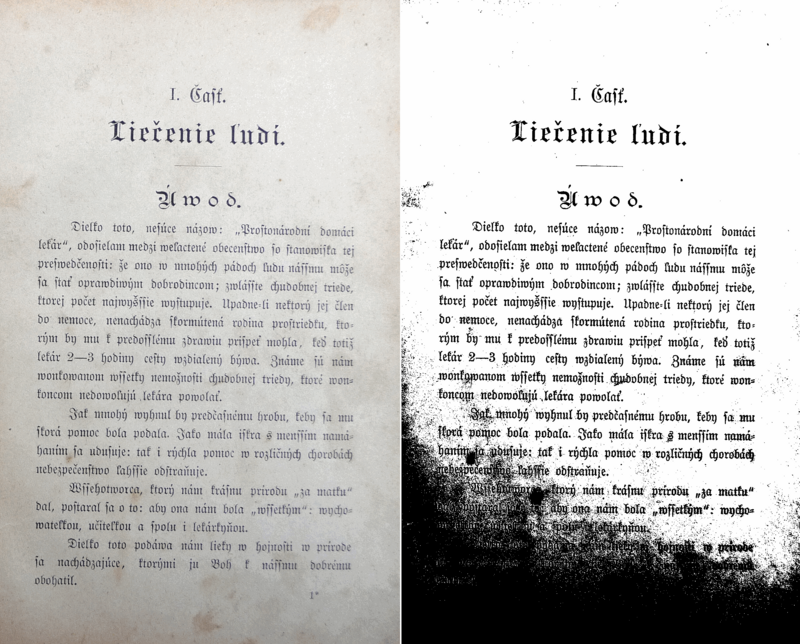
This is converting an image to black and white. Tesseract does this internally, but the result can be suboptimal, particularly if the page background is of uneven darkness.
Noise Removal
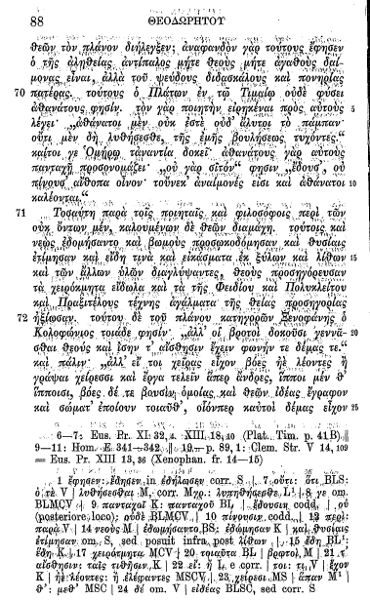
Noise is random variation of brightness or colour in an image, that can make the text of the image more difficult to read. Certain types of noise cannot be removed by Tesseract in the binarisation step, which can cause accuracy rates to drop.
Rotation / Deskewing
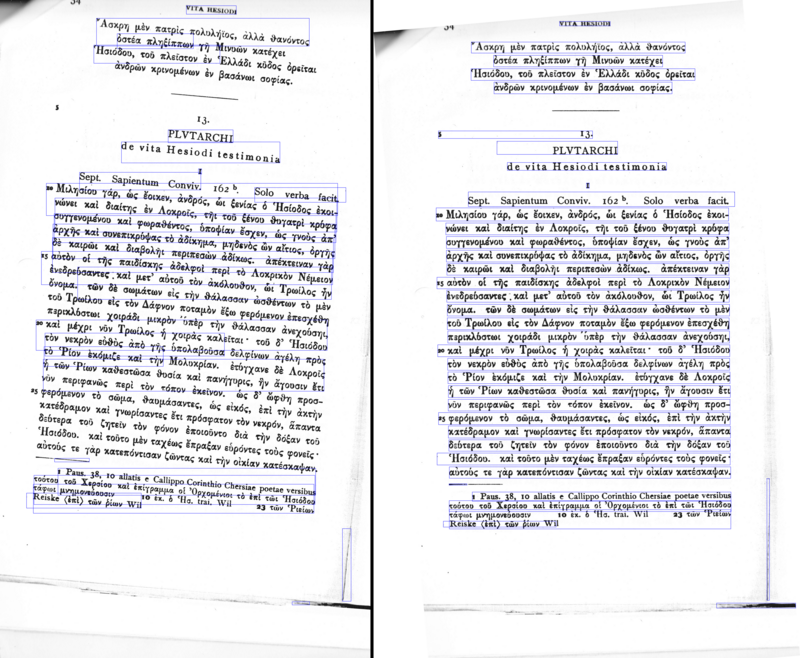
A skewed image is when an page has been scanned when not straight. The quality of Tesseract's line segmentation reduces significantly if a page is too skewed, which severely impacts the quality of the OCR. To address this rotating the page image so that the text lines are horizontal.
Border Removal
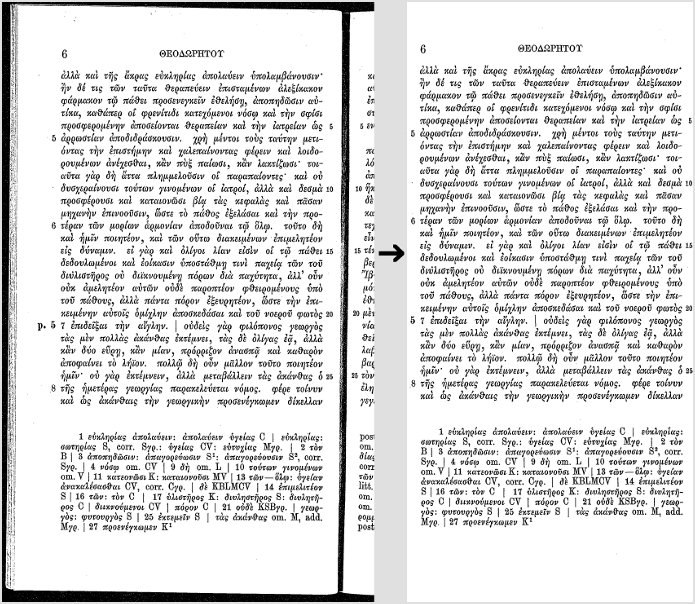
Scanned pages often have dark borders around them. These can be erroneously picked up as extra characters, especially if they vary in shape and gradation.
Tools / Libraries
Examples
If you need an example how to improve image quality programmatically, have a look at this examples:
- OpenCV - Rotation (Deskewing) - c++ example
- Fred's ImageMagick TEXTCLEANER - bash script for processing a scanned document of text to clean the text background.
- rotation_spacing.py - python script for automatic detection of rotation and line spacing of an image of text
- crop_morphology.py - Finding blocks of text in an image using Python, OpenCV and numpy
Page segmentation method
By default Tesseract expects a page of text when it segments an image. If you're just seeking to OCR a small region try a different segmentation mode, using the -psm argument. Note that adding a white border to text which is too tightly cropped may also help, see issue 398.
To see a complete list of supported page segmentation modes, use tesseract -h. Here's the list as of 3.04:
 0   Orientation and script detection (OSD) only.

 1   Automatic page segmentation with OSD.

 2   Automatic page segmentation, but no OSD, or OCR.

 3   Fully automatic page segmentation, but no OSD. (Default)

 4   Assume a single column of text of variable sizes.

 5   Assume a single uniform block of vertically aligned text.

 6   Assume a single uniform block of text.

 7   Treat the image as a single text line.

 8   Treat the image as a single word.

 9   Treat the image as a single word in a circle.

10   Treat the image as a single character.
Dictionaries, word lists, and patterns
By default Tesseract is optimized to recognize sentences of words. If you're trying to recognize something else, like receipts, price lists, or codes, there are a few things you can do to improve the accuracy of your results, as well as double-checking that the appropriate segmentation method is selected.
Disabling the dictionaries Tesseract uses should increase recognition if most of your text isn't dictionary words. They can be disabled by setting the both of the configuration variablesload_system_dawg and load_freq_dawg to false.
It is also possible to add words to the word list Tesseract uses to help recognition, or to add common character patterns, which can further help to improve accuracy if you have a good idea of the sort of input you expect. This is explained in more detail in the Tesseract manual.
If you know you will only encounter a subset of the characters available in the language, such as only digits, you can use the tessedit_char_whitelist configuration variable. See the FAQ for an example.
Still having problems?
If you've tried the above and are still getting low accuracy results, ask on the forum for help, ideally posting an example image.
Improving the quality of the output的更多相关文章
- Fully Convolutional Networks for Semantic Segmentation 译文
Fully Convolutional Networks for Semantic Segmentation 译文 Abstract Convolutional networks are powe ...
- PhoenixFD插件流体模拟——UI布局【Output】详解
Liquid Output 流体输出 本文主要讲解Output折叠栏中的内容.原文地址:https://docs.chaosgroup.com/display/PHX3MAX/Liquid+Outp ...
- CIImage实现滤镜效果
Core Image also provides autoadjustment methods that analyze an image for common deficiencies and re ...
- 39. Volume Rendering Techniques
Milan Ikits University of Utah Joe Kniss University of Utah Aaron Lefohn University of California, D ...
- Codeforces Round #302 (Div. 1)
转载请注明出处: http://www.cnblogs.com/fraud/ ——by fraud A. Writing Code Programmers working on a ...
- Code Complete阅读笔记(二)
2015-03-06 328 Unusual Data Types ——You can carry this technique to extremes,putting all the ...
- 44个JAVA代码质量管理工具(转)
1. CodePro AnalytixIt’s a great tool (Eclipse plugin) for improving software quality. It has the nex ...
- PA教材提纲 TAW10-1
Unit1 SAP systems(SAP系统) 1.1 Explain the Key Capabilities of SAP NetWeaver(解释SAP NetWeaver的关键能力) Rep ...
- 近年Recsys论文
2015年~2017年SIGIR,SIGKDD,ICML三大会议的Recsys论文: [转载请注明出处:https://www.cnblogs.com/shenxiaolin/p/8321722.ht ...
随机推荐
- 在本机搭建mycat 单机环境,使用mariadb 伪集群
首先搭建mairadb的集群 master 使用端口3306 slave 使用端口3406 master 相关配置 在my.ini 文件的[mysqld] 节点中添加或修改如下配置 #允许其他机器re ...
- Android studio 运行demo时一直卡在"Installing APKS"时的解决办法
现象 一 File --- Settings 二 看图操作
- Oracle相关内容整理
一.常用sql 1.查看版本 SELECT * FROM V$VERSION; SELECT version FROM V$INSTANCE 2.数据库发生死锁时,跟踪文件的位置 关于跟踪文件,大义是 ...
- jvisualvm连接远程应用终于成功,附踩大坑记录!!(二:jmx方式)
一.问题概述 参考前一篇: jvisualvm连接远程应用终于成功,附踩大坑记录!!(一:jstatd方式) 这篇主要讲讲jmx方式. 二.启动前设置jmx参数 我这边拿tomcat举例,其余java ...
- Python 安装出错:Setup script exited with error: command 'gcc' failed with exit status 1
退出当前环境: logout (再重新登录进去) yum install python-devel -yyum install libevent-devel -y 把环境更新下yum instal ...
- C语言位操作--判断整数是否为2的幂
unsigned int v; // 判断v是否为2的幂 bool f; // f为判断的结果 f = (v & (v - 1)) == 0; // 结果为0表示不是2 的幂 // 改变表示方 ...
- jquery.fn.extend与jquery.extend用法与区别
jQuery为开发插件提拱了两个方法,分别是: 代码如下 复制代码 jQuery.fn.extend(object); 和 jQuery.extend(object); jQuery.exte ...
- Android之读取 AndroidManifest.xml 中的数据:版本号、应用名称、自定义K-V数据(meta-data)
AndroidManifest.xml中的定义如下: <manifest xmlns:android="http://schemas.android.com/apk/res/andro ...
- sublime添加到鼠标右键打开文件的方法?
步骤: 1.win+R 打开运行,并输入regedit. 2.在左侧依次打开HKEY_CLASSES_ROOT\*\shell 3.在shell下新建“Sublime Text”项,在右侧窗口的“默认 ...
- Spark2 Dataset多维度统计cube与rollup
val df6 = spark.sql("select gender,children,max(age),avg(age),count(age) from Affairs group by ...