
ElasticSearch Document API





删除索引库


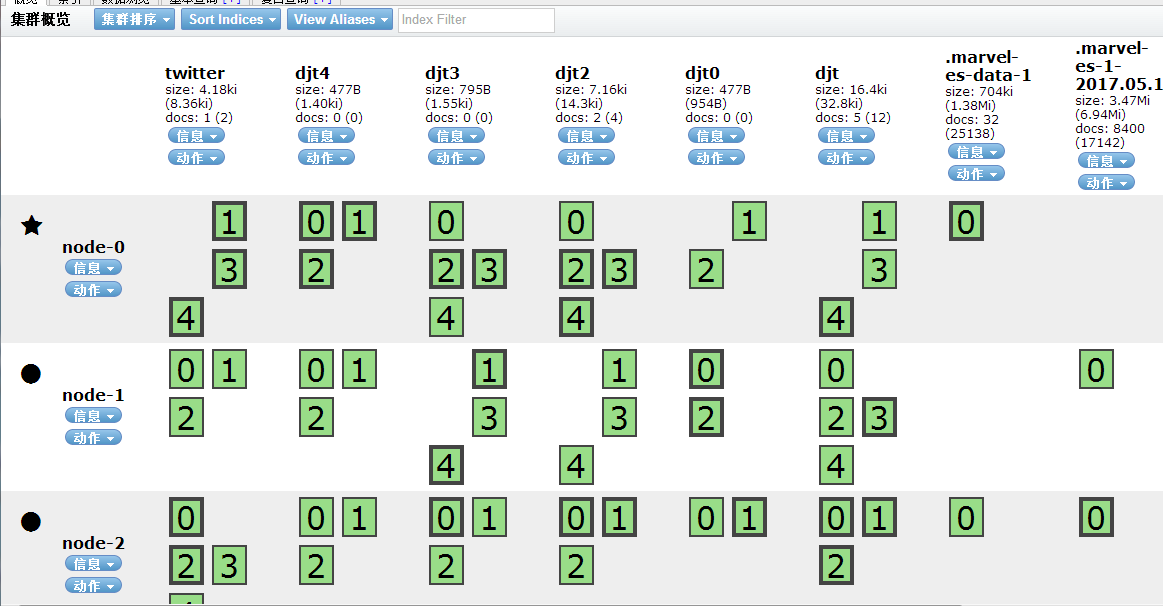
可以看到id为1的索引库不见了





这里要修改下配置文件
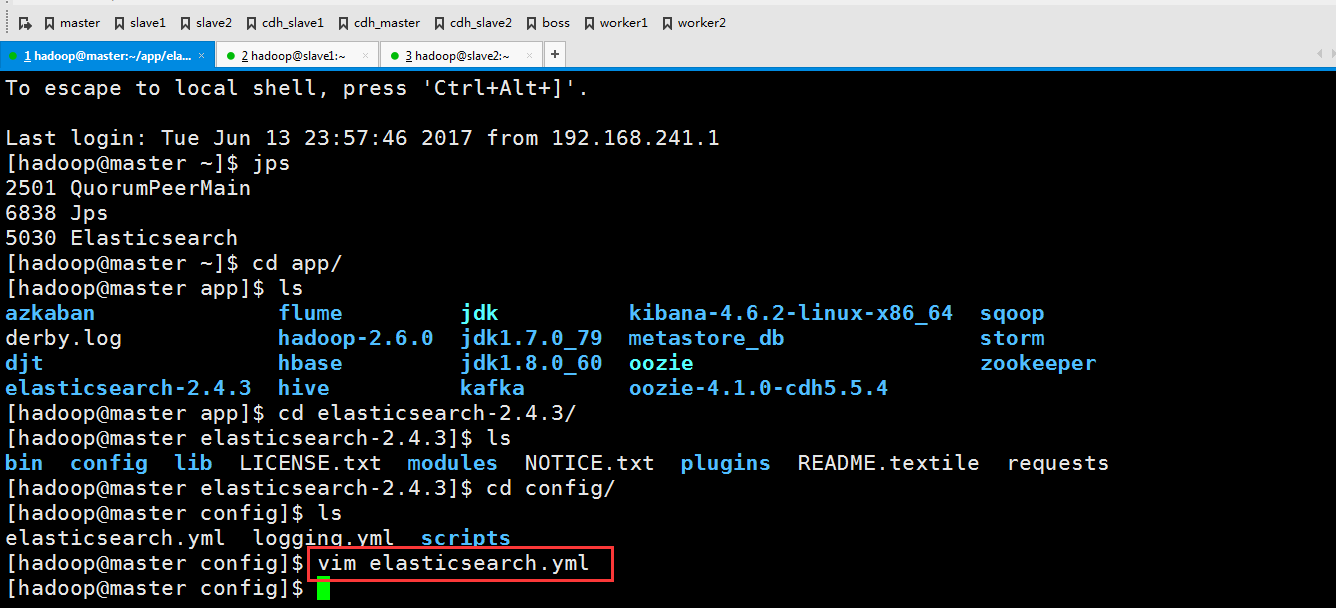

slave1,slave2也做同样的操作,在这里就不多赘述了。
这个时候记得要重启elasticseach才能生效,怎么重启这里就不多说了
运行程序


这个函数的意思是如果文件存在就更新,不存在就创建
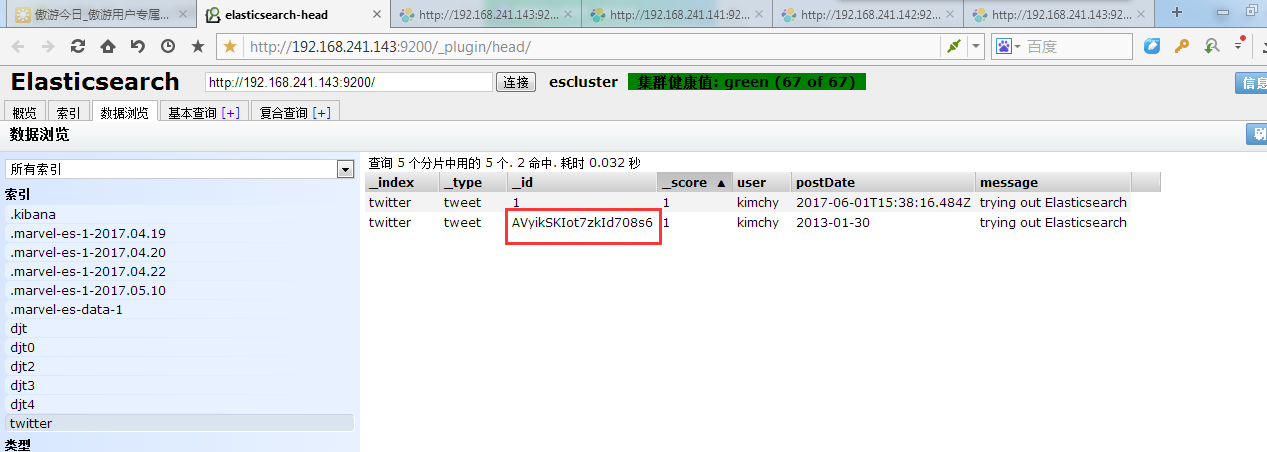
第一次执行下来

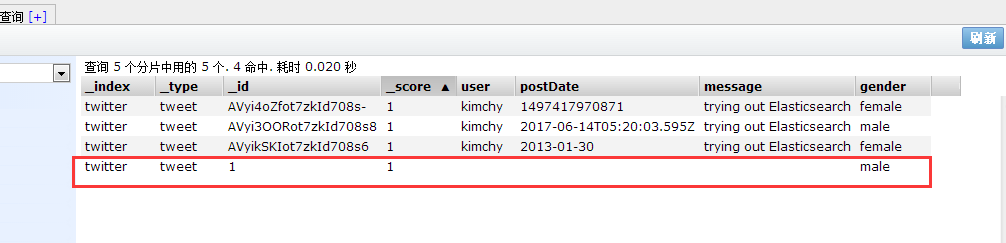
第二次执行(因为文件已经存在了,所以就把里面的内容更新)

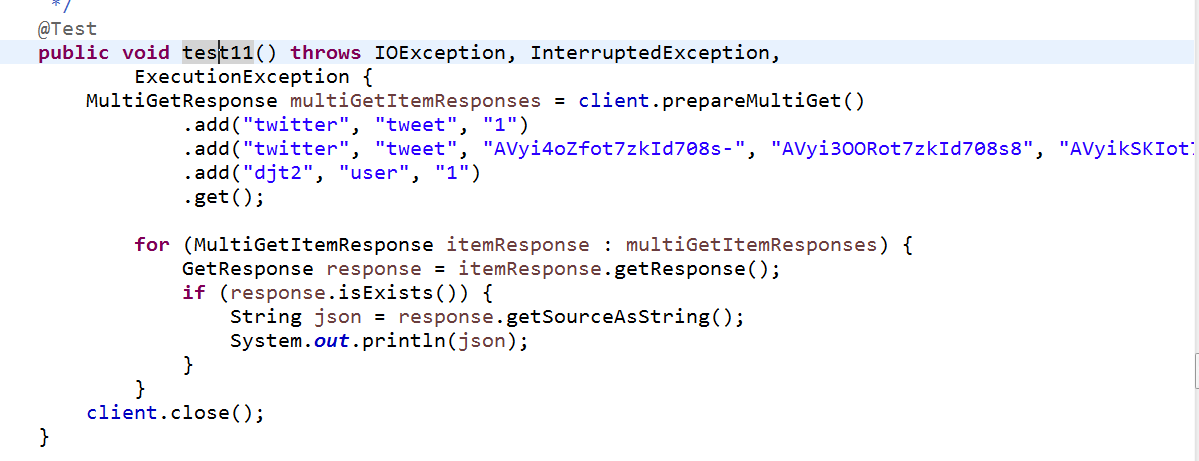
这个是批量操作,来获取多条索引


添加两个删除一个


 public void test13() throws IOException, InterruptedException,

             ExecutionException {

         BulkProcessor bulkProcessor = BulkProcessor.builder(

                 client,

                 new BulkProcessor.Listener() {

                     public void beforeBulk(long executionId, BulkRequest request) {

                         // TODO Auto-generated method stub

                         System.out.println(request.numberOfActions());

                     }

                     public void afterBulk(long executionId, BulkRequest request,

                             Throwable failure) {

                         // TODO Auto-generated method stub

                         System.out.println(failure.getMessage());

                     }

                     public void afterBulk(long executionId, BulkRequest request,

                             BulkResponse response) {

                         // TODO Auto-generated method stub

                         System.out.println(response.hasFailures());

                     }

                 })

                 .setBulkActions(1000) // 每个批次的最大数量

                 .setBulkSize(new ByteSizeValue(1, ByteSizeUnit.GB))// 每个批次的最大字节数

                 .setFlushInterval(TimeValue.timeValueSeconds(5))// 每批提交时间间隔

                 .setConcurrentRequests(1) //设置多少个并发处理线程

                 //可以允许用户自定义当一个或者多个bulk请求失败后,该执行如何操作

                 .setBackoffPolicy(

                     BackoffPolicy.exponentialBackoff(TimeValue.timeValueMillis(100), 3))

                 .build();

         String json = "{" +

                 "\"user\":\"kimchy\"," +

                 "\"postDate\":\"2013-01-30\"," +

                 "\"message\":\"trying out Elasticsearch\"" +

             "}";

         for (int i = 0; i < 1000; i++) {

             bulkProcessor.add(new IndexRequest("djt6", "user").source(json));

         }

         //阻塞至所有的请求线程处理完毕后,断开连接资源

         bulkProcessor.awaitClose(3, TimeUnit.MINUTES);

         client.close();

     }

     /**

      * SearchType使用方式

      * @throws Exception

      */

     @Test

     public void test14() throws Exception {

         SearchResponse response = client.prepareSearch("djt")

                 .setTypes("user")

                 //.setSearchType(SearchType.DFS_QUERY_THEN_FETCH)

                 .setSearchType(SearchType.QUERY_AND_FETCH)

                 .execute()

                 .actionGet();

         SearchHits hits = response.getHits();

         System.out.println(hits.getTotalHits());

     }

 }
这个是批量插入


这里有1000个,我就不数了
参考代码ESTestDocumentAPI.java
 package com.dajiangtai.djt_spider.elasticsearch;

 import java.io.IOException;

 import java.net.InetAddress;

 import java.net.UnknownHostException;

 import java.util.Date;

 import java.util.HashMap;

 import java.util.Iterator;

 import java.util.List;

 import java.util.Map;

 import java.util.concurrent.ExecutionException;

 import java.util.concurrent.TimeUnit;

 import static org.elasticsearch.node.NodeBuilder.*;

 import static org.elasticsearch.common.xcontent.XContentFactory.*;

 import org.elasticsearch.action.bulk.BackoffPolicy;

 import org.elasticsearch.action.bulk.BulkProcessor;

 import org.elasticsearch.common.unit.ByteSizeUnit;

 import org.elasticsearch.common.unit.ByteSizeValue;

 import org.elasticsearch.common.unit.TimeValue;

 import org.codehaus.jackson.map.ObjectMapper;

 import org.elasticsearch.action.bulk.BulkItemResponse;

 import org.elasticsearch.action.bulk.BulkRequest;

 import org.elasticsearch.action.bulk.BulkRequestBuilder;

 import org.elasticsearch.action.bulk.BulkResponse;

 import org.elasticsearch.action.delete.DeleteRequestBuilder;

 import org.elasticsearch.action.delete.DeleteResponse;

 import org.elasticsearch.action.get.GetResponse;

 import org.elasticsearch.action.get.MultiGetItemResponse;

 import org.elasticsearch.action.get.MultiGetResponse;

 import org.elasticsearch.action.index.IndexRequest;

 import org.elasticsearch.action.index.IndexRequestBuilder;

 import org.elasticsearch.action.index.IndexResponse;

 import org.elasticsearch.action.search.SearchResponse;

 import org.elasticsearch.action.search.SearchType;

 import org.elasticsearch.action.update.UpdateRequest;

 import org.elasticsearch.client.Client;

 import org.elasticsearch.client.transport.TransportClient;

 import org.elasticsearch.cluster.node.DiscoveryNode;

 import org.elasticsearch.common.settings.Settings;

 import org.elasticsearch.common.transport.InetSocketTransportAddress;

 import org.elasticsearch.index.query.QueryBuilders;

 import org.elasticsearch.node.Node;

 import org.elasticsearch.script.Script;

 import org.elasticsearch.script.ScriptService;

 import org.elasticsearch.search.SearchHits;

 import org.junit.Before;

 import org.junit.Test;

 /**

  * Document API 操作

  *

  * @author 大讲台

  *

  */

 public class ESTestDocumentAPI {

     private TransportClient client;

     @Before

     public void test0() throws UnknownHostException {

         // 开启client.transport.sniff功能,探测集群所有节点

         Settings settings = Settings.settingsBuilder()

                 .put("cluster.name", "escluster")

                 .put("client.transport.sniff", true).build();

         // on startup

         // 获取TransportClient

         client = TransportClient

                 .builder()

                 .settings(settings)

                 .build()

                 .addTransportAddress(

                         new InetSocketTransportAddress(InetAddress

                                 .getByName("master"), 9300))

                 .addTransportAddress(

                         new InetSocketTransportAddress(InetAddress

                                 .getByName("slave1"), 9300))

                 .addTransportAddress(

                         new InetSocketTransportAddress(InetAddress

                                 .getByName("slave2"), 9300));

     }

     /**

      * 创建索引:use ElasticSearch helpers

      *

      * @throws IOException

      */

     @Test

     public void test1() throws IOException {

         IndexResponse response = client

                 .prepareIndex("twitter", "tweet", "1")

                 .setSource(

                         jsonBuilder().startObject().field("user", "kimchy")

                                 .field("postDate", new Date())

                                 .field("message", "trying out Elasticsearch")

                                 .endObject()).get();

         System.out.println(response.getId());

         client.close();

     }

     /**

      * 创建索引:do it yourself

      *

      * @throws IOException

      */

     @Test

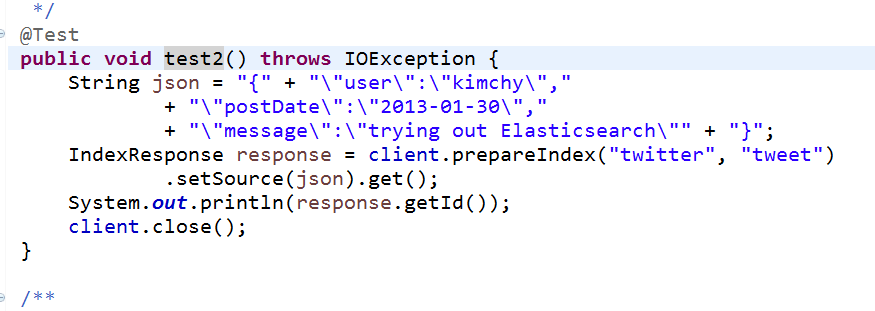
     public void test2() throws IOException {

         String json = "{" + "\"user\":\"kimchy\","

                 + "\"postDate\":\"2013-01-30\","

                 + "\"message\":\"trying out Elasticsearch\"" + "}";

         IndexResponse response = client.prepareIndex("twitter", "tweet")

                 .setSource(json).get();

         System.out.println(response.getId());

         client.close();

     }

     /**

      * 创建索引:use map

      *

      * @throws IOException

      */

     @Test

     public void test3() throws IOException {

         Map<String, Object> json = new HashMap<String, Object>();

         json.put("user", "kimchy");

         json.put("postDate", new Date());

         json.put("message", "trying out Elasticsearch");

         IndexResponse response = client.prepareIndex("twitter", "tweet")

                 .setSource(json).get();

         System.out.println(response.getId());

         client.close();

     }

     /**

      * 创建索引:serialize your beans

      *

      * @throws IOException

      */

     @Test

     public void test4() throws IOException {

         User user = new User();

         user.setUser("kimchy");

         user.setPostDate(new Date());

         user.setMessage("trying out Elasticsearch");

         // instance a json mapper

         ObjectMapper mapper = new ObjectMapper(); // create once, reuse

         // generate json

         byte[] json = mapper.writeValueAsBytes(user);

         IndexResponse response = client.prepareIndex("twitter", "tweet")

                 .setSource(json).get();

         System.out.println(response.getId());

         client.close();

     }

     /**

      * 查询索引:get

      *

      * @throws IOException

      */

     @Test

     public void test5() throws IOException {

         GetResponse response = client.prepareGet("twitter", "tweet", "1").get();

         System.out.println(response.getSourceAsString());

         client.close();

     }

     /**

      * 删除索引:delete

      *

      * @throws IOException

      */

     @Test

     public void test6() throws IOException {

         client.prepareDelete("twitter", "tweet", "1").get();

         client.close();

     }

     /**

      * 更新索引:Update API-UpdateRequest

      *

      * @throws IOException

      * @throws ExecutionException

      * @throws InterruptedException

      */

     @Test

     public void test7() throws IOException, InterruptedException,

             ExecutionException {

         UpdateRequest updateRequest = new UpdateRequest();

         updateRequest.index("twitter");

         updateRequest.type("tweet");

         updateRequest.id("AVyi3OORot7zkId708s8");

         updateRequest.doc(jsonBuilder().startObject().field("gender", "male")

                 .endObject());

         client.update(updateRequest).get();

         System.out.println(updateRequest.version());

         client.close();

     }

     /**

      * 更新索引:Update API-prepareUpdate()-doc

      *

      * @throws IOException

      * @throws ExecutionException

      * @throws InterruptedException

      */

     @Test

     public void test8() throws IOException, InterruptedException,

             ExecutionException {

         client.prepareUpdate("twitter", "tweet", "AVyikSKIot7zkId708s6")

                 .setDoc(jsonBuilder().startObject().field("gender", "female")

                         .endObject()).get();

         client.close();

     }

     /**

      * 更新索引:Update API-prepareUpdate()-script

      * 需要开启:script.engine.groovy.inline.update: on

      *

      * @throws IOException

      * @throws ExecutionException

      * @throws InterruptedException

      */

     @Test

     public void test9() throws IOException, InterruptedException,

             ExecutionException {

         client.prepareUpdate("twitter", "tweet", "AVyi4oZfot7zkId708s-")

                 .setScript(

                         new Script("ctx._source.gender = \"female\"",

                                 ScriptService.ScriptType.INLINE, null, null))

                 .get();

         client.close();

     }

     /**

      * 更新索引:Update API-UpdateRequest-upsert

      *

      * @throws IOException

      * @throws ExecutionException

      * @throws InterruptedException

      */

     @Test

     public void test10() throws IOException, InterruptedException,

             ExecutionException {

         IndexRequest indexRequest = new IndexRequest("twitter", "tweet", "1")

                                         .source(jsonBuilder()

                                         .startObject()

                                         .field("name", "Joe Smith")

                                         .field("gender", "male")

                                         .endObject());

         UpdateRequest updateRequest = new UpdateRequest("twitter", "tweet", "1")

                                         .doc(jsonBuilder()

                                         .startObject()

                                         .field("gender", "female")

                                         .endObject()).upsert(indexRequest);

         client.update(updateRequest).get();

         client.close();

     }

     /**

      * 批量查询索引:Multi Get API

      *

      * @throws IOException

      * @throws ExecutionException

      * @throws InterruptedException

      */

     @Test

     public void test11() throws IOException, InterruptedException,

             ExecutionException {

         MultiGetResponse multiGetItemResponses = client.prepareMultiGet()

                 .add("twitter", "tweet", "1")

                 .add("twitter", "tweet", "AVyi4oZfot7zkId708s-", "AVyi3OORot7zkId708s8", "AVyikSKIot7zkId708s6")

                 .add("djt2", "user", "1")

                 .get();

             for (MultiGetItemResponse itemResponse : multiGetItemResponses) {

                 GetResponse response = itemResponse.getResponse();

                 if (response.isExists()) {

                     String json = response.getSourceAsString();

                     System.out.println(json);

                 }

             }

         client.close();

     }

     /**

      * 批量操作索引:Bulk API

      *

      * @throws IOException

      * @throws ExecutionException

      * @throws InterruptedException

      */

     @Test

     public void test12() throws IOException, InterruptedException,

             ExecutionException {

         BulkRequestBuilder bulkRequest = client.prepareBulk();

         // either use client#prepare, or use Requests# to directly build index/delete requests

         bulkRequest.add(client.prepareIndex("twitter", "tweet", "3")

                 .setSource(jsonBuilder()

                             .startObject()

                                 .field("user", "kimchy")

                                 .field("postDate", new Date())

                                 .field("message", "trying out Elasticsearch")

                             .endObject()

                           )

                 );

         bulkRequest.add(client.prepareIndex("twitter", "tweet", "2")

                 .setSource(jsonBuilder()

                             .startObject()

                                 .field("user", "kimchy")

                                 .field("postDate", new Date())

                                 .field("message", "another post")

                             .endObject()

                           )

                 );

         DeleteRequestBuilder prepareDelete = client.prepareDelete("twitter", "tweet", "AVyikSKIot7zkId708s6");

         bulkRequest.add(prepareDelete);

         BulkResponse bulkResponse = bulkRequest.get();

         //批量操作:其中一个操作失败不影响其他操作成功执行

         if (bulkResponse.hasFailures()) {

             // process failures by iterating through each bulk response item

             BulkItemResponse[] items = bulkResponse.getItems();

             for (BulkItemResponse bulkItemResponse : items) {

                 System.out.println(bulkItemResponse.getFailureMessage());

             }

         }else{

             System.out.println("bulk process success!");

         }

         client.close();

     }

     /**

      * 批量操作索引:Using Bulk Processor

      * 优化:先关闭副本,再添加副本,提升效率

      * @throws IOException

      * @throws ExecutionException

      * @throws InterruptedException

      */

     @Test

     public void test13() throws IOException, InterruptedException,

             ExecutionException {

         BulkProcessor bulkProcessor = BulkProcessor.builder(

                 client,

                 new BulkProcessor.Listener() {

                     public void beforeBulk(long executionId, BulkRequest request) {

                         // TODO Auto-generated method stub

                         System.out.println(request.numberOfActions());

                     }

                     public void afterBulk(long executionId, BulkRequest request,

                             Throwable failure) {

                         // TODO Auto-generated method stub

                         System.out.println(failure.getMessage());

                     }

                     public void afterBulk(long executionId, BulkRequest request,

                             BulkResponse response) {

                         // TODO Auto-generated method stub

                         System.out.println(response.hasFailures());

                     }

                 })

                 .setBulkActions(1000) // 每个批次的最大数量

                 .setBulkSize(new ByteSizeValue(1, ByteSizeUnit.GB))// 每个批次的最大字节数

                 .setFlushInterval(TimeValue.timeValueSeconds(5))// 每批提交时间间隔

                 .setConcurrentRequests(1) //设置多少个并发处理线程

                 //可以允许用户自定义当一个或者多个bulk请求失败后,该执行如何操作

                 .setBackoffPolicy(

                     BackoffPolicy.exponentialBackoff(TimeValue.timeValueMillis(100), 3))

                 .build();

         String json = "{" +

                 "\"user\":\"kimchy\"," +

                 "\"postDate\":\"2013-01-30\"," +

                 "\"message\":\"trying out Elasticsearch\"" +

             "}";

         for (int i = 0; i < 1000; i++) {

             bulkProcessor.add(new IndexRequest("djt6", "user").source(json));

         }

         //阻塞至所有的请求线程处理完毕后,断开连接资源

         bulkProcessor.awaitClose(3, TimeUnit.MINUTES);

         client.close();

     }

     /**

      * SearchType使用方式

      * @throws Exception

      */

     @Test

     public void test14() throws Exception {

         SearchResponse response = client.prepareSearch("djt")

                 .setTypes("user")

                 //.setSearchType(SearchType.DFS_QUERY_THEN_FETCH)

                 .setSearchType(SearchType.QUERY_AND_FETCH)

                 .execute()

                 .actionGet();

         SearchHits hits = response.getHits();

         System.out.println(hits.getTotalHits());

     }

 }
ElasticSearch Document API的更多相关文章
- Elasticsearch Java Rest Client API 整理总结 (一)——Document API
目录 引言 概述 High REST Client 起步 兼容性 Java Doc 地址 Maven 配置 依赖 初始化 文档 API Index API GET API Exists API Del ...
- [搜索]ElasticSearch Java Api(一) -添加数据创建索引
转载:http://blog.csdn.net/napoay/article/details/51707023 ElasticSearch JAVA API官网文档:https://www.elast ...
- 搜索引擎Elasticsearch REST API学习
Elasticsearch为开发者提供了一套基于Http协议的Restful接口,只需要构造rest请求并解析请求返回的json即可实现访问Elasticsearch服务器.Elasticsearch ...
- 第08章 ElasticSearch Java API
本章内容 使用客户端对象(client object)连接到本地或远程ElasticSearch集群. 逐条或批量索引文档. 更新文档内容. 使用各种ElasticSearch支持的查询方式. 处理E ...
- Elasticsearch Java API 很全的整理
Elasticsearch 的API 分为 REST Client API(http请求形式)以及 transportClient API两种.相比来说transportClient API效率更高, ...
- 利用kibana学习 elasticsearch restful api (DSL)
利用kibana学习 elasticsearch restful api (DSL) 1.了解elasticsearch基本概念Index: databaseType: tableDocument: ...
- elasticsearch REST API方式批量插入数据
elasticsearch REST API方式批量插入数据 1:ES的服务地址 http://127.0.0.1:9600/_bulk 2:请求的数据体,注意数据的最后一行记得加换行 { &quo ...
- Elasticsearch java api 基本搜索部分详解
文档是结合几个博客整理出来的,内容大部分为转载内容.在使用过程中,对一些疑问点进行了整理与解析. Elasticsearch java api 基本搜索部分详解 ElasticSearch 常用的查询 ...
- Elasticsearch java api 常用查询方法QueryBuilder构造举例
转载:http://m.blog.csdn.net/u012546526/article/details/74184769 Elasticsearch java api 常用查询方法QueryBuil ...
随机推荐
- C高级第一次PTA作业 要求三
要求一.要求二 内容链接:http://www.cnblogs.com/X-JY/p/8550457.html 一.PTA作业中的知识点总结 1.6-1 计算两数的和与差(10 分) (1)*在程序中 ...
- bisect
# 二分查找算法 import bisect farm = sorted(['haystack', 'needle', 'cow', 'pig']) # ['cow', 'haystack', 'ne ...
- dbt 包的构建
dbt的包是一种可以复用的代码,可以方便进行模型的共享 创建一个包 和普通的dbt 项目类似 初始化(init) dbt init [packagename] 目录结构 文件: README.md d ...
- .NET4.0框架退休日期逐渐临近
微软宣布了.NET框架4.0至4.5.1版本的生命周期终结计划. 2016年1月12日之后,所有的技术支持,包含安全和非安全的更新补丁,都将会停止.开发人员和用户到时候可以选择回退到.NET 3.5 ...
- visual studio 2014 新特性
原文如下: Visual Studio "14" CTP Today, we are making available a first community technology p ...
- 【转】每天一个linux命令(38):cal 命令
原文网址:http://www.cnblogs.com/peida/archive/2012/12/14/2817473.html cal命令可以用来显示公历(阳历)日历.公历是现在国际通用的历法,又 ...
- DllPlugin、DllReferencePlugin 可以提取的第三方库列表
DllPlugin.DllReferencePlugin 可以提取的第三方库列表: 'vue/dist/vue.esm.js', // 'vue/dist/vue.common.js' for web ...
- Visual Studio2010不能安装Silverlight4_Tools,提示语言不一致
天在装Silverlight4_Tools时出现“必须先安装与 Silverlight Tools 4 语言版本相一致的 Visual Studio 2010.Visual Web Developer ...
- JSOI2008——星球大战
题目:https://www.luogu.org/problemnew/show/1197 并查集. 难点是若依次去掉点在求连通块个数,时间太长. 精妙的思维:先全部读入,再逆向求连通块个数——增加点 ...
- hdu3037——卢卡斯定理
题目:http://acm.hdu.edu.cn/showproblem.php?pid=3037 卢卡斯定理模板——大组合数取模 #include<iostream> #include& ...