
How to Build a Search Page with Elasticsearch and .NET
Although SQL Server's Full-Text search is good for searching text that is within a database, there are better ways of implementing search if the text is less-well structured, or comes from a wide variety of sources or formats. Ryszard takes ElasticSearch, and seven million questions from StackOverflow, in order to show you how to get started with one of the most popular search engines around.
We need search engines to query and analyse the massive amounts of data that many organizations are required to access: We have no great problem in storing it but how can we then find what we need? Large organizations store many types of structured and unstructured content such as documents in different formats, e-mails, CMS pages or Microsoft Office files. They want their employees and clients to be able to search and analyze it through one user interface.
At the same time, Internet users, who are used to Google-like search, expect every bespoke search to be as fast and precise: They need autocomplete, they assume that the search tolerates misspellings, and they expect to be able to use filters and many other advanced search features.
Many .NET developers might now ask: 'Why would we need other search engines when we are happy with SQL Server's Full-Text Search feature?' The answer is that it might be enough for simple searches, but other search engines are a better choice when we need to index and search unstructured data from different sources or when we need custom functionality such as spellchecking, hit-highlighting, autocomplete or advanced scoring.
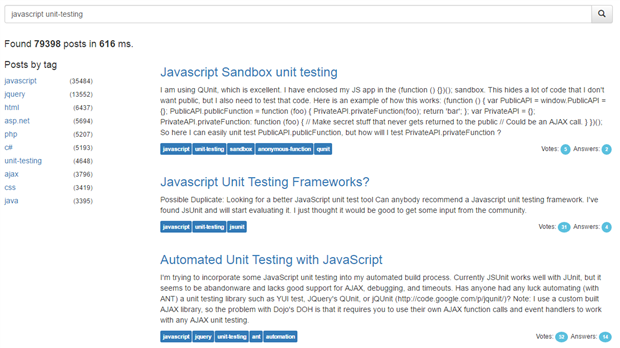
This is where search engines come into play. In order to get more familiar with the way they work, I will show how to build a search page that will query the dump of StackOverflow questions. The dump has considerable amount of data (7 million questions) and it is easy for developers to test the relevance of the search results. The search page will have following features:
- Full text search
- Grouping by tags
- Autocomplete
Why Elasticsearch?
Elasticsearch is an open source search engine, written in Java and based on Lucene. It is currently the most popular search engine.
It offers greater scalability than SQL Server's full-text search: After all, Stack Exchange initially grew on SQL Server Full-Text Search, but the limitations of its feature and performance forced them migrate to Elasticsearch for their search requirements.
I decided to test Elasticsearch because it does not require that we create an up-front schema file and it exposes Web-friendly APIs (REST and JSON).
NEST
To interact with Elasticsearch, we will use NEST 2.3.0 which is one of two official .NET clients for Elasticsearch. NEST is a high-level client which maps closely to Elasticsearch API. All the request and response objects have been mapped. NEST provides the alternatives of either a fluent syntax for building queries, which resembles structure of raw JSON requests to API, or the use of object initializer syntax.
In order to build a web page, I will use Single Page Application (SPA) approach with AngularJS as MVVM framework. The client side will make AJAX requests to ASP.NET Web API 2. The Web API 2 controller will use NEST to communicate with Elasticsearch.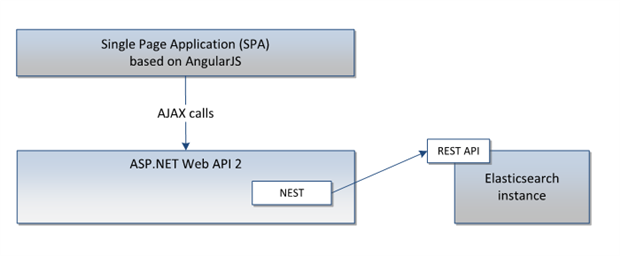
Code snippets in this article will only show the service implementation. Web API 2 code is just a boilerplate code so I decided to skip it, as well as the AngularJS code which you can replace with your favourite UI framework. The whole code is available on GitHub.
The page after applying HTML and styles may look like this:
Installation of Elasticsearch
Elasticsearch is very easy to install. Just go to its web page, download an installer, unzip it and install in three simple steps. Once it is installed, Elasticsearch should be available by default underhttp://localhost:9200.
It exposes a HTTP API so it is possible to use cURL to make requests but I recommend using Sensewhich is Chrome extension. Sense offers syntax highlighting, autocomplete, formatting and code folding. The Elasticsearch reference contains samples in cURL format: for example the request to get high level statistics for all our indices looks like this:
|
curl localhost:9200/_stats |
but Sense offers a nice copy and paste feature that translates cURL requests to the proper Sense syntax:
|
GET /_stats |
Search index population
Elasticsearch is document-oriented, meaning that it stores entire documents in its index. First of all we need to create a client to communicate with Elasticsearch.
|
var node = new Uri("http://localhost:9200"); var settings = new ConnectionSettings(node); settings.DefaultIndex("stackoverflow"); var client = new ElasticClient(settings); |
Next, let's create a class representing our document.
|
public class Post { public string Id { get; set; } public DateTime? CreationDate { get; set; } public int? Score { get; set; } public int? AnswerCount { get; set; } public string Body { get; set; } public string Title { get; set; } [String(Index = FieldIndexOption.NotAnalyzed)] public IEnumerable<string> Tags { get; set; } [Completion] public IEnumerable<string> Suggest { get; set; } } |
Although Elasticsearch is able to dynamically resolve the document type and its fields at index time, you can override field mappings or use attributes on fields in order to provide for more advanced usages. In this example we decorated our POCO class with some attributes (which I explain later) so we need to create mappings with AutoMap.
|
var indexDescriptor = new CreateIndexDescriptor(stackoverflow) .Mappings(ms => ms .Map<Post>(m => m.AutoMap())); |
Then, we can create our index called and put the mappings.
|
client.CreateIndex("stackoverflow", i => indexDescriptor); |
Now that we have defined our mappings and created an index, we can seed it with documents. Elasticsearch does not offer any handler to import specific file formats such as XML or CSV, but because it has client libraries for different languages, it is easy to build our own importer. AsStackOverflow dump is in XML format, we will use .NET XmlReader class to read question rows, map them to an instance of Post and add objects to the collection. The field Suggest should be also populated with the same values as Tags, which will be explained later in the article.
Next, we need to iterate over batches of 1-10k objects and call the IndexMany method on the client:
|
int batch = 1000; IEnumerable<Post> data = LoadPostsFromFile(path); foreach (var batches in data.Batch(batch)) { client.IndexMany<Post>(batches, "stackoverflow"); } |
On my machine, i7 quad core with 16GB RAM and HDD drive, it took around two seconds to index each batch. Depending on size and structure of documents, you can increase batch size until the performance drops drastically.
Full text search
Now that our document database is populated, let's define the search service interface:
|
public interface ISearchService<T> { SearchResult<T> Search(string query, int page, int pageSize); SearchResult<Post> SearchByCategory(string query, IEnumerable<string> tags, int page, int pageSize); IEnumerable<string> Autocomplete(string query, int count); |
and a search result class:
|
public class SearchResult<T> { public int Total { get; set; } public int Page { get; set; } public IEnumerable<T> Results { get; set; } public int ElapsedMilliseconds { get; set; } } |
The search method will execute the multi match query against user input. The multi match query is useful when we want to run the query against multiple fields. By using this, we can see how relevant the Elasticsearch results are with the default configuration.
First of all we need to call the parent Query method that is a container for any specific query we want to execute. Next, we call the MultiMatch method which calls the Query method with the actual search phrase as a parameter and a list of fields that we want to search against. In our case these are: Title,Body, and Tags.
|
var result = client.Search(x => x // use search method .Query(q => q // define query .MultiMatch(mp => mp // of type MultiMatch .Query(query) // pass text .Fields(f => f // define fields to search against .Fields(f1 => f1.Title, f2 => f2.Body, f3 => f3.Tags)))) .From(page - 1) // apply paging .Size(pageSize)); // limit to page size return new SearchResult<Post> { Total = (int)result.Total, Page = page, Results = result.Documents, ElapsedMilliseconds = result.Took }; |
The raw request to Elasticsearch will look like:
|
GET stackoverflow/post/_search { "query": { "multi_match": { "query": "elasticsearch", "fields": ["title","body","tags"] } } } |
Grouping by tags
Once our search returns results, we will group them by tags so that users can refine their search. To group result by categories, we will use the bucket aggregations. They allow as to compose bucket of documents which falls into given criterion or not. As we want to aggregate by tags, which is a text field, we will use the term aggregations.
Let's look at attribute on the Tags field
|
[String(Index = FieldIndexOption.NotAnalyzed)] public IEnumerable<string> Tags { get; set; } |
It tells Elasticsearch to neither analyze nor process the input, and to search against the field. It would store values as they are. Thanks to that, it would not change 'unit-testing' tag to 'unit' and 'testing' etc.
Now, we can extend the search result class with a dictionary containing the tag name and the number of posts decorated with this tag.
|
public Dictionary<string, long> AggregationsByTags { get; set; } |
Next, we need to add Aggregation, of type Term, to our query and give it a name.
|
var result = client.Search<Post>(x => x .Query(q => q .MultiMatch(mp => mp .Query(query) .Fields(f => f .Fields(f1 => f1.Title, f2 => f2.Body, f3 => f3.Tags)))) .Aggregations(a => a // aggregate results .Terms("by_tags", t => t // use term aggregations and name it .Field(f => f.Tags) // on field Tags .Size(10))) // limit aggregation buckets .From(page - 1) .Size(pageSize)); |
The search results now contain aggregation results so we use the newly-added field to return it back to the caller:
|
AggregationsByTags = result.Aggs.Terms("by_tags").Items .ToDictionary(x => x.Key, y => y.DocCount) |
The next step is to allow users to select one or more tags and use them as a filter. Let's add a new method to the interface. It will enable us to pass the selected tags to the search method.
|
SearchResult<Post> SearchByCategory(string query, IEnumerable<string> tags, int page, int pageSize); |
In the method implementation, first of all we need to map the tags into an array of filters.
|
var filters = tags .Select(c => new Func<FilterDescriptor<Post>, FilterContainer>(x => x .Term(f => f.Tags, c))); |
Then, we need to build our search as a bool query. Bool queries combine multiple queries with must orshould clauses. The queries inside clauses will be used for searching documents and applying a relevance score to them.
Then we can append a Filter clause which also contains a Bool query which filters the result set.
|
var result = client.Search<Post>(x => x .Query(q => q .Bool(b => b .Must(m => m // apply clause that must match .MultiMatch(mp => mp // our initial search query .Query(query) .Fields(f => f .Fields(f1 => f1.Title, f2 => f2.Body, f3 => f3.Tags)))) .Filter(f => f // apply filter on the results .Bool(b1 => b1 .Must(filters))))) // with array of filters .Aggregations(a => a .Terms("by_tags", t => t .Field(f => f.Tags) .Size(10))) .From(page - 1) .Size(pageSize)); |
The aggregations work in the scope of a query so they return a number of documents in a filtered set.
Autocomplete
One of the features that we frequently use in search forms is autocomplete, sometimes called 'typeahead' or 'search as you type'.
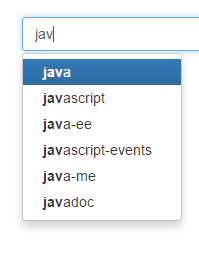
Searching big sets of text data by only a few characters is not a trivial task. Elasticsearch provides us with the completion suggester which works on a special field that is indexed in a way that enables very fast searching.
We need to decide which field or fields we want autocomplete to operate on and what results will be suggested. Elasticsearch enables us to define both input and output so, for example, user text can be searched against title or author and return a term or even the whole post or subset of its fields.
For simplicity, in our case we will search user input against the tags and display matched tags as well. It will work as a dictionary of tags. That is why we decorated our Post class with a special attribute.
|
[Completion] public IEnumerable<string> Suggest { get; set; } |
The field decorated with Completion may contain Input, Output, Payload (which can store any arbitrary object) and Weight that ranks suggestions. We will use only mandatory input so the type will be a collection of strings.
Now we can implement an autocomplete method:
|
var result = client.Suggest<Post>(x => x // use suggest method .Completion("tag-suggestions", c => c // use completion suggester and name it .Text(query) // pass text .Field(f => f.Suggest) // work against completion field .Size(count))); // limit number of suggestions return result.Suggestions["tag-suggestions"].SelectMany(x => x.Options) .Select(y => y.Text); |
The method will return a collection of terms that match the query. The result of particular suggestion is a collection of suggestion options. We may order them by frequency or weight (which we did not defined) and return the suggested text.
Summary
This article demonstrated how to build a full text search functionality that includes grouping results by tags and an autocomplete feature.
We have seen that the installation and configuration of Elasticsearch is very easy. The default configuration options are just right to start working with. Elasticsearch does not need a schema file and exposes a friendly JSON-based HTTP API for its configuration, index-population, and searching. The engine is optimized to work with large amount of data.
We used a high-level .NET client to communicate with Elasticsearch so it fits nicely in .NET project. It allowed us to define our index using POCO classes with little configuration work. We also choose to use a fluent syntax to build queries, but object initializer syntax is also available.
Finally, we have extended our search with two functionalities with not much effort. Having implemented a search service, we can now hook it up with either Web API with AngularJS or ASP.NET MVC.
Elasticsearch is an advanced search engine with many features and its own query DSL. Before we can build a production search site, we would require more analysis on how to store and query our data and fine tuning queries but I hope this article helped you to learn the basics in examples.
How to Build a Search Page with Elasticsearch and .NET的更多相关文章
- [elastic search][redis] 初试 ElasticSearch / redis
现有项目组,工作需要. http://www.cnblogs.com/xing901022/p/4704319.html Elastic Search权威指南(中文版) https://es.xiao ...
- 初识Elastic search—附《Elasticsearch权威指南—官方guide的译文》
本文作为Elastic search系列的开篇之作,简要介绍其简要历史.安装及基本概念和核心模块. 简史 Elastic search基于Lucene(信息检索引擎,ES里一个index—索引,一个索 ...
- full text search
definition https://www.techopedia.com/definition/17113/full-text-search A full-text search is a comp ...
- Elasticsearch 常用基本查询
安装启动很简单,参考官网步骤:https://www.elastic.co/downloads/elasticsearch 为了介绍Elasticsearch中的不同查询类型,我们将对带有下列字段的文 ...
- ElasticSearch 常用查询语句
为了演示不同类型的 ElasticSearch 的查询,我们将使用书文档信息的集合(有以下字段:title(标题), authors(作者), summary(摘要), publish_date(发布 ...
- 常用ElasticSearch 查询语句
为了演示不同类型的 ElasticSearch 的查询,我们将使用书文档信息的集合(有以下字段:title(标题), authors(作者), summary(摘要), publish_date(发布 ...
- ElasticSearch 7.X版本19个常用的查询语句
整理一篇常用的CRUD查询语句,之前这篇文件是在17年左右发表的,从英文翻译过来,现在采用7.x 版本进行实验,弃用的功能或者参数,我这边会进行更新,一起来学习吧. 为了演示不同类型的 Elastic ...
- 常用的Elasticseaerch检索技巧汇总
本篇博客是对前期工作中遇到ES坑的一些小结,顺手记录下,方便日后查阅. 0.前言 为了讲解不同类型ES检索,我们将要对包含以下类型的文档集合进行检索: . title 标题: . authors 作者 ...
- Elasticsearch 5.0 安装 Search Guard 5 插件 (五)
一.Search Guard 简介 Search Guard 是 Elasticsearch 的安全插件.它为后端系统(如LDAP或Kerberos)提供身份验证和授权,并向Elasticsearc ...
随机推荐
- spring cloud 学习(5) - config server
分布式环境下的统一配置框架,已经有不少了,比如百度的disconf,阿里的diamand.今天来看下spring cloud对应的解决方案: 如上图,从架构上就可以看出与disconf之类的有很大不同 ...
- AES advanced encryption standard 3
This optimized <../aesbench/> AES implementation conforms to FIPS-. aes.h #ifndef _AES_H #defi ...
- 「GIT SourceTree冲突」解决方案
现在程序猿标配GIT作为代码管理,但是从SVN到GIT学习中,其中GIT的冲突是一个难点,常常会导致Push不上去,Pull不下来,很尴尬的地步,还不知道自己写的代码被覆盖没,废话不多说,直接上干货! ...
- ARM 编程平台+coresight
http://www.keil.com/product/ DS-5:http://www.cnblogs.com/njseu/p/6023081.html http://www.arm.com/pro ...
- mysql 移除服务,并在cmd下切换目录
实际中需要把注册的mysql移除, 一时忘了命令, 特此记录 在网上找的帮助 #Path to installation directory. All paths are usually resolv ...
- react-router 从 v2/v3 to v4 迁移(翻译)
react-router v4 是完全重写的,所以没有简单的迁移方式,这份指南将为您提供一些步骤,以帮助您了解如何升级应用程序. 注意: 这份迁移指南适用于react-router v2和v3,但为简 ...
- CPU和线程的关系
比如,电脑开了两个程序qq和qq音乐,假设这两个程序都只有一个线程.人能够感觉到CPU切换的频率是一秒一次,假设当前cpu计算速度是1秒1次,那么我们就能明显感到卡顿,当聊天,点击发送按钮时候,qq音 ...
- Getting OS version with NDK in C c++获得版本号
http://stackoverflow.com/questions/19355783/getting-os-version-with-ndk-in-c #include <cutils/pro ...
- OAuth:Access to shared resources via web applications
A web application which wants to gain access to shared resources should redirect the user to a page ...
- Java删除List和Set集合中元素
今天在做项目时,需要删除List和Set中的某些元素,当时使用边遍历,边删除的方法,却报了以下异常: ConcurrentModificationException 为了以后不忘记,使用烂笔头把它记录 ...