
《DSP using MATLAB》Problem 3.17
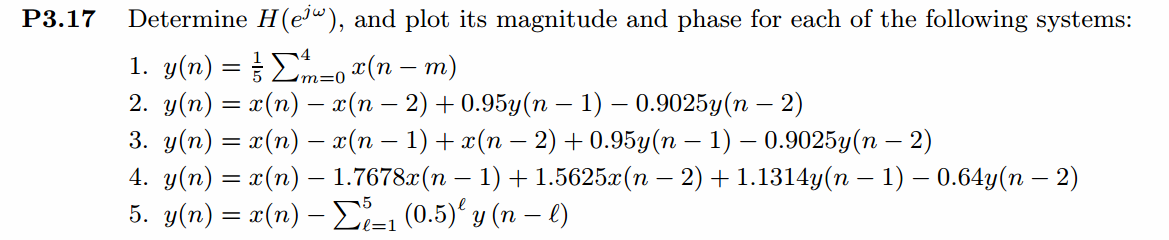
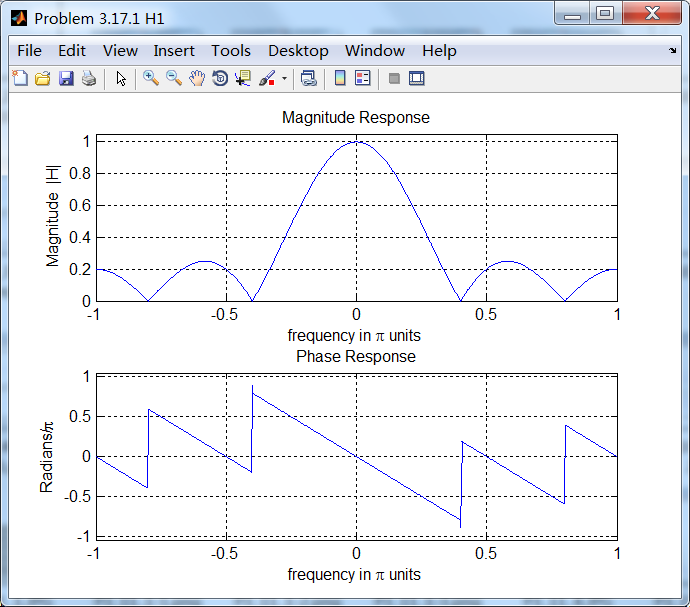
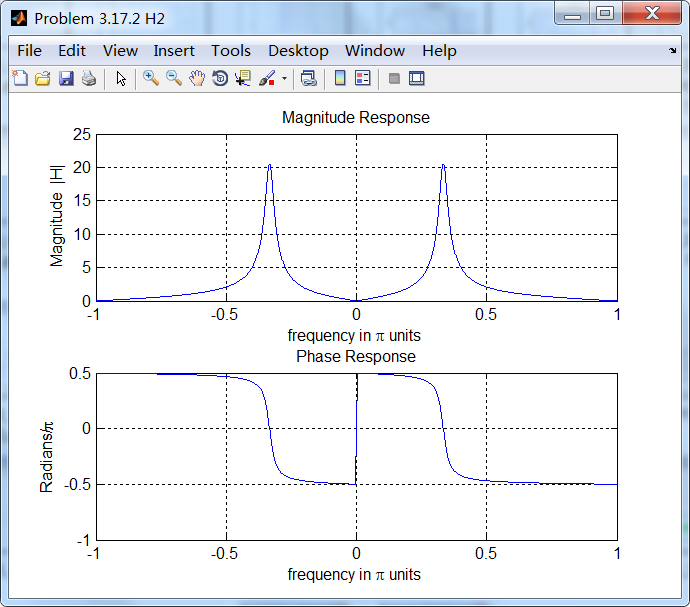
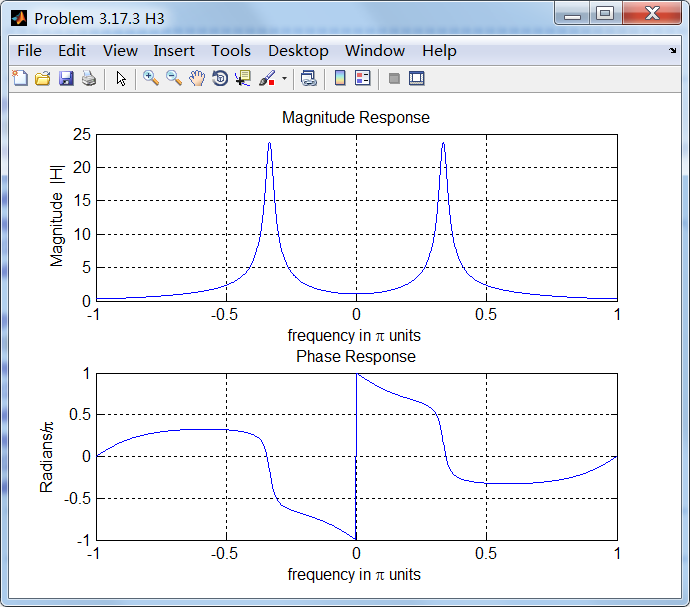
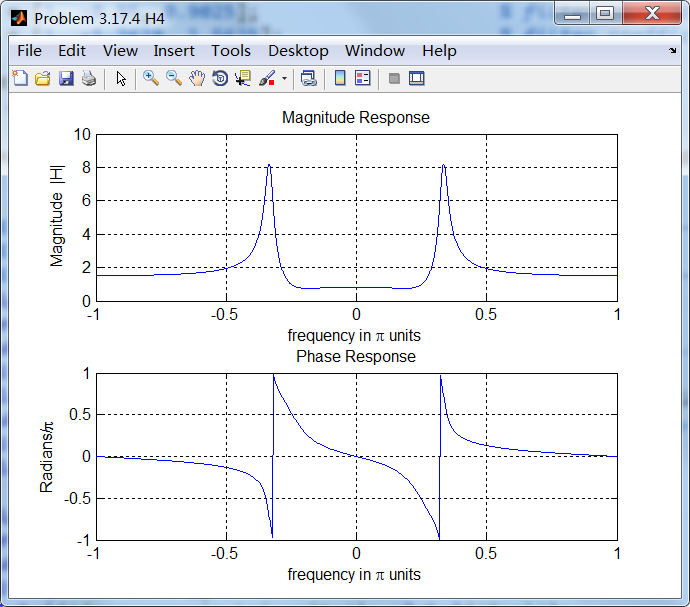
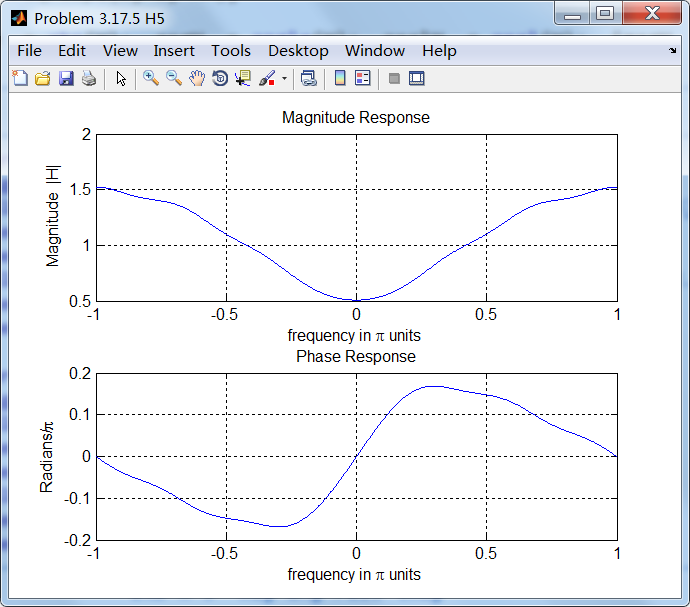
用差分方程两边进行z变换,再变量带换得到频率响应函数(或转移函数,即LTI系统脉冲响应的DTFT)。
代码:
%% ------------------------------------------------------------------------

%%            Output Info about this m-file

fprintf('\n***********************************************************\n');

fprintf('        <DSP using MATLAB> Problem 3.17 \n\n');

banner();

%% ------------------------------------------------------------------------

%% --------------------------------------------------------------

%%   1   y(n)=0.2*[x(n)+x(n-1)+x(n-2)+x(n-3)+x(n-4)]

%% --------------------------------------------------------------

a = [1];                                        % filter coefficient array a

b = [0.2, 0.2, 0.2, 0.2, 0.2];                  % filter coefficient array b

MM = 500;

H = freqresp1(b, a, MM);

magH  = abs(H);  angH  = angle(H);  realH  = real(H);  imagH  = imag(H);

%% --------------------------------------------------------------------

%%              START H's  mag ang real imag

%% --------------------------------------------------------------------

figure('NumberTitle', 'off', 'Name', 'Problem 3.17.1 H1');

set(gcf,'Color','white');

subplot(2,1,1); plot(w/pi,magH); grid on;  axis([-1,1,0,1.05]);

title('Magnitude Response');

xlabel('frequency in \pi units'); ylabel('Magnitude  |H|');

subplot(2,1,2); plot(w/pi, angH/pi); grid on;  axis([-1,1,-1.05,1.05]);

title('Phase Response');

xlabel('frequency in \pi units'); ylabel('Radians/\pi');

figure('NumberTitle', 'off', 'Name', 'Problem 3.17.1 H1');

set(gcf,'Color','white');

subplot(2,1,1); plot(w/pi, realH); grid on;

title('Real Part');

xlabel('frequency in \pi units'); ylabel('Real');

subplot(2,1,2); plot(w/pi, imagH); grid on;

title('Imaginary Part');

xlabel('frequency in \pi units'); ylabel('Imaginary');

%% -------------------------------------------------------------------

%%             END X's  mag ang real imag

%% -------------------------------------------------------------------

%% --------------------------------------------------------------

%%   2   y(n)=x(n)-x(n-2)+0.95y(n-1)-0.9025y(n-2)

%% --------------------------------------------------------------

a = [1, -0.95, 0.9025];                    % filter coefficient array a

b = [1, 0, -1];                            % filter coefficient array b

MM = 500;

H = freqresp1(b, a, MM);

magH  = abs(H);  angH  = angle(H);  realH  = real(H);  imagH  = imag(H);

%% --------------------------------------------------------------------

%%              START H's  mag ang real imag

%% --------------------------------------------------------------------

figure('NumberTitle', 'off', 'Name', 'Problem 3.17.2 H2');

set(gcf,'Color','white');

subplot(2,1,1); plot(w/pi,magH); grid on;  %axis([-1,1,0,1.05]);

title('Magnitude Response');

xlabel('frequency in \pi units'); ylabel('Magnitude  |H|');

subplot(2,1,2); plot(w/pi, angH/pi); grid on;  %axis([-1,1,-1.05,1.05]);

title('Phase Response');

xlabel('frequency in \pi units'); ylabel('Radians/\pi');

figure('NumberTitle', 'off', 'Name', 'Problem 3.17.2 H2');

set(gcf,'Color','white');

subplot(2,1,1); plot(w/pi, realH); grid on;

title('Real Part');

xlabel('frequency in \pi units'); ylabel('Real');

subplot(2,1,2); plot(w/pi, imagH); grid on;

title('Imaginary Part');

xlabel('frequency in \pi units'); ylabel('Imaginary');

%% -------------------------------------------------------------------

%%             END X's  mag ang real imag

%% -------------------------------------------------------------------

%% --------------------------------------------------------------

%%   3   y(n)=x(n)-x(n-1)-x(n-2)+0.95y(n-1)-0.9025y(n-2)

%% --------------------------------------------------------------

a = [1, -0.95, 0.9025];                    % filter coefficient array a

b = [1, -1, -1];                           % filter coefficient array b

MM = 500;

H = freqresp1(b, a, MM);

magH  = abs(H);  angH  = angle(H);  realH  = real(H);  imagH  = imag(H);

%% --------------------------------------------------------------------

%%              START H's  mag ang real imag

%% --------------------------------------------------------------------

figure('NumberTitle', 'off', 'Name', 'Problem 3.17.3 H3');

set(gcf,'Color','white');

subplot(2,1,1); plot(w/pi,magH); grid on;  %axis([-1,1,0,1.05]);

title('Magnitude Response');

xlabel('frequency in \pi units'); ylabel('Magnitude  |H|');

subplot(2,1,2); plot(w/pi, angH/pi); grid on;  %axis([-1,1,-1.05,1.05]);

title('Phase Response');

xlabel('frequency in \pi units'); ylabel('Radians/\pi');

figure('NumberTitle', 'off', 'Name', 'Problem 3.17.3 H3');

set(gcf,'Color','white');

subplot(2,1,1); plot(w/pi, realH); grid on;

title('Real Part');

xlabel('frequency in \pi units'); ylabel('Real');

subplot(2,1,2); plot(w/pi, imagH); grid on;

title('Imaginary Part');

xlabel('frequency in \pi units'); ylabel('Imaginary');

%% -------------------------------------------------------------------

%%             END X's  mag ang real imag

%% -------------------------------------------------------------------

%% --------------------------------------------------------------

%%   4   y(n)=x(n)-1.7678x(n-1)+1.5625x(n-2)

%%               +0.95y(n-1)-0.9025y(n-2)

%% --------------------------------------------------------------

a = [1, -0.95, 0.9025];                    % filter coefficient array a

b = [1, -1.7678, 1.5625];                  % filter coefficient array b

MM = 500;

H = freqresp1(b, a, MM);

magH  = abs(H);  angH  = angle(H);  realH  = real(H);  imagH  = imag(H);

%% --------------------------------------------------------------------

%%              START H's  mag ang real imag

%% --------------------------------------------------------------------

figure('NumberTitle', 'off', 'Name', 'Problem 3.17.4 H4');

set(gcf,'Color','white');

subplot(2,1,1); plot(w/pi,magH); grid on;  %axis([-1,1,0,1.05]);

title('Magnitude Response');

xlabel('frequency in \pi units'); ylabel('Magnitude  |H|');

subplot(2,1,2); plot(w/pi, angH/pi); grid on;  %axis([-1,1,-1.05,1.05]);

title('Phase Response');

xlabel('frequency in \pi units'); ylabel('Radians/\pi');

figure('NumberTitle', 'off', 'Name', 'Problem 3.17.4 H4');

set(gcf,'Color','white');

subplot(2,1,1); plot(w/pi, realH); grid on;

title('Real Part');

xlabel('frequency in \pi units'); ylabel('Real');

subplot(2,1,2); plot(w/pi, imagH); grid on;

title('Imaginary Part');

xlabel('frequency in \pi units'); ylabel('Imaginary');

%% -------------------------------------------------------------------

%%             END X's  mag ang real imag

%% -------------------------------------------------------------------

%% ------------------------------------------------------------------------------

%%   5   y(n)=x(n)-0.5y(n-1)-0.25y(n-2)-0.125y(n-3)-0.0625y(n-4)-0.03125y(n-5)

%%

%% ------------------------------------------------------------------------------

a = [1, 0.5, 0.25, 0.125, 0.0625, 0.03125];         % filter coefficient array a

b = [1];                                            % filter coefficient array b

MM = 500;

H = freqresp1(b, a, MM);

magH  = abs(H);  angH  = angle(H);  realH  = real(H);  imagH  = imag(H);

%% --------------------------------------------------------------------

%%              START H's  mag ang real imag

%% --------------------------------------------------------------------

figure('NumberTitle', 'off', 'Name', 'Problem 3.17.5 H5');

set(gcf,'Color','white');

subplot(2,1,1); plot(w/pi,magH); grid on;  %axis([-1,1,0,1.05]);

title('Magnitude Response');

xlabel('frequency in \pi units'); ylabel('Magnitude  |H|');

subplot(2,1,2); plot(w/pi, angH/pi); grid on;  %axis([-1,1,-1.05,1.05]);

title('Phase Response');

xlabel('frequency in \pi units'); ylabel('Radians/\pi');

figure('NumberTitle', 'off', 'Name', 'Problem 3.17.5 H5');

set(gcf,'Color','white');

subplot(2,1,1); plot(w/pi, realH); grid on;

title('Real Part');

xlabel('frequency in \pi units'); ylabel('Real');

subplot(2,1,2); plot(w/pi, imagH); grid on;

title('Imaginary Part');

xlabel('frequency in \pi units'); ylabel('Imaginary');

%% -------------------------------------------------------------------

%%             END X's  mag ang real imag

%% -------------------------------------------------------------------
运行结果:
《DSP using MATLAB》Problem 3.17的更多相关文章
- 《DSP using MATLAB》Problem 6.17
代码: %% ++++++++++++++++++++++++++++++++++++++++++++++++++++++++++++++++++++++++++++++++ %% Output In ...
- 《DSP using MATLAB》Problem 5.17
1.代码 %% ++++++++++++++++++++++++++++++++++++++++++++++++++++++++++++++++++++++++++++++++++++++++ %% ...
- 《DSP using MATLAB》Problem 2.17
1.代码: %% ------------------------------------------------------------------------ %% Output Info abo ...
- 《DSP using MATLAB》Problem 8.17
代码: %% ------------------------------------------------------------------------ %% Output Info about ...
- 《DSP using MATLAB》Problem 4.17
- 《DSP using MATLAB》Problem 5.22
代码: %% ++++++++++++++++++++++++++++++++++++++++++++++++++++++++++++++++++++++++++++++++++++++++ %% O ...
- 《DSP using MATLAB》Problem 5.15
代码: %% ++++++++++++++++++++++++++++++++++++++++++++++++++++++++++++++++++++++++++++++++ %% Output In ...
- 《DSP using MATLAB》Problem 2.18
1.代码: function [y, H] = conv_tp(h, x) % Linear Convolution using Toeplitz Matrix % ----------------- ...
- 《DSP using MATLAB》Problem 7.28
又是一年五一节,朋友圈都是晒名山大川的,晒脑袋的,我这没钱的待在家里上网转转吧 频率采样法设计带通滤波器,过渡带中有一个样点 代码: %% ++++++++++++++++++++++++++++++ ...
随机推荐
- Unity搭建简单的图片服务器
具体要实现的目标是:将图片手动拷贝到服务器,然后在Unity中点击按钮将服务器中的图片加载到Unity中. 首先简答解释下 WAMP(Windows + Apache + Mysql + PHP),一 ...
- [.NET开发] C#实现剪切板功能
C#剪切板 Clipboard类 我们现在先来看一下官方文档的介绍 位于:System.Windows.Forms 命名空间下 Provides methods to place data on an ...
- 自适应界面开发总结——WPF客户端开发
1.由于界面大小是变化的,所以必须有一个稳定不变的参考界面(即在一个标准的界面尺寸下进行WPF界面开发,比如:发票查验V3.0的美工设计尺寸——1024*740): PS:在WPF的用户控件Xam ...
- Mr. Kitayuta vs. Bamboos CodeForces - 505E (堆,二分答案)
大意: 给定$n$棵竹子, 每棵竹子初始$h_i$, 每天结束时长$a_i$, 共$m$天, 每天可以任选$k$棵竹子砍掉$p$, 若不足$p$则变为0, 求$m$天中竹子最大值的最小值 先二分答案转 ...
- Wannafly挑战赛20-A,B
A-链接:https://www.nowcoder.com/acm/contest/133/A来源:牛客网 题目描述 现在有一棵被Samsara-Karma染了k种颜色的树,每种颜色有着不同的价值 A ...
- Oracle OAF 应用构建基础之实现控制器 (转)
原文地址: Oracle OAF 应用构建基础之实现控制器 设计一个OA Controller 如OA Framework Page解析中所描述的,OA Controller定义了web beans的 ...
- PaodingAnalysis 提示 "dic home should not be a file, but a directory"
Exception in thread "main" net.paoding.analysis.exception.PaodingAnalysisException: dic ho ...
- Windows系统下修改Erlang默认路径
新建.erlang文件: io:format("consulting .erlang in ~p~n",[element(2, file:get_cwd())]). c:cd(&q ...
- SVM学习(五):松弛变量与惩罚因子
https://blog.csdn.net/qll125596718/article/details/6910921 1.松弛变量 现在我们已经把一个本来线性不可分的文本分类问题,通过映射到高维空间而 ...
- 小程序animation动画效果综合应用案例(交流QQ群:604788754)
如果案例有问题,可到QQ群找到今日相关压缩文件下载测试. WXML: <view class="cebian"> <view animation="{{ ...