
JavaWeb_(Struts2框架)struts.xml核心配置、动态方法调用、结果集的处理
此系列博文基于同一个项目已上传至github 传送门
JavaWeb_(Struts2框架)Struts创建Action的三种方式 传送门
JavaWeb_(Struts2框架)struts.xml核心配置、动态方法调用、结果集的处理 传送门
JavaWeb_(Struts2框架)Log4j的配置以及解决中文乱码 传送门
JavaWeb_(Struts2框架)参数传递之接收参数与传递参数 传送门
JavaWeb_(Struts2框架)Ognl小案例查询帖子 传送门
JavaWeb_(Struts2框架)Action中struts-default下result的各种转发类型 传送门
JavaWeb_(Struts2框架)拦截器interceptor 传送门
核心配置
动态方法调用
结果集处理
一、核心配置
struts.xml
    <!-- name:配置包名 namespace:给action的访问路径定义一个命名空间 -->

    <package name="MyPackage" namespace="/user" extends="struts-default">

        <!-- action:配置action类

            name:决定了action访问的资源名称  servlet:url-pattern

            class:action的完整类名

            method:指定调用action中的哪个方法来去处理请求-->

        <action name="LoginAction" class="com.Gary.web.UserAction" method="execute">

            <!-- 默认为转发  redirect设置为重定向-->

            <result name="success" type="redirect">/index.html</result>

            <result name="error">/login.jsp</result>

        </action>

    </package>
namespace:作用是可以让不同的packet里面包含相同action名称,起虚拟路径作用
<package name="MyPackage" namespace="/" extends="struts-default"></package>
此时访问的路径http://localhost:8080/项目名字/请求
<package name="MyPackage" namespace="/user" extends="struts-default">
此时访问路径此时访问的路径http://localhost:8080/项目名字/user/请求
二、动态方法调用
在web层UserAction.java类中编写login()注册方法
        <action name="LoginAction" class="com.Gary.web.UserAction" method="login">

            <!-- 默认为转发  redirect设置为重定向  -->

            <result name="success" type="redirect">/index.html</result>

            <result name="error">/login.jsp</result>

        </action>
public String login() throws Exception {

        System.err.println("login()方法");

        UserService userService = new UserService();

        boolean success = userService.findUser(user);

        if(success)

        {

            return "success";

        }else{

            ServletActionContext.getRequest().setAttribute("error", "用户名或密码错误!!!");

            return "error";

        }

    }
在web层UserAction.java类中编写register()注册方法
        <action name="LoginActionRegister" class="com.Gary.web.UserAction" method="register">

            <!-- 默认为转发  redirect设置为重定向  -->

            <result name ="success" type="redirect">/index.html</result>

            <result name ="error">/login.jsp</result>

        </action>
    //注册

    public String register() throws Exception {

        System.err.println("register()方法");

        return null;

    }
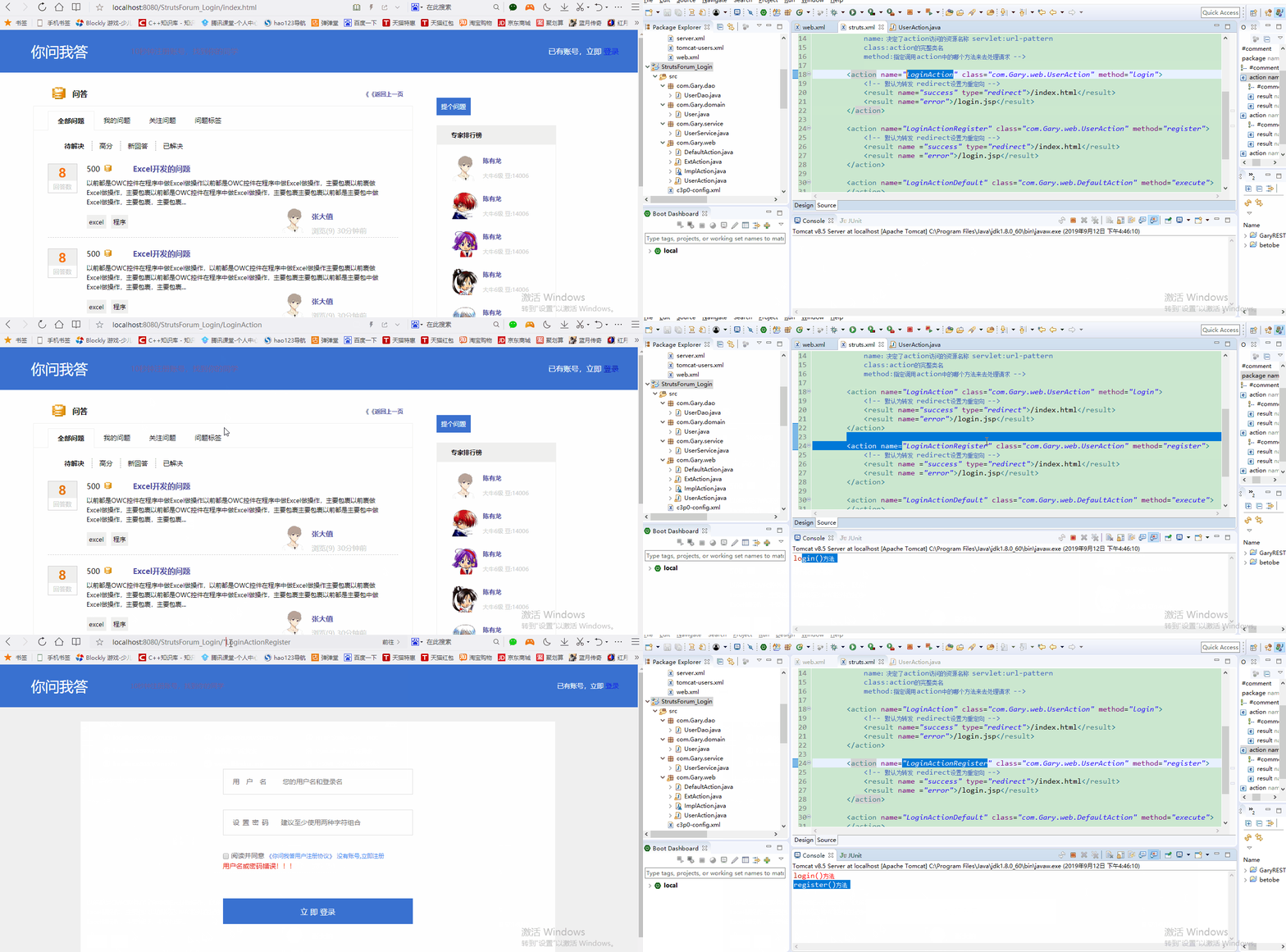
此时,如果想要访问com.Gary.web.UserAction路径下的login方法,就需要调用http://localhost:8080/StrutsForum_Login/LoginAction,如果想要访问com.Gary.web.UserAction路径下的register方法,就需要调用http://localhost:8080/StrutsForum_Login/LoginActionRegister。
package com.Gary.web;

import org.apache.struts2.ServletActionContext;

import com.Gary.domain.User;

import com.Gary.service.UserService;

import com.opensymphony.xwork2.ActionSupport;

import com.opensymphony.xwork2.ModelDriven;

public class UserAction extends ActionSupport implements ModelDriven<User>{

    public User user = new User();

    public String login() throws Exception {

        System.err.println("login()方法");

        UserService userService = new UserService();

        boolean success = userService.findUser(user);

        if(success)

        {

            return "success";

        }else{

            ServletActionContext.getRequest().setAttribute("error", "用户名或密码错误!!!");

            return "error";

        }

    }

    //注册

    public String register() throws Exception {

        System.err.println("register()方法");

        return null;

    }

    @Override

    public User getModel() {

        // TODO Auto-generated method stub

        return user;

    }

}
UserAction.java
<?xml version="1.0" encoding="UTF-8"?>

<!DOCTYPE struts PUBLIC

    "-//Apache Software Foundation//DTD Struts Configuration 2.5//EN"

    "http://struts.apache.org/dtds/struts-2.5.dtd">

<struts>

    <!-- name:配置包名 namespace:给action的访问路径定义一个命名空间 -->

    <package name="MyPackage" namespace="/" extends="struts-default">

        <!-- action:配置action类

            name:决定了action访问的资源名称  servlet:url-pattern

            class:action的完整类名

            method:指定调用action中的哪个方法来去处理请求  -->

        <action name="LoginAction" class="com.Gary.web.UserAction" method="login">

            <!-- 默认为转发  redirect设置为重定向  -->

            <result name="success" type="redirect">/index.html</result>

            <result name="error">/login.jsp</result>

        </action>

        <action name="LoginActionRegister" class="com.Gary.web.UserAction" method="register">

            <!-- 默认为转发  redirect设置为重定向  -->

            <result name ="success" type="redirect">/index.html</result>

            <result name ="error">/login.jsp</result>

        </action>

        <action name="LoginActionDefault" class="com.Gary.web.DefaultAction" method="execute">

        </action>

        <action name="LoginActionImpl" class="com.Gary.web.ImplAction" method="execute">

        </action>

    </package>

</struts>
struts.xml
如果每一个方法就需要在struct.xml中配置一个<action>,那配置多个方法时就有一些麻烦了,此时我们可以用到struct框架中的动态方法调用
使用动态方法调用一定注意在struct.xml中添加两行<constant>标签和一行<global-allowed-methods>
<constant name="struts.devMode" value="true"></constant>

<constant name="struts.enable.DynamicMethodInvocation" value="true"></constant>

<!-- 增加动态方法调用的安全性 -->

<global-allowed-methods>login,register,kill</global-allowed-methods>
三、结果集
        <action name="LoginAction_*" class="com.Gary.web.UserAction" method="{1}">

            <!-- 默认为转发  redirect设置为重定向  -->

            <result name="success" type="redirect">/index.html</result>

            <!-- 默认为转发 -->

            <result name="error">/login.jsp</result>

        </action>
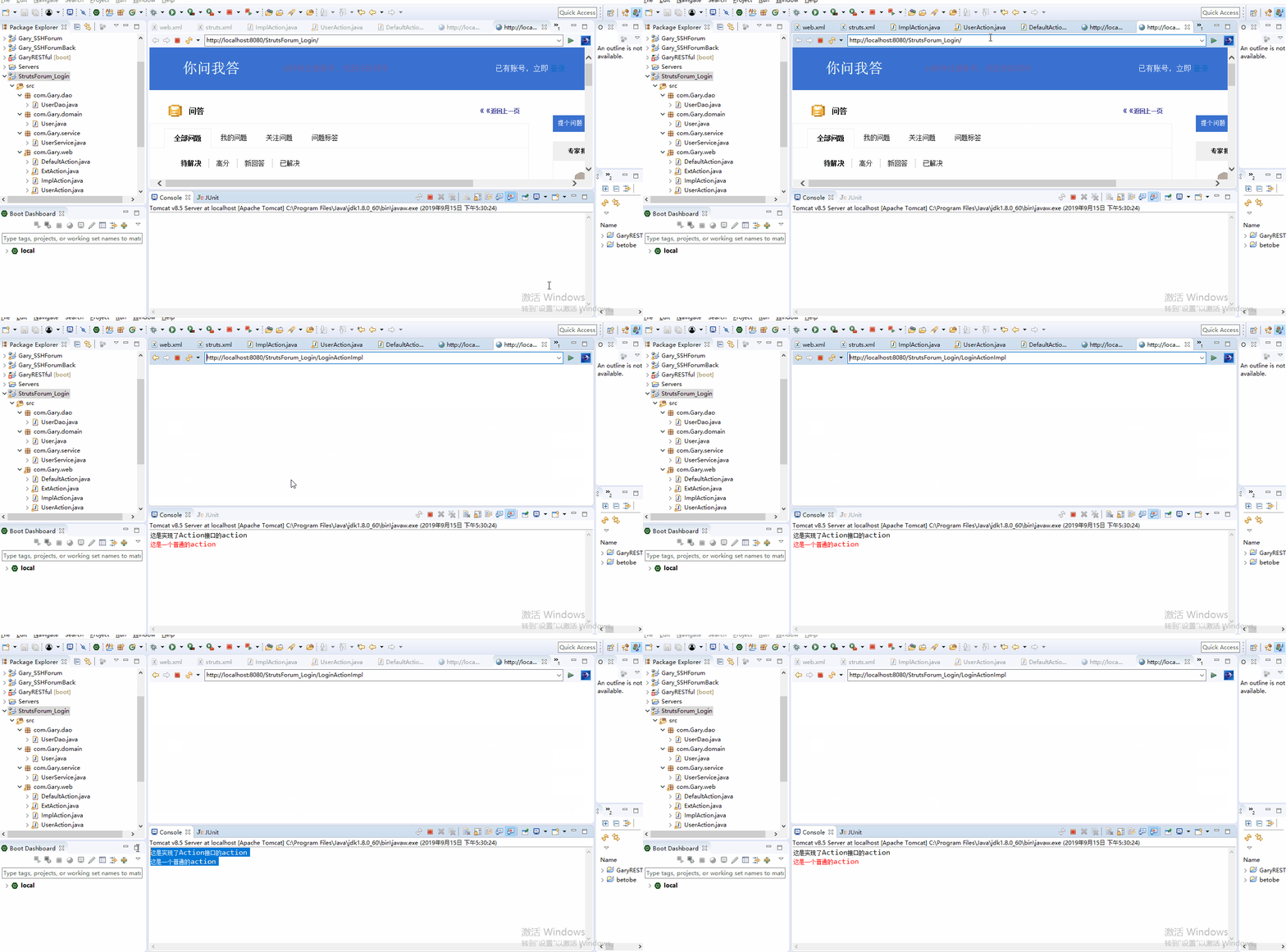
转发到Action【转发的路径是不会变的】
在struct.xml中配置动态方法调用
        <action name="LoginActionDefault" class="com.Gary.web.DefaultAction" method="execute">

        </action>

        <action name="LoginActionImpl" class="com.Gary.web.ImplAction" method="execute">

            <!-- 转发到LoginActionDefault -->

            <result name="defaultAction" type="chain">LoginActionDefault</result>

        </action>
ImplAction.java中编写execute()方法
    @Override

    public String execute() throws Exception {

        System.out.println("这是实现了Action接口的action");

        return "defaultAction";

    }
package com.Gary.web;

import com.opensymphony.xwork2.Action;

public class ImplAction implements Action{

    @Override

    public String execute() throws Exception {

        System.out.println("这是实现了Action接口的action");

        return "defaultAction";

    }

}
ImplAction.java
<?xml version="1.0" encoding="UTF-8"?>

<!DOCTYPE struts PUBLIC

    "-//Apache Software Foundation//DTD Struts Configuration 2.5//EN"

    "http://struts.apache.org/dtds/struts-2.5.dtd">

<struts>

    <constant name="struts.devMode" value="true"></constant>

    <constant name="struts.enable.DynamicMethodInvocation" value="true"></constant>

    <!-- name:配置包名 namespace:给action的访问路径定义一个命名空间 -->

    <package name="MyPackage" namespace="/" extends="struts-default">

        <!-- 增加动态方法调用的安全性 -->

        <global-allowed-methods>login,register,kill</global-allowed-methods>

        <!-- action:配置action类

            name:决定了action访问的资源名称  servlet:url-pattern

            class:action的完整类名

            method:指定调用action中的哪个方法来去处理请求  -->

        <action name="LoginAction_*" class="com.Gary.web.UserAction" method="{1}">

            <!-- 默认为转发  redirect设置为重定向  -->

            <result name="success" type="redirect">/index.html</result>

            <!-- 默认为转发 -->

            <result name="error">/login.jsp</result>

        </action>

        <action name="LoginActionDefault" class="com.Gary.web.DefaultAction" method="execute">

        </action>

        <action name="LoginActionImpl" class="com.Gary.web.ImplAction" method="execute">

            <!-- 转发到LoginActionDefault -->

            <result name="defaultAction" type="chain">LoginActionDefault</result>

        </action>

    </package>

</struts>
struts.xml
重定向到Action【转发的路径是不会变的】
在struts.xml中添加"toLogin"结果集,配置type="redirectAction"
<action name="LoginActionImpl_*" class="com.Gary.web.ImplAction" method="{1}">

            <!-- 转发到LoginActionDefault -->

            <result name="defaultAction" type="chain">LoginActionDefault</result>

            <!-- 重定向到Action(LoginAction_*) -->

            <result name="toLogin" type="redirectAction">

                <param name="actionName">LoginAction_login</param>

                <param name="username">${username}</param>

                <param name="password">${password}</param>

            </result>

        </action>
在ImplAction.java中添加login()方法,return去发起toLogin请求
    public String login()

    {

        //得到原生的request域

        //ServletActionContext.getRequest().setAttribute("username", "123");

        //ServletActionContext.getRequest().setAttribute("password", "123");

        ActionContext.getContext().put("username", "123");

        ActionContext.getContext().put("password", "123");

        return "toLogin";

    }
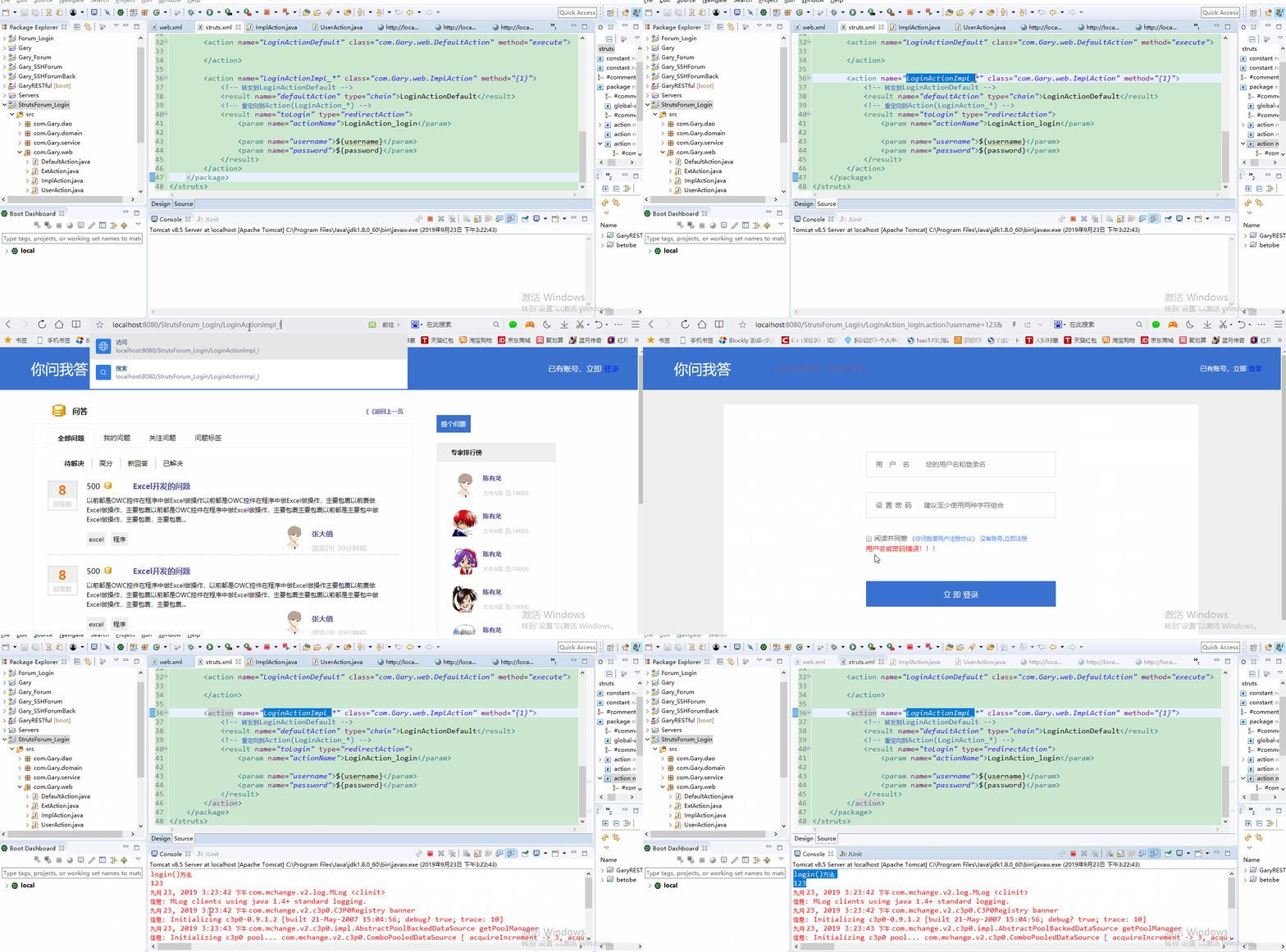
运行程序,在网页的url中输入http://localhost:8080/StrutsForum_Login/LoginActionImpl_login请求,请求后【http://localhost:8080/StrutsForum_Login/LoginAction_login路径不变
package com.Gary.web;

import org.apache.struts2.ServletActionContext;

import com.opensymphony.xwork2.Action;

import com.opensymphony.xwork2.ActionContext;

public class ImplAction implements Action{

    @Override

    public String execute() throws Exception {

        System.out.println("这是实现了Action接口的action");

        return "defaultAction";

    }

    public String login()

    {

        //得到原生的request域

        //ServletActionContext.getRequest().setAttribute("username", "123");

        //ServletActionContext.getRequest().setAttribute("password", "123");

        ActionContext.getContext().put("username", "123");

        ActionContext.getContext().put("password", "123");

        return "toLogin";

    }

}
ImplAction.java
<?xml version="1.0" encoding="UTF-8"?>

<!DOCTYPE struts PUBLIC

    "-//Apache Software Foundation//DTD Struts Configuration 2.5//EN"

    "http://struts.apache.org/dtds/struts-2.5.dtd">

<struts>

    <constant name="struts.devMode" value="true"></constant>

    <constant name="struts.enable.DynamicMethodInvocation" value="true"></constant>

    <!-- name:配置包名 namespace:给action的访问路径定义一个命名空间 -->

    <package name="MyPackage" namespace="/" extends="struts-default">

        <!-- 增加动态方法调用的安全性 -->

        <global-allowed-methods>regex:.*</global-allowed-methods>

        <!-- action:配置action类

            name:决定了action访问的资源名称  servlet:url-pattern

            class:action的完整类名

            method:指定调用action中的哪个方法来去处理请求  -->

        <action name="LoginAction_*" class="com.Gary.web.UserAction" method="{1}">

            <!-- 默认为转发  redirect设置为重定向  -->

            <result name="success" type="redirect">/index.html</result>

            <!-- 默认为转发 -->

            <result name="error">/login.jsp</result>

        </action>

        <action name="LoginActionDefault" class="com.Gary.web.DefaultAction" method="execute">

        </action>

        <action name="LoginActionImpl_*" class="com.Gary.web.ImplAction" method="{1}">

            <!-- 转发到LoginActionDefault -->

            <result name="defaultAction" type="chain">LoginActionDefault</result>

            <!-- 重定向到Action(LoginAction_*) -->

            <result name="toLogin" type="redirectAction">

                <param name="actionName">LoginAction_login</param>

                <param name="username">${username}</param>

                <param name="password">${password}</param>

            </result>

        </action>

    </package>

</struts>
struts.xml
JavaWeb_(Struts2框架)struts.xml核心配置、动态方法调用、结果集的处理的更多相关文章
- JavaWeb_(Struts2框架)Struts创建Action的三种方式
此系列博文基于同一个项目已上传至github 传送门 JavaWeb_(Struts2框架)Struts创建Action的三种方式 传送门 JavaWeb_(Struts2框架)struts.xml核 ...
- struts.enable.DynamicMethodInvocation = true 动态方法调用
default.properties 在Struts 2的核心jar包-struts2-core中,有一个default.properties的默认配置文件.里面配置了一些全局的信息,比如: stru ...
- struts.enable.DynamicMethodInvocation = true 动态方法调用(转)
原文地址:http://blog.csdn.net/wfcaven/article/details/5937557 default.properties 在Struts 2的核心jar包-struts ...
- struts2视频学习笔记 11-12(动态方法调用,接收请求参数)
课时11 动态方法调用 如果Action中存在多个方法时,可以使用!+方法名调用指定方法.(不推荐使用) public String execute(){ setMsg("execute&q ...
- Struts2学习-struts.xml文件配置
学习框架过程中,一直对框架中的配置文件比较难理解,特搜集资料简要记录一下struts.xml文件遇到的问题. <?xml version="1.0" encoding=&qu ...
- JavaWeb_(Struts2框架)Log4j的配置以及解决中文乱码
此系列博文基于同一个项目已上传至github 传送门 JavaWeb_(Struts2框架)Struts创建Action的三种方式 传送门 JavaWeb_(Struts2框架)struts.xml核 ...
- JavaWeb_(Struts2框架)拦截器interceptor
此系列博文基于同一个项目已上传至github 传送门 JavaWeb_(Struts2框架)Struts创建Action的三种方式 传送门 JavaWeb_(Struts2框架)struts.xml核 ...
- JavaWeb_(Struts2框架)Action中struts-default下result的各种转发类型
此系列博文基于同一个项目已上传至github 传送门 JavaWeb_(Struts2框架)Struts创建Action的三种方式 传送门 JavaWeb_(Struts2框架)struts.xml核 ...
- JavaWeb_(Struts2框架)Ognl小案例查询帖子
此系列博文基于同一个项目已上传至github 传送门 JavaWeb_(Struts2框架)Struts创建Action的三种方式 传送门 JavaWeb_(Struts2框架)struts.xml核 ...
随机推荐
- Validator自动验证与手动验证
自动: public JResult projectAdd(@Valid Project project, BindingResult result) {Map<String,Object> ...
- 题解 UVA1316 【Supermarket】
题目链接: https://www.luogu.org/problemnew/show/UVA1316 思路: 根据题目意思,我们需要用到贪心的思想,越晚过期的商品当然是越晚卖好.同时你假如有多个商品 ...
- 关于jar冲突的解决方向servlet-api
1.可以考虑尽量往 java自带的jar 靠 比如说jdk-tools 2.如果用springboot项目 让其他jar 排除servlet-api的依赖 <dependency> ...
- Windows+Nginx+Tomcat整合的安装与配置学习笔记
以下全部是nginx在window7下运行的: nginx学习总结: 我的是放在F盘 1.启动:F:\nginx-1.10.2\nginx-1.10.2>start nginx.exe(找到相应 ...
- 币种大写算法(js)
注意事项:小数精度处理问题,n*10出现精度误差,如1.88*10计算得18.799999999999997,实际想要的数据是18.8: 思路一:小数变成整数(通过字符串处理),计算后,变成小数: 思 ...
- 第十五章、线程之queue模块的各种队列
目录 第十五章.线程之queue模块的各种队列 一.Queue 二.LifoQueue堆栈 三.PriorityQueue优先级队列 第十五章.线程之queue模块的各种队列 一.Queue impo ...
- 使用busybox1.21.1制作根文件系统
1. 下载源码 https://busybox.net/downloads/ 2. 解压 3. 修改Makefile ~/busybox-1.21.1$ vi Makefile 164行: 修改前:C ...
- MG301使用笔记
[1]模块接收到的数据为16进制,显示乱码 配置命令:AT^IOMODE=1,1 设置对接收数据进行转换,当对端以 hex 格式发送数据,必须使用数据转换,否则数据无法完全上报.必须禁止使用缓存区.
- 基于MYCAT中间件实现MYSQL读写分离
基于mycat实现mysql读写分离 完成主从复制的配置 /* 主节点:192.168.47.101 从节点:192.168.47.102 */ /*mycat为同一网段客户端*/ /* 修改主节点基 ...
- python常用模块:模块练习
今日作业: 1.简述 什么是模块 模块就将一些函数功能封装在一个文件内,以‘文件名.py’命名,以“import 文件名”方式调用 模块有哪些来源 自定义.内置.DLL编译器.包模块的格式要求有哪些 ...