
JavaWeb_(Struts2框架)struts.xml核心配置、动态方法调用、结果集的处理
此系列博文基于同一个项目已上传至github 传送门
JavaWeb_(Struts2框架)Struts创建Action的三种方式 传送门
JavaWeb_(Struts2框架)struts.xml核心配置、动态方法调用、结果集的处理 传送门
JavaWeb_(Struts2框架)Log4j的配置以及解决中文乱码 传送门
JavaWeb_(Struts2框架)参数传递之接收参数与传递参数 传送门
JavaWeb_(Struts2框架)Ognl小案例查询帖子 传送门
JavaWeb_(Struts2框架)Action中struts-default下result的各种转发类型 传送门
JavaWeb_(Struts2框架)拦截器interceptor 传送门
核心配置
动态方法调用
结果集处理
一、核心配置
struts.xml
    <!-- name:配置包名 namespace:给action的访问路径定义一个命名空间 -->

    <package name="MyPackage" namespace="/user" extends="struts-default">

        <!-- action:配置action类

            name:决定了action访问的资源名称  servlet:url-pattern

            class:action的完整类名

            method:指定调用action中的哪个方法来去处理请求-->

        <action name="LoginAction" class="com.Gary.web.UserAction" method="execute">

            <!-- 默认为转发  redirect设置为重定向-->

            <result name="success" type="redirect">/index.html</result>

            <result name="error">/login.jsp</result>

        </action>

    </package>
namespace:作用是可以让不同的packet里面包含相同action名称,起虚拟路径作用
<package name="MyPackage" namespace="/" extends="struts-default"></package>
此时访问的路径http://localhost:8080/项目名字/请求
<package name="MyPackage" namespace="/user" extends="struts-default">
此时访问路径此时访问的路径http://localhost:8080/项目名字/user/请求
二、动态方法调用
在web层UserAction.java类中编写login()注册方法
        <action name="LoginAction" class="com.Gary.web.UserAction" method="login">

            <!-- 默认为转发  redirect设置为重定向  -->

            <result name="success" type="redirect">/index.html</result>

            <result name="error">/login.jsp</result>

        </action>
public String login() throws Exception {

        System.err.println("login()方法");

        UserService userService = new UserService();

        boolean success = userService.findUser(user);

        if(success)

        {

            return "success";

        }else{

            ServletActionContext.getRequest().setAttribute("error", "用户名或密码错误!!!");

            return "error";

        }

    }
在web层UserAction.java类中编写register()注册方法
        <action name="LoginActionRegister" class="com.Gary.web.UserAction" method="register">

            <!-- 默认为转发  redirect设置为重定向  -->

            <result name ="success" type="redirect">/index.html</result>

            <result name ="error">/login.jsp</result>

        </action>
    //注册

    public String register() throws Exception {

        System.err.println("register()方法");

        return null;

    }
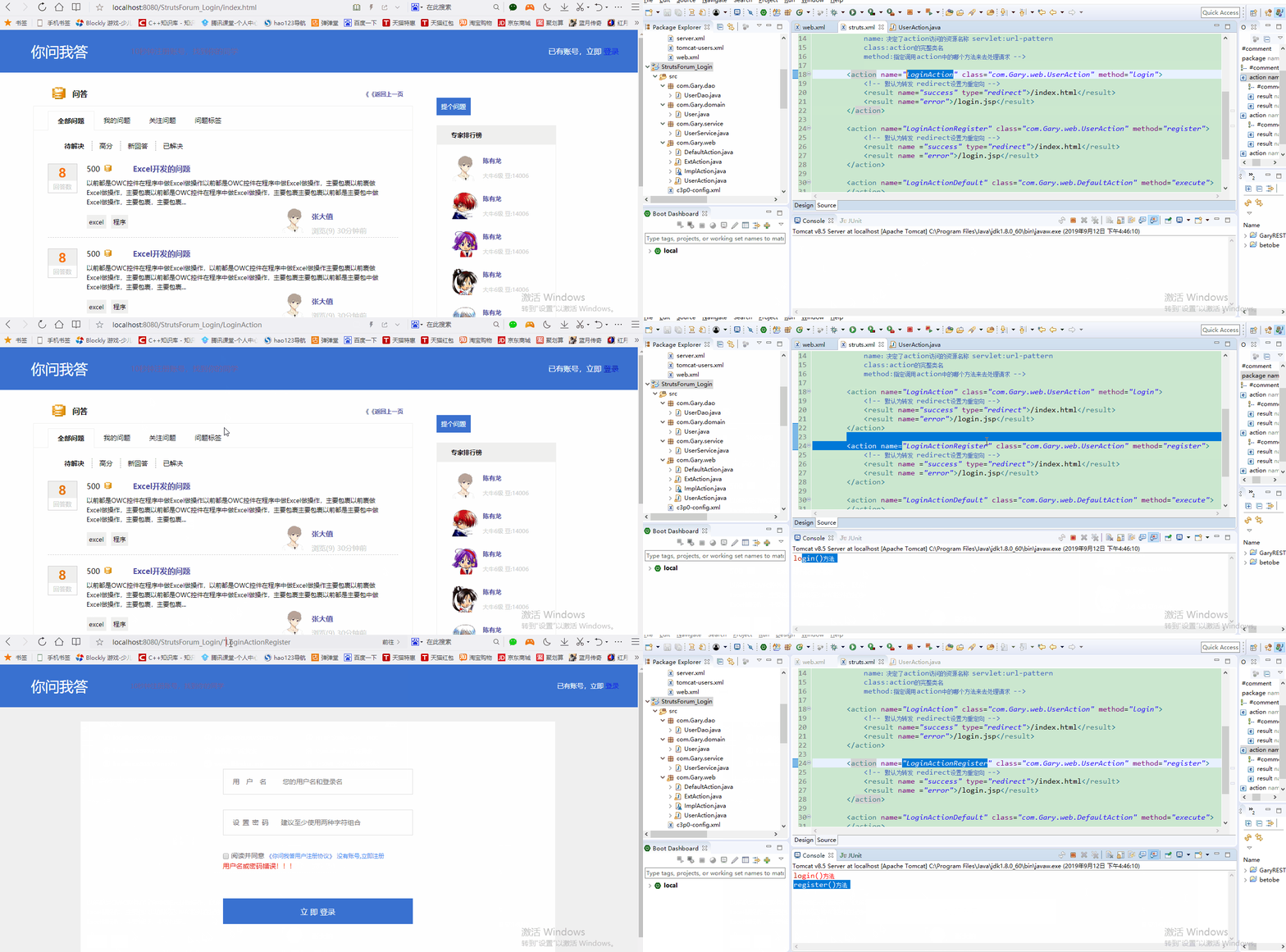
此时,如果想要访问com.Gary.web.UserAction路径下的login方法,就需要调用http://localhost:8080/StrutsForum_Login/LoginAction,如果想要访问com.Gary.web.UserAction路径下的register方法,就需要调用http://localhost:8080/StrutsForum_Login/LoginActionRegister。
package com.Gary.web;

import org.apache.struts2.ServletActionContext;

import com.Gary.domain.User;

import com.Gary.service.UserService;

import com.opensymphony.xwork2.ActionSupport;

import com.opensymphony.xwork2.ModelDriven;

public class UserAction extends ActionSupport implements ModelDriven<User>{

    public User user = new User();

    public String login() throws Exception {

        System.err.println("login()方法");

        UserService userService = new UserService();

        boolean success = userService.findUser(user);

        if(success)

        {

            return "success";

        }else{

            ServletActionContext.getRequest().setAttribute("error", "用户名或密码错误!!!");

            return "error";

        }

    }

    //注册

    public String register() throws Exception {

        System.err.println("register()方法");

        return null;

    }

    @Override

    public User getModel() {

        // TODO Auto-generated method stub

        return user;

    }

}
UserAction.java
<?xml version="1.0" encoding="UTF-8"?>

<!DOCTYPE struts PUBLIC

    "-//Apache Software Foundation//DTD Struts Configuration 2.5//EN"

    "http://struts.apache.org/dtds/struts-2.5.dtd">

<struts>

    <!-- name:配置包名 namespace:给action的访问路径定义一个命名空间 -->

    <package name="MyPackage" namespace="/" extends="struts-default">

        <!-- action:配置action类

            name:决定了action访问的资源名称  servlet:url-pattern

            class:action的完整类名

            method:指定调用action中的哪个方法来去处理请求  -->

        <action name="LoginAction" class="com.Gary.web.UserAction" method="login">

            <!-- 默认为转发  redirect设置为重定向  -->

            <result name="success" type="redirect">/index.html</result>

            <result name="error">/login.jsp</result>

        </action>

        <action name="LoginActionRegister" class="com.Gary.web.UserAction" method="register">

            <!-- 默认为转发  redirect设置为重定向  -->

            <result name ="success" type="redirect">/index.html</result>

            <result name ="error">/login.jsp</result>

        </action>

        <action name="LoginActionDefault" class="com.Gary.web.DefaultAction" method="execute">

        </action>

        <action name="LoginActionImpl" class="com.Gary.web.ImplAction" method="execute">

        </action>

    </package>

</struts>
struts.xml
如果每一个方法就需要在struct.xml中配置一个<action>,那配置多个方法时就有一些麻烦了,此时我们可以用到struct框架中的动态方法调用
使用动态方法调用一定注意在struct.xml中添加两行<constant>标签和一行<global-allowed-methods>
<constant name="struts.devMode" value="true"></constant>

<constant name="struts.enable.DynamicMethodInvocation" value="true"></constant>

<!-- 增加动态方法调用的安全性 -->

<global-allowed-methods>login,register,kill</global-allowed-methods>
三、结果集
        <action name="LoginAction_*" class="com.Gary.web.UserAction" method="{1}">

            <!-- 默认为转发  redirect设置为重定向  -->

            <result name="success" type="redirect">/index.html</result>

            <!-- 默认为转发 -->

            <result name="error">/login.jsp</result>

        </action>
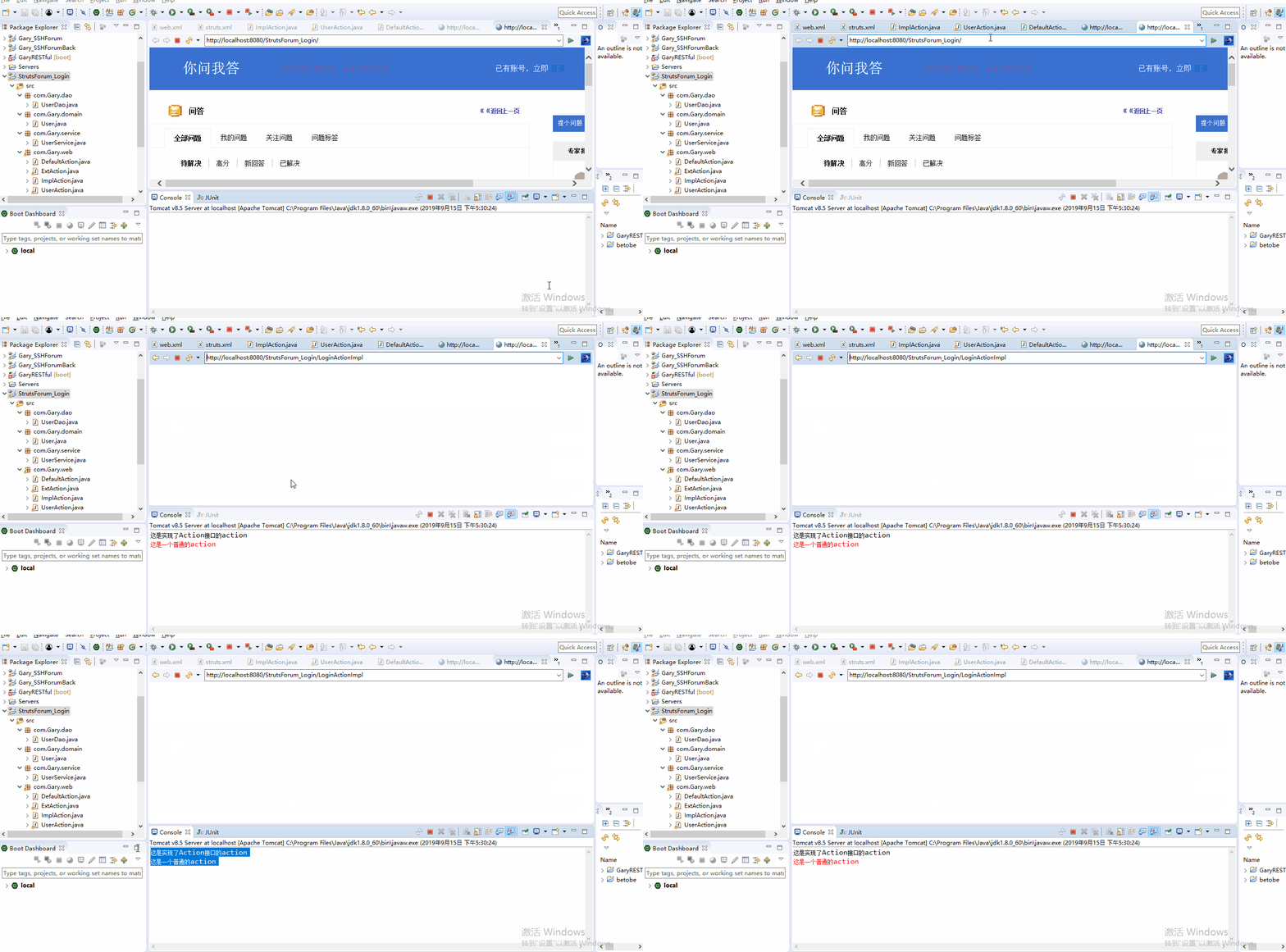
转发到Action【转发的路径是不会变的】
在struct.xml中配置动态方法调用
        <action name="LoginActionDefault" class="com.Gary.web.DefaultAction" method="execute">

        </action>

        <action name="LoginActionImpl" class="com.Gary.web.ImplAction" method="execute">

            <!-- 转发到LoginActionDefault -->

            <result name="defaultAction" type="chain">LoginActionDefault</result>

        </action>
ImplAction.java中编写execute()方法
    @Override

    public String execute() throws Exception {

        System.out.println("这是实现了Action接口的action");

        return "defaultAction";

    }
package com.Gary.web;

import com.opensymphony.xwork2.Action;

public class ImplAction implements Action{

    @Override

    public String execute() throws Exception {

        System.out.println("这是实现了Action接口的action");

        return "defaultAction";

    }

}
ImplAction.java
<?xml version="1.0" encoding="UTF-8"?>

<!DOCTYPE struts PUBLIC

    "-//Apache Software Foundation//DTD Struts Configuration 2.5//EN"

    "http://struts.apache.org/dtds/struts-2.5.dtd">

<struts>

    <constant name="struts.devMode" value="true"></constant>

    <constant name="struts.enable.DynamicMethodInvocation" value="true"></constant>

    <!-- name:配置包名 namespace:给action的访问路径定义一个命名空间 -->

    <package name="MyPackage" namespace="/" extends="struts-default">

        <!-- 增加动态方法调用的安全性 -->

        <global-allowed-methods>login,register,kill</global-allowed-methods>

        <!-- action:配置action类

            name:决定了action访问的资源名称  servlet:url-pattern

            class:action的完整类名

            method:指定调用action中的哪个方法来去处理请求  -->

        <action name="LoginAction_*" class="com.Gary.web.UserAction" method="{1}">

            <!-- 默认为转发  redirect设置为重定向  -->

            <result name="success" type="redirect">/index.html</result>

            <!-- 默认为转发 -->

            <result name="error">/login.jsp</result>

        </action>

        <action name="LoginActionDefault" class="com.Gary.web.DefaultAction" method="execute">

        </action>

        <action name="LoginActionImpl" class="com.Gary.web.ImplAction" method="execute">

            <!-- 转发到LoginActionDefault -->

            <result name="defaultAction" type="chain">LoginActionDefault</result>

        </action>

    </package>

</struts>
struts.xml
重定向到Action【转发的路径是不会变的】
在struts.xml中添加"toLogin"结果集,配置type="redirectAction"
<action name="LoginActionImpl_*" class="com.Gary.web.ImplAction" method="{1}">

            <!-- 转发到LoginActionDefault -->

            <result name="defaultAction" type="chain">LoginActionDefault</result>

            <!-- 重定向到Action(LoginAction_*) -->

            <result name="toLogin" type="redirectAction">

                <param name="actionName">LoginAction_login</param>

                <param name="username">${username}</param>

                <param name="password">${password}</param>

            </result>

        </action>
在ImplAction.java中添加login()方法,return去发起toLogin请求
    public String login()

    {

        //得到原生的request域

        //ServletActionContext.getRequest().setAttribute("username", "123");

        //ServletActionContext.getRequest().setAttribute("password", "123");

        ActionContext.getContext().put("username", "123");

        ActionContext.getContext().put("password", "123");

        return "toLogin";

    }
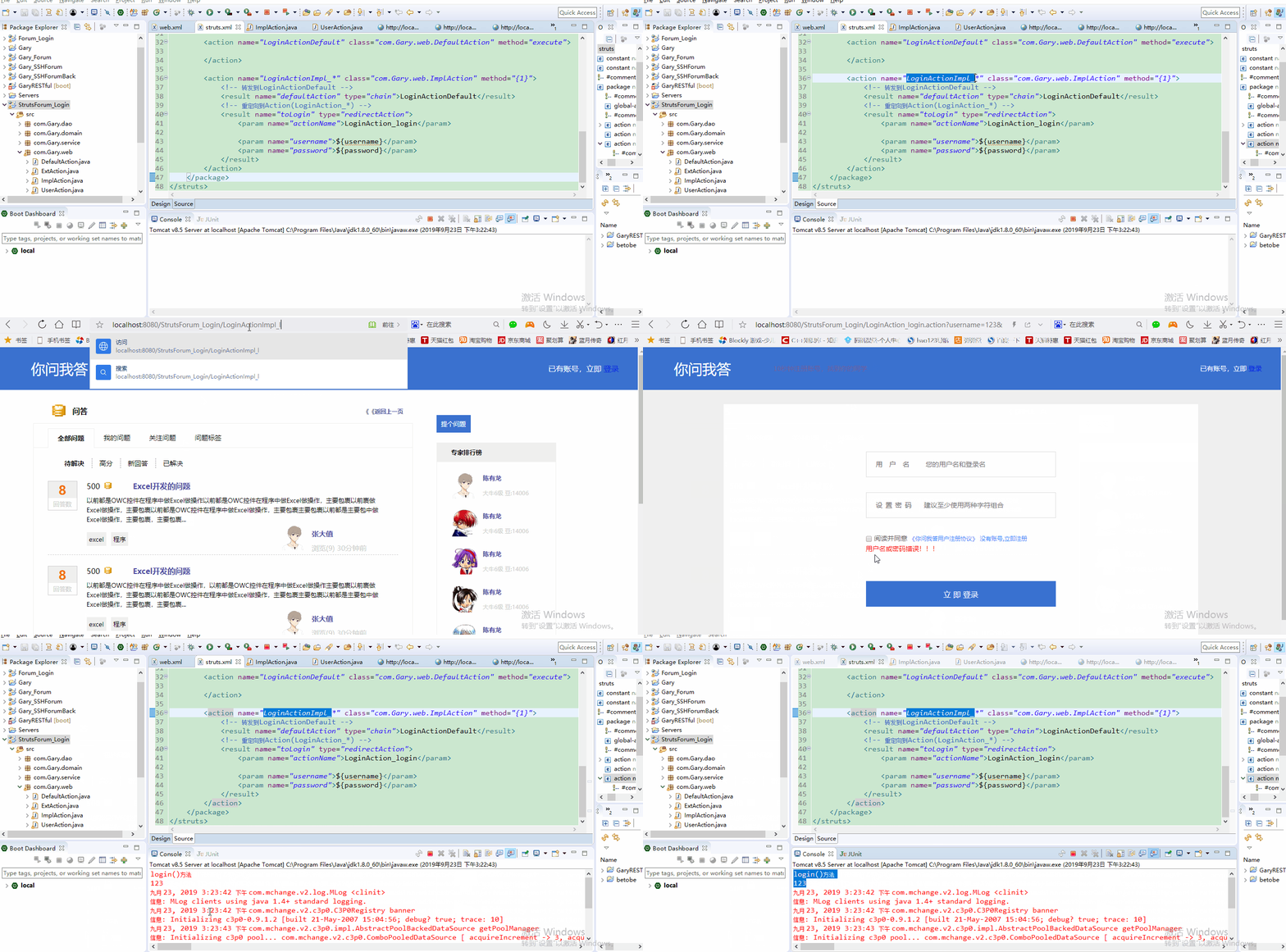
运行程序,在网页的url中输入http://localhost:8080/StrutsForum_Login/LoginActionImpl_login请求,请求后【http://localhost:8080/StrutsForum_Login/LoginAction_login路径不变
package com.Gary.web;

import org.apache.struts2.ServletActionContext;

import com.opensymphony.xwork2.Action;

import com.opensymphony.xwork2.ActionContext;

public class ImplAction implements Action{

    @Override

    public String execute() throws Exception {

        System.out.println("这是实现了Action接口的action");

        return "defaultAction";

    }

    public String login()

    {

        //得到原生的request域

        //ServletActionContext.getRequest().setAttribute("username", "123");

        //ServletActionContext.getRequest().setAttribute("password", "123");

        ActionContext.getContext().put("username", "123");

        ActionContext.getContext().put("password", "123");

        return "toLogin";

    }

}
ImplAction.java
<?xml version="1.0" encoding="UTF-8"?>

<!DOCTYPE struts PUBLIC

    "-//Apache Software Foundation//DTD Struts Configuration 2.5//EN"

    "http://struts.apache.org/dtds/struts-2.5.dtd">

<struts>

    <constant name="struts.devMode" value="true"></constant>

    <constant name="struts.enable.DynamicMethodInvocation" value="true"></constant>

    <!-- name:配置包名 namespace:给action的访问路径定义一个命名空间 -->

    <package name="MyPackage" namespace="/" extends="struts-default">

        <!-- 增加动态方法调用的安全性 -->

        <global-allowed-methods>regex:.*</global-allowed-methods>

        <!-- action:配置action类

            name:决定了action访问的资源名称  servlet:url-pattern

            class:action的完整类名

            method:指定调用action中的哪个方法来去处理请求  -->

        <action name="LoginAction_*" class="com.Gary.web.UserAction" method="{1}">

            <!-- 默认为转发  redirect设置为重定向  -->

            <result name="success" type="redirect">/index.html</result>

            <!-- 默认为转发 -->

            <result name="error">/login.jsp</result>

        </action>

        <action name="LoginActionDefault" class="com.Gary.web.DefaultAction" method="execute">

        </action>

        <action name="LoginActionImpl_*" class="com.Gary.web.ImplAction" method="{1}">

            <!-- 转发到LoginActionDefault -->

            <result name="defaultAction" type="chain">LoginActionDefault</result>

            <!-- 重定向到Action(LoginAction_*) -->

            <result name="toLogin" type="redirectAction">

                <param name="actionName">LoginAction_login</param>

                <param name="username">${username}</param>

                <param name="password">${password}</param>

            </result>

        </action>

    </package>

</struts>
struts.xml
JavaWeb_(Struts2框架)struts.xml核心配置、动态方法调用、结果集的处理的更多相关文章
- JavaWeb_(Struts2框架)Struts创建Action的三种方式
此系列博文基于同一个项目已上传至github 传送门 JavaWeb_(Struts2框架)Struts创建Action的三种方式 传送门 JavaWeb_(Struts2框架)struts.xml核 ...
- struts.enable.DynamicMethodInvocation = true 动态方法调用
default.properties 在Struts 2的核心jar包-struts2-core中,有一个default.properties的默认配置文件.里面配置了一些全局的信息,比如: stru ...
- struts.enable.DynamicMethodInvocation = true 动态方法调用(转)
原文地址:http://blog.csdn.net/wfcaven/article/details/5937557 default.properties 在Struts 2的核心jar包-struts ...
- struts2视频学习笔记 11-12(动态方法调用,接收请求参数)
课时11 动态方法调用 如果Action中存在多个方法时,可以使用!+方法名调用指定方法.(不推荐使用) public String execute(){ setMsg("execute&q ...
- Struts2学习-struts.xml文件配置
学习框架过程中,一直对框架中的配置文件比较难理解,特搜集资料简要记录一下struts.xml文件遇到的问题. <?xml version="1.0" encoding=&qu ...
- JavaWeb_(Struts2框架)Log4j的配置以及解决中文乱码
此系列博文基于同一个项目已上传至github 传送门 JavaWeb_(Struts2框架)Struts创建Action的三种方式 传送门 JavaWeb_(Struts2框架)struts.xml核 ...
- JavaWeb_(Struts2框架)拦截器interceptor
此系列博文基于同一个项目已上传至github 传送门 JavaWeb_(Struts2框架)Struts创建Action的三种方式 传送门 JavaWeb_(Struts2框架)struts.xml核 ...
- JavaWeb_(Struts2框架)Action中struts-default下result的各种转发类型
此系列博文基于同一个项目已上传至github 传送门 JavaWeb_(Struts2框架)Struts创建Action的三种方式 传送门 JavaWeb_(Struts2框架)struts.xml核 ...
- JavaWeb_(Struts2框架)Ognl小案例查询帖子
此系列博文基于同一个项目已上传至github 传送门 JavaWeb_(Struts2框架)Struts创建Action的三种方式 传送门 JavaWeb_(Struts2框架)struts.xml核 ...
随机推荐
- MySQL连表查询练习题
1.建库 库名:linux50 字符集:utf8 校验规则:utf8_general_ci  create database linux4 charset utf8 default collate ...
- 网络初级篇之STP(实验验证)
一.根桥的选举. 1.优先级相等时. (图1-1) (图1-2) 在上面1-1图中,已经标出桥的mac地址,桥的优先级为默认优先级(缺省:32768).任意一端口抓包,查看STP数据包内包含的信息,根 ...
- 二、CentOS 7安装部署GitLab服务器(解决邮箱发信问题)
一.环境安装(10.0.0) 1.安装依赖软件 yum -y install policycoreutils policycoreutils-python openssh-server openssh ...
- Select,poll,epoll复用
Select,poll,epoll复用 1)select模块以列表的形式接受四个参数,分别是可读对象,可写对象,产生异常的对象,和超时设置.当监控符对象发生变化时,select会返回发生变化的对象列表 ...
- 日常系统维护之修复linux的grub引导
恩,不知道怎么表达为win10的更新很烦人,其实我感觉windows用的不是那么顺手,但是制作视频的时候还是要用到,图片的话linux也可以胜任,毕竟GUN IMAGE还是挺不错的,但到了视频制作方面 ...
- 数据结构---->数组
1.什么是数组? 数组是一种线性的数据结构.它同一组连续的内存空间,来存储一组具有相同类型的数据. 简单说明几点: (1).线性表:就是数据排成像一条线一样的结构.每个线性表的数据最多只有前和后两个方 ...
- Python3.8新特性--PositionalOnly参数
“理论联系实惠,密切联系领导,表扬和自我表扬”——我就是老司机,曾经写文章教各位怎么打拼职场的老司机. 不记得没关系,只需要知道:有这么一位老司机, 穿上西装带大家打拼职场! 操起键盘带大家打磨技术! ...
- 白话跨域CORS
跨域访问控制是浏览器和服务器按照约定,协同工作,守护安全的一种机制. 其中认为浏览器和服务器是安全的,但是浏览器上运行的页面(HTML+JS)可能不安全. 分几种不同方式. 页面跨域简单请求(Get/ ...
- zoomeye使用
简介 ZoomEye是一款针对网络空间的搜索引擎,收录了互联网空间中的设备.网站及其使用的服务或组件等信息. ZoomEye 拥有两大探测引擎:Xmap 和 Wmap,分别针对网络空间中的设备及网站, ...
- Linux之apt-get软件管理
apt-get 用Linux apt-get命令的第一步就是引入必需的软件库,Debian的软件库也就是所有Debian软件包的集合,它们存在互联网上的一些公共站点上.把它们的地址加入,apt-get ...