
vue-时间插件,效果见图
<template>

  <div class="select-time-wrapper">

    <h5 class="titie">选择自提时间</h5>

    <div class="select-time-content flex">

      <ul class="days">

        <li

          v-for="(item, i) in days"

          :key="i"

          class="select-day"

          :class="{ current: currentDay === i }"

          @click="currentDay = i"

        >

          {{ item }}

        </li>

      </ul>

      <ul class="time-range">

        <li

          v-for="(item, i) in displayTimeRange"

          :key="i"

          class="select-time"

          @click="handleTimeClick(i)"

        >

          <span class="txt">{{ item }}</span>

          <i class="icon"></i>

        </li>

      </ul>

    </div>

  </div>

</template>

<script>

import dayjs from 'dayjs';

const checkNum = num => (num < 10 ? `0${num}` : String(num));

const suffixZero = str => `${str}:00`;

const translateToDays = {

  0: '周日',

  1: '周一',

  2: '周二',

  3: '周三',

  4: '周四',

  5: '周五',

  6: '周六'

};

const defaultSelectedDay = 0;

export default {

  name: 'SelectTime',

  data() {

    const date = dayjs();

    const tomorrow = date.add(1, 'day');

    const theDayAfterTomorrow = date.add(2, 'day');

    const days = [

      `今日(${translateToDays[date.day()]})`,

      `明日(${translateToDays[tomorrow.day()]})`,

      `${theDayAfterTomorrow.format('M-DD')}(${

        translateToDays[theDayAfterTomorrow.day()]

      })`

    ];

    return {

      days,

      currentDay: defaultSelectedDay,

      initialArr: [],

      maxHour: 22,

      minHour: 9,

      selectedTime: ''

    };

  },

  computed: {

    displayTimeRange() {

      const { currentDay, initialArr, minHour, maxHour } = this;

      const currentHour = new Date().getHours();

      const sliceStart =

        currentHour < minHour || currentHour + 1 > maxHour

          ? 0

          : currentHour + 1 - minHour;

      return currentDay === defaultSelectedDay

        ? initialArr.slice(sliceStart)

        : [...initialArr];

    }

  },

  created() {

    this.initialArr = this.generateArr();

  },

  methods: {

    generateArr() {

      const { minHour, maxHour } = this;

      var arr = [];

      for (let i = minHour; i < maxHour; i++) {

        arr.push(

          [suffixZero(checkNum(i)), '-', suffixZero(checkNum(i + 1))].join('')

        );

      }

      return arr;

    },

    handleTimeClick(i) {

      this.selectedTime = this.displayTimeRange[i];

    }

  }

};

</script>

<style lang="scss" scoped>

.select-time-wrapper {

  .titie {

    padding: 10px;

    text-align: center;

  }

  .select-time-content {

    display: flex;

    .days {

      width: 120px;

      background-color: #ddd;

      text-align: center;

    }

    .time-range {

      flex: 1;

      height: 200px;

      overflow-y: scroll;

      -webkit-overflow-scrolling: smooth;

    }

    .select-day,

    .select-time {

      cursor: pointer;

    }

    .select-day {

      &.current {

        background-color: #fff;

      }

    }

  }

}

</style>
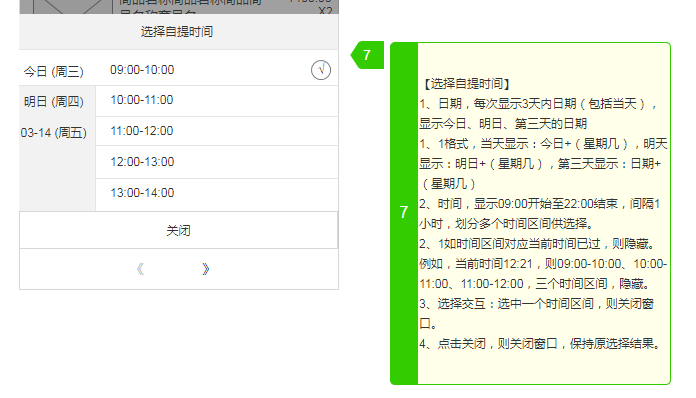
vue-时间插件,效果见图的更多相关文章
- vue使用日期时间插件layDate
项目中需要用到日期时间插件,尝试用bootstrap.element的时间插件都各有各的报错,对于一个菜鸟来说真的是很痛苦啊.终于,最后用了layDate实现了需要的功能 最终效果: 使用步骤: 1. ...
- vue+elementUI封装的时间插件(有起始时间不能大于结束时间的验证)
vue+elementUI封装的时间插件(有起始时间不能大于结束时间的验证): html: <el-form-item label="活动时间" required> & ...
- 写一个Vue loading 插件
什么是vue插件? 从功能上说,插件是为Vue添加全局功能的一种机制,比如给Vue添加一个全局组件,全局指令等: 从代码结构上说,插件就是一个必须拥有install方法的对象,这个方法的接收的第一个参 ...
- vue各种插件汇总
https://blog.csdn.net/wh8_2011/article/details/80497620(copy) Vue是什么? Vue.js(读音 /vjuː/, 类似于 view) 是一 ...
- VUE图片懒加载-vue lazyload插件的简单上手使用(优化版本)
在用VUE做项目开发的过程中,首页用到了懒加载的方法,查找了一些方法,觉得官网写得太复杂,有一篇博客不错(https://www.cnblogs.com/xyyt/p/7650539.html),但是 ...
- vue 常用插件,保存
UI组件 element- 饿了么出品的Vue2的web UI工具套件 Vux- 基于Vue和WeUI的组件库 mint-ui- Vue 2的移动UI元素 iview- 基于 Vuejs 的开源 UI ...
- vue自定义插件封装,实现简易的elementUi的Message和MessageBox
vue自定义插件封装示例 1.实现message插件封装(类似简易版的elementUi的message) message组件 <template> <transition ...
- bootstrap时间插件 火狐不显示 完美解决方法
原文链接:http://www.phpbiji.cn/article/index/id/141/cid/4.html bootstrap时间插件火狐 bootstrap-datetimepicker火 ...
- jquery仿ios日期时间插件
Demo下载: 手机时间控件.zip 使用之前,请在页面中加入以下js和css: jquery-1.9.1.js mobiscroll.core-2.5.2.js mobiscroll.core-2. ...
- Asp.net+jquery+ajaxpro异步仿Facebook纵向时间轴效果
Asp.net+jquery+ajaxpro异步仿Facebook纵向时间轴效果 在一个项目中,用到了时间轴展示产品的开发进度,为了更好用户体验,想到了Facebook的timeline效果, 搜了一 ...
随机推荐
- leetcode-hard-array- 227. Basic Calculator II
mycode 29.58% class Solution(object): def calculate(self, s): """ :type s: str :rtyp ...
- hive 使用笔记(table format;lateral view横表转纵表)
1. create table 创建一张目标表,指定分隔符和存储格式: create table tmp_2 (resource_id bigint ,v int) ROW FORMAT DELIMI ...
- 利用ExpandableListView实现常用号码查询功能的实现
package com.loaderman.expandablelistviewdemo; import android.content.Context; import android.databas ...
- ajax post 请求
$(".login_btn").click(function(){ if($(".user_").val()=="admin"&&a ...
- [笔记] 如何在Windows上同时打开多个钉钉?
钉钉防多开原理 常规程序防止多开,会使用Mutex. 钉钉是常规程序,所以也是使用Mutex. 查找钉钉使用的Mutex 工具:ProcessExplorer.exe 启动钉钉,然后使用Process ...
- Selenium下Chrome配置
地址:https://peter.sh/experiments/chromium-command-line-switches/ chrome_options.add_argument('--headl ...
- mysql实现id自增
用下面这句话就可以实现插入mysql数据时候实现id自增 create table shuju (id int(10) auto_increment primary key,name varchar( ...
- 【转】Java从hdfs上读取文件中的某一行
[From]https://blog.csdn.net/u010989078/article/details/51790166 package test; import java.io.Buffere ...
- .net core中读取配置文件
1)先看丑陋的方法 读取 appsettings.json 然后在 Startup 的 ConfigureServices() 方法中进行注入: public IConfigurationRoot ...
- mysql账户授权
mysql新加用户及授权 --登录数据库mysql -uroot -p --查询当前用户1.SELECT User, Host FROM mysql.user;2.select host,user,a ...