
JavaFX WebView and WebEngine Tutorial教程
JavaFX WebView
JavaFX WebView is a mini browser that is called as an embedded browser in JavaFX application. This browser is based on WebKit that is a open source code browser engine to support CSS, JavaScript, DOM and HTML5.
- JavaFX WebView enables you to perform the following tasks in your JavaFX applications:
- Render HTML content from local and remote URLs
- Obtain Web history
- Execute JavaScript commands
- Perform upcalls from JavaScript to JavaFX
- Manage web pop-up windows
- Apply effects to the embedded browser
The current implementation ( JavaFX 2.3) of the WebView component supports the following HTML5 features: - Canvas
- Media Playback
- Form controls (except for
<input type="color">) - Editable content
- History maintenance
- Support for the
<meter>and<progress> - Support for the
<details>and<summary> - DOM
- SVG
- Support for domain names written in national languages
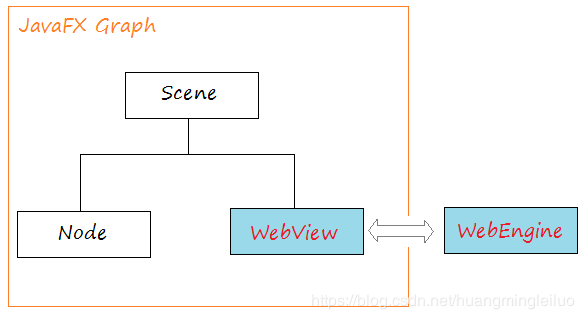
The image below is the architecture of embedded browser in JavaFX:
WebEngine
The WebEngine class provides basic web page functionality. It supports user interaction such as navigating links and submitting HTML forms, although it does not interact with users directly. The WebEngine class handles one web page at a time. It supports the basic browsing features of loading HTML content and accessing the DOM as well as executing JavaScript commands.
WebView
WebView is extended from Node class, it wraps a WebEngine object and displays Html content. You can get WebEngine object from WebView using getEngine() method.
// Create a WebView

WebView browser = new WebView();

// Get WebEngine via WebView

WebEngine webEngine = browser.getEngine();

// Load page

webEngine.load("http://eclipse.com");
WebView example
Load a remote URL.
WebView browser = new WebView();

WebEngine webEngine = browser.getEngine();

String url = "https://eclipse.org";

// Load a page from remote url.

webEngine.load(url);
Besides the display content of a remote URL, you also can display the static HTML content.
// A HTML text

String html = "<html><h1>Hello</h1><h2>Hello</h2></html>";

// Load content.

webEngine.loadContent(html);

// Or

webEngine.loadContent(html,"text/html");
Or loading html content from a local file.
File file = new File("C:/test/a.html");

URL url= file.toURI().toURL();

// file:/C:/test/a.html

webEngine.load(url.toString());
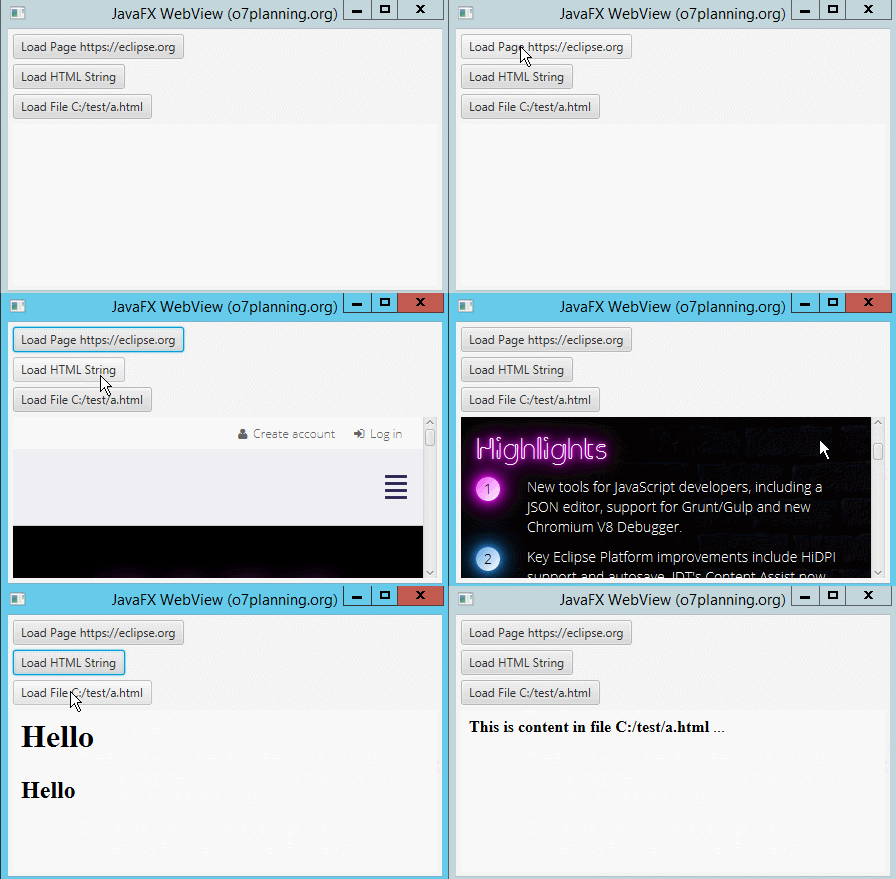
Let's see the example of WebView. Note that the default WebView had a ScrollPane, scrolls will display when the website content is bigger than display area.
WebViewDemo.java
import java.io.File;

import java.net.MalformedURLException;

import java.net.URL;

import javafx.application.Application;

import javafx.event.ActionEvent;

import javafx.event.EventHandler;

import javafx.geometry.Insets;

import javafx.scene.Scene;

import javafx.scene.control.Button;

import javafx.scene.layout.VBox;

import javafx.scene.web.WebEngine;

import javafx.scene.web.WebView;

import javafx.stage.Stage;

public class WebViewDemo extends Application {

    @Override

    public void start(final Stage stage) {

        Button buttonURL = new Button("Load Page https://eclipse.org");

        Button buttonHtmlString = new Button("Load HTML String");

        Button buttonHtmlFile = new Button("Load File C:/test/a.html");

        final WebView browser = new WebView();

        final WebEngine webEngine = browser.getEngine();

        buttonURL.setOnAction(new EventHandler<ActionEvent>() {

            @Override

            public void handle(ActionEvent event) {

                String url = "https://eclipse.org";

                // Load a page from remote url.

                webEngine.load(url);

            }

        });

        buttonHtmlString.setOnAction(new EventHandler<ActionEvent>() {

            @Override

            public void handle(ActionEvent event) {

                String html = "<html><h1>Hello</h1><h2>Hello</h2></html>";

                // Load HTML String

                webEngine.loadContent(html);

            }

        });

        buttonHtmlFile.setOnAction(new EventHandler<ActionEvent>() {

            @Override

            public void handle(ActionEvent event) {

                try {

                    File file = new File("C:/test/a.html");

                    URL url = file.toURI().toURL();

                    // file:/C:/test/a.html

                    System.out.println("Local URL: " + url.toString());

                    webEngine.load(url.toString());

                } catch (MalformedURLException e) {

                    e.printStackTrace();

                }

            }

        });

        VBox root = new VBox();

        root.setPadding(new Insets(5));

        root.setSpacing(5);

        root.getChildren().addAll(buttonURL, buttonHtmlString, buttonHtmlFile, browser);

        Scene scene = new Scene(root);

        stage.setTitle("JavaFX WebView (o7planning.org)");

        stage.setScene(scene);

        stage.setWidth(450);

        stage.setHeight(300);

        stage.show();

    }

    public static void main(String[] args) {

        launch(args);

    }

}
WebView and ProgressBar example
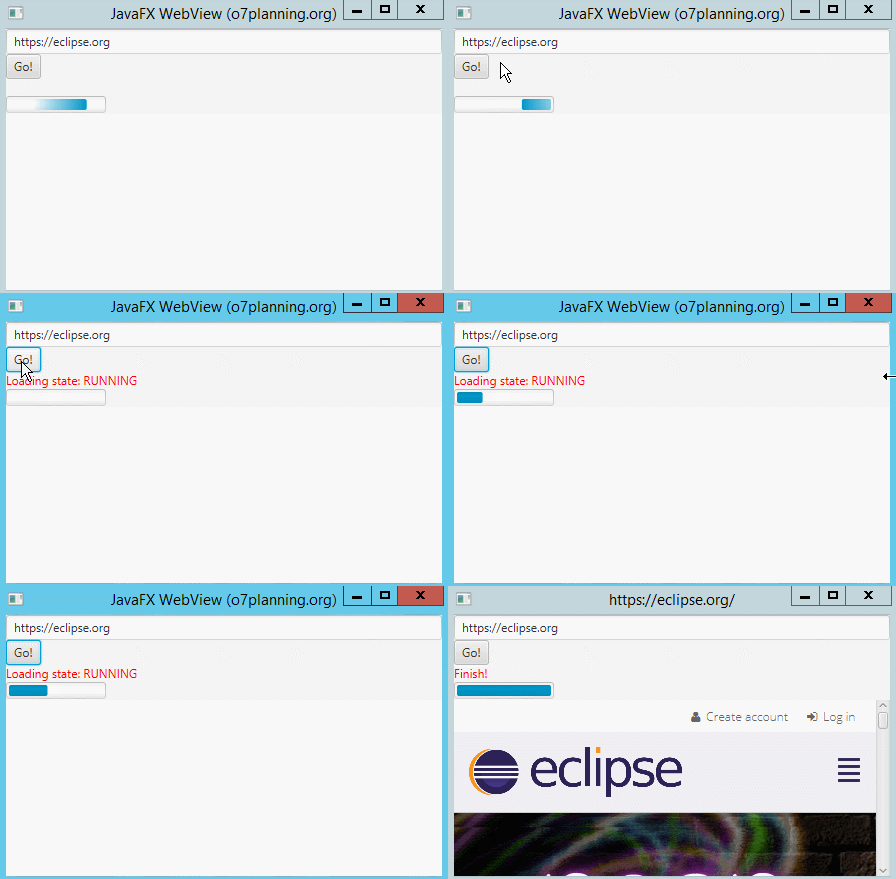
Loading a website to browser takes some time. In some cases, you need to use a ProgressBar in order to display the percentage of uploading website.
WebViewWithProgressDemo.java
import javafx.application.Application;

import javafx.beans.value.ChangeListener;

import javafx.beans.value.ObservableValue;

import javafx.concurrent.Worker;

import javafx.concurrent.Worker.State;

import javafx.event.ActionEvent;

import javafx.event.EventHandler;

import javafx.scene.Scene;

import javafx.scene.control.Button;

import javafx.scene.control.Label;

import javafx.scene.control.ProgressBar;

import javafx.scene.control.TextField;

import javafx.scene.layout.VBox;

import javafx.scene.paint.Color;

import javafx.scene.web.WebEngine;

import javafx.scene.web.WebView;

import javafx.stage.Stage;

public class WebViewWithProgressDemo extends Application {

   @Override

   public void start(final Stage stage) {

       TextField addressBar = new TextField();

       addressBar.setText("https://eclipse.org");

       Button goButton = new Button("Go!");

       Label stateLabel = new Label();

       stateLabel.setTextFill(Color.RED);

       ProgressBar progressBar = new ProgressBar();

       final WebView browser = new WebView();

       final WebEngine webEngine = browser.getEngine();

       // A Worker load the page

       Worker<Void> worker = webEngine.getLoadWorker();

        // Listening to the status of worker

       worker.stateProperty().addListener(new ChangeListener<State>() {

           @Override

           public void changed(ObservableValue<? extends State> observable, State oldValue, State newValue) {

               stateLabel.setText("Loading state: " + newValue.toString());

               if (newValue == Worker.State.SUCCEEDED) {

                   stage.setTitle(webEngine.getLocation());

                   stateLabel.setText("Finish!");

               }

           }

       });

       // Bind the progress property of ProgressBar

       // with progress property of Worker

       progressBar.progressProperty().bind(worker.progressProperty());

       goButton.setOnAction(new EventHandler<ActionEvent>() {

           @Override

           public void handle(ActionEvent event) {

               String url = addressBar.getText();

               // Load the page.

               webEngine.load(url);

           }

       });

       //

       VBox root = new VBox();

       root.getChildren().addAll(addressBar, goButton, stateLabel, progressBar, browser);

       Scene scene = new Scene(root);

       stage.setTitle("JavaFX WebView (o7planning.org)");

       stage.setScene(scene);

       stage.setWidth(450);

       stage.setHeight(300);

       stage.show();

   }

   public static void main(String[] args) {

       launch(args);

   }

}
Calling Javascript from JavaFX
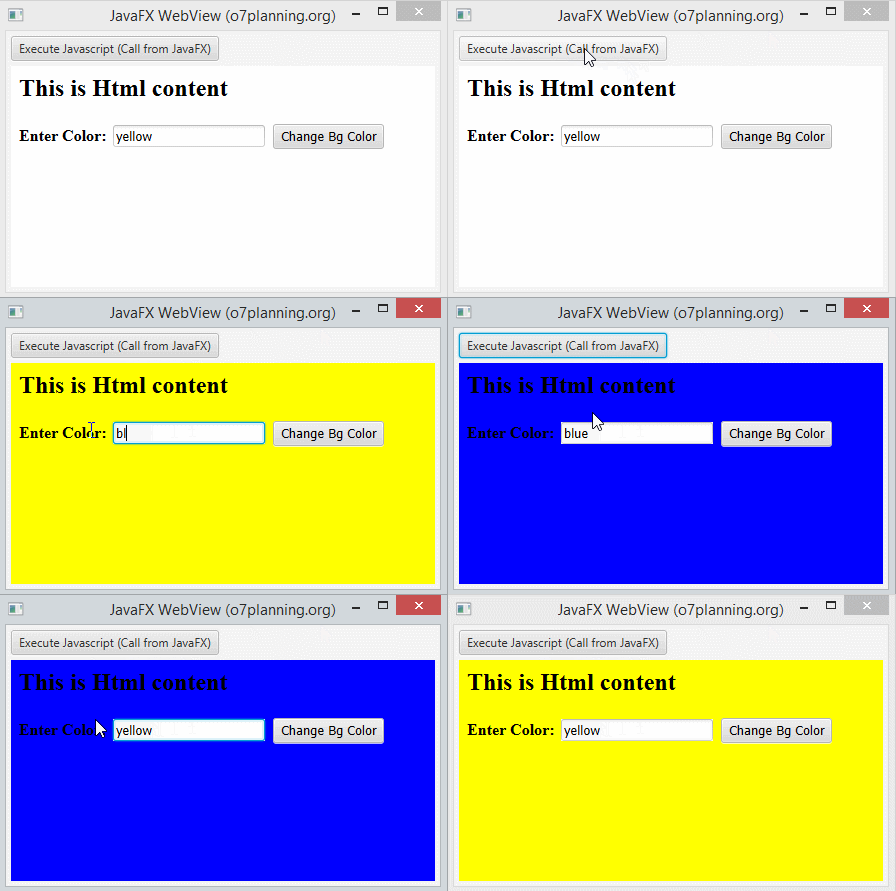
After WebView loads a website, you can interact with the webpage from JavaFX. The example below illustrates that when user clicks on a Button of JavaFX application, it will call a Javascript function of webpage displaying on WebView.
// Enable Javascript.

webEngine.setJavaScriptEnabled(true);

// Call a JavaScript function of the current page

webEngine.executeScript("changeBgColor();");
WebViewExecuteJsDemo.java
import javafx.scene.layout.VBox;

import javafx.scene.web.WebEngine;

import javafx.scene.web.WebView;

import javafx.stage.Stage;

public class WebViewExecuteJsDemo extends Application {

   // A HTML Content with a javascript function.

   private static String HTML_STRING = //

           "<html>"//

                   + "<head> " //

                   + "  <script language='javascript'> " //

                   + "     function changeBgColor()  { "//

                   + "       var color= document.getElementById('color').value; "//

                   + "       document.body.style.backgroundColor= color; " //

                   + "     } " //

                   + "  </script> "//

                   + "</head> "//

                   + "<body> "//

                   + "   <h2>This is Html content</h2> "//

                   + "   <b>Enter Color:</b> "//

                   + "   <input id='color' value='yellow' /> "//

                   + "   <button onclick='changeBgColor();'>Change Bg Color</button> "//

                   + "</body> "//

                   + "</html> "//

   ;

   @Override

   public void start(final Stage stage) {

       Button button = new Button("Execute Javascript (Call from JavaFX)");

       final WebView browser = new WebView();

       final WebEngine webEngine = browser.getEngine();

       // Enable Javascript.

       webEngine.setJavaScriptEnabled(true);

       webEngine.loadContent(HTML_STRING);

       button.setOnAction(new EventHandler<ActionEvent>() {

           @Override

           public void handle(ActionEvent event) {

               // Call a JavaScript function of the current page

               webEngine.executeScript("changeBgColor();");

           }

       });

       VBox root = new VBox();

       root.setPadding(new Insets(5));

       root.setSpacing(5);

       root.getChildren().addAll(button, browser);

       Scene scene = new Scene(root);

       stage.setTitle("JavaFX WebView (o7planning.org)");

       stage.setScene(scene);

       stage.setWidth(450);

       stage.setHeight(300);

       stage.show();

   }

   public static void main(String[] args) {

       launch(args);

   }

}
You can access Javascript objects via Java objects. Most of the Javascript objects are wrapped by netscape.javascript.JSObject class. The methods of JSObject:
public Object call(String methodName, Object... args);

public Object eval(String s);

public Object getMember(String name);

public void setMember(String name, Object value);

public void removeMember(String name);

public Object getSlot(int index);

public void setSlot(int index, Object value);
Example:
// Back Browser History

webEngine.executeScript("history.back()");

// Or

// Get the object representing the history of JavaScript objects JSObject.

JSObject history = (JSObject) webEngine.executeScript("history");

// Call 'back' method, without parameter.

history.call("back");
A special case is when a JavaScript call returns a DOM Node. In this case, the result is wrapped in an instance of JSObject that also implements org.w3c.dom.Node.
Element p = (Element) ebEngine.executeScript("document.getElementById('para')");

p.setAttribute("style", "font-weight: bold");
Making Upcalls from JavaScript to JavaFX
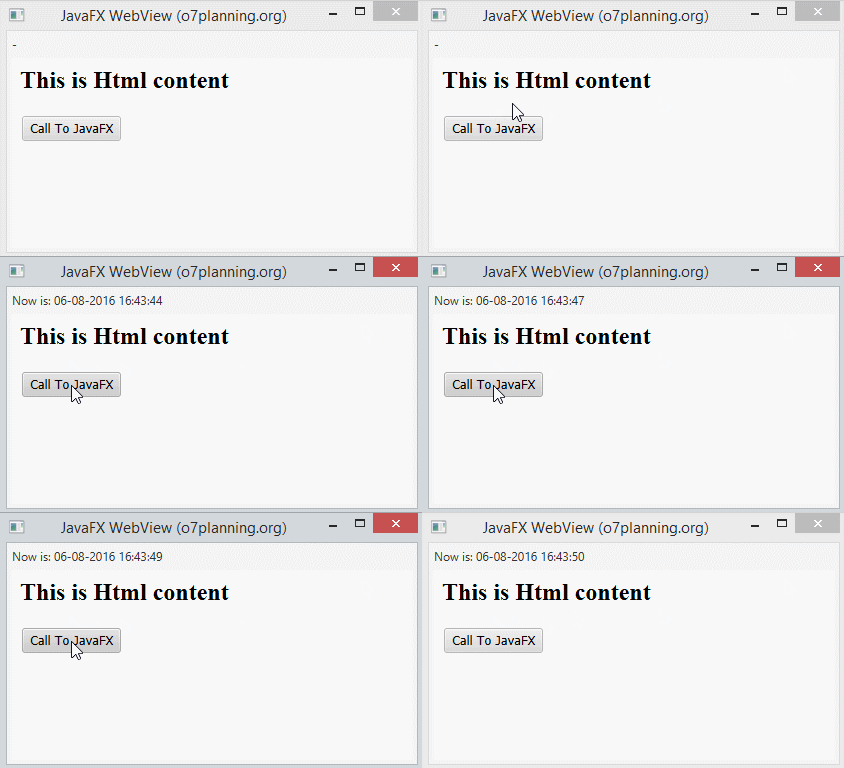
Above, you can call a Javascript function displaying on WebView from JavaFX. Reversely, you also can create Upcalls from Javascript to JavaFX.
On the JavaFX side, you need to create an interface object (of any class) and make it known to JavaScript by calling JSObject.setMember(). Having performed this, you can call public methods from JavaScript and access public fields of that object.
// A Bridge class and must a public class

public class Bridge {

    public void showTime() {

        System.out.println("Show Time");

        label.setText("Now is: " + df.format(new Date()));

    }

}

// Get window object of page.

JSObject jsobj = (JSObject) webEngine.executeScript("window");

// Set member cho đối tượng 'window'

jsobj.setMember("myJavaMember", new Bridge());
In HTML:
<!-- In HTML -->

<button onclick='myJavaMember.showTime();'>Call To JavaFX</button>
View full example:
WebViewUpCallsDemo.java
package org.o7planning.javafx.webview;

import java.text.DateFormat;

import java.text.SimpleDateFormat;

import java.util.Date;

import javafx.application.Application;

import javafx.beans.value.ChangeListener;

import javafx.beans.value.ObservableValue;

import javafx.concurrent.Worker;

import javafx.concurrent.Worker.State;

import javafx.geometry.Insets;

import javafx.scene.Scene;

import javafx.scene.control.Label;

import javafx.scene.layout.VBox;

import javafx.scene.web.WebEngine;

import javafx.scene.web.WebView;

import javafx.stage.Stage;

import netscape.javascript.JSObject;

public class WebViewUpCallsDemo extends Application {

    private DateFormat df = new SimpleDateFormat("dd-MM-yyyy HH:mm:ss");

    private Label label;

    // A Bridge class and must a public class

    public class Bridge {

        public void showTime() {

            System.out.println("Show Time");

            label.setText("Now is: " + df.format(new Date()));

        }

    }

    // A HTML Content with a javascript function.

    private static String HTML_STRING = //

            "<html>"//

                    + "<head> " //

                    + "  <script language='javascript'> " //

                    + "     function callToJavaFX()  { "//

                    + "        myJavaMember.showTime(); " //

                    + "     } " //

                    + "  </script> "//

                    + "</head> "//

                    + "<body> "//

                    + "   <h2>This is Html content</h2> "//

                    + "   <button onclick='callToJavaFX();'>Call To JavaFX</button> "//

                    + "</body> "//

                    + "</html> "//

    ;

    @Override

    public void start(final Stage stage) {

        label = new Label("-");

        final WebView browser = new WebView();

        final WebEngine webEngine = browser.getEngine();

        // Enable Javascript.

        webEngine.setJavaScriptEnabled(true);

        // A Worker load the page

        Worker<Void> worker = webEngine.getLoadWorker();

        // Listening to the status of worker

        worker.stateProperty().addListener(new ChangeListener<State>() {

            @Override

            public void changed(ObservableValue<? extends State> observable, //

                    State oldValue, State newValue) {

                // When load successed.

                if (newValue == Worker.State.SUCCEEDED) {

                    // Get window object of page.

                    JSObject jsobj = (JSObject) webEngine.executeScript("window");

                    // Set member for 'window' object.

                    // In Javascript access: window.myJavaMember....

                    jsobj.setMember("myJavaMember", new Bridge());

                }

            }

        });

        // Load HTML content.

        // Tải nội dung HTML

        webEngine.loadContent(HTML_STRING);

        VBox root = new VBox();

        root.setPadding(new Insets(5));

        root.setSpacing(5);

        root.getChildren().addAll(label, browser);

        Scene scene = new Scene(root);

        stage.setTitle("JavaFX WebView (o7planning.org)");

        stage.setScene(scene);

        stage.setWidth(450);

        stage.setHeight(300);

        stage.show();

    }

    public static void main(String[] args) {

        launch(args);

    }

}
感谢原文地址:
https://o7planning.org/en/11151/javafx-webview-and-webengine-tutorial
JavaFX WebView and WebEngine Tutorial教程的更多相关文章
- Atitit 桌面软件跨平台gui解决方案 javafx webview
Atitit 桌面软件跨平台gui解决方案 javafx webview 1.1. 双向js交互1 1.2. 新弹出窗口解决1 1.3. 3.文档对象入口dom解析1 1.4. 所以果断JavaFX, ...
- 用javafx webview 打造自己的浏览器
背景 项目需要做一个客户端的壳,内置浏览器,访问指定 的url 采用技术 java 1.8 开始吧! java环境配置略 hello world import javafx.application.A ...
- JavaFx WebView使用研究
原文: JavaFx WebView使用研究 | Stars-One的杂货小窝 本篇是基于TornadoFx框架的基础研究的,示例代码都是Kotlin版本,各位可以看着参考下 WebView中比较重要 ...
- [转载] CMake Official Tutorial——教程还是官方的好
CMake官方教程传送门:https://cmake.org/cmake-tutorial/ 以下的内容跟官方教程基本一致,少数地方根据自己的测试有所改动: A Basic Starting Poin ...
- Cheat Engine TUTORIAL 教程 (8个步骤)
https://www.cnblogs.com/ae6623/archive/2011/04/16/4416874.html https://www.52pojie.cn/thread-828030- ...
- web端生成的带有echarts图表的html页面,嵌入在(javaFx)webview中显示错位问题
web项目需要嵌入到手机APP的webview里面以及 windows客户端应用(JavaFx)的webview里面,这个时候就出现了问题. echarts渲染的时候根据浏览器不同的内核显示是有区别的 ...
- JAVAFX 2.0 javascript中调用java代码
现在你已经知道如何在JavaFX中调用JavaScript.在本章中,你将了解到相反的功能——在web页面中调用JavaFX. 大体上的理念是在JavaFX程序中创建一个接口对象,并通过调用JSObj ...
- JavaFX学习之Web
PopupFeatures 处理新窗口 WebHistory 网页一般都带有历史记录的功能,可以回退,也可以前进,fx用WebHistory处理. final WebHistory wh = w ...
- Swing与javafx直接调用
Swing调用javafx 调用方法: Platform.runLater(new Runnable(){ @Override public void run() { WebView webView ...
随机推荐
- 心の壁 From EOE:Air / 真心为你
https://www.bilibili.com/bangumi/media/md10272/ 真嗣:我问你. 凌波:什么? 真嗣:梦到底是什么呢? 凌波:梦? 真嗣:我不太明白什么是现实. 凌波:你 ...
- 【ARM-Linux开发】DRM学习(一)
http://www.landley.NET/kdocs/htmldocs/drm.html 非常好的一个链接,直接把DRM说的很透.很多API的功能都写全了. Table of Contents 1 ...
- QtCreator中打开.ui文件时卡死崩溃的解决方法
问题 QtCreator中打开一个项目,在编辑器中打开普通的.cpp或.h等文件正常,构建正常,运行正常,但是打开ui文件(QtCreator自动调用designer)时会卡死然后崩溃退出. 解决方法 ...
- Django_03_模板的使用
{{ }} 变量 list类型用 'lst.索引',且不支持倒序索引,即不能识别lst.-1 dic类型用 'dic.key',去取对应的value,不支持{} 对于实例对象,通常自己重写__str_ ...
- JS 报错(intermediate value)(...) is not a function
- js前端 多条件筛选查询
一.前言 在做项目中,遇到多条件筛选案例.实现完成以后,我将我做的代码分享在这里,希望可以帮助到其他朋友. 二.效果截图 三.实现代码 首先我先类型.类别.职位分成三块来处理,如果传到服务器端的话,就 ...
- The Select mechanism in linux for block mechanism
Today, some one mention theknowledge of Select Mechanism. It's better to konw something about it ! O ...
- Eureka如何剔除已经宕机的节点
同一个服务部署了多个实例,在通过网关调用时会随机调用其中一个.但是,当某个服务挂掉之后,依然在注册中心中,依然会随机被调用到,调用时便会超时报错.(主要是开发测试或者演示时需要立即将失效的从注册中心剔 ...
- sqlserver2005版本的mdf文件,还没有log文件,
https://www.cnblogs.com/wanglg/p/3740129.html 来自此文 仅做备忘 感谢提供信息让我处理好此问题 sqlserver mdf向上兼容附加数据库(无法打开 ...
- 脉脉的一道网红Java面试题
题目如下: public class Test { public static void main(String[] args) { int a = 10; int b = 10; // 需要在met ...