
shell 数组介绍
平时的定义a=1;b=2;c=3,变量如果多了,再一个一个定义很繁琐,并且取变量值也很累。简单的说,数组就是各种数据类型的元素按一定顺序排列的集合。
数组就是把有限个元素变量或数组用一个名字命名,然后用编号区分他们的变量的集合。这个名字成为数组名,编号成为数组下标。组成数组的各个变量成为数组的分量,也称为数组的元素,有时也称为下标变量。
如果有过用其它语言编程的经历,那么想必会熟悉数组的概念。由于有了数组,可以用相同的名字引用一系列变量,并用数字(索引)来识别它们。在许多场合,使用数组可以缩短和简化程序开发,因为可以利用索引值设计一个循环,高效处理多种情况。
数组定义与增删改查:
数组定义:array=(1 2 3)
获取数组的长度:echo ${#array[@]} 或echo ${#array[*]}
打印数组元素:echo ${array[0]} 或echo ${array[1]}
打印数组所有元素:echo ${array[*]} 或echo ${array[@]}
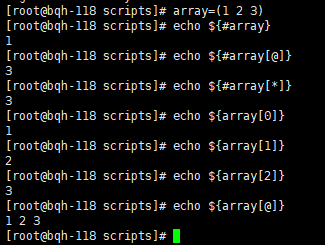
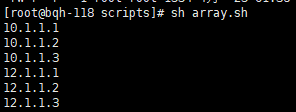
测试:用数组定义ip地址,然后用for循环打印出来
vim array.sh

array=(

10.1.1.1

10.1.1.2

10.1.1.3

)

for ip in ${array[*]}

do

    echo $ip

    sleep 1

done

C语言型:

array=(

10.1.1.1

10.1.1.2

10.1.1.3

)

for ((i=0;i<${array[@]};i++))

do

echo ${array[]i}

done
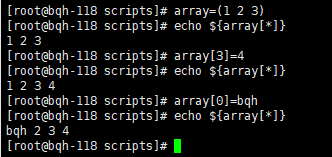
数组赋值:
[root@bqh-118 scripts]# array=(1 2 3)

[root@bqh-118 scripts]# echo ${array[*]}

1 2 3

[root@bqh-118 scripts]# array[3]=4    #增加数组元素

[root@bqh-118 scripts]# echo ${array[*]}

1 2 3 4

[root@bqh-118 scripts]# array[0]=bqh     #修改数组元素

[root@bqh-118 scripts]# echo ${array[*]}

bqh 2 3 4
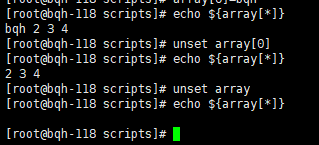
数组删除:直接用unset数组[下标]可以清楚相应的元素,不带下标,清楚整个数组
[root@bqh-118 scripts]# echo ${array[*]}

bqh 2 3 4

[root@bqh-118 scripts]# unset array[0]

[root@bqh-118 scripts]# echo ${array[*]}

2 3 4

[root@bqh-118 scripts]# unset array

[root@bqh-118 scripts]# echo ${array[*]}

[root@bqh-118 scripts]#
数组内容的截取和替换:
截取:
[root@bqh-118 scripts]# array=(1 2 3 4 5)

[root@bqh-118 scripts]# echo ${array[*]:1:3}

2 3 4

[root@bqh-118 scripts]# echo ${array[*]:3:2}

4 5
调用方法:${数组名[@或*]:起始位置:长度}
替换:
[root@bqh-118 scripts]# echo ${array[*]/5/6}   #把数组中的5替换成6,临时生效,和sed很像

1 2 3 4 6

[root@bqh-118 scripts]# echo ${array[*]}

1 2 3 4 5
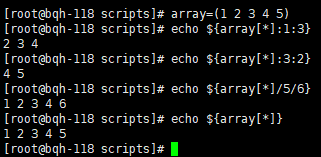
调用方法:${数组名[*或@]/查找字符/替换字符}
-----------------------------------------------------------------------
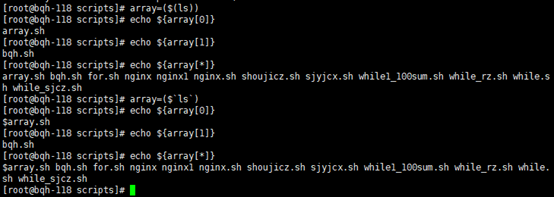
测试:把系统命令结果作为数组元素,然后一一打印出来
[root@bqh-118 scripts]# array=($(ls))    #或array=($`ls`)

[root@bqh-118 scripts]# echo ${array[0]}

array.sh

[root@bqh-118 scripts]# echo ${array[1]}

bqh.sh

[root@bqh-118 scripts]# echo ${array[*]}

array.sh bqh.sh for.sh nginx nginx1 nginx.sh shoujicz.sh sjyjcx.sh while1_100sum.sh while_rz.sh while.sh while_sjcz.sh

[root@bqh-118 scripts]#
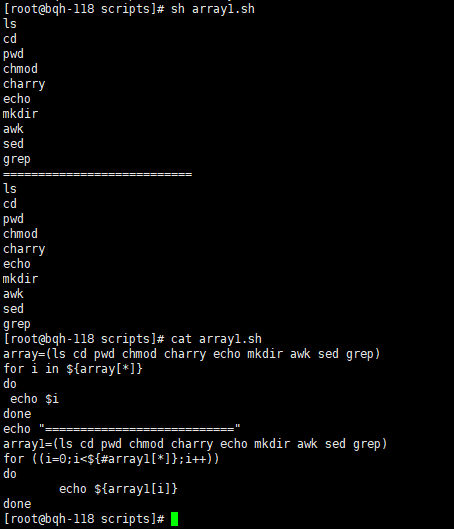
[root@bqh-118 scripts]# vim array1.sh

#!/bin/sh
array=(ls cd pwd chmod charry echo mkdir awk sed grep)

for i in ${array[*]}

do

 echo $i

done

echo "==========================="

array1=(ls cd pwd chmod charry echo mkdir awk sed grep)

for ((i=0;i<${#array1[*]};i++))

do

    echo ${array1[i]}

done
OK,我们来一个实战测试:
批量检查网站状态(数组for循环方法)
首先拿一个一个网站检查,没问题了在用数组定义批量检测。
我们常用curl、nmap、ping等方式检测,下为curl方法:
[root@bqh-118 scripts]# curl -I www.baidu.com

HTTP/1.1 200 OK

Accept-Ranges: bytes

Cache-Control: private, no-cache, no-store, proxy-revalidate, no-transform

Connection: Keep-Alive

Content-Length: 277

Content-Type: text/html

Date: Wed, 15 May 2019 15:21:10 GMT

Etag: "575e1f6f-115"

Last-Modified: Mon, 13 Jun 2016 02:50:23 GMT

Pragma: no-cache

Server: bfe/1.0.8.18

[root@bqh-118 scripts]# curl -I www.baidu.com 2>/devnull|egrep "200|302"

HTTP/1.1 200 OK

[root@bqh-118 scripts]# curl -I www.baidu.com 2>/devnull|egrep "200|302"|wc -l

1

[root@bqh-118 scripts]# curl -I www.taobao.com 2>/devnull|egrep "200|302"

HTTP/1.1 302 Found

[root@bqh-118 scripts]# curl -I www.taobao.com 2>/devnull|egrep "200|302"|wc -l

1

[root@bqh-118 scripts]#
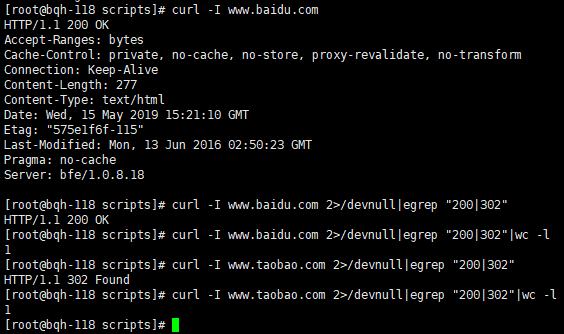
我们只需要检测状态信息返回值有200或302时就代表网站畅通,反之异常。
单个测试没问题,我们接着写脚本:
[root@bqh-118 scripts]# vim curl.sh

#!/bin/sh

# ******************************************************

# Author       : aゞ锦衣卫

# Last modified: 2019-05-15 23:35

# Email        : 1147076062@qq.com

# blog         : https://www.cnblogs.com/su-root

# Filename     : curl.sh

# Description  :curl jiance

# ******************************************************

array=(

www.baidu.com

www.kanq.com.cn

www.bqh.com

www.jyw.org

www.taobao.com

www.jd.com

)

for n in ${array[*]}

do

curl=`curl -I -m 3 $n 2>/dev/null|egrep "200|302"|wc -l`

  if [ $curl -eq 1 ];then

    echo -e "$n \033[32m is ok!\033[0m"

  else

    echo -e "$n \033[33;5m is not ok!\033[0m"

  fi

done
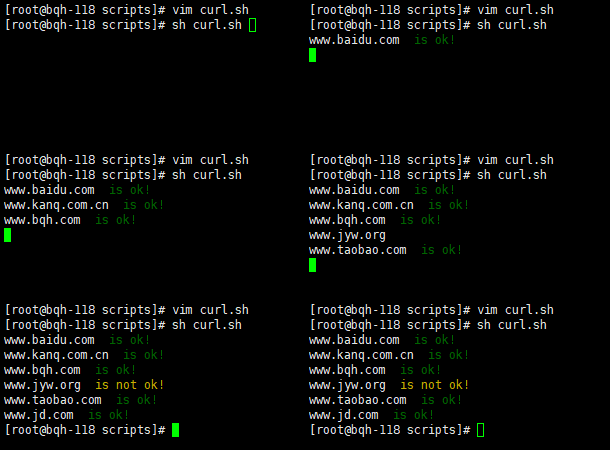
当然还有其它很多方法,这里只介绍了curl。
其它方法:
ping ip地址/域名 #等于0
nmap ip地址 -p 端口|grep open|wc -l #等于1
wget --spider --timeout=10 --tries=2 ip地址 &>/dev/null #返回值等于0
shell 数组介绍的更多相关文章
- linux shell数组
from: http://www.jb51.net/article/34322.htm bash shell只支持一维数组,但参数个数没有限制. 声明一个数组:declare -a array(其实不 ...
- centos shell脚本编程1 正则 shell脚本结构 read命令 date命令的用法 shell中的逻辑判断 if 判断文件、目录属性 shell数组简单用法 $( ) 和${ } 和$(( )) 与 sh -n sh -x sh -v 第三十五节课
centos shell脚本编程1 正则 shell脚本结构 read命令 date命令的用法 shell中的逻辑判断 if 判断文件.目录属性 shell数组简单用法 $( ) 和$ ...
- Linux学习笔记 -- Shell 数组
定义 在Shell的世界里,我们只能定义一维数组. 定义数组的时候不需要指定长度,数组的下标从0开始; Shell 数组用括号来表示,元素用"空格"符号分割开,语法格式如下: sh ...
- Linux Shell系列教程之(六)Shell数组
本文是Linux Shell系列教程的第(六)篇,更多shell教程请看:Linux Shell系列教程 Shell在编程方面非常强大,其数组功能也非常的完善,今天就为大家介绍下Shell数组的用法. ...
- Linux Shell 数组
shell 数组一般都是一维数组. 1. 数组的声明 declare -a arr 该命令将声明一个数组arr,实际上不声明也可以直接定义数组. 2. 数组的初始化 arr=(1 2 3):该命令定义 ...
- shell--2.shell数组
shell 数组 (1)定义数组 shell中,用括号表示数组,数组元素用空格分开,定义数组的一般形式 arrt_name=(val1 val2 val3) 或者 arry_name=(val1 va ...
- Linux Shell数组常用操作详解
Linux Shell数组常用操作详解 1数组定义: declare -a 数组名 数组名=(元素1 元素2 元素3 ) declare -a array array=( ) 数组用小括号括起,数组元 ...
- Shell数组例子
Shell数组例子 循环打印数组,并统计数组的个数: [root@slavedb array]# cat a.sh #!/bin/bash array=( freddy freddie tang sh ...
- Shell数组的增删改查
Shell数组的增删改查 shell数组的定义及取值: a=(1 2 3) [root@bogon tmp]# echo ${a[*]} 1 2 3 [root@bogon tmp]# echo $ ...
随机推荐
- 123457123456---com.threeObj03.FanPaiZi01--- 记忆翻牌儿童
com.threeObj03.FanPaiZi01--- 记忆翻牌儿童
- iOS笔试题03
1. When to use NSMutableArray and when to use NSArray? 1> 当数组元素需要动态地添加或者删除时,用NSMutableArray 2> ...
- iCMSv7.0.15后台database.admincp文件仍存在SQL注入漏洞
闲着无聊,国庆时间没事做,又在Q群看到这种公告,只好下个icms慢慢玩.(PS:医院和学校居然都关网站了) 无奈自己太菜,审不出问题.只好上网百度icms之前的漏洞.然后居然成功在iCMSv7.0.1 ...
- Andrew Ng机器学习课程16
Andrew Ng机器学习课程16 声明:引用请注明出处http://blog.csdn.net/lg1259156776/ 说明:主要介绍了ICA算法,并利用最大似然估计和随机梯度上升算法进行求解, ...
- 高级UI-RecyclerView间隔线添加
上文讲到了RecyclerView的简单使用,知道RecycleView是怎么使用的了,那么这一节将基于上一届的内容继续改进,在ListView中很轻松就能实现的间隔线,在RecycleView中也需 ...
- 最新 吉比特java校招面经 (含整理过的面试题大全)
从6月到10月,经过4个月努力和坚持,自己有幸拿到了网易雷火.京东.去哪儿.吉比特等10家互联网公司的校招Offer,因为某些自身原因最终选择了吉比特.6.7月主要是做系统复习.项目复盘.LeetCo ...
- Tengine编译安装+lua+sticky模块
一.两个依赖包 有yum的直接 yum yum –y install openssl openssl-devel prce prce-devel zlib zlib-devel 没有yum环境的, ...
- CVE-2019-0708 RDP MSF漏洞利用
CVE-2019-0708 RDP MSF漏洞复现 漏洞环境 使用 VMware 安装Windows7 X64 模拟受害机 Windows7 X64下载链接:链接: https://pan.baidu ...
- python爬虫的入门问题
第一张图是代码,爬的是亚马逊的一个商品网页,能爬出来内容,但是内容之间有很多空白换行,这是什么原因?要怎么解决?
- [转帖]linux bash环境变量简单总结
linux bash环境变量简单总结 来源链接:http://www.178linux.com/8005 原创文章,如有转载,请注明原文地址 需要简单学习一下. 其实 我都是直接放一个 .sh文件到 ...