
SVN 执行cleanup报错:Cleanup failed to process the following paths
SVN 执行cleanup报错:Cleanup failed to process the following paths
先来说下这个错误的原因:用SVN在使用过程中,各种原因中途取消或中断,导致需要执行cleanup,但是由于上次操作未完成,在.svn/wc.db中的work_queue表中记录了SVN的工作队列,所以在执行cleanup时就报错了。
解决方法:清空.svn/wc.db中的work_queue表中的工作队列,让SVN没有”Previous operation(上一个操作的信息)”,就可以正常执行cleanup命令了
不多说了,上操作步骤
1、需要在官网上下载Sqlite3.exe(http://www.sqlite.org/download.html)
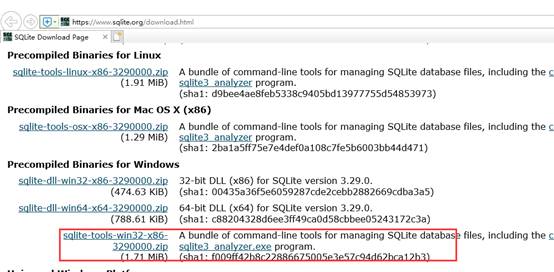
2、下载后解压文件,将解压文件都拷贝到项目路径下的”.svn”中,与”wc.db”同级目录
这里注意下:默认”.svn”时隐藏的,通过文件夹选项”显示隐藏的文件、文件夹和驱动器”设置显示”.svn”文件夹
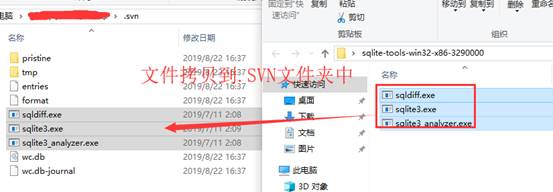
3、然后就是执行命令了,执行查询和删除命令
1)通过cmd命令控制台将目录转到svn版本控制的文件夹的.SVN
2)查询命令:可查询work_queue 表中是否有工作队列(嘿嘿,有点多余,因为都知道有了,不然也不来找解决方法了)
sqlite3 wc.db "select * from work_queue"
3)删除命令:删除work_queue 表中的工作队列
sqlite3 wc.db "delete from work_queue"
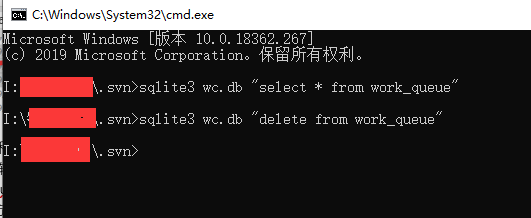
最后,再去试下cleanup,就好了
SVN 执行cleanup报错:Cleanup failed to process the following paths的更多相关文章
- svn报错cleanup failed–previous operation has not finished; run cleanup if it was interrupted的解决办法
今天在svn提交的时候它卡顿了一下,我以为已经提交完了,就按了一下,结果就再也恢复不了,也继续不了了... 报错 cleanup failed–previous operation has not f ...
- svn报错cleanup failed–previous operation has not finished; run cleanup if it was interrupte...
今天在svn提交的时候它卡顿了一下,我以为已经提交完了,就按了一下,结果就再也恢复不了,也继续不了了... 报错 cleanup failed–previous operation has not f ...
- svn-clearup 报错的处理(Cleanup failed to process the following paths...)
在使用 svn 客户端执行操作失败后,执行 Clean up 操作也报错:Cleanup failed to process the following paths... ,一直不知道是什么原因.通常 ...
- SVN Cleanup failed to process the following paths错误的解决
在使用TortoiseSVN工具执行Cleanup操作时经常出现Cleanup failed to process the following paths的错误,具体如下图: 网上搜索了一下,找到了解 ...
- 解决SVN Cleanup时遇到错误信息:Cleanup failed to process the following paths:xxxxxxx Previous operation has not finished: run 'cleanup' if it was interrupted Please execute the 'Cleanup' command.
解决SVN Cleanup时遇到错误信息:Cleanup failed to process the following paths:xxxxxxx Previous operation has no ...
- 执行opatch apply 报错 OPatch failed with error code 73
.执行opatch apply 报错 OPatch failed [oracle@ora_11g 14275605]$ /opt/oracle/product/db_1/OPatch/opatch a ...
- Cleanup failed to process the following paths错误的解决
在使用TortoiseSVN工具执行Cleanup操作时经常出现Cleanup failed to process the following paths的错误,具体如下图: 网上搜索了一下,找到了解 ...
- selenium执行js报错
selenium执行js报错 Traceback (most recent call last): dr.execute_script(js) File "C:\Python27\l ...
- ionic报错: Failed to load resource
隔了一天,才发现是代码写错了 出错的原因是在ts 文件中使用这样的定义 data: [] = ['高新区', '经开区', '其他园区']; 错误在于这个定义的类型,不能是 [],修改成 any就没有 ...
随机推荐
- linux 安装网易云音乐
1.首先去官网下载最新的网易云 网易云音乐曾经推出官方Linux版本,提供的下载安装包有:deepin15(32位):http://s1.music.126.net/download/pc/net . ...
- Django:文章详情页面评论功能需要登录后才能使用,登录后自动返回到文章详情页
背景: 文章详情页正在查看文章,想评论一下写的不错,但是需要先登录才能.页面长这个样子: 方案: 1.点击登录链接时,将该页面的URL传递到登录视图中 request.path获取的是当前页面的相对路 ...
- Scratch3架构结构说明
Scratch3.0整体项目结构比较庞大,对于不同二次开发开始的时候会出现一头雾水,需要先了解下整体框架,可以按需要在指定的源码下进行修改,大致结构如下: 1. scratch-gui: 是基于Rea ...
- 单点登录系统(SSO)详细设计说明书(上篇)
1.引言 1.1编写目的 为了单点登录系统(SSO系统)的可行性,完整性,并能按照预期的设想实现该系统,特编写需求说明书. 同时,说明书也发挥与策划和设计人员更好地沟通的作用. 1.2 ...
- DLT(Direct Linear Transform)算法
1.DLT定义 DLT是一个 用于解决包含尺度问题的最小二乘问题 的算法. DLT解决问题的标准形式为: ...
- 关于lib和dll
关于lib和dll 声明:引用请注明出处http://blog.csdn.net/lg1259156776/ 说明:这里说的就是静态链接库LIB和动态链接库DL,有些时候经常弄混淆这两个东西,这里基于 ...
- bootstrap基础学习【导航条、分页导航】(五)
<!DOCTYPE html> <html> <head> <meta charset="UTF-8"> <title> ...
- 20175316 盛茂淞 2018-2019-2 《Java程序设计》实验三《敏捷开发与XP实践》 实验报告
实验内容与要求 1.XP基础 极限编程(Extreme Programming,XP)是一种全新而快捷的软件开发方法.XP团队使用现场客户.特殊计划方法和持续测试来提供快速的反馈和全面的交流: XP是 ...
- 第一周-----基本数据类型(primitive data type)
- Android 8.1 MTK6739修改文档
1. 信息-设置-通知-重要程度-中(不发出提示音),非锁屏界面下无提示通知框弹出 vendor/mediatek/proprietary/packages/apps/SystemUI/src/com ...