
SVN 执行cleanup报错:Cleanup failed to process the following paths
SVN 执行cleanup报错:Cleanup failed to process the following paths
先来说下这个错误的原因:用SVN在使用过程中,各种原因中途取消或中断,导致需要执行cleanup,但是由于上次操作未完成,在.svn/wc.db中的work_queue表中记录了SVN的工作队列,所以在执行cleanup时就报错了。
解决方法:清空.svn/wc.db中的work_queue表中的工作队列,让SVN没有”Previous operation(上一个操作的信息)”,就可以正常执行cleanup命令了
不多说了,上操作步骤
1、需要在官网上下载Sqlite3.exe(http://www.sqlite.org/download.html)
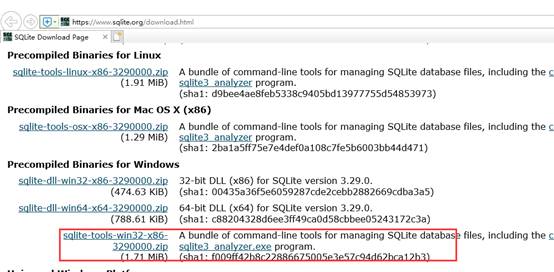
2、下载后解压文件,将解压文件都拷贝到项目路径下的”.svn”中,与”wc.db”同级目录
这里注意下:默认”.svn”时隐藏的,通过文件夹选项”显示隐藏的文件、文件夹和驱动器”设置显示”.svn”文件夹
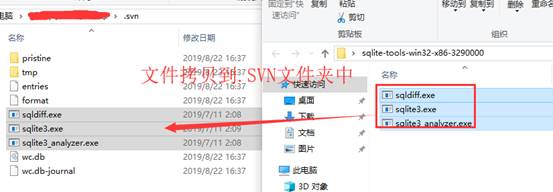
3、然后就是执行命令了,执行查询和删除命令
1)通过cmd命令控制台将目录转到svn版本控制的文件夹的.SVN
2)查询命令:可查询work_queue 表中是否有工作队列(嘿嘿,有点多余,因为都知道有了,不然也不来找解决方法了)
sqlite3 wc.db "select * from work_queue"
3)删除命令:删除work_queue 表中的工作队列
sqlite3 wc.db "delete from work_queue"
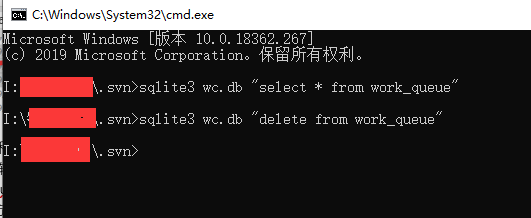
最后,再去试下cleanup,就好了
SVN 执行cleanup报错:Cleanup failed to process the following paths的更多相关文章
- svn报错cleanup failed–previous operation has not finished; run cleanup if it was interrupted的解决办法
今天在svn提交的时候它卡顿了一下,我以为已经提交完了,就按了一下,结果就再也恢复不了,也继续不了了... 报错 cleanup failed–previous operation has not f ...
- svn报错cleanup failed–previous operation has not finished; run cleanup if it was interrupte...
今天在svn提交的时候它卡顿了一下,我以为已经提交完了,就按了一下,结果就再也恢复不了,也继续不了了... 报错 cleanup failed–previous operation has not f ...
- svn-clearup 报错的处理(Cleanup failed to process the following paths...)
在使用 svn 客户端执行操作失败后,执行 Clean up 操作也报错:Cleanup failed to process the following paths... ,一直不知道是什么原因.通常 ...
- SVN Cleanup failed to process the following paths错误的解决
在使用TortoiseSVN工具执行Cleanup操作时经常出现Cleanup failed to process the following paths的错误,具体如下图: 网上搜索了一下,找到了解 ...
- 解决SVN Cleanup时遇到错误信息:Cleanup failed to process the following paths:xxxxxxx Previous operation has not finished: run 'cleanup' if it was interrupted Please execute the 'Cleanup' command.
解决SVN Cleanup时遇到错误信息:Cleanup failed to process the following paths:xxxxxxx Previous operation has no ...
- 执行opatch apply 报错 OPatch failed with error code 73
.执行opatch apply 报错 OPatch failed [oracle@ora_11g 14275605]$ /opt/oracle/product/db_1/OPatch/opatch a ...
- Cleanup failed to process the following paths错误的解决
在使用TortoiseSVN工具执行Cleanup操作时经常出现Cleanup failed to process the following paths的错误,具体如下图: 网上搜索了一下,找到了解 ...
- selenium执行js报错
selenium执行js报错 Traceback (most recent call last): dr.execute_script(js) File "C:\Python27\l ...
- ionic报错: Failed to load resource
隔了一天,才发现是代码写错了 出错的原因是在ts 文件中使用这样的定义 data: [] = ['高新区', '经开区', '其他园区']; 错误在于这个定义的类型,不能是 [],修改成 any就没有 ...
随机推荐
- 第二十二章 集成验证码——《跟我学Shiro》
目录贴:跟我学Shiro目录贴 在做用户登录功能时,很多时候都需要验证码支持,验证码的目的是为了防止机器人模拟真实用户登录而恶意访问,如暴力破解用户密码/恶意评论等.目前也有一些验证码比较简单,通过一 ...
- jQuery和ajax【“Asynchronous Javascript And XML】
环境搭建 搭建一个jQuery的开发环境非常方便,可以通过下列几个步骤进行. 下载jQuery文件库 在jQuery的官方网站(http://jquery.com)中,下载最新版本的jQuery文件库 ...
- sql语句-按照汉字拼音首字母排序
在oracle9i中新增了按照拼音.部首.笔画排序功能.设置NLS_SORT值 SCHINESE_RADICAL_M 按照部首(第一顺序).笔划(第二顺序)排序SCHINESE_STROKE_M 按照 ...
- JavaScript form提交汉字乱码
<script type="text/javascript"> var test1="http://www.w3school.com.cn/My first/ ...
- Java使用icepdf转高清图片
<dependency> <groupId>org.icepdf.os</groupId> <artifactId>icepdf-core</ar ...
- CTO(技术总监 张王岩 17805272076)之 SSH(安全外壳协议)
SSH 为 Secure Shell 的缩写,由 IETF 的网络小组(Network Working Group)所制定:SSH 为建立在应用层基础上的安全协议.SSH 是较可靠,专为远程登录会话和 ...
- 第一周006------Java 三大版本含义——Java ME和安卓开发的关系
Java ME 和安卓开发没有任何关系 Java SE(Java Standard Edition):标准版,定位在个人计算机的应用(桌面系统 QQ 游戏)Java EE(Java Enterp ...
- Mui 沉浸模式以及状态栏颜色改变
手机的顶部状态栏,也就是信号.电量那条,有4种状态,分别是正常.变色.透明(也称沉浸式状态栏).消失(也就是全屏).后3种特殊用法,具体见下: 这些都是真机运行不生效,需提交App云端打包后才生效: ...
- Feign【token传递】
使用feign调用服务的时候,存在一个问题,比如当前服务调用A服务,在请求头中包含了某些特殊的字段信息,比如当前操作人的token信息,调用A的时候可以正常拿到token,然而在去调用B服务的时候,可 ...
- asp.net mvc抓取微信文章里面所有的图片
/// <summary> /// 下载指定URL下的所有图片 /// </summary> public class WebPageImage { /// <summa ...